Onesignal-ios-sdk: Mac Catalyst - Swift Project - Unable to load standard library for target 'x86_64h-apple-ios13.1-macabi'
Description:
(your description here)
Environment
- What version of the iOS SDK are you using?
- 2.12.6
- How did you add the SDK to your project (eg. cocoapods)
- CocoaPods
Steps to Reproduce Issue:
Added Mac Catalyst support with checking the checkbox for the Target
Anything else:
If I set the build target to my iPad or to a simulator everything works fine.
 robertveringa89
All 20 comments
Same problem for us. @robertveringa89 which version of Xcode are you using? I'm trying 11.2.1
 marvin-yorke
on 17 Mar 2020
marvin-yorke
on 17 Mar 2020
I'm at Version 11.3.1 (11C504). Build target is iOS 11.0
robertveringa89
on 17 Mar 2020
Same here.
 exevil
on 17 Mar 2020
exevil
on 17 Mar 2020
Can you make sure you only have x86_64h without x86_64 for both "Valid Architectures" and "Architectures"?
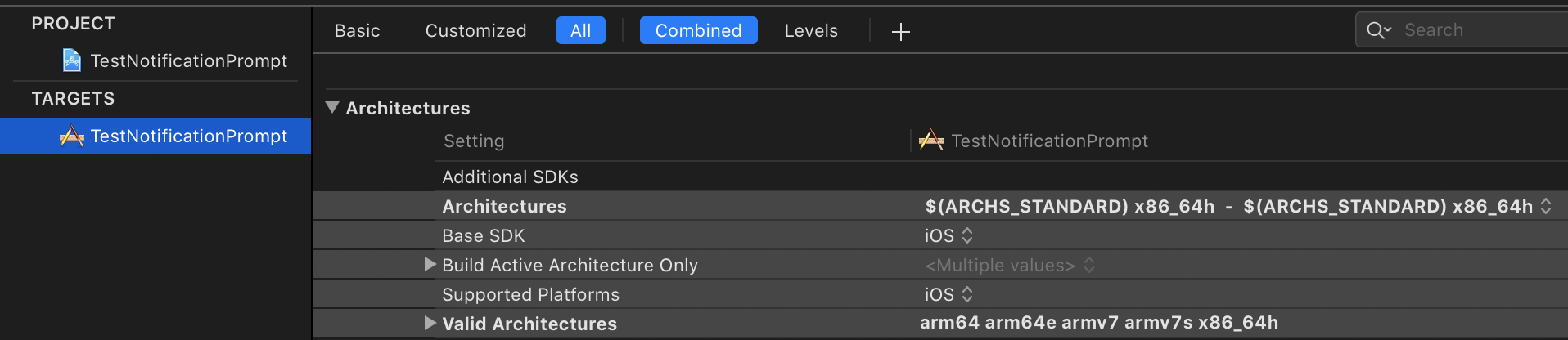
More details in https://github.com/OneSignal/OneSignal-iOS-SDK/issues/534#issuecomment-563431891
 jkasten2
on 18 Mar 2020
jkasten2
on 18 Mar 2020
Yes, I did that for both
robertveringa89
on 18 Mar 2020
I tried multiple times with different configurations as well.
exevil
on 18 Mar 2020
I've even tried leaving x86_64h the only architecture
ARCHS=x86_64h
VALID_ARCHS=x86_64h
I was able to reproduce the issue with Xcode 11.3.1 on a Swift project.
Objective-C projects build without this error.
I believe the x86_64h-apple-ios13.1-macabi standard library is referring to the Swift standard library. I tried to search if there is a x86_64h build of the swift standard library for Mac Catalyst but wasn't able to find anything. It is possible there is only a x86_64 build of this.
For reference here is the details of the exact error and the command it is running:
Error: <unknown>:0: error: unable to load standard library for target 'x86_64h-apple-ios13.1-macabi'
 /Applications/Xcode.app/Contents/Developer/Toolchains/XcodeDefault.xctoolchain/usr/bin/swift
 -frontend
 -c
 -primary-file /Users/josh/Documents/repos/OneSignal-iOS-SDK/Examples/SwiftExample/OneSignalNotificationServiceExtension/NotificationService.swift
 -emit-module-path /Users/josh/Library/Developer/Xcode/DerivedData/OneSignalDemo-havtxbliryjovwgdekpsihwblrun/Build/Intermediates.noindex/OneSignalDemo.build/Debug-maccatalyst/OneSignalNotificationServiceExtension.build/Objects-normal/x86_64h/NotificationService\~partial.swiftmodule
 -emit-module-doc-path /Users/josh/Library/Developer/Xcode/DerivedData/OneSignalDemo-havtxbliryjovwgdekpsihwblrun/Build/Intermediates.noindex/OneSignalDemo.build/Debug-maccatalyst/OneSignalNotificationServiceExtension.build/Objects-normal/x86_64h/NotificationService\~partial.swiftdoc
 -serialize-diagnostics-path /Users/josh/Library/Developer/Xcode/DerivedData/OneSignalDemo-havtxbliryjovwgdekpsihwblrun/Build/Intermediates.noindex/OneSignalDemo.build/Debug-maccatalyst/OneSignalNotificationServiceExtension.build/Objects-normal/x86_64h/NotificationService.dia
 -emit-dependencies-path /Users/josh/Library/Developer/Xcode/DerivedData/OneSignalDemo-havtxbliryjovwgdekpsihwblrun/Build/Intermediates.noindex/OneSignalDemo.build/Debug-maccatalyst/OneSignalNotificationServiceExtension.build/Objects-normal/x86_64h/NotificationService.d
 -emit-reference-dependencies-path /Users/josh/Library/Developer/Xcode/DerivedData/OneSignalDemo-havtxbliryjovwgdekpsihwblrun/Build/Intermediates.noindex/OneSignalDemo.build/Debug-maccatalyst/OneSignalNotificationServiceExtension.build/Objects-normal/x86_64h/NotificationService.swiftdeps
 -target x86_64h-apple-ios13.1-macabi
 -enable-objc-interop
 -sdk /Applications/Xcode.app/Contents/Developer/Platforms/MacOSX.platform/Developer/SDKs/MacOSX10.15.sdk
 -I /Users/josh/Library/Developer/Xcode/DerivedData/OneSignalDemo-havtxbliryjovwgdekpsihwblrun/Build/Products/Debug-maccatalyst
 -F /Users/josh/Library/Developer/Xcode/DerivedData/OneSignalDemo-havtxbliryjovwgdekpsihwblrun/Build/Products/Debug-maccatalyst
 -F /Users/josh/Documents/repos/OneSignal-iOS-SDK/Examples/SwiftExample/Pods/OneSignal/iOS_SDK/OneSignalSDK/Framework
 -Fsystem /Applications/Xcode.app/Contents/Developer/Platforms/MacOSX.platform/Developer/SDKs/MacOSX10.15.sdk/System/iOSSupport/System/Library/Frameworks
 -application-extension
 -enable-testing
 -g
 -module-cache-path /Users/josh/Library/Developer/Xcode/DerivedData/ModuleCache.noindex
 -swift-version 5
 -enforce-exclusivity=checked
 -Onone
 -D DEBUG
 -serialize-debugging-options
 -Xcc
 -working-directory
 -Xcc /Users/josh/Documents/repos/OneSignal-iOS-SDK/Examples/SwiftExample
 -enable-anonymous-context-mangled-names
 -Xcc
 -I/Users/josh/Library/Developer/Xcode/DerivedData/OneSignalDemo-havtxbliryjovwgdekpsihwblrun/Build/Intermediates.noindex/OneSignalDemo.build/Debug-maccatalyst/OneSignalNotificationServiceExtension.build/swift-overrides.hmap
 -Xcc
 -iquote
 -Xcc /Users/josh/Library/Developer/Xcode/DerivedData/OneSignalDemo-havtxbliryjovwgdekpsihwblrun/Build/Intermediates.noindex/OneSignalDemo.build/Debug-maccatalyst/OneSignalNotificationServiceExtension.build/OneSignalNotificationServiceExtension-generated-files.hmap
 -Xcc
 -I/Users/josh/Library/Developer/Xcode/DerivedData/OneSignalDemo-havtxbliryjovwgdekpsihwblrun/Build/Intermediates.noindex/OneSignalDemo.build/Debug-maccatalyst/OneSignalNotificationServiceExtension.build/OneSignalNotificationServiceExtension-own-target-headers.hmap
 -Xcc
 -I/Users/josh/Library/Developer/Xcode/DerivedData/OneSignalDemo-havtxbliryjovwgdekpsihwblrun/Build/Intermediates.noindex/OneSignalDemo.build/Debug-maccatalyst/OneSignalNotificationServiceExtension.build/OneSignalNotificationServiceExtension-all-target-headers.hmap
 -Xcc
 -iquote
 -Xcc /Users/josh/Library/Developer/Xcode/DerivedData/OneSignalDemo-havtxbliryjovwgdekpsihwblrun/Build/Intermediates.noindex/OneSignalDemo.build/Debug-maccatalyst/OneSignalNotificationServiceExtension.build/OneSignalNotificationServiceExtension-project-headers.hmap
 -Xcc
 -I/Users/josh/Library/Developer/Xcode/DerivedData/OneSignalDemo-havtxbliryjovwgdekpsihwblrun/Build/Products/Debug-maccatalyst/include
 -Xcc
 -isystem
 -Xcc /Applications/Xcode.app/Contents/Developer/Platforms/MacOSX.platform/Developer/SDKs/MacOSX10.15.sdk/System/iOSSupport/usr/include
 -Xcc
 -I/Users/josh/Library/Developer/Xcode/DerivedData/OneSignalDemo-havtxbliryjovwgdekpsihwblrun/Build/Intermediates.noindex/OneSignalDemo.build/Debug-maccatalyst/OneSignalNotificationServiceExtension.build/DerivedSources-normal/x86_64h
 -Xcc
 -I/Users/josh/Library/Developer/Xcode/DerivedData/OneSignalDemo-havtxbliryjovwgdekpsihwblrun/Build/Intermediates.noindex/OneSignalDemo.build/Debug-maccatalyst/OneSignalNotificationServiceExtension.build/DerivedSources/x86_64h
 -Xcc
 -I/Users/josh/Library/Developer/Xcode/DerivedData/OneSignalDemo-havtxbliryjovwgdekpsihwblrun/Build/Intermediates.noindex/OneSignalDemo.build/Debug-maccatalyst/OneSignalNotificationServiceExtension.build/DerivedSources
 -Xcc
 -DDEBUG=1
 -Xcc
 -DCOCOAPODS=1
 -parse-as-library
 -module-name OneSignalNotificationServiceExtension
 -o /Users/josh/Library/Developer/Xcode/DerivedData/OneSignalDemo-havtxbliryjovwgdekpsihwblrun/Build/Intermediates.noindex/OneSignalDemo.build/Debug-maccatalyst/OneSignalNotificationServiceExtension.build/Objects-normal/x86_64h/NotificationService.o
 -index-store-path /Users/josh/Library/Developer/Xcode/DerivedData/OneSignalDemo-havtxbliryjovwgdekpsihwblrun/Index/DataStore
 -index-system-modules
Workaround
Option 1 - Use Swift x86_64 for x86_64h builds
It might be possible to use the x86_64 build of Swift libraries for x86_64h, however we don't have the details on how or if this could be done. However it might be worth exploring.
Option 2 - Build OneSignal-iOS-SDK locally with x86_64
Currently the x86_64 archeature is being used for the iOS simulator, the simulator could be switch to use Mac Catalyst instead. To do this the ARCHS and VALID_ARCHS can be set to x86_64 on this line
https://github.com/OneSignal/OneSignal-iOS-SDK/blob/2.12.6/iOS_SDK/OneSignalSDK/build_fat_framework.sh#L19
To build on your machine you will also need to update these 2 lines to /Applications/Xcode.app/Contents/Developer/usr/bin/xcodebuild
https://github.com/OneSignal/OneSignal-iOS-SDK/blob/2.12.6/iOS_SDK/OneSignalSDK/build_fat_framework.sh#L12-L13
Lastly delete simulator references from this line
https://github.com/OneSignal/OneSignal-iOS-SDK/blob/2.12.6/iOS_SDK/OneSignalSDK/build_fat_framework.sh#L40
Then you can run this script to create the OneSignal.framework file.
Fix
The long term fix will be for OneSignal to migrate from a static framework to an XCFramework.
https://developer.apple.com/videos/play/wwdc2019/416/
These should be able to support the same CPU architecture for multiple targets.
jkasten2
on 18 Mar 2020
How can I build the OneSignal-iOS-SDK locally ? I'm using Cocoapods currently
 SwiftiSwift
on 23 Jun 2020
SwiftiSwift
on 23 Jun 2020
This issue is fixed by using the XCFramework version of the SDK (currently only supported via Cocoapods). Instructions for use are here
 emawby
on 5 Aug 2020
emawby
on 5 Aug 2020
@emawby It doesn't work. If i use the XCFramework of the SDK i get this error:
Undefined symbols for architecture x86_64:
  "_OBJC_CLASS_$_OneSignal", referenced from:
      objc-class-ref in NotificationService.o
ld: symbol(s) not found for architecture x86_64
clang: error: linker command failed with exit code 1 (use -v to see invocation)
This is my Podfile:
target 'MY_PROJECT_NAME' do

  pod 'FSPagerView'
  pod 'Firebase/Analytics'
  pod 'Firebase/Crashlytics'
  pod 'Firebase/Performance'
  pod 'OneSignalXCFramework', :git => 'https://github.com/OneSignal/OneSignal-iOS-SDK.git', :tag => '2.15.1'

end

target 'OneSignalNotificationServiceExtension' do
  #only copy below line
  pod 'OneSignalXCFramework', :git => 'https://github.com/OneSignal/OneSignal-iOS-SDK.git', :tag => '2.15.1'
end
These are my Architectures for my_project target:

I get the SAME error when i use x86_64h for both 'Valid Architectures' and 'Architectures'
SwiftiSwift
on 6 Aug 2020
@SwiftiSwift Hello, this is a known Cocoapods bug that is fixed in their upcoming release (Cocoapods is only using one of the slices in the XCFramework). To get the fix now run sudo gem install cocoapods --pre and reinstall the XCFramework
emawby
on 7 Aug 2020
@emawby Then i get this error for 'MY_PROJECT Workspace':
Multiple commands produce '/Users/USER_NAME/Library/Developer/Xcode/DerivedData/PROJECT_NAME-aeazewmhqxgqogghbnuwewuaajan/Build/Products/Debug-iphonesimulator/XCFrameworkIntermediates/OneSignal':
1) That command depends on command in Target 'OneSignalXCFramework-iOS10.0' (project 'Pods'): script phase “[CP] Copy XCFrameworks”
2) That command depends on command in Target 'OneSignalXCFramework-iOS9.0' (project 'Pods'): script phase “[CP] Copy XCFrameworks”
pod deintegrate and pod install doesn't work either
SwiftiSwift
on 7 Aug 2020
@emawby Then i get this error for 'MY_PROJECT Workspace':
Multiple commands produce '/Users/USER_NAME/Library/Developer/Xcode/DerivedData/PROJECT_NAME-aeazewmhqxgqogghbnuwewuaajan/Build/Products/Debug-iphonesimulator/XCFrameworkIntermediates/OneSignal':
1) That command depends on command in Target 'OneSignalXCFramework-iOS10.0' (project 'Pods'): script phase “[CP] Copy XCFrameworks”
2) That command depends on command in Target 'OneSignalXCFramework-iOS9.0' (project 'Pods'): script phase “[CP] Copy XCFrameworks”
pod deintegrateandpod installdoesn't work either
@SwiftiSwift are you still encountering this error with the latest version of Cocoapods? I am not able to reproduce this issue.
emawby
on 16 Oct 2020
@emawby I still encounter this issue with the latest version 2.15.4!
SwiftiSwift
on 6 Nov 2020
@SwiftiSwift but are you on the latest version of cocoapods itself not the OneSignal pod?
emawby
on 24 Nov 2020
Yes I ran sudo gem install cocoapods --pre
SwiftiSwift
on 24 Nov 2020
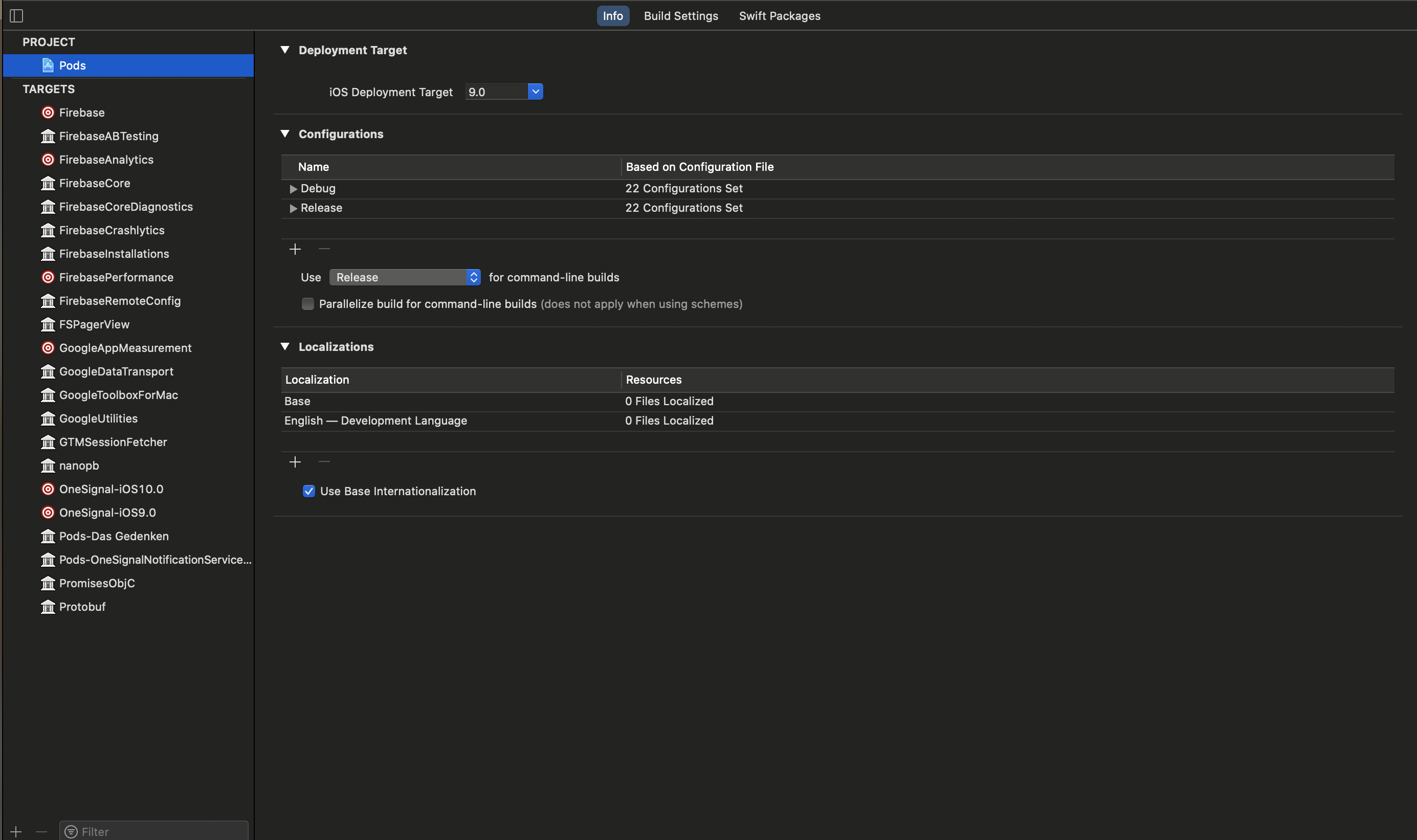
What is your minimum deployment target? When I do this I do not have 2 targets in the Pod project I only have 1. Are you deploying to iOS 9?
emawby
on 24 Nov 2020
@emawby (Please @ me if you answer to me so i get an email notification.) My Minimum deployment target is iOS 9 for my project yes. For OneSignal it is iOS 10. These are my pods:
SwiftiSwift
on 8 Dec 2020
@emawby any update?
SwiftiSwift
on 15 Dec 2020
Related issues
 basememara
·
4Comments
basememara
·
4Comments
 chmiiller
·
6Comments
chmiiller
·
6Comments
 konkontos
·
3Comments
konkontos
·
3Comments
 luai-kalkatawi
·
4Comments
luai-kalkatawi
·
4Comments
 reza-khalafi
·
5Comments
reza-khalafi
·
5Comments
Most helpful comment
I was able to reproduce the issue with Xcode 11.3.1 on a Swift project.
Objective-C projects build without this error.
I believe the
x86_64h-apple-ios13.1-macabistandard library is referring to the Swift standard library. I tried to search if there is ax86_64hbuild of the swift standard library for Mac Catalyst but wasn't able to find anything. It is possible there is only ax86_64build of this.For reference here is the details of the exact error and the command it is running:
Error:
<unknown>:0: error: unable to load standard library for target 'x86_64h-apple-ios13.1-macabi'Workaround
Option 1 - Use Swift
x86_64forx86_64hbuildsIt might be possible to use the
x86_64build of Swift libraries forx86_64h, however we don't have the details on how or if this could be done. However it might be worth exploring.Option 2 - Build OneSignal-iOS-SDK locally with
x86_64Currently the
x86_64archeature is being used for the iOS simulator, the simulator could be switch to use Mac Catalyst instead. To do this theARCHSandVALID_ARCHScan be set tox86_64on this linehttps://github.com/OneSignal/OneSignal-iOS-SDK/blob/2.12.6/iOS_SDK/OneSignalSDK/build_fat_framework.sh#L19
To build on your machine you will also need to update these 2 lines to
/Applications/Xcode.app/Contents/Developer/usr/bin/xcodebuildhttps://github.com/OneSignal/OneSignal-iOS-SDK/blob/2.12.6/iOS_SDK/OneSignalSDK/build_fat_framework.sh#L12-L13
Lastly delete simulator references from this line
https://github.com/OneSignal/OneSignal-iOS-SDK/blob/2.12.6/iOS_SDK/OneSignalSDK/build_fat_framework.sh#L40
Then you can run this script to create the OneSignal.framework file.
Fix
The long term fix will be for OneSignal to migrate from a static framework to an XCFramework.
https://developer.apple.com/videos/play/wwdc2019/416/
These should be able to support the same CPU architecture for multiple targets.