Onesignal-ios-sdk: Using OneSignal and Catalyst
Description:
Hi there! I would like to use Catalyst in order to run my app on the Mac as well. Unfortunately I get an Error in my notification target regarding the OneSignal SDK.
Is it possible to use the iOS SDK with Catalyst?
ld: in /
/Pods/OneSignal/iOS_SDK/OneSignalSDK/Framework/OneSignal.framework/OneSignal(OneSignal-x86_64-master.o), building for Mac Catalyst, but linking in object file built for iOS Simulator, file ' /Pods/OneSignal/iOS_SDK/OneSignalSDK/Framework/OneSignal.framework/OneSignal'
clang: error: linker command failed with exit code 1 (use -v to see invocation)
Thanks!
Environment
Xcode 11 GM Seed 1
iOS 13
OneSignal via Cocoapods (latest version)
Steps to Reproduce Issue:
- Install the latest iOS SDK using Cocoapods
- Setup OneSignal in your NotificationExtension as shown below.
- Enable Mac in your Deployment Info
- Try to run your code on your Mac using macOS 10.15
import UserNotifications
import OneSignal

class NotificationService: UNNotificationServiceExtension {

    var contentHandler: ((UNNotificationContent) -> Void)?
    var receivedRequest: UNNotificationRequest!
    var bestAttemptContent: UNMutableNotificationContent?

    override func didReceive(_ request: UNNotificationRequest, withContentHandler contentHandler: @escaping (UNNotificationContent) -> Void) {
        self.receivedRequest = request;
        self.contentHandler = contentHandler
        bestAttemptContent = (request.content.mutableCopy() as? UNMutableNotificationContent)

        if let bestAttemptContent = bestAttemptContent {
            OneSignal.didReceiveNotificationExtensionRequest(self.receivedRequest, with: self.bestAttemptContent)
            contentHandler(bestAttemptContent)
        }
    }

    override func serviceExtensionTimeWillExpire() {
        // Called just before the extension will be terminated by the system.
        // Use this as an opportunity to deliver your "best attempt" at modified content, otherwise the original push payload will be used.
        if let contentHandler = contentHandler, let bestAttemptContent =  bestAttemptContent {
            OneSignal.serviceExtensionTimeWillExpireRequest(self.receivedRequest, with: self.bestAttemptContent)
            contentHandler(bestAttemptContent)
        }
    }

}
 iDevo
iDevo
All 17 comments
It seems to me that there shouldn't be an issue running this on Catalyst. How did you add the OneSignal SDK? Perhaps try running pod deintegrate && pod install
 rgomezp
on 18 Sep 2019
rgomezp
on 18 Sep 2019
Closing due to no response
rgomezp
on 26 Sep 2019
I also have this problem have tried deintegrating and reinstalling, nothing has worked so far
 isaac-computer
on 11 Oct 2019
isaac-computer
on 11 Oct 2019
Howdy!
Quick update everybody:
We will be rolling out support very soon with adequate documentation. Thanks for your patience. In the meantime, I will include the OneSignal framework binary with the proper x86_64 architecture support that you can use as a work-around. This is intended for building to Mac ONLY. Enjoy!
rgomezp
on 31 Oct 2019
The new version is released! Enjoy
rgomezp
on 21 Nov 2019
I get "No such module OneSignal" when building for Mac Catalyst (I've added OneSignal 2.12.0 manually as Xcode project). It builds OK for iPhones.
EDIT: I'll try again via cocoapods.
EDIT2: Via cocoapods OneSignal 2.12.0 I still get:
ld: in /Users/sabiland/Documents/SabilandGithub/Texturing/Pods/OneSignal/iOS_SDK/OneSignalSDK/Framework/OneSignal.framework/OneSignal(OneSignal-x86_64-master.o), building for Mac Catalyst, but linking in object file built for iOS Simulator, file '/Users/sabiland/Documents/SabilandGithub/Texturing/Pods/OneSignal/iOS_SDK/OneSignalSDK/Framework/OneSignal.framework/OneSignal'
clang: error: linker command failed with exit code 1 (use -v to see invocation)
I do not know if I am doing something wrong?
 sabiland
on 22 Nov 2019
sabiland
on 22 Nov 2019
I have the same error with cocoapods version 2.12.0 :
ld: in /Users/pierre-olivier/Projets/usmontagnarde_app/Pods/OneSignal/iOS_SDK/OneSignalSDK/Framework/OneSignal.framework/OneSignal(OneSignal-x86_64-master.o), building for Mac Catalyst, but linking in object file built for iOS Simulator, file '/Users/pierre-olivier/Projets/usmontagnarde_app/Pods/OneSignal/iOS_SDK/OneSignalSDK/Framework/OneSignal.framework/OneSignal'
clang: error: linker command failed with exit code 1 (use -v to see invocation)
Could you re-open the issue ?
Thanks
 pierrolivier
on 26 Nov 2019
pierrolivier
on 26 Nov 2019
@sabiland @pierrolivier Can you ensure you have updated OneSignal for both the main target and the OneSignalNotificationServiceExtension. I recommend confirming that that when you run pod install you are seeing 2.12.0 in the terminal.
You can also check the size of the file in your project Pods/OneSignal/iOS_SDK/OneSignalSDK/Framework/OneSignal.framework/OneSignal matches the one on github
https://github.com/OneSignal/OneSignal-iOS-SDK/blob/2.12.0/iOS_SDK/OneSignalSDK/Framework/OneSignal.framework/Versions/A/OneSignal
 jkasten2
on 27 Nov 2019
jkasten2
on 27 Nov 2019
Yes I have updated both main targets:
platform :ios, '12.0'
use_frameworks!

target 'Textures' do

  pod 'Spring', :git => 'https://github.com/MengTo/Spring.git'
  pod 'BezierPathLength', '~> 1.1.0'
  pod 'NVActivityIndicatorView'
  pod 'DynamicColor', '~> 4.2.0'
  pod 'SnapKit', '~> 5.0.0'
  pod 'PopupDialog', '~> 1.1'
  pod 'JGProgressHUD'
  pod 'FirebaseAnalytics'
  pod 'OneSignal', '>= 2.11.2', '< 3.0'

end

target 'OneSignalNotificationServiceExtension' do
  pod 'OneSignal', '>= 2.11.2', '< 3.0'
end
I've also tried adding "x86_64h" (and "x86_64") to ARCHS and VALID ARCHS, but had problems with bulding also.
sabiland
on 27 Nov 2019
I also confirm that I'm using the latest version of OneSignal 2.12.0. And A files are the same size, 16.8mo.
Thanks
pierrolivier
on 27 Nov 2019
Did you add the architecture to both values ARCHS and VALID ARCHS across BOTH targets?
rgomezp
on 27 Nov 2019
I will try again today, it's just I had lots of problems when building when setting ARCHS and VALID ARCHS. I read somewhere that "x86_64h" is not ok and "x86_64" should be used in those cases?
sabiland
on 28 Nov 2019
Yes, same error for me with this settings.
pierrolivier
on 28 Nov 2019
Sometimes you need to remove the framework and add it back. Otherwise I'm not really sure. Try removing it and adding back OneSignal.framework.
If possible, please reach out through our support channel and share your project that reproduces the issue. Ask for Rodrigo
Cheers
rgomezp
on 6 Dec 2019
The issue is that you must use only x86_64h without x86_64 for both "Valid Architectures" and "Architectures".
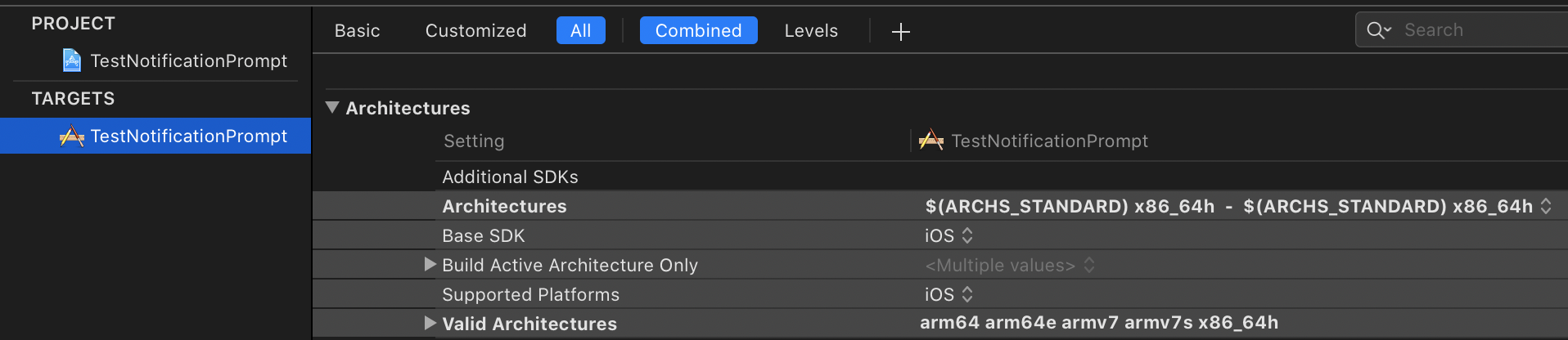
The h in x86_64h here means Intel Haswell. If you are concerned about supported macs on this architecture this means the late 2013 MacBook Pros and newer are supported.
With the OneSignal SDK we went with x86_64h as we already have a x86_64 architecture to support the iOS Simulator for testing. (push notifications itself are not supported but In-App Messages are for the simulator).
jkasten2
on 9 Dec 2019
I'll try it soon...Thx for info.
sabiland
on 11 Dec 2019
Closing as Catalyst is now supported as long as you use the OneSignalXCFramework or install via SwiftPM
jkasten2
on 8 Jan 2020
Related issues
 ogres
·
3Comments
ogres
·
3Comments
 0x7fs
·
6Comments
0x7fs
·
6Comments
 konkontos
·
3Comments
konkontos
·
3Comments
 pvcary
·
5Comments
pvcary
·
5Comments
 dirkoswanepoel
·
5Comments
dirkoswanepoel
·
5Comments
Most helpful comment
I also have this problem have tried deintegrating and reinstalling, nothing has worked so far