Onesignal-ios-sdk: Xcode 10.3 GenerateDSYMFile warnings
Description:
After updating to One Signal 2.10.2, I've got a lot of warnings on both my personal project and OneSignalServiceExtension schemes.
Environment
- What version of the iOS SDK are you using?
iOS SDK 2.10.2 - How did you add the SDK to your project (eg. cocoapods)
Cocoapods
Steps to Reproduce Issue:
- Update your project's One Signal SDK version to 2.10.2 using _pod install_.
Anything else:
I found this issue that sounds a lot like the issue I'm having https://github.com/OneSignal/OneSignal-iOS-SDK/issues/440. Since I have tried cleaning derived data and rebuilding the project, and also _pod deintegrate_ and _pod install_ and it did not made the warnings disappear, I am opening this issue.
I found out that "mikechoch" (a name that appears on a path on the warnings) is the Github user of Michael DiCioccio, one of your Software Engineers, and that he made a commit just yesterday (09/03) https://github.com/OneSignal/OneSignal-iOS-SDK/commit/ff0e93888d0ae3038d59f35a4e47884a43021400.
Examples of some of the 72 warnings on OneSignalServiceExtension:
warning: (i386) /Users/mikechoch/Library/Developer/Xcode/DerivedData/OneSignalSDK-hgznuhhoqujfbdezmyqrlfdkedbp/Build/Products/OneSignal.build/Debug-iphonesimulator/OneSignalFramework.build/Objects-normal/i386/OneSignal.o unable to open object file: No such file or directory
warning: (i386) /Users/mikechoch/Library/Developer/Xcode/DerivedData/OneSignalSDK-hgznuhhoqujfbdezmyqrlfdkedbp/Build/Products/OneSignal.build/Debug-iphonesimulator/OneSignalFramework.build/Objects-normal/i386/OneSignalClient.o unable to open object file: No such file or directory
warning: (i386) /Users/mikechoch/Library/Developer/Xcode/DerivedData/OneSignalSDK-hgznuhhoqujfbdezmyqrlfdkedbp/Build/Products/OneSignal.build/Debug-iphonesimulator/OneSignalFramework.build/Objects-normal/i386/OneSignalNotificationSettingsIOS8.o unable to open object file: No such file or directory
warning: (i386) /Users/mikechoch/Library/Developer/Xcode/DerivedData/OneSignalSDK-hgznuhhoqujfbdezmyqrlfdkedbp/Build/Products/OneSignal.build/Debug-iphonesimulator/OneSignalFramework.build/Objects-normal/i386/OneSignalNotificationCategoryController.o unable to open object file: No such file or directory
warning: (i386) /Users/mikechoch/Library/Developer/Xcode/DerivedData/OneSignalSDK-hgznuhhoqujfbdezmyqrlfdkedbp/Build/Products/OneSignal.build/Debug-iphonesimulator/OneSignalFramework.build/Objects-normal/i386/OneSignalJailbreakDetection.o unable to open object file: No such file or directory
Examples of some of the 72 warnings on my project's scheme:
warning: (i386) /Users/mikechoch/Library/Developer/Xcode/DerivedData/OneSignalSDK-hgznuhhoqujfbdezmyqrlfdkedbp/Build/Products/OneSignal.build/Debug-iphonesimulator/OneSignalFramework.build/Objects-normal/i386/OneSignal.o unable to open object file: No such file or directory
warning: (i386) /Users/mikechoch/Library/Developer/Xcode/DerivedData/OneSignalSDK-hgznuhhoqujfbdezmyqrlfdkedbp/Build/Products/OneSignal.build/Debug-iphonesimulator/OneSignalFramework.build/Objects-normal/i386/OneSignalClient.o unable to open object file: No such file or directory
warning: (i386) /Users/mikechoch/Library/Developer/Xcode/DerivedData/OneSignalSDK-hgznuhhoqujfbdezmyqrlfdkedbp/Build/Products/OneSignal.build/Debug-iphonesimulator/OneSignalFramework.build/Objects-normal/i386/OneSignalNotificationSettingsIOS8.o unable to open object file: No such file or directory
warning: (i386) /Users/mikechoch/Library/Developer/Xcode/DerivedData/OneSignalSDK-hgznuhhoqujfbdezmyqrlfdkedbp/Build/Products/OneSignal.build/Debug-iphonesimulator/OneSignalFramework.build/Objects-normal/i386/OneSignalNotificationCategoryController.o unable to open object file: No such file or directory
warning: (i386) /Users/mikechoch/Library/Developer/Xcode/DerivedData/OneSignalSDK-hgznuhhoqujfbdezmyqrlfdkedbp/Build/Products/OneSignal.build/Debug-iphonesimulator/OneSignalFramework.build/Objects-normal/i386/OneSignalJailbreakDetection.o unable to open object file: No such file or directory
 thiagocesarm
All 26 comments
Yes, I see that too, and it bothers a lot.
Temp fix: set
CLANG_ENABLE_MODULE_DEBUGGING
to NO
in your projects' build settings.
EDIT: you must re-compile the framework with that setting.
 skuske
on 5 Sep 2019
skuske
on 5 Sep 2019
@skuske It did not work, all the warnings are still there
thiagocesarm
on 5 Sep 2019
@thiagocesarm
Ah, I think I re-compiled the framework with that setting. I‘ll edit my reply above.
skuske
on 5 Sep 2019
@skuske It did work, thanks! Now let's wait and see if someone can fix this issue
thiagocesarm
on 5 Sep 2019
Hi @mikechoch
I have the same issue. Maybe you know why it happens since your nickname is a part of warning?
 Ariandr
on 5 Sep 2019
Ariandr
on 5 Sep 2019
Updates: the warnings are back :(
thiagocesarm
on 6 Sep 2019
@thiagocesarm
Yes, back here, too. Maybe someone of the 'officials' can reply and offer a solution?
skuske
on 7 Sep 2019
Same problem here with OneSignal 2.10.2.
 Morniak
on 9 Sep 2019
Morniak
on 9 Sep 2019
Updated to OneSignal 2.11.0 using cocoapods.
_pod update_ command ended successfully.
Now gone from 36 warnings to 49 warnings about @mikechoch derived data.
Podfile.lock shows on 2.11.0
Deleted derived data directory contents and closed xcode and rebooted computer.
Still 49 warnings.
Thoughts?
 hishak
on 10 Sep 2019
hishak
on 10 Sep 2019
Updated to OneSignal 2.11.0 using cocoapods.
_pod update_ command ended successfully.
Now gone from 36 warnings to 49 warnings about @mikechoch derived data.
Podfile.lock shows on 2.11.0
Deleted derived data directory contents and closed xcode and rebooted computer.
Still 49 warnings.
Thoughts?
I have exactly the same problem
 johncodeos
on 10 Sep 2019
johncodeos
on 10 Sep 2019
Updated to OneSignal 2.11.0 using cocoapods.
_pod update_ command ended successfully.
Now gone from 36 warnings to 49 warnings about @mikechoch derived data.
Podfile.lock shows on 2.11.0
Deleted derived data directory contents and closed xcode and rebooted computer.
Still 49 warnings.
Thoughts?
Same :/
 andreyoshev
on 11 Sep 2019
andreyoshev
on 11 Sep 2019
Howdy everyone,
We're aware of the issue and are looking into it. Luckily, these are just warnings. Thanks for your patience.
 rgomezp
on 11 Sep 2019
rgomezp
on 11 Sep 2019
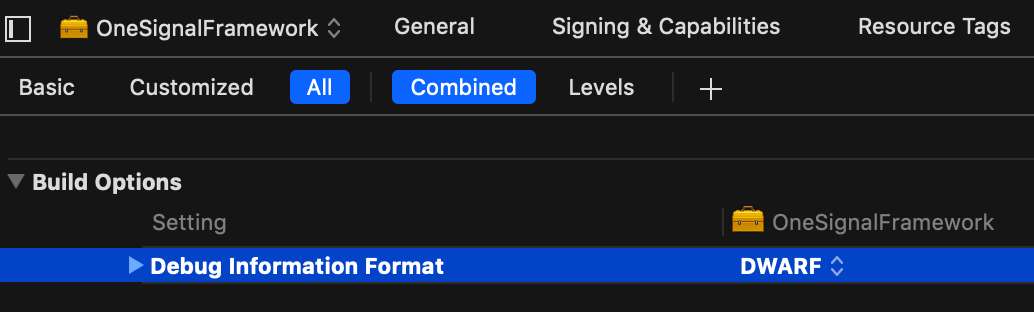
I am not sure if this solution is permanent, but if you recompile the framework and set
Debug Information Format
to
DWARF (instead of DWARF with dSYM File)
in the build settings of the OneSignalFramework target and recompile the framework, then the warnings disappear. I had a similar solution before (see further above), but the warnings came back later. So, I am not sure if this here fixes it permanently. However, worth a try... I rebuild my project a few times now, and the warnings are still gone.
skuske
on 13 Sep 2019
If this SDK was distributed as the source instead of binary this kind of issue will never happen.
I understand that you need the binary to bundle it inside other SDKs, but for CocoaPods I don't see any benefit.
Please, consider updating the podspec to distribute the source code instead of the binary, thanks.
 diogot
on 13 Sep 2019
diogot
on 13 Sep 2019
Hi @skuske here is some info I found in an old Apple Developer Forum post about DWARF. Might want to consider before removing 'with dSYM File':
DWARF is the debug information format and the dSYM file is a package containing debug symbols.
For example, if you have a library libfoo.dylib, the debug symbol file would be libfoo.dylib.dSYM.
Using DWARF with dSYM strips debug symbols from the executable and places them into a separate dSYM file. Using the DWARF option keeps debug symbols in the executable instead of separating them into a separate dSYM file.
You generally want to use the DWARF with dSYM option for release builds because otherwise, debug symbols get shipped with the executable if they are turned on, so turning off dSYM generation by switching to the DWARF option is not a fix, it just masks the problem. Switching to use DWARF masks the problem because it does not separate debug symbols, whereas DWARF with dSYM uses the strip and dsymutil commands, and it is typically these commands that tend to fail when there is malformed stuff in the binary. Failure on dSYM creation usually indicates malformed code somewhere, so it would be worthwhile to do further investigation. That is, if something got messed up in the binary, debug symbols can't reliably get stripped out.
hishak
on 14 Sep 2019
@mikechoch any updates? I'm seeing 98 of these warnings in my project and I'm on 2.11.0. Installed with cocoapods.
 summera
on 17 Sep 2019
summera
on 17 Sep 2019
Howdy, @rgomezp ...
I've had to temporarily set my project to Bitcode Enabled to NO to archive the product to successfully submit it to the App Store. I highly suggest you guys fix this as soon as possible.
 HackShitUp
on 20 Sep 2019
HackShitUp
on 20 Sep 2019
I'm using version 2.10.1. It's the last one that doesn't show warnings and seems to have the push notification fix.
diogot
on 20 Sep 2019
This will be fixed in the next release 2.11.1
The issue was due to a flag we set in 2.10.2 to remove the requirement of the -ObjC linker flag. When we added this it caused all of these warnings to show up and the fix was changing another flag called DEPLOYMENT_POSTPROCESSING to YES.
 mikechoch
on 25 Sep 2019
mikechoch
on 25 Sep 2019
@mikechoch
Sorry, but the warning issue is still there for us, even in 2.11.1, but https://github.com/OneSignal/OneSignal-iOS-SDK/issues/531 disappeared.
skuske
on 26 Sep 2019
@skuske if you update to Xcode11, this warning/issue goes away. The new ios 13 SDK introduced a whole host of bugs that I had to fix, but doing so seems to keep the OS lib up to date.
HackShitUp
on 26 Sep 2019
@HackShitUp
No, I am using the most recent Xcode: Version 11.1 (11A1027)
skuske
on 26 Sep 2019
Are folks seeing this still with 2.11.2?
rgomezp
on 10 Oct 2019
Are folks seeing this still with 2.11.2?
No, it has been fixed with 2.11.2.
Thanks!
johncodeos
on 10 Oct 2019
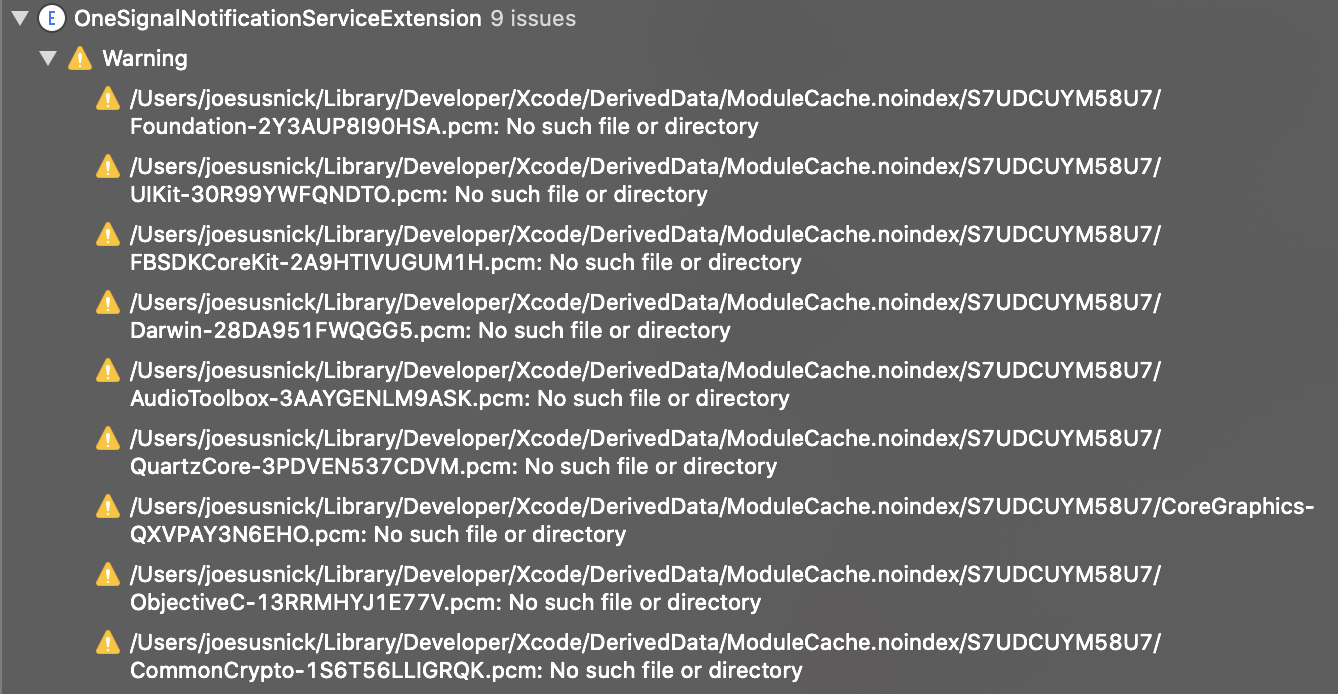
Hi @johncodeos and @mikechoch , the warning still there in version 2.13.1. Now it is from joesusnick.
Xcode 11.4.1
 andre991
on 14 May 2020
andre991
on 14 May 2020
Hi @johncodeos and @mikechoch , the warning still there in version 2.13.1. Now it is from joesusnick.
Xcode 11.4.1
Yeah, it came back
johncodeos
on 14 May 2020
Related issues
 Tavernari
·
4Comments
Tavernari
·
4Comments
 pvcary
·
5Comments
pvcary
·
5Comments
 KishanVyas
·
6Comments
KishanVyas
·
6Comments
 brunodelgado
·
3Comments
brunodelgado
·
3Comments
 luai-kalkatawi
·
4Comments
luai-kalkatawi
·
4Comments
Most helpful comment
@mikechoch any updates? I'm seeing 98 of these warnings in my project and I'm on 2.11.0. Installed with cocoapods.