Onesignal-flutter-sdk: ld: framework not found FirebaseCore
Hi there
I have an error when try to execute my app in iOS phone or simulator.
I followed the instructions with the page (https://documentation.onesignal.com/docs/flutter-sdk-setup). But the error persists.


Also, I clean, build, set the commands pod Install, Pod deintegrate, delete Pod folder, PodFile.lockfile, delete files in ~/Library/Developer/Xcode/DerivedData, delete Target OneSignalNotificationServiceExtension and create it again. But the error continues.
I'm using the package onesignal_flutter: ^2.2.0
Thanks
 FabianVarela
All 14 comments
@FabianVarela The OneSignalNotificationServiceExtension target should only have OneSignal as a dependency, make sure you don't have any other pods in your Podfile for this target.
 jkasten2
on 6 Nov 2019
jkasten2
on 6 Nov 2019
Hi @jkasten2 actually this is my PodFile
I need set use_frameworks! in OneSignalNotificationServiceExtension target, because appears this error
Runner (true) and OneSignalNotificationServiceExtension (false) do not both set use_frameworks!
````ruby
Uncomment this line to define a global platform for your project
platform :ios, '10.0'
CocoaPods analytics sends network stats synchronously affecting flutter build latency.
ENV['COCOAPODS_DISABLE_STATS'] = 'true'
project 'Runner', {
'Debug' => :debug,
'Profile' => :release,
'Release' => :release,
}
def parse_KV_file(file, separator='=')
file_abs_path = File.expand_path(file)
if !File.exists? file_abs_path
return [];
end
pods_ary = []
skip_line_start_symbols = ["#", "/"]
File.foreach(file_abs_path) { |line|
next if skip_line_start_symbols.any? { |symbol| line =~ /^\s*#{symbol}/ }
plugin = line.split(pattern=separator)
if plugin.length == 2
podname = plugin[0].strip()
path = plugin[1].strip()
podpath = File.expand_path("#{path}", file_abs_path)
pods_ary.push({:name => podname, :path => podpath});
else
puts "Invalid plugin specification: #{line}"
end
}
return pods_ary
end
target 'Runner' do
use_frameworks!
# Prepare symlinks folder. We use symlinks to avoid having Podfile.lock
# referring to absolute paths on developers' machines.
system('rm -rf .symlinks')
system('mkdir -p .symlinks/plugins')
# Flutter Pods
generated_xcode_build_settings = parse_KV_file('./Flutter/Generated.xcconfig')
if generated_xcode_build_settings.empty?
puts "Generated.xcconfig must exist. If you're running pod install manually, make sure flutter packages get is executed first."
end
generated_xcode_build_settings.map { |p|
if p[:name] == 'FLUTTER_FRAMEWORK_DIR'
symlink = File.join('.symlinks', 'flutter')
File.symlink(File.dirname(p[:path]), symlink)
pod 'Flutter', :path => File.join(symlink, File.basename(p[:path]))
end
}
# Plugin Pods
plugin_pods = parse_KV_file('../.flutter-plugins')
plugin_pods.map { |p|
symlink = File.join('.symlinks', 'plugins', p[:name])
File.symlink(p[:path], symlink)
pod p[:name], :path => File.join(symlink, 'ios')
}
end
pre_install do |installer|
# workaround for https://github.com/CocoaPods/CocoaPods/issues/3289
Pod::Installer::Xcode::TargetValidator.send(:define_method, :verify_no_static_framework_transitive_dependencies) {}
end
target 'OneSignalNotificationServiceExtension' do
use_frameworks!
pod 'OneSignal', '>= 2.9.5', '< 3.0'
end
post_install do |installer|
installer.pods_project.targets.each do |target|
target.build_configurations.each do |config|
config.build_settings['ENABLE_BITCODE'] = 'NO'
end
end
end
```
FabianVarela
on 6 Nov 2019
Even I faced the issue, but i resolved it. I am still not sure is this the right way to do it or not. But i will share you the solution which i have done by looking into stackoverflow.
Open your project (ios directory) in xcode.
Navigate to One signal extension and in that General Tab.
Search for Linked Frameworks and add the Firebase Core Framework by tapping on the + icon and try to build it (if your project is using Firebase core.).
 GadepalliAditya1998
on 6 Nov 2019
GadepalliAditya1998
on 6 Nov 2019
Hi @GadepalliAditya1998, I did made the steps that you recommended:
- Select the OneSignalNotificationExtensions
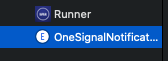
- Added the FirebaseCore Library
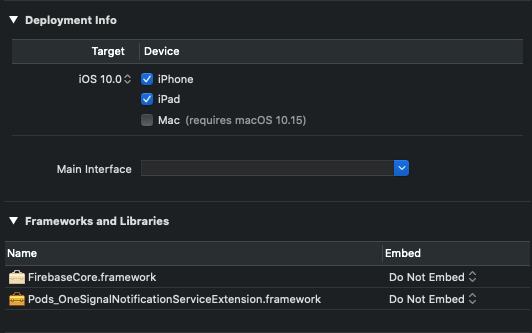
- Clean and Build from XCode, but the error persists
FabianVarela
on 6 Nov 2019
@FabianVarela Texted on facebook can you just reply there?
GadepalliAditya1998
on 6 Nov 2019
@GadepalliAditya1998 what's the Facebook message URL?
FabianVarela
on 6 Nov 2019
Texted personally
On Wed 6 Nov, 2019, 8:01 PM Fabian Varela Bonett, notifications@github.com
wrote:
@GadepalliAditya1998 https://github.com/GadepalliAditya1998 what's the
Facebook message URL?—
You are receiving this because you were mentioned.
Reply to this email directly, view it on GitHub
https://github.com/OneSignal/OneSignal-Flutter-SDK/issues/168?email_source=notifications&email_token=AMGJTW3AHHINQXHHTGRKO73QSLILBA5CNFSM4JJHXX2KYY3PNVWWK3TUL52HS4DFVREXG43VMVBW63LNMVXHJKTDN5WW2ZLOORPWSZGOEDGXEVI#issuecomment-550335061,
or unsubscribe
https://github.com/notifications/unsubscribe-auth/AMGJTW7UJKWF7CS6KNWLSALQSLILBANCNFSM4JJHXX2A
.
GadepalliAditya1998
on 6 Nov 2019
Perhaps changing the Embed setting would do the trick?
 rgomezp
on 7 Nov 2019
rgomezp
on 7 Nov 2019
@rgomezp can you help me where I change the embed setting, what are the steps? Thanks
FabianVarela
on 7 Nov 2019
@FabianVarela ,
Next to the framework, the current setting is "Do Not Embed". Try toggling that
rgomezp
on 8 Nov 2019
Take a look at my response here
rgomezp
on 8 Nov 2019
Closing due to no response
rgomezp
on 19 Nov 2019
Hi @rgomezp the solution that one signal support did give to me is with this link:
https://github.com/OneSignal/OneSignal-Flutter-SDK/issues/42#issuecomment-459476383
Moreover, I had to change my project from objective C to swift, add or link all the packages to OneSignalNotificationExtensions
And the error has gone
Thanks
FabianVarela
on 20 Nov 2019
Can I recommend, update the documentation in OneSignal Flutter SDK or create a troubleshotting?
Thanks
FabianVarela
on 20 Nov 2019
Related issues
 newbieflutter
·
4Comments
newbieflutter
·
4Comments
 jopicornell
·
8Comments
jopicornell
·
8Comments
 royibernthal
·
3Comments
royibernthal
·
3Comments
 danielgomezrico
·
3Comments
danielgomezrico
·
3Comments
 TarekkMA
·
10Comments
TarekkMA
·
10Comments
Most helpful comment
Hi @GadepalliAditya1998, I did made the steps that you recommended: