Onesignal-flutter-sdk: Can no longer distribute app with Validation Error "Found an unexpected Mach-O header code: 0x72613c2" on flutter master
Description:
After ugprading to the flutter master channel and using the latest build system where both the one signal package and the runner use use_frameworks!, everything runs perfectly on test devices, but when trying to distribute to iOS, the distribution fails with the error
Found an unexpected Mach-O header code: 0x72613c2
I've opened an issue in Github on this and the person taking a look is convinced that this is an issue of the OneSignal extension and not flutter itself.
You can see the issue and comments here.
https://github.com/flutter/flutter/issues/43499
The extension is the one created following the integration tutorial and has not been modified otherwise.
Environment
Pubspec
onesignal_flutter: ^2.2.0
In Podfile
target 'OneSignalNotificationServiceExtension' do
  pod 'OneSignal', '>= 2.9.5', '< 3.0'
  use_frameworks!
end
Steps to Reproduce Issue:
Given a project with the OneSignal extension
- flutter channel master && flutter channel upgrade
- flutter build ios
- Observe build succeeds.
- Archive the build on XCode
- Attempt to distribute | validate the archive
- Observe error

Anything else:
(crash stacktraces, as well as any other information here)
 lifenautjoe
All 26 comments
@lifenautjoe I recommend removing use_frameworks! from target 'OneSignalNotificationServiceExtension' do as it isn't need for OneSignal.
If are you still seeing an issue I recommend following this guide:
https://kobkrit.com/how-to-fix-found-an-unexpected-mach-o-header-code-0x72613c21-on-submitting-to-app-store-7d5b8ec180c
 jkasten2
on 1 Nov 2019
jkasten2
on 1 Nov 2019
Hmm, build fails saying the extension must have also use_frameworks if it is to be embedded in the Runner app
    - Runner (true) and OneSignalNotificationServiceExtension (false) do not both
    set use_frameworks!.

    /usr/local/Cellar/cocoapods/1.8.3/libexec/gems/cocoapods-1.8.3/lib/cocoapods/i
    nstaller/analyzer.rb:412:in `analyze_host_targets_in_podfile'
    /usr/local/Cellar/cocoapods/1.8.3/libexec/gems/cocoapods-1.8.3/lib/cocoapods/i
    nstaller/analyzer.rb:457:in `generate_targets'
    /usr/local/Cellar/cocoapods/1.8.3/libexec/gems/cocoapods-1.8.3/lib/cocoapods/i
    nstaller/analyzer.rb:127:in `analyze'
    /usr/local/Cellar/cocoapods/1.8.3/libexec/gems/cocoapods-1.8.3/lib/cocoapods/i
    nstaller.rb:410:in `analyze'
    /usr/local/Cellar/cocoapods/1.8.3/libexec/gems/cocoapods-1.8.3/lib/cocoapods/i
    nstaller.rb:234:in `block in resolve_dependencies'
    /usr/local/Cellar/cocoapods/1.8.3/libexec/gems/cocoapods-1.8.3/lib/cocoapods/u
    ser_interface.rb:64:in `section'
    /usr/local/Cellar/cocoapods/1.8.3/libexec/gems/cocoapods-1.8.3/lib/cocoapods/i
    nstaller.rb:233:in `resolve_dependencies'
    /usr/local/Cellar/cocoapods/1.8.3/libexec/gems/cocoapods-1.8.3/lib/cocoapods/i
    nstaller.rb:156:in `install!'
    /usr/local/Cellar/cocoapods/1.8.3/libexec/gems/cocoapods-1.8.3/lib/cocoapods/c
    ommand/install.rb:52:in `run'
    /usr/local/Cellar/cocoapods/1.8.3/libexec/gems/claide-1.0.3/lib/claide/command
    .rb:334:in `run'
    /usr/local/Cellar/cocoapods/1.8.3/libexec/gems/cocoapods-1.8.3/lib/cocoapods/c
    ommand.rb:52:in `run'
    /usr/local/Cellar/cocoapods/1.8.3/libexec/gems/cocoapods-1.8.3/bin/pod:55:in
    `<top (required)>'
    /usr/local/Cellar/cocoapods/1.8.3/libexec/bin/pod:22:in `load'
    /usr/local/Cellar/cocoapods/1.8.3/libexec/bin/pod:22:in `<main>'
Removing use_frameworks! also from the Runner breaks a lot of plugins that require use_frameworks 😬 . Every app from flutter also now comes with use_frameworks so can imagine this will be a frequent issue
lifenautjoe
on 1 Nov 2019
I've also tried to follow the recommended guide. There's no double frameworks to remove in any of the targets... So pretty stuck... 😞
lifenautjoe
on 1 Nov 2019
Thanks for your patience while we continue to investigate
 rgomezp
on 7 Nov 2019
rgomezp
on 7 Nov 2019
Thank you for letting us know you’re on it.
Much appreciated Rodrigo.
On Thu, 7 Nov 2019 at 23:11, Rodrigo Gomez Palacio notifications@github.com
wrote:
Thanks for your patience while we continue to investigate
—
You are receiving this because you were mentioned.
Reply to this email directly, view it on GitHub
https://github.com/OneSignal/OneSignal-Flutter-SDK/issues/166?email_source=notifications&email_token=ADBFXZI45QTC52VQKB3SLPDQSSG75A5CNFSM4JH4KGMKYY3PNVWWK3TUL52HS4DFVREXG43VMVBW63LNMVXHJKTDN5WW2ZLOORPWSZGOEDOAHYQ#issuecomment-551289826,
or unsubscribe
https://github.com/notifications/unsubscribe-auth/ADBFXZOTVYGMT5HSWOGGVIDQSSG75ANCNFSM4JH4KGMA
.
lifenautjoe
on 7 Nov 2019
This is a breaking Issue. Just having exactly the same problem.
 EddieRietz
on 8 Nov 2019
EddieRietz
on 8 Nov 2019
Perhaps Copy Bundle Resources settings are resulting in duplicate symbols
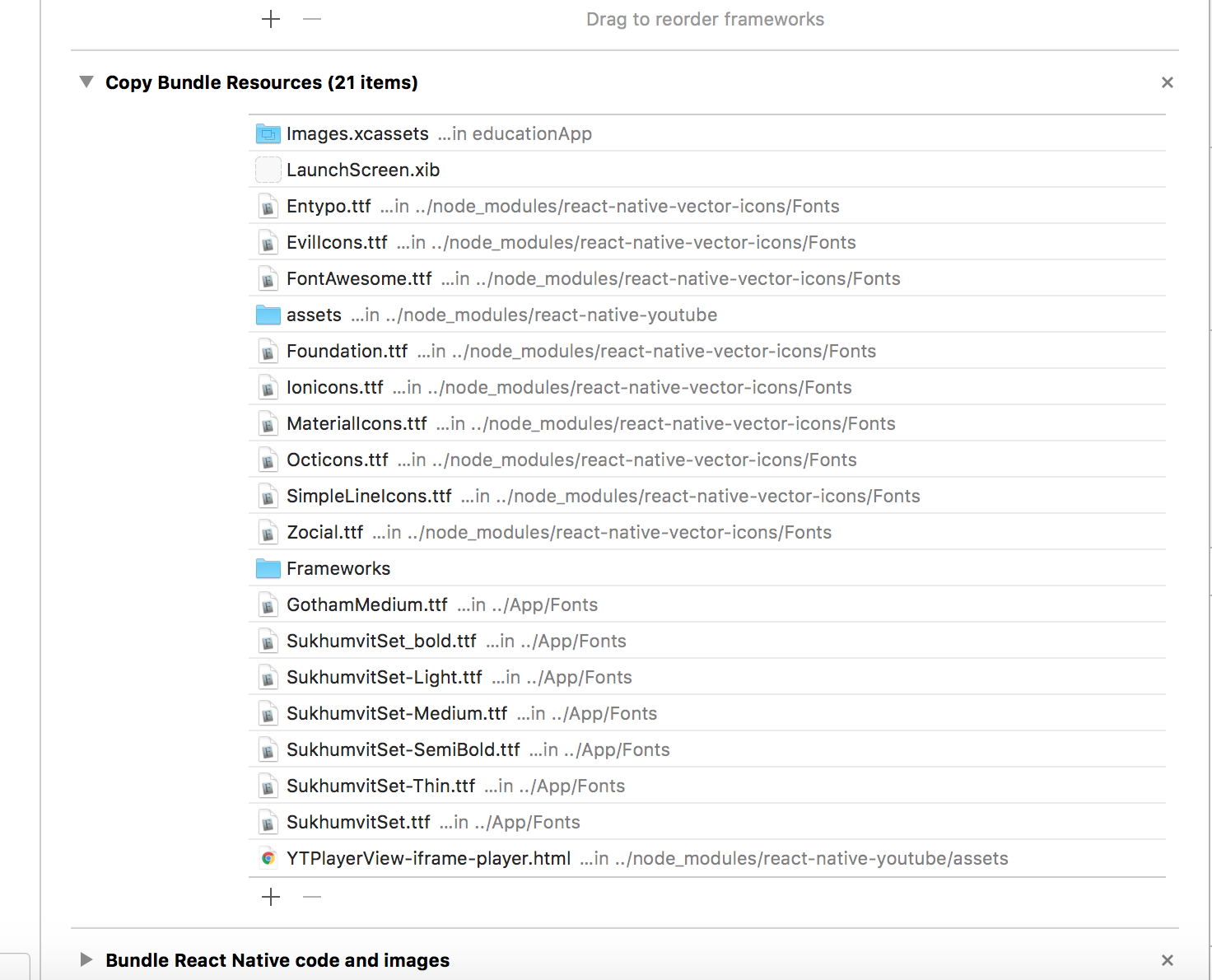
Can you try:
- Go to “Copy Bundle Resources” in the Build Phases.
- Take a look if there are any Frameworks’ related files that are going to be copied into the package twice, resulting in duplicates. In other words, make sure there are no duplicates between "Copy Bundle Resources" and "Link Binary with Libraries"
- In above case, the “Frameworks” directory is the culprit here. Remove it.
rgomezp
on 8 Nov 2019
I don't want to open my own ticket right now, because I have gone through the #168 , #157, #130 and this one and tried all the suggestions there.
My issue seems to be with the Branch.io SDK.
To make it short:
- If I do not have
use_frameworks!for the OneSignal target, I get the following error during build (just like the others):
- Runner (true) and OneSignalNotificationServiceExtension (false) do not both set use_frameworks!.
- If I set
use_frameworks!and I try all the suggestions here and in the aforementioned other tickets, the best I get is this:
$ flutter build ios --debug --flavor=development
Building com.foodstarz.connect2.OneSignalNotificationServiceExtension for device (ios)...
Automatically signing iOS for device deployment using specified development team in Xcode project: abc123
Running pod install...                                              6,4s
Running Xcode build...

Xcode build done.                                           12,9s
Failed to build iOS app
Error output from Xcode build:
↳
    ** BUILD FAILED **


Xcode's output:
↳
    ld: framework not found Branch
    clang: error: linker command failed with exit code 1 (use -v to see invocation)

Encountered error while building for device.
I will debug this a bit more myself. But this seems to be an important issue at the moment and I wanted to weigh in with my own error report.
(Everything works fine under Android, btw. I'm really, really happy with OneSignal so far! Good job, guys! 👍 )
 SvenSchoene
on 13 Nov 2019
SvenSchoene
on 13 Nov 2019
Hi @SvenSchoene ,
I'm glad you are enjoy OneSignal. I'm sorry you're struggling to resolve this. Any further insights since your last post?
If you are still seeing the issue, some folks have been able to resolve similar problems by following the instructions here
rgomezp
on 22 Nov 2019
Oh, indeed, I wanted to write something here, but I forgot.
Unfortunately, I don't have anything truly helpful or insightful to contribute.
I spent around 20 working hours on debugging the build process and got it to work in the end.
Here's what I ended up with:
- Removing
use_frameworks!from all runners was absolutely impossible to get to work. - At some point, adding
use_framworks!to theOneSignalNotificationServiceExtension-runner worked.
Now, the big question is: What did I do to make 2. work?
I wish I could give a good answer for this. I played around with too many settings to be able to properly trace it back now.
One thing I did do, however, was removing pod itself completely, and reinstalling that from the ground up (for updating Cocoa Pods, see this e.g. https://guides.cocoapods.org/using/getting-started.html#updating-cocoapods or https://stackoverflow.com/questions/39481636/updating-to-latest-version-of-cocoapods).
That also deleted all gems and other dependencies I had installed before.
I also updated to the latest beta-channel Flutter version and also removed all dependencies/packages that were existent before.
FWIW I'm using the Legacy Build System (in XCode: File --> Workspace Settings).
Also, I made sure to allow pod install to set the configuration for all my runners. Previously I got a lot of warnings because I have a custom setup with different build targets (for having different Firebase configurations for dev/staging/production). But I believe this was a key step as well.
In order to allow pod install to be able to set the build configuration for the targets, open XCode and select the _Project_ (_not_ a specific _Target_), select "Info" and then look for the "Configuration"-part. There, set all options for all your configured runners to "None". This will allow pod install to assume that it's ok to overwrite them with whatever configuration it deems appropriate.
I know that it's frustrating that I cannot pinpoint it any better. I hope there's something here that helps someone.
Working with OneSignal now is absolutely amazing, though. It works really, really well. 👍
SvenSchoene
on 27 Nov 2019
I'm glad this worked! I haven't heard from anyone else in a while. Is this safe to close?
rgomezp
on 27 Nov 2019
Uhh, our current setup only worked because we manually put the pods framework not to be embedded but linked after building the app, but before archiving it. It's a hack I've been doing ever since to get it to submit to the store.
Will try what Sven said next time.
lifenautjoe
on 5 Dec 2019
1- Make sure there's no duplicates in link binary with libraries and Embed frameworks for your project target and OneSignalNotificationServiceExtension
2- Remove static frameworks from Embed frameworks and move to Link binary with frameworks
 Ta7an
on 5 Dec 2019
Ta7an
on 5 Dec 2019
same error, please any help!!!!
 xellDart
on 7 Jan 2020
xellDart
on 7 Jan 2020
Hi everyone. I posted our "hack" solution to this over here
https://github.com/flutter/flutter/issues/43499#issuecomment-571558841
lifenautjoe
on 7 Jan 2020
Closing this issue as the problem is with Flutter
jkasten2
on 8 Jan 2020
Updated cocoapods with
brew upgrade cocoapods
Then, changed in pods file:
config.build_settings['ENABLE_BITCODE'] = 'NO'
to
config.build_settings['ENABLE_BITCODE'] = 'YES'
Change
target 'OneSignalNotificationServiceExtension' do
pod 'OneSignal', '>= 2.9.3', '< 3.0'
end
to
target 'OneSignalNotificationServiceExtension' do
use_frameworks!
pod 'OneSignal', '>= 2.9.3', '< 3.0'
end
Then
flutter build ios
and
XCode Archive
Done 👏
 arutkayb
on 21 Apr 2020
arutkayb
on 21 Apr 2020
Some folks are still seeing this issue
rgomezp
on 3 Jun 2020
Hi, I still have that issue:
App Store Connect Operation Error ERROR ITMS-90206: "Invalid Bundle. The bundle at 'Runner.app/PlugIns/OneSignalNotificationServiceExtension.appex' contains disallowed file 'Frameworks'."
I can't remove the use_frameworks! from the extension target (Runner needs it so the extension as well).
How can I fix it? @rgomezp
 vscafuto87
on 28 Jul 2020
vscafuto87
on 28 Jul 2020
I had the same issue as @vscafuto87, this only happens when you try to archive the build, not in "development mode".
 danielgomezrico
on 5 Aug 2020
danielgomezrico
on 5 Aug 2020
Here's my solution:
- config.build_settings['ENABLE_BITCODE'] = 'YES' in Podfile
- set all ENABLE_BITCODE = 'YES' in Runner project
- Importance ALWAYS_EMBED_SWIFT_STANDARD_LIBRARIES = 'NO' in Runner app.
Hope this useful!
 chungbd
on 10 Aug 2020
chungbd
on 10 Aug 2020
I am still facing this issue

I am using onesignal_flutter: ^2.4.1
Podfile
# Uncomment this line to define a global platform for your project
# platform :ios, '9.0'

# CocoaPods analytics sends network stats synchronously affecting flutter build latency.
ENV['COCOAPODS_DISABLE_STATS'] = 'true'

project 'Runner', {
  'Debug' => :debug,
  'Profile' => :release,
  'Release' => :release,
}

def parse_KV_file(file, separator='=')
  file_abs_path = File.expand_path(file)
  if !File.exists? file_abs_path
    return [];
  end
  generated_key_values = {}
  skip_line_start_symbols = ["#", "/"]
  File.foreach(file_abs_path) do |line|
    next if skip_line_start_symbols.any? { |symbol| line =~ /^\s*#{symbol}/ }
    plugin = line.split(pattern=separator)
    if plugin.length == 2
      podname = plugin[0].strip()
      path = plugin[1].strip()
      podpath = File.expand_path("#{path}", file_abs_path)
      generated_key_values[podname] = podpath
    else
      puts "Invalid plugin specification: #{line}"
    end
  end
  generated_key_values
end

target 'Runner' do
  use_frameworks!
  use_modular_headers!

  # Flutter Pod

  copied_flutter_dir = File.join(__dir__, 'Flutter')
  copied_framework_path = File.join(copied_flutter_dir, 'Flutter.framework')
  copied_podspec_path = File.join(copied_flutter_dir, 'Flutter.podspec')
  unless File.exist?(copied_framework_path) && File.exist?(copied_podspec_path)
    # Copy Flutter.framework and Flutter.podspec to Flutter/ to have something to link against if the xcode backend script has not run yet.
    # That script will copy the correct debug/profile/release version of the framework based on the currently selected Xcode configuration.
    # CocoaPods will not embed the framework on pod install (before any build phases can generate) if the dylib does not exist.

    generated_xcode_build_settings_path = File.join(copied_flutter_dir, 'Generated.xcconfig')
    unless File.exist?(generated_xcode_build_settings_path)
      raise "Generated.xcconfig must exist. If you're running pod install manually, make sure flutter pub get is executed first"
    end
    generated_xcode_build_settings = parse_KV_file(generated_xcode_build_settings_path)
    cached_framework_dir = generated_xcode_build_settings['FLUTTER_FRAMEWORK_DIR'];

    unless File.exist?(copied_framework_path)
      FileUtils.cp_r(File.join(cached_framework_dir, 'Flutter.framework'), copied_flutter_dir)
    end
    unless File.exist?(copied_podspec_path)
      FileUtils.cp(File.join(cached_framework_dir, 'Flutter.podspec'), copied_flutter_dir)
    end
  end

  # Keep pod path relative so it can be checked into Podfile.lock.
  pod 'Flutter', :path => 'Flutter'

  # Plugin Pods

  # Prepare symlinks folder. We use symlinks to avoid having Podfile.lock
  # referring to absolute paths on developers' machines.
  system('rm -rf .symlinks')
  system('mkdir -p .symlinks/plugins')
  plugin_pods = parse_KV_file('../.flutter-plugins')
  plugin_pods.each do |name, path|
    symlink = File.join('.symlinks', 'plugins', name)
    File.symlink(path, symlink)
    pod name, :path => File.join(symlink, 'ios')
  end
end

# Prevent Cocoapods from embedding a second Flutter framework and causing an error with the new Xcode build system.
install! 'cocoapods', :disable_input_output_paths => true

target 'OneSignalNotificationServiceExtension' do
  use_frameworks!
  pod 'OneSignal', '>= 2.9.3', '< 3.0'
end

post_install do |installer|
  installer.pods_project.targets.each do |target|
    target.build_configurations.each do |config|
      config.build_settings['ENABLE_BITCODE'] = 'YES'
    end
  end
end
I have tried setting config.build_settings['ENABLE_BITCODE'] = 'YES' in Podfile but no luck
I have also tried @chungbd solution but no luck either
please help
 pacifio
on 16 Aug 2020
pacifio
on 16 Aug 2020
I finally solved it
1 . Go to Runner and then to Build Settings and set Always Embed Swift Standard Libraries to YES
2 . Then go to OneSignalNotificationServiceExtension and then to Build Settings and set Always Embed Swift Standard Libraries to NO
Hope this helps
pacifio
on 17 Aug 2020
pacifio
on 17 Aug 2020
I'm glad this is resolved. Will close for now. Please comment if this issue is still ocurring even with the workarounds mentioned above.
rgomezp
on 2 Sep 2020
Related issues
 lucasratske
·
10Comments
lucasratske
·
10Comments
 royibernthal
·
3Comments
royibernthal
·
3Comments
 Galahand
·
3Comments
lifenautjoe
·
5Comments
Galahand
·
3Comments
lifenautjoe
·
5Comments
 Allan-Nava
·
4Comments
Allan-Nava
·
4Comments
Most helpful comment
This is a breaking Issue. Just having exactly the same problem.