Onesignal-flutter-sdk: Framework not found branch onesignalnotificationserviceextension time of creating archive bundle in ios from xcode
Hi,
I'm getting the linker error with 'Generic IOS device' at the time of build or 'flutter build ios'.
But when I'm using the iOS physical device the 'flutter build ios' and 'flutter run' working well. After running well when I'm going to create an archive from Xcode it shows linker error.
ld: warning: directory not found for option '-F/Users/debasis/Library/Developer/Xcode/DerivedData/Runner-fwhtndylovafgpdictkmhghkxamv/Build/Intermediates.noindex/ArchiveIntermediates/Runner/BuildProductsPath/Release-iphoneos/flutter_branch_io_plugin'
ld: warning: directory not found for option '-F/Users/debasis/Library/Developer/Xcode/DerivedData/Runner-fwhtndylovafgpdictkmhghkxamv/Build/Intermediates.noindex/ArchiveIntermediates/Runner/BuildProductsPath/Release-iphoneos/flutter_secure_storage'
ld: warning: directory not found for option '-F/Users/debasis/Library/Developer/Xcode/DerivedData/Runner-fwhtndylovafgpdictkmhghkxamv/Build/Intermediates.noindex/ArchiveIntermediates/Runner/BuildProductsPath/Release-iphoneos/image_picker'
ld: warning: directory not found for option '-F/Users/debasis/Library/Developer/Xcode/DerivedData/Runner-fwhtndylovafgpdictkmhghkxamv/Build/Intermediates.noindex/ArchiveIntermediates/Runner/BuildProductsPath/Release-iphoneos/onesignal_flutter'
ld: warning: directory not found for option '-F/Users/debasis/Library/Developer/Xcode/DerivedData/Runner-fwhtndylovafgpdictkmhghkxamv/Build/Intermediates.noindex/ArchiveIntermediates/Runner/BuildProductsPath/Release-iphoneos/path_provider'
ld: warning: directory not found for option '-F/Users/debasis/Library/Developer/Xcode/DerivedData/Runner-fwhtndylovafgpdictkmhghkxamv/Build/Intermediates.noindex/ArchiveIntermediates/Runner/BuildProductsPath/Release-iphoneos/permission_handler'
ld: warning: directory not found for option '-F/Users/debasis/Library/Developer/Xcode/DerivedData/Runner-fwhtndylovafgpdictkmhghkxamv/Build/Intermediates.noindex/ArchiveIntermediates/Runner/BuildProductsPath/Release-iphoneos/shared_preferences'
ld: warning: directory not found for option '-F/Users/debasis/Library/Developer/Xcode/DerivedData/Runner-fwhtndylovafgpdictkmhghkxamv/Build/Intermediates.noindex/ArchiveIntermediates/Runner/BuildProductsPath/Release-iphoneos/sqflite'
ld: warning: directory not found for option '-F/Users/debasis/Library/Developer/Xcode/DerivedData/Runner-fwhtndylovafgpdictkmhghkxamv/Build/Intermediates.noindex/ArchiveIntermediates/Runner/BuildProductsPath/Release-iphoneos/uni_links'
ld: warning: directory not found for option '-F/Users/debasis/Library/Developer/Xcode/DerivedData/Runner-fwhtndylovafgpdictkmhghkxamv/Build/Intermediates.noindex/ArchiveIntermediates/Runner/BuildProductsPath/Release-iphoneos/url_launcher'
ld: framework not found Branch
clang: error: linker command failed with exit code 1 (use -v to see invocation)

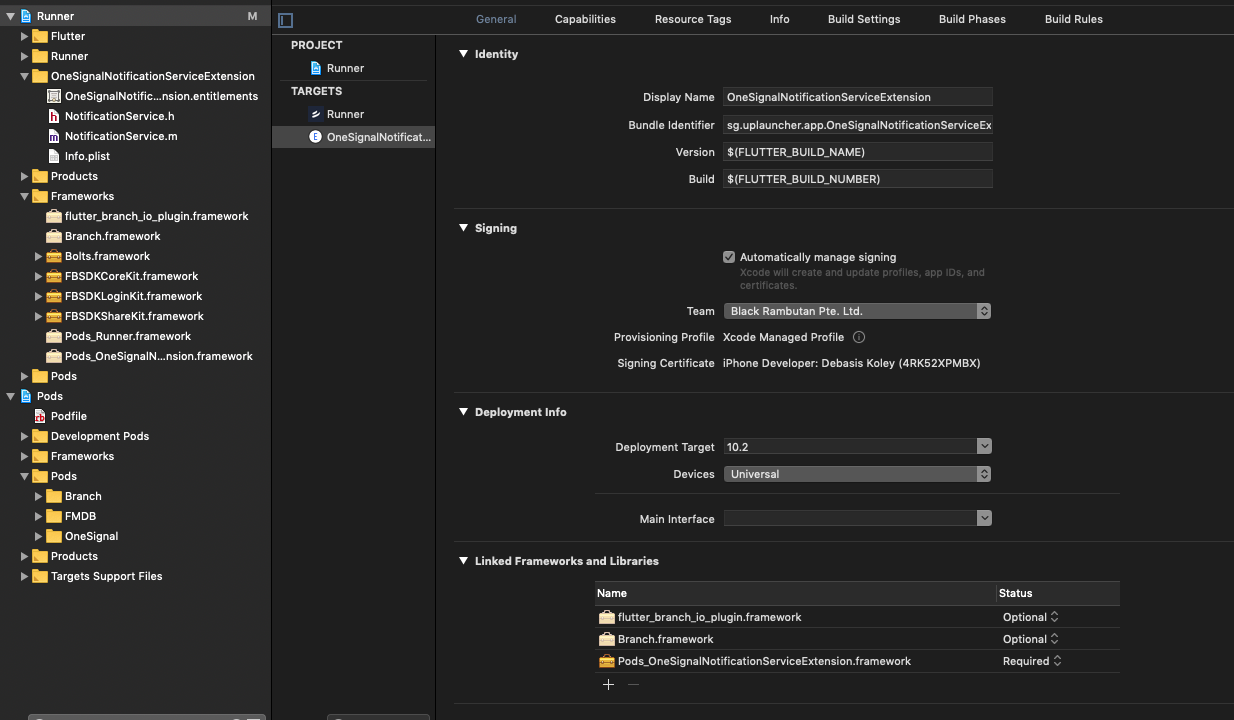
Please check the screenshot. Please help to solve the issue for IOS.
 debasiskoley
>All comments
The issue is resolved now :)
To resolve the above issue need to complete some more steps which are not described in Onesignal Flutter documentation. I think the steps will help others to solve the archive issue for the iOS build.
Note: First Setup one signal as per documentation. (https://documentation.onesignal.com/docs/flutter-sdk-setup)
(IOS Setup Steps after one signal document. )
Environment:
Flutter 1.7.8+hotfix.4 • channel stable
Dart 2.4.0
onesignal_flutter: ^2.0.2
Step 1:
Run 'flutter clean' from root directory.
then open ios module from xcode
Goto click Product > Clean
Step 2:
Open Pod file from Xcode. Add the line " platform :ios, '8.0' " at the top.
Open terminal from IDE and Goto Ios directory (cd ios )
- pod deintegrate
- pod install
Run above comment
Step 3:
Now Open Ios module from Xcode.
- Select the main application target and select Build settings -> search 'emb' term . Then create the same as per below screenshot.
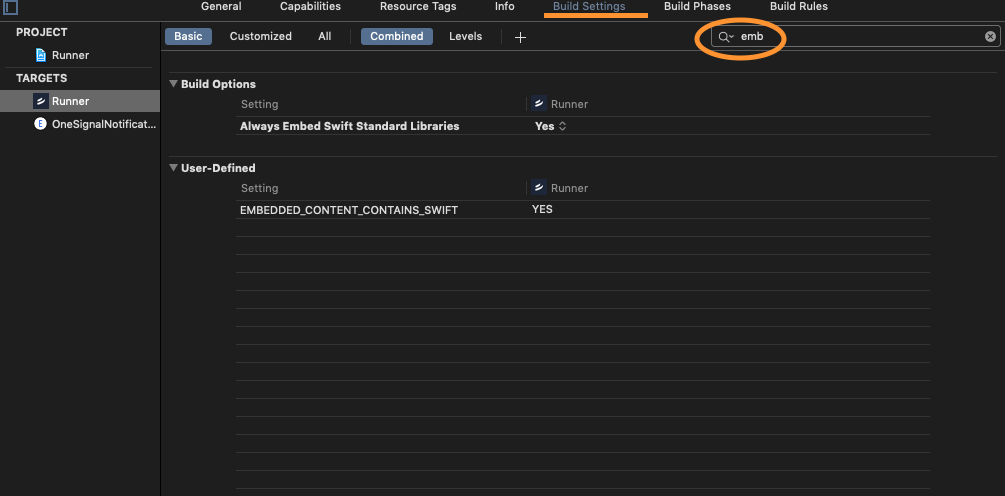
- Now select the One signal notification target and select Build settings -> search 'emb' term . Then create the same as per below screenshot.

Step 4:
Also, check the 'Build Settings' -> Enable Bitcode = No in both target.
Step 5:
Now Select 'Generic iOS Device' and Click Product -> Build.
After 'Build Success' Open flutter module from your IDE and run
- flutter build ios
All Done!
Now the app is ready to create 'Archive' from Xcode to upload in the App store.
debasiskoley
on 29 Aug 2019
Related issues
 royibernthal
·
8Comments
royibernthal
·
8Comments
 Holofox
·
8Comments
royibernthal
·
3Comments
Holofox
·
8Comments
royibernthal
·
3Comments
 getmmg
·
7Comments
getmmg
·
7Comments
 newbieflutter
·
4Comments
newbieflutter
·
4Comments
Most helpful comment
The issue is resolved now :)
To resolve the above issue need to complete some more steps which are not described in Onesignal Flutter documentation. I think the steps will help others to solve the archive issue for the iOS build.
Note: First Setup one signal as per documentation. (https://documentation.onesignal.com/docs/flutter-sdk-setup)
(IOS Setup Steps after one signal document. )
Environment:
Flutter 1.7.8+hotfix.4 • channel stable
Dart 2.4.0
onesignal_flutter: ^2.0.2
Step 1:
Run 'flutter clean' from root directory.
then open ios module from xcode
Goto click Product > Clean
Step 2:
Open Pod file from Xcode. Add the line " platform :ios, '8.0' " at the top.
Open terminal from IDE and Goto Ios directory (cd ios )
Run above comment
Step 3:
Now Open Ios module from Xcode.
Step 4:
Also, check the 'Build Settings' -> Enable Bitcode = No in both target.
Step 5:
Now Select 'Generic iOS Device' and Click Product -> Build.
After 'Build Success' Open flutter module from your IDE and run
All Done!
Now the app is ready to create 'Archive' from Xcode to upload in the App store.