Onedrive-api-docs: `generalException` when copying a file without providing a new name
Category
- [ ] Question
- [ ] Documentation issue
- [x] Bug
Expected or Desired Behavior
When copying a file and omitting "name", original file name is used, as specified in the documentation.
Observed Behavior
Copy operation is Accepted (202), but monitor endpoint reports:
{
  "@odata.context": "https://{domain}-my.sharepoint.com/personal/{username}/_api/v2.1/$metadata#drives('default')/operations/$entity",
  "id": "{operationId}",
  "status": "failed",
  "error": {
    "code": "generalException",
    "message": "General exception while processing"
  }
}
Steps to Reproduce
I could not find a way to get the copy to work without providing "name", so the steps are just:
POST https://graph.microsoft.com/v1.0/users/{username}/drive/items/{itemId}/copy

{
  "parentReference": {
    "driveId": "{driveId}",
    "id": "{parentItemId}"
  }
}
^ This fails.
POST https://graph.microsoft.com/v1.0/users/{username}/drive/items/{itemId}/copy

{
  "parentReference": {
    "driveId": "{driveId}",
    "id": "{parentItemId}"
  },
  "name": "foo"
}
^ This works with the same IDs, just "name" added.
 indigane
All 40 comments
Hi @indigane, I tried reproing the problem on my test tenant and wasn't able to. Could you provide the request-id response header from the call that returns the generalException?
I've pre-emptively marked this as a bug because there is a known issue where concurrent copies to the same drive can manifest in a response like this and so there's the potential there's a relationship to your repro. But it sounds different enough that it's probably not the case - we'll figure out what's going on though!
 ificator
on 15 Jan 2019
ificator
on 15 Jan 2019
request-id of the request that starts the copy operation: 72c137c5-5de7-461d-9294-9d2f2bf232eb
request-id of a request to the monitor endpoint that returns the generalException: ad7ab69e-30c5-7000-7d75-d1aaff818424
indigane
on 16 Jan 2019
Thanks for the details @indigane - that should be enough for us to try and figure out what's going on.
ificator
on 16 Jan 2019
Hi @indigane, just to confirm - do this issue repro every time you don't provide a new name in the copy request body?
ificator
on 17 Jan 2019
I have not yet succeeded in copying a file without providing "name" in the payload. However, I haven't had the resources to do extensive testing with different files or parent items. Maybe there is a configuration in which it might work, if as you say it's not reproing normally.
indigane
on 17 Jan 2019
Are you by any chance enqueuing multiple copy attempts at the same time?
ificator
on 17 Jan 2019
Not deliberately at least. I tried with a different set up where I can be sure I'm only sending the request once, and I still get the same. Copy with "name" works, without gives generalException.
EDIT: If I already have a file with the same name in the destination folder, and I omit the "name" property, then instead of generalException, I get nameAlreadyExists from the monitor endpoint.
This differs from if I provide a conflicting name via the "name" property, since that will immediately respond with nameAlreadyExists instead of starting an async operation.
Also the copy works from the OneDrive Business Web UI, but that uses
https://{domain}-my.sharepoint.com/personal/{username}/_api/SP.MoveCopyUtil.CopyFileByPath()
instead of the Graph API, and copies with full paths.
indigane
on 18 Jan 2019
I've got new information on this issue. I tried to work around it by retrieving the file name first, only to find out, that even if I specify "name", if it's the same name as the original, it will fail with generalException. I had tried the copy with names such as "foo", which worked as they were not the original file name.
So here are my current steps:
- Have a file in drive root
- Create a folder in drive root
- Attempt file copy from drive root into the created folder with the same filename (whether omitted, or specified as exactly the same).
indigane
on 8 Feb 2019
Thanks for updating us @indigane. I'll see if this new information is useful to the team trying to figure out what's going on.
ificator
on 8 Feb 2019
It sounds like we've added more instrumentation to try and track down what's going on here. On that note, it would be useful if you could provide a request-id for the createUploadSession call that ends up triggering these failures. We've tried to reproduce the issue ourselves but have thus far not succeeded, so it's going to be an "interesting" problem once we track it down :)
ificator
on 8 Feb 2019
"name" omitted: 706f0723-841d-4aa9-849b-527ebde922dd (generalException)
"name" specified, but same as origin: bb589141-7662-4ec8-8dc0-190c8a5df702 (generalException)
"name" specified and different: 3edeff08-5b4f-4893-9625-fa5bf1f2d4a8 (success)
EDIT: Also, it is not a createUploadSession call, it is a call to the /copy endpoint of a drive item, unless that's the same internally.
indigane
on 11 Feb 2019
Sorry, I crossed wires (was looking at another issue at the same time). copy is what we're debugging here so what you've provided is fine :)
ificator
on 11 Feb 2019
I just wanted to update this issue to say that we believe we have an idea what's going on and are working with the appropriate teams to resolve it. Hopefully we'll have it fixed soon.
ificator
on 18 Apr 2019
Hi guys,
Any news on this issue, I'm a little blocked by this issue, any idea on when/if there will be a correction?
Thanks in advance
POFerro
 POFerro
on 7 Jun 2019
POFerro
on 7 Jun 2019
@POFerro and @indigane
We've added some more instrumentation that will allow us to collect more details - can one of you provide a new correlation id of when the monitor URL fails with the generalException? The data will help prove the theory I alluded to on April 18th.
ificator
on 20 Jun 2019
Hi @ificator ,
Here they are:
Request to copy an 18.5MB folder providing a different name:
'Code: notAllowed
Message: Cross-site operations cannot be performed on files larger than 50MiB
Inner error
'
{Transfer-Encoding: chunked
request-id: ec7cc201-dea4-4a3a-9c9a-f54561576b5b
client-request-id: ec7cc201-dea4-4a3a-9c9a-f54561576b5b
x-ms-ags-diagnostic: {"ServerInfo":{"DataCenter":"West Europe","Slice":"SliceC","Ring":"5","ScaleUnit":"001","RoleInstance":"AGSFE_IN_48","ADSiteName":"WEU"}}
Duration: 937.4682
Strict-Transport-Security: max-age=31536000
Cache-Control: private
Date: Fri, 28 Jun 2019 03:59:22 GMT
}
Request to copy an 9.5MB folder providing a different name:
: 'Code: UnknownError
Inner error
'
{Transfer-Encoding: chunked
request-id: b7967fd0-402a-4370-b958-e461d3dceac3
client-request-id: b7967fd0-402a-4370-b958-e461d3dceac3
x-ms-ags-diagnostic: {"ServerInfo":{"DataCenter":"West Europe","Slice":"SliceC","Ring":"5","ScaleUnit":"002","RoleInstance":"AGSFE_IN_53","ADSiteName":"WEU"}}
Duration: 10024.1965
Strict-Transport-Security: max-age=31536000
Cache-Control: private
Date: Fri, 28 Jun 2019 04:13:18 GMT
}
When I don't provide a name or provide the same name as the origin folder I get a success response but nothing happens. Since I'm using the graph sdk I haven't got the requestId :(.
Thanks in advance
POFerro
POFerro
on 28 Jun 2019
Thanks @POFerro, unfortunately there's a current quirk in the copy system that results in different behavior when you choose a new name for the target file/folder (vs not providing it or providing it the same). So the first two failures are not actually related to the issue we're trying to debug.
But I can still tell you why those two failed :).
- Since the "new name" scenario actually copies synchronously it tries to limit the amount of data copies so that Graph doesn't timeout the request. In this case the system things the folder is roughly 200MiB in size - can you confirm that the folder is only 18.5MiB? How did you get that size value?
- This folder was small enough, but the copy still took too long so that Graph gave up and failed the request. The copy would have actually completed in the background but the request would have appeared to fail.
We're tracking work to make the "new name" scenario behave in a nicer manner, but we cannot comment on time frames.
The last failure that you did get a requestid from would have been the one that correlates to this issue. In that case the call to Graph should have returned a 202 Accepted response with a Location header containing a monitor URL. If you have that URL it might be enough data for us to work with.
ificator
on 28 Jun 2019
Hi @ificator ,
I managed to get the urls you where talking about from a response to a copy without a name provided, here they are:
HTTP/1.1 202 Accepted
Cache-Control: private
Transfer-Encoding: chunked
Content-Type: text/plain
Location: https://novabase.sharepoint.com/sites/EPMTemplateGeneral/_api/v2.1/drives/b!UWq_wnr1M0-BToTCv3wLXBlWX2IFrf5Hm2wVB1gdFqWaVoXKcZ1ITIwy8n3JdpB_/operations/fdae908f-f5eb-4587-b34e-2dd01ecb66f2?c=M0VHR1JHYmQycjB1WVh0eCt0eGg4RWJSTUp3WUNrdllZYmVCeUdDTkMydz0jaHR0cHM6Ly9zcG9kYjFhbTFtMDQwcHIucXVldWUuY29yZS53aW5kb3dzLm5ldC8yNDMzcHEyMDE5MDYyOC0yNzk4NDViYjRjY2Q0Zjc2YjU5YjQzM2RjNDczNGUxMz9zdj0yMDE3LTA3LTI5JnNpZz1nUDJNcWZBbDI5UEp1NGJpZmpaSmdLdUViSjhWTHdCV0ppVWNaMWQxaGxrJTNEJnN0PTIwMTktMDYtMjdUMDclM0EwMCUzQTAwWiZzZT0yMDE5LTA3LTE5VDA3JTNBMDAlM0EwMFomc3A9cmFw&v=2.0&tempauth=eyJ0eXAiOiJKV1QiLCJhbGciOiJub25lIn0.eyJhdWQiOiIwMDAwMDAwMy0wMDAwLTBmZjEtY2UwMC0wMDAwMDAwMDAwMDAvbm92YWJhc2Uuc2hhcmVwb2ludC5jb21ANGU5OWI4NWUtOWM2Mi00OGM0LThlM2UtZDBkZGE5ODgzMTc5IiwiaXNzIjoiMDAwMDAwMDMtMDAwMC0wZmYxLWNlMDAtMDAwMDAwMDAwMDAwIiwibmJmIjoiMTU2MTc2MjQ5MiIsImV4cCI6IjE1NjE4NDg4OTIiLCJlbmRwb2ludHVybCI6IkJ1OU9DMW4yWWZucnpRbVVpdkJRTXZvMXVybmtKaGJoQnJIeUh2WjNPOE09IiwiZW5kcG9pbnR1cmxMZW5ndGgiOiI1NTMiLCJpc2xvb3BiYWNrIjoiVHJ1ZSIsImNpZCI6IllUWTJNelprTldVdFlXTmhPQzAwWVdJMExXRTNOemt0TXpoak5qRTJObVU0TkRRNSIsInZlciI6Imhhc2hlZHByb29mdG9rZW4iLCJzaXRlaWQiOiJZekppWmpaaE5URXRaalUzWVMwMFpqTXpMVGd4TkdVdE9EUmpNbUptTjJNd1lqVmoiLCJhcHBfZGlzcGxheW5hbWUiOiJFUE0iLCJuYW1laWQiOiIwMjBmZmZmNi1jMGIwLTRlOTItYThmYy05ZDUzNjg2YWZkZmJANGU5OWI4NWUtOWM2Mi00OGM0LThlM2UtZDBkZGE5ODgzMTc5Iiwicm9sZXMiOiJncm91cC53cml0ZSBhbGxzaXRlcy5tYW5hZ2UgYWxsZmlsZXMud3JpdGUgYWxscHJvZmlsZXMucmVhZCIsInR0IjoiMSIsInVzZVBlcnNpc3RlbnRDb29raWUiOm51bGx9.U0UxeXJHUjlQZ25TS3RGbHpRakdvTXcrYVdsWm1iN09QakxXNzJtcER4OD0
request-id: a6636d5e-aca8-4ab4-a779-38c6166e8449
client-request-id: a6636d5e-aca8-4ab4-a779-38c6166e8449
x-ms-ags-diagnostic: {"ServerInfo":{"DataCenter":"West Europe","Slice":"SliceC","Ring":"5","ScaleUnit":"002","RoleInstance":"AGSFE_IN_13","ADSiteName":"WEU"}}
Duration: 1306.7242
Strict-Transport-Security: max-age=31536000
Date: Fri, 28 Jun 2019 22:54:51 GMT
0
Regarding the other two scenarios if this one works I'm fine :). Any way the files are not 200MB I've got a local copy of the folder I'm trying to copy and the files on disk take less than 20MB it's weird that it's being reported as having +200MB
Thanks and best regards.
POFerro
POFerro
on 29 Jun 2019
Hi @ificator ,
Have you had a chance to look at the urls I sent you in the last comment? They were the cases that correlate to this issue, where they enough? Do you need any more info?
Thanks and best regards
POFerro
POFerro
on 10 Jul 2019
My apologies @POFerro I dropped the ball on this one and didn't follow up in time. If you could grab the same data again (or even just the Location header as that'll give me what I need) I'll make sure I look at it right away.
ificator
on 10 Jul 2019
Hi @ificator ,
Here it is, I have logs of two calls for copy, please let me know if you need any more info:
HTTP/1.1 202 Accepted
Cache-Control: private
Transfer-Encoding: chunked
Content-Type: text/plain
Location: https://novabase.sharepoint.com/sites/EPMTemplateGeneral/_api/v2.1/drives/b!UWq_wnr1M0-BToTCv3wLXBlWX2IFrf5Hm2wVB1gdFqWaVoXKcZ1ITIwy8n3JdpB_/operations/cf3f348a-15a1-4e28-945e-98b8a9d0569d?c=eDEwWGNnamhscElZaTVZV2FVV1dYS1RXZTlXWFBvOTdrRDdvOVFvdjVvWT0jaHR0cHM6Ly9zcG9kYjFhbTFtMDI4cHIucXVldWUuY29yZS53aW5kb3dzLm5ldC8yNDMzcHEyMDE5MDcxMC0yODQ5ZTIzNDk1YWM0OGMxYjg1NTQ4ZTkwOTMzZTMwMz9zdj0yMDE3LTA3LTI5JnNpZz1iNXplbXdVZnBoUjJVZmVzTGw1T1N3MnBMSjQlMkZ0Q1RNeVdrb2VpTW1LSEElM0Qmc3Q9MjAxOS0wNy0wOVQwNyUzQTAwJTNBMDBaJnNlPTIwMTktMDctMzFUMDclM0EwMCUzQTAwWiZzcD1yYXA&v=2.0&tempauth=eyJ0eXAiOiJKV1QiLCJhbGciOiJub25lIn0.eyJhdWQiOiIwMDAwMDAwMy0wMDAwLTBmZjEtY2UwMC0wMDAwMDAwMDAwMDAvbm92YWJhc2Uuc2hhcmVwb2ludC5jb21ANGU5OWI4NWUtOWM2Mi00OGM0LThlM2UtZDBkZGE5ODgzMTc5IiwiaXNzIjoiMDAwMDAwMDMtMDAwMC0wZmYxLWNlMDAtMDAwMDAwMDAwMDAwIiwibmJmIjoiMTU2Mjc4NzQzMiIsImV4cCI6IjE1NjI4NzM4MzIiLCJlbmRwb2ludHVybCI6IldMZXl1TTI5MzBYNjZINW04NklmU2hpTlNpWFVZUVZ3NmhOUkkyYnRudWs9IiwiZW5kcG9pbnR1cmxMZW5ndGgiOiI1NTYiLCJpc2xvb3BiYWNrIjoiVHJ1ZSIsImNpZCI6IlpqUTJZakl4WkRVdFlURXdNUzAwTURVNUxUZzBaakl0TkRsbE5tRTRPR0prWlRRNSIsInZlciI6Imhhc2hlZHByb29mdG9rZW4iLCJzaXRlaWQiOiJZekppWmpaaE5URXRaalUzWVMwMFpqTXpMVGd4TkdVdE9EUmpNbUptTjJNd1lqVmoiLCJhcHBfZGlzcGxheW5hbWUiOiJFUE0iLCJuYW1laWQiOiIwMjBmZmZmNi1jMGIwLTRlOTItYThmYy05ZDUzNjg2YWZkZmJANGU5OWI4NWUtOWM2Mi00OGM0LThlM2UtZDBkZGE5ODgzMTc5Iiwicm9sZXMiOiJncm91cC53cml0ZSBhbGxzaXRlcy5tYW5hZ2UgYWxsZmlsZXMud3JpdGUgYWxscHJvZmlsZXMucmVhZCIsInR0IjoiMSIsInVzZVBlcnNpc3RlbnRDb29raWUiOm51bGx9.TTd0RTUxWER1T2pzUktrRlM0RTRnMUE5WnFBaytXSlY0alJNN1ZodjY1VT0
request-id: f46b21d5-a101-4059-84f2-49e6a88bde49
client-request-id: f46b21d5-a101-4059-84f2-49e6a88bde49
x-ms-ags-diagnostic: {"ServerInfo":{"DataCenter":"West Europe","Slice":"SliceC","Ring":"4","ScaleUnit":"000","RoleInstance":"AGSFE_IN_24","ADSiteName":"WEU"}}
Duration: 1894.3071
Strict-Transport-Security: max-age=31536000
Date: Wed, 10 Jul 2019 19:37:11 GMT
HTTP/1.1 202 Accepted
Cache-Control: private
Transfer-Encoding: chunked
Content-Type: text/plain
Location: https://novabase.sharepoint.com/sites/EPMTemplateGeneral/_api/v2.1/drives/b!UWq_wnr1M0-BToTCv3wLXBlWX2IFrf5Hm2wVB1gdFqWaVoXKcZ1ITIwy8n3JdpB_/operations/4757913c-84d2-4147-9de1-6f18f53ccd35?c=VlY1VXZVRVhrbDhtUHRYaW9PY0JvVzFRdGxKc3RvYmMycnVTL3hoSW9Uaz0jaHR0cHM6Ly9zcG9kYjFhbTFtMDA2cHIucXVldWUuY29yZS53aW5kb3dzLm5ldC8yNDMzcHEyMDE5MDcxMC04MzBjZGMzN2VjYWU0YzgxODg4NjNmODNhMWZhNDI2ZT9zdj0yMDE3LTA3LTI5JnNpZz1sWm1rSVAwVHN5TUwlMkIyY1BqWlMlMkZIZ2VtTTBaSnlIdUtBWlVCTmg0dmYxcyUzRCZzdD0yMDE5LTA3LTA5VDA3JTNBMDAlM0EwMFomc2U9MjAxOS0wNy0zMVQwNyUzQTAwJTNBMDBaJnNwPXJhcA&v=2.0&tempauth=eyJ0eXAiOiJKV1QiLCJhbGciOiJub25lIn0.eyJhdWQiOiIwMDAwMDAwMy0wMDAwLTBmZjEtY2UwMC0wMDAwMDAwMDAwMDAvbm92YWJhc2Uuc2hhcmVwb2ludC5jb21ANGU5OWI4NWUtOWM2Mi00OGM0LThlM2UtZDBkZGE5ODgzMTc5IiwiaXNzIjoiMDAwMDAwMDMtMDAwMC0wZmYxLWNlMDAtMDAwMDAwMDAwMDAwIiwibmJmIjoiMTU2Mjc4NzQyOSIsImV4cCI6IjE1NjI4NzM4MjkiLCJlbmRwb2ludHVybCI6IkhJNzZkSWpaWk0xZ2I1VDJnVy9IbzNSZDM5ZVpQZEx4am8wQzl0amxwZ0k9IiwiZW5kcG9pbnR1cmxMZW5ndGgiOiI1NTkiLCJpc2xvb3BiYWNrIjoiVHJ1ZSIsImNpZCI6Ik1qUmxaR0ZsWmpndE1qWXdNQzAwWXpjM0xXRmhPV0l0TkRZeE5EZGtaRGd6TVdRMiIsInZlciI6Imhhc2hlZHByb29mdG9rZW4iLCJzaXRlaWQiOiJZekppWmpaaE5URXRaalUzWVMwMFpqTXpMVGd4TkdVdE9EUmpNbUptTjJNd1lqVmoiLCJhcHBfZGlzcGxheW5hbWUiOiJFUE0iLCJuYW1laWQiOiIwMjBmZmZmNi1jMGIwLTRlOTItYThmYy05ZDUzNjg2YWZkZmJANGU5OWI4NWUtOWM2Mi00OGM0LThlM2UtZDBkZGE5ODgzMTc5Iiwicm9sZXMiOiJncm91cC53cml0ZSBhbGxzaXRlcy5tYW5hZ2UgYWxsZmlsZXMud3JpdGUgYWxscHJvZmlsZXMucmVhZCIsInR0IjoiMSIsInVzZVBlcnNpc3RlbnRDb29raWUiOm51bGx9.Wk1UbUtkU0pYN3FpelJMZUV5MnRLUUJIKzdxNEhDNmRyWTJDdFBIa3R5MD0
request-id: 24edaef8-2600-4c77-aa9b-46147dd831d6
client-request-id: 24edaef8-2600-4c77-aa9b-46147dd831d6
x-ms-ags-diagnostic: {"ServerInfo":{"DataCenter":"West Europe","Slice":"SliceC","Ring":"4","ScaleUnit":"000","RoleInstance":"AGSFE_IN_24","ADSiteName":"WEU"}}
Duration: 1734.9723
Strict-Transport-Security: max-age=31536000
Date: Wed, 10 Jul 2019 19:37:09 GMT
Thanks and best regards
POFerro
POFerro
on 10 Jul 2019
Got it, thanks @POFerro
ificator
on 10 Jul 2019
@POFerro and @indigane, can both of you confirm that your scenarios are using app-only tokens (i.e. application permissions and NOT delegated permissions).
ificator
on 11 Jul 2019
Hi @ificator ,
That's correct, in my case I use app token.
POFerro
on 11 Jul 2019
Yes, we are using app-only tokens for our use case.
indigane
on 12 Jul 2019
So the good news is we understand what's going on now - we're working on a fix now and I'll update when it's deploying.
ificator
on 17 Jul 2019
Thanks Brad, that’s really good news, let me know when you have a fix then.
POFerro
on 18 Jul 2019
The fix has been deployed - you should hopefully now see copy requests succeed for application permissions like sites.readwrite.all. Can you guys confirm things are looking better?
ificator
on 6 Aug 2019
Hi @ificator ,
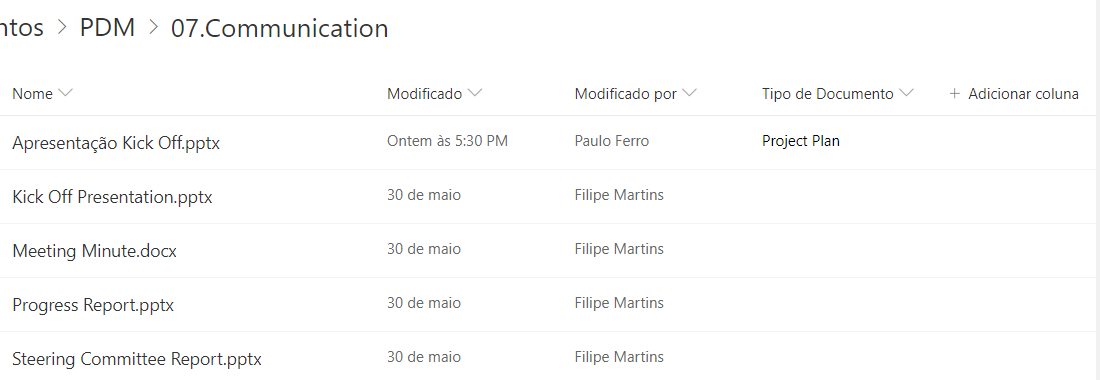
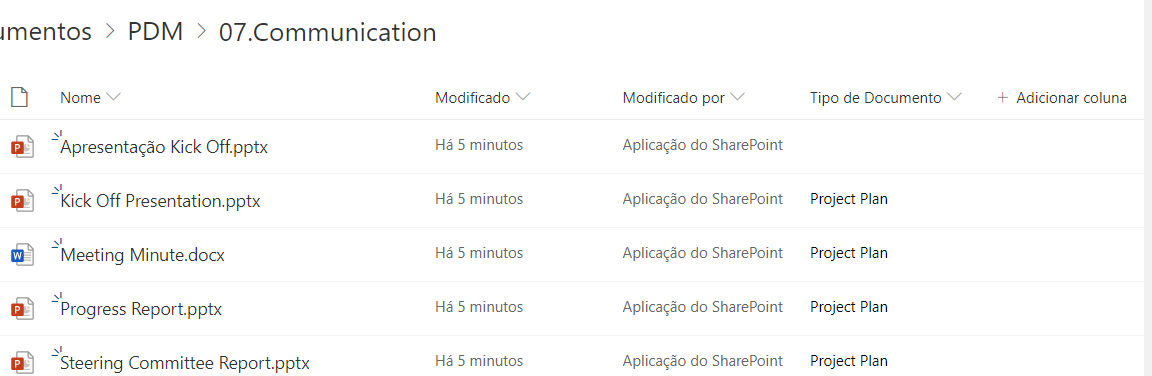
Copy has succeeded and files where copied, only had a weird behavior with Custom List Item Fields, my site list has a custom field which is a lookup field, on the source one of the items had this field with value and on the target all other documents had this value except the one that actually has the value on the source, it's weird but I believe something is not right with List Item Fields copy.
Please find attached the source and target folder screenshot so you can see what I'm talking about.
Can you have a look?
Thanks and best regards.
POFerro
on 7 Aug 2019
@POFerro that's interesting - can you open a new issue with the above data, and include the headers of the 202 Accepted response for the copy request? We'll drill in and see what's going on.
Also, was this a cross-site copy or was it within the same site?
ificator
on 7 Aug 2019
This issue isn't fully fixed - application permissions that are file scoped (e.g. Files.ReadWrite.All) may still have issues. Until those are fixed, the workaround is to switch to site scoped application permissions (e.g. Sites.ReadWrite.All) for the time being.
ificator
on 7 Aug 2019
Hi @ificator ,
I just created the new issue #1122 regarding the fields copy issue. As for the permissions, my user has Sites.ReadWrite.All permissions, so regarding this issue copy is fine for me.
Thanks for your help
POFerro
on 12 Aug 2019
Hi @ificator
Can you pls help to check my issue, this is similar this issue.
I copy a file to another location with difference name but fail, here is the request body and response:
Request body:
{
"parentReference": {
"path": "/drives/b!MfEbXXD4VE6t8fQ4_Dy5smcOOdUDnKxOpnskq-ju-MQ1iFUZGf0dQ6KvqC6I8aUj/root:/8894201"
},
"name": "File_Rename.zip"
}
The Response:
{
"error": {
"code": "invalidRequest",
"message": "The request is malformed or incorrect.",
"innerError": {
"request-id": "11beecc7-e573-487d-96e4-c131d603a106",
"date": "2019-12-18T12:12:17"
}
}
}
But copy without renaming the file is ok. *
*Some file(s) work fine, some files fail with rename.
Thanks
 mrphannguyen
on 18 Dec 2019
mrphannguyen
on 18 Dec 2019
failing just now. trying to copy file named testdoc1.docx from one folder to another.
request:
POST
https://graph.microsoft.com/v1.0/users/<CENSORED>/drive/items/<CENSORED>/copy
{
  "parentReference": {
    "driveId": "<CENSORED>",
    "id": "<CENSORED>"
  },
  "name": "testdoc1.docx"
}
request-id: 6982fac0-1f7c-4019-836a-e012bbd916bf
monitor response contents (censored):
{
  "@odata.context": "https://<CENSORED>.sharepoint.com/personal/<CENSORED>/_api/v2.1/$metadata#drives('default')/operations/$entity",
  "id": "<CENSORED>",
  "createdDateTime": "0001-01-01T00:00:00Z",
  "lastActionDateTime": "0001-01-01T00:00:00Z",
  "status": "failed",
  "error": {
    "code": "generalException",
    "message": "General exception while processing"
  }
}
trying with name different from original (testdoc1_.docx) succeeds:
request:
POST
https://graph.microsoft.com/v1.0/users/<CENSORED>/drive/items/<CENSORED>/copy
{
  "parentReference": {
    "driveId": "<CENSORED>",
    "id": "<CENSORED>"
  },
  "name": "testdoc1_.docx"
}
request-id: 95573169-34e8-4999-820e-72ccfee99073
{
  "@odata.context": "https://<CENSORED>.sharepoint.com/personal/<CENSORED>/_api/v2.0/$metadata#oneDrive.asynchronousOperationStatus",
  "percentageComplete": 100.0,
  "resourceId": "<CENSORED>",
  "status": "completed"
}
authenticating with using OAuth 2.0.
both tried out with Postman 7.16.1 & Java GraphQL client com.microsoft.graph:microsoft-graph:1.7.1 - same results.
also, its a bit puzzling that this issue has not been solved for more than a year now. copying seems like a core feature.
Thanks!
 mbjelac
on 17 Feb 2020
mbjelac
on 17 Feb 2020
I am still getting this issue when I try to copy an item from a drive to another drive with same name. Is there any update on this issue? I am using application permission Sites.ReadWrite.All .
 kunalvalecha
on 23 Jun 2020
kunalvalecha
on 23 Jun 2020
The issue doesn't seem to be fixed right now, I only got it working with additional permissons _Sites.ReadWrite.All_ as mentioned here
 stefanheimann
on 2 Jul 2020
stefanheimann
on 2 Jul 2020
This issue isn't fully fixed - application permissions that are file scoped (e.g.
Files.ReadWrite.All) may still have issues. Until those are fixed, the workaround is to switch to site scoped application permissions (e.g.Sites.ReadWrite.All) for the time being.
Tried application permissions 'Sites.ReadWrite.All' but still facing the same issue
kunalvalecha
on 9 Jul 2020
If the workaround isn't allowing your calls to succeed, we can take a deeper look - can you provide us with the request-id and date values from the response? Since you're calling through Graph they should be in the response body on failure.
As for still requiring the workaround in the first place I'll follow up internally and see what the hold up is on the fix.
ificator
on 10 Jul 2020
Thanks for your feedback; however, we need more information to understand the issue further. If you have not provided the following information, could you please provide the following?
Could you please provide the following response headers:
- Date (in UTC, please)
- request-id
- SPRequestGuid (for requests made to OneDrive for Business)
Please provide as recent values as possible.
Could you please describe the steps to reproduce the bug in sufficient detail for another person to be able to reproduce it?
Could you please provide sample requests and responses that illustrate the issue that you are encountering?
Could you please describe the behavior you expected to occur when performing the action?
![msftbot[bot] picture](https://avatars.githubusercontent.com/in/26612?v=4&s=40) msftbot[bot]
on 15 Sep 2020
msftbot[bot]
on 15 Sep 2020
This issue has been automatically marked as stale because it has marked as requiring author feedback but has not had any activity for 10 days. It will be closed if no further activity occurs within 10 days of this comment. Thank you for your contributions to OneDrive API Docs!
msftbot[bot]
on 25 Sep 2020
Related issues
 kverhoef
·
3Comments
kverhoef
·
3Comments
 upxact
·
9Comments
upxact
·
9Comments
 audiorecorder
·
5Comments
audiorecorder
·
5Comments
 ishansaxena1
·
3Comments
ishansaxena1
·
3Comments
 ClaroJack
·
9Comments
ClaroJack
·
9Comments