Onedrive-api-docs: Rate Limiting Policy Documentation Improvements
We frequently see 429 error codes from the API with our application, despite performing some of the standard best practices around rate limiting:
- Making not more than 2-3 concurrent requests for a particular user
- Performing exponential backoff retry (Initial retry of 8 seconds, 5 retries)
There is some documentation of errors at https://docs.microsoft.com/en-us/onedrive/developer/rest-api/concepts/errors, but it doesn't correspond to what we see, which are errors with the body 429 TOO MANY REQUESTS.
Some questions I have about OneDrive API Rate limiting:
- What are the limits applied to an application using the API? Are these limits based on the user/drive the request is made on behalf of, or the tenant, or the requesting IP, etc?
- To what extent are SharePoint rate limiting policies applicable to one drive, e.g. https://docs.microsoft.com/en-us/sharepoint/dev/general-development/how-to-avoid-getting-throttled-or-blocked-in-sharepoint-online#BKMK_Whycantyoujusttellmetheexactthrottlinglimits ? Is there a requirement to specify an app name, and what does that actually accomplish?
- What are best practices for an application to avoid rate limiting?
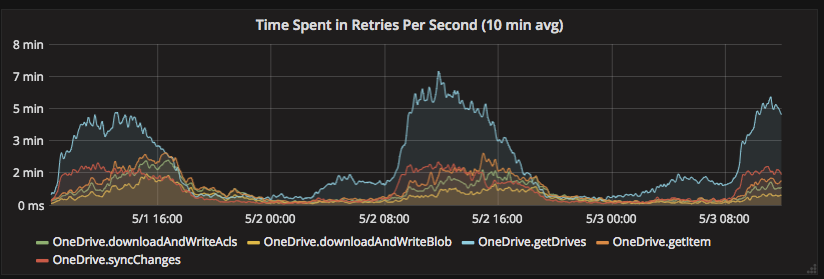
- We have observed much more extreme rate limiting between 9am and 5pm EST [1]. Is this a documented limit?
- What are the different types of rate limiting errors returned by the API. e.g., which type of rate limiting does the 429 with a body of
429 TOO MANY REQUESTSindicate? How should one determine a time to retry after?
[1]
 ANorwell
All 7 comments
Just recently we are seeing a dramatic increase in 429s with our app, as well. The exception coming back is:
{"error":{"code":"activityLimitReached","message":"The request has been throttled","innerError":{"code":"throttledRequest"}
This appears to be limit on the API key, where the throttling is global. A test account that has had no activity will hit this error within one or two requests.
I have many of the same questions that @ANorwell posted above.
Has there been a recent change to the limits imposed at API level? Is there a way to increase those limits?
 amagliul
on 8 May 2018
amagliul
on 8 May 2018
We've struggled with this as well. Here are some some general observations.
1) Throttling is most likely to occur during normal business hours. We've moved our api calls to off peak hours which has improved the situation.
2) The api's generally return a retry-after header when being throttled. It is currently always 2 minutes.
3) Tenants can be "hard locked" which means all of your requests will be throttled. There is no way to deduce programmatically when this occurs.
4) We haven't found a way to deduce programmatically when we are nearing capacity on api calls.
From a developer standpoint, the only real option we have at the moment is to just retry a lot. It isn't ideal.
 rloehr
on 9 May 2018
rloehr
on 9 May 2018
Thanks for your feedback.
UserVoice would be a great place to provide this feedback to ensure that the appropriate team(s) are getting this feedback. For example here's a link that to the SharePoint Developer Platform UserVoice:
https://sharepoint.uservoice.com/forums/329220-sharepoint-dev-platform
Look for existing suggestions and vote for them, or create a new one.
 chackman
on 12 May 2018
chackman
on 12 May 2018
We could vote this suggestion https://sharepoint.uservoice.com/forums/329220-sharepoint-dev-platform/suggestions/34198828-improved-api-feedback-around-throttling
 cristian-vescan
on 14 May 2018
cristian-vescan
on 14 May 2018
Nice - that was my suggestion.
rloehr
on 14 May 2018
Our customers often contact our support service with theese throttling errors, so we decided to add to log some message describing what's going on and denoting that it's not our fault.
To be clear: our software uses up to 10 trials with timeout of 2 minutes (or whatever Retry-After value is), and then writes out the 10th error to the log.
@ificator, do you have any recommendations about such messages? How would OneDrive respond to users in that case?
 AnnieChmarak
on 4 Jul 2018
AnnieChmarak
on 4 Jul 2018
I also wanted to add that we have been working on a document to assist with partners and customers who are writing applications that scan through content in SharePoint Online / OneDrive for Business. That documentation is at https://aka.ms/scanguidance.
chackman
on 10 Dec 2018
Related issues
 Sanjeev143
·
9Comments
Sanjeev143
·
9Comments
 indigane
·
9Comments
indigane
·
9Comments
 atkinchris
·
6Comments
atkinchris
·
6Comments
 geoffrey-mantel
·
6Comments
geoffrey-mantel
·
6Comments
 StewartRyanSony
·
9Comments
StewartRyanSony
·
9Comments
Most helpful comment
We could vote this suggestion https://sharepoint.uservoice.com/forums/329220-sharepoint-dev-platform/suggestions/34198828-improved-api-feedback-around-throttling