Onedrive-api-docs: PATCH on an item to set fileSystemInfo.lastModifiedDateTime takes up more storage quota
When transferring small files, we use the straight upload approach. However, that endpoint does not allow us to set metadata on the item, such as fileSystemInfo.lastModifiedDateTime. Given that we need to update this timestamp, we do a PATCH request to update the item. We then send the timestamps in the body, as the endpoint describes. This works well.
The only problem that we're seeing is that the last request will create a new version of the item with just the modified time changed. However, this new version seems to count on its own towards the storage quota. So basically we have the same content counting twice towards the quota, just because we updated the modified time.
Is this the expected behaviour?
PS: Our current workaround relies on asking the client to disable versioning for the document library before a migration and to re-enable it at the end. But that's definitely not ideal.
 dluces
All 17 comments
That seems strange @dluces. Am I correct in assuming this is OneDrive Business?
 ificator
on 17 Jan 2018
ificator
on 17 Jan 2018
@ificator It does seem strange. We saw it happening in a SharePoint Online document library (we were transferring data from OneDrive for Business to a SharePoint Online doclib). Without the PATH request, the storage quota looked fine. But when we did the PATH requests, we would see the storage used doubled. We were doing a time sensitive migration, so I didn't have much time to confirm if this was a tenant-specific issue or if it happened in our tenant as well. I will try it out in our tenant tomorrow though.
dluces
on 18 Jan 2018
rclone is seeing the same problem in OneDrive for business in this issue https://github.com/ncw/rclone/issues/1716 which has been confirmed by multiple users.
 ncw
on 24 Jan 2018
ncw
on 24 Jan 2018
Thank you @ncw! I've been having trouble finding time to replicate the issue to provide @ificator with request/responses. But you guys seem to have covered it pretty well. This seems to be the exact same behaviour we're seeing.
dluces
on 24 Jan 2018
Thanks guys, I'll see if I can find some time tomorrow to repro and debug on my dev environment.
ificator
on 26 Jan 2018
I've drilled into this and it looks like there's a pretty strong guarantee in SharePoint that ALL changes will generate a version, and ALL versions will impact quota. Ideally we'd provide a multi-part contract for small file uploads in OneDrive Business like we do for OneDrive Consumer, but in lieu of that my only real suggestion is to use the session based uploading for small files as well. It'll cost an extra round trip but will sidestep the issue with the subsequent PATCH triggering a version.
ificator
on 30 Jan 2018
@ificator The same issue exisit if we do session based uploading.
In rclone I created an uploadSession like this:
```2018/01/30 08:50:38 DEBUG : HTTP REQUEST (req 0xc042470400)
2018/01/30 08:50:38 DEBUG : POST /v1.0/drives/b!XXXXXXXXXXXXXXX/root:/rclone.go:/createUploadSession HTTP/1.1
Host: graph.microsoft.com
User-Agent: rclone/v1.39-DEV
Content-Length: 142
Authorization: XXXX
Content-Type: application/json
Accept-Encoding: gzip
{"item":{"fileSystemInfo":{"createdDateTime":"2018-01-16T07:56:14.6111518+01:00","lastModifiedDateTime":"2018-01-16T07:56:14.6111518+01:00"}}}
2018/01/30 08:50:38 DEBUG : >>>>>>>>>>>>>>>>>>>>>>>>>>>>>>>>>>>>>>>>>>>>>>>>>>>>>>>>>>>>
2018/01/30 08:50:39 DEBUG : <<<<<<<<<<<<<<<<<<<<<<<<<<<<<<<<<<<<<<<<<<<<<<<<<<<<<<<<<<<<
2018/01/30 08:50:39 DEBUG : HTTP RESPONSE (req 0xc042470400)
2018/01/30 08:50:39 DEBUG : HTTP/1.1 200 OK
Transfer-Encoding: chunked
Cache-Control: private
Client-Request-Id: f9aeea56-c96d-4a5f-ab89-1cc742a6454f
Content-Type: application/json;odata.metadata=minimal;odata.streaming=true;IEEE754Compatible=false;charset=utf-8
Date: Tue, 30 Jan 2018 07:50:39 GMT
Duration: 910.9421
Location: https://graph.microsoft.com
Odata-Version: 4.0
Request-Id: f9aeea56-c96d-4a5f-ab89-1cc742a6454f
Vary: Accept-Encoding
X-Ms-Ags-Diagnostic: {"ServerInfo":{"DataCenter":"West Europe","Slice":"SliceA","Ring":"5","ScaleUnit":"001","Host":"AGSFE_IN_15","ADSiteName":"AMS"}}
```
but after the upload I still get two versions (sorry for the German locale, couldn't change it to English somehow):
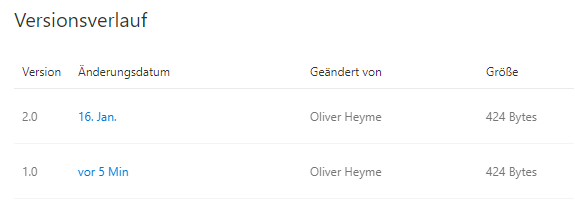
(I also tried setting only the createDate / lastLodDate), same result.
Or are we doing something wrong?
 olihey
on 30 Jan 2018
olihey
on 30 Jan 2018
@ificator Unfortunately, I can confirm that this behaviour happens with chunked uploads as well. So we basically have no way of updating the timestamps on files without it counting twice towards the storage quota (except by disabling versioning before and re-enabling it after the transfer). I wonder how the sync client does it?
dluces
on 30 Jan 2018
@dluces when you see the issue with chunked uploads are you creating or updating? I confirmed no unexpected version for the create scenario, but I did not confirm on the update. If the update is indeed the issue I think that's something we can resolve on our side.
ificator
on 30 Jan 2018
@ificator I see the issue when creating a new file:
Request:
POST /_api/v2.0/sites/{site_id}/drives/{drive_id}/items/01HZ2ARZ4VCGEVBODMEBFIZHK2CVKPD34B:/modification_time_test_large.txt:/createUploadSession?select=id%2Cname%2Csize%2CeTag%2CfileSystemInfo%2Cfile%2Cfolder%2Cpackage%2Csharepointids%2ClastModifiedDateTime%2C%40content.downloadUrl%2CwebUrl HTTP/1.1
Content-Type: application/json
...

{"item": {"@name.conflictBehavior": "replace", "fileSystemInfo": {"lastModifiedDateTime":"2017-05-12T21:08:18+00:00"}}}
Response:
HTTP/1.1 200 OK
Cache-Control: private, max-age=0
Transfer-Encoding: chunked
Content-Type: application/json;odata.metadata=minimal;odata.streaming=true;IEEE754Compatible=false;charset=utf-8
Expires: Mon, 15 Jan 2018 20:02:03 GMT
Last-Modified: Tue, 30 Jan 2018 20:02:03 GMT
P3P: CP="ALL IND DSP COR ADM CONo CUR CUSo IVAo IVDo PSA PSD TAI TELo OUR SAMo CNT COM INT NAV ONL PHY PRE PUR UNI"
X-SharePointHealthScore: 0
X-SP-SERVERSTATE: ReadOnly=0
ODATA-VERSION: 4.0
SPClientServiceRequestDuration: 643
SPRequestDuration: 687
X-AspNet-Version: 4.0.30319
SPRequestGuid: 65ad459e-907c-5000-f7d7-7f922ca4bb94
request-id: 65ad459e-907c-5000-f7d7-7f922ca4bb94
MS-CV: nkWtZXyQAFD313+SLKS7lA.0
Strict-Transport-Security: max-age=31536000
X-FRAME-OPTIONS: SAMEORIGIN
X-Powered-By: ASP.NET
MicrosoftSharePointTeamServices: 16.0.0.7324
X-Content-Type-Options: nosniff
X-MS-InvokeApp: 1; RequireReadOnly
X-MSEdge-Ref: Ref A: 66696BB98B92459CB606D9CD057D031D Ref B: CO1EDGE0312 Ref C: 2018-01-30T20:02:04Z
Date: Tue, 30 Jan 2018 20:02:03 GMT
Then the file was uploaded in two chunks and this is the file version history:
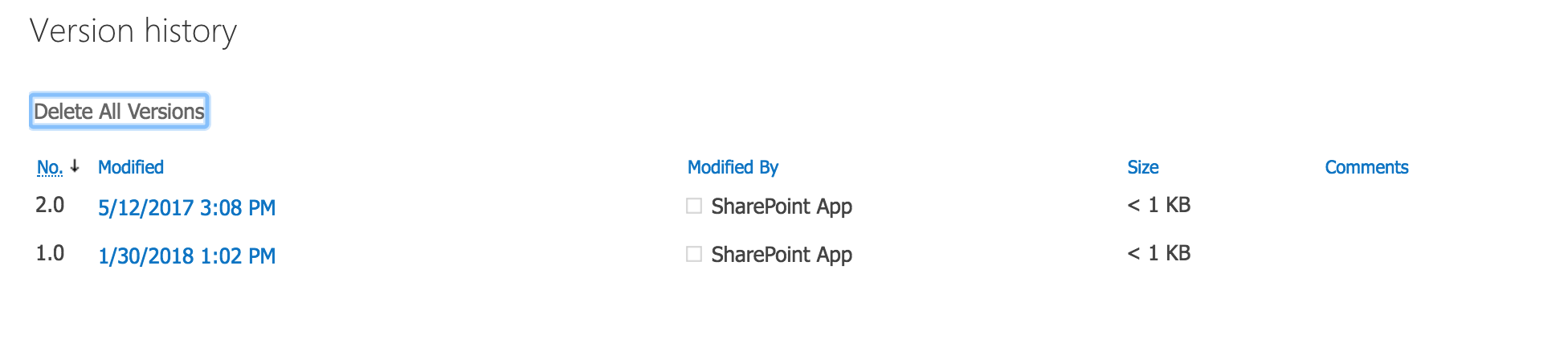
I haven't tested when replacing a file, but the request would look the same way (I include "@name.conflictBehavior": "replace" by default)
dluces
on 30 Jan 2018
Strange, I'll need to circle back and see if there was something I did wrong with my repro.
ificator
on 30 Jan 2018
My repro was indeed flawed - I had some changes in the code that were impacting the results. I see no reason we cannot suppress versioning on the timestamp update that's part of session commit, so I'll mark this as a bug.
ificator
on 31 Jan 2018
Session commit should no longer result in two version snaps when timestamps were provided in fileSystemInfo. Can you guys confirm that you're seeing the behavior you expect now?
ificator
on 22 Feb 2018
@ificator Thanks! I can confirm that I'm only seeing one version now with the timestamp updated:
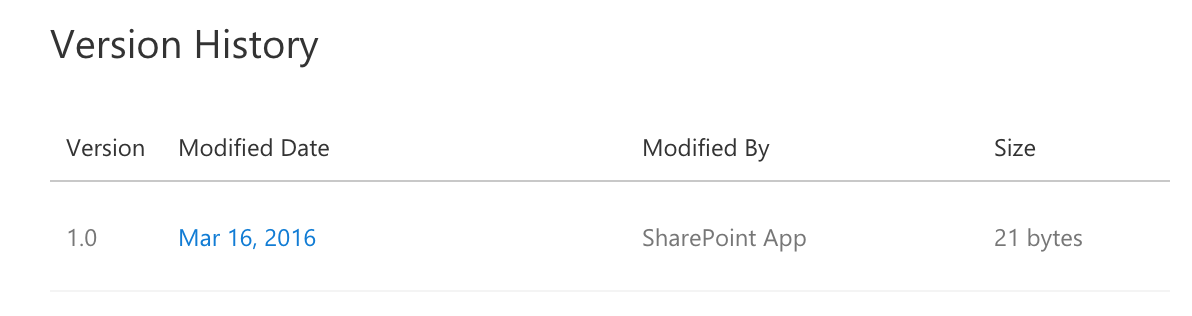
Just to confirm, this won't be fixed for the case of the PATCH request that doesn't modify the contents but just the timestamps, right?
dluces
on 25 Feb 2018
@dluces that's correct - unfortunately SharePoint versions a file when there's any change, not just content.
ificator
on 26 Feb 2018
@ificator Thank you. Also, just for clarification for someone reading this issue, it applies to both ODB/SPO and OneDrive Personal. Both services create an additional version if there's any change in the item even if it's only in metadata and not content, and each version will count towards storage quota. Now, using chunked uploads does let us set metadata and content in one operation that does not trigger creation of another version.
dluces
on 26 Feb 2018
@ificator
I know this issue is closed, however can you help provide some advice here.
Trying to submit / upload a new item via createUploadSession:
POST /v1.0/drives/<redacted>/items/01D6JQORV6Y2GOVW7725BZO354PWSELRRZ:/Cygwin.zip:/createUploadSession
I add the following as the 'Request Body' as per https://docs.microsoft.com/en-us/onedrive/developer/rest-api/api/driveitem_createuploadsession
{"item":{"@microsoft.graph.conflictBehavior":"rename","fileSystemInfo":{"lastModifiedDateTime":"2018-06-03T02:34:50Z"}}}
However OneDrive returns the following:
HTTP request returned status code 400 (Bad Request)
{
    "error": {
        "code": "invalidRequest",
        "innerError": {
            "date": "2018-06-03T08:00:29",
            "request-id": "cced3836-3874-4b69-bdd9-612ddd4cd70f"
        },
        "message": "The request is malformed or incorrect."
    }
}
Can you help suggest how the 'Request Body' should be formatted to overcome the original issue of 2 file versions being created when simply updating the lastModifiedDateTime
 abraunegg
on 3 Jun 2018
abraunegg
on 3 Jun 2018
Related issues
 kverhoef
·
3Comments
kverhoef
·
3Comments
 brownbl1
·
10Comments
brownbl1
·
10Comments
 audiorecorder
·
5Comments
dluces
·
3Comments
audiorecorder
·
5Comments
dluces
·
3Comments
 marcreicher
·
3Comments
marcreicher
·
3Comments
Most helpful comment
My repro was indeed flawed - I had some changes in the code that were impacting the results. I see no reason we cannot suppress versioning on the timestamp update that's part of session commit, so I'll mark this as a bug.