Omnisharp-vscode: Changing marketplace publisher from ms-vscode to ms-dotnettools causes extension recommendations to repeat ad nauseum
Steps to reproduce
- Have an old version of the extension installed that uses
ms-vscode.csharpas the extension ID. - Be upgraded to
ms-dotnettools.csharp. - Have a project that uses extension recommendations, set up to install the extension under the new
ms-dotnettools.csharp
Expected behavior
Everything keeps working normally.
Actual behavior
Constantly keep being pestered with the need to install a not-yet-installed recommended extension, even though the extension is already installed.
 rjgotten
All 31 comments
NOTE
Issue can be worked around by
- going into the VSCode extensions folder (
%USERPROFILE%/.vscode/extensions/on Windows) - opening the
ms-dotnettools.csharpextension folder holding the locally installed extension. - opening the
package.jsonfile. - editing the
publisherfield to thems-dotnettoolsvalue.
Moral of the story;
Probably don't just change the publisher on the marketplace without also correctly updating the package manifest?
rjgotten
on 5 Mar 2020
Your workaround does not work for me, @rjgotten, but my situation may be slightly different (perhaps we have different situations or encountered different repo states)
Steps To Reproduce:
- Open an existing workspace for which the "csharp" extension is "recommended", that was created before the release of the latest extension version 1.21.13 (I have Azure Functions app workspaces that were built prior to March 5, 2020)
- Let VS Code update the csharp extension to the latest available version (automatic in my case, but could be manual for other users)
Expected behavior:
Everything keeps working normally.
Actual behavior:
VS Code still recommends the extension referencing the old publisher attribute and shows the following warning notification after the latest extension has been upgraded to v1.21.13:
The below 1 extension(s) in workspace recommendations have issues:
ms-vscode.csharp (not found in marketplace)
_* NOTE: In this case, Investigating %USERPROFILE%/.vscode/extensions/ms-dotnettools.csharp-1.21.13/package.json reveals that it already has the new publisher attribute ("publisher": "ms-dotnettools")_
Workaround:
Because the existing workspace references the old publisher attribute value ("ms-vscode.csharp"), the only workaround I know of is to edit every such workspace in the following way:
- Edit each workspace's extensions file: .vs-codeextensions.json
- Change the recommendation line from "ms-vscode.csharp" to "ms-dotnettools.csharp"
- Load/Reload the given workspace(s)
- Result: No more publisher mismatch for the recommended plugin, so no warning notification.
This really should not happen with such a broadly used and recommended extension :(
Hope this helps some folks
 widgetcollector
on 5 Mar 2020
widgetcollector
on 5 Mar 2020
@rjgotten Sorry about that. There was a gap time between the publisher switch and we when we were able to publish a new build with the updated publisher id. We published a new release this morning so things should be back in a good state. Note you will likely see a suggestion to try the C# extension but that should go away with the next insiders release 3/6 and the next stable release 3/9.
The main takeaway is that it can be hard to coordinate a publisher change, new release of the C# extension, and new release of VS Code.
 JoeRobich
on 5 Mar 2020
JoeRobich
on 5 Mar 2020
@rjgotten Totally understand and appreciate the reply, hopefully others can avoid the nagging message using my quick workaround or perhaps somebody has another suggestion for the interim end-user workaround.
From the extension upgrade side of things, is there not a means (formal SOP or similar) to update the publisher attribute at the repo/asset level without such issues resulting? I'm thinking super simply here, but some manifest attribute or mapping that can list historical publisher values. I'm not sure how the extensions mechanisms work internally, but it would be nice if you could change things like the publisher or extension name while still keeping mappings to the historical values such that VS Code or other clients could easily detect and handle such changes? (e.g. VS Code would recognize that a workspace is simply using an old reference and not render such warnings, or have a mechanism that updates or maps recommendations automatically)
UPDATE:
I just found the following which shed light on this for me:
https://github.com/microsoft/vscode/issues/76211
widgetcollector
on 5 Mar 2020
@widgetcollector I believe on the backend, requests for the package under the old publisher will get forwarded correctly. The issue is that the suggestion engine is just doing a string comparison and not aware of the package forwarding.
JoeRobich
on 5 Mar 2020
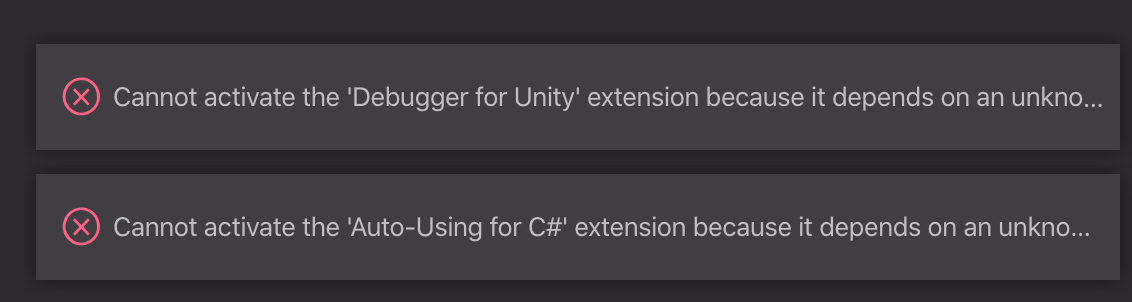
Unfortunately, it also seems to prevent other extensions from loading:

 videopilot
on 5 Mar 2020
videopilot
on 5 Mar 2020
@widgetcollector
my situation may be slightly different (perhaps we have different situations or encountered different repo states)
Yes; you seem to have had the dual of my problem; a recommendation setting for the old publisher ID and an installation that according to:
_NOTE: In this case, Investigating %USERPROFILE%/.vscode/extensions/ms-dotnettools.csharp-1.21.13/package.json reveals that it already has the new publisher attribute ("publisher": "ms-dotnettools")_
--- came with the new publisher ID. I guess that means you must've installed the new version with the fixed publisher ID that @JoeRobich referred to, while I was still served the old one.
Good to hear that everything is syncing back up and the problem will fix itself.
@videopilot
Unfortunately, it also seems to prevent other extensions from loading:
_That_ though... Ouch. That sounds significantly more nasty than a bit of notification-nag. Probably better to roll back to the old version and disable auto-updates until the other extensions can catch up. Or maybe a compatibility package published under the old publisher ID can be issued in the mean time, to serve as a pass-through/proxy or something?
rjgotten
on 5 Mar 2020
@videopilot you could try https://github.com/Unity-Technologies/vscode-unity-debug/pull/152 for a fix for unity and track https://github.com/Unity-Technologies/vscode-unity-debug/issues/153 for a related issue. I've made the change locally. I had rolled back to https://github.com/OmniSharp/omnisharp-vscode/releases/tag/v1.21.12 for a bit this morning which also worked.
 petergiuntoli
on 5 Mar 2020
petergiuntoli
on 5 Mar 2020
Rolling back to 1.21.12 via uninstall and command line code --install-extension csharp-1.21.12.vsix worked for me... intellisense back up and running
 zachstronaut
on 5 Mar 2020
zachstronaut
on 5 Mar 2020
I've had to stop work and waste hours searching for a solution and finally happened on this thread. Not good as I'm self-employed. I don't know where to start with "rolling back" things. Surely there was a more graceful way to have handled this change? Was it absolutely necessary to change publisher id?? Millions of devs use VSCode.
 SporeProductions
on 5 Mar 2020
SporeProductions
on 5 Mar 2020
I've had to stop work and waste hours searching for a solution and finally happened on this thread. Not good as I'm self-employed. I don't know where to start with "rolling back" things. Surely there was a more graceful way to have handled this change? Was it absolutely necessary to change publisher id?? Millions of devs use VSCode.
Same here. Instructions:
uninstall c# extension (and disable any other extensions that are throwing errors because of c# not being "found").
Download csharp-1.21.12.vsix from here: https://github.com/OmniSharp/omnisharp-vscode/releases/tag/v1.21.12
Restart VS Code
Open the Command Palette in VS Code. Search for "shell command install" and run that
Open a command line terminal and go to the folder you downloaded the vsix file to
Run: code --install-extension csharp-1.21.12.vsix
Restart VS Code
Open Preferences -> Settings in VS Code. Search for "update" and uncheck Extensions: Auto Update
Microsoft products are uniquely affected by Mercury Retrogrades.
zachstronaut
on 5 Mar 2020
@JoeRobich
Note you will likely see a suggestion to try the C# extension but that should go away with the next insiders release 3/6 and the next stable release 3/9
I take it you're refering to the built-in notifications in VS Code to use a pre-determined extension to handle files of a known type?
rjgotten
on 6 Mar 2020
Thank you @zachstronaut. Sorry, you lost so much time researching the issue and thank you for saving me time with your solution. It worked perfectly.
 cha0tic75
on 7 Mar 2020
cha0tic75
on 7 Mar 2020
Thank you @zachstronaut this thing's been driving me crazy. I finally found this and that worked perfectly
 warethis-dev
on 8 Mar 2020
warethis-dev
on 8 Mar 2020
Having the same problem with Ubuntu 19.10
 enriquemorenotent
on 8 Mar 2020
enriquemorenotent
on 8 Mar 2020
Same problem /w Ubuntu 18.04
 pantapita
on 8 Mar 2020
pantapita
on 8 Mar 2020
Same problem with macOS Mojave
 zephyo
on 8 Mar 2020
zephyo
on 8 Mar 2020
Rolling back to 1.21.12 via uninstall and command line code --install-extension csharp-1.21.12.vsix worked for me
Eventually did the same as well, because next to these issues the new .13 release has major performance problems too - hanging for minutes on end and clogging up all manner of other functionality in VS Code, all the way to git commit/pull/push/etc actions.
It's just completely broken and imho should be pulled.
rjgotten
on 9 Mar 2020
Same problem /w Windows 10. Rolling to csharp-1.21.12 back fixed it.
 lm-ffx
on 9 Mar 2020
lm-ffx
on 9 Mar 2020
- Open the Command Palette in VS Code. Search for "shell command install" and run that
Thanks @zachstronaut , this worked for me as well. I didn't have to do step 4, though (as I couldn't find that specific item in the command palette).
 leehans
on 9 Mar 2020
leehans
on 9 Mar 2020
Thanks @zachstronaut , and I also didn't do step 4, instead I downloaded the vsix package, and seached for "Install from VSIX" to run that.
 panzerstadt-dev
on 9 Mar 2020
panzerstadt-dev
on 9 Mar 2020
I've got an update. I've verified that the latest stable and insiders releases, which are available now, no longer suggest installing the C# extension from the old publisher. However, extensions with dependencies on the C# extension still need to be republished specifying the new publisher.
JoeRobich
on 10 Mar 2020
@JoeRobich Confirmed. v1.43.0 fixed the popup
enriquemorenotent
on 10 Mar 2020
Closing as the issue with the popup is resolved. #3620 is tracking the overall rename issue.
 cartermp
on 10 Mar 2020
cartermp
on 10 Mar 2020
Haha, whoops, I'm stupid. Re-opening.
cartermp
on 10 Mar 2020
Update regarding unity: https://github.com/Unity-Technologies/vscode-unity-debug/pull/152
Pull request is merged, so once the unity debugger extension is updated, this shouldn't be an issue for folks using it. A lot of reports here came from that. Many other extensions have had PRs sent to them, but it will take time for them to incorporate those changes and publish updates. Since the name change is final (and changing it again would break things again), I think we'll just have to close this out as by design. Sorry for the horrible inconvenience here. We'll strive to do better and ensure something like this doesn't happen again.
cartermp
on 10 Mar 2020
Still having the issue with v1.23.2 and VS Code Insider 1.50.0-insider
 abouroubi
on 21 Sep 2020
abouroubi
on 21 Sep 2020
@abouroubi Sorry you are seeing this issue. What is the message that you are seeing in VS Code?
JoeRobich
on 21 Sep 2020
@JoeRobich VSCode send a notification each time I open a C# project.
The 1 extension(s) below, in workspace recommendations have issues: ms-vscode.csharp (not found in marketplace)
abouroubi
on 21 Sep 2020
@abouroubi Workspace recommendations are stored locally in your workspace and must be manually updated (https://code.visualstudio.com/docs/editor/extension-gallery#_workspace-recommended-extensions). You should be able to change ms-vscode.csharp to ms-dotnettools.csharp to get rid of this message.
JoeRobich
on 21 Sep 2020
@JoeRobich Thank you, it helped me solve it.
So if someone has the same issue, for me it was a project created with Azure Function Extension, wich had an outdated extension name.
abouroubi
on 22 Sep 2020
Related issues
 visten
·
4Comments
visten
·
4Comments
 ZeldaZocker
·
3Comments
ZeldaZocker
·
3Comments
 gregg-miskelly
·
3Comments
gregg-miskelly
·
3Comments
 olfek
·
3Comments
olfek
·
3Comments
 hamhub7
·
3Comments
hamhub7
·
3Comments
Most helpful comment
Same here. Instructions:
uninstall c# extension (and disable any other extensions that are throwing errors because of c# not being "found").
Download csharp-1.21.12.vsix from here: https://github.com/OmniSharp/omnisharp-vscode/releases/tag/v1.21.12
Restart VS Code
Open the Command Palette in VS Code. Search for "shell command install" and run that
Open a command line terminal and go to the folder you downloaded the vsix file to
Run: code --install-extension csharp-1.21.12.vsix
Restart VS Code
Open Preferences -> Settings in VS Code. Search for "update" and uncheck Extensions: Auto Update
Microsoft products are uniquely affected by Mercury Retrogrades.