Omnisharp-vscode: 'System' not found after update to dotnet core 3.0
Issue Description
Steps to Reproduce
- Updated to dotnet core 3.0 following instructions here
- Created new project with dotnet new console
- Run dotnet build (0 errors and 0 warnings)
- Opened Program.cs
Expected Behavior
- No red swiggly lines, with error messages about everything
Actual Behavior
- Everything of significant's is underlined with errors on hover about System or a sub namespace being missing.
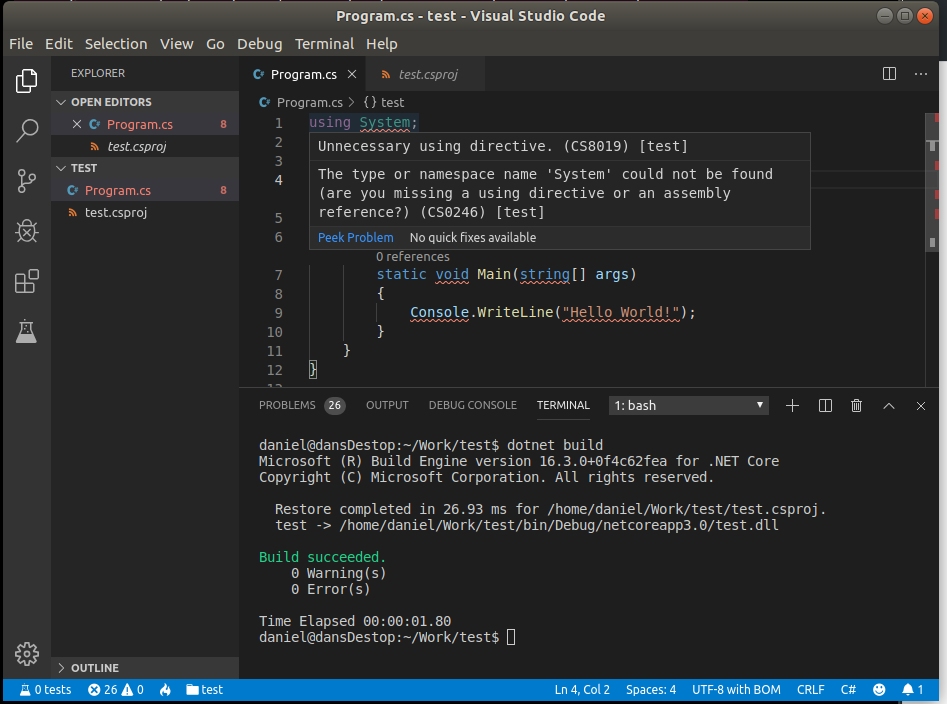
Logs
OmniSharp log
Starting OmniSharp server at 24/09/2019, 11:08:29 PM
Target: /home/daniel/Work/test
OmniSharp server started.
Path: /home/daniel/.vscode/extensions/ms-vscode.csharp-1.21.3/.omnisharp/1.34.3/run
PID: 6357
    Starting OmniSharp on ubuntu 18.4 (x64)
    DotNetPath set to dotnet
    Located 1 MSBuild instance(s)
        1: StandAlone 16.0 - "/home/daniel/.vscode/extensions/ms-vscode.csharp-1.21.3/.omnisharp/1.34.3/omnisharp/.msbuild/Current/Bin"
    MSBUILD_EXE_PATH environment variable set to '/home/daniel/.vscode/extensions/ms-vscode.csharp-1.21.3/.omnisharp/1.34.3/omnisharp/.msbuild/Current/Bin/MSBuild.dll'
    Registered MSBuild instance: StandAlone 16.0 - "/home/daniel/.vscode/extensions/ms-vscode.csharp-1.21.3/.omnisharp/1.34.3/omnisharp/.msbuild/Current/Bin"
        MSBuildExtensionsPath = /home/daniel/.vscode/extensions/ms-vscode.csharp-1.21.3/.omnisharp/1.34.3/omnisharp/.msbuild
        BypassFrameworkInstallChecks = true
        CscToolPath = /home/daniel/.vscode/extensions/ms-vscode.csharp-1.21.3/.omnisharp/1.34.3/omnisharp/.msbuild/Current/Bin/Roslyn
        CscToolExe = csc.exe
        MSBuildToolsPath = /home/daniel/.vscode/extensions/ms-vscode.csharp-1.21.3/.omnisharp/1.34.3/omnisharp/.msbuild/Current/Bin
        TargetFrameworkRootPath = /usr/lib/mono/xbuild-frameworks
    Detecting Cake files in '/home/daniel/Work/test'.
    Could not find any Cake files
    No solution files found in '/home/daniel/Work/test'
    Queue project update for '/home/daniel/Work/test/test.csproj'
    Detecting CSX files in '/home/daniel/Work/test'.
    Could not find any CSX files
    Invoking Workspace Options Provider: OmniSharp.Roslyn.CSharp.Services.CSharpFormattingWorkspaceOptionsProvider, Order: 0
    Loading project: /home/daniel/Work/test/test.csproj
    Invoking Workspace Options Provider: OmniSharp.Roslyn.CSharp.Services.RenameWorkspaceOptionsProvider, Order: 100
    Invoking Workspace Options Provider: OmniSharp.Roslyn.CSharp.Services.EditorConfigWorkspaceOptionsProvider, Order: 200
    Configuration finished.
    Omnisharp server running using Stdio at location '/home/daniel/Work/test' on host 6235.
    Successfully loaded project file '/home/daniel/Work/test/test.csproj'.
    Adding project '/home/daniel/Work/test/test.csproj'
    Update project: test
    test: Did not find 'Microsoft.NETCore.App' in lock file.
C# log
NA
Environment information
VSCode version: 1.38.1
C# Extension: 1.21.3
Mono Information
OmniSharp using built-in mono
Dotnet Information
.NET Core SDK (reflecting any global.json):
Version: 3.0.100
Commit: 04339c3a26
Runtime Environment:
OS Name: ubuntu
OS Version: 18.04
OS Platform: Linux
RID: ubuntu.18.04-x64
Base Path: /usr/share/dotnet/sdk/3.0.100/
Host (useful for support):
Version: 3.0.0
Commit: 95a0a61858
.NET Core SDKs installed:
2.1.802 [/usr/share/dotnet/sdk]
2.2.402 [/usr/share/dotnet/sdk]
3.0.100 [/usr/share/dotnet/sdk]
.NET Core runtimes installed:
Microsoft.AspNetCore.All 2.1.13 [/usr/share/dotnet/shared/Microsoft.AspNetCore.All]
Microsoft.AspNetCore.All 2.2.7 [/usr/share/dotnet/shared/Microsoft.AspNetCore.All]
Microsoft.AspNetCore.App 2.1.13 [/usr/share/dotnet/shared/Microsoft.AspNetCore.App]
Microsoft.AspNetCore.App 2.2.7 [/usr/share/dotnet/shared/Microsoft.AspNetCore.App]
Microsoft.AspNetCore.App 3.0.0 [/usr/share/dotnet/shared/Microsoft.AspNetCore.App]
Microsoft.NETCore.App 2.1.13 [/usr/share/dotnet/shared/Microsoft.NETCore.App]
Microsoft.NETCore.App 2.2.7 [/usr/share/dotnet/shared/Microsoft.NETCore.App]
Microsoft.NETCore.App 3.0.0 [/usr/share/dotnet/shared/Microsoft.NETCore.App]
To install additional .NET Core runtimes or SDKs:
https://aka.ms/dotnet-download
Visual Studio Code Extensions
|Extension|Author|Version|
|---|---|---|
|csharp|ms-vscode|1.21.3|
|docomment|k--kato|0.1.8|
|dotnet-test-explorer|formulahendry|0.7.1|
|ShowTestResults|EffectiveLabs|0.4.0|;
 trampster
All 79 comments
I toggled the TargetFramework in client.csproj from netcoreapp3.0 => netcoreapp2.1 => netcoreapp3.0. I did restores, build, run for each transition.
I had clean install and didn't have netcore sdk 2.1 installed initially. Prior to this Omnisharp was failing, but failed to capture the log.
After netcore 2.1 install, that Omnisharp failed resolved, then I hit this issue.
Dotnet Information
.NET Core SDK (reflecting any global.json):
Version: 3.0.100
Commit: 04339c3a26
Runtime Environment:
OS Name: ubuntu
OS Version: 18.04
OS Platform: Linux
RID: ubuntu.18.04-x64
Base Path: /usr/share/dotnet/sdk/3.0.100/
Host (useful for support):
Version: 3.0.0
Commit: 95a0a61858
.NET Core SDKs installed:
2.1.802 [/usr/share/dotnet/sdk]
3.0.100 [/usr/share/dotnet/sdk]
.NET Core runtimes installed:
Microsoft.AspNetCore.All 2.1.13 [/usr/share/dotnet/shared/Microsoft.AspNetCore.All]
Microsoft.AspNetCore.App 2.1.13 [/usr/share/dotnet/shared/Microsoft.AspNetCore.App]
Microsoft.AspNetCore.App 3.0.0 [/usr/share/dotnet/shared/Microsoft.AspNetCore.App]
Microsoft.NETCore.App 2.1.13 [/usr/share/dotnet/shared/Microsoft.NETCore.App]
Microsoft.NETCore.App 3.0.0 [/usr/share/dotnet/shared/Microsoft.NETCore.App]
To install additional .NET Core runtimes or SDKs:
https://aka.ms/dotnet-download
 erangeljr
on 24 Sep 2019
erangeljr
on 24 Sep 2019
I have the same problem, and it worked just fine with the previews and intermediate VS release.
 ngollan
on 24 Sep 2019
ngollan
on 24 Sep 2019
Same here
 henriqueprj
on 24 Sep 2019
henriqueprj
on 24 Sep 2019
Going back to rc1 makes IDE features work again.
ngollan
on 24 Sep 2019
This is the same problem as described in https://github.com/OmniSharp/omnisharp-vscode/issues/3289
As a workaround, you can:
- Linux/MacOS https://github.com/OmniSharp/omnisharp-vscode/issues/3289#issuecomment-534396993 (install Mono 6.0.0 or newer)
- Windows https://github.com/OmniSharp/omnisharp-vscode/issues/3289#issuecomment-534419211 (install VS 2019) or https://github.com/OmniSharp/omnisharp-vscode/issues/3289#issuecomment-534488147 (instal MsBuild Tools 2019)
edit:
For Windows there is also a new OmniSharp build with a fix.
To try it, add the following to your VS Code settings and restart VS Code:
"omnisharp.path": "1.34.4-beta.7"
This will download the latest prerelease OmniSharp to your VS Code and hopefully help. Thanks.
 filipw
on 24 Sep 2019
filipw
on 24 Sep 2019
Same issue, I know that it can be fixed by installing visual studio 2019, but if you don't want install full VS2019, you can just install standalone build tools from VS2019, for me it resolved issue https://visualstudio.microsoft.com/downloads/?q=build+tools
 steel97
on 24 Sep 2019
steel97
on 24 Sep 2019
@filipw can you give us an ETA for the fix?
I'm also getting red squiggly lines everywhere.

 BrightSoul
on 24 Sep 2019
BrightSoul
on 24 Sep 2019
Same here on Mac. This was working just fine prior to installing .net core 3
 ignaciofuentes
on 24 Sep 2019
ignaciofuentes
on 24 Sep 2019
As a workaround, you can:
* Linux/MacOS [#3289 (comment)](https://github.com/OmniSharp/omnisharp-vscode/issues/3289#issuecomment-534396993)
ACK! Upgrading to Mono 6.4 solves problem under Linux!
(Under Mono 6.0 problem occurs as I have had this version before)
 patrolez
on 24 Sep 2019
patrolez
on 24 Sep 2019
I can confirm that upgrading Mono (I happen to be running 6.6 Preview) resolves this issue on my MacOS Mojave Macbook Pro.
 apshoemaker
on 24 Sep 2019
apshoemaker
on 24 Sep 2019
if you have this problem and haven't used any of the workarounds mentioned here https://github.com/OmniSharp/omnisharp-vscode/issues/3290#issuecomment-534537270 we currently have a new OmniSharp build to test out, which hopefully fixes the issue. I only tested on Windows, but it seems to have fixed it there.
To try it, add the following to your VS Code settings and restart VS Code:
"omnisharp.path": "1.34.4-beta.7"
This will download the latest prerelease OmniSharp to your VS Code and hopefully help. Thanks.
filipw
on 24 Sep 2019
Just tested "omnisharp.path": "1.34.4-beta.7" on Mac ... it doesn't seem to fix the issue here.
But thanks !
 cziedins
on 24 Sep 2019
cziedins
on 24 Sep 2019
I also just tried it and can confirm it did not work for me on Debian 10 with the default web template of netcore 3:
Starting OmniSharp server at 9/24/2019, 1:30:42 PM
    Target: /home/chad/dev/aspnet3

OmniSharp server started.
    Path: /home/chad/.vscode/extensions/ms-vscode.csharp-1.21.3/.omnisharp/1.34.4-beta.7/run
    PID: 10492

[info]: OmniSharp.Stdio.Host
        Starting OmniSharp on debian 10.0 (x64)
[info]: OmniSharp.Services.DotNetCliService
        DotNetPath set to dotnet
[info]: OmniSharp.MSBuild.Discovery.MSBuildLocator
        Located 1 MSBuild instance(s)
            1: StandAlone 16.0 - "/home/chad/.vscode/extensions/ms-vscode.csharp-1.21.3/.omnisharp/1.34.4-beta.7/omnisharp/.msbuild/Current/Bin"
[info]: OmniSharp.MSBuild.Discovery.MSBuildLocator
        MSBUILD_EXE_PATH environment variable set to '/home/chad/.vscode/extensions/ms-vscode.csharp-1.21.3/.omnisharp/1.34.4-beta.7/omnisharp/.msbuild/Current/Bin/MSBuild.dll'
[info]: OmniSharp.MSBuild.Discovery.MSBuildLocator
        Registered MSBuild instance: StandAlone 16.0 - "/home/chad/.vscode/extensions/ms-vscode.csharp-1.21.3/.omnisharp/1.34.4-beta.7/omnisharp/.msbuild/Current/Bin"
            MSBuildExtensionsPath = /home/chad/.vscode/extensions/ms-vscode.csharp-1.21.3/.omnisharp/1.34.4-beta.7/omnisharp/.msbuild
            BypassFrameworkInstallChecks = true
            CscToolPath = /home/chad/.vscode/extensions/ms-vscode.csharp-1.21.3/.omnisharp/1.34.4-beta.7/omnisharp/.msbuild/Current/Bin/Roslyn
            CscToolExe = csc.exe
            MSBuildToolsPath = /home/chad/.vscode/extensions/ms-vscode.csharp-1.21.3/.omnisharp/1.34.4-beta.7/omnisharp/.msbuild/Current/Bin
[info]: OmniSharp.Cake.CakeProjectSystem
        Detecting Cake files in '/home/chad/dev/aspnet3'.
[info]: OmniSharp.Cake.CakeProjectSystem
        Could not find any Cake files
[info]: OmniSharp.MSBuild.ProjectSystem
        No solution files found in '/home/chad/dev/aspnet3'
[info]: OmniSharp.MSBuild.ProjectManager
        Queue project update for '/home/chad/dev/aspnet3/aspnet3.csproj'
[info]: OmniSharp.Script.ScriptProjectSystem
        Detecting CSX files in '/home/chad/dev/aspnet3'.
[info]: OmniSharp.Script.ScriptProjectSystem
        Could not find any CSX files
[info]: OmniSharp.WorkspaceInitializer
        Invoking Workspace Options Provider: OmniSharp.Roslyn.CSharp.Services.CSharpFormattingWorkspaceOptionsProvider, Order: 0
[info]: OmniSharp.WorkspaceInitializer
        Invoking Workspace Options Provider: OmniSharp.Roslyn.CSharp.Services.RenameWorkspaceOptionsProvider, Order: 100
[info]: OmniSharp.WorkspaceInitializer
        Invoking Workspace Options Provider: OmniSharp.Roslyn.CSharp.Services.EditorConfigWorkspaceOptionsProvider, Order: 200
[info]: OmniSharp.WorkspaceInitializer
        Configuration finished.
[info]: OmniSharp.Stdio.Host
        Omnisharp server running using Stdio at location '/home/chad/dev/aspnet3' on host 10306.
[info]: OmniSharp.MSBuild.ProjectManager
        Loading project: /home/chad/dev/aspnet3/aspnet3.csproj
[info]: OmniSharp.MSBuild.ProjectManager
        Successfully loaded project file '/home/chad/dev/aspnet3/aspnet3.csproj'.
[info]: OmniSharp.MSBuild.ProjectManager
        Adding project '/home/chad/dev/aspnet3/aspnet3.csproj'
[info]: OmniSharp.MSBuild.ProjectManager
        Update project: aspnet3
[warn]: OmniSharp.MSBuild.PackageDependencyChecker
        aspnet3: Did not find 'Microsoft.NETCore.App' in lock file.
This is the csproj generated by dotnet new web:
<Project Sdk="Microsoft.NET.Sdk.Web">

  <PropertyGroup>
    <TargetFramework>netcoreapp3.0</TargetFramework>
  </PropertyGroup>

</Project>
 chadly
on 24 Sep 2019
chadly
on 24 Sep 2019
ugh thanks. On *nix things are a bit complicated because we are shipping an embedded mono runtime, which is based on 5.18.1, looks like we may need to move to 6.0.0.
What is interesting is that when you have Mono installed, even if you don't use it in VS Code to run OmniSharp but still you run in Standalone mode (so no global Mono enabled in VS Code), because of how we pick up MSBuildExtensionsPath and TargetFrameworkRootPath from global Mono "behind the scenes", things work fine.
[info]: OmniSharp.MSBuild.Discovery.MSBuildLocator
        Located 1 MSBuild instance(s)
            1: StandAlone 16.0 - "/Users/filip/.vscode/extensions/ms-vscode.csharp-1.21.3/.omnisharp/1.34.3/omnisharp/.msbuild/Current/Bin"
[info]: OmniSharp.MSBuild.Discovery.MSBuildLocator
        MSBUILD_EXE_PATH environment variable set to '/Users/filip/.vscode/extensions/ms-vscode.csharp-1.21.3/.omnisharp/1.34.3/omnisharp/.msbuild/Current/Bin/MSBuild.dll'
[info]: OmniSharp.MSBuild.Discovery.MSBuildLocator
        Registered MSBuild instance: StandAlone 16.0 - "/Users/filip/.vscode/extensions/ms-vscode.csharp-1.21.3/.omnisharp/1.34.3/omnisharp/.msbuild/Current/Bin"
            MSBuildExtensionsPath = /Library/Frameworks/Mono.framework/Versions/6.0.0/lib/mono/xbuild
            BypassFrameworkInstallChecks = true
            CscToolPath = /Users/filip/.vscode/extensions/ms-vscode.csharp-1.21.3/.omnisharp/1.34.3/omnisharp/.msbuild/Current/Bin/Roslyn
            CscToolExe = csc.exe
            MSBuildToolsPath = /Users/filip/.vscode/extensions/ms-vscode.csharp-1.21.3/.omnisharp/1.34.3/omnisharp/.msbuild/Current/Bin
            TargetFrameworkRootPath = /Library/Frameworks/Mono.framework/Versions/6.0.0/lib/mono/xbuild-frameworks
This might be old news but I upgraded mono to the nightly build and everything started working. FYI, I'm getting "Not Found" page from the when trying to download the stable builds on mac mono-project.
 waystilos
on 24 Sep 2019
waystilos
on 24 Sep 2019
@DustinCampbell would be able to give us some time to help solidify the process for building the embedded mono runtime, including things like getting it so that we can ship it to the Azure Storage account?
 david-driscoll
on 24 Sep 2019
david-driscoll
on 24 Sep 2019
I recently had this issue when I had the 3.0 sdk and the 2.2.102 sdks installed. After uninstalling the 2.2.102 sdk, the issue went away. Perhaps this will help others.
 RandomGHUser
on 24 Sep 2019
RandomGHUser
on 24 Sep 2019
Using the beta of OmniSharp
"omnisharp.path": "1.34.4-beta.7"mentioned here fixed this for me on Win10!
 swainr
on 25 Sep 2019
swainr
on 25 Sep 2019
I got it fixed on my Fedora 30 by removing all the other SDKs and only having .Net Core 3 installed.
 mdx0111
on 25 Sep 2019
mdx0111
on 25 Sep 2019
Removing the other SDKS (2.1 and 2.2 in my case) got it working for me (Ubuntu 18.04)
I'm not sure if this affected the prereleases because microsoft have chosen not to provide prerelease packages for linux and thus do not get the benefit of my testing.
trampster
on 25 Sep 2019
I installed Mono 6.4.0 from here https://www.mono-project.com/download/stable/
And problem (Did not find 'Microsoft.NETCore.App' in lock file.) disappeared on my MacOs with multiple SDKs.
 squalsoft
on 25 Sep 2019
squalsoft
on 25 Sep 2019
Same issue here, using netcoreapp3.0 in TargetFramework gives errors all over.
 Peterkmoss
on 25 Sep 2019
Peterkmoss
on 25 Sep 2019
Like @squalsoft I installed Mono 6.4.0 from https://www.mono-project.com/download/stable/
(Visual Studio channel) and the problem disappeared on my macOS with multiple SDKs installed.
 Britvich
on 26 Sep 2019
Britvich
on 26 Sep 2019
I upgraded my ancient Visual Studio for Mac to latest, and errors went away as well.
 kashifshaikh
on 26 Sep 2019
kashifshaikh
on 26 Sep 2019
I'm on Ubuntu 18.04, and I got it to work by removing older versions of my sdks/runtimes, and potentially needing to point to the beta version of omnisharp as mentioned above by editing the settings in vs code.
dotnet --list-sdks
3.0.100 [/usr/share/dotnet/sdk]
dotnet --list-runtimes
Microsoft.AspNetCore.App 3.0.0 [/usr/share/dotnet/shared/Microsoft.AspNetCore.App]
Microsoft.NETCore.App 3.0.0 [/usr/share/dotnet/shared/Microsoft.NETCore.App]
in my settings.json for vscode...
"omnisharp.path": "1.34.4-beta.7"
removed the old SDKs by following this documentation https://docs.microsoft.com/en-us/dotnet/core/versions/remove-runtime-sdk-versions?tabs=linux
 ddeamaral
on 27 Sep 2019
ddeamaral
on 27 Sep 2019
I can confirm that the beta build (1.34.4-beta.7) with fix works for Windows 10 Pro. Many thanks!
 kahveci
on 27 Sep 2019
kahveci
on 27 Sep 2019
@filipw - beta build (1.34.4-beta.7) works for Windows 10 Home. Excellent!
 snerks
on 27 Sep 2019
snerks
on 27 Sep 2019
Like others in this thread, installing mono 6.4 resolved my problem. I'm running VS Code on Ubuntu 18.04 and have multiple .NET Core Runtimes and SDK's installed.
.NET Core SDK (reflecting any global.json):
 Version:   3.0.100
 Commit:    04339c3a26

Runtime Environment:
 OS Name:     ubuntu
 OS Version:  18.04
 OS Platform: Linux
 RID:         ubuntu.18.04-x64
 Base Path:   /usr/share/dotnet/sdk/3.0.100/

Host (useful for support):
  Version: 3.0.0
  Commit:  95a0a61858

.NET Core SDKs installed:
  2.2.402 [/usr/share/dotnet/sdk]
  3.0.100 [/usr/share/dotnet/sdk]

.NET Core runtimes installed:
  Microsoft.AspNetCore.All 2.2.7 [/usr/share/dotnet/shared/Microsoft.AspNetCore.All]
  Microsoft.AspNetCore.App 2.2.7 [/usr/share/dotnet/shared/Microsoft.AspNetCore.App]
  Microsoft.AspNetCore.App 3.0.0 [/usr/share/dotnet/shared/Microsoft.AspNetCore.App]
  Microsoft.NETCore.App 2.2.7 [/usr/share/dotnet/shared/Microsoft.NETCore.App]
  Microsoft.NETCore.App 3.0.0 [/usr/share/dotnet/shared/Microsoft.NETCore.App]
 rickrain
on 27 Sep 2019
rickrain
on 27 Sep 2019
if you have this problem and haven't used any of the workarounds mentioned here #3290 (comment) we currently have a new OmniSharp build to test out, which hopefully fixes the issue. I only tested on Windows, but it seems to have fixed it there.
To try it, add the following to your VS Code settings and restart VS Code:
"omnisharp.path": "1.34.4-beta.7"This will download the latest prerelease OmniSharp to your VS Code and hopefully help. Thanks.
This solution works for me in Windows 10 Pro, Visual Studio Code V1.38.1. Thank you for the proposal.
 yovafree
on 28 Sep 2019
yovafree
on 28 Sep 2019
I installed the preview build of mono on Ubuntu and the problem has gone away
Edit - nevermind, I changed to another project and the problem came back
 coryfinnegan
on 28 Sep 2019
coryfinnegan
on 28 Sep 2019
Same here. I have completely removed all dotnet folders and installed 3.0 as clean.
After that I have different issues, I can't do things like Go to definition.
Visual Studio Code 1.38.1
C# extension 1.21.3
.NET Core SDK (reflecting any global.json):
Version: 3.0.100
Commit: 04339c3a26
Runtime Environment:
OS Name: Mac OS X
OS Version: 10.14
OS Platform: Darwin
RID: osx.10.14-x64
Base Path: /usr/local/share/dotnet/sdk/3.0.100/
Host (useful for support):
Version: 3.0.0
Commit: 7d57652f33
.NET Core SDKs installed:
3.0.100 [/usr/local/share/dotnet/sdk]
.NET Core runtimes installed:
Microsoft.AspNetCore.App 3.0.0 [/usr/local/share/dotnet/shared/Microsoft.AspNetCore.App]
Microsoft.NETCore.App 3.0.0 [/usr/local/share/dotnet/shared/Microsoft.NETCore.App]
 eduardobr
on 28 Sep 2019
eduardobr
on 28 Sep 2019
Friends, if you still have this problem and haven't used any of the workarounds mentioned here earlier, we have a new OmniSharp build today to test out.
It has already been confirmed already to fix the issue on Windows, and I tested the latest build on the repro Mac I had and it fixed it there too.
To try it, add the following to your VS Code settings and restart VS Code:
"omnisharp.path": "1.34.4-beta.23"
This will download the latest prerelease OmniSharp to your VS Code and hopefully help. Thanks.
filipw
on 28 Sep 2019
I am still having the same problem.
- I reinstalled VS Code and dotnet core 3.0 sdk.
-- Confirmed this was done thro`ugh dotnet --list-sdks and --list-runtimes - I changed the omni-sharp path to 1.34.4-beta.23 in my path
Here is my log
Starting OmniSharp server at 9/28/2019, 4:44:33 PM
    Target: /home/cory/source/repos/StowPocket/StowPocket

OmniSharp server started with Mono 6.6.0.
    Path: /home/cory/.vscode/extensions/ms-vscode.csharp-1.21.3/.omnisharp/1.34.4-beta.23/omnisharp/OmniSharp.exe
    PID: 8789

[info]: OmniSharp.Stdio.Host
        Starting OmniSharp on ubuntu 18.10 (x64)
[info]: OmniSharp.Services.DotNetCliService
        DotNetPath set to dotnet
[info]: OmniSharp.MSBuild.Discovery.MSBuildLocator
        Located 2 MSBuild instance(s)
            1: Mono 16.0 - "/usr/lib/mono/msbuild/Current/bin"
            2: StandAlone 16.0 - "/home/cory/.vscode/extensions/ms-vscode.csharp-1.21.3/.omnisharp/1.34.4-beta.23/omnisharp/.msbuild/Current/Bin"
[info]: OmniSharp.MSBuild.Discovery.MSBuildLocator
        Registered MSBuild instance: Mono 16.0 - "/usr/lib/mono/msbuild/Current/bin"
            CscToolExe = csc.exe
            CscToolPath = /home/cory/.vscode/extensions/ms-vscode.csharp-1.21.3/.omnisharp/1.34.4-beta.23/omnisharp/.msbuild/Current/Bin/Roslyn
[info]: OmniSharp.Cake.CakeProjectSystem
        Detecting Cake files in '/home/cory/source/repos/StowPocket/StowPocket'.
[info]: OmniSharp.Cake.CakeProjectSystem
        Could not find any Cake files
[info]: OmniSharp.MSBuild.ProjectSystem
        No solution files found in '/home/cory/source/repos/StowPocket/StowPocket'
[info]: OmniSharp.MSBuild.ProjectManager
        Queue project update for '/home/cory/source/repos/StowPocket/StowPocket/StowPocket.csproj'
[info]: OmniSharp.Script.ScriptProjectSystem
        Detecting CSX files in '/home/cory/source/repos/StowPocket/StowPocket'.
[info]: OmniSharp.Script.ScriptProjectSystem
        Could not find any CSX files
[info]: OmniSharp.WorkspaceInitializer
        Invoking Workspace Options Provider: OmniSharp.Roslyn.CSharp.Services.CSharpFormattingWorkspaceOptionsProvider, Order: 0
[info]: OmniSharp.MSBuild.ProjectManager
        Loading project: /home/cory/source/repos/StowPocket/StowPocket/StowPocket.csproj
[info]: OmniSharp.WorkspaceInitializer
        Invoking Workspace Options Provider: OmniSharp.Roslyn.CSharp.Services.RenameWorkspaceOptionsProvider, Order: 100
[info]: OmniSharp.WorkspaceInitializer
        Invoking Workspace Options Provider: OmniSharp.Roslyn.CSharp.Services.EditorConfigWorkspaceOptionsProvider, Order: 200
[info]: OmniSharp.WorkspaceInitializer
        Configuration finished.
[info]: OmniSharp.Stdio.Host
        Omnisharp server running using Stdio at location '/home/cory/source/repos/StowPocket/StowPocket' on host 8372.
  It was not possible to find any installed dotnet SDKs
  Did you mean to run dotnet SDK commands? Please install dotnet SDK from:
      https://aka.ms/dotnet-download
  It was not possible to find any installed dotnet SDKs
  Did you mean to run dotnet SDK commands? Please install dotnet SDK from:
      https://aka.ms/dotnet-download
  It was not possible to find any installed dotnet SDKs
  Did you mean to run dotnet SDK commands? Please install dotnet SDK from:
      https://aka.ms/dotnet-download
  It was not possible to find any installed dotnet SDKs
  Did you mean to run dotnet SDK commands? Please install dotnet SDK from:
      https://aka.ms/dotnet-download
  It was not possible to find any installed dotnet SDKs
  Did you mean to run dotnet SDK commands? Please install dotnet SDK from:
      https://aka.ms/dotnet-download
[info]: OmniSharp.MSBuild.ProjectManager
        Successfully loaded project file '/home/cory/source/repos/StowPocket/StowPocket/StowPocket.csproj'.
[info]: OmniSharp.MSBuild.ProjectManager
        Adding project '/home/cory/source/repos/StowPocket/StowPocket/StowPocket.csproj'
[info]: OmniSharp.MSBuild.ProjectManager
        Update project: StowPocket
[warn]: OmniSharp.MSBuild.PackageDependencyChecker
        StowPocket: Did not find 'Microsoft.NETCore.App' in lock file.
@coryfinnegan looking at your log, you have a different problem than reported here.
Looks like on your machine you have global mono that is installed without msbuild or with corrupt msbuild. you could try changing the setting in VS Code to "omnisharp.useGlobalMono": "never" to not use global mono (OmniSharp uses global mono by default if found), or you could repair your mono installation to include msbuild https://www.mono-project.com/download/stable/#download-lin (if that doesn't work you need to install msbuild separately, i.e. on Arch it's https://aur.archlinux.org/packages/msbuild-stable/#comment-706344)
filipw
on 29 Sep 2019
@eduardobr took me a while to notice but I now have the same issue as you, updating the the latest beta build ("1.34.4-beta.23) does not help with this.
So uninstalling the other dotnet versions stopped all the errors but the intellisence is still mostly broken. Most warning and errors are not showing, and goto definition nearly always doesn't work. :( I can raise a separate issue if required.
trampster
on 29 Sep 2019
@filipw 1.34.4-beta.23 works for me on a Mac. Thanks!
 MaikelS11
on 29 Sep 2019
MaikelS11
on 29 Sep 2019
@MaikelS11 great, thanks for confirming 👍
filipw
on 29 Sep 2019
@filipw it appears I am having similar issue to @coryfinnegan with 1.34.4-beta.23 but I don't have global mono installed. It looks like it is using the correct bundled msbuild instance but then the log ends with Did not find 'Microsoft.NETCore.App' in lock file with no intellisense. This is for the default web template generated by dotnet new.
I have dotnet 2.2/3.0 sdks installed and haven't done any of the workarounds in this thread. See full log:
Starting OmniSharp server at 9/29/2019, 8:25:18 AM
    Target: /home/chad/dev/aspnet3

OmniSharp server started.
    Path: /home/chad/.vscode/extensions/ms-vscode.csharp-1.21.3/.omnisharp/1.34.4-beta.23/run
    PID: 9190

[info]: OmniSharp.Stdio.Host
        Starting OmniSharp on debian 10.0 (x64)
[info]: OmniSharp.Services.DotNetCliService
        DotNetPath set to dotnet
[info]: OmniSharp.MSBuild.Discovery.MSBuildLocator
        Located 1 MSBuild instance(s)
            1: StandAlone 16.0 - "/home/chad/.vscode/extensions/ms-vscode.csharp-1.21.3/.omnisharp/1.34.4-beta.23/omnisharp/.msbuild/Current/Bin"
[info]: OmniSharp.MSBuild.Discovery.MSBuildLocator
        MSBUILD_EXE_PATH environment variable set to '/home/chad/.vscode/extensions/ms-vscode.csharp-1.21.3/.omnisharp/1.34.4-beta.23/omnisharp/.msbuild/Current/Bin/MSBuild.dll'
[info]: OmniSharp.MSBuild.Discovery.MSBuildLocator
        Registered MSBuild instance: StandAlone 16.0 - "/home/chad/.vscode/extensions/ms-vscode.csharp-1.21.3/.omnisharp/1.34.4-beta.23/omnisharp/.msbuild/Current/Bin"
            MSBuildExtensionsPath = /home/chad/.vscode/extensions/ms-vscode.csharp-1.21.3/.omnisharp/1.34.4-beta.23/omnisharp/.msbuild
            BypassFrameworkInstallChecks = true
            CscToolPath = /home/chad/.vscode/extensions/ms-vscode.csharp-1.21.3/.omnisharp/1.34.4-beta.23/omnisharp/.msbuild/Current/Bin/Roslyn
            CscToolExe = csc.exe
            MSBuildToolsPath = /home/chad/.vscode/extensions/ms-vscode.csharp-1.21.3/.omnisharp/1.34.4-beta.23/omnisharp/.msbuild/Current/Bin
[info]: OmniSharp.Cake.CakeProjectSystem
        Detecting Cake files in '/home/chad/dev/aspnet3'.
[info]: OmniSharp.Cake.CakeProjectSystem
        Could not find any Cake files
[info]: OmniSharp.MSBuild.ProjectSystem
        No solution files found in '/home/chad/dev/aspnet3'
[info]: OmniSharp.MSBuild.ProjectManager
        Queue project update for '/home/chad/dev/aspnet3/aspnet3.csproj'
[info]: OmniSharp.Script.ScriptProjectSystem
        Detecting CSX files in '/home/chad/dev/aspnet3'.
[info]: OmniSharp.Script.ScriptProjectSystem
        Could not find any CSX files
[info]: OmniSharp.WorkspaceInitializer
        Invoking Workspace Options Provider: OmniSharp.Roslyn.CSharp.Services.CSharpFormattingWorkspaceOptionsProvider, Order: 0
[info]: OmniSharp.WorkspaceInitializer
        Invoking Workspace Options Provider: OmniSharp.Roslyn.CSharp.Services.RenameWorkspaceOptionsProvider, Order: 100
[info]: OmniSharp.WorkspaceInitializer
        Invoking Workspace Options Provider: OmniSharp.Roslyn.CSharp.Services.EditorConfigWorkspaceOptionsProvider, Order: 200
[info]: OmniSharp.WorkspaceInitializer
        Configuration finished.
[info]: OmniSharp.Stdio.Host
        Omnisharp server running using Stdio at location '/home/chad/dev/aspnet3' on host 8921.
[info]: OmniSharp.MSBuild.ProjectManager
        Loading project: /home/chad/dev/aspnet3/aspnet3.csproj
[info]: OmniSharp.MSBuild.ProjectManager
        Successfully loaded project file '/home/chad/dev/aspnet3/aspnet3.csproj'.
[info]: OmniSharp.MSBuild.ProjectManager
        Adding project '/home/chad/dev/aspnet3/aspnet3.csproj'
[info]: OmniSharp.MSBuild.ProjectManager
        Update project: aspnet3
[warn]: OmniSharp.MSBuild.PackageDependencyChecker
        aspnet3: Did not find 'Microsoft.NETCore.App' in lock file.
Thanks, based on the comments in this and other threads - we managed to get it fixed on Windows already, and on the Mac with the 1.34.4-beta.23 build, therefore I am convinced we are going to fix it on Linux too 😀
What I suspect is that the MSBuild SDK resolver doesn't work correctly on Linux. Could you try adding an omnisharp.json file to the root of the folder you open in VS Code:
{
   "MSBuild": {
       "UseLegacySdkResolver": true
   }
}
and see if it helps?
filipw
on 29 Sep 2019
Added legacy resolver to omnisharp.json, same log, same broken behavior.
I just uninstalled my 2.2 sdk and with the beta.23, everything is now working for a 3.0 project. However, I do need to still work on some 2.2 apps so I can't leave my system like this. I'm not sure what the problem is but it appears to be using the correct version of msbuild whether or not I set the UseLegacySdkResolver to true.
chadly
on 29 Sep 2019
@chadly thanks a lot for checking.
I think I got it (though I am not a big linux expert). If you are feeling adventurous, could you try downloading the attached OmniSharp build from here https://github.com/filipw/omnisharp-roslyn/raw/feature/linux-fix/files/omnisharp-1.34.4-alpha.ubuntu.fix.100.zip, go to /home/<user>/.vscode/extensions/ms-vscode.csharp-1.21.3/.omnisharp/1.34.4-beta.23 folder, delete everything and replace with the contents of the build I attached? I would very much appreciate, seems to work on my Ubuntu 18.04
Thanks
filipw
on 29 Sep 2019
@filipw that does it! Works perfectly now on Debian 10 with 2.2 & 3.0 sdks :grinning:
chadly
on 29 Sep 2019
oooh great! I will PR it into OmniSharp then 👏
filipw
on 29 Sep 2019
I have another problem.

It can't load pdb files while debugging.
 kreekton
on 29 Sep 2019
kreekton
on 29 Sep 2019
Sorry to inform but still wasnt fixed i still have same issue:
Version: 1.38.1 (user setup)
Commit: b37e54c98e1a74ba89e03073e5a3761284e3ffb0
Date: 2019-09-11T13:35:15.005Z
Electron: 4.2.10
Chrome: 69.0.3497.128
Node.js: 10.11.0
V8: 6.9.427.31-electron.0
OS: Windows_NT x64 10.0.18362
"omnisharp.path": "1.34.4-beta.23"
and also tried adding omnisharp.json with:
{
  "MSBuild": {
      "UseLegacySdkResolver": true
  }
}
 Dzivo
on 30 Sep 2019
Dzivo
on 30 Sep 2019
@kreekton please open a separate issue for this, this issue is dedicated to projects not loading on .NET Core 3.0 RTM
@Dzivo please post your OmniSharp log otherwise it's impossible to help. Since the problem was easily reproducible on Windows and has been fixed since 5 days ago with an earlier beta build already (https://github.com/OmniSharp/omnisharp-vscode/issues/3290#issuecomment-534806094) you likely have a different issue.
thanks
filipw
on 30 Sep 2019
@filipw thanks for the help. I am no longer seeing the intellisense errors after adding the setting and using your copy of omnisharp
coryfinnegan
on 30 Sep 2019
I only have
{
    "omnisharp.path": "latest"
}
Which I tested today, and it downloaded version 1.34.4-beta.29.
I work on a Mac BTW.
That seems to work with multiple SDK's and no global Mono installed!
Thanks a lot for your work guys!
 johankvint
on 30 Sep 2019
johankvint
on 30 Sep 2019
Based on the feedback received in this and across different issues - the problem has been fixed on Windows and on Mac in earlier beta builds already (see above in this thread). The only outstanding issue was Linux, and yesterday (you can also see this above in the thread) I supplied a private build to @coryfinnegan and @chadly and they confirmed it fixed it for them on Linux.
This change has now been merged into OmniSharp and is available as newest beta build.
To try it, add the following to your VS Code settings and restart VS Code:
"omnisharp.path": "1.34.4-beta.34"
This will download the latest prerelease OmniSharp to your VS Code. With this beta build, things should now work on Windows, MacOS and Linux.
Thanks.
filipw
on 30 Sep 2019
Awesome work, @filipw. Thank you, and we will coordinate better on minimum msbuild version changes in the future.
 nguerrera
on 1 Oct 2019
nguerrera
on 1 Oct 2019
Thanks, @filipw. I've added "omnisharp.path": "1.34.4-beta.34" and it fixed the issue for me on macOS Mojave.
 d-dizhevsky
on 2 Oct 2019
d-dizhevsky
on 2 Oct 2019
Why is it still needed, tough? Apparently omnisharp-roslyn 1.34.4 has already been released: https://github.com/OmniSharp/omnisharp-roslyn/releases/tag/v1.34.4
 marcogroppo
on 2 Oct 2019
marcogroppo
on 2 Oct 2019
Not sure what version I had installed before, but it didn't work. omnisharp-path wasn't in my config at all and there were no 'Update' extension button on Marketplace. I've also tried to restart VS Code before switching to beta to see if it will download latest version but nothing happened.
d-dizhevsky
on 2 Oct 2019
@d-dizhevsky yeah, I know, it's still not working without the manual omnisharp.path... I was just wondering why
marcogroppo
on 2 Oct 2019
the stable OmniSharp has been released indeed but the release of the C# extension on the marketplace is a separate process.
@rchande is working on that
filipw
on 3 Oct 2019
@filipw ok, thanks!
marcogroppo
on 3 Oct 2019
Extension 1.21.4 with OmniSharp 1.34.4 and the fix above has been released - please update 😀
also, if you used a custom OmniSharp version via "omnisharp.path": .... setting I recommend you now remove it - as you'd be stuck on an old build.
filipw
on 3 Oct 2019
I am still getting the dreaded incorrect syntax highliting in VS code. I finally got it working at some point yesterday when I had Omnisharp configured to use the latest build, but then this morning all the errors came back.
I tried filipw's suggestion of now removing the line completely but that didn't work.
Here's the log from Omnisharp:
Starting OmniSharp server at 2019-10-04 09 h 39 min 33 s
Target: c:\Users\bracette\test-net-core-web-api\test-net-core-web-api.sln
OmniSharp server started.
Path: C:\Users\bracette.vscode\extensions\ms-vscode.csharp-1.21.3.omnisharp\1.34.3\OmniSharp.exe
PID: 6720
    Starting OmniSharp on Windows 6.1.7601.65536 (x64)
    DotNetPath set to dotnet
    Located 3 MSBuild instance(s)
        1: Visual Studio Community 2019 16.2.29230.47 - "C:\Program Files (x86)\Microsoft Visual Studio\2019\Community\MSBuild\Current\Bin"
        2: Visual Studio Enterprise 2017 15.9.28307.344 - "C:\Program Files (x86)\Microsoft Visual Studio\2017\Enterprise\MSBuild\15.0\Bin"
        3: StandAlone 16.0 - "C:\Users\bracette\.vscode\extensions\ms-vscode.csharp-1.21.3\.omnisharp\1.34.3\.msbuild\Current\Bin"
    Registered MSBuild instance: Visual Studio Community 2019 16.2.29230.47 - "C:\Program Files (x86)\Microsoft Visual Studio\2019\Community\MSBuild\Current\Bin"
    Detecting Cake files in 'c:\Users\bracette\test-net-core-web-api'.
    Could not find any Cake files
    Detecting projects in 'c:\Users\bracette\test-net-core-web-api\test-net-core-web-api.sln'.
    Queue project update for 'c:\Users\bracette\test-net-core-web-api\test-net-core-web-api.csproj'
    Detecting CSX files in 'c:\Users\bracette\test-net-core-web-api'.
    Could not find any CSX files
    Invoking Workspace Options Provider: OmniSharp.Roslyn.CSharp.Services.CSharpFormattingWorkspaceOptionsProvider, Order: 0
    Loading project: c:\Users\bracette\test-net-core-web-api\test-net-core-web-api.csproj
    Invoking Workspace Options Provider: OmniSharp.Roslyn.CSharp.Services.RenameWorkspaceOptionsProvider, Order: 100
    Invoking Workspace Options Provider: OmniSharp.Roslyn.CSharp.Services.EditorConfigWorkspaceOptionsProvider, Order: 200
    Configuration finished.
    Omnisharp server running using Stdio at location 'c:\Users\bracette\test-net-core-web-api' on host 6336.
    Successfully loaded project file 'c:\Users\bracette\test-net-core-web-api\test-net-core-web-api.csproj'.
    Adding project 'c:\Users\bracette\test-net-core-web-api\test-net-core-web-api.csproj'
    Update project: test-net-core-web-api
    test-net-core-web-api: Did not find 'Microsoft.NETCore.App' in lock file.
 lonesomearchitect
on 4 Oct 2019
lonesomearchitect
on 4 Oct 2019
1) please update the extension to version 1.21.4 - according to your log you are using 1.21.3
2) please update your VS 2019 to 16.3, this is needed to work with .NET Core 3.0. according to your log you are using Visual Studio Community 2019 16.2.29230.47. OmniSharp will use VS msbuild if found on the machine so you need at least 16.3 to be able to work with .NET Core 3.0
filipw
on 4 Oct 2019
Extension version 1.21.4 fixed the issue.
 vinothvkr
on 4 Oct 2019
vinothvkr
on 4 Oct 2019
Thank you guys for your quick answers, however, I can confirm that I am still getting the errors.
I am now using version 1.21.4 and not using my VS community, the errors are appearing in VS Code.
lonesomearchitect
on 4 Oct 2019
Ok I got it working again. You guys were right. The MSBuild that was being used was the one from VS community even though I was running VS Code and my Community was outdated. Uninstalling Community did the trick.
Thanks!
lonesomearchitect
on 4 Oct 2019
I have this problem even though I have C# extension version 1.21.4 and VSCode version 1.38.1.
Only the dotnet core 3.0 SDK and runtime are installed.
If I open a terminal at the project location and issue "dotnet run", the program compiles and runs without errors.
Should I open a separate issue?
There are spaces and accented characters in the project path. Could that be the problem?
OS: Lubuntu 18.04
About VSCode:
Version: 1.38.1
Commit: b37e54c98e1a74ba89e03073e5a3761284e3ffb0
Date: 2019-09-11T13:30:08.229Z
Electron: 4.2.10
Chrome: 69.0.3497.128
Node.js: 10.11.0
V8: 6.9.427.31-electron.0
OS: Linux x64 4.15.0-58-generic snap
 thinslice
on 7 Oct 2019
thinslice
on 7 Oct 2019
please post your Omnisharp log - thanks
filipw
on 7 Oct 2019
The same problem as @thinslice but on Ubuntu 18.04 with .net core 3.0 only installed
Version: 1.38.1
Commit: b37e54c98e1a74ba89e03073e5a3761284e3ffb0
Date: 2019-09-11T13:30:08.229Z
Electron: 4.2.10
Chrome: 69.0.3497.128
Node.js: 10.11.0
V8: 6.9.427.31-electron.0
OS: Linux x64 4.15.0-65-generic
Omnisharp log from vs code
Starting OmniSharp server at 10/7/2019, 4:29:07 PM
    Target: /home/adi/Dev/test

OmniSharp server started.
    Path: /home/adi/.vscode/extensions/ms-vscode.csharp-1.21.4/.omnisharp/1.34.4/run
    PID: 10443

[info]: OmniSharp.Stdio.Host
        Starting OmniSharp on ubuntu 18.4 (x64)
[info]: OmniSharp.Services.DotNetCliService
        DotNetPath set to dotnet
[info]: OmniSharp.MSBuild.Discovery.MSBuildLocator
        Located 1 MSBuild instance(s)
            1: StandAlone 16.0 - "/home/adi/.vscode/extensions/ms-vscode.csharp-1.21.4/.omnisharp/1.34.4/omnisharp/.msbuild/Current/Bin"
[info]: OmniSharp.MSBuild.Discovery.MSBuildLocator
        MSBUILD_EXE_PATH environment variable set to '/home/adi/.vscode/extensions/ms-vscode.csharp-1.21.4/.omnisharp/1.34.4/omnisharp/.msbuild/Current/Bin/MSBuild.dll'
[info]: OmniSharp.MSBuild.Discovery.MSBuildLocator
        Registered MSBuild instance: StandAlone 16.0 - "/home/adi/.vscode/extensions/ms-vscode.csharp-1.21.4/.omnisharp/1.34.4/omnisharp/.msbuild/Current/Bin"
            MSBuildExtensionsPath = /home/adi/.vscode/extensions/ms-vscode.csharp-1.21.4/.omnisharp/1.34.4/omnisharp/.msbuild
            BypassFrameworkInstallChecks = true
            CscToolPath = /home/adi/.vscode/extensions/ms-vscode.csharp-1.21.4/.omnisharp/1.34.4/omnisharp/.msbuild/Current/Bin/Roslyn
            CscToolExe = csc.exe
            MSBuildToolsPath = /home/adi/.vscode/extensions/ms-vscode.csharp-1.21.4/.omnisharp/1.34.4/omnisharp/.msbuild/Current/Bin
[info]: OmniSharp.Cake.CakeProjectSystem
        Detecting Cake files in '/home/adi/Dev/test'.
[info]: OmniSharp.Cake.CakeProjectSystem
        Could not find any Cake files
[info]: OmniSharp.MSBuild.ProjectSystem
        No solution files found in '/home/adi/Dev/test'
[info]: OmniSharp.MSBuild.ProjectManager
        Queue project update for '/home/adi/Dev/test/test.csproj'
[info]: OmniSharp.Script.ScriptProjectSystem
        Detecting CSX files in '/home/adi/Dev/test'.
[info]: OmniSharp.Script.ScriptProjectSystem
        Could not find any CSX files
[info]: OmniSharp.WorkspaceInitializer
        Invoking Workspace Options Provider: OmniSharp.Roslyn.CSharp.Services.CSharpFormattingWorkspaceOptionsProvider, Order: 0
[info]: OmniSharp.MSBuild.ProjectManager
        Loading project: /home/adi/Dev/test/test.csproj
[info]: OmniSharp.WorkspaceInitializer
        Invoking Workspace Options Provider: OmniSharp.Roslyn.CSharp.Services.RenameWorkspaceOptionsProvider, Order: 100
[info]: OmniSharp.WorkspaceInitializer
        Invoking Workspace Options Provider: OmniSharp.Roslyn.CSharp.Services.EditorConfigWorkspaceOptionsProvider, Order: 200
[info]: OmniSharp.WorkspaceInitializer
        Configuration finished.
[info]: OmniSharp.Stdio.Host
        Omnisharp server running using Stdio at location '/home/adi/Dev/test' on host 10273.
  It was not possible to find any installed .NET Core SDKs
  Did you mean to run .NET Core SDK commands? Install a .NET Core SDK from:
      https://aka.ms/dotnet-download
[warn]: OmniSharp.MSBuild.ProjectManager
        Failed to load project file '/home/adi/Dev/test/test.csproj'.
/home/adi/Dev/test/test.csproj(1,1)
Microsoft.Build.Exceptions.InvalidProjectFileException: The SDK 'Microsoft.NET.Sdk' specified could not be found.  /home/adi/Dev/test/test.csproj
  at Microsoft.Build.Shared.ProjectErrorUtilities.ThrowInvalidProject (System.String errorSubCategoryResourceName, Microsoft.Build.Shared.IElementLocation elementLocation, System.String resourceName, System.Object[] args) [0x00040] in <b695b16788dd418cbe8b4d98f7a92ff3>:0
  at Microsoft.Build.Shared.ProjectErrorUtilities.VerifyThrowInvalidProject[T1] (System.Boolean condition, System.String errorSubCategoryResourceName, Microsoft.Build.Shared.IElementLocation elementLocation, System.String resourceName, T1 arg0) [0x00003] in <b695b16788dd418cbe8b4d98f7a92ff3>:0
  at Microsoft.Build.Shared.ProjectErrorUtilities.ThrowInvalidProject[T1] (Microsoft.Build.Shared.IElementLocation elementLocation, System.String resourceName, T1 arg0) [0x00000] in <b695b16788dd418cbe8b4d98f7a92ff3>:0
  at Microsoft.Build.Evaluation.Evaluator`4[P,I,M,D].ExpandAndLoadImportsFromUnescapedImportExpressionConditioned (System.String directoryOfImportingFile, Microsoft.Build.Construction.ProjectImportElement importElement, System.Collections.Generic.List`1[Microsoft.Build.Construction.ProjectRootElement]& projects, Microsoft.Build.BackEnd.SdkResolution.SdkResult& sdkResult, System.Boolean throwOnFileNotExistsError) [0x00254] in <b695b16788dd418cbe8b4d98f7a92ff3>:0
  at Microsoft.Build.Evaluation.Evaluator`4[P,I,M,D].ExpandAndLoadImports (System.String directoryOfImportingFile, Microsoft.Build.Construction.ProjectImportElement importElement, Microsoft.Build.BackEnd.SdkResolution.SdkResult& sdkResult) [0x00027] in <b695b16788dd418cbe8b4d98f7a92ff3>:0
  at Microsoft.Build.Evaluation.Evaluator`4[P,I,M,D].EvaluateImportElement (System.String directoryOfImportingFile, Microsoft.Build.Construction.ProjectImportElement importElement) [0x0000d] in <b695b16788dd418cbe8b4d98f7a92ff3>:0
  at Microsoft.Build.Evaluation.Evaluator`4[P,I,M,D].PerformDepthFirstPass (Microsoft.Build.Construction.ProjectRootElement currentProjectOrImport) [0x000e6] in <b695b16788dd418cbe8b4d98f7a92ff3>:0
  at Microsoft.Build.Evaluation.Evaluator`4[P,I,M,D].Evaluate (Microsoft.Build.BackEnd.Logging.ILoggingService loggingService, Microsoft.Build.Framework.BuildEventContext buildEventContext) [0x0011c] in <b695b16788dd418cbe8b4d98f7a92ff3>:0
  at Microsoft.Build.Evaluation.Evaluator`4[P,I,M,D].Evaluate (Microsoft.Build.Evaluation.IEvaluatorData`4[P,I,M,D] data, Microsoft.Build.Construction.ProjectRootElement root, Microsoft.Build.Evaluation.ProjectLoadSettings loadSettings, System.Int32 maxNodeCount, Microsoft.Build.Collections.PropertyDictionary`1[T] environmentProperties, Microsoft.Build.BackEnd.Logging.ILoggingService loggingService, Microsoft.Build.Evaluation.IItemFactory`2[S,T] itemFactory, Microsoft.Build.Evaluation.IToolsetProvider toolsetProvider, Microsoft.Build.Evaluation.ProjectRootElementCache projectRootElementCache, Microsoft.Build.Framework.BuildEventContext buildEventContext, Microsoft.Build.BackEnd.SdkResolution.ISdkResolverService sdkResolverService, System.Int32 submissionId, Microsoft.Build.Evaluation.Context.EvaluationContext evaluationContext, System.Boolean interactive) [0x0002f] in <b695b16788dd418cbe8b4d98f7a92ff3>:0
  at Microsoft.Build.Evaluation.Project.Reevaluate (Microsoft.Build.BackEnd.Logging.ILoggingService loggingServiceForEvaluation, Microsoft.Build.Evaluation.ProjectLoadSettings loadSettings, Microsoft.Build.Evaluation.Context.EvaluationContext evaluationContext) [0x0005e] in <b695b16788dd418cbe8b4d98f7a92ff3>:0
  at Microsoft.Build.Evaluation.Project.ReevaluateIfNecessary (Microsoft.Build.BackEnd.Logging.ILoggingService loggingServiceForEvaluation, Microsoft.Build.Evaluation.ProjectLoadSettings loadSettings, Microsoft.Build.Evaluation.Context.EvaluationContext evaluationContext) [0x00035] in <b695b16788dd418cbe8b4d98f7a92ff3>:0
  at Microsoft.Build.Evaluation.Project.ReevaluateIfNecessary (Microsoft.Build.BackEnd.Logging.ILoggingService loggingServiceForEvaluation, Microsoft.Build.Evaluation.Context.EvaluationContext evaluationContext) [0x00000] in <b695b16788dd418cbe8b4d98f7a92ff3>:0
  at Microsoft.Build.Evaluation.Project.ReevaluateIfNecessary (Microsoft.Build.Evaluation.Context.EvaluationContext evaluationContext) [0x00007] in <b695b16788dd418cbe8b4d98f7a92ff3>:0
  at Microsoft.Build.Evaluation.Project.Initialize (System.Collections.Generic.IDictionary`2[TKey,TValue] globalProperties, System.String toolsVersion, System.String subToolsetVersion, Microsoft.Build.Evaluation.ProjectLoadSettings loadSettings, Microsoft.Build.Evaluation.Context.EvaluationContext evaluationContext) [0x00126] in <b695b16788dd418cbe8b4d98f7a92ff3>:0
  at Microsoft.Build.Evaluation.Project..ctor (System.String projectFile, System.Collections.Generic.IDictionary`2[TKey,TValue] globalProperties, System.String toolsVersion, System.String subToolsetVersion, Microsoft.Build.Evaluation.ProjectCollection projectCollection, Microsoft.Build.Evaluation.ProjectLoadSettings loadSettings, Microsoft.Build.Evaluation.Context.EvaluationContext evaluationContext) [0x00093] in <b695b16788dd418cbe8b4d98f7a92ff3>:0
  at Microsoft.Build.Evaluation.Project..ctor (System.String projectFile, System.Collections.Generic.IDictionary`2[TKey,TValue] globalProperties, System.String toolsVersion, System.String subToolsetVersion, Microsoft.Build.Evaluation.ProjectCollection projectCollection, Microsoft.Build.Evaluation.ProjectLoadSettings loadSettings) [0x00000] in <b695b16788dd418cbe8b4d98f7a92ff3>:0
  at Microsoft.Build.Evaluation.Project..ctor (System.String projectFile, System.Collections.Generic.IDictionary`2[TKey,TValue] globalProperties, System.String toolsVersion, Microsoft.Build.Evaluation.ProjectCollection projectCollection, Microsoft.Build.Evaluation.ProjectLoadSettings loadSettings) [0x00000] in <b695b16788dd418cbe8b4d98f7a92ff3>:0
  at Microsoft.Build.Evaluation.Project..ctor (System.String projectFile, System.Collections.Generic.IDictionary`2[TKey,TValue] globalProperties, System.String toolsVersion, Microsoft.Build.Evaluation.ProjectCollection projectCollection) [0x00000] in <b695b16788dd418cbe8b4d98f7a92ff3>:0
  at Microsoft.Build.Evaluation.ProjectCollection.LoadProject (System.String fileName, System.Collections.Generic.IDictionary`2[TKey,TValue] globalProperties, System.String toolsVersion) [0x000f7] in <b695b16788dd418cbe8b4d98f7a92ff3>:0
  at Microsoft.Build.Evaluation.ProjectCollection.LoadProject (System.String fileName, System.String toolsVersion) [0x00000] in <b695b16788dd418cbe8b4d98f7a92ff3>:0
  at OmniSharp.MSBuild.ProjectLoader.EvaluateProjectFileCore (System.String filePath) [0x0003f] in <4d39b1cf1ca84cccbd4059b400c1cde5>:0
  at OmniSharp.MSBuild.ProjectLoader.BuildProject (System.String filePath) [0x0000d] in <4d39b1cf1ca84cccbd4059b400c1cde5>:0
  at OmniSharp.MSBuild.ProjectFile.ProjectFileInfo.Load (System.String filePath, OmniSharp.MSBuild.ProjectIdInfo projectIdInfo, OmniSharp.MSBuild.ProjectLoader loader) [0x00015] in <4d39b1cf1ca84cccbd4059b400c1cde5>:0
  at OmniSharp.MSBuild.ProjectManager+<>c__DisplayClass29_0.<LoadProject>b__0 () [0x00000] in <4d39b1cf1ca84cccbd4059b400c1cde5>:0
  at (wrapper delegate-invoke) System.Func`1[System.ValueTuple`3[OmniSharp.MSBuild.ProjectFile.ProjectFileInfo,System.Collections.Immutable.ImmutableArray`1[OmniSharp.MSBuild.Logging.MSBuildDiagnostic],OmniSharp.MSBuild.Notification.ProjectLoadedEventArgs]].invoke_TResult()
  at OmniSharp.MSBuild.ProjectManager.LoadOrReloadProject (System.String projectFilePath, System.Func`1[TResult] loader) [0x0001b] in <4d39b1cf1ca84cccbd4059b400c1cde5>:0

[fail]: OmniSharp.MSBuild.ProjectManager
        Attempted to update project that is not loaded: /home/adi/Dev/test/test.csproj
With omnisharp.json file in open folder the .vscode is created and project run properly
{
    "MsBuild": {
        "UseLegacySdkResolver": true
    }
}
 cichya
on 7 Oct 2019
cichya
on 7 Oct 2019
how did you install dotnet core SDK, was it snap installed?
filipw
on 7 Oct 2019
Installed by install scripts:
https://dotnet.microsoft.com/download/linux-package-manager/ubuntu18-04/sdk-3.0.100
Snap has been installed because I didin't have 'dotnet' command after installation.
cichya
on 7 Oct 2019
@filipw I still have this issue with VSCode 1.39.2, Mono 6.4.0 and OmniSharp 1.34.5, please help.
I don't have any errors in OmniSharp, only warnings, but still everything fails.
dotnet
dotnet --info
.NET Core SDK (reflecting any global.json):
 Version:   3.0.100
 Commit:    04339c3a26

Runtime Environment:
 OS Name:     Mac OS X
 OS Version:  10.14
 OS Platform: Darwin
 RID:         osx.10.14-x64
 Base Path:   /usr/local/share/dotnet/sdk/3.0.100/

Host (useful for support):
  Version: 3.0.0
  Commit:  7d57652f33

.NET Core SDKs installed:
  2.2.402 [/usr/local/share/dotnet/sdk]
  3.0.100 [/usr/local/share/dotnet/sdk]

.NET Core runtimes installed:
  Microsoft.AspNetCore.All 2.2.7 [/usr/local/share/dotnet/shared/Microsoft.AspNetCore.All]
  Microsoft.AspNetCore.App 2.2.7 [/usr/local/share/dotnet/shared/Microsoft.AspNetCore.App]
  Microsoft.AspNetCore.App 3.0.0 [/usr/local/share/dotnet/shared/Microsoft.AspNetCore.App]
  Microsoft.NETCore.App 2.2.7 [/usr/local/share/dotnet/shared/Microsoft.NETCore.App]
  Microsoft.NETCore.App 3.0.0 [/usr/local/share/dotnet/shared/Microsoft.NETCore.App]
OmniSharp Logs
Starting OmniSharp server at 10/18/2019, 11:40:54 AM
    Target: /Users/me/projects/kaplan/MyApp/MyApp.sln

OmniSharp server started with Mono 6.4.0.
    Path: /Users/me/.vscode/extensions/ms-vscode.csharp-1.21.5/.omnisharp/1.34.5/omnisharp/OmniSharp.exe
    PID: 66024

[info]: OmniSharp.Stdio.Host
        Starting OmniSharp on MacOS 10.14.6 (x64)
[info]: OmniSharp.Services.DotNetCliService
        DotNetPath set to dotnet
[info]: OmniSharp.MSBuild.Discovery.MSBuildLocator
        Located 2 MSBuild instance(s)
            1: Mono 16.0 - "/usr/local/Cellar/mono/6.4.0.198/lib/mono/msbuild/Current/bin"
            2: StandAlone 16.0 - "/Users/me/.vscode/extensions/ms-vscode.csharp-1.21.5/.omnisharp/1.34.5/omnisharp/.msbuild/Current/Bin"
[info]: OmniSharp.MSBuild.Discovery.MSBuildLocator
        Registered MSBuild instance: Mono 16.0 - "/usr/local/Cellar/mono/6.4.0.198/lib/mono/msbuild/Current/bin"
            CscToolExe = csc.exe
            CscToolPath = /Users/me/.vscode/extensions/ms-vscode.csharp-1.21.5/.omnisharp/1.34.5/omnisharp/.msbuild/Current/Bin/Roslyn

...

[warn]: OmniSharp.MSBuild.PackageDependencyChecker
        Project1: Did not find 'NETStandard.Library' in lock file.
[warn]: OmniSharp.MSBuild.PackageDependencyChecker
        Project2: Did not find 'Microsoft.NETCore.App' in lock file.
[warn]: OmniSharp.MSBuild.PackageDependencyChecker
        Project3: Found implicit package reference 'NETStandard.Library', but none of the versions in the lock file ("1.6.1") satisfy [2.0.2, )
[warn]: OmniSharp.MSBuild.PackageDependencyChecker
        Project4: Found implicit package reference 'NETStandard.Library', but none of the versions in the lock file ("1.6.1") satisfy [2.0.2, )
[warn]: OmniSharp.MSBuild.PackageDependencyChecker
        Project1.Test: Did not find 'Microsoft.NETCore.App' in lock file.
[warn]: OmniSharp.MSBuild.PackageDependencyChecker
        Project2.Test: Did not find 'Microsoft.NETCore.App' in lock file.
[info]: OmniSharp.Roslyn.CSharp.Services.Refactoring.V2.CachingCodeFixProviderForProjects
        Skipping code fix provider 'Microsoft.CodeAnalysis.Analyzers.MetaAnalyzers.CodeFixes.ApplyDiagnosticAnalyzerAttributeFix' because its language doesn't match 'C#'.
 davidcv5
on 18 Oct 2019
davidcv5
on 18 Oct 2019
In my case, I have an outdated Visual Studio 2019. I saw in the logs that Omnisharp is using the one inside the Visual Studio 2019 installation. I updated VS 2019 to the latest version ( the one that supports .NET Core 3.0) and the error in VScode was gone after :)
 keeed
on 21 Oct 2019
keeed
on 21 Oct 2019
Same problem here on MacOS. I have mono 6.4.0 installed via Homebrew. Using beta omnisharp version "omnisharp.path": "latest" does not help
OmniSharp server started with Mono 6.4.0.
    Path: /Users/nils/.vscode/extensions/ms-vscode.csharp-1.21.5/.omnisharp/1.34.6-beta.34/omnisharp/OmniSharp.exe
The type or namespace name 'System' could not be found (are you missing a using directive or an assembly reference?) [omnisharp-debug]


md5-205101d162b860d679d22309c42b9df2


dotnet new console
 koliyo
on 21 Oct 2019
koliyo
on 21 Oct 2019
I found a solution here: https://github.com/OmniSharp/omnisharp-vscode/issues/2147#issuecomment-539659411
I have Visual Studio 2019 (installed by Unity), and checking for updates downloaded new versions of runtime/libs. After this the omnisharp problems in VS Code was resolved!
Ugh, took a lot of effort to trace this though!
Ping @davidcv5, do you have Visual Studio 2019 as well?
So to summarize, my environment:
- MacOS
- Mono (Homebrew)
- Visual Studio 2019 (Unity)
- .Net Core 3.0 (Homebrew)
koliyo
on 21 Oct 2019
@koliyo I'm using vscode, nothing has worked for me so far, so had to change to full visual studio for mac in the meantime, but don't like it as much as vscode. Visual Studio 2019 for Mac 8.4 Preview works just fine.
davidcv5
on 21 Oct 2019
+1 also having this problem on mac.
dotnet --info
.NET Core SDK (reflecting any global.json):
 Version:   3.0.100
 Commit:    04339c3a26

Runtime Environment:
 OS Name:     Mac OS X
 OS Version:  10.14
 OS Platform: Darwin
 RID:         osx.10.14-x64
 Base Path:   /usr/local/share/dotnet/sdk/3.0.100/

Host (useful for support):
  Version: 3.0.0
  Commit:  7d57652f33

.NET Core SDKs installed:
  2.1.402 [/usr/local/share/dotnet/sdk]
  2.2.101 [/usr/local/share/dotnet/sdk]
  3.0.100 [/usr/local/share/dotnet/sdk]

.NET Core runtimes installed:
  Microsoft.AspNetCore.All 2.1.4 [/usr/local/share/dotnet/shared/Microsoft.AspNetCore.All]
  Microsoft.AspNetCore.All 2.2.0 [/usr/local/share/dotnet/shared/Microsoft.AspNetCore.All]
  Microsoft.AspNetCore.App 2.1.4 [/usr/local/share/dotnet/shared/Microsoft.AspNetCore.App]
  Microsoft.AspNetCore.App 2.2.0 [/usr/local/share/dotnet/shared/Microsoft.AspNetCore.App]
  Microsoft.AspNetCore.App 3.0.0 [/usr/local/share/dotnet/shared/Microsoft.AspNetCore.App]
  Microsoft.NETCore.App 2.1.4 [/usr/local/share/dotnet/shared/Microsoft.NETCore.App]
  Microsoft.NETCore.App 2.2.0 [/usr/local/share/dotnet/shared/Microsoft.NETCore.App]
  Microsoft.NETCore.App 3.0.0 [/usr/local/share/dotnet/shared/Microsoft.NETCore.App]

To install additional .NET Core runtimes or SDKs:
  https://aka.ms/dotnet-download
Omnisharp log
Starting OmniSharp server at 10/24/2019, 12:50:25 PM
    Target: /Users/dgraham/git/dan655t/mvc-test

OmniSharp server started with Mono 6.4.0.
    Path: /Users/dgraham/.vscode/extensions/ms-vscode.csharp-1.21.5/.omnisharp/1.34.5/omnisharp/OmniSharp.exe
    PID: 66552

[info]: OmniSharp.Stdio.Host
        Starting OmniSharp on MacOS 10.14.6 (x64)
[info]: OmniSharp.Services.DotNetCliService
        DotNetPath set to dotnet
[info]: OmniSharp.MSBuild.Discovery.MSBuildLocator
        Located 2 MSBuild instance(s)
            1: Mono 16.0 - "/usr/local/Cellar/mono/6.4.0.198/lib/mono/msbuild/Current/bin"
            2: StandAlone 16.0 - "/Users/dgraham/.vscode/extensions/ms-vscode.csharp-1.21.5/.omnisharp/1.34.5/omnisharp/.msbuild/Current/Bin"
[info]: OmniSharp.MSBuild.Discovery.MSBuildLocator
        Registered MSBuild instance: Mono 16.0 - "/usr/local/Cellar/mono/6.4.0.198/lib/mono/msbuild/Current/bin"
            CscToolExe = csc.exe
            CscToolPath = /Users/dgraham/.vscode/extensions/ms-vscode.csharp-1.21.5/.omnisharp/1.34.5/omnisharp/.msbuild/Current/Bin/Roslyn
[info]: OmniSharp.Cake.CakeProjectSystem
        Detecting Cake files in '/Users/dgraham/git/dan655t/mvc-test'.
[info]: OmniSharp.Cake.CakeProjectSystem
        Could not find any Cake files
[info]: OmniSharp.MSBuild.ProjectSystem
        No solution files found in '/Users/dgraham/git/dan655t/mvc-test'
[info]: OmniSharp.MSBuild.ProjectManager
        Queue project update for '/Users/dgraham/git/dan655t/mvc-test/mvc-test.csproj'
[info]: OmniSharp.Script.ScriptProjectSystem
        Detecting CSX files in '/Users/dgraham/git/dan655t/mvc-test'.
[info]: OmniSharp.Script.ScriptProjectSystem
        Could not find any CSX files
[info]: OmniSharp.WorkspaceInitializer
        Invoking Workspace Options Provider: OmniSharp.Roslyn.CSharp.Services.CSharpFormattingWorkspaceOptionsProvider, Order: 0
[info]: OmniSharp.WorkspaceInitializer
        Invoking Workspace Options Provider: OmniSharp.Roslyn.CSharp.Services.RenameWorkspaceOptionsProvider, Order: 100
[info]: OmniSharp.MSBuild.ProjectManager
        Loading project: /Users/dgraham/git/dan655t/mvc-test/mvc-test.csproj
[info]: OmniSharp.WorkspaceInitializer
        Invoking Workspace Options Provider: OmniSharp.Roslyn.CSharp.Services.EditorConfigWorkspaceOptionsProvider, Order: 200
[info]: OmniSharp.WorkspaceInitializer
        Configuration finished.
[info]: OmniSharp.Stdio.Host
        Omnisharp server running using Stdio at location '/Users/dgraham/git/dan655t/mvc-test' on host 66515.
[info]: OmniSharp.OmniSharpWorkspace
        Miscellaneous file: /Users/dgraham/git/dan655t/mvc-test/Views/Shared/_Layout.cshtml__virtual.cs added to workspace
[info]: OmniSharp.MSBuild.ProjectManager
        Successfully loaded project file '/Users/dgraham/git/dan655t/mvc-test/mvc-test.csproj'.
[info]: OmniSharp.MSBuild.ProjectManager
        Adding project '/Users/dgraham/git/dan655t/mvc-test/mvc-test.csproj'
[info]: OmniSharp.MSBuild.ProjectManager
        Update project: mvc-test
[warn]: OmniSharp.MSBuild.PackageDependencyChecker
        mvc-test: Did not find 'Microsoft.NETCore.App' in lock file.
[info]: OmniSharp.Roslyn.CSharp.Services.Diagnostics.CSharpDiagnosticWorkerWithAnalyzers
        Solution initialized -> queue all documents for code analysis. Initial document count: 7.
 dan655t
on 24 Oct 2019
dan655t
on 24 Oct 2019
I was able to resolve this issue by uninstalling mono via brew and letting omnisharp use the MSBuild that it ships with.
As a note for the omnisharp team I was on the latest version of mono via brew.
dan655t
on 28 Oct 2019
I was able to resolve this issue by uninstalling mono via brew and letting omnisharp use the MSBuild that it ships with.
As a note for the omnisharp team I was on the latest version of mono via brew.
Setting "omnisharp.useGlobalMono": "never" achieves the same (I think) and fixed it for me.
 smitssjors
on 28 Oct 2019
smitssjors
on 28 Oct 2019
I was able to resolve this issue by uninstalling mono via brew and letting omnisharp use the MSBuild that it ships with.
As a note for the omnisharp team I was on the latest version of mono via brew.Setting
"omnisharp.useGlobalMono": "never"achieves the same (I think) and fixed it for me.
That's work!
 paladin2005
on 28 Oct 2019
paladin2005
on 28 Oct 2019
This issue basically saved my day. Today I decided to learn how to make c# web apps with .net.
I had this issue and tried every solution that appeared in internet. 8 hours later , i found this issue , write "omnisharp.path": "1.34.4-beta.7" in my settings.json , and at the third or second attempt it worked ! . Now i can code without any error. Thank you !
 DavidPalomeque
on 21 Dec 2019
DavidPalomeque
on 21 Dec 2019
This is the same problem as described in #3289
As a workaround, you can:
- Linux/MacOS #3289 (comment) (install Mono 6.0.0 or newer)
- Windows #3289 (comment) (install VS 2019) or #3289 (comment) (instal MsBuild Tools 2019)
edit:
For Windows there is also a new OmniSharp build with a fix.To try it, add the following to your VS Code settings and restart VS Code:
"omnisharp.path": "1.34.4-beta.7"This will download the latest prerelease OmniSharp to your VS Code and hopefully help. Thanks.
thank you @filipw, I just update msbuild on visual studio 2019
 buster95
on 15 Feb 2020
buster95
on 15 Feb 2020
I had this problem on macOS and had Mono 6.8.0.96 installed via Homebrew. When I installed Mono 6.8.0 (Visual Studio channel) from the Mono website it finally started working.
 bradymholt
on 9 Jun 2020
bradymholt
on 9 Jun 2020
Related issues
 mattwoberts
·
3Comments
mattwoberts
·
3Comments
 mshinnie
·
3Comments
mshinnie
·
3Comments
 hamhub7
·
3Comments
hamhub7
·
3Comments
 rucka
·
4Comments
rucka
·
4Comments
 mentoreet
·
3Comments
mentoreet
·
3Comments
Most helpful comment
Setting
"omnisharp.useGlobalMono": "never"achieves the same (I think) and fixed it for me.