Omnisharp-vscode: When doing git pull, git merge, ... (basically any git operation that changes files) then omnisharp does not update its intellisense / symbols database
Issue Type: Bug
To reproduce:
- Start vscode
- Wait for omnisharp to have completely started and having parsed all files
- Do a git merge, git pull or something that creates new files, moves files, ...
- Intellisense / Omnisharp symbols are not updated
This causes several different issues, for example:
- New classes not being recognized by intellisense
- If a file that is open in vscode was moved on git, and one does a git pull, it sometimes thinks the symbol is defined twice
- ...
VS Code version: Code 1.32.2 (e64cb27, 2019-03-13T02:00:46.035Z)
OS version: Windows_NT x64 10.0.16299
 RononDex
All 5 comments
@RononDex Those git operations can do all kinds of file manipulations. Can you help us narrow this down? Is it renaming file that results in duplicate? Adding a new file with a new type and it doesn't show up? And so forth.
 rchande
on 18 Mar 2019
rchande
on 18 Mar 2019
@rchande yes, its file renaming that results in a duplicate.
New files declaring new classes are then not resolved by omnisharp (and it keeps showing unkown type error within vscode, building works fine though)
RononDex
on 19 Mar 2019
@rchande @akshita31 Just tried with the beta10 release, still got the same issue (occurred with git checkout, checking out another branch)
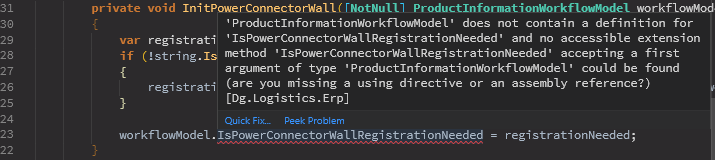
But project builds without issues
RononDex
on 20 Mar 2019
Issue here is that omnisharp currently loads source text:
- initial server load,
- "Buffer Update" endpoint (which updates source as you type in vscode)
- "FileCreated" event.
What is missing here is "FileChanged" event, which gets triggered every time any process changes file. Adding this is very simple, I have a local build with this turned on because I find the issue so annoying
https://github.com/SirIntruder/omnisharp-roslyn/commit/7ef1410c44cbffa41d9e14c4431d6b3d4f175ebf
I assumed it was not done originally for performance fears, but having this is a life saver when working with git. In my experience, I didn't have any major issues with this on. If it was just an oversight I would apply this patch, and if not, at least expose an option to the users.
 SirIntruder
on 20 Mar 2019
SirIntruder
on 20 Mar 2019
Also there is another issue in "making omnisharp more responsive" agenda: vscode extension currently doesn't forward "folder changed" events because the globbing pattern is set to only watch files, and there is no code in omnisharp that can handle "folder deleted" events.
SirIntruder
on 20 Mar 2019
Related issues
 mattwoberts
·
3Comments
mattwoberts
·
3Comments
 mshinnie
·
3Comments
mshinnie
·
3Comments
 gregg-miskelly
·
3Comments
gregg-miskelly
·
3Comments
 kiminuo
·
3Comments
kiminuo
·
3Comments
 mentoreet
·
3Comments
mentoreet
·
3Comments
Most helpful comment
Issue here is that omnisharp currently loads source text:
What is missing here is "FileChanged" event, which gets triggered every time any process changes file. Adding this is very simple, I have a local build with this turned on because I find the issue so annoying
https://github.com/SirIntruder/omnisharp-roslyn/commit/7ef1410c44cbffa41d9e14c4431d6b3d4f175ebf
I assumed it was not done originally for performance fears, but having this is a life saver when working with git. In my experience, I didn't have any major issues with this on. If it was just an oversight I would apply this patch, and if not, at least expose an option to the users.