Omnisharp-vscode: Autocomplete often incorrectly replaces typed text
Original issue reported here: https://github.com/Microsoft/vscode/issues/57037
I was asked to refer this issue to the C# extension project instead.
Often, while typing in the editor, when I press space after a word, the editor will replace the perfectly valid code with something invalid. I am currently working in C#, and have this happen frequently with several keywords. Today, I tried the Insiders build as well, but still run into the issue. I have also attached a video of the problem happening.
Some examples:
newbecomesnameofprivatebecomespartialreturnbecomesref
Environment data
dotnet --info output:
.NET Core SDK (reflecting any global.json):
Version: 2.1.301
Commit: 59524873d6
Runtime Environment:
OS Name: Mac OS X
OS Version: 10.13
OS Platform: Darwin
RID: osx.10.13-x64
Base Path: /usr/local/share/dotnet/sdk/2.1.301/
Host (useful for support):
Version: 2.1.1
Commit: 6985b9f684
.NET Core SDKs installed:
2.1.301 [/usr/local/share/dotnet/sdk]
.NET Core runtimes installed:
Microsoft.AspNetCore.All 2.1.1 [/usr/local/share/dotnet/shared/Microsoft.AspNetCore.All]
Microsoft.AspNetCore.App 2.1.1 [/usr/local/share/dotnet/shared/Microsoft.AspNetCore.App]
Microsoft.NETCore.App 2.1.1 [/usr/local/share/dotnet/shared/Microsoft.NETCore.App]
VS Code version: 1.26.1 and 1.27.0-insiders
C# Extension version: 1.15.2
Steps to reproduce
Type an entire name/keyword, verbatim, in the editor and press the spacebar. It does not always happen, but happens enough to be extremely frustrating and to severely impact my productivity.
Expected behavior
Typed name or keyword matches the top entry in the suggestion list and should not be changed.
Actual behavior
Typed name or keyword changes to an unrelated, and often semantically invalid, name or keyword.
 rayrSC
All 34 comments
That is definitely strange behavior! Is the correct word selected in the completion list when you press SPACE? cc @rchande / @akshita31
 DustinCampbell
on 23 Aug 2018
DustinCampbell
on 23 Aug 2018
Yes. At the very beginning of type (in the example video, after typing p), it suggests partial, but as soon as I press r and for every character afterwards, the top, highlighted suggestion is private in the completion list. It acts almost as though the visual list has been updated but the one it uses after pressing the completion key has not.
rayrSC
on 23 Aug 2018
@rayrSC That's extremely strange! I haven't been able to reproduce this on a relatively recent insider's build. Would you mind updating and see if you still see the issue?
Version: 1.27.0-insider
Commit: 07618102efdd63f09949ce54c161e7fd2a954ee8
Date: 2018-08-23T05:20:35.051Z
Electron: 2.0.7
Chrome: 61.0.3163.100
Node.js: 8.9.3
V8: 6.1.534.41
Architecture: x64
 rchande
on 28 Aug 2018
rchande
on 28 Aug 2018
Same here, with
VS Code version: 1.26.1
C# Extension version: 1.15.2
Very quickly installed Insiders and doesn't seem to be happening there, but will keep trying and report back if it does happen.
 dansoper
on 29 Aug 2018
dansoper
on 29 Aug 2018
Is it possible that another extension installed into 1.26.1 is interfering and causing the issue?
DustinCampbell
on 30 Aug 2018
I have just installed all my 1.26.1 extensions into the insiders, and the code replacement hasn't happened yet. But it did happen again several times in 1.26.1
For info, my extensions are
Ayu (theme), C#, Custom CSS and JS Loader, Debugger for Chrome, Typescript Hero, VS Live Share
dansoper
on 30 Aug 2018
It might be worth installing them 1 at a time into Insiders to see if one of them is the culprit. Additionally, you might try uninstalling and reinstalling C# in 1.26.1 and see if the problem persists. It's definitely not normal behavior.
DustinCampbell
on 30 Aug 2018
I had to work on something else for a few days, so I didn't have a chance to do any further testing on this until now. I have yet to experience the problem with the latest Insiders build, but that's not really direct evidence of anything. The issue seemed to happen more frequently when I was focused and typing quickly, which is unfortunate since it would often disrupt that focus.
As far as extensions go, I have the following on both 1.26.1 and 1.27.0-insiders:
- C# 1.15.2
- Debugger for Unity 1.3.0
rayrSC
on 30 Aug 2018
It happens to me frequently, but never when I try to replicate it... I also noticed it always happen when I am typing really fast. I will try to work with insiders and report if I find it there
 SirIntruder
on 30 Aug 2018
SirIntruder
on 30 Aug 2018
This happens to me multiple times a day and is a real flow interruption. Normally for me it occurs with new and nameof.
Visual studio appears to fix this issue is by checking if the current text that would apply to intellisense no longer matches the intellisense ui default selected item it just adds a space normally (unless you actually manually select an item).
 thesmallbang
on 3 Oct 2018
thesmallbang
on 3 Oct 2018
this bug makes me annoying.

 geniikw
on 19 Oct 2018
geniikw
on 19 Oct 2018
@jrieken Is this a behavior change in VS Code? We haven't made any changes to how we provide completion and I don't believe the API even gives us this level of control...
rchande
on 23 Oct 2018
Hm... Looks like a filtering/timing issue... Do you guys use commit characters? Would space be one here? It might be that we work on the n prefix and haven't "seen" the ne yet. Your provider implements the resolveCompletionItem function, right? What version is this? We recently fixed a timing (1.29-insider) in that area...
 jrieken
on 24 Oct 2018
jrieken
on 24 Oct 2018
We had an internal report of this on 1.29. I'm not sure what version @geniikw is on. We do use space as a commit character (https://github.com/OmniSharp/omnisharp-vscode/blob/9acb7494ed847b3cbd244b265a6923e0eb7b8ba5/src/features/completionItemProvider.ts#L17) but we don't implement ResolveCompletionItem.
rchande
on 24 Oct 2018
above is on 1.28.
and on 1.29 insider
Despite turned on [acceptSuggestionOnCommitCharacter] option, Space do not work as commit character. So I can't check above situation at 1.29.
geniikw
on 25 Oct 2018
@geniikw can you check what value this setting has for you: editor.suggestSelection?
jrieken
on 25 Oct 2018
@jrieken both were recentlyUsed(1.28, 1.29)
geniikw
on 25 Oct 2018
@geniikw and what is the exact sequence of events in
https://github.com/OmniSharp/omnisharp-vscode/issues/2472#issuecomment-431236867.
- type
n - type
e - type what❓ did you press space? or tab, enter?
jrieken
on 25 Oct 2018
@jrieken
that was "new "
I tried to reproduce the same thing at home, but I can not reproduce it at 1.28.2. (It works fine.)
It seems that I misunderstood the version due to something wrong. When I tried it in the company, it was obviously changed to "nameof " if I wrote "new " quickly.
Anyway, it's okay now. Sorry for miss report.
geniikw
on 25 Oct 2018
This might be a dupe of https://github.com/Microsoft/vscode/issues/60753. Please try with latest insider for which we have fixed this: https://code.visualstudio.com/insiders/
jrieken
on 25 Oct 2018
This problem hasn't happened for me now for a while, so I think it has been resolved. I'm on VS Code 1.28.2.
dansoper
on 1 Nov 2018
For what it's worth, this is happening for me (new/nameof is the one that catches me most frequently) on 1.28.2.
I can reliably make it happen by typing fast and typing either [n, e, <space>] or [n, e, w, <space>]. Typing fast is crucial. It never happens if I am typing slowly.
Full version info
Version: 1.28.2 (user setup)
Commit: 7f3ce96ff4729c91352ae6def877e59c561f4850
Date: 2018-10-17T00:23:51.859Z
Electron: 2.0.9
Chrome: 61.0.3163.100
Node.js: 8.9.3
V8: 6.1.534.41
Architecture: x64
 nickstenning
on 2 Nov 2018
nickstenning
on 2 Nov 2018
And I'm afraid I can also reproduce with the latest Insiders build (1.29.0), with only the C# extension installed (at version 1.17.0).
Full version info
Version: 1.29.0-insider (user setup)
Commit: 9b2a7f4a83ca6a2d495463276a21157f398b41e7
Date: 2018-11-02T13:42:21.142Z
Electron: 2.0.12
Chrome: 61.0.3163.100
Node.js: 8.9.3
V8: 6.1.534.41
Architecture: x64Thanks @nickstenning. I will keep digging...
jrieken
on 5 Nov 2018
I am on v1.32.2 with Unity 2018.3.x and C#. For int32, I get iPhoneSettings. It's really annoying.
 HardcodedNumber
on 16 Mar 2019
HardcodedNumber
on 16 Mar 2019
@jrieken Did you make any progress here?
rchande
on 18 Mar 2019
no, we weren't able to reproduce...
jrieken
on 19 Mar 2019
You can close this, I think its with VS Code itself.
HardcodedNumber
on 24 Mar 2019
I wanted to chime in this has been occuring for me for a long time (not sure on the exact time frame) with Unity / VS Code. It occurs when I type "int" followed by spacebar and it completes to "iPhoneSettings". I'm using Visual Studio Code on OSX. It is a major productivity drain for me.
Also, the Visual Studio Code issue @HardcodedNumber referenced is closed with the reason given that it's an extension issue, not a VS Code issue.
Edit: I'd like to add that this is dependent on how quickly I type. If I type "int" and spacebar very quickly "iPhoneSettings" is inserted. If I pause before pressing the spacebar "int" is inserted.
 kettle11
on 9 May 2019
kettle11
on 9 May 2019
This seems to be occurring for me too.

 naknode
on 3 Jul 2019
naknode
on 3 Jul 2019
This also happens to me many times daily. 50% of the time I type for example return new the new gets converted to nameof.
From the comment here https://github.com/microsoft/vscode/issues/60753#issuecomment-430190566 it seems like the issue could be a missed "cancel" call on the async suggest handler?
It appears what happens is:
- I start typing "n"
- The suggest system reacts to the "n" event but is slow to respond
- A cancel on that request gets sent since I typed another char "e", but it gets overlooked
- I type "w" and that also gets overlooked
- Now the suggest system responds with "nameof" since it sees that as the item to use:
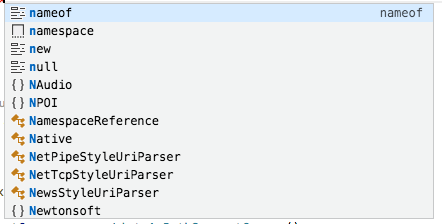
- I type " " (space) and now the "nameof" gets selected/committed, since the suggest system never reacted to the cancel events.
Note this is just my analysis of what goes on, I have no real idea of how the code is structured.
Wrt repro, it appears this primarily happens with large repos. I think the way to test it would be to simulate slow responses by adding some Thread.Sleep(...).
Other cases where this appears:
- Starting to type a lambda, the variable name gets replaced
- The ones mentioned in the OP
This is a huge blocker for productivity since we constantly have to go back and fix the incorrectly committed suggestion.
 christianscheuer
on 8 Jul 2019
christianscheuer
on 8 Jul 2019
Started happening to me following the recent update:
OS: macOS Mojave (10.14.5)
VSCode version: 1.36.1
language within editor: Javascript

It seems like the autocompletion is selected by default and pressing the semicolon key triggers it.
EDIT: restarting vscode solved the issue.
 silicakes
on 17 Jul 2019
silicakes
on 17 Jul 2019
[React.js & React Native] this.props.item becomes this.tsPropertySignature.isTemplateElement; LOL.
Restarting VSCode also solves it for me. VSCode Version: 1.37.0
 jordangrant
on 15 Aug 2019
jordangrant
on 15 Aug 2019
@silicakes This is the repository for the C# extension--we can't help with Javascript issues. For JS, I recommend filing an issue directly against VS Code because JS support is built into VS Code.
rchande
on 15 Aug 2019
Related issues
 kiminuo
·
3Comments
kiminuo
·
3Comments
 greghroberts
·
3Comments
greghroberts
·
3Comments
 jrmcdona
·
3Comments
jrmcdona
·
3Comments
 mattwoberts
·
3Comments
mattwoberts
·
3Comments
 mentoreet
·
3Comments
mentoreet
·
3Comments
Most helpful comment
Started happening to me following the recent update:
OS: macOS Mojave (10.14.5)
VSCode version: 1.36.1
language within editor: Javascript
It seems like the autocompletion is selected by default and pressing the semicolon key triggers it.
EDIT: restarting vscode solved the issue.