Omnisharp-vscode: The type or namespace name 'System' could not be found
Environment data
dotnet --info output:
.NET Command Line Tools (2.1.103)

Product Information:
  Version:                       2.1.103
  Commit SHA-1 hash:  60218cecb5

Runtime Environment:
 OS Name:     Windows OS
 Version:        6.1.7601 OS
 Platform:      Windows
 RID:              win7-x64
 Base Path:   C:\Program Files\dotnet\sdk\2.1.103\

Microsoft .NET Core Shared Framework Host
  Version  : 2.0.6
  Build      : 74b1c703813c8910df5b96f304b0f2b78cdf194d
VS Code version:
1.21.1
C# Extension version:
1.14.0
Issue:
I upgraded from VS Code 1.19 and C# Extension 1.13 to the latest VS Code and # Extension and all of sudden every reference is all messed up, but I'm able to do dotnet build without issues. Attached screenshot and trace logs from OmniSharp.
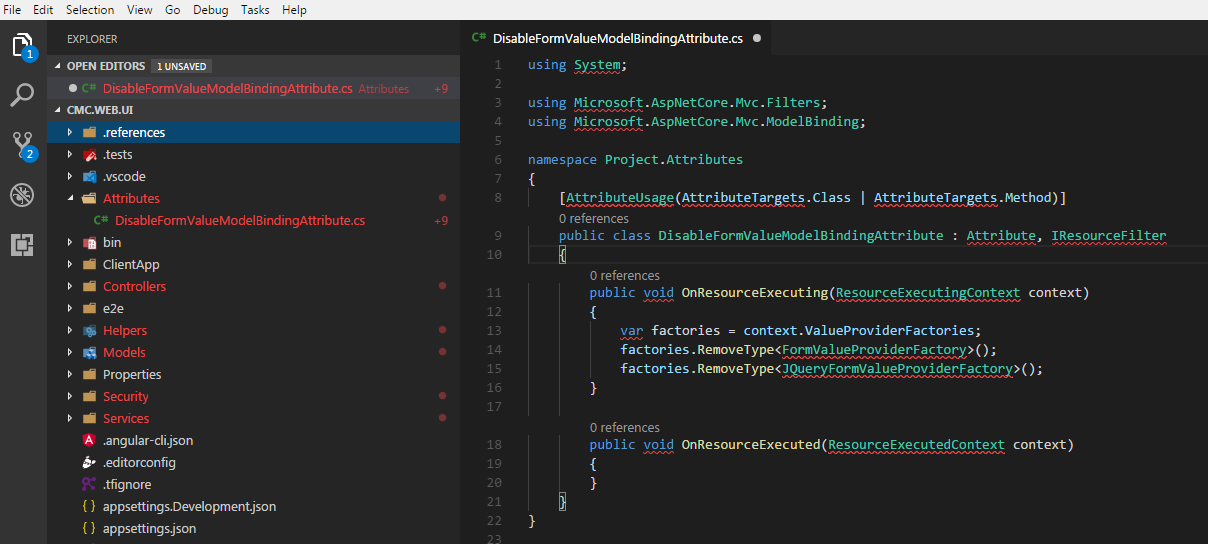
 dmumladze
All 53 comments
@dmumladze Thanks for including your omnisharp log. Can you try deleting the C:\Users\{username}\.vscode\extensions\ms-vscode.csharp-1.14.0\.omnisharp directory and see if that helps? Also, it looks like you're on a pretty recent release of the CLI. Have you updated the CLI recently, and if so, was everything working before you updated?
 rchande
on 3 Apr 2018
rchande
on 3 Apr 2018
To reinstall omnisharp, you also need to delete the install.LOCK file in the extension folder as mentioned above.
 akshita31
on 3 Apr 2018
akshita31
on 3 Apr 2018
If I delete .omnisharp folder, I cannot install as I'm behind a corp. proxy, so I had to do it manually. I've done the same manual installation before many times and also tried to reinstall manually few times now. I've also cleaned up .nuget and .dotnet cached folders.
And yes, before the CLI upgrade it worked.
So far nothing worked. Can one of you install the latest CLI along with latest VSCode/Omnisharp and see if it works?
dmumladze
on 3 Apr 2018
Still monitoring this issue?
dmumladze
on 5 Apr 2018
@dmumladze I can confirm that CLI version 2.1.300-preview3-008443 seems to work for me, at least when creating a simple class library.
rchande
on 5 Apr 2018
@dmumladze Have you tried deleteing build/restore artifacts (whatever the moral equivalent of git clean is for your project) and tried re-restoring?
rchande
on 5 Apr 2018
@rchande I deleted the entire source branch and did rebuild/restore from scratch..still the same.
dmumladze
on 5 Apr 2018
@dmumladze Is there a way I could get access to this project in order to debug further? Also, I noticed one interesting discrepancy, but I'm not sure if it means anything: In your O# log, the project directory contains an obj directory (as you would expect after restore). However, in your screenshot, there's no obj directory visible. Any idea why that might be?
rchande
on 6 Apr 2018
Also, @dmumladze if it's not possible for you to share all the source (.cs) files, would it be possible for you to share a version of the .csproj file with anything private removed? I suspect that that's where the problem lies...
rchande
on 6 Apr 2018
@dmumladze One more question for you: I noticed that the output c:\Projects\ProjectCollection\ProjectName\Source\Middleware\Core\Common\OneCRM.Common\OneCRM.Common.csproj appears in your log. Can you confirm that you've run dotnet restore for that OneCRM.common project?
rchande
on 9 Apr 2018
@obj directory missing: It's hidden from .settings file
@OneCRM.common project: Restore runs Ok
Unfortunately I cannot share.
dmumladze
on 9 Apr 2018
@dmumladze My current hypothesis is that something is going wrong when OmniSharp uses MSBuild to build your project that results in us not finding the right reference paths. I added some diagnostics to OmniSharp to collect more info. Please give this a try:
Install the 15.0-beta4 release of C# extension for VS Code: https://github.com/OmniSharp/omnisharp-vscode/releases/tag/v1.15.0-beta4 (basically, download the .vsix file and use the extension manager in VS Code to "install from VSIX")
In "user settings", set 2 options:
"omnisharp.loggingLevel": "debug" : I think you already had this set, causes O# to log more info
"omnisharp.path": "latest": We added a new feature to the extension that will download the latest build of Omnisharp from https://github.com/OmniSharp/omnisharp-roslyn. In this case, I recently added https://github.com/OmniSharp/omnisharp-roslyn/pull/1151, which will log more project info
Then, do whatever you did to load your project and share your OmniSharp log again. Note that it will print lots of file paths. If you want to elide your username, go ahead, but try to leave paths as intact as possible. Hopefully this will help us diagnose what's happening on your machine.
rchande
on 10 Apr 2018
@rchande thanks for the build. I'm behind the proxy, and even though I set correct settings, I'm still not able to download neither extension nor "latest" per configuration you've provided ("omnisharp.path": "latest").
The proxy issue is something that's been there in VS Code for a long time. Note that I'm using proxy settings as below, but it never works (let's leave this as is for now).
"http.proxy": "http://DOMAIN%5Cusername:[email protected]:8080",
"http.proxyStrictSSL": false,
OR
"http.proxy": "http://webproxy.blabla.net:8080"
So, back to the extension issue... I was only able to install C# Extension v1.15.0-beta4 from VSIX and manually download and install omnisharp-win-x64-1.29.1.zip as well as coreclr-debug-win7-x64.zip. Once I installed these three, then I modified the settings file with "omnisharp.path": "latest" and restarted VS Code. Then it failed with below.
Error occured in loading omnisharp from omnisharp.path
Could not start the server due to Error: Could not download the latest version file due to Error: 407
I removed "omnisharp.path": "latest" and restarted again. See attached.
And lastly, I've uninstalled all but latest SDK so the updated dotnet --infois below and project builds as expected when using dotnet build.
.NET Command Line Tools (2.1.104)

Product Information:
 Version:            2.1.104
 Commit SHA-1 hash:  48ec687460

Runtime Environment:
 OS Name:     Windows
 OS Version:  6.1.7601
 OS Platform: Windows
 RID:         win7-x64
 Base Path:   C:\Program Files\dotnet\sdk\2.1.104\

Microsoft .NET Core Shared Framework Host

  Version  : 2.0.6
  Build    : 74b1c703813c8910df5b96f304b0f2b78cdf194d
@dmumladze Try downloading this https://roslynomnisharp.blob.core.windows.net/releases/1.29.2-beta.139/omnisharp-win-x86.zip . Unzip it wherever you like and use the omnisharp.path setting to point at the omnisharp.exe within it.
rchande
on 11 Apr 2018
@rchande All my projects are multi-targeting, could that be an issue? It was certainly not an issue with .NET Core 2.0.3 and VS Code 1.20.
<TargetFrameworks>netstandard2.0;net46</TargetFrameworks>
dmumladze
on 23 Apr 2018
OmniSharp will only process the first TFM in your project. Maybe try switching them?
 DustinCampbell
on 24 Apr 2018
DustinCampbell
on 24 Apr 2018
@DustinCampbell I think switching isn't needed, since projects I'm opening in VS Code are the ones needed to be built for .NET Core.
dmumladze
on 24 Apr 2018
Did you try and find that it didn't make a difference?
DustinCampbell
on 24 Apr 2018
I suspect that this might be the same issue as https://github.com/OmniSharp/omnisharp-vscode/issues/2295
DustinCampbell
on 19 May 2018
We've merged a fix to #2295 to OmniSharp. Try setting "omnisharp.path" in the VS Code settings to "latest". This will cause C# for VS Code to download and use the latest build of OmniSharp, which contains that fix.
DustinCampbell
on 21 May 2018
@DustinCampbell We have stopped using VSCode for now... It is unfortunate, but it's the decision we made due to this and other issue. For the other issue, there seems to be solution in using a different NTLM lib.
dmumladze
on 22 Jun 2018
@dmumladze Sorry to hear that. If you have time, it would be helpful to us (and other users) if you could confirm whether the fix for #2295 works for you.
rchande
on 22 Jun 2018
not sure if this is related/helpful. I had two visual studio code instances open, one was my angular CLI project (which was open first) then I launched a new visual studio code instance and opened my C# project folder and received this error/issue.
after closing both and only opening my C# project the issue went away.
 Marshal27
on 26 Jun 2018
Marshal27
on 26 Jun 2018
@rchande I tried with latest version 1.30.1 and logs are attached. Should I try your beta version, which you'd provided the link in above comment?
dmumladze
on 23 Jul 2018
I'm seeing similar issue with Monaco editor.
Followed Che csharp LS setup script as reference to setup omnisharp and its dependencies.
Picked up a sample project from omnisharp test-projects and fired up the editor.
Editor: Monaco v0.13.0
Language client: monaco-languageclient v0.6.3
Omnisharp: v1.32.1
dotnet: sdk-2.1.302-linux
 patilarpith
on 10 Aug 2018
patilarpith
on 10 Aug 2018
I am facing the same issues behind the proxy.
.NET Core SDK (reflecting any global.json):
Version: 2.1.401
Commit: 91b1c13032
Runtime Environment:
OS Name: Windows
OS Version: 10.0.14393
OS Platform: Windows
RID: win10-x64
Base Path: C:\Program Files\dotnet\sdk\2.1.401\
 Dereeg
on 25 Oct 2018
Dereeg
on 25 Oct 2018
@dmumladze Does the error still reproduce for the latest version of the C# extension ?
akshita31
on 30 Oct 2018
Original issue has been fixed in ms-vscode.csharp-1.17.0, and proxy issue is still there, but workaround is easy:
Create folders (note the version 1.32.6; this is per version you download)
%userprofile%\.vscode\extensions\ms-vscode.csharp-1.17.0\.omnisharp\1.32.6\
%userprofile%\.vscode\extensions\ms-vscode.csharp-1.17.0\.debugger\
Download and unzip the debugger and omnisharp packages manually, and restart vscode.
More on the proxy issue: Proxy authentication can be done either by NTLM, Digest, or Negotiate auth schemes.. In my corp case, it must be NTLM, but VSCode is doing the Negotiate.. So, until that issue is resolved, I'm stuck with manual, which I don't mind and it isn't as annoying as "'System' could not be found" issue I reported earlier.
How do I know NTLM works? I use cURL utility reguarly, which by default uses the Negotiate auth scheme, but once I forced it to the NTLM, it worked, so same for VSCode:
curl -x webproxy.net:8080 -U usernaname:password http://google.com --proxy-ntlm
You can try other options and see what works for you: --proxy-digest or --proxy-negotiate
Thanks for the fix provided in 1.17.0 version!
PLEASE fix the proxy auth issue as well...
dmumladze
on 12 Nov 2018
Getting this with latest stuff.
CoreFx 3.0.0 preview 2
VSCode 1.30.2
c# extension 1.18.0-beta6
OmniSharp for Windows (.NET 4.6 / x64), Version = 1.32.11-beta.1
My personal home workstation, Nothing special about the network here.
Edit:
I investigated a little more and saw that I'm experiencing OmniSharp/omnisharp-roslyn#1094.
The workaround fixed editing (c# 8.0 still out) in VS Code but I see these errors in the log.
omnisharp.log
 tdaniely
on 3 Feb 2019
tdaniely
on 3 Feb 2019
@tdaniely Can you try installing .Net Core Build Tools as described here and checking if the error still reproduces?
akshita31
on 4 Feb 2019
I had those installed.
The error stopped when I installed VS 2019 Preview which comes with MSBuild 16.
The bundled MSBuild that comes with omnisharp did not work.
The MSBuild from updated VS 2017 did not work.
With the 2019 Preview installed I see no errors in VSC and <LangVersion>8.0</LangVersion> is working as expected.
tdaniely
on 5 Feb 2019
Experiencing the same issue on macOS.
Attempted resolution:
- Uninstall C# extension within VS Code
- Reload VS Code
- Exit VS Code
- rm -rf ~/.vscode/extensions/ms-vscode.csharp-1.17.1/
- Launch VS Code
- Install C# extension
- Restart VS Code
- Wait for OmniSharp to download
Attempted with .NET Core 3.0 Preview 1:
.NET Core SDK (reflecting any global.json):
 Version:   3.0.100-preview-010184
 Commit:    c57bde4593

Runtime Environment:
 OS Name:     Mac OS X
 OS Version:  10.14
 OS Platform: Darwin
 RID:         osx.10.14-x64
 Base Path:   /usr/local/share/dotnet/sdk/3.0.100-preview-010184/

Host (useful for support):
  Version: 3.0.0-preview-27324-5
  Commit:  63a01b08e5

.NET Core SDKs installed:
  2.1.302 [/usr/local/share/dotnet/sdk]
  3.0.100-preview-010184 [/usr/local/share/dotnet/sdk]

.NET Core runtimes installed:
  Microsoft.AspNetCore.All 2.1.2 [/usr/local/share/dotnet/shared/Microsoft.AspNetCore.All]
  Microsoft.AspNetCore.App 2.1.2 [/usr/local/share/dotnet/shared/Microsoft.AspNetCore.App]
  Microsoft.AspNetCore.App 3.0.0-preview-19075-0444 [/usr/local/share/dotnet/shared/Microsoft.AspNetCore.App]
  Microsoft.NETCore.App 2.1.2 [/usr/local/share/dotnet/shared/Microsoft.NETCore.App]
  Microsoft.NETCore.App 3.0.0-preview-27324-5 [/usr/local/share/dotnet/shared/Microsoft.NETCore.App]
Attempted again with .NET Core 3.0 Preview 3:
NET Core SDK (reflecting any global.json):
 Version:   3.0.100-preview3-010431
 Commit:    d72abce213

Runtime Environment:
 OS Name:     Mac OS X
 OS Version:  10.14
 OS Platform: Darwin
 RID:         osx.10.14-x64
 Base Path:   /usr/local/share/dotnet/sdk/3.0.100-preview3-010431/

Host (useful for support):
  Version: 3.0.0-preview3-27503-5
  Commit:  3844df9537

.NET Core SDKs installed:
  2.1.302 [/usr/local/share/dotnet/sdk]
  3.0.100-preview-010184 [/usr/local/share/dotnet/sdk]
  3.0.100-preview3-010431 [/usr/local/share/dotnet/sdk]

.NET Core runtimes installed:
  Microsoft.AspNetCore.All 2.1.2 [/usr/local/share/dotnet/shared/Microsoft.AspNetCore.All]
  Microsoft.AspNetCore.App 2.1.2 [/usr/local/share/dotnet/shared/Microsoft.AspNetCore.App]
  Microsoft.AspNetCore.App 3.0.0-preview-19075-0444 [/usr/local/share/dotnet/shared/Microsoft.AspNetCore.App]
  Microsoft.AspNetCore.App 3.0.0-preview3-19153-02 [/usr/local/share/dotnet/shared/Microsoft.AspNetCore.App]
  Microsoft.NETCore.App 2.1.2 [/usr/local/share/dotnet/shared/Microsoft.NETCore.App]
  Microsoft.NETCore.App 3.0.0-preview-27324-5 [/usr/local/share/dotnet/shared/Microsoft.NETCore.App]
  Microsoft.NETCore.App 3.0.0-preview3-27503-5 [/usr/local/share/dotnet/shared/Microsoft.NETCore.App]
C# extension constantly tells me I need to restore packages. Upon restoring, it immediately prompts again. However, my project doesn't rely on any NuGet packages:
<Project Sdk="Microsoft.NET.Sdk">

  <PropertyGroup>
    <TargetFramework>netcoreapp3.0</TargetFramework>
    <LangVersion>8.0</LangVersion>
    <NullableReferenceTypes>true</NullableReferenceTypes>
    <AllowUnsafeBlocks>true</AllowUnsafeBlocks>
  </PropertyGroup>

  <PropertyGroup Condition=" '$(Configuration)' == 'Debug' ">
  </PropertyGroup>

  <PropertyGroup Condition=" '$(Configuration)' == 'Release' ">
  </PropertyGroup>

</Project>
Here's what shows up when I click the Restore button:
  Persisting no-op dg to /Users/paul/git/Test/Test.Base/obj/Test.Base.csproj.nuget.dgspec.json
  Restore completed in 11.5 sec for /Users/paul/git/TEst/Test.Base/Test.Base.csproj.
Done: 0.
There are two warnings in the OmniSharp log:
[warn]: OmniSharp.MSBuild.PackageDependencyChecker
        Test.Base: Found implicit package reference 'Microsoft.NETCore.App', but none of the versions in the lock file ("3.0.0-preview-27324-5") satisfy [3.0.0, )
[warn]: OmniSharp.MSBuild.PackageDependencyChecker
        Test.Base: Did not find 'Microsoft.NETCore.App' in lock file.
Presumably 3.0.0-preview-27324-5 < 3.0.0. Since I'm not explicitly specifying a version anywhere besides TargetFramework, and that TargetFramework works fine in VS 2019 Preview, I'm unsure how to proceed.
% dotnet list Test.Base/Test.Base.csproj package
Project 'Test.Base' has the following package references
   [netcoreapp3.0]:
   Top-level Package                      Requested                     Resolved
   > Microsoft.AspNetCore.App.Ref   (A)   [3.0.0-preview3-19153-02, )   3.0.0-preview3-19153-02
   > Microsoft.NETCore.App.Ref      (A)   [3.0.0-preview3-27503-5, )    3.0.0-preview3-27503-5
   > Microsoft.NETCore.Platforms    (A)   [3.0.0-preview3.19128.7, )    3.0.0-preview3.19128.7
   > Microsoft.WindowsDesktop.App   (A)   [3.0.0-preview3-27504-2, )    3.0.0-preview3-27504-2

(A) : Auto-referenced package.
Issue vanishes if I target netcoreapp2.2.
 Zenexer
on 15 Mar 2019
Zenexer
on 15 Mar 2019
Confirmed that this remains an issue even with a fresh project created with dotnet new console. The resulting csproj:
<Project Sdk="Microsoft.NET.Sdk">

  <PropertyGroup>
    <OutputType>Exe</OutputType>
    <TargetFramework>netcoreapp3.0</TargetFramework>
  </PropertyGroup>

</Project>
I ran into this when installing 3.0.0-preview3 (was on 3.0.0-preview before).
Tried to set "omnisharp.path": "latest", but then got The SDK 'Microsoft.NET.Sdk' specified could not be found when the newest OmniSharp got installed. Then restarted VS Code and it went back to the "restore packages" loop and missing reference errors all over.
Then installed VS 2019 preview and it went back to normal (kudos @tdaniely !).
Some logs in case it helps (project path/name are anonymized):
Starting OmniSharp server at 4/5/2019, 4:32:05 PM
    Target: c:\Users\jrend\PATH\TO\PROJ

OmniSharp server started.
    Path: C:\Users\jrend\.vscode\extensions\ms-vscode.csharp-1.18.0\.omnisharp\1.32.14-beta.11\OmniSharp.exe
    PID: 12660

[info]: OmniSharp.Stdio.Host
        Starting OmniSharp on Windows 6.2.9200.0 (x64)
[info]: OmniSharp.Services.DotNetCliService
        DotNetPath set to dotnet
[info]: OmniSharp.MSBuild.Discovery.MSBuildLocator
        Located 1 MSBuild instance(s)
            1: StandAlone 15.0 - "C:\Users\jrend\.vscode\extensions\ms-vscode.csharp-1.18.0\.omnisharp\1.32.14-beta.11\msbuild\15.0\Bin"
[info]: OmniSharp.MSBuild.Discovery.MSBuildLocator
        MSBUILD_EXE_PATH environment variable set to 'C:\Users\jrend\.vscode\extensions\ms-vscode.csharp-1.18.0\.omnisharp\1.32.14-beta.11\msbuild\15.0\Bin\MSBuild.exe'
[info]: OmniSharp.MSBuild.Discovery.MSBuildLocator
        Registered MSBuild instance: StandAlone 15.0 - "C:\Users\jrend\.vscode\extensions\ms-vscode.csharp-1.18.0\.omnisharp\1.32.14-beta.11\msbuild\15.0\Bin"
            CscToolExe = csc.exe
            CscToolPath = C:\Users\jrend\.vscode\extensions\ms-vscode.csharp-1.18.0\.omnisharp\1.32.14-beta.11\msbuild\15.0\Bin\Roslyn
            MSBuildExtensionsPath = C:\Users\jrend\.vscode\extensions\ms-vscode.csharp-1.18.0\.omnisharp\1.32.14-beta.11\msbuild
            MSBuildToolsPath = C:\Users\jrend\.vscode\extensions\ms-vscode.csharp-1.18.0\.omnisharp\1.32.14-beta.11\msbuild\15.0\Bin
[info]: OmniSharp.Cake.CakeProjectSystem
        Detecting Cake files in 'c:\Users\jrend\PATH\TO\PROJ'.
[info]: OmniSharp.Cake.CakeProjectSystem
        Could not find any Cake files
[info]: OmniSharp.WorkspaceInitializer
        Project system 'OmniSharp.DotNet.DotNetProjectSystem' is disabled in the configuration.
[info]: OmniSharp.MSBuild.ProjectSystem
        No solution files found in 'c:\Users\jrend\PATH\TO\PROJ'
[info]: OmniSharp.MSBuild.ProjectManager
        Queue project update for 'c:\Users\jrend\PATH\TO\PROJ\PROJ.csproj'
[info]: OmniSharp.Script.ScriptProjectSystem
        Detecting CSX files in 'c:\Users\jrend\PATH\TO\PROJ'.
[info]: OmniSharp.Script.ScriptProjectSystem
        Could not find any CSX files
[info]: OmniSharp.WorkspaceInitializer
        Invoking Workspace Options Provider: OmniSharp.Roslyn.CSharp.Services.CSharpWorkspaceOptionsProvider
[info]: OmniSharp.MSBuild.ProjectManager
        Loading project: c:\Users\jrend\PATH\TO\PROJ\PROJ.csproj
[info]: OmniSharp.WorkspaceInitializer
        Configuration finished.
[info]: OmniSharp.Stdio.Host
        Omnisharp server running using Stdio at location 'c:\Users\jrend\PATH\TO\PROJ' on host 17512.
[warn]: OmniSharp.MSBuild.ProjectManager
        Failed to load project file 'c:\Users\jrend\PATH\TO\PROJ\PROJ.csproj'.
c:\Users\jrend\PATH\TO\PROJ\PROJ.csproj(1,1)
Microsoft.Build.Exceptions.InvalidProjectFileException: The SDK 'Microsoft.NET.Sdk' specified could not be found.  c:\Users\jrend\PATH\TO\PROJ\PROJ.csproj
   at Microsoft.Build.Shared.ProjectErrorUtilities.ThrowInvalidProject(String errorSubCategoryResourceName, IElementLocation elementLocation, String resourceName, Object[] args)
   at Microsoft.Build.Evaluation.Evaluator`4.ExpandAndLoadImportsFromUnescapedImportExpressionConditioned(String directoryOfImportingFile, ProjectImportElement importElement, List`1& projects, Boolean throwOnFileNotExistsError)
   at Microsoft.Build.Evaluation.Evaluator`4.ExpandAndLoadImports(String directoryOfImportingFile, ProjectImportElement importElement)
   at Microsoft.Build.Evaluation.Evaluator`4.EvaluateImportElement(String directoryOfImportingFile, ProjectImportElement importElement)
   at Microsoft.Build.Evaluation.Evaluator`4.PerformDepthFirstPass(ProjectRootElement currentProjectOrImport)
   at Microsoft.Build.Evaluation.Evaluator`4.Evaluate(ILoggingService loggingService, BuildEventContext buildEventContext)
   at Microsoft.Build.Evaluation.Project.Reevaluate(ILoggingService loggingServiceForEvaluation, ProjectLoadSettings loadSettings)
   at Microsoft.Build.Evaluation.Project.ReevaluateIfNecessary(ILoggingService loggingServiceForEvaluation, ProjectLoadSettings loadSettings)
   at Microsoft.Build.Evaluation.Project.Initialize(IDictionary`2 globalProperties, String toolsVersion, String subToolsetVersion, ProjectLoadSettings loadSettings)
   at Microsoft.Build.Evaluation.Project..ctor(String projectFile, IDictionary`2 globalProperties, String toolsVersion, String subToolsetVersion, ProjectCollection projectCollection, ProjectLoadSettings loadSettings)
   at Microsoft.Build.Evaluation.ProjectCollection.LoadProject(String fileName, IDictionary`2 globalProperties, String toolsVersion)
   at OmniSharp.MSBuild.ProjectLoader.EvaluateProjectFileCore(String filePath)
   at OmniSharp.MSBuild.ProjectLoader.BuildProject(String filePath)
   at OmniSharp.MSBuild.ProjectFile.ProjectFileInfo.Load(String filePath, ProjectIdInfo projectIdInfo, ProjectLoader loader)
   at OmniSharp.MSBuild.ProjectManager.<>c__DisplayClass31_0.<LoadProject>b__0()
   at OmniSharp.MSBuild.ProjectManager.LoadOrReloadProject(String projectFilePath, Func`1 loader)

[fail]: OmniSharp.MSBuild.ProjectManager
        Attempted to update project that is not loaded: c:\Users\jrend\PATH\TO\PROJ\PROJ.csproj
dotnet --info:
.NET Core SDK (reflecting any global.json):
 Version:   3.0.100-preview3-010431
 Commit:    d72abce213

Runtime Environment:
 OS Name:     Windows
 OS Version:  10.0.17763
 OS Platform: Windows
 RID:         win10-x64
 Base Path:   C:\Program Files\dotnet\sdk\3.0.100-preview3-010431\

Host (useful for support):
  Version: 3.0.0-preview3-27503-5
  Commit:  3844df9537

.NET Core SDKs installed:
  2.1.503 [C:\Program Files\dotnet\sdk]
  2.1.505 [C:\Program Files\dotnet\sdk]
  2.2.104 [C:\Program Files\dotnet\sdk]
  3.0.100-preview3-010431 [C:\Program Files\dotnet\sdk]

.NET Core runtimes installed:
  Microsoft.AspNetCore.All 2.1.7 [C:\Program Files\dotnet\shared\Microsoft.AspNetCore.All]
  Microsoft.AspNetCore.All 2.1.9 [C:\Program Files\dotnet\shared\Microsoft.AspNetCore.All]
  Microsoft.AspNetCore.All 2.2.2 [C:\Program Files\dotnet\shared\Microsoft.AspNetCore.All]
  Microsoft.AspNetCore.App 2.1.7 [C:\Program Files\dotnet\shared\Microsoft.AspNetCore.App]
  Microsoft.AspNetCore.App 2.1.9 [C:\Program Files\dotnet\shared\Microsoft.AspNetCore.App]
  Microsoft.AspNetCore.App 2.2.2 [C:\Program Files\dotnet\shared\Microsoft.AspNetCore.App]
  Microsoft.AspNetCore.App 3.0.0-preview3-19153-02 [C:\Program Files\dotnet\shared\Microsoft.AspNetCore.App]
  Microsoft.NETCore.App 2.1.7 [C:\Program Files\dotnet\shared\Microsoft.NETCore.App]
  Microsoft.NETCore.App 2.1.9 [C:\Program Files\dotnet\shared\Microsoft.NETCore.App]
  Microsoft.NETCore.App 2.2.2 [C:\Program Files\dotnet\shared\Microsoft.NETCore.App]
  Microsoft.NETCore.App 3.0.0-preview3-27503-5 [C:\Program Files\dotnet\shared\Microsoft.NETCore.App]
  Microsoft.WindowsDesktop.App 3.0.0-preview3-27504-2 [C:\Program Files\dotnet\shared\Microsoft.WindowsDesktop.App]
After restarting VS Code:
Starting OmniSharp server at 4/5/2019, 4:43:06 PM
    Target: c:\Users\jrend\PATH\TO\PROJ

OmniSharp server started.
    Path: C:\Users\jrend\.vscode\extensions\ms-vscode.csharp-1.18.0\.omnisharp\1.32.14-beta.11\OmniSharp.exe
    PID: 17524

[info]: OmniSharp.Stdio.Host
        Starting OmniSharp on Windows 6.2.9200.0 (x64)
[info]: OmniSharp.Services.DotNetCliService
        DotNetPath set to dotnet
[info]: OmniSharp.MSBuild.Discovery.MSBuildLocator
        Located 2 MSBuild instance(s)
            1: Visual Studio Community 2017 15.9.28307.586 - "C:\Program Files (x86)\Microsoft Visual Studio\2017\Community\MSBuild\15.0\Bin"
            2: StandAlone 15.0 - "C:\Users\jrend\.vscode\extensions\ms-vscode.csharp-1.18.0\.omnisharp\1.32.14-beta.11\msbuild\15.0\Bin"
[info]: OmniSharp.MSBuild.Discovery.MSBuildLocator
        Registered MSBuild instance: Visual Studio Community 2017 15.9.28307.586 - "C:\Program Files (x86)\Microsoft Visual Studio\2017\Community\MSBuild\15.0\Bin"
[info]: OmniSharp.Cake.CakeProjectSystem
        Detecting Cake files in 'c:\Users\jrend\PATH\TO\PROJ'.
[info]: OmniSharp.Cake.CakeProjectSystem
        Could not find any Cake files
[info]: OmniSharp.WorkspaceInitializer
        Project system 'OmniSharp.DotNet.DotNetProjectSystem' is disabled in the configuration.
[info]: OmniSharp.MSBuild.ProjectSystem
        No solution files found in 'c:\Users\jrend\PATH\TO\PROJ'
[info]: OmniSharp.MSBuild.ProjectManager
        Queue project update for 'c:\Users\jrend\PATH\TO\PROJ\PROJ.csproj'
[info]: OmniSharp.Script.ScriptProjectSystem
        Detecting CSX files in 'c:\Users\jrend\PATH\TO\PROJ'.
[info]: OmniSharp.Script.ScriptProjectSystem
        Could not find any CSX files
[info]: OmniSharp.WorkspaceInitializer
        Invoking Workspace Options Provider: OmniSharp.Roslyn.CSharp.Services.CSharpWorkspaceOptionsProvider
[info]: OmniSharp.MSBuild.ProjectManager
        Loading project: c:\Users\jrend\PATH\TO\PROJ\PROJ.csproj
[info]: OmniSharp.WorkspaceInitializer
        Configuration finished.
[info]: OmniSharp.Stdio.Host
        Omnisharp server running using Stdio at location 'c:\Users\jrend\PATH\TO\PROJ' on host 1592.
[info]: OmniSharp.MSBuild.ProjectManager
        Successfully loaded project file 'c:\Users\jrend\PATH\TO\PROJ\PROJ.csproj'.
[info]: OmniSharp.MSBuild.ProjectManager
        Adding project 'c:\Users\jrend\PATH\TO\PROJ\PROJ.csproj'
[info]: OmniSharp.MSBuild.ProjectManager
        Update project: ffs
[warn]: OmniSharp.MSBuild.PackageDependencyChecker
        ffs: Did not find 'Microsoft.NETCore.App' in lock file.
 jrend
on 5 Apr 2019
jrend
on 5 Apr 2019
Similar issue on mac too.
C# Extension version: 1.18.0
MacOs: Mojave 10.14.3
VS Code version: 1.32.3(1.32.3)
Issue: Every time I start my Unity project(C# project), I got a message.
Cannot open assembly '/Users/(MYNAME)/.vscode/extensions/ms-vscode.csharp-1.18.0/.omnisharp/1.32.14-beta.11/omnisharp/OmniSharp.exe': No such file or directory.
It is really weird cause my machine is mac, not window. (try to find .exe file on mac?)
My Solution: Comment out following line.
Preference: Open User Settings > Omnisharp: Path > Edit in settings.json >
{
"window.zoomLevel": 1,
"powermode.enabled": true,
"extensions.autoUpdate": false,
// "omnisharp.path": "latest" (Comment out this line)
}
Result:
[info]: OmniSharp.Stdio.Host
Starting OmniSharp on MacOS 10.14.3 (x64)
[info]: OmniSharp.Services.DotNetCliService
DotNetPath set to dotnet
[info]: OmniSharp.MSBuild.Discovery.MSBuildLocator
Located 2 MSBuild instance(s)
1: Mono 15.0 - "/Library/Frameworks/Mono.framework/Versions/5.16.0/lib/mono/msbuild/15.0/bin"
2: StandAlone 15.0 - "/Users/(MY NAME)/.vscode/extensions/ms-vscode.csharp-1.18.0/.omnisharp/1.32.11/omnisharp/msbuild/15.0/Bin"
[info]: OmniSharp.MSBuild.Discovery.MSBuildLocator
Registered MSBuild instance: Mono 15.0 - "/Library/Frameworks/Mono.framework/Versions/5.16.0/lib/mono/msbuild/15.0/bin"
CscToolPath = /Users/(MY NAME)/.vscode/extensions/ms-vscode.csharp-1.18.0/.omnisharp/1.32.11/omnisharp/msbuild/15.0/Bin/Roslyn
CscToolExe = csc.exe
[info]: OmniSharp.Cake.CakeProjectSystem
Detecting Cake files in '/Users/(MY NAME)/AngularMonitor'.
[info]: OmniSharp.Cake.CakeProjectSystem
Could not find any Cake files
[info]: OmniSharp.WorkspaceInitializer
Project system 'OmniSharp.DotNet.DotNetProjectSystem' is disabled in the configuration.
[info]: OmniSharp.MSBuild.ProjectSystem
Detecting projects in '/Users/(MY NAME)/AngularMonitor/AngularMonitor.sln'.
[info]: OmniSharp.MSBuild.ProjectManager
Queue project update for '/Users/(MY NAME)/AngularMonitor/Assembly-CSharp-Editor.csproj'
[info]: OmniSharp.Script.ScriptProjectSystem
Detecting CSX files in '/Users/(MY NAME)/AngularMonitor'.
[info]: OmniSharp.Script.ScriptProjectSystem
Could not find any CSX files
[info]: OmniSharp.WorkspaceInitializer
Invoking Workspace Options Provider: OmniSharp.Roslyn.CSharp.Services.CSharpWorkspaceOptionsProvider
[info]: OmniSharp.MSBuild.ProjectManager
Loading project: /Users/(MY NAME)/AngularMonitor/Assembly-CSharp-Editor.csproj
[info]: OmniSharp.WorkspaceInitializer
Configuration finished.
[info]: OmniSharp.Stdio.Host
Omnisharp server running using Stdio at location '/Users/(MY NAME)/AngularMonitor' on host 12609.
[info]: OmniSharp.MSBuild.ProjectManager
Successfully loaded project file '/Users/(MY NAME)/AngularMonitor/Assembly-CSharp-Editor.csproj'.
[info]: OmniSharp.MSBuild.ProjectManager
Adding project '/Users/(MY NAME)/AngularMonitor/Assembly-CSharp-Editor.csproj'
[info]: OmniSharp.MSBuild.ProjectManager
Update project: Assembly-CSharp-Editor
I got these messages on Output window, and Everything goes fine.
 Cliwo
on 7 Apr 2019
Cliwo
on 7 Apr 2019
I am also having issues with Omnisharp, I've tried deleting everything, reinstalling on mac. I am getting a whole bunch of type or namespace errors, but when I use VS2019 it works just fine.
[info]: OmniSharp.MSBuild.Discovery.MSBuildLocator
        Located 2 MSBuild instance(s)
            1: Mono 15.0 - "/Library/Frameworks/Mono.framework/Versions/5.18.1/lib/mono/msbuild/15.0/bin"
            2: StandAlone 15.0 - "/Users/jbejarano/.vscode/extensions/ms-vscode.csharp-1.19.0/.omnisharp/1.32.18/omnisharp/.msbuild/Current/Bin"
[dbug]: OmniSharp.MSBuild.Discovery.MSBuildLocator
        SUCCESS: Resolved to '/Library/Frameworks/Mono.framework/Versions/5.18.1/lib/mono/msbuild/15.0/bin/Microsoft.Build.Utilities.Core.dll' (name-only).
[dbug]: OmniSharp.MSBuild.Discovery.MSBuildLocator
        SUCCESS: Resolved to '/Library/Frameworks/Mono.framework/Versions/5.18.1/lib/mono/msbuild/15.0/bin/Microsoft.Build.Tasks.Core.dll' (name-only).
[dbug]: OmniSharp.MSBuild.Discovery.MSBuildLocator
        SUCCESS: Resolved to '/Library/Frameworks/Mono.framework/Versions/5.18.1/lib/mono/msbuild/15.0/bin/Microsoft.Build.Framework.dll' (name-only).
[dbug]: OmniSharp.MSBuild.Discovery.MSBuildLocator
        SUCCESS: Resolved to '/Library/Frameworks/Mono.framework/Versions/5.18.1/lib/mono/msbuild/15.0/bin/Microsoft.Build.dll' (name-only).
[info]: OmniSharp.MSBuild.Discovery.MSBuildLocator
        Registered MSBuild instance: Mono 15.0 - "/Library/Frameworks/Mono.framework/Versions/5.18.1/lib/mono/msbuild/15.0/bin"
            CscToolPath = /Users/jbejarano/.vscode/extensions/ms-vscode.csharp-1.19.0/.omnisharp/1.32.18/omnisharp/.msbuild/Current/Bin/Roslyn
            CscToolExe = csc.exe
[dbug]: OmniSharp.MSBuild.Discovery.MSBuildLocator
        Attempting to resolve 'Microsoft.CodeAnalysis.VisualBasic.Workspaces, Version=3.1.0.0, Culture=neutral, PublicKeyToken=31bf3856ad364e35'
[dbug]: OmniSharp.MSBuild.Discovery.MSBuildLocator
        FAILURE: Could not locate '/Library/Frameworks/Mono.framework/Versions/5.18.1/lib/mono/msbuild/15.0/bin/Microsoft.CodeAnalysis.VisualBasic.Workspaces.dll'.
[dbug]: OmniSharp.MSBuild.Discovery.MSBuildLocator
        Attempting to resolve 'Microsoft.CodeAnalysis.VisualBasic.Features, Version=3.1.0.0, Culture=neutral, PublicKeyToken=31bf3856ad364e35'
[dbug]: OmniSharp.MSBuild.Discovery.MSBuildLocator
        FAILURE: Could not locate '/Library/Frameworks/Mono.framework/Versions/5.18.1/lib/mono/msbuild/15.0/bin/Microsoft.CodeAnalysis.VisualBasic.Features.dll'.
[info]: OmniSharp.Cake.CakeProjectSystem
        Detecting Cake files in '/Users/jbejarano/DTDMS.Eforms.AllServicesTest/apps/Fields'.
[info]: OmniSharp.Cake.CakeProjectSystem
        Could not find any Cake files
[info]: OmniSharp.WorkspaceInitializer
        Project system 'OmniSharp.DotNet.DotNetProjectSystem' is disabled in the configuration.
[dbug]: OmniSharp.MSBuild.ProjectSystem
        MSBuild environment:
Mode: Standalone
RunningTests: False
RunningInVisualStudio: False
MSBuildToolsDirectory32: /Library/Frameworks/Mono.framework/Versions/5.18.1/lib/mono/msbuild/15.0/bin
MSBuildToolsDirectory64: /Library/Frameworks/Mono.framework/Versions/5.18.1/lib/mono/msbuild/15.0/bin
MSBuildSDKsPath: /Library/Frameworks/Mono.framework/Versions/5.18.1/lib/mono/msbuild/15.0/bin/Sdks
CurrentMSBuildConfigurationFile: /Library/Frameworks/Mono.framework/Versions/5.18.1/lib/mono/msbuild/15.0/bin/MSBuild.dll.config
CurrentMSBuildExePath: /Library/Frameworks/Mono.framework/Versions/5.18.1/lib/mono/msbuild/15.0/bin/MSBuild.dll
CurrentMSBuildToolsDirectory: /Library/Frameworks/Mono.framework/Versions/5.18.1/lib/mono/msbuild/15.0/bin
VisualStudioInstallRootDirectory:
MSBuildExtensionsPath: /Library/Frameworks/Mono.framework/Versions/5.18.1/lib/mono/msbuild/15.0/bin
 jbejar
on 18 Apr 2019
jbejar
on 18 Apr 2019
Disable the C# plugin and the error messages will go away (KISS).
 hbrooks3
on 2 Oct 2019
hbrooks3
on 2 Oct 2019
I had been dealing with the same issue for an hour. I have tried everything here and none of them worked but as a final try, I uninstall C# extension once more, then reload, then install it again. Now it is working! It must be a really weird bug.
 barbarosalp
on 3 Oct 2019
barbarosalp
on 3 Oct 2019
Same issue. Only context I can provide other than the above is that this started occurring after updating the project to use .NET Core SDK 3.0.
- SDK 2.2 was installed
- Projects were created targeting v2.2
- SDK 3.0 was installed
- Project files were updated to target v3.0
At this point the errors started being reported in the Problems panel.
 maltieri-sogeti
on 8 Oct 2019
maltieri-sogeti
on 8 Oct 2019
please provide OmiSharp log when reporting any issues, otherwise there is no way to diagnose any problem, thanks
 filipw
on 8 Oct 2019
filipw
on 8 Oct 2019
For some reason, updating Visual Studio 2019 to v16.3.3 (from v16.2.4). No clue why that would effect anything, but the errors suddenly went away part-way through that install.
Unfortunately, this means I don't have any errors to log for your investigation now. Hopefully someone else can provide.
maltieri-sogeti
on 8 Oct 2019
OmniSharp uses msbuild from Visual Studio 2019 if it's installed on your machine.
The minimum version of msbuild needed for .NET Core 3.0 is 16.3, which only ships with VS 2019 16.3.x.
So if you had VS 2019 16.2, then OmniSharp used that msbuild and it was too old to support .NET Core 3.0 RTM which caused your errors.
filipw
on 8 Oct 2019
If it's not installed, OmniSharp will use the msbuild version from the SDK? Or is the decision tree more complex than that?
Just getting a full understanding so I can communicate out to my organization.
maltieri-sogeti
on 8 Oct 2019
if it's not installed, then it uses it's own bundled msbuild which is now version 16.3 (but a simpler version that cannot handle i.e some Unity projects or complex legacy frameworks, that's why VS is always preferred).
.NET Core 3.0 has raised the minimum msbuild level required from 16.0 to 16.3 between the final previews and RTM version, which caught us a bit off guard, that's why OmniSharp worked fine with previews but not RTM of .NET Core 3.0, as we used to ship with 16.0 - which is really what this entire issue has been about.
hope this explains
filipw
on 8 Oct 2019
Installing VS 2019 16.3.x worked for me 👍
 Mr-Markus
on 8 Oct 2019
Mr-Markus
on 8 Oct 2019
Explains perfectly. Thanks!
maltieri-sogeti
on 8 Oct 2019
I was having the same issue. Agree with the last explanation, upgraded my msbuild to 16.6 and works fine now!
I followed this https://github.com/OmniSharp/omnisharp-vscode/issues/3407#issuecomment-554111373 and installed mono via online pkg download as opposed to doing via brew
 san18ind
on 31 Jul 2020
san18ind
on 31 Jul 2020
I am having the same issue with latest everything at this moment (Windows 10, vs & msbuild 16.7, vscode 1.47.3, omnisharp is 'latest').
My debug log of omnisharp is here
https://gist.github.com/majkinetor/d7985109c607ca9420e07cc4a2627f61
Can anybody help ? I hate to open VS just because of this. I wasn't sure which msbuild it uses so I deleted folder containing internal one at .vscode\extensions\ms-dotnettools.csharp-1.22.1\.omnisharp\1.35.5-beta.80\.msbuild. Log showed only 1 detected after that but it was still the same.

 majkinetor
on 11 Aug 2020
majkinetor
on 11 Aug 2020
does it work in VS? your omnisharp log has no errors so it's difficult to say
filipw
on 11 Aug 2020
Yes, it works. It works with dotnet CLI too.
My omnisharp log shows missing namespaces
    "QuickFixes": [
      {
        "LogLevel": "Error",
        "Id": "CS0234",
        "Tags": [],
        "FileName": "c:\\Work\\_\\nil\\jafin2k\\top\\top-rest\\source\\service\\Top.Rest.Api\\Controllers\\Security\\RolesController.cs",
        "Line": 11,
        "Column": 20,
        "EndLine": 11,
        "EndColumn": 25,
        "Text": "The type or namespace name 'Model' does not exist in the namespace 'Top.Rest.Api' (are you missing an assembly reference?)",
        "Projects": [
          "Top.Rest.Api"
        ]
      },
yes, but those are compiler diagnostics, not OmniSharp errors. I was referring to the fact that there is nothing suspicious in OmniSharp loading process.
You can try the latest prerelease https://github.com/OmniSharp/omnisharp-vscode/releases/tag/v1.23.0-beta2 (make sure to remove "omnisharp.path":"latest" setting before).
Also, can you provide a repro project? btw. your problem is different from the one tracked in this thread which was related to discovery of system ref assemblies.
filipw
on 11 Aug 2020
I will close this issue to avoid any further confusion.
The original issue tracked here was caused by old MSBuild (later MSBuild < 16.3 for .NET Core 3.x apps) being discovered. We have raised the minimum discovered version of MSBuild in the meantime.
filipw
on 11 Aug 2020
OK @filipw , I reported new problem at #3962.
majkinetor
on 11 Aug 2020
Related issues
 ghost
·
3Comments
ghost
·
3Comments
 kiminuo
·
3Comments
kiminuo
·
3Comments
 jwbay
·
3Comments
jwbay
·
3Comments
 IdeoG
·
3Comments
IdeoG
·
3Comments
 Alumniminium
·
3Comments
Alumniminium
·
3Comments
Most helpful comment
@dmumladze Thanks for including your omnisharp log. Can you try deleting the
C:\Users\{username}\.vscode\extensions\ms-vscode.csharp-1.14.0\.omnisharpdirectory and see if that helps? Also, it looks like you're on a pretty recent release of the CLI. Have you updated the CLI recently, and if so, was everything working before you updated?