Omnisharp-vscode: Run Debug stalls after build task
Environment data
dotnet --info output:
.NET Command Line Tools (2.0.3)

Product Information:
 Version:            2.0.3
 Commit SHA-1 hash:  eb1d5ee318

Runtime Environment:
 OS Name:     Mac OS X
 OS Version:  10.13
 OS Platform: Darwin
 RID:         osx.10.12-x64
 Base Path:   /usr/local/share/dotnet/sdk/2.0.3/

Microsoft .NET Core Shared Framework Host

  Version  : 2.0.3
  Build    : a9190d4a75f4a982ae4b4fa8d1a24526566c69df
VS Code version: 1.18.1
C# Extension version: 1.13.1
Steps to reproduce
dotnet new console -o test-debug
cd test-debug
code .
put a breakpoint on line 9. Run Debug.
Expected behavior
The debugger should launch and hit the breakpoint, showing current runtime variables.
Actual behavior
The build task run successfully, but the debugger variables never show up. It looks like something is hanging because the spinner in the lower left corner is spinning. Even after tens of minutes, the debugger never fully launches.
Omnisharp Logs:
omnisharp test debug.txt
Work arounds:
- Use VS Code from the Insiders Channel (download link)
-or- - Edit your launch.json and comment out the "preLaunchTask": "build" line. If you do this you will now need to build from the command line (project will not automatically rebuild as part of start debugging).
-or- - At the end of the build, put focus on the terminal and hit enter
 danechambers
All 6 comments
@danechambers can you try enabling debug logging and tell us what you get? My guess is you will need to use the 'full method'.
 gregg-miskelly
on 11 Dec 2017
gregg-miskelly
on 11 Dec 2017
@gregg-miskelly Thank you very much for the reply. I followed the long version of the article you linked. However, when I launch debug, it just spins with slash icon in the lower left corner:
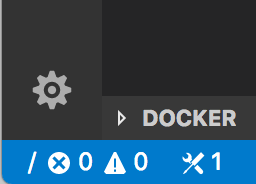
It doesn't stop debugging when I click "Stop debugging", so I an unable to perform the last part of step 4. I keep quitting the app (command-q) in order to get debugging to stop, but no logs are written after this. I also tried using "--engineLogging=/Users/dane/Desktop/vsdbg-ui.log", but no logs were written using that method either.
FWIW: here are
launch.json.txt
settings.json.txt
tasks.json.txt
Let me know if there is anything else I can try!
danechambers
on 12 Dec 2017
I have the same problem with .net core 2.1.2
 xiexin36
on 12 Dec 2017
xiexin36
on 12 Dec 2017
I have the same issue.
build task won't end/terminate/complete.
Focusing on the terminal, and pressing Ctrl + C will terminate it manually, and debug session starts promptly.
 Systemic33
on 12 Dec 2017
Systemic33
on 12 Dec 2017
I updated my Mac to the latest of everything (VS Code, CLI, OS) and I can also reproduce this problem.
It looks like a VS Code issue -- VS Code thinks the build task didn't finish even though it did. I tried the VS Code Insiders channel and the problem went away, so I am guessing this is something that they have already fixed.
So I believe there are three possible work around:
- Install Insiders Channel
-or- - Edit your launch.json and comment out the
"preLaunchTask": "build"line. If you do this you will now need to build from the command line (project will not automatically rebuild as part of start debugging).
-or- - Go to the terminal and hit the enter key at the end of the build
gregg-miskelly
on 12 Dec 2017
Here is the VS Code issue: https://github.com/Microsoft/vscode/issues/37846
gregg-miskelly
on 12 Dec 2017
Related issues
 ZeldaZocker
·
3Comments
ZeldaZocker
·
3Comments
 tstivers1990
·
3Comments
tstivers1990
·
3Comments
 Alumniminium
·
3Comments
Alumniminium
·
3Comments
 greghroberts
·
3Comments
greghroberts
·
3Comments
 olfek
·
3Comments
olfek
·
3Comments