Omnisharp-vscode: Editor's Bracket styling C# seems to be only following JavaScript style bracket-styling
Repost on a closed issue in https://github.com/Microsoft/vscode/issues/29314
Spotted by @binnysenpai
Apparently, the Editor only follow JavaScript-style bracket-styling for the autobracket formatting for C#/C++ files.
Usually in Visual Studio, this would be autoomaticaly formatted by automatically newline the opening bracket and put the statement after the line.
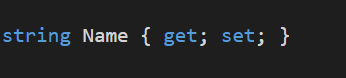
And also it seems not to format automatically this type of statements
Which should look like this
Environment data
dotnet --info output:
.NET Command Line Tools (1.0.0-preview2-003121)

Product Information:
 Version:            1.0.0-preview2-003121
 Commit SHA-1 hash:  1e9d529bc5

Runtime Environment:
 OS Name:     Windows
 OS Version:  10.0.14393
 OS Platform: Windows
 RID:         win10-x64
VS Code version: 1.13.1
C# Extension version: 1.10.0
 sr229
sr229
All 16 comments
Hi! Thanks for reporting this issue. We'd definitely like to improve formatting in these particular cases to better match Visual Studio's behavior. Note that you can press Alt+Shift+F to format the current document, which should force the proper formatting.
 DustinCampbell
on 26 Jun 2017
DustinCampbell
on 26 Jun 2017
I have the same issue. Upon forcing formatting it works and using formatOnSave it also works. But not using formatOnType. I find myself saving every block or manually fixing it.
 DanielKorsah
on 29 Aug 2017
DanielKorsah
on 29 Aug 2017
@akshita31 Can you take a look at this one too?
 rchande
on 30 Nov 2017
rchande
on 30 Nov 2017
Any new solution for this problem? Still have it with 1.19.
 xky0007
on 5 May 2019
xky0007
on 5 May 2019
I've got this issue also. Only thing that works for me is format on save. Paste doesn't even format. This affects all formatting extensions not just the C# one.
 DanJ210
on 15 Nov 2019
DanJ210
on 15 Nov 2019
This small thing is making me considering going back to VS
 T0uchM3
on 18 Jan 2020
T0uchM3
on 18 Jan 2020
Any updates on this?
 Ashen-Vaults
on 13 Feb 2020
Ashen-Vaults
on 13 Feb 2020
Would like to voice my support for this. That's one of the few things keeping me from going permanent VS Code for C# development.
 jrovny
on 24 Feb 2020
jrovny
on 24 Feb 2020
Looks like this is slated for 1.18 so we finally might see this in that release.
sr229
on 2 Mar 2020
I am on omnisharp 1.22.1 over vscode 1.46.0 and still seeing this issue. I don't like to be rude but the frustration is unbelievable over such a simple function.
 pengshao82
on 17 Jun 2020
pengshao82
on 17 Jun 2020
I understand the frustration but this is blocked by an issue in VS Code https://github.com/Microsoft/vscode/issues/40235
 filipw
on 17 Jun 2020
filipw
on 17 Jun 2020
Thanks filipw. It is really sad that such a simple bug is taking them this long to respond.
pengshao82
on 17 Jun 2020
and instead they're trying to figure out how to replace the term master with something that won't offend people of color, and any other similar derogatory terms that have nothing to do with their history in the context of programming but oh well, variable and project names are more important than functionality ---- On Wed, 17 Jun 2020 13:12:32 -0500 [email protected] wrote ----
Thanks filipw. It is really sad that such a simple bug is taking them this long to respond.
—You are receiving this because you were mentioned.Reply to this email directly, view it on GitHub, or unsubscribe.
 binn
on 17 Jun 2020
binn
on 17 Jun 2020
To be fair to the VS code team, no one is giving them any feedback that it is important. If you're interested in getting this resolved, please follow up on the VS Code blocking issue - https://github.com/microsoft/vscode/issues/40235
 vcipriani
on 17 Jun 2020
vcipriani
on 17 Jun 2020
I suggest leaving politics out of this @binn. This does not concern OmniSharp in any way at all.
sr229
on 30 Jun 2020
@vcipriani I asked for an update on microsoft/vscode#40235 - is this the only blocker for this feature?
sr229
on 9 Aug 2020
Related issues
 ZeldaZocker
·
3Comments
ZeldaZocker
·
3Comments
 slevengood
·
3Comments
slevengood
·
3Comments
 jrmcdona
·
3Comments
jrmcdona
·
3Comments
 kiminuo
·
3Comments
kiminuo
·
3Comments
 gregg-miskelly
·
3Comments
gregg-miskelly
·
3Comments
Most helpful comment
This small thing is making me considering going back to VS