Omnisharp-vscode: Errors in output window do not get source links
Environment data
dotnet --info output:
.NET Command Line Tools (1.0.0-rc4-004769)

Product Information:
 Version:            1.0.0-rc4-004769
 Commit SHA-1 hash:  9cf4e9d1d0

Runtime Environment:
 OS Name:     Windows
 OS Version:  10.0.14393
 OS Platform: Windows
 RID:         win10-x64
 Base Path:   C:\Program Files\dotnet\sdk\1.0.0-rc4-004769
VS Code version: 1.9.0
C# Extension version: 1.6.2
Steps to reproduce
- dotnet new console
- dotnet restore
- Edit program.cs and make a deliberate error
- code .
- Ctrl+Shift+B
- Configure build task -> .NET Core
- Ctrl+Shift+B again
- Look at output window
Expected behavior
I can click on each of the errors in the output window and go to the relevant source.
Actual behavior
I can't click on the errors because they have project-relative paths.
Workaround
Set <GenerateFullPaths>true</GenerateFullPaths> in csproj.
Notes
Visual Studio arranges to have full paths in its output window, but VS code does not.
Related: dotnet/sdk#823
 nguerrera
All 39 comments
Is there a step missing here? There needs to be a tasks.json file present for Ctrl+Shift+B to work.
 DustinCampbell
on 7 Feb 2017
DustinCampbell
on 7 Feb 2017
Sorry, that was from memory. It prompted me to add necessary files and I said yes.
nguerrera
on 7 Feb 2017
Cool. Just wanted to check and make sure it didn't happen some other way. This is pretty easily solved.
DustinCampbell
on 7 Feb 2017
I've updated the steps.
nguerrera
on 7 Feb 2017
Thanks for finding the duplicate @akshita31 , I'll look for a fix (unless you want to :) )
 rchande
on 21 Feb 2018
rchande
on 21 Feb 2018
so...on a mac, is this expected behavior, and the line for full paths only on a mac fixes the problem? The issue i logged 2045 has been closed though it really doesn't seem like a duplicate of my issue as it relates to warning messages being duplicated??
i'm not real clear on the resolution or just that it's an on going issue. please advise and thank you.
 CoderJason123
on 22 Feb 2018
CoderJason123
on 22 Feb 2018
@rchande: The right fix is to update the tasks.json generation to include /p:GenerateFullPaths=true.
DustinCampbell
on 28 Feb 2018
I my case, my build is done by a .bat file
Because we can not chain tasks in the launch.json file.
Using a build file, the error persists.
And yes I have the argument on the build line in my .bat file
dotnet build /property:GenerateFullPaths=true
I have to do this because I have to copy dll's for the application to work.
The day the launch.json file will execute tasks successively, then the workaround will work in my case.
 Xarkam
on 2 Mar 2018
Xarkam
on 2 Mar 2018
So it turns out that VS output window has the same problem (but you can use error list to double click there) for .NET Core projects, but not classic projects. I could swear I checked that when I filed this bug, but @Pilchie doesn't think it's a regression. I am thinking maybe we should just change the default behavior for sdk-based projects to GenerateFullPaths=true.
nguerrera
on 10 Mar 2018
I'm seeing this issue in the Problems window after a build. Is that the same as this case?
 WhatFreshHellIsThis
on 5 Jun 2018
WhatFreshHellIsThis
on 5 Jun 2018
@WhatFreshHellIsThis Likely the same issue. Can you try setting the property as described in the first post of this issue?
rchande
on 5 Jun 2018
@rchande Yes! That fixed it, thank you. For any future readers flailing around the setting referred to in the first post needs to go into a <PropertyGroup>
WhatFreshHellIsThis
on 5 Jun 2018
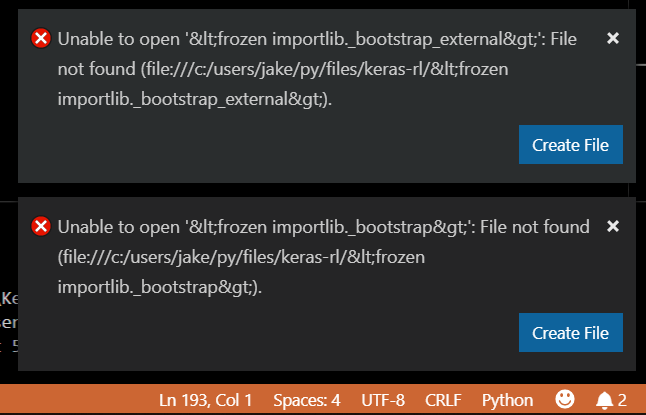
Having similar issue. Running python and step tracing with F11/F10. Running (F5) without the step trace works fine.
What is the fix? Where is the fix?
 jarlva
on 18 Dec 2018
jarlva
on 18 Dec 2018
@jheffez Since you're working with Python, I recommend filing an issue against Python for VS Code. This is the repo for the C# extension.
rchande
on 18 Dec 2018
The problem relates to using MS python language support. Since I disabled it I get much less of the errors above. Even better, the horrible VSCode memory leak is gone.
MS python language server support needs a lot of work....
jarlva
on 7 Jan 2019
I'm getting this very often as well. I can try the workaround, is there any downside to it?
Also, is this something I'll have to memorize and start adding to all projects from here on out? Or is this temporary because a solution is being worked on?
 DanJ210
on 19 Jun 2019
DanJ210
on 19 Jun 2019
Any news about this issue? It is very uncomfortable go to file:line by manual file open with navigate to line instead double click to message (using vs code Explorer files opens without problems and it really exist).
How I see this issue exist on internet more than 2 years already (((
Error is the same: Unable to open 'XXX.cs': File not found ("file://XXX.cs").
Where XXX- is file name without extension.
If I click to Create then it will be created in root folder (/XXX.cs) instead file path defined in project (e.g. /home/qqq/some_path/XXX.cs).
VS Code version: 1.31.1
OS: Ubuntu 14.04, Ubuntu 18.04.2
 morden2k
on 21 Jun 2019
morden2k
on 21 Jun 2019
How I see this issue exist on internet more than 2 years already
There's a trivial workaround in my original bug report. Did you try it?
nguerrera
on 21 Jun 2019
@nguerrera I guess I'm surprised that there's a workaround for this and not an actual fix yet. Which is what the user above meant by two years and no fix yet. Just a workaround.
DanJ210
on 21 Jun 2019
Set
<GenerateFullPaths>true</GenerateFullPaths>in csproj.
For those of us who are not proficient with .csproj files, this means adding <GenerateFullPaths>true</GenerateFullPaths> in the the top-most <PropertyGroup> element.
 roa-nyx
on 21 Jun 2019
roa-nyx
on 21 Jun 2019
I'm not speaking for the maintainers, but sometimes things which are trivial to achieve with a tweak to a project are naturally lower priority. As the original reporter here, I understand that.
nguerrera
on 21 Jun 2019
@nguerrera That's understandable from one very limited point of view certainly however keep in mind that from every single end users point of view who are trying the software for the first time they will all commonly see a major broken aspect of a very important and commonly used part of the UI and either stop using it, live with obviously broken functionality or be forced to go hunting for a resolution. though the workaround is "trivial" that's ignoring the end user and not respecting their time. This kind of bug should have a pretty high priority attached to it in the normal course of software development, maybe a priority only one level down from actually losing data so it's understandably inexplicable to anyone not involved in the decision making to see something this serious languish for so long.
WhatFreshHellIsThis
on 21 Jun 2019
I filed this bug as an end user. It frustrated me too and took me a while to figure out. I do think it should be fixed. I too am disappointed it isn't, but also empathize with some things getting delayed by everything else going on.
I'm not a maintainer of this project and I don't speak for them, but "how can this not be fixed for [time period]" really bothers me in general. Developers on a project have many competing responsibilities, and I don't think it's fair to point at one issue that's not yet fixed and say that is disrespectful. Nobody is actively avoiding fixing things. It's just other things filling available time so far.
nguerrera
on 21 Jun 2019
Correction: I see that this was originally reported to me by a customer. I remembered wrong. Sorry for misrepresenting that.
nguerrera
on 21 Jun 2019
I think I'll make a change in the 3.0 sdk to make full paths the default. Historically, this was something VS handled but in a world of multiple IDEs, it seems reasonable to me now to pick the most qualified output by default.
nguerrera
on 21 Jun 2019
Thanks @nguerrera and all for the thoughtful discussion. We'll do our best to prioritize this.
rchande
on 24 Jun 2019
Gotta imagine too the amount of users who don't take the time to report feedback. They just use something else.
DanJ210
on 24 Jun 2019
@DanJ210 I'd also like to point out that this is open source software--you're more than welcome to create pull requests to address issues you feel aren't getting enough traction :).
rchande
on 24 Jun 2019
@rchande I hear you, I'm a huge Microsoft fan and VS Code fan. I support and I understand work is work. I'm not giving any flak for issues especially when I'm a dev myself. If I could help I would but I'm afraid I'm probably not advanced enough yet. Perhaps one day I will be able to. The VS Code team is also pushing out highly advanced features within updates quite often so an issue like this that could drive users away would be something I would think would be top of the backlog after a few months let alone a year.
But I mean no disrespect when I say any of the above. I love the product, I love using it, and I dealt with the issue all this time. I'm only reporting it now in hopes to get it some attention in case not many people are taking the time to report it. I would love for it to keep gaining the user base and love that it's been getting.
DanJ210
on 24 Jun 2019
Another solution is to change the problemMatcher in the tasks.json to "$tsc". I noticed that if you generate the tasks.json using the "Required Assets to debug..." prompt when you first open the project, ths issue doesnt come up as the problem matcher is "$tsc" there.
 akshita31
on 28 Jun 2019
akshita31
on 28 Jun 2019
The template that is being used here is shipped as part of vscode: https://github.com/microsoft/vscode/blob/35523f6c51bdc1edae1696a586dadd021fe47096/src/vs/workbench/contrib/tasks/common/taskTemplates.ts#L30. So probably the right change is to either:
- Append /p:GenerateFullPaths=true in the "dotnet build" line in the template
- Use the problem matcher as "$tsc"
Thoughts @rchande ?
akshita31
on 28 Jun 2019
Further analysis, the tsc problem matcher assumes that the file paths are relative and the mscompile problem matcher assumes that the paths are absolute. However mscompile is the correct "out-of-the-box" compiler for C#. Hence we should append the /p:GenerateFullPaths=true in the "dotnet build" line in the template and keep using the mscompile problem matcher. It is already done in the msbuild task so I will do it in the dotnet task also.
https://code.visualstudio.com/docs/editor/tasks#_processing-task-output-with-problem-matchers
akshita31
on 29 Jun 2019
https://github.com/microsoft/vscode/pull/76318. This is the PR in vscode with the change to the build templates.
akshita31
on 29 Jun 2019
However this makes me wonder if we should have the dotnet build templates only with the C# extension, however I dont know if that is completely possible.
akshita31
on 29 Jun 2019
Cool, so does this mean that future projects generated with VS Code will have the GenerateFullPaths=true setting in them?
And thanks @akshita31
DanJ210
on 1 Jul 2019
@DanJ210 A part of the problem is fixed. Now when the extension prompts you to add the assets for debugging, the tasks.json added will do the right thing. However the part where we use Ctrl+Shift+B and have some build tasks prompted, comes from vscode and I have created a PR to change that, however the earliest that can be available will be the July vscode release.
akshita31
on 1 Jul 2019
The extension release should be out in a few days though
akshita31
on 1 Jul 2019
Thank you @akshita31 very informative. I appreciate the awesome product no doubt and July is no time at all.
DanJ210
on 5 Jul 2019
This is fixed and merged in the extension and in vscode and should be available in the next releases.
akshita31
on 2 Aug 2019
Related issues
 hamhub7
·
3Comments
hamhub7
·
3Comments
 slevengood
·
3Comments
slevengood
·
3Comments
 rucka
·
4Comments
rucka
·
4Comments
 olfek
·
3Comments
olfek
·
3Comments
 Alumniminium
·
3Comments
Alumniminium
·
3Comments
Most helpful comment
@rchande Yes! That fixed it, thank you. For any future readers flailing around the setting referred to in the first post needs to go into a
<PropertyGroup>