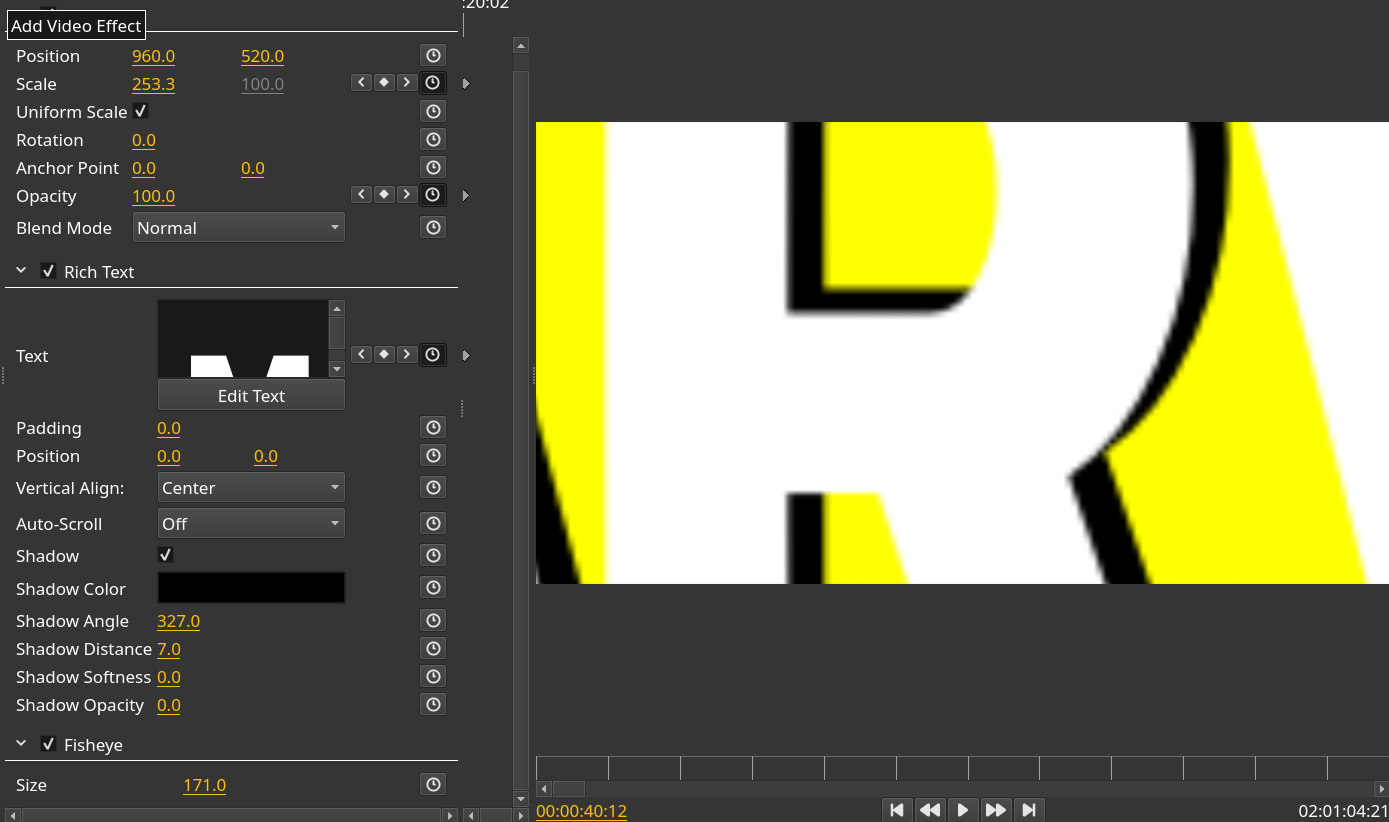
Olive: "Fish eye" video effect blur even generated text content
System Information
Olive version: Olive (March 2019 | Alpha | 35e0cb4)
Source: AppImage
Operating system: OpenSUSE 15 - 64 bits
CPU: Intel Core i5-6600K @ 3.50GHz
RAM: 16 GiB
GPU: NVIDIA Geforce GTX 1050 Ti 4GB (Driver ver 418.56)
Detailed Description
When using multiple video effects over a "Title", the "Fish" effect blur the text.
Update: It happens with other video effects like "Sphere" and others that simulates lenses.
Steps to reproduce
- Add video track
- Add a "Title" track and then add to it next video effects:
- A "Transform", to scale the text from 13 to 283
- A "Rich text", to add a single shadow not blurred to the text (131px font size)
- A "Fish eye", size 171
The blurred text is very clear at 231 scale factor.
 RafaelLinux
All 7 comments
I'm not sure what the issue is here, scaling up an image will cause blurriness, including an image generated by a text effect
 itsmattkc
on 19 Apr 2019
itsmattkc
on 19 Apr 2019
The fact of using vector based elements (like fonts or SVG elements) is precisely to get them scaled or distorted without losing definition (sharpness). Usually, if I don't need to distort my text or vector element, I'll raster it before insert it to my project. So I think the issue is that video effects rasterize in some stage vector based elements and the collateral effect is that they appears finally blurred.
RafaelLinux
on 19 Apr 2019
The text is a vector, but the frame it's rendered onto is very much a raster.
 benrob0329
on 19 Apr 2019
benrob0329
on 19 Apr 2019
Olive doesn't have any vector support, by the time the image leaves the text effect, it's a raster. Even if the text was, let's say, OpenGL polygons, all the effects are fragment/pixel shaders and don't warp vertices. Sorry to say, but most vector-based graphics operations are out of scope for Olive at this time.
itsmattkc
on 20 Apr 2019
Thank you itsmattkc. I wish in the future Olive can consider vector-based graphics operations to get better quality results.
RafaelLinux
on 21 Apr 2019
This moves into the realm of resolution independence. As the text effect is rastering at a 1:1 resolution to the output- yet the effect is zooming into the text layer, breaking the 1:1 resolution.
Rastering at a greater resolution may solve this issue for now, however working out a dynamic system to work out the best resolution is not going to be easy.
Possibly the effects that raster can have a resolution factor?
 alcomposer
on 21 Apr 2019
alcomposer
on 21 Apr 2019
I'm sure it will not be easy, as you write, but I understand that if Olive pretends to be a professional/better alternative to actual opensource alternatives, should implement features that makes the difference, and this one of do not loose sharpness when working with vector based elements is one of them. An older, but harder to learn, video editor as KDEnlive, let me do upscaling operations without loosing sharpness.
RafaelLinux
on 22 Apr 2019
Related issues
 malnaanah
·
17Comments
malnaanah
·
17Comments
 elsandosgrande
·
21Comments
elsandosgrande
·
21Comments
 Chadt54
·
35Comments
Chadt54
·
35Comments
 naj59
·
33Comments
naj59
·
33Comments
 LeandroStanger
·
25Comments
LeandroStanger
·
25Comments
Most helpful comment
Olive doesn't have any vector support, by the time the image leaves the text effect, it's a raster. Even if the text was, let's say, OpenGL polygons, all the effects are fragment/pixel shaders and don't warp vertices. Sorry to say, but most vector-based graphics operations are out of scope for Olive at this time.