Hi,
In collaboration with @alcomposer we are developing a set of custom cursors.
This thread is just opened to discuss what tools need a custom cursor, design, implementation, etc.
By now they are being developed under this branch, if you help like helping us start by sharing a words with us here.
Here you have a preview of the first cursors designed:
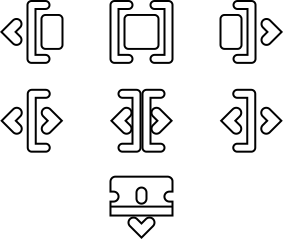
I hope this feature is soon pulled to master but in the meantime it's a good solution to have this thread as a hub for opinions, conversation, etc.
 pgilfernandez
All 15 comments
I wonder if it's a good idea for the razor tool to have a downward arrow? What are peoples thoughts on that? Would the razer tools horizontal alignment (the way it is) be center, or to the left?
 alcomposer
on 17 Feb 2019
alcomposer
on 17 Feb 2019
Good point!
Actually I included it because I usually find this icon in other editors to be confusing, I mean, it’s not clear where is the cutting point...
I would suggest to add something that makes it clear like the arrow, a simple line, point (or colored)...
pgilfernandez
on 17 Feb 2019
KDEnlive uses scissors for the icon and has a red line on the timeline item to indicate where it's cutting.
 elsandosgrande
on 17 Feb 2019
elsandosgrande
on 17 Feb 2019
I have added a new option for the "razor tool" cursor, now we have:
 or
or 
Opinions?
pgilfernandez
on 17 Feb 2019
Currently there is a line that is drawn onto the currently active clip when using the razor tool in the timeline.
I think that it is clearer, (at least for me) to have the razor tool offset, like Premier, Resolve & FCPX do. I really like the razor cursor without the arrow, or red line.
Premier Pro razor tool example

It may also be interesting to have different states for the icons. For example the tool icon can turn red when activated?
I really like the slip & drag tool designs.
alcomposer
on 17 Feb 2019
Oh, that's a good point.
I have just uploaded a third option without any arrow or line, it seems the best option so far.
>
It may also be interesting to have different states for the icons. For example the tool icon can turn red when activated?
Yes, I have also thought about that but with the "hand tool": an open hand when moving the pointer around and a closed hand when moving.
I really like the slip & drag tool designs.
Thanks!
pgilfernandez
on 17 Feb 2019
The one good thing about having the razor tool at an angle, (like PP above) is that a user can clearly see where the edit point is, (even more so than having the tool offset and straight).
However, one of the main reasons to have consistent icons/cursors is so they are consistent. So whatever the razor tool looks, it should be the same look and feel of the tool icon.
alcomposer
on 18 Feb 2019
Hey these are pretty good. As far as the razor tool goes, I agree that a Premiere-like angle with the line on the left side might be good. I think that might be clearer than having a line in the middle.
 itsmattkc
on 18 Feb 2019
itsmattkc
on 18 Feb 2019
Here is a super quick setup for @pgilfernandez's new tool icons. I have had to resize them in the loader to 24pix, if anyone wants to play with that, simply comment out, or change the values at 24,24:
temp = temp.scaled(24,24,Qt::IgnoreAspectRatio, Qt::SmoothTransformation);
to:
//temp = temp.scaled(24,24,Qt::IgnoreAspectRatio, Qt::SmoothTransformation);
In the file cursors.cpp
https://github.com/alcomposer/olive/tree/my_custom_cursors
Please note, that the branch is called my_custom_cursors only because I was working on it on my machine, I'm not saying they are *my" cursors. :-)
Also just noticed (Hopefully I am wrong) that currently Olive doesn't have a Roll edit. This tool I think should be in the default set (with pointer, left trim, right trim) and be activated when a user positions their mouse over a connected edit point. (From what I can see, Resolve cheats and simply changes the cursor to Roll edit tool whenever the mouse gets too close to any edit point - connected or not) I don't see an issue with this behaviour.
Currently on this branch I haven't connected up the Roll edit cursor.
alcomposer
on 18 Feb 2019
There used to be a rolling edit tool (there are still artifacts of it in the code), but I realized the pointer tool does more or less the same thing being able to overwrite other clips. I'm okay with "cheating" by doing the same behavior but showing a different cursor if that improves clarity for the user.
itsmattkc
on 18 Feb 2019
I made a new request for Roll edit here #529
alcomposer
on 19 Feb 2019
@itsmattkc as per the size of the pointer, what is a good way to take into account HiDPI screens?
alcomposer
on 19 Feb 2019
@alcomposer The most platform-independent way I've found is to multiply by QApplication::desktop()->devicePixelRatio().
itsmattkc
on 19 Feb 2019
Are these ready to be merged? I'm happy to start implementing them if so.
itsmattkc
on 26 Feb 2019
@itsmattkc:
Hey these are pretty good. As far as the razor tool goes, I agree that a Premiere-like angle with the line on the left side might be good. I think that might be clearer than having a line in the middle.
Currently the center razor cursor is implemented? Should this not be the edge razor? (as left aligned)
alcomposer
on 9 Mar 2019
Related issues
elsandosgrande
·
21Comments
 zakaria-chahboun
·
21Comments
zakaria-chahboun
·
21Comments
 frink
·
16Comments
itsmattkc
·
18Comments
frink
·
16Comments
itsmattkc
·
18Comments
 Symbian9
·
23Comments
Symbian9
·
23Comments