Okhttp: java.net.SocketTimeoutException from HTTP/2 connection leaves dead okhttp clients in pool
Tried writing a unit test w/ TestButler on Android w/ no luck, so I'll write up the steps to reproduce this and include some sample code. This happens if you connect to an HTTP/2 server and your network goes down while the okhttp client is connected to it:
1) create an okhttp client
2) tell it to read from the HTTP/2 server
3) bring the network down
4) tell it to read from the HTTP/2 server (it'll get a SocketTimeoutException)
5) bring the network back up
6) tell it to read from the HTTP/2 server again (it'll be stuck w/ SocketTimeoutExceptions)
7) if you create new http clients at this point, it'll work, but the dead http client will eventually come back in the pool and fail.
okhttp client should attempt to reopen the HTTP/2 connection instead of being stuck in this state
Code sample for Android (create a trivial view w/ a button and a textview):
public class MainActivity extends AppCompatActivity {
    OkHttpClient okhttpClient = new OkHttpClient();

    @Override
    protected void onCreate(Bundle savedInstanceState) {
        super.onCreate(savedInstanceState);
        setContentView(R.layout.activity_main);

        Button loadButton = (Button) findViewById(R.id.loadButton);
        TextView outputView = (TextView) findViewById(R.id.outputView);

        loadButton.setOnClickListener(view -> Observable.fromCallable(() -> {
                    Request request = new Request.Builder()
                            .url(<INSERT URL TO YOUR HTTP/2 SERVER HERE>)
                            .build();

                    Response response = okhttpClient.newCall(request).execute();

                    return response.body().string();
                })
                .subscribeOn(Schedulers.io())
                .observeOn(AndroidSchedulers.mainThread())
                .subscribe(outputView::setText, t -> outputView.setText(t.toString()))
        );
    }
}
 kenyee
All 111 comments
FYI, we found a workaround...set the connectionPool in the builder so it uses a new connection pool w/ a size of zero and also turn off HTTP/2 support by setting a new protocolList in the builder with only HTTP/1.1 support.
kenyee
on 31 Jan 2017
You’re using 3.6.0?
 swankjesse
on 31 Jan 2017
swankjesse
on 31 Jan 2017
yep...3.6.0 unfortunately. Thought about rolling back to pre-http/2 support but that would mean 2.2 which is too far back because of all the okhttp3 dependencies :-(
kenyee
on 31 Jan 2017
Oh that's terrible. We've had problems with similar failures before but I thought we'd fixed ’em all. If you can make a test case that'd be handy, otherwise I'll try to look soon.
In the interim you can disable HTTP/2 with the protocols list in the OkHttpClient.Builder.
swankjesse
on 1 Feb 2017
Correct me if I'm wrong, but I think part of this is working as expected. HTTP/2 connections can carry N outstanding requests. If one of those requests times out and the HTTP/2 connection is closed, then the other N - 1 requests are also lost. I think the intent is that for HTTP/2 connections, a timeout does not necessarily mean the connection is bad.
Is it surprising to 'bring the network down' and not receive any sort of socket exception reading or writing?
 dave-r12
on 1 Feb 2017
dave-r12
on 1 Feb 2017
N-1 requests being lost is fine if the connection is down.
The issue is that it doesn't recover when you bring the network back up...i.e., the broken idle connection objects are in the pool stay there and when you try connecting again, you can't connect until the user kills off your app to restart everything...
kenyee
on 1 Feb 2017
@swankjesse : I couldn't figure out how to write a test for this because making all the sockets disconnected was happening at at an OS level. Tried to write and Android Test Butler one (to flip the network switch on/off on an Android emulator) but the current version of that has issues and probably wouldn't work in this code base :-)
kenyee
on 1 Feb 2017
So our attempts to write to the socket are failing silently? Might need to steal the automatic pings that we added for web sockets.
swankjesse
on 1 Feb 2017
Essentially...not that they're failing silently, but they're dead sockets and they're stuck in the pool. We traced through a bit of the code and saw some code that was pulling the a dead socket out of the pool each time it tried to use one which should have cleared things up after 5 dead sockets were pulled out but the network layer still appeared stuck unless we purged the pool w/ evictAll() or waited for the 5 min eviction timeout. Wasn't obvious what a proper fix was...
HTTP/2 essentially behaves like web sockets so you're probably on the right track...
kenyee
on 1 Feb 2017
Pretty sure this issue is another manifestation of this one:
 laurencedawson
on 2 Feb 2017
laurencedawson
on 2 Feb 2017
I'm sure it's not. We don't see any SSL Handshake exceptions.
This bug is actually probably two bugs because we had to disable the connection pool and the HTTP/2 support. #3118 might be affected by the connection pool bug (it doesn't clear the broken idle connection objects in the pool).
kenyee
on 2 Feb 2017
I've seen what you've described but then also the ssl exceptions. Same steps to reproduce as you outlined.
laurencedawson
on 2 Feb 2017
any updates? I've same issue
 aheliver
on 6 Feb 2017
aheliver
on 6 Feb 2017
The workaround I described works in our QA testing so far :-)
kenyee
on 6 Feb 2017
@kenyee setting new pool works, but I wonder when an update will arrive?
aheliver
on 6 Feb 2017
Is this issue resolved? I ran into the same issue using 3.5.0. I am using OkHttp to send push to Apple http/2. Yesterday I had this issue resulting in almost 80k push messages not getting delivered.
Caused by: java.net.SocketTimeoutException: timeout
at okhttp3.internal.http2.Http2Stream$StreamTimeout.newTimeoutException(Http2Stream.java:587) ~[okhttp-3.5.0.jar:?]
at okhttp3.internal.http2.Http2Stream$StreamTimeout.exitAndThrowIfTimedOut(Http2Stream.java:595) ~[okhttp-3.5.0.jar:?]
at okhttp3.internal.http2.Http2Stream.getResponseHeaders(Http2Stream.java:140) ~[okhttp-3.5.0.jar:?]
at okhttp3.internal.http2.Http2Codec.readResponseHeaders(Http2Codec.java:115) ~[okhttp-3.5.0.jar:?]
at okhttp3.internal.http.CallServerInterceptor.intercept(CallServerInterceptor.java:54) ~[okhttp-3.5.0.jar:?]
at okhttp3.internal.http.RealInterceptorChain.proceed(RealInterceptorChain.java:92) ~[okhttp-3.5.0.jar:?]
at okhttp3.internal.connection.ConnectInterceptor.intercept(ConnectInterceptor.java:45) ~[okhttp-3.5.0.jar:?]
at okhttp3.internal.http.RealInterceptorChain.proceed(RealInterceptorChain.java:92) ~[okhttp-3.5.0.jar:?]
at okhttp3.internal.http.RealInterceptorChain.proceed(RealInterceptorChain.java:67) ~[okhttp-3.5.0.jar:?]
at okhttp3.internal.cache.CacheInterceptor.intercept(CacheInterceptor.java:93) ~[okhttp-3.5.0.jar:?]
at okhttp3.internal.http.RealInterceptorChain.proceed(RealInterceptorChain.java:92) ~[okhttp-3.5.0.jar:?]
at okhttp3.internal.http.RealInterceptorChain.proceed(RealInterceptorChain.java:67) ~[okhttp-3.5.0.jar:?]
at okhttp3.internal.http.BridgeInterceptor.intercept(BridgeInterceptor.java:93) ~[okhttp-3.5.0.jar:?]
at okhttp3.internal.http.RealInterceptorChain.proceed(RealInterceptorChain.java:92) ~[okhttp-3.5.0.jar:?]
at okhttp3.internal.http.RetryAndFollowUpInterceptor.intercept(RetryAndFollowUpInterceptor.java:120) ~[okhttp-3.5.0.jar:?]
at okhttp3.internal.http.RealInterceptorChain.proceed(RealInterceptorChain.java:92) ~[okhttp-3.5.0.jar:?]
at okhttp3.internal.http.RealInterceptorChain.proceed(RealInterceptorChain.java:67) ~[okhttp-3.5.0.jar:?]
at okhttp3.RealCall.getResponseWithInterceptorChain(RealCall.java:179) ~[okhttp-3.5.0.jar:?]
at okhttp3.RealCall.execute(RealCall.java:63) ~[okhttp-3.5.0.jar:?]
After I got this error, none of my other requests succeeded.
Code:
```
KeyStore ks = KeyStore.getInstance("PKCS12");
ks.load(new ByteArrayInputStream("/foo/bar/mycert"), password.toCharArray());
KeyManagerFactory kmf = KeyManagerFactory.getInstance(KeyManagerFactory.getDefaultAlgorithm());
kmf.init(ks, password.toCharArray());
KeyManager[] keyManagers = kmf.getKeyManagers();
SSLContext sslContext = SSLContext.getInstance("TLS");
final TrustManagerFactory tmf = TrustManagerFactory.getInstance(TrustManagerFactory.getDefaultAlgorithm());
tmf.init((KeyStore) null);
sslContext.init(keyManagers, tmf.getTrustManagers(), null);
TrustManager[] trustManagers = tmf.getTrustManagers();
if (trustManagers != null && (trustManagers.length != 1 || !(trustManagers[0] instanceof X509TrustManager))) {
throw new IllegalStateException("Unexpected default trust managers:"
+ Arrays.toString(trustManagers));
}
final X509TrustManager trustManager = (X509TrustManager) trustManagers[0];
final SSLSocketFactory sslSocketFactory = sslContext.getSocketFactory();
OkHttpClient.Builder builder = new OkHttpClient.Builder();
builder.connectTimeout(5, TimeUnit.SECONDS).writeTimeout(10, TimeUnit.SECONDS).readTimeout(10, TimeUnit.SECONDS);
builder.connectionPool(new ConnectionPool(3, 10, TimeUnit.MINUTES));
builder.sslSocketFactory(sslSocketFactory, trustManager);
Proxy proxy = new Proxy(Proxy.Type.HTTP, new InetSocketAddress(proxyHost, proxyPort));
builder.proxy(proxy);
OkHttpClient client = builder.build();
```
 servlette
on 16 Mar 2017
servlette
on 16 Mar 2017
As socket timeout exception is an instance of IO exception, I am not sure if the following approach will work.
Can one of you pls get back to me?
I am calling evictAll() in the catch block of IOException.
try {
response = client.newCall(request).execute();
statusCode = response.code();
responseBody = response.body().string();
} catch (IOException ioe) {
client.connectionPool().evictAll();
} finally {
if (response != null) {
response.body().close();
}
}
Also how do we check if a connection is stale or not?
With Apache HttpClient, there is a way to do it to set a flag for checking stale connections.
Wondering how OkHttp3 checks for it internally before it uses the connection.
CloseableHttpClient client = HttpClients.custom().setDefaultRequestConfig(
RequestConfig.custom().setStaleConnectionCheckEnabled(true).build()
).setConnectionManager(connManager).build();
Any updates? I have the same issue too. :(
 b95505017
on 22 May 2017
b95505017
on 22 May 2017
Same issue here!
 teobaranga
on 28 May 2017
teobaranga
on 28 May 2017
We still experiencing the same issue :-(
 ekstro
on 31 May 2017
ekstro
on 31 May 2017
I think i'm seeing another manifestation of this on 3.5.0, when the server forcibly closes the connection.
We try to establish both a h2 and http1.1 connection. The server responds with 200 to both:
06-26 15:07:55.286 22094 22380 I okhttp3.OkHttpClient: --> GET<url> http/1.1
06-26 15:07:55.524 22094 22380 I okhttp3.OkHttpClient: --> GET<url> h2

06-26 15:07:55.596 22094 22380 I okhttp3.OkHttpClient: <-- 200  <url> (71ms)
06-26 15:07:55.597 22094 22380 I okhttp3.OkHttpClient: <-- 200  <url> (303ms)
Then at some point we try to read from the http2 connection, which fails in checkNotClosed and throws a StreamResetException
06-26 15:06:01.560 22094 22126 I MyProject: Caused by: okhttp3.internal.http2.StreamResetException: stream was reset: PROTOCOL_ERROR
06-26 15:06:01.560 22094 22126 I MyProject:     at okhttp3.internal.http2.Http2Stream$FramedDataSource.checkNotClosed(Http2Stream.java:428)
06-26 15:06:01.560 22094 22126 I MyProject:     at okhttp3.internal.http2.Http2Stream$FramedDataSource.read(Http2Stream.java:330)
06-26 15:06:01.560 22094 22126 I MyProject:     at okio.ForwardingSource.read(ForwardingSource.java:35)
06-26 15:06:01.560 22094 22126 I MyProject:     at okio.RealBufferedSource$1.read(RealBufferedSource.java:409)
06-26 15:06:01.560 22094 22126 I MyProject:     at com.google.android.exoplayer.upstream.HttpDataSource.read(HttpDataSourceImpl.java:699)
06-26 15:06:01.560 22094 22126 I MyProject:     at com.google.android.exoplayer.upstream.HttpDataSource.read(HttpDataSourceImpl.java:424)
Then, since this is media, we do something that causes a seek to 0 in the media, which needs to reopen the request from the beginning. At this point, we see the same exception as is posted above:
06-26 15:08:39.387 22094 22126 I MyProject: Caused by: java.net.SocketTimeoutException: timeout
06-26 15:08:39.387 22094 22126 I MyProject:     at okhttp3.internal.http2.Http2Stream$StreamTimeout.newTimeoutException(Http2Stream.java:587)
06-26 15:08:39.387 22094 22126 I MyProject:     at okhttp3.internal.http2.Http2Stream$StreamTimeout.exitAndThrowIfTimedOut(Http2Stream.java:595)
06-26 15:08:39.387 22094 22126 I MyProject:     at okhttp3.internal.http2.Http2Stream.getResponseHeaders(Http2Stream.java:140)
06-26 15:08:39.387 22094 22126 I MyProject:     at okhttp3.internal.http2.Http2Codec.readResponseHeaders(Http2Codec.java:115)
06-26 15:08:39.387 22094 22126 I MyProject:     at okhttp3.internal.http.CallServerInterceptor.intercept(CallServerInterceptor.java:54)
06-26 15:08:39.387 22094 22126 I MyProject:     at okhttp3.internal.http.RealInterceptorChain.proceed(RealInterceptorChain.java:92)
06-26 15:08:39.387 22094 22126 I MyProject:     at okhttp3.internal.http.RealInterceptorChain.proceed(RealInterceptorChain.java:67)
06-26 15:08:39.387 22094 22126 I MyProject:     at okhttp3.logging.HttpLoggingInterceptor.intercept(HttpLoggingInterceptor.java:212)
06-26 15:08:39.387 22094 22126 I MyProject:     at okhttp3.internal.http.RealInterceptorChain.proceed(RealInterceptorChain.java:92)
06-26 15:08:39.387 22094 22126 I MyProject:     at okhttp3.internal.connection.ConnectInterceptor.intercept(ConnectInterceptor.java:45)
06-26 15:08:39.387 22094 22126 I MyProject:     at okhttp3.internal.http.RealInterceptorChain.proceed(RealInterceptorChain.java:92)
06-26 15:08:39.387 22094 22126 I MyProject:     at okhttp3.internal.http.RealInterceptorChain.proceed(RealInterceptorChain.java:67)
06-26 15:08:39.387 22094 22126 I MyProject:     at okhttp3.internal.cache.CacheInterceptor.intercept(CacheInterceptor.java:93)
06-26 15:08:39.387 22094 22126 I MyProject:     at okhttp3.internal.http.RealInterceptorChain.proceed(RealInterceptorChain.java:92)
06-26 15:08:39.387 22094 22126 I MyProject:     at okhttp3.internal.http.RealInterceptorChain.proceed(RealInterceptorChain.java:67)
06-26 15:08:39.387 22094 22126 I MyProject:     at okhttp3.internal.http.BridgeInterceptor.intercept(BridgeInterceptor.java:93)
06-26 15:08:39.387 22094 22126 I MyProject:     at okhttp3.internal.http.RealInterceptorChain.proceed(RealInterceptorChain.java:92)
06-26 15:08:39.387 22094 22126 I MyProject:     at okhttp3.internal.http.RetryAndFollowUpInterceptor.intercept(RetryAndFollowUpInterceptor.java:120)
06-26 15:08:39.387 22094 22126 I MyProject:     at okhttp3.internal.http.RealInterceptorChain.proceed(RealInterceptorChain.java:92)
06-26 15:08:39.387 22094 22126 I MyProject:     at okhttp3.internal.http.RealInterceptorChain.proceed(RealInterceptorChain.java:67)
06-26 15:08:39.387 22094 22126 I MyProject:     at okhttp3.logging.HttpLoggingInterceptor.intercept(HttpLoggingInterceptor.java:212)
06-26 15:08:39.387 22094 22126 I MyProject:     at okhttp3.internal.http.RealInterceptorChain.proceed(RealInterceptorChain.java:92)
06-26 15:08:39.387 22094 22126 I MyProject:     at okhttp3.internal.http.RealInterceptorChain.proceed(RealInterceptorChain.java:67)
06-26 15:08:39.387 22094 22126 I MyProject:     at okhttp3.RealCall.getResponseWithInterceptorChain(RealCall.java:179)
06-26 15:08:39.387 22094 22126 I MyProject:     at okhttp3.RealCall.execute(RealCall.java:63)
this seems to be very similar to the other cases here, which seem to all be related to an ungraceful shutdown of the connection, and it remaining pooled.
I've also confirmed that disabling the ConnectionPool "works around" this issue:
OkHttpClient.Builder clientBuilder = new OkHttpClient.Builder()
            .connectTimeout(connectTimeoutMillis, TimeUnit.MILLISECONDS)
            .retryOnConnectionFailure(true)
            .readTimeout(readTimeoutMillis, TimeUnit.MILLISECONDS).connectionPool(new ConnectionPool(0, 1, TimeUnit.NANOSECONDS));
 jpearl
on 26 Jun 2017
jpearl
on 26 Jun 2017
is thr any update on this issue?
 Kiran89kumar
on 3 Aug 2017
Kiran89kumar
on 3 Aug 2017
Same issue here
 justinuang
on 4 Sep 2017
justinuang
on 4 Sep 2017
any idea if/when this will be fixed? We're seeing the same issue.
 natez0r
on 13 Sep 2017
natez0r
on 13 Sep 2017
@jpearl
I can confirm that disabling ConnectionPool stops getting StreamResetException when it uses HTTP/2.
I'm also using ExoPlayer with OkHttp and in my case, it was happening when my app goes to background. Even if I turn off the Battery Optimizations it was being closed after few minutes in background getting SocketTimeoutException when the player tried to play the next track.
I was thinking to use DefaultHttpDataSource for the requests in the ExoPlayer because it also works without throwing SocketTimeoutException, but by disabling the ConnectionPool for me would better at this moment.
I'll keep it disabled for now until I find a better solution.
OkHttp: 3.8.1
Model: Huawei P9 Lite
OS: 7.1.2
Thanks for sharing this!
 alessandrojp
on 18 Sep 2017
alessandrojp
on 18 Sep 2017
@alessandrojp do you know if the ExoPlayer team is aware of this issue? We've run into it only with exoplayer as well.
natez0r
on 19 Sep 2017
I'm also seeing SocketTimeout / dead client issues with OkHttp and Exoplayer.
 CoryCharlton
on 28 Oct 2017
CoryCharlton
on 28 Oct 2017
evict all connection from connection pool,resolve sockettimeout exception
if(throwable instanceof SocketTimeoutException){
okHttpClient.connectionPool().evictAll();
}
 RohitD07
on 3 Nov 2017
RohitD07
on 3 Nov 2017
I am also facing similar issue.
When my app goes in background and if internet goes off and comes back and after if i come back to the app, nothing loads and even request doesn't go and i get timeout. After that all requests behave same. Please help me in solving this issue.
For now i have put a hack by reading the above thread is that whenever i get IOException i evict all connections from connection pool. This solves the problem but this happens at least once and user sees retry/reload screen.
 samyakjain
on 6 Dec 2017
samyakjain
on 6 Dec 2017
@swankjesse Any news on this?
 NitroXenon
on 14 Jan 2018
NitroXenon
on 14 Jan 2018
We have implemented the described a workaround, but it still causes us to hit the exceptions, which is not ideal. Would love to hear if this will be addressed soon
natez0r
on 16 Jan 2018
Any updates for a fix?
 muhammadsr
on 7 Feb 2018
muhammadsr
on 7 Feb 2018
It would be great to get a fix for this. Any release date?
 auror
on 14 Feb 2018
auror
on 14 Feb 2018
Will implement with this:
https://github.com/square/okhttp/issues/3261
swankjesse
on 18 Feb 2018
Try THIS:
ConnectionSpec spec = new ConnectionSpec.Builder(ConnectionSpec.COMPATIBLE_TLS)
.tlsVersions(TlsVersion.TLS_1_1)
.build();
 Danil4ever
on 25 Mar 2018
Danil4ever
on 25 Mar 2018
@swankjesse could you clarify if this is fixed? The issue you link to references a couple of merged PRs, but it's not obvious if they directly address this issue or not.
 gatesn
on 9 May 2018
gatesn
on 9 May 2018
It is not fixed as far as I can tell.
 kanongil
on 9 May 2018
kanongil
on 9 May 2018
When I checked the fix, it seemed to leave the dead connection in the pool until you try using it which causes an exception to propagate into your code. So after the network comes back up, the user would get a bunch of "could not connect" errors in our app (because it didn't handle retries properly for this case) and then it would work again. We decided to just leave the pool size at zero for now until we can rewrite parts of the code to handle this case.
But at least the zombies don't stay stuck in the pool....
kenyee
on 9 May 2018
okhttp: 3.11
SocketTimeoutException is not fixed still its appears
 williams98
on 25 Jul 2018
williams98
on 25 Jul 2018
it clears out on the second call. It looks like what happens is the pool gets zombie connections. Next time you grab one of the zombies out of the pool, it throws that exception but is removed. The original bug was that the zombies got stuck in the pool.
That said, this isn't great behavior either, so we've just left the pool size at zero...
kenyee
on 25 Jul 2018
I can confirm this is still an issue.
 c0dehunter
on 25 Jul 2018
c0dehunter
on 25 Jul 2018
@c0dehunter try setting a ping interval on your OkHttpClient?
https://square.github.io/okhttp/3.x/okhttp/okhttp3/OkHttpClient.Builder.html#pingInterval-long-java.util.concurrent.TimeUnit-
swankjesse
on 26 Jul 2018
@swankjesse Thanks for quick response. We tried setting pingInterval(1, TimeUnit.SECOND) and it seems it is behaving properly now. I don't want to say it's fixed yet as we need to do more testing, but will report back after a few days.
c0dehunter
on 26 Jul 2018
I also can confirm that that issue is reproducing on okhttp v3.11.0
Looks like setting protocols(listOf(Protocol.HTTP_1_1)) should fix it for now
 ahulyk
on 30 Jul 2018
ahulyk
on 30 Jul 2018
I'm just reporting back and my findings contradict others, so I am really not sure anymore. After updating to the latest version, we have not been able to reproduce this issue
c0dehunter
on 30 Jul 2018
I also reproduce this issue, please found a fix, any suggestion:
 roysG
on 2 Aug 2018
roysG
on 2 Aug 2018
tracking this issue...
 Kyson
on 2 Aug 2018
Kyson
on 2 Aug 2018
Tracking this issue as well.
Here is my client in Android, still failing even after attempting the suggestions that worked for others:
@Provides
@Singleton
    static OkHttpClient provideOkHttpClient() {
        OkHttpClient.Builder client = new OkHttpClient.Builder()
                .protocols(Arrays.asList(Protocol.HTTP_1_1))
                .connectionPool(new ConnectionPool(0, 1,
                        TimeUnit.NANOSECONDS));
        if (!EnvironmentConstants.IS_PRODUCTION) {
            CurlLoggingInterceptor curlLoggingInterceptor = new CurlLoggingInterceptor();
            curlLoggingInterceptor.setCurlOptions("-i");
            client.addNetworkInterceptor(curlLoggingInterceptor)
                    .addInterceptor(chain -> {
                        Request request = chain.request().newBuilder()
                                .addHeader("Accept", "application/json").build();
                        return chain.proceed(request);
                    });
        }
        return client.build();
    }
It is simple to reproduce:
Successfully complete POST request.
Turn on airplane mode. Attempt POST request and fail.
Turn off airplane mode. Attempt POST request. That fails with:
08-06 21:42:02.321 25955-25955/tech.duchess.luminawallet.staging.debug E/SendPresenter: Transaction failed
java.net.SocketTimeoutException: timeout
.
.
.
08-06 21:42:02.323 25955-25955/tech.duchess.luminawallet.staging.debug E/SendPresenter: Caused by: java.net.SocketException: socket is closed
at com.android.org.conscrypt.ConscryptFileDescriptorSocket$SSLInputStream.read(ConscryptFileDescriptorSocket.java:546)
All subsequent transactions continue to fail with the same issue. Restarting my application works fine, presumably due to the new OkHttp client.
Forgot to mention, I'm also on 3.11.0
 Timothy-Duch
on 7 Aug 2018
Timothy-Duch
on 7 Aug 2018
Which version can be fixed?
 Caij
on 8 Aug 2018
Caij
on 8 Aug 2018
You dont need to disable connectionPool, just insert inside your BroadcastReceiver when the network changes the following code
BroadcastReceiver networkStateReceiver = new BroadcastReceiver() {

 @Override
 public void onReceive(Context context, Intent intent) {
     final ConnectivityManager connectivityManager = (ConnectivityManager) context.getSystemService(Context.CONNECTIVITY_SERVICE);
     final NetworkInfo activeNetInfo = connectivityManager.getActiveNetworkInfo();
     if (activeNetInfo != null) {
          //clear here the offline pool when got online
          getInstance().okClient.connectionPool().evictAll();
     }
 }
 };
 IntentFilter filter = new IntentFilter(ConnectivityManager.CONNECTIVITY_ACTION);
 ApplicationLoader.appContext.registerReceiver(networkStateReceiver, filter);
 tucomel
on 12 Aug 2018
tucomel
on 12 Aug 2018
StreamAllocation
 public void streamFailed(IOException e) {
    boolean noNewStreams = false;
    synchronized (connectionPool) {
      if (e instanceof StreamResetException) {

      } else if (connection != null
          && (!connection.isMultiplexed() || e instanceof ConnectionShutdownException)) {
        noNewStreams = true;
      }
      socket = deallocate(noNewStreams, false, true);
      }
  }
if is http 2.0 , on TimeoutException, noNewStreams is false.
ConnectionPool
  boolean connectionBecameIdle(RealConnection connection) {
    if (connection.noNewStreams || maxIdleConnections == 0) {
      connections.remove(connection);
      return true;
    } else {
    }
  }
When TimeoutException, why the connection is not remove ConnectionPool?
Caij
on 31 Aug 2018
There are ways a stream will time out that don't signal a connectivity problem. For example, you could be requesting a resource that the server is taking too long to compute.
swankjesse
on 31 Aug 2018
When the phone is running in the background for a few minutes, the socket is essentially disconnected, but RealConnection.isHealthy() is true, all requests will be TimeoutException at this time, and the connecttion will always be in connection pool, subsequent requests will also be TimeoutException. Must re-kill the app to resolve
Caij
on 3 Sep 2018
@Caij that’s unsatisfying. I’m frustrated that the host OS doesn’t tell us anything when our sockets are effectively zombies. If you need a simple workaround, configure a ping interval. That’ll close connections that are not actually healthy.
swankjesse
on 3 Sep 2018
@swankjesse but i think this is a bad solution(Timed execute ping). I think that if an Exception occurs, this connection big probability is wrong.
you say There are ways a stream will time out that don't signal a connectivity problem. This situation may occur when the ‘read byteCount' is set too large, This situation is very rare.
code:
public long read(Buffer sink, long byteCount) throws IOException {
      long read = -1;
      ErrorCode errorCode;
      synchronized (Http2Stream.this) {
        waitUntilReadable();  //start whatch dog time out
        if (closed) {
          throw new IOException("stream closed");
        }
        errorCode = Http2Stream.this.errorCode;

        if (readBuffer.size() > 0) {
          // Move bytes from the read buffer into the caller's buffer.
          read = readBuffer.read(sink, Math.min(byteCount, readBuffer.size()));
          unacknowledgedBytesRead += read;
        }
}
So I insist that the connection is released when it is TimeoutException.
or There is another way to execute ping in TimeoutException.
Caij
on 6 Sep 2018
Same problem here with every okhttp version
 cioccarellia
on 26 Sep 2018
cioccarellia
on 26 Sep 2018
Same problem here with every okhttp version.
@c0dehunter try setting a ping interval on your OkHttpClient?
https://square.github.io/okhttp/3.x/okhttp/okhttp3/OkHttpClient.Builder.html#pingInterval-long-java.util.concurrent.TimeUnit-
So the interval parameter allows to set the time the server has to respond.
But how often are these ping intervals sent? Or do I have to send them manually?
 shamo42
on 10 Oct 2018
shamo42
on 10 Oct 2018
We use the same interval for both maximum time to respond and period between pings.
swankjesse
on 11 Oct 2018
okhttp: 3.11
SocketTimeoutException is not fixed still its appears
My code throws an SocketTimeoutException every 20 times or so.
 fengbianyun
on 19 Oct 2018
fengbianyun
on 19 Oct 2018
I'm just reporting back and my findings contradict others, so I am really not sure anymore. After updating to the latest version, we have not been able to reproduce this issue
I use 3.11.0,sometimes,it happens again. The probability is very small。
fengbianyun
on 19 Oct 2018
KLog#!2018-10-31 17:38:57.513#!v1#!HttpLogEvent#*call id :721 , callFailed Exception trace :
okhttp3.internal.http2.Http2Stream.waitForIo(SourceFile:602)
okhttp3.internal.http2.Http2Stream.takeResponseHeaders(SourceFile:143)
okhttp3.internal.http2.Http2Codec.readResponseHeaders$___twin___(SourceFile:127)
okhttp3.internal.http2.Http2Codec.access$002(Unknown Source:0)
okhttp3.internal.http2.Http2Codec$_lancet.me_ele_skynet_network_hook_okhttp3_HttpCodecHook_readResponseHeadersV360(Unknown Source:20)
okhttp3.internal.http2.Http2Codec.readResponseHeaders(Unknown Source:0)
okhttp3.internal.http.CallServerInterceptor.intercept(SourceFile:88)
okhttp3.internal.http.RealInterceptorChain.proceed(SourceFile:147)
okhttp3.internal.http.RealInterceptorChain.proceed(SourceFile:121)
me.ele.tnet.b.d.intercept(SourceFile:18)
okhttp3.internal.http.RealInterceptorChain.proceed(SourceFile:147)
okhttp3.internal.http.RealInterceptorChain.proceed(SourceFile:121)
me.ele.skynet.network.hook.a.a.intercept(SourceFile:29)
okhttp3.internal.http.RealInterceptorChain.proceed(SourceFile:147)
okhttp3.internal.http.RealInterceptorChain.proceed(SourceFile:121)
me.ele.timecalibrator.e.intercept(SourceFile:38)
I use 3.11.0,sometimes,it happens again. The probability is very small。
 xujinyang
on 1 Nov 2018
xujinyang
on 1 Nov 2018
We're using okhttp 3.9.0 and started seeing something like this when upgrading our application from Java 8 to Java 11. Downgraded to Java 8 again and the issue went away.
 danielnorberg
on 12 Nov 2018
danielnorberg
on 12 Nov 2018
Is upgrade fix? 3.12.0 still has problem!
 ljying
on 3 Jan 2019
ljying
on 3 Jan 2019
I can confirm that in 3.12.1 this is still an issue. We have a React Native App that strongly depends on react-native-video which depends on OkHttp.
If we hadn't force HTTP 1.1 protocol the app would hang itself after several scrolls through the list with videos.
I kindly ask that this issue should receive more attention.
 platech
on 25 Jan 2019
platech
on 25 Jan 2019
Executable test case please?
swankjesse
on 1 Feb 2019
Degraded Connections
Here’s a proposal for a fix.
When the HTTP/2 reader hasn’t received any frames for 500 ms and a stream times out on a read, we degrade the HTTP/2 connection by setting a new degraded field to true. The stream remains degraded until any data is received. The connection pool will not return degraded connections. Instead it will establish new connections.
When a connection becomes degraded we also send a degraded ping and set a new awaitingDegradedPong field to true. We have at most one degraded ping in flight at a time. The motivation of this ping is to trigger a pong to be received.
500 ms?
Thrashing in and out of the degraded state will be bad for performance if a busy connection has a few bad streams. If the connection has received something within 500 ms, it’s likely a bad stream and not a bad connection.
Interaction with Ping Interval?
The pings here are independent of the OkHttpClient’s pingInterval, if one is set.
Drawbacks
The HTTP/2 code is pretty busy already, and this adds more. Keeping a timestamp of the most recent frame could be particularly annoying. We should use nanoTime(), not currentTimeMillis() for this.
This addresses read timeouts only. We can’t ping our way out of write timeouts; the pings will be queued up behind other outbound data! I need to study this further.
swankjesse
on 9 Mar 2019
@swankjesse Could you please say whether this issue fix is pushed to the 3.12 branch?
 andrewsdv
on 7 May 2019
andrewsdv
on 7 May 2019
Nothing is implemented yet.
swankjesse
on 7 May 2019
@swankjesse Any news on this issue?
I've been having problems with this on mobile data when turning off and on.
I am using retrofit 2.2.0 + okhttp 3.6.0.
Also this is on an Android app.
 ruieduardosoares
on 15 May 2019
ruieduardosoares
on 15 May 2019
I tried to hold a reference to the ConnectionPool and then use a broadcast receiver to listen to a connectivity change, when received a connectivity disconnect event i call connectionPool.evictAll() but that didnt always work because the evictAll() method only removes the connections it they dont have stream allocations.
And the weird thing is that the stream allocations contained a StreamAllocation that has a an Object callstackTrace that as a "Explicit termination method 'response.body().close()' not called" that then is added to a RetryAndFollowUpInterceptor
Not sure if i am suposed to close any response body when using retrofit.
But it is kinda of impossible to close a response from a call when we "try catch" the execute method on retrofit method because we will never hold a reference to the raw response when the IOException is thrown.
ruieduardosoares
on 15 May 2019
We have in our app android newrelic-agent that uses okhttp and we can see in the logs that it also has problems with this socket timeout exception
com.newrelic.agent.android: Failed to send POST to collector: Read timed out
    HarvestConnection: Attempting to convert network exception java.net.SocketTimeoutException to error code
After some debugging e found, (not sure if this helps) the following.
From what i understand this runnable, which is always running while the connection is healthy, reads from Http2Connection BufferSource that then calls a http2reader that interprets the frame in the buffer data that then callsback the handler that is the runnable itseld that then finds a http2stream by id to delegate the correct frame information to.
When turning off and then back on mobile data in android app, this Http2Connection.ReaderRunnable class stopped working, i no longer could breakpoint this runnable.
ruieduardosoares
on 15 May 2019
@ruieduardosoares so its working fine for you now?
 ishwarverma39
on 15 May 2019
ishwarverma39
on 15 May 2019
@ruieduardosoares so its working fine for you now?
No, still nothing.
They have a work around that is "disabling" the ConnectionPool of okhttp client, this way everytime a new request is made a new connection is created.
ruieduardosoares
on 15 May 2019
@ruieduardosoares so its working fine for you now?
No, still nothing.
They have a work around that is "disabling" the ConnectionPool of okhttp client, this way everytime a new request is made a new connection is created.
And Yes, that work around fixes the issue temporarily.
ruieduardosoares
on 15 May 2019
Hi All, we are also getting the same issue.
Connection time out on Samsung devices
ishwarverma39
on 16 May 2019
Can reproduce on nexus 4 api 22 emulator. Turning off internet disables any network requests until the app is restarted. Removing connection pools as above fixes the problem
 CarsonRedeye
on 28 May 2019
CarsonRedeye
on 28 May 2019
I've got a good repro in a React Native test app that shows network state and the connection pool, so I'm going to explore the best options to resolve automatically within OkHttp.
 yschimke
on 28 May 2019
yschimke
on 28 May 2019
This needs urgent attention! We have many users complaining about the app just dying on them with no network connection. There must be thousands more apps with the same issue!
CarsonRedeye
on 29 May 2019
@yschimke awesome. What's the failure mode? ReaderRunnable blocks forever on a read that never completes? Something else?
swankjesse
on 29 May 2019
I don’t have that answer yet. And I don’t have a fix. Let me share the github repo by the end of the week. I need more visibility, which probably includes using internal APIs for now and might point at missing functionality for us to include in 4.1.
yschimke
on 29 May 2019
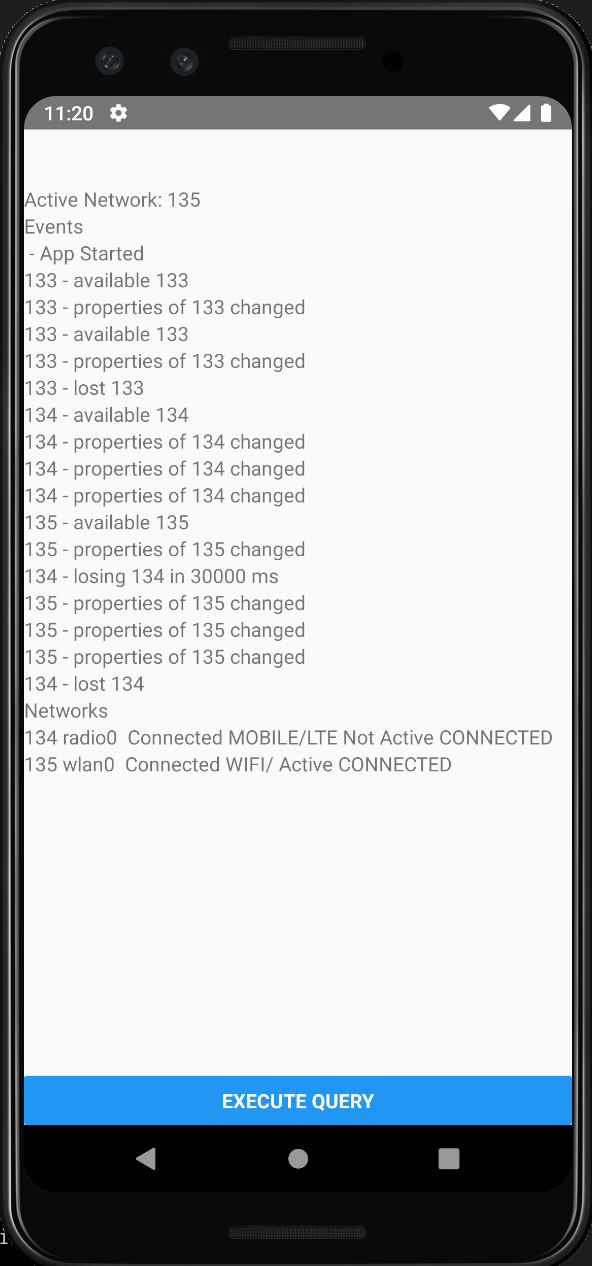
@swankjesse No explanation yet. But I did repro it again in an emulator.
It seems to be something like
1) Send requests, get a connection in the pool on network 123.
2) turn on flight mode, but don't submit requests. At this point, network 123 still exists according to Android but is status disconnected.
3) turn off flight mode, Android throws away network 123, and connects to network 124, 125. The old connection still exists in the connection pool and is active with failing requests.


yschimke
on 1 Jun 2019
We definitely get enough events from Android we can choose to listen to, and actively drop the connection/force close the socket. But it's non-trivial code.
It might be best implemented as a custom Android SocketFactory, that listens for changes to the active network, and ties each socket to the network at creation time (through either default active network, or by looking at the local address).
yschimke
on 1 Jun 2019
I can't reproduce on a device. Only an emulator so far. It's generally by toggling airplane mode, or even alternating between Cell and Wifi so either one is always available.
I've put my sample app here https://github.com/yschimke/OkHttpAndroidApp/
installs with react-native run-android
yschimke
on 1 Jun 2019
I can't repro with pings on (still on an emulator), so if you are ok with the additional traffic and keeping radio awake etc. That is worth trying.
The more I look into doing smart things in Android, the more I suspect that the Android network engineers know what they are doing and the defaults are pretty good.
So far I just suspect a bug in the emulator network emulation.
yschimke
on 2 Jun 2019
Hi guys.
The issue is still present in version 3.14.2, I was able to reproduce it in two of our applications. It happens every time on android 6 and less frequently on other versions, when I turn mobile data off and then back on. With wifi it seems to be working correctly.
 kozmabalazs
on 26 Jun 2019
kozmabalazs
on 26 Jun 2019
Can you share weighted frequency stats by version?
yschimke
on 26 Jun 2019
my problem solved by changing
@POST("api/history")
Observable<ResponseHistory> getHistory(@Body String id);
to
@POST("api/history")
Observable<ResponseHistory> getHistory(@Query("id") String id);
 RezaNazari66
on 8 Jul 2019
RezaNazari66
on 8 Jul 2019
Guys.
Be aware of the temporary bug fix of disabling the connection pool cache.
new ConnectionPool(0, 1, TimeUnit.NANOSECONDS)
We began to receive a lot of complaints about our app hanging from our users and we started to explore and profile our app to check what might be the problem.
After a lot of search we found out that our app was allocating very fast a lot of objects in a short amount of time.
First we saw a lot of this logs relative to Garbage collector
zygote: Background concurrent copying GC freed 112219(7MB) AllocSpace objects, 8(2MB) LOS objects, 59% free, 6MB/15MB, paused 538us total 114.061ms
Then we found out this when profiling the app
Normally you would find in first position of a dump, primitive objects like "int", "char", etc...

Everytime we make a request a new connection is put in ConnectionPool which triggers a cleanupRunnable which in turn in runs a while(true) loop.
Insied this infinite loop a method cleanUp() is called that in turn loops the connections list using an iterator of an ArrayDeque that creates a new Deque Object every time it is called, thus allocating Deque objects without mercy.
Because of the rate of object creation, the gc enter in action a lot of time to try to free up memory, and it had a side effect.
It was blocking our app background threads, thus blocking the app flow.
The gc was in concurrent mode, and this mode does not blocks app threads, but the reality is that they were being blocked anyway.
This allocated dequeue objects eventually will be destroyed by the GC after some time, but the issue here is the rate of object creation that triggers the GC a lot of times when a http request is made.
ruieduardosoares
on 18 Jul 2019
Hey, any update to this?
 Eklow02
on 29 Aug 2019
Eklow02
on 29 Aug 2019
Please give OkHttp 4.2.0 or newer a try. I suspect this fixed this problem. The fix is also backported to 3.14.3 and 3.12.5.
swankjesse
on 12 Sep 2019
Problem still exists in OkHttp 4.2.0, 3.14.3, 3.12.5 - checked on genymotion emulator (turn on and off airplane mode)
 kenumir
on 12 Sep 2019
kenumir
on 12 Sep 2019
@kenumir my problem is fixed with version 3.12.5. I have tested it with a "real" device.
Eklow02
on 12 Sep 2019
Core problem:
When the phone is running in the background for a few minutes, the socket is essentially disconnected, but RealConnection.isHealthy() is true, all requests will be TimeoutException at this time, and the connecttion will always be in connection pool, subsequent requests will also be TimeoutException.
and if is http 2.0 , When TimeoutException, the connection is not remove ConnectionPool.
Caij
on 12 Sep 2019
4.2.0 did not work for us. Downloading files from servers with http 1.1 can resume but not from 2. We are switching to 1.1 protocol for now, would be great with a fix for this in OkHttp.
 johanjbbc
on 12 Sep 2019
johanjbbc
on 12 Sep 2019
I'm also seeing the same issue on 4.2.0
using http 1.1 or pingInterval fixes the issue
 ouchadam
on 30 Sep 2019
ouchadam
on 30 Sep 2019
I'm also seeing the same issue on 4.2.0
using
http 1.1orpingIntervalfixes the issue
pingInterval how to set the value?
 qq8803128
on 15 Oct 2019
qq8803128
on 15 Oct 2019
OKhttp websocket have the same problem, it's use http1.1
 crossle
on 4 Nov 2019
crossle
on 4 Nov 2019
Facing the same issue with okhttp 3.14.0. Our scenario - Java client application is communicating to backend java processes. Backend instances are sitting behind HA Proxy and the connection (client->HA Proxy -> server) is h2c end-to-end. There was an issue with HA Proxy earlier which would cause segmentation fault. This was recently identified as a bug and was fixed. However, started seeing socket timeouts on the client side right after the fix. If it helps, this was the HA Proxy issue and fix - http://git.haproxy.org/?p=haproxy-2.0.git;a=commit;h=85ee6e8343101f598a6e7d9149af37a6579ec6ff
This is the stack trace when the issue happens (tried evicting all connections in case of socket timeout but that didn't seem to help. Also, tried disabling the connection pool but didn't help. Setting a ping interval didn't help either). Any suggestion would be very much appreciated -
Caused by: java.net.SocketTimeoutException: timeout
at okhttp3.internal.http2.Http2Stream$StreamTimeout.newTimeoutException(Http2Stream.java:662)
at okhttp3.internal.http2.Http2Stream$StreamTimeout.exitAndThrowIfTimedOut(Http2Stream.java:670)
at okhttp3.internal.http2.Http2Stream.takeHeaders(Http2Stream.java:154)
at okhttp3.internal.http2.Http2ExchangeCodec.readResponseHeaders(Http2ExchangeCodec.java:136)
at okhttp3.internal.connection.Exchange.readResponseHeaders(Exchange.java:115)
at okhttp3.internal.http.CallServerInterceptor.intercept(CallServerInterceptor.java:94)
at okhttp3.internal.http.RealInterceptorChain.proceed(RealInterceptorChain.java:142)
at okhttp3.internal.connection.ConnectInterceptor.intercept(ConnectInterceptor.java:43)
at okhttp3.internal.http.RealInterceptorChain.proceed(RealInterceptorChain.java:142)
at okhttp3.internal.http.RealInterceptorChain.proceed(RealInterceptorChain.java:117)
at okhttp3.internal.cache.CacheInterceptor.intercept(CacheInterceptor.java:94)
at okhttp3.internal.http.RealInterceptorChain.proceed(RealInterceptorChain.java:142)
at okhttp3.internal.http.RealInterceptorChain.proceed(RealInterceptorChain.java:117)
at okhttp3.internal.http.BridgeInterceptor.intercept(BridgeInterceptor.java:93)
at okhttp3.internal.http.RealInterceptorChain.proceed(RealInterceptorChain.java:142)
at okhttp3.internal.http.RetryAndFollowUpInterceptor.intercept(RetryAndFollowUpInterceptor.java:88)
at okhttp3.internal.http.RealInterceptorChain.proceed(RealInterceptorChain.java:142)
at okhttp3.internal.http.RealInterceptorChain.proceed(RealInterceptorChain.java:117)
at okhttp3.RealCall.getResponseWithInterceptorChain(RealCall.java:221)
at okhttp3.RealCall.execute(RealCall.java:81)
 phaze-debug
on 5 Dec 2019
phaze-debug
on 5 Dec 2019
This is fixed 4.3. Keeping this open until I backport #5638 to 3.12.x and 3.14.x.
swankjesse
on 31 Dec 2019
Am I right in thinking this was released in 3.12.7 and 3.14.5 (and so can now be closed)? Thanks!
 ojw28
on 8 Jan 2020
ojw28
on 8 Jan 2020
@ojw28 yes!
swankjesse
on 8 Jan 2020
Is it possible to cherry pick to 3.13 branch too?
 jkozlowski
on 28 Feb 2020
jkozlowski
on 28 Feb 2020
@jkozlowski only 3.12.x and 3.14.x branches get updates.
swankjesse
on 28 Feb 2020
FYI - Users of ExoPlayer report that this issue still hasn't been fully fixed in 3.12.7, but that it's not harder to reproduce (https://github.com/google/ExoPlayer/issues/4078#issuecomment-588172597).
ojw28
on 28 Feb 2020
@swankjesse oh sorry didn't know, is 3.13 known to have issues and therefore not supported?
jkozlowski
on 28 Feb 2020
@jkozlowski nothing that fancy. Users of 3.13 can upgrade to 3.14 which has all the fixes.
swankjesse
on 28 Feb 2020
the same issue on 4.4.0
 JackeyWong
on 12 Mar 2020
JackeyWong
on 12 Mar 2020
Also still getting this problem on emulator with api 22, and 3.14.4. Also I get a SocketTimeoutException after 2 minutes (what my readTimeout is set to), instead of 10 seconds (what my connectTimeout is set to). The workaround using .connectionPool(new ConnectionPool(0, 1, TimeUnit.NANOSECONDS)) still works. I'd say it's time to re-open this :(. Steps to reproduce are same as OP.
I can confirm the issue doesn't exist when using a real device Note 9, API 29.
CarsonRedeye
on 20 Mar 2020
Still having problems with 3.12.12 on Samsung Galaxy A7 (2018) SM-A750FN/DS, Android 10 (One UI 2.0).
Unless I set custom parameters as mentioned above:
.connectionPool(ConnectionPool(0, 5, TimeUnit.MINUTES))
.protocols(listOf(Protocol.HTTP_1_1))
 janbolat
on 13 Jun 2020
janbolat
on 13 Jun 2020
I am also facing the same issue.
So the workaround which is suggested here in https://github.com/square/okhttp/issues/3146#issuecomment-311158567
will this cause any side effects for the long term? if we don't use a connection pool at all.
And in this solution we setting
.retryOnConnectionFailure(true) , will this cause any problem or only below setting connection pool with 0 idle connection is sufficient for the fix.
.connectionPool(new ConnectionPool(0, 1, TimeUnit.NANOSECONDS));
 praveendroid
on 13 Jun 2020
praveendroid
on 13 Jun 2020
Related issues
 mleibner
·
3Comments
mleibner
·
3Comments
 vanshg
·
3Comments
yschimke
·
3Comments
vanshg
·
3Comments
yschimke
·
3Comments
 dannyZhou
·
3Comments
dannyZhou
·
3Comments
 sargunv
·
3Comments
sargunv
·
3Comments
Most helpful comment
I think i'm seeing another manifestation of this on 3.5.0, when the server forcibly closes the connection.
We try to establish both a h2 and http1.1 connection. The server responds with 200 to both:
Then at some point we try to read from the http2 connection, which fails in checkNotClosed and throws a StreamResetException
Then, since this is media, we do something that causes a seek to 0 in the media, which needs to reopen the request from the beginning. At this point, we see the same exception as is posted above:
this seems to be very similar to the other cases here, which seem to all be related to an ungraceful shutdown of the connection, and it remaining pooled.
I've also confirmed that disabling the ConnectionPool "works around" this issue: