Okd: high CPU usage on some cluster nodes since upgrading to 4.6
Describe the bug
After upgrading a cluster to 4.6, I see this on one of the master nodes:
 PID USER      PR  NI    VIRT    RES    SHR S  %CPU  %MEM     TIME+ COMMAND
    808 openvsw+  10 -10   55280   9016   5080 R  44.7   0.1   1241:19 ovsdb-server
   2226 root      20   0  281076  25024   6000 R  43.4   0.2   1196:04 ovn-controller
    885 root      20   0  491428  22452  17228 R  39.1   0.1   1079:32 NetworkManager
   2861 root      20   0 2845640   1.6g  36704 S  21.2  10.4 654:54.30 kube-apiserver
   1135 root      20   0 3365296 332860  66300 S  10.3   2.0 523:00.76 kubelet
   3441 root      20   0 9542344   1.1g 173880 S  12.5   7.1 334:20.04 etcd
So the three top CPU (ab)users are network related. Any suggestions what to do?
Version
4.6 20201127
How reproducible
I have upgraded three clusters to 4.6 so far. I see the problem on all three clusters.
On one of the two other clusters it is affecting two of the three master nodes.
This is not good. It is going to become a serious problem (wasting so much of the available CPU capacity).
Log bundle
Can provide if needed.
 kai-uwe-rommel
All 54 comments
Please provide journal logs for the three services in question
 LorbusChris
on 2 Dec 2020
LorbusChris
on 2 Dec 2020
Is this OKD specific? I'd rather have OVN issues tracked in bugzilla
 vrutkovs
on 2 Dec 2020
vrutkovs
on 2 Dec 2020
@LorbusChris you mean journalctl output?
@vrutkovs I don't know, I have no experience with OCP 4.6 yet.
But I'm right now deploying a new OKD 4.6 cluster from scratch to see if it affects new clusters as well or only upgraded ones.
kai-uwe-rommel
on 2 Dec 2020
@LorbusChris you mean journalctl output?
yes. Please also consider opening bugs against those components on bugzilla.redhat.com as Vadim suggested (in product Fedora)
LorbusChris
on 2 Dec 2020
Sure, NetManager is a FCOS component. But the main issue is OVN which is an OKD issue.
kai-uwe-rommel
on 2 Dec 2020
All of these are coming from the fedora repos and are thus Fedora components
https://bugzilla.redhat.com/enter_bug.cgi?product=Fedora&component=openvswitch-ovn-kubernetes
Edit: The component might also be openvswitch or NetworkManager - please post the logs
LorbusChris
on 2 Dec 2020
I had a fresh deployed 4.6 OKD cluster now up for a couple of hours and did not see the problem there.
So it could be a problem for updated clusters only.
On the cluster in question I just saw such high CPU abuse by the same components also on one of the worker nodes.
kai-uwe-rommel
on 2 Dec 2020
ovsdb-server is a systemd unit (will look for log soon).
ovn-controller is actually a container running on that node, controlled by the ovnkube-node daemonset of OKD.
kai-uwe-rommel
on 2 Dec 2020
The "journalctl -u ovsdb-server.service" actually yields exactly nothing.
But:
[root@master-01 ~]# systemctl status ovsdb-server.service
● ovsdb-server.service - Open vSwitch Database Unit
     Loaded: loaded (/usr/lib/systemd/system/ovsdb-server.service; enabled; vendor preset: disabled)
    Drop-In: /etc/systemd/system/ovsdb-server.service.d
             └─10-ovsdb-restart.conf
     Active: active (running) since Mon 2020-11-30 12:02:02 UTC; 2 days ago
    Process: 703 ExecStartPre=/usr/bin/chown ${OVS_USER_ID} /var/run/openvswitch /var/log/openvswitch (code=exited, status=1/FAILURE)
    Process: 711 ExecStartPre=/bin/sh -c rm -f /run/openvswitch.useropts; /usr/bin/echo "OVS_USER_ID=${OVS_USER_ID}" > /run/openvswitch.useropts (code=exited, status=0/SUCCESS)
    Process: 732 ExecStartPre=/bin/sh -c if [ "$${OVS_USER_ID/:*/}" != "root" ]; then /usr/bin/echo "OVS_USER_OPT=--ovs-user=${OVS_USER_ID}" >> /run/openvswitch.useropts; fi (code=exited, status=0/SUCCESS)
    Process: 735 ExecStart=/usr/share/openvswitch/scripts/ovs-ctl --no-ovs-vswitchd --no-monitor --system-id=random ${OVS_USER_OPT} start $OPTIONS (code=exited, status=0/SUCCESS)
   Main PID: 808 (ovsdb-server)
      Tasks: 1 (limit: 19108)
     Memory: 441.6M
        CPU: 23h 53min 43.751s
     CGroup: /system.slice/ovsdb-server.service
             └─808 ovsdb-server /etc/openvswitch/conf.db -vconsole:emer -vsyslog:err -vfile:info --remote=punix:/var/run/openvswitch/db.sock --private-key=db:Open_vSwitch,SSL,private_key --certificate=db:Open_vSwitch,SSL,certificate --bootstrap-ca-cert=db:Open_vSwitch,SSL,ca>lines 1-15/15 (END)
Notice the "CPU: 23h ...".
kai-uwe-rommel
on 2 Dec 2020
Well, I rebooted the two nodes and after the reboot it seems to be better.
So perhaps only a transient issue? I'll keep an eye on it.
kai-uwe-rommel
on 2 Dec 2020
The problem is coming back. On one master and one worker I had the problem again.
On the other mentioned clusters as well.
On a cluster installed from scratch with OKD 4.6 two days ago, two of three masters and three of six workers have the problem, too.
kai-uwe-rommel
on 8 Dec 2020
A must-gather of that freshly installed cluster is available here:
https://domino.ars.de/file/must-gather.local.6497755030432361477.tar.gz (163 MB)
The file is available there for one week.
kai-uwe-rommel
on 8 Dec 2020
I've hit this myself (NetworkManager using 80+% CPU)
It seems putting
* hard nofile 524288
* soft nofile 4096
in /etc/security/limits.conf worked (increased soft open file limit to 4096 from default 1024).
However there is no definite way to reproduce this, so I'm not sure if the case.
If its still an issue, please check dmesg - there might be a message about open files limit
vrutkovs
on 11 Dec 2020
I'll give this a try.
kai-uwe-rommel
on 13 Dec 2020
Unfortunately, the nofile increase does not help with the problem on my clusters. I had changed the setting on one node and rebooted it. Over night, the CPU abuse by the OVN components is back.
kai-uwe-rommel
on 14 Dec 2020
I am seeing a similar CPU issue with my cluster I upgraded from 4.5 -> 4.6. My new 4.6 cluster seems fine.
I am not seeing any open file limit issue and I did not make any changes to /etc/security/limits
I am linking the must-gather
 fortinj66
on 14 Dec 2020
fortinj66
on 14 Dec 2020
The OKD 4.6 2020-12-12 update did not help against this problem. I did not expect this, but updated the cluster, anyway (with --force). It seems it even got worse now. All three masters show the CPU (ab)usage problem now.
kai-uwe-rommel
on 15 Dec 2020
Nobody reacted on Bugzilla so far ... :-(
https://bugzilla.redhat.com/show_bug.cgi?id=1905579
kai-uwe-rommel
on 18 Dec 2020
@vrutkovs, do you know of anyone working on this?
kai-uwe-rommel
on 8 Jan 2021
Possibly related, I have a vSphere UPI cluster which failed upgrading 4.5 -> 4.6 and along the way one of the compute nodes CPU went up by 10x what was normal and triggered a CPU alert in vSphere, becoming non responsive and did not update. Eventually it became ready again, but was marked nonschedulable.
After a clean install of 4.6 with OVNKubernetes and running for several days, another compute node suddenly started using 10x CPU (and the cluster was essentially "idle" with no active users) I did a must-gather and there was nothing gathered from the problem node's machine-config-daemon (current log zero bytes). I could also not ping or ssh into it. Rebooting the. node brought it back to ready state. From the machine-config-daemon's viewpoint after the fact, kubelet was failing health checks. Looking at journalctl after the fact, there was no obvious cause.
 bdlink
on 8 Jan 2021
bdlink
on 8 Jan 2021
I have UPI cluster, freshly installed with 4.6.0-0.okd-2020-12-21-142926 and OpenshiftSDN with no applications. After every couple of days one of the worker (compute) nodes would display exactly same characteristics noted above by @bdlink . No ping / ssh, on the console of the server, there are some iptables-restore related journal log messages. After force reboot, there are no logs and machine behaves normally, so nothing much to look back at to find the problem..
 adarshaj
on 10 Jan 2021
adarshaj
on 10 Jan 2021
Any workaround or fix here
 alexanderniebuhr
on 19 Jan 2021
alexanderniebuhr
on 19 Jan 2021
I am anxiously waiting as well ... but no response from anyone, unfortunately. :-(
kai-uwe-rommel
on 19 Jan 2021
Any news on the topic? We're facing the same issue on all nodes of the cluster.
 kgw4it
on 4 Feb 2021
kgw4it
on 4 Feb 2021
Nobody reacted on Bugzilla so far ... :-(
It should be filed against OCP -> Networking -> ovn-kubernetes, not Fedora's openswitch
vrutkovs
on 5 Feb 2021
add your problems there too if you have them, also must-gather are appreciated
alexanderniebuhr
on 5 Feb 2021
Nobody reacted on Bugzilla so far ... :-(
It should be filed against OCP -> Networking -> ovn-kubernetes, not Fedora's openswitch
@vrutkovs could you tell me exactly the product? I cannot find what you suggest.
I can either choose (under "Red Hat Products") either "OpenShift Container Platform" or "OKD".
But under neither I can find ovn-kubernetes as a component.
Feel free to change the bug yourself ... thanks. May be I can't see as much as you can.
kai-uwe-rommel
on 5 Feb 2021
@kai-uwe-rommel i think he was talking about the section i posted it (https://bugzilla.redhat.com/show_bug.cgi?id=1925475)
Feel free to add to it
alexanderniebuhr
on 5 Feb 2021
You may be right. I linked there now to the older Bugzilla item that I created in December.
I thought that Vadim meant me since he was quoting from my comment.
kai-uwe-rommel
on 5 Feb 2021
@vrutkovs in the meantime ( i do not think that the ovn team will fix this any time soon ) is it suggested to roll back to OpenShift-SDN?
https://docs.openshift.com/container-platform/4.6/networking/ovn_kubernetes_network_provider/rollback-to-openshift-sdn.html
alexanderniebuhr
on 7 Feb 2021
@vrutkovs in the meantime ( i do not think that the ovn team will fix this any time soon ) is it suggested to roll back to OpenShift-SDN?
https://docs.openshift.com/container-platform/4.6/networking/ovn_kubernetes_network_provider/rollback-to-openshift-sdn.html
As noted earlier in this thread, my cluster has openshift SDN and still had the exact same issue..
adarshaj
on 7 Feb 2021
@adarshaj do you even have ovn pods with openshift SDN or are the comparable pods with high CPU?
alexanderniebuhr
on 7 Feb 2021
don't know what we did, but with force upgrading of some etcd members (our master nodes), like hart killing them and fixing with docs https://docs.openshift.com/container-platform/4.6/backup_and_restore/replacing-unhealthy-etcd-member.html#restore-replace-stopped-etcd-member_replacing-unhealthy-etcd-member we got it back to very less CPU usage... seems odd and still not the right
alexanderniebuhr
on 11 Feb 2021
Stay tuned and monitor your cluster ... the problem (in my experience) keeps coming back no matter what I do ... :-(
kai-uwe-rommel
on 11 Feb 2021
Given the investigation on the OVS bug https://bugzilla.redhat.com/show_bug.cgi?id=1905579 it seems something is making ovn-controller add/remove GENEVE ports to other nodes. We recently fixed a similar issue that was related to hostnames, because hostnames are used as the chassis record index. This was fixed in upstream ovn-kubernetes in https://github.com/ovn-org/ovn-kubernetes/pull/1653 and fixed downstream in OpenShift via https://github.com/openshift/ovn-kubernetes/pull/279
Is each machine's hostname the same as the node name in the Kube API?
 dcbw
on 11 Feb 2021
dcbw
on 11 Feb 2021
Yes, in our clusters the node name is always exactly the FQDN.
kai-uwe-rommel
on 11 Feb 2021
We have the exact same problem with a fresh install of OKD v4.6.0-0.okd-2021-01-23-132511 with OVN
One afer the other, the cpu % of nodes goes very high (60%+) due to very high cpu consumption of theovn-controllerandovsdb-server processes eating most of the cpu
Rebooting the node seems to "reset" the problem but it comes back after a while. always
Some logs from anovnkube-nodepod that went wild:
2021-02-12T03:56:24Z|00359|poll_loop|INFO|wakeup due to [POLLIN] on fd 15 (<->/var/run/openvswitch/db.sock) at lib/stream-fd.c:157 (53% CPU usage)
2021-02-12T03:56:24Z|00360|poll_loop|INFO|wakeup due to [POLLIN] on fd 15 (<->/var/run/openvswitch/db.sock) at lib/stream-fd.c:157 (53% CPU usage)
2021-02-12T03:56:24Z|00361|poll_loop|INFO|wakeup due to [POLLIN] on fd 15 (<->/var/run/openvswitch/db.sock) at lib/stream-fd.c:157 (53% CPU usage)
2021-02-12T03:56:30Z|00362|poll_loop|INFO|Dropped 2720 log messages in last 6 seconds (most recently, 0 seconds ago) due to excessive rate
2021-02-12T03:56:30Z|00363|poll_loop|INFO|wakeup due to [POLLIN] on fd 15 (<->/var/run/openvswitch/db.sock) at lib/stream-fd.c:157 (54% CPU usage)
 titou10titou10
on 12 Feb 2021
titou10titou10
on 12 Feb 2021
I am seeing this issue as well with a fresh install of OKD 4.6.0-0.okd-2021-02-14-205305.
 SriRamanujam
on 15 Feb 2021
SriRamanujam
on 15 Feb 2021
So many users are experiencing this problem. Yet progress on the solution is slow ... :-(
https://bugzilla.redhat.com/show_bug.cgi?id=1905579
kai-uwe-rommel
on 16 Feb 2021
I have the same problem. Unfortunately, the Bugzilla ticket https://bugzilla.redhat.com/show_bug.cgi?id=1905579 is private and I can't see the progress.
 Reamer
on 24 Feb 2021
Reamer
on 24 Feb 2021
@Reamer I know. I opened the Bugzilla ticket and probably did this wrong. Unfortunately, I cannot find out how to make it public now, later.
kai-uwe-rommel
on 24 Feb 2021
@Reamer I opened up permisisons on the BZ, PTAL
LorbusChris
on 24 Feb 2021
@LorbusChris, thanks. Somehow I was not able to "unselect" the selected groups in the ticket.
kai-uwe-rommel
on 24 Feb 2021
Can someone from OKD team please check the latest comments in the Bugzilla item and advise how to update this in OKD? Thanks! @LorbusChris @vrutkovs
kai-uwe-rommel
on 25 Feb 2021
OKD is using the same OVN images as in OCP. When the bug is fixed in OCP it would automatically land in OKD nightly
vrutkovs
on 25 Feb 2021
I do also have an OCP 4.6 cluster here and there we don't see the problem - yet. Probably because that still runs with OpenshiftSDN ... as probably many (if not most) OCP customers still do.
So even if the same problem applies to OCP it will take much more time until it surfaces there and will take even more time until pressure is high enough so that someone will fix this (hopefully by just updating that component).
So it would still be a long time that OKD users will have to wait and will be plagued by the problem.
Can we somehow give this issue higher priority at Red hat?
kai-uwe-rommel
on 26 Feb 2021
I see that there is no migration path from OpenshiftSDN to OVN-Kubernetes for UPI clusters.
So many customers of OCP will stay with OpenshiftSDN for a longer time until they can reinstall the entire clusters.
kai-uwe-rommel
on 26 Feb 2021
I just quickly installed an OCP 4.7.0 cluster with OVNKubernetes networking.
So far (it runs now for only about two hours) I don't see the issue yet ...
kai-uwe-rommel
on 26 Feb 2021
The bug does not occur in recent 4.6 and 4.7 versions of OCP.
So there still is the problem as the OCP folks may not see a need to quickly get this fix out of the door.
kai-uwe-rommel
on 1 Mar 2021
Definitely occurs in latest stable OKD 4.7
vrutkovs
on 1 Mar 2021
So,
a) we need to get the OCP folks to quickly deploy this fix into the product stream so that we also get it into OKD
b) cross our fingers that it actualy fixes the problem (currently it is only "this _should_ _probably_ fix it" thing)
kai-uwe-rommel
on 1 Mar 2021
we are experiencing the same problem, OVN components using an absurd amout of cpu

 philipp1992
on 12 Mar 2021
philipp1992
on 12 Mar 2021
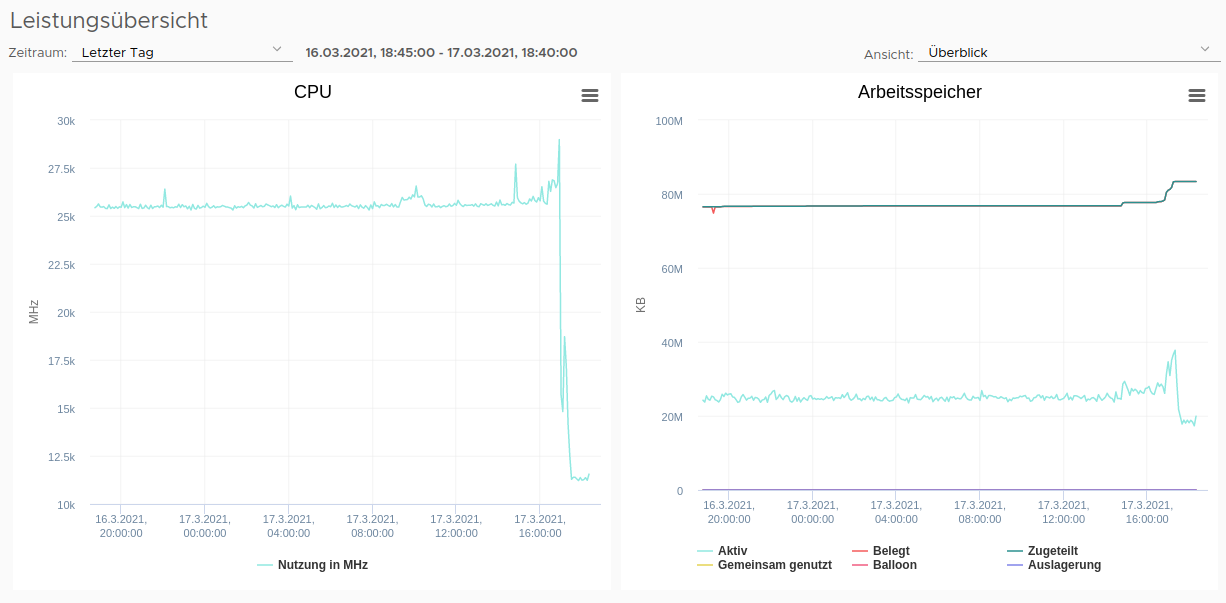
I have updated to 4.7.0-0.okd-2021-03-15-222638 and can confirm that https://bugzilla.redhat.com/show_bug.cgi?id=1925475 has solved this problem.
Reamer
on 17 Mar 2021
Resolved in 4.7.0-0.okd-2021-03-21-094146
vrutkovs
on 22 Mar 2021
Related issues
 DanyC97
·
10Comments
DanyC97
·
10Comments
 evertmulder
·
6Comments
evertmulder
·
6Comments
 kkk25641463
·
5Comments
kkk25641463
·
5Comments
 mkelnermishal
·
9Comments
mkelnermishal
·
9Comments
 achilles-git
·
5Comments
achilles-git
·
5Comments
Most helpful comment
I have updated to 4.7.0-0.okd-2021-03-15-222638 and can confirm that https://bugzilla.redhat.com/show_bug.cgi?id=1925475 has solved this problem.
