Oidc-client-js: Uncaught (in promise) Error: No matching state found in storage
Hi,
Our scenario is like this: If user presses browser back button right after the login it goes back to provider. And there our provider asks for login again (they don't keep the session apparently). So, after entering the login info, user is redirected to our login result page with new token.
Here we only call the signinRedirectCallback method to get the user. But this method fails and goes in to the catch from promise. From the console I see following error:
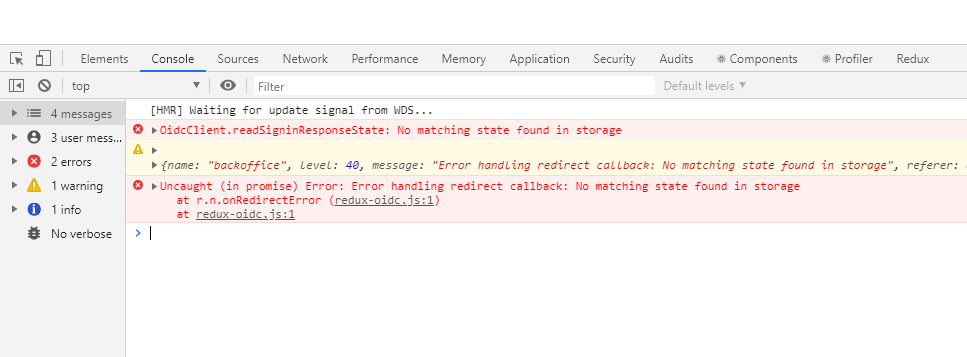
Uncaught (in promise) Error: No matching state found in storage
    at oidc-client.min.js:1
In catch if I restart login by calling signInRedirect it works but I am just curious about what is the issue here. Is it because the second login can't overwrite the first one? Is there a good way to handle this from our application?
P.S. I can't make any change from provider side if that's necessary. Need to handle this in our application somehow.
 abarisuzuner
All 11 comments
the same problem
everything fine, everything works - but errors in console -
 Manimall
on 29 Jan 2020
Manimall
on 29 Jan 2020
Do you clear the callback page form your history entry? Perhaps you should. Here's an example:
 brockallen
on 1 Feb 2020
brockallen
on 1 Feb 2020
Thank you for the reply. But in my case the Promise is rejected and goes to catch directly.
abarisuzuner
on 3 Feb 2020
I just dropped in to say, I was running into the same thing. Your key value for oidc.
I then put a break point in UserManager.prototype._signInStart. (line 10207-ish) Step through, and after the call to 'createSigninRequest' (line 10216-ish), check your storage, the key should be there 'oidc.
I spent more time than I wanted to debugging through this library, and in the end IT WAS MEEEE!
;=P
 gtrbarbarian
on 26 Feb 2020
gtrbarbarian
on 26 Feb 2020
Do you clear the callback page form your history entry? Perhaps you should. Here's an example:
Sorry for running into this conversation, but no matter if I replace the history entry or not, I have a strange behavior only in Chrome.
The browser seems to ignore the callback page and goes straight to the Idsrv login page when the user presses back button. But when holding the back button and choosing explicitly the callback page from history entry - chrome hits the callback and everything is fine.
Should I enhance the callback page with proper headers? Why is chrome not hitting the callback? Any ideas?
 apacherose
on 5 Mar 2020
apacherose
on 5 Mar 2020
Do you clear the callback page form your history entry? Perhaps you should. Here's an example:
Unfortunatly we get thrown out of the 'then' before we start the function. the exception seems to be thrown in signinRedirectCallback
 jeanpoelie
on 8 Apr 2020
jeanpoelie
on 8 Apr 2020
@abarisuzuner
i have fixed this issue by alllowing cookies to store data.actually i have faced this issue from the last 4 month but i could not able to find any clue about this error. but yesterday my colleague and me were trying find out the exact issue and we have found that cookie is blocked for our app url. so we have allow to it and issue is solved within a pulse of second.
-

go to show cookies and other site data then go to blocked tab and allow from there itself will fix the issue
 JayeshLadumor
on 21 Apr 2020
JayeshLadumor
on 21 Apr 2020
Much of these problems are due to browsers trying to protect users from tracking/advertising software and sites. Unfortunately to implement many of the OIDC/OAuth2 protocols from the client browser/JS side, we need to utilize the similar storage mechanisms. if these features are disabled/blocked wholesale, then there's not much we can do except reachitect to a more BFF pattern:
brockallen
on 21 Apr 2020
@abarisuzuner
i have fixed this issue by alllowing cookies to store data.actually i have faced this issue from the last 4 month but i could not able to find any clue about this error. but yesterday my colleague and me were trying find out the exact issue and we have found that cookie is blocked for our app url. so we have allow to it and issue is solved within a pulse of second.
go to show cookies and other site data then go to blocked tab and allow from there itself will fix the issue
Did you also change the store type from tbe oidc library? And how would you handle people denying cookies?
We now handle people who have cookies disabled by showing an alert and not rendering the app, same for storage.
jeanpoelie
on 22 Apr 2020
Much of these problems are due to browsers trying to protect users from tracking/advertising software and sites. Unfortunately to implement many of the OIDC/OAuth2 protocols from the client browser/JS side, we need to utilize the similar storage mechanisms. if these features are disabled/blocked wholesale, then there's not much we can do except reachitect to a more BFF pattern:
Thank you for that answer we were thinking the same, we have decided to block users who do not have localstorage available.
There are some older devices with android 5.1 that do not have localstorage activated automatically.
Now we only need to write a how to on turning on the localstorage 😁
jeanpoelie
on 22 Apr 2020
Ok, I think it's safe to close this issue now.
brockallen
on 7 Aug 2020
Related issues
 bialabs
·
3Comments
bialabs
·
3Comments
 saeed-badar
·
4Comments
saeed-badar
·
4Comments
 iXmonvi33
·
4Comments
iXmonvi33
·
4Comments
 tomeinar
·
3Comments
tomeinar
·
3Comments
 m-andrew-albright
·
5Comments
m-andrew-albright
·
5Comments
Most helpful comment
Thank you for the reply. But in my case the
Promiseis rejected and goes tocatchdirectly.