Oidc-client-js: oidc-client.js Signout (Yes another signout issue) -- Edge browser only.
I'm using:
IDS4 2.2.0
QuickStart UI with custom user store.
dotnet core 2.1
oidc-client.js 1.5.2-beta.1in a SPA
Implicit Flow
No external login.
No consent required.
In Chrome everything seems to work as expected. For the most part. More on that later.
In Edge (and maybe IE), when the user clicks the signout button, the SPA calls and awaits UserManager.signoutPopup( ).
I watch the logout popup window open and navigate to OP.
On OP, AccountOptions::ShowLogoutPrompt is set to false
I can step through AccountController::Logout and watch HttpContext.SignOutAsync( ); get called.
The popup window pretty much immediately navigates to my post_logout_redirect_uri which is a separate static html page from my SPA.
The post_logout_redirect_uri page calls and awaits UserManager.signoutPopupCallback( false ).
By this point the awaited call to UserManager.signoutPopup will have returned to the SPA. Here, I call UserManager.removeUser() in the SPA. After that I will have either done a window.location.reload() or redirected the SPA router to the /login route -- depending on which iteration of trying things to get this to work I'm on. In both cases the SPA router middleware will detect that lack of a valid oidc-client user and starts the login popup.
Note that the first problem is that by this point the logout popup window should have, but doesn't close.
But here is where things go really wrong. And I should mention that up to now, I think I've implemented everything correctly. Further, we are still in the context of Edge here. After all the above, and starting the login popup again, I see login popup navigate to OP and immediately redirect to the popup_redirect_uri. And the user is now successfully logged in without having entered credentials. The SPA sees them as logged in. They can call the API without issue.
In chrome if I don't do a window.location.reload in the SPA after UserManager.signoutPopup( ) returns, then the user stays logged in. Just like edge.
I'm desperate to get this working. Have I missed something simple? Or am I completely off-base with my implementation?
I know there have been many issues logged that seem to have the same problem, but I just don't see where I have done things wrong.
 cosmoKenney
All 27 comments
FYI, I just downloaded the samples from here: https://github.com/IdentityServer/IdentityServer4.Samples
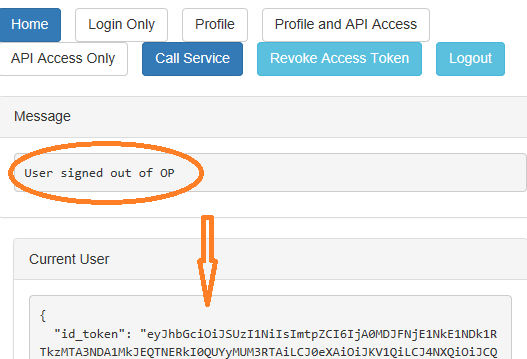
and am trying run them against my IDS4 implementation. Works fine with the out of the box samples. But if I switch the sample over to use popup for both signin and signout, then Edge can login fine. But when I attempt to logout I can watch the popup go to the OP, but then it stays open and I see this:
cosmoKenney
on 14 Jul 2018
This is the Logout in my IDS4 -- direct from the quickstart:
```C#
[HttpPost]
[ValidateAntiForgeryToken]
public async Task
{
// build a model so the logged out page knows what to display
var vm = await BuildLoggedOutViewModelAsync( model.LogoutId );
        if ( User?.Identity.IsAuthenticated == true )
        {
            // delete local authentication cookie
            await HttpContext.SignOutAsync( );

            // raise the logout event
            await _events.RaiseAsync( new UserLogoutSuccessEvent( User.GetSubjectId( ), User.GetDisplayName( ) ) );
        }

        // check if we need to trigger sign-out at an upstream identity provider
        if ( vm.TriggerExternalSignout )
        {
            // build a return URL so the upstream provider will redirect back
            // to us after the user has logged out. this allows us to then
            // complete our single sign-out processing.
            string url = Url.Action( "Logout", new { logoutId = vm.LogoutId } );

            // this triggers a redirect to the external provider for sign-out
            return SignOut( new AuthenticationProperties { RedirectUri = url }, vm.ExternalAuthenticationScheme );
        }

        return View( "LoggedOut", vm );
    }
```
cosmoKenney
on 14 Jul 2018
Reading this: http://docs.identityserver.io/en/release/topics/signout.html
Implies that if you call this:
await HttpContext.SignOutAsync( IdentityServerConstants.DefaultCookieAuthenticationScheme );
Then your client should be signed-out. But that is clearly not working.
cosmoKenney
on 14 Jul 2018
I've just tested with chrome, firefox, IE11 and Edge. Edge is the only one that will not logout. Or, I should say that after logging out, going to login again immediately logs you in without prompting for creds. For all intents it may well be logging out, but might be trying to use old cookies again when hitting the login page after logout.
cosmoKenney
on 14 Jul 2018
Is there any chance that someone could look into this? I currently have two login/logout UX for my application. One for Chrome/Firefox and one for Edge and IE which is forced to use popups. With Edge having a clear problem with logout.
I really don't think this is a problem with my implementation since everything works on the other three browsers. There is something in the oidc-client that Edge doesn't like.
cosmoKenney
on 20 Jul 2018
What have you done to debug into the oidc-client library? Have you found anything that looks odd under Edge?
I will try to repo when I can.
 brockallen
on 20 Jul 2018
brockallen
on 20 Jul 2018
I have debugged it some. But as you know the Edge debugger is wonky at best. For instance most of the time when I open the debugger I cannot even see my sources, so I cannot set breakpoints. Sorry about that, didn't me to close the issue.
cosmoKenney
on 20 Jul 2018
I tested on edge and I see the popup failing for both login and logout. The logic in the popup window wrapper in oidc-client is detecting that the window has been closed (when it has not), and thus stops its processing. Seems like a known issue: https://developer.microsoft.com/en-us/microsoft-edge/platform/issues/15030423/
brockallen
on 21 Jul 2018
Also, when the popup navigates back to the app's callback page, this happens:
PopupWindow.notifyOpener: no window.opener. Can't complete notification.
So something in edge severs the tie between the opener and the popup window when it navigates away.
What a difficult browser.
brockallen
on 21 Jul 2018
Marking this issue as a bug for now, but it's currently due to some change in how edge works.
So there's not much I can do at this point without a rewrite of how the popup window communicates back to the parent. Feel free to dig in and help with a design.
brockallen
on 21 Jul 2018
@brockallen
This is just a tangent remark and something to possibly think about for the future...
I'd love for the oidc-client.js library to not handle the UI/UX at all. Or at least provide a slightly lower level login api.
In any given app I have either bootstrap or jquery ui type dialogs that present with the theme of my app much better than a pop-up window does. And in the case of my highly styled SPA apps I really don't want to use pop-ups at all. And I especially don't want to use redirects due to the load times of SPA apps.
In the case where I show a bootstrap or jquery ui dialog one major plus would be that I could get a truly cross-browser _modal_ box. And in the case of a SPA component it would allow me to keep the SPA theme and keep the SPA loaded only once.
I think in both cases I could use an IFrame (inside the dialog or SPA component) to show the login page. And I might be able to get away with MutationObserver watching the iframe src to figure out when the post login/logout redirect happens. And at that point close the dialog/component and notify oidc-client.js of the close. The question then becomes how to get the user object and hand it back off to oidc-client.js.
Maybe could dispatch a custom event. https://medium.com/@Farzad_YZ/cross-domain-iframe-parent-communication-403912fff692
EDIT:
Just looking through the source for PopupWindow and it definitely looks like one could dispense with the reliance on window.opener in favor of calling dispatchEvent on window.parent. I guess that's a sizable _assumption_ that window.parent is the caller/opener. But I think it would cover most scenarios.
In any event I'd love to have an interface or base class for both the [Popup]Window and [Popup]Navigator objects that I could implement my own iframe scheme in. At least it would give us a way to play around with ideas for fixing old and daft browsers.
cosmoKenney
on 21 Jul 2018
I'd love for the oidc-client.js library to not handle the UI/UX at all. Or at least provide a slightly lower level login api.
In a sense, there already is. The OidcClient class provides you that. You would miss out on some of the session management features that the UserManager provides.
But as for using a bootstrap (or other style) modal -- that most likely won't work due to XFO issues. No sound minded login page would ever allow that, and so that's why I designed this library to use a popup.
It's a difficult (and seeming ever changing) challenge.
brockallen
on 21 Jul 2018
@brockallen
Is there really any difference between presenting an IFrame in a bootstrap modal vs. a pop-up window?
cosmoKenney
on 23 Jul 2018
yes: click jacking
brockallen
on 23 Jul 2018
@brockallen sorry for the noob question, but considering:
- my OP implementation is only for logging in to my company's client applications (and protecting our APIs).
- no external providers
- the OP and client applications are developed by us
Is click jacking an issue?
cosmoKenney
on 23 Jul 2018
Is click jacking an issue?
I can't answer that in (nor should you accept any answer in) a github issue. You need to threat model it.
brockallen
on 23 Jul 2018
I found another confirmation of this being a bug in edge: https://developer.microsoft.com/en-us/microsoft-edge/platform/issues/11324352/
I don't know if you have any updates on your end for this... but given that it seems like a bug in Edge, there's not much I can do I don't think, unless you have any ideas or workarounds.
brockallen
on 5 Oct 2018
@brockallen
Might as well close this. Though I still think the dispatchEvent API could could be used to solve the problem. If I knew how to do a pull request, I would try it out. But I'm still noob at the whole GitHub thing.
cosmoKenney
on 6 Oct 2018
I don't see how dispatchEvent would help... especially cross-window. What event would you want to trigger?
brockallen
on 6 Oct 2018
The other thing to look into -- Edge has odd behavior when it comes to websites running on localhost. Can you try it on a non-localhost host?
brockallen
on 6 Oct 2018
@brockallen
You can send a custom event with dispatchEvent. So something along the along the lines of "the pop-up is done please close me" being sent by the page in the the pop-up to the window.parent of the pop-up. dispatchEvent is supported by pretty much all browsers.
As for testing edge in non-localost environment. I believe I did deploy to my QA server and that's were the problem was discovered.
cosmoKenney
on 7 Oct 2018
Hmm, ok, I'll see if I can experiment with that.
brockallen
on 7 Oct 2018
Have you tested Edge recently? I just did (the sames in this repo w/ IdentityServer) and the popup for signin and signout is working.
brockallen
on 16 Jun 2019
@brockallen thanks for the reply. I gave up on the pop-ups and am just using the standard redirects. Works well, cleared QA, no problems thus far. Though, for the redirects, I did have to move my individual redirect destination pages into folders and name them all index.html in order to fix the issue when not using trailing slashes in redirect URLs. I.e. safari/firefox dropping the hash when a url like: /logged-in.html instead of /logged-in/ for the sign-in redirect. When you use a url without trialing slash you get the "No state in response" error due to the hash being dropped.
...sorry, I wasn't clear it's late here and I should have been in bed an hour ago. ;-)
cosmoKenney
on 16 Jun 2019
I ran into a similar issue: After calling signoutRedirect, on the subsequent signinRedirect Edge would go through like it's already authenticated. I could not reproduce this in Chrome or IE11.
I resolved it by changing my signin call to:
this.userManager.signinRedirect({ ...this.getSigninSettings(), prompt: "select_account" });
This got to the desired behavior: the user is prompted with the login screen. I'm not sure if this is merely avoiding a deeper issue of Edge retaining the authentication session in some way, though.
 zamzowd
on 3 Jul 2019
zamzowd
on 3 Jul 2019
@zamzowd hmm.. that doesn't give me a lot of confidence in edge working properly.
brockallen
on 4 Jul 2019
On some attempts today, it looks like this issue is no longer occurring on my Edge browser. After signing out, subsequent signins correctly wait for user credentials rather than re-using the previous session, even if I don't specify prompt=select-account.
My browser version is Microsoft Edge 42.17134.1.0
zamzowd
on 6 Aug 2019
Related issues
 pawepaw
·
3Comments
pawepaw
·
3Comments
 dotli
·
3Comments
dotli
·
3Comments
 tamias
·
3Comments
tamias
·
3Comments
 saeed-badar
·
4Comments
saeed-badar
·
4Comments
 bialabs
·
3Comments
bialabs
·
3Comments