Oidc-client-js: While doing silentRenew token I get "Frame window timed out"
Hi,
I'm trying to use oidc with IndentityServer using implicit flow and login using redirect URI.
However I cannot make silentRenew work, ended up with errors regarding Frame Window Timeout.
Please help,
Silviu.
 freemanfx
All 21 comments
Did you do this in our samples? Can you give the exact steps to repo in our sample?
 brockallen
on 27 Oct 2016
brockallen
on 27 Oct 2016
No, I have my own app. I think I found some explanation for the issue. The iframe doesn't load because of CORS I think. I have to check if I can modify something related to that in the IdentityServer
freemanfx
on 27 Oct 2016
Did you add the silent renew url to the list of redirectUris on IdentityServer for your application
 kristofdegrave
on 28 Oct 2016
kristofdegrave
on 28 Oct 2016
I had the exact same error, but when I switched to use the version being worked on in the dev branch, the error disappeared. Perhaps this commit has fixed the problem?
 ErikSchierboom
on 31 Oct 2016
ErikSchierboom
on 31 Oct 2016
The iframe will time out if the authorization endpoint does not honor prompt=none, or if it's showing an error of some sort (that the user can't see).
brockallen
on 2 Nov 2016
I ended up working directly on the same server because the frame will load there. It seems that it's a CORS related issue and I don't have access to the source code of the Identity Server to modify the configuration which I find very weird that it's hardcoded.
freemanfx
on 2 Nov 2016
CORS is unrelated to iframes. Sounds more like an IE zone issue -- are you using IE? Either that, or a XFO/CSP issue -- are you using that in the OP?
brockallen
on 2 Nov 2016
@freemanfx did u solve the issue? looks like this one is something similar that happened in my case https://github.com/IdentityModel/oidc-client-js/issues/362 and @tibbus
 kuncevic
on 28 Jun 2017
kuncevic
on 28 Jun 2017
I solved the issue. Was related to the IdentityServer. The configuration was not correct and the server didn't respond as expected making the client fail.
freemanfx
on 29 Jun 2017
@freemanfx Can you please give more details with what was wrong in the server config and what did you fixed ?
 tibbus
on 29 Jun 2017
tibbus
on 29 Jun 2017
As far as I remember the redirectURI was not the same as the page making the request or something along those lines. I mentioned previously that it worked on the same machine as the IdentityServer making be believe what the possible issue could be.
freemanfx
on 29 Jun 2017
Here is an update on https://github.com/IdentityModel/oidc-client-js/issues/362#issuecomment-312153803 basically I ended up of using html files for redirects instead of redirecting straight to my angular SPA. That solved the timeout issue in my case.
kuncevic
on 30 Jun 2017
Hi i have the same problem, iam working with React. my client js configuration
authConfig =
        {
            authority: "http://localhost:5000",
            client_id: "jsClient",
            redirect_uri: window.location.origin + "/callback",
            response_type: "id_token token",
            scope: "openid profile emapi ",
            post_logout_redirect_uri: window.location.origin +"/dashboard",
             silent_redirect_uri: window.location.origin + "/silentrenew"
    },
i invoke the mgr.signinSilent(); (mgr is a object created with this configuration) and my signinSilentCallback is like this: new Oidc.UserManager().signinSilentCallback(); and a iframe time out is reaised when i invoke my signinSilent function, can you help me?
 lumamatadamas
on 27 Jul 2017
lumamatadamas
on 27 Jul 2017
Hi,
I have same problem, Can anyone help me to resolve this issue
Error: Frame window timed out
at IFrameWindow._error (IFrameWindow.js:68)
at IFrameWindow._timeout (IFrameWindow.js:89)
 krishna1682
on 6 Sep 2017
krishna1682
on 6 Sep 2017
Chances are that there's some useful info in the STS logs.
brockallen
on 6 Sep 2017
I can not solve this problem.
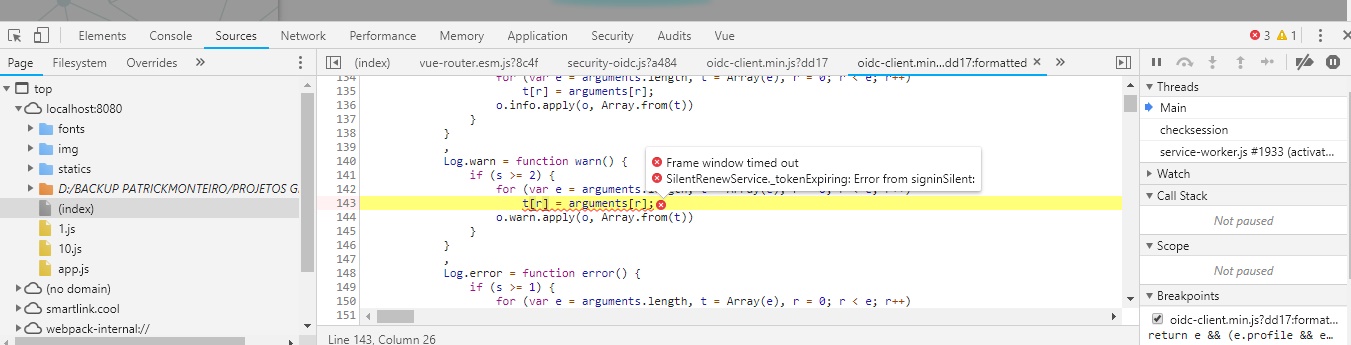
 patrickmonteiro
on 23 Oct 2018
patrickmonteiro
on 23 Oct 2018
anybody found the solution?
 elyasnew
on 6 Mar 2019
elyasnew
on 6 Mar 2019
CORS is unrelated to iframes. Sounds more like an IE zone issue -- are you using IE? Either that, or a XFO/CSP issue -- are you using that in the OP?
Hi @brockallen, my problem is with addUserSignOut (which is constantly called, creating an infinite loop) I think my problem could be related to that. I've CSP configure in the OP
 app.Use(async (context, next) =>
            {
                context.Response.Headers.Add(
                  "Content-Security-Policy",
                  "script-src 'self' 'unsafe-inline' *; " +
                  "style-src *; " +
                  "img-src *");
                await next();
            });
What I don't understand is that locally beside the error Frame window timed out and a couple of redirect cause by addUserSignOut to my login page the loop doesn't repeat constantly as in deployed app,
This is my Angular settings:
authority: `${environment.identity_server_url}`,
  client_id: 'js',
  redirect_uri: `${environment.login_redirect}/signin-oidc`,
  response_type: 'id_token token',
  scope: 'openid profile salesforce api1',
  post_logout_redirect_uri: `${environment.login_redirect}`,
  userStore: new WebStorageStateStore({ store: window.localStorage }),
  silent_redirect_uri: `${environment.login_redirect}/signin-oidc-silent`,
I set silent_redirect_uri even though I'm not using it to prevent this error:
UserManager.querySessionStatus: No silent_redirect_uri configured
this is the only error I can see on my console log (using Log.logger = console;):
Frame window timed out
any idea?
 leobel
on 11 Apr 2019
leobel
on 11 Apr 2019
Ok, after complete the silent redirect flow calling signinSilentCallback on my silent_redirect_uri, the Frame window timed out goes away. Also I remove my CSP config. The only problem now is the infinite loop cause by the addUserSignOut get always called (which doesn't happens locally), I notice this warning on my logs:
ResponseValidator._processSigninParams: Response was error login_required
any idea?
leobel
on 11 Apr 2019
Hi @leobel, Did you find any solution? Please share
 mperk
on 21 Aug 2019
mperk
on 21 Aug 2019
for me, it worked when I set the UserManager property includeIdTokenInSilentRenew to false. Also as confirmed in this thread, signinSilentCallback has to be called on the redirect_uri/silent_redirect_uri. If dev tools are opened, you will be able to see an iframe with the /authorize endpoint. You can manually paste that in browser for debugging purposes.
 ekdev2
on 2 Mar 2020
ekdev2
on 2 Mar 2020
Related issues
 arnaldo-infinite
·
4Comments
arnaldo-infinite
·
4Comments
 tamias
·
3Comments
tamias
·
3Comments
 dotli
·
3Comments
dotli
·
3Comments
 shesellsanctuary
·
4Comments
shesellsanctuary
·
4Comments
 baoduy
·
4Comments
baoduy
·
4Comments
Most helpful comment
Did you add the silent renew url to the list of redirectUris on IdentityServer for your application