Ohara: Ohara 0.11.0 product testing report
測試項目
1. 基本測試
- [ ] 確認畫面(UI)與設計稿(Design)是否一致
- 顏色、字型、符號、圖片、...
- [ ] 檢查所有畫面的 Title 名稱是否正確
- [ ] 所有連結是否有前往正確頁面
- [ ] 切換視窗大小時,有無跑版情形
- [ ] 切換視窗大小後,文字與圖形是否竄行
- 表單
- [ ] 任何一個必填欄位未填寫,不能送出
- [ ] 表單送出中,應該明確表達正在處理中的訊號
- [ ] 表單送出中,應該要凍結表單(除非有提供取消功能)
- [ ] 任何表單至少要有 CTA 及 Cancel 兩類按紐 (CTA: Call-To-Action)
- 訊息
- [ ] 成功訊息,應該要明確指出完成對象
- [ ] 錯誤訊息,應該要明確指出錯誤對象
- [ ] 確認訊息
- [ ] 刪除確認,應該要明確指出欲刪除對象
- 按鈕
- [ ] 任何一個刪除按鈕,都要有刪除確認提示
- 鼠標
- [ ] 移動到所有可以點擊的元素,要出現 pointer cursor
- Button, Link icon, Link text, ...
- Button, Link icon, Link text, ...
- [ ] 移動到所有可以點擊的元素,要出現 pointer cursor
 jackyoh
All 20 comments
- [x] 在Pipeline中如果在element是stop的狀態中啟動Metrics開關接著啟動element後,element上不會出現Metrics。 (#5479)
- [x] Incorrect restart workspace range of danger zone in setting page #5425
- [x] 先建立一個pipeline後,刪除workspace後,在重建一個同名的workspace會看到原有的pipeline,但刷新後會消失 (#5438)
- [x] 在Pipeline中若是有數個connector連接到topic,接著restart workspace 會順利完成,但實際上worker是stop->start->stop。
- [x] Pipeline中若element的def屬性valueType :TAGS 無法正確的在 property dialog使用 #5437
- [x] An error occurs when "close after finish" is checked in create workspace progress dialog #5452
- [x] Should not start a Paper elements which is "illegal" (#5431)
- [x] Force delete topic not available from RUNNING connector (#5473)
- [x] Property view metrics will not update #5461
- [x] The shared topics table field use by pipeline displays the error pipeline #5476
- [x] Shabondi and stream fetch metrics failed if not running (#5482)
 wu87988622
on 13 Jul 2020
wu87988622
on 13 Jul 2020
Workspace 出現unstable tag後,無法進入workspace做刪除或重啟動作。

偶爾會遇到workspace無法重啟之情況,目前尚未找出原因重現(單獨重啟broker或worker皆沒問題)
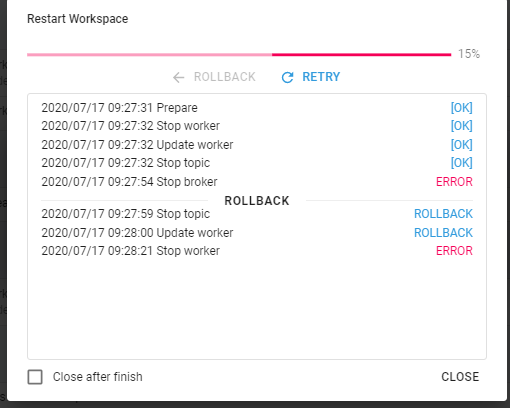
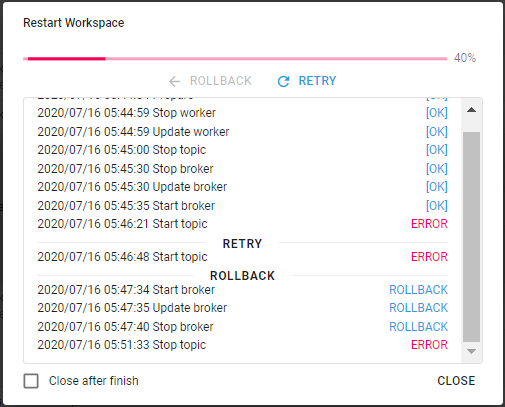
當pipeline上有topic,無法重啟broker

 chuntsekevin
on 17 Jul 2020
chuntsekevin
on 17 Jul 2020
Workspace 出現unstable tag後,無法進入workspace做刪除或重啟動作。
This is the desired result, please see #5385
 saivirtue
on 17 Jul 2020
saivirtue
on 17 Jul 2020
當pipeline上有topic,無法重啟broker
This looks like the exact problem to #5402 🤔 , would you share the testing steps?
saivirtue
on 17 Jul 2020
當pipeline上有topic,無法重啟broker
This looks like the exact problem to #5402 🤔 , would you share the testing steps?
My testing step
- create a new pipeline
- creat a new topic
- restart broker
thanks!
chuntsekevin
on 17 Jul 2020
當pipeline上有topic,無法重啟broker
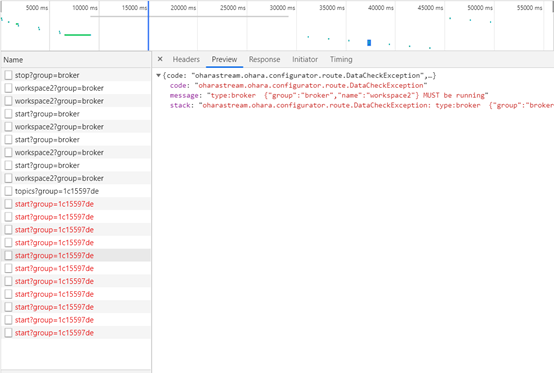
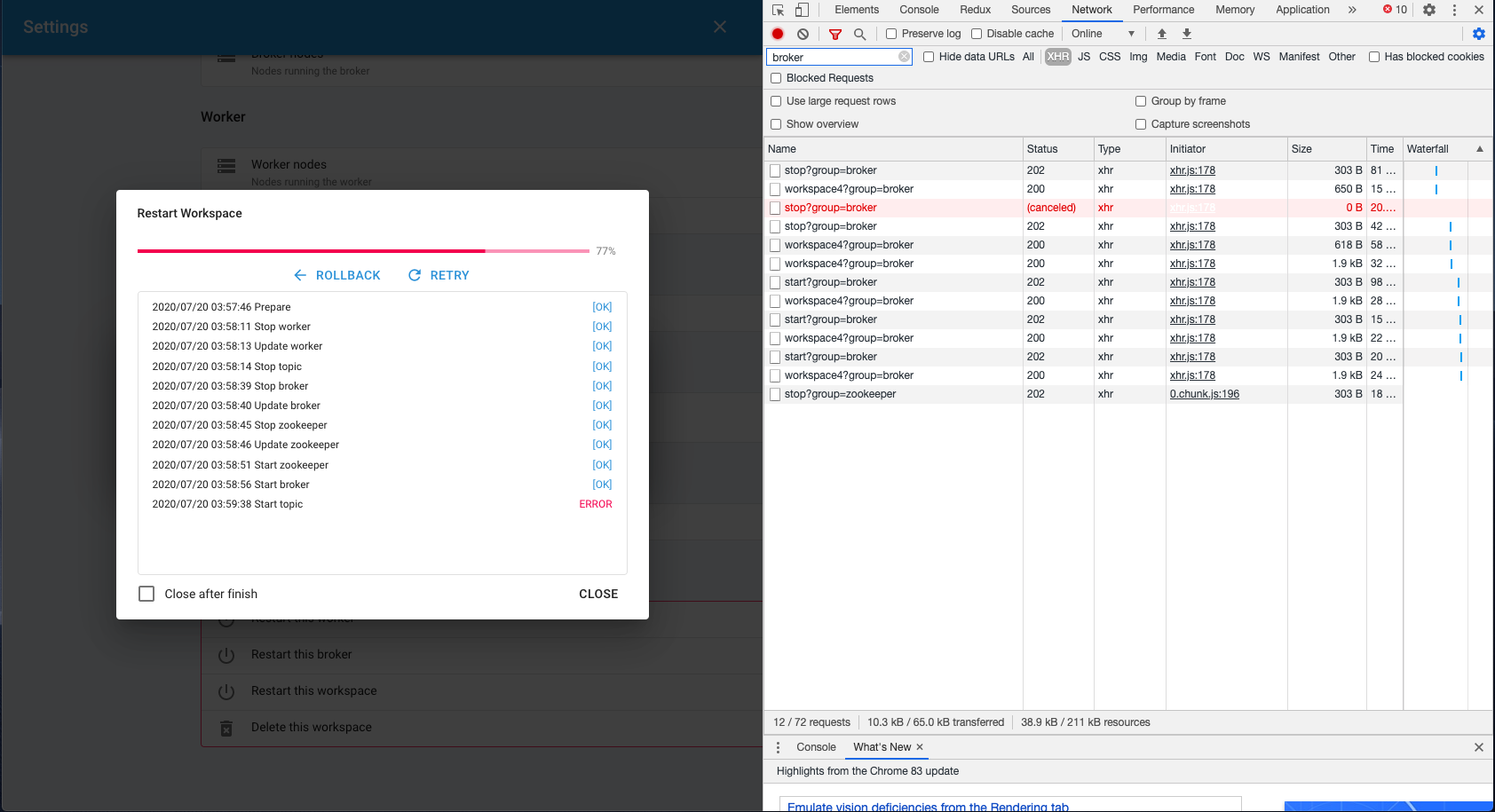
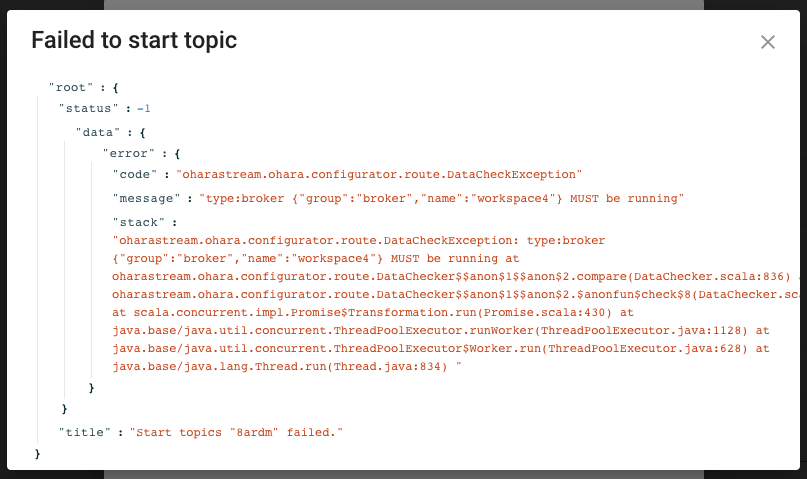
一直遇到類似的問題,只要有 topic,不管是重啟 broker 或是 workspace 時,Start topic 一定會失敗 :(
 eechih
on 20 Jul 2020
eechih
on 20 Jul 2020
一直遇到類似的問題,只要有 topic,不管是重啟 broker 或是 workspace 時,Start topic 一定會失敗 :(
錯誤訊息呢?
 chia7712
on 20 Jul 2020
chia7712
on 20 Jul 2020
一直遇到類似的問題,只要有 topic,不管是重啟 broker 或是 workspace 時,Start topic 一定會失敗 :(
錯誤訊息呢?
測試步驟:
eechih
on 20 Jul 2020
這感覺跟worker的故事蠻像的?
chia7712
on 20 Jul 2020
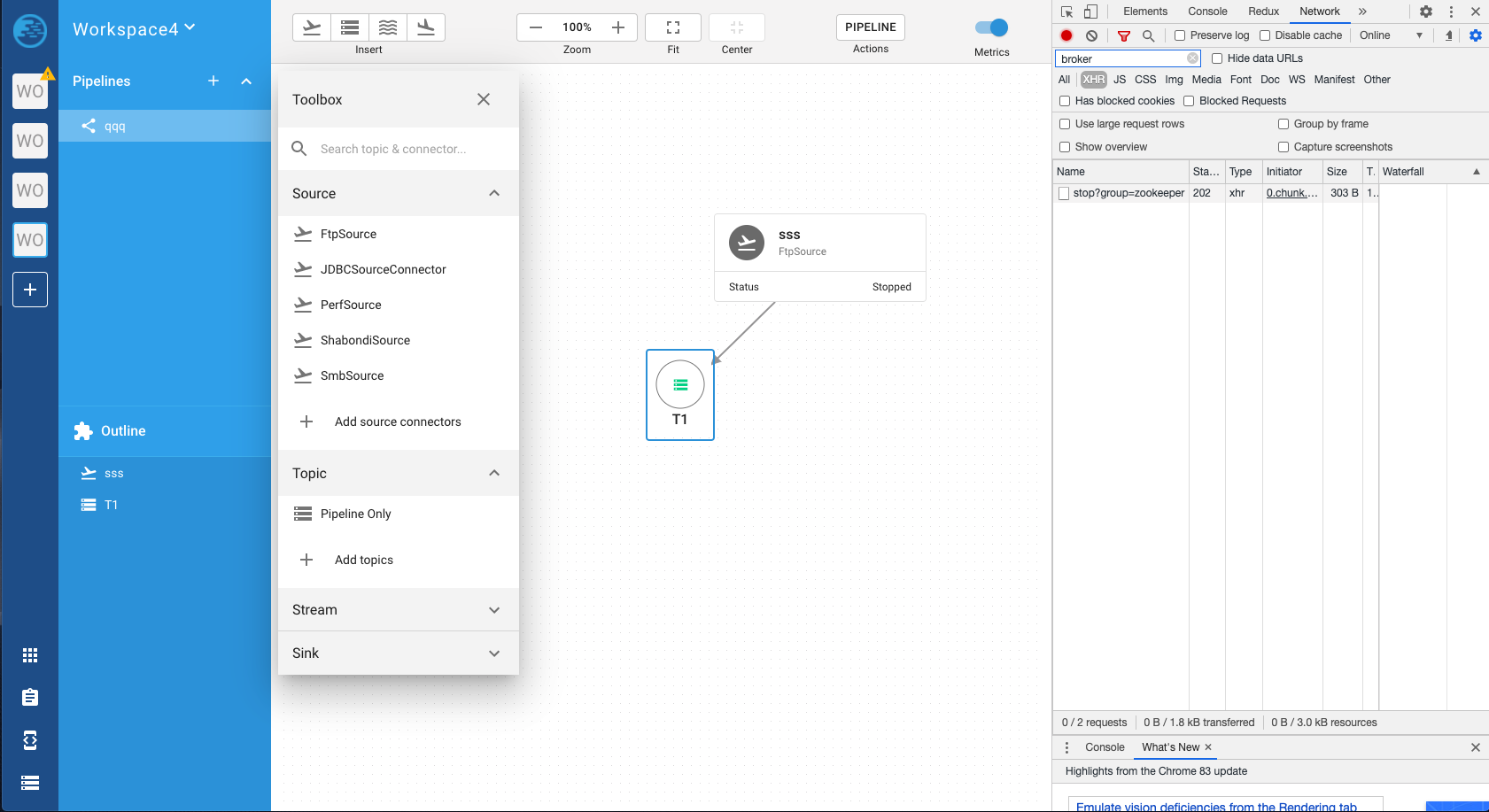
Restart broker 成功後,重新整理畫面,pipeline 的 toolbox 無法正常顯示
測試步驟:
- 啟動一個全新的 Ohara
- 新建一組 node
- 新建一組 workspace
- 執行 Restart worker 成功
- 呼叫 inspect broker api 正常
- 呼叫 inspect worker api 正常
- 執行 Restart broker 成功
~~ 經過 30 秒後 ~~ - 呼叫 inspect broker api 正常
- 呼叫 inspect worker api 失敗
worker container logs:
[2020-07-21 02:48:01,699] WARN [Consumer clientId=consumer-7755f77964cd41f0b57e5b6ef-1, groupId=7755f77964cd41f0b57e5b6ef] 1 partitions have leader brokers without a matching listener, including [connect.offset5f73c54bedef40a5938b3ced5-0] (org.apache.kafka.clients.NetworkClient:1063)
[2020-07-21 02:48:01,766] INFO AbstractConfig values:
 (org.apache.kafka.common.config.AbstractConfig:347)
[2020-07-21 02:48:01,806] WARN [Consumer clientId=consumer-7755f77964cd41f0b57e5b6ef-1, groupId=7755f77964cd41f0b57e5b6ef] 1 partitions have leader brokers without a matching listener, including [connect.offset5f73c54bedef40a5938b3ced5-0] (org.apache.kafka.clients.NetworkClient:1063)
[2020-07-21 02:48:01,915] WARN [Consumer clientId=consumer-7755f77964cd41f0b57e5b6ef-1, groupId=7755f77964cd41f0b57e5b6ef] 1 partitions have leader brokers without a matching listener, including [connect.offset5f73c54bedef40a5938b3ced5-0] (org.apache.kafka.clients.NetworkClient:1063)
[2020-07-21 02:48:02,034] WARN [Consumer clientId=consumer-7755f77964cd41f0b57e5b6ef-1, groupId=7755f77964cd41f0b57e5b6ef] 1 partitions have leader brokers without a matching listener, including [connect.offset5f73c54bedef40a5938b3ced5-0] (org.apache.kafka.clients.NetworkClient:1063)

.... 經過 30 秒

[2020-07-21 02:48:26,897] WARN [Consumer clientId=consumer-7755f77964cd41f0b57e5b6ef-1, groupId=7755f77964cd41f0b57e5b6ef] 1 partitions have leader brokers without a matching listener, including [connect.offset5f73c54bedef40a5938b3ced5-0] (org.apache.kafka.clients.NetworkClient:1063)
[2020-07-21 02:48:26,998] WARN [Consumer clientId=consumer-7755f77964cd41f0b57e5b6ef-1, groupId=7755f77964cd41f0b57e5b6ef] 1 partitions have leader brokers without a matching listener, including [connect.offset5f73c54bedef40a5938b3ced5-0] (org.apache.kafka.clients.NetworkClient:1063)
[2020-07-21 02:48:27,099] WARN [Consumer clientId=consumer-7755f77964cd41f0b57e5b6ef-1, groupId=7755f77964cd41f0b57e5b6ef] 1 partitions have leader brokers without a matching listener, including [connect.offset5f73c54bedef40a5938b3ced5-0] (org.apache.kafka.clients.NetworkClient:1063)
[2020-07-21 02:48:27,200] WARN [Consumer clientId=consumer-7755f77964cd41f0b57e5b6ef-1, groupId=7755f77964cd41f0b57e5b6ef] 1 partitions have leader brokers without a matching listener, including [connect.offset5f73c54bedef40a5938b3ced5-0] (org.apache.kafka.clients.NetworkClient:1063)
[2020-07-21 02:48:27,201] ERROR [Worker clientId=connect-1, groupId=7755f77964cd41f0b57e5b6ef] Uncaught exception in herder work thread, exiting:  (org.apache.kafka.connect.runtime.distributed.DistributedHerder:297)
org.apache.kafka.common.errors.TimeoutException: Failed to get offsets by times in 30000ms
[2020-07-21 02:48:27,206] INFO Stopped http_41325@63538bb4{HTTP/1.1,[http/1.1]}{0.0.0.0:41325} (org.eclipse.jetty.server.AbstractConnector:380)
[2020-07-21 02:48:27,207] INFO node0 Stopped scavenging (org.eclipse.jetty.server.session:158)
[2020-07-21 02:48:27,214] INFO Kafka Connect stopping (org.apache.kafka.connect.runtime.Connect:67)
[2020-07-21 02:48:27,214] INFO Stopping REST server (org.apache.kafka.connect.runtime.rest.RestServer:321)
[2020-07-21 02:48:27,215] INFO REST server stopped (org.apache.kafka.connect.runtime.rest.RestServer:338)
[2020-07-21 02:48:27,215] INFO [Worker clientId=connect-1, groupId=7755f77964cd41f0b57e5b6ef] Herder stopping (org.apache.kafka.connect.runtime.distributed.DistributedHerder:616)
[2020-07-21 02:48:32,215] INFO [Worker clientId=connect-1, groupId=7755f77964cd41f0b57e5b6ef] Herder stopped (org.apache.kafka.connect.runtime.distributed.DistributedHerder:636)
[2020-07-21 02:48:32,215] INFO Kafka Connect stopped (org.apache.kafka.connect.runtime.Connect:72)
Delete workspace 成功後,如果沒有勾選 close after finish,Dialog 不應該被關閉。
eechih
on 22 Jul 2020
Pipeline and connector fail to remove
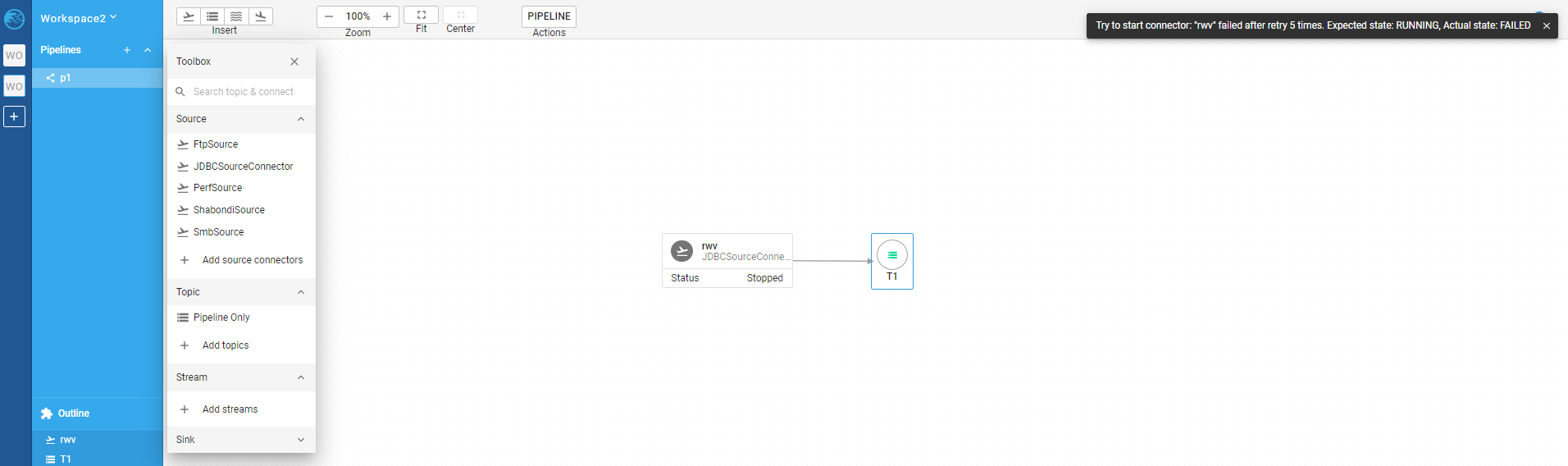
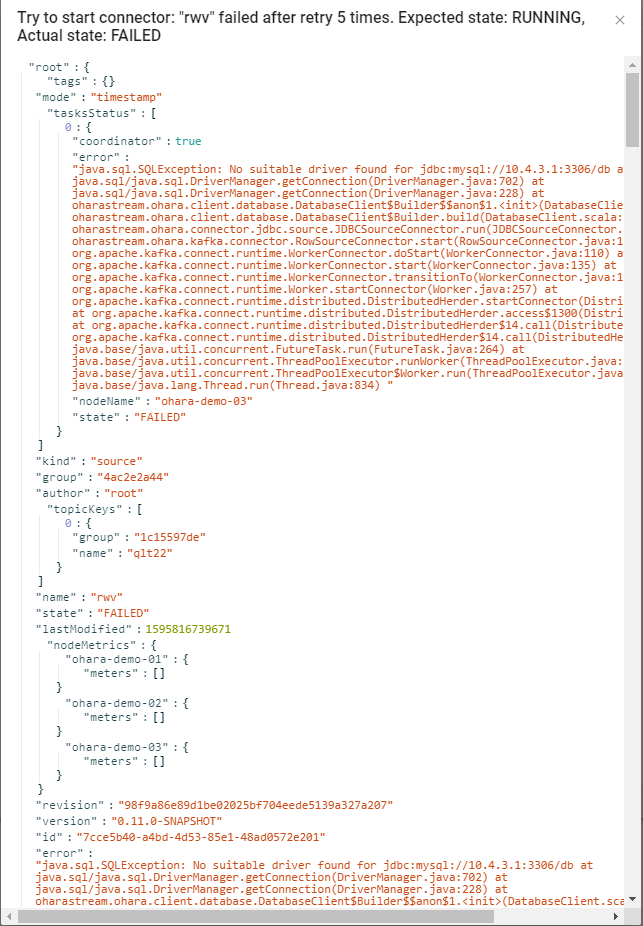
Add a JDBC connector (without JDBC connector plugin), when user forgot to add the plugin jar will cause the pipeline dead.
Can't remove any component(topic or connector) and pipeline can't delete.
And the connector should show failed status(red) but still show stopped status(gray), user have to refresh the page to see the real status.
Can't restart Workspace, Broker, Worker
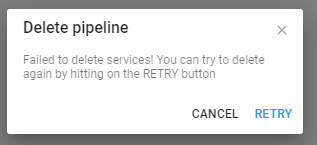
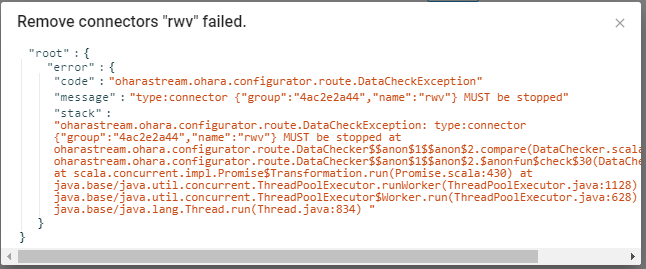
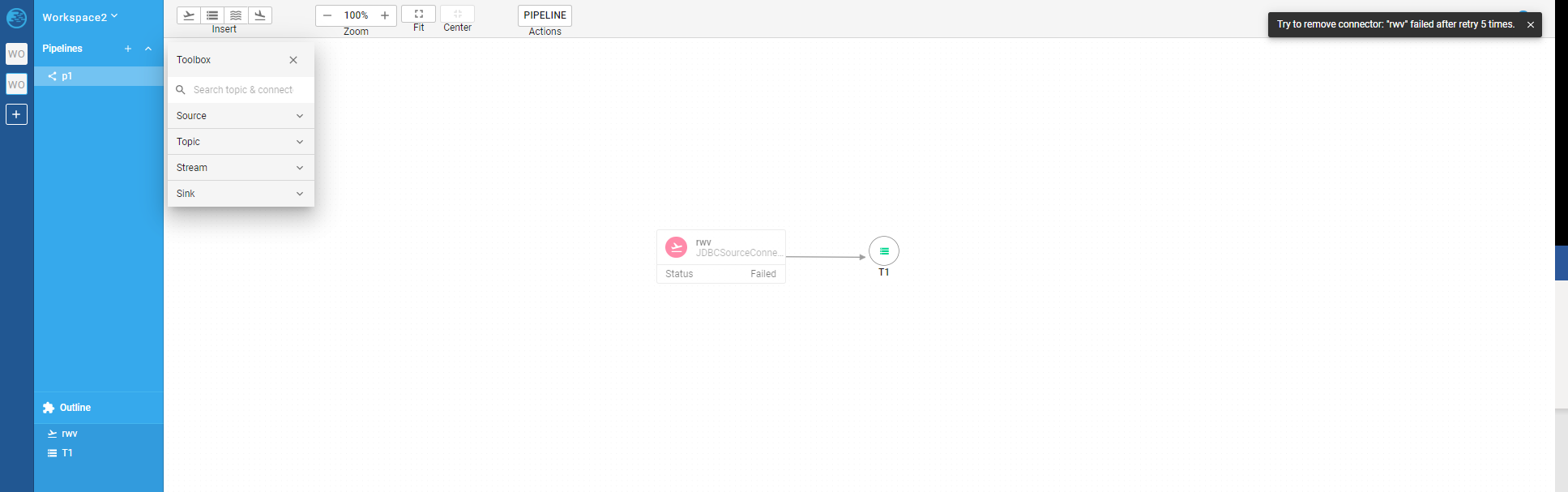
Tracked in #5501 and #5502
chuntsekevin
on 27 Jul 2020
Thanks @chuntsekevin !
@oharastream/frontend Does anyone take a look?
 vitojeng
on 27 Jul 2020
vitojeng
on 27 Jul 2020
It's a bug, I've opened a new issue here
saivirtue
on 27 Jul 2020
Add a JDBC connector (without JDBC connector plugin), when user forgot to add the plugin jar will cause the pipeline dead.
Can't remove any component(topic or connector) and pipeline can't delete.
And the connector should show failed status(red) but still show stopped status(gray), user have to refresh the page to see the real status.
Can't restart Workspace, Broker, Worker
A couple of bug we have discovered while trying to repro this issue:
- [ ] Inspect worker definitions always return success if it reaches the retry limit (@konekoya) #5500
- [ ] Separate start connectors/streams/shabondis epic's start and get logic (@eechih) #5502
- [ ] Remove illegal element status from Paper (@konekoya) #5501
 konekoya
on 27 Jul 2020
konekoya
on 27 Jul 2020
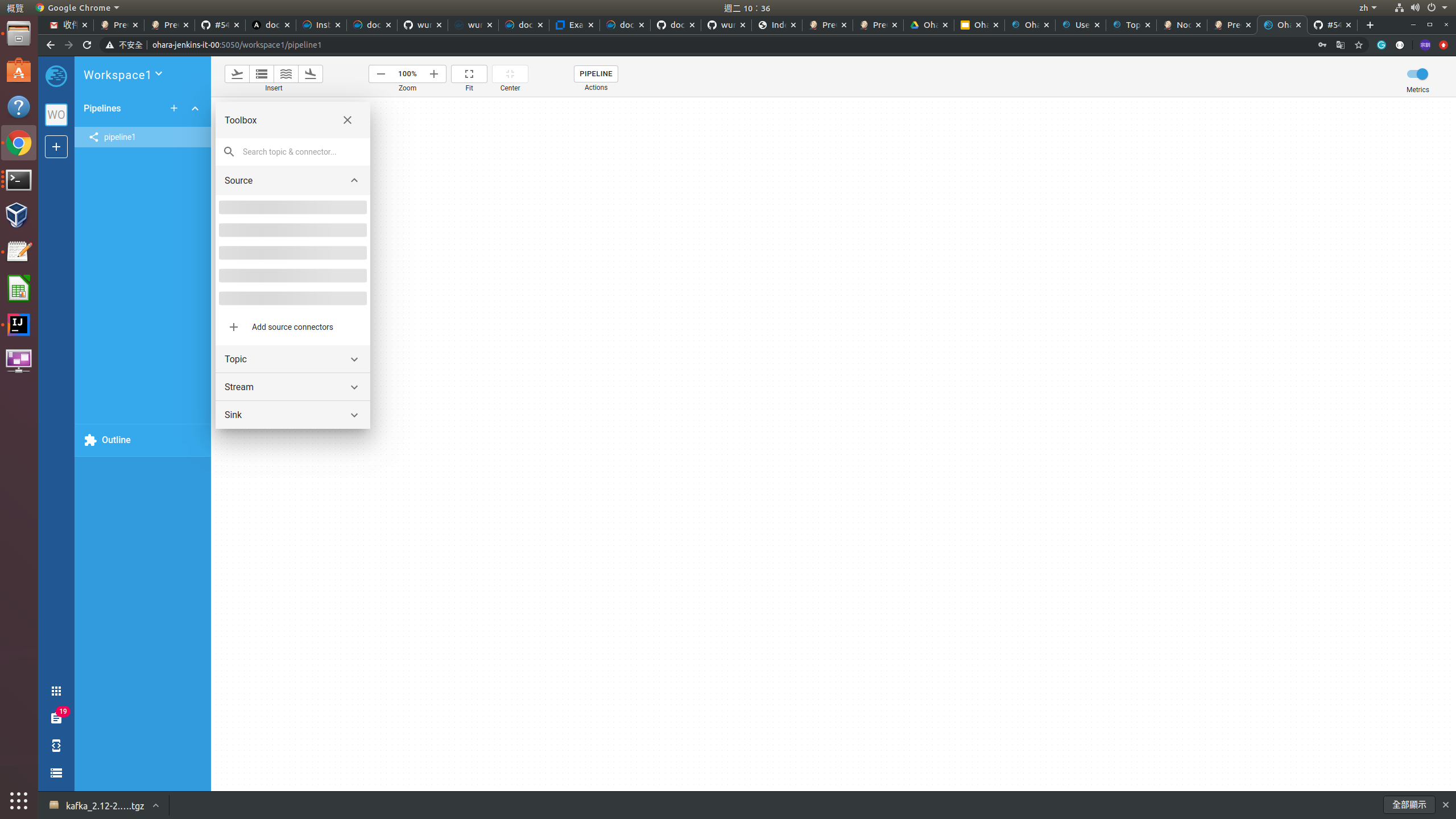
重複建立到相同的 workspace name 會造成 Pipeline Toolbox 的 Source 和 Sink 無法顯示
測試步驟如下:
- 第一次啟動 configurator 和 manager 之後,建立 workspace1
建立完成 workspace1 之後,把 configurator 和 manager 關閉掉。但是忘記刪除之前建立 workspace1 的 zookeeper, broker 和 worker container
第二次啟動 configurator 和 manager 之後,再一次建立 workspace1
完成 workspace1 的建立之後,再去建立 pipeline1,打開 pipeline1 就會看到如下的畫面:
jackyoh
on 28 Jul 2020
以上的問題主要是沒有將 configurator container 存放的資料 (rockdb) 保留到 host 裡,才會造成 configurator 重啟時所有 workspace 的資訊都不見,使用以下指令可以把 configurator container 的資料保留到 host 裡:
docker run -d --rm -v /tmp/rockdb:/home/ohara/configurator -p 12345:12345 oharastream/configurator:0.11.0-SNAPSHOT --port 12345 --hostname ohara-jenkins-it-00 --folder /home/ohara/configurator
重新 Restart Broker 之後 worker 的 container 會收到如下的 warn 訊息:
[2020-07-29 06:22:01,852] WARN [Consumer clientId=consumer-ed51f67fb39846ebb2a483dfd-1, groupId=ed51f67fb39846ebb2a483dfd] 1 partitions have leader brokers without a matching listener, including [connect.offsetbbdbd649eacb41f1ae8031065-0] (org.apache.kafka.clients.NetworkClient:1063)
測試步驟如下:
- 建立 workspsace
- 當 workspace 建立完成之後,會建立一個 pipeline。pipeline 上面會有一個 perf connector 以及一個 topic
- 重新啟動 broker。就會看到以上的 WARN 訊息,大概等 3 分鐘之後 worker container 就會出現 error 狀態。
這跟上面 @eechih 所敘述的問題應該是一樣的問題
jackyoh
on 29 Jul 2020
[2020-07-29 06:22:01,852] WARN [Consumer clientId=consumer-ed51f67fb39846ebb2a483dfd-1, groupId=ed51f67fb39846ebb2a483dfd] 1 partitions have leader brokers without a matching listener, including [connect.offsetbbdbd649eacb41f1ae8031065-0] (org.apache.kafka.clients.NetworkClient:1063)
以上的錯誤確定是因為目前,前端沒有整合 volume 的部份,所以在 restart broker 的 container 時也需要將 zookeeper container 也一起刪掉重啟。確保 zookeeper container 沒有存放到 restart 之前 broker container 的系統資料,這樣才能讓 broker container 和 worker container 正常執行。
jackyoh
on 29 Jul 2020
0.11.0 已經 release 了,我先把此議題關閉。之後有發現問題再來 reopen 此議題
jackyoh
on 3 Aug 2020
Related issues
vitojeng
·
3Comments
saivirtue
·
5Comments
saivirtue
·
3Comments
eechih
·
3Comments
vitojeng
·
4Comments
Most helpful comment
It's a bug, I've opened a new issue here