Ohara: Ohara 0.8 product testing report
測試項目
1. 基本測試:
- [ ] 確認畫面(UI)與設計稿(Design)是否一致
- 顏色、字型、符號、圖片、...
- [ ] 檢查所有畫面的 Title 名稱是否正確
- [ ] 所有連結是否有前往正確頁面
- [ ] 切換視窗大小時,有無跑版情形
- [ ] 切換視窗大小後,文字與圖形是否竄行
- 表單
- [ ] 任何一個必填欄位未填寫,不能送出
- [ ] 表單送出中,應該明確表達正在處理中的訊號
- [ ] 表單送出中,應該要凍結表單(除非有提供取消功能)
- [ ] 任何表單至少要有 CTA 及 Cancel 兩類按紐 (CTA: Call-To-Action)
- 訊息
- [ ] 成功訊息,應該要明確指出完成對象
- [ ] 錯誤訊息,應該要明確指出錯誤對象
- [ ] 確認訊息
- [ ] 刪除確認,應該要明確指出欲刪除對象
- 按鈕
- [ ] 任何一個刪除按鈕,都要有刪除確認提示
- 鼠標
- [ ] 移動到所有可以點擊的元素,要出現 pointer cursor
- Button, Link icon, Link text, ...
- Button, Link icon, Link text, ...
- [ ] 移動到所有可以點擊的元素,要出現 pointer cursor
2.功能測試:
Note:
- Please make sure you're testing these cases on demo environment
- The full test procedure can be found in each case's link
- Add your test report in the comment
Case 1: FTP to Topic to Streamapp to HDFS
- [ ] Create a new workspace with three nodes
- [ ] Create two topic and upload a stream app jar into the workspace
- [ ] Create a new pipeline, add some connectors, topics and a stream app
- [ ] 連接 FTP source -> Topic -> StreamApp -> Topic -> HDFS sink
- [ ] Prepare the required folders and test data on the FTP server
- [ ] Start all connectors and stream app
- [ ] Verify which test data was successfully dumped to HDFS
Case 2: JDBC to Topic to FTP
- [ ] Create a new workspace with three nodes
- [ ] Create new topic into the workspace
- [ ] Create a new pipeline, add a jdbc source connector, topics and a ftp sink connector
- [ ] 連接 JDBC source -> Topic -> FTP sink
- [ ] Prepare the required table and data on the PostgreSQL server
- [ ] Prepare the required output folder on the FTP server
- [ ] Start all connectors on the second_pipeline page
- [ ] Verify which test data was successfully dumped to FTP server
3. 安裝測試:
Note:
- Test this case in your own environment
- The full test procedure can be found in each case's link
- Add your test report in the comment
Case 1: Ohara installation
- [ ] Confirm your use the hardware specification
- [ ] Confirm your use version
- [ ] Install Kubernetes
- [ ] Running the Ohara Configuration service
- [ ] Running the Ohara Manager service
測試所發現的問題紀錄
設計稿:
- Upgrade workspace: #1364
測試環境:
- Ohara
- Mode: k8s
- Version: 0.8.0-SNAPSHOT
- Build date:
- 測試工具
- 瀏覽器:Chrome 76.0.3809.100
- 最小螢幕寬度:1200
基本測試:
功能測試:
- [x] #2894 [Manager] Don't start a topic if it's failed in the creation phase (__confirmed by__: @konekoya @DavidMi-1)
- [x] #2891 [Manager] Don't update a connector when it's running (__confirmed by__: @konekoya @DavidMi-1)
- [x] #2886 Remove column definition from JsonIn and JsonOut (__confirmed by__: @konekoya @DavidMi-1)
- [x] #2901 [Manager] Connector should display the node it contains instead of the node in workspace (__confirmed by__: @konekoya @DavidMi-1)
- [x] #2888 Topic APIs should prevent users from inputting negative number to partitions and replications (__confirmed by__: )
- [x] #2886 Remove column definition from JsonIn and JsonOut (__confirmed by__: @konekoya)
- [x] #2902 [Manager] Prevent UI from breaking when connector's column table has wrong inputs (__confirmed by__: @konekoya @DavidMi-1)
- [x] #2914 Fail to validate Ftp, hdfs and Rdb when the request carries the workerClusterKey
- [x] #2904 fix weird warnings "Check docer version" from k8s-pre-install.sh
- [x] #2828 Failed to parse container name in ssh mode when there are non-hosted containers
- [x] #2920 Validation APIs does not return error report when we define the incorrect rdb settings
- [x] #2917 the consumer used to receive validation reports is closed too early
- [x] #2924 [Manager] Don't create a graph if the new connector's name is already taken in the pipeline (__confirmed by__: @konekoya)
- [x] #2930 [Manager] The stream jars link is broken in workspace overview's stream jars section (__confirmed by__: @konekoya)
- [x] #2938 JsonIn should use java.BigDecimal rather than scala.BigDecimal
- [x] #2942 [Manager] Should handle topic starting error
- [x] #2943 [Manager] Disable column table when the connector is running
- [x] #2954 [Manager] Display connector running state without a page refresh
- [x] #2958 [Manager] Only display topics that are belong to the current workspace in overview page
- [x] #2964 Failed to get/list Connector/Topic if it count on a non-running cluster
 konekoya
All 28 comments
@chia7712 @DavidMi-1 @HarryChiang143 Please leave your test report in this issue.
konekoya
on 2 Oct 2019
@chia7712 @DavidMi-1 @HarryChiang143
Please start testing the __ohara installation__ today
I'm going thur the normal test cases locally today and found out the docs need some updates/tweaks due to the UI changes from this release. So I will file a PR to update the test case docs today. You guys can start to test the installation case in the meantime. Let me know if you have any problems/questions regarding the tests.
konekoya
on 3 Oct 2019
測試項目
1. 基本測試:
[x] 確認畫面(UI)與設計稿(Design)是否一致
- 顏色、字型、符號、圖片、...
- [x] 檢查所有畫面的 Title 名稱是否正確
- [x] 所有連結是否有前往正確頁面
- [x] 切換視窗大小時,有無跑版情形
- [x] 切換視窗大小後,文字與圖形是否竄行
表單
- [x] 任何一個必填欄位未填寫,不能送出
- [x] 表單送出中,應該明確表達正在處理中的訊號
- [x] 表單送出中,應該要凍結表單(除非有提供取消功能)
- [x] 任何表單至少要有 CTA 及 Cancel 兩類按紐 (CTA: Call-To-Action)
訊息
- [x] 成功訊息,應該要明確指出完成對象
- [x] 錯誤訊息,應該要明確指出錯誤對象
[x] 確認訊息
[x] 刪除確認,應該要明確指出欲刪除對象
按鈕
- [x] 任何一個刪除按鈕,都要有刪除確認提示
鼠標
[x] 移動到所有可以點擊的元素,要出現 pointer cursor
Button, Link icon, Link text, ...
2.功能測試:
Note:
- Please make sure you're testing these cases on demo environment
- The full test procedure can be found in each case's link
- Add your test report in the comment
Case 1: FTP to Topic to Streamapp to HDFS
- [x] Create a new workspace with three nodes
- [x] Create two topic and upload a stream app jar into the workspace
- [x] Create a new pipeline, add some connectors, topics and a stream app
- [x] 連接 FTP source -> Topic -> StreamApp -> Topic -> HDFS sink
- [x] Prepare the required folders and test data on the FTP server
- [x] Start all connectors and stream app
- [x] Verify which test data was successfully dumped to HDFS
Case 2: JDBC to Topic to FTP
- [x] Create a new workspace with three nodes
- [x] Create new topic into the workspace
- [x] Create a new pipeline, add a jdbc source connector, topics and a ftp sink connector
- [x] 連接 JDBC source -> Topic -> FTP sink
- [x] Prepare the required table and data on the PostgreSQL server
- [x] Prepare the required output folder on the FTP server
- [ ] Start all connectors on the second_pipeline page
- [ ] Verify which test data was successfully dumped to FTP server
3. 安裝測試: Done
Case 1: Ohara installation
- [x] Confirm your use the hardware specification
- [x] Confirm your use version
- [x] Install Kubernetes
- [x] Running the Ohara Configuration service
- [x] Running the Ohara Manager service
測試結果:
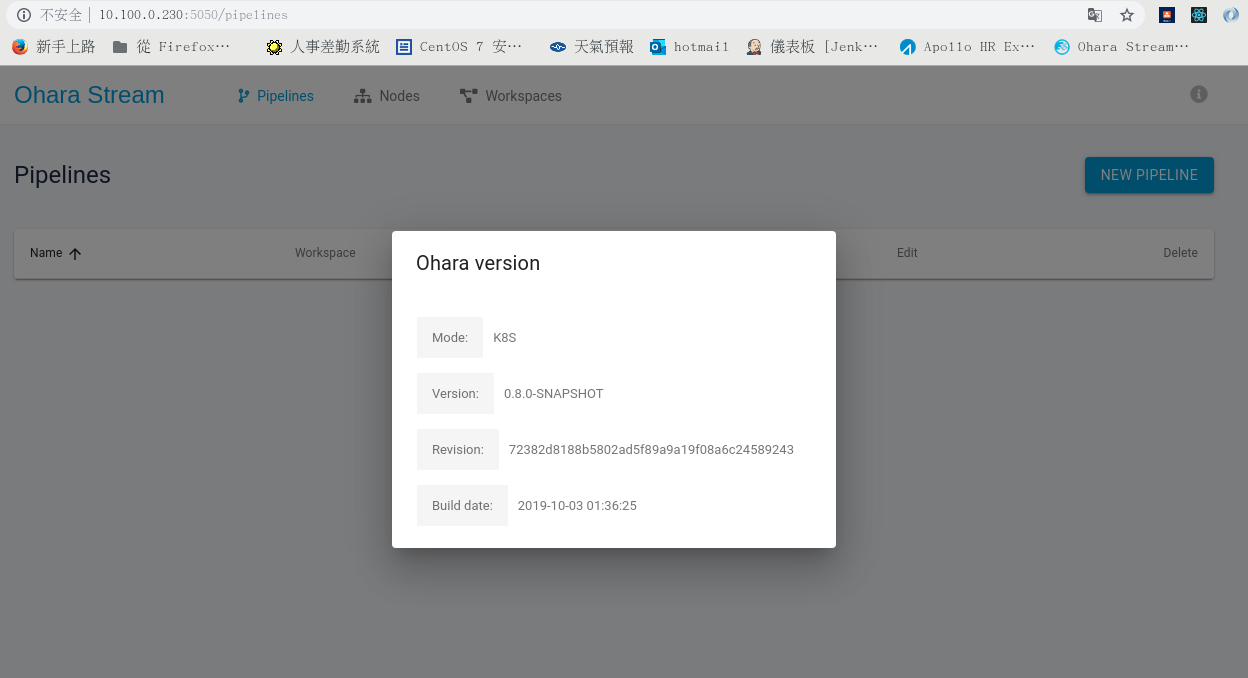
- 成功打開 Ohara manager 網頁如下圖
測試所發現的問題紀錄
設計稿:
測試環境:
Ohara
- Mode: k8s
- Version: 0.8.0-SNAPSHOT
- Build date: 2019-10-03 01:36:25
測試工具
- 瀏覽器:Chrome 77.0.3865.90
- 最小螢幕寬度:1200
基本測試:
功能測試:
case1.:
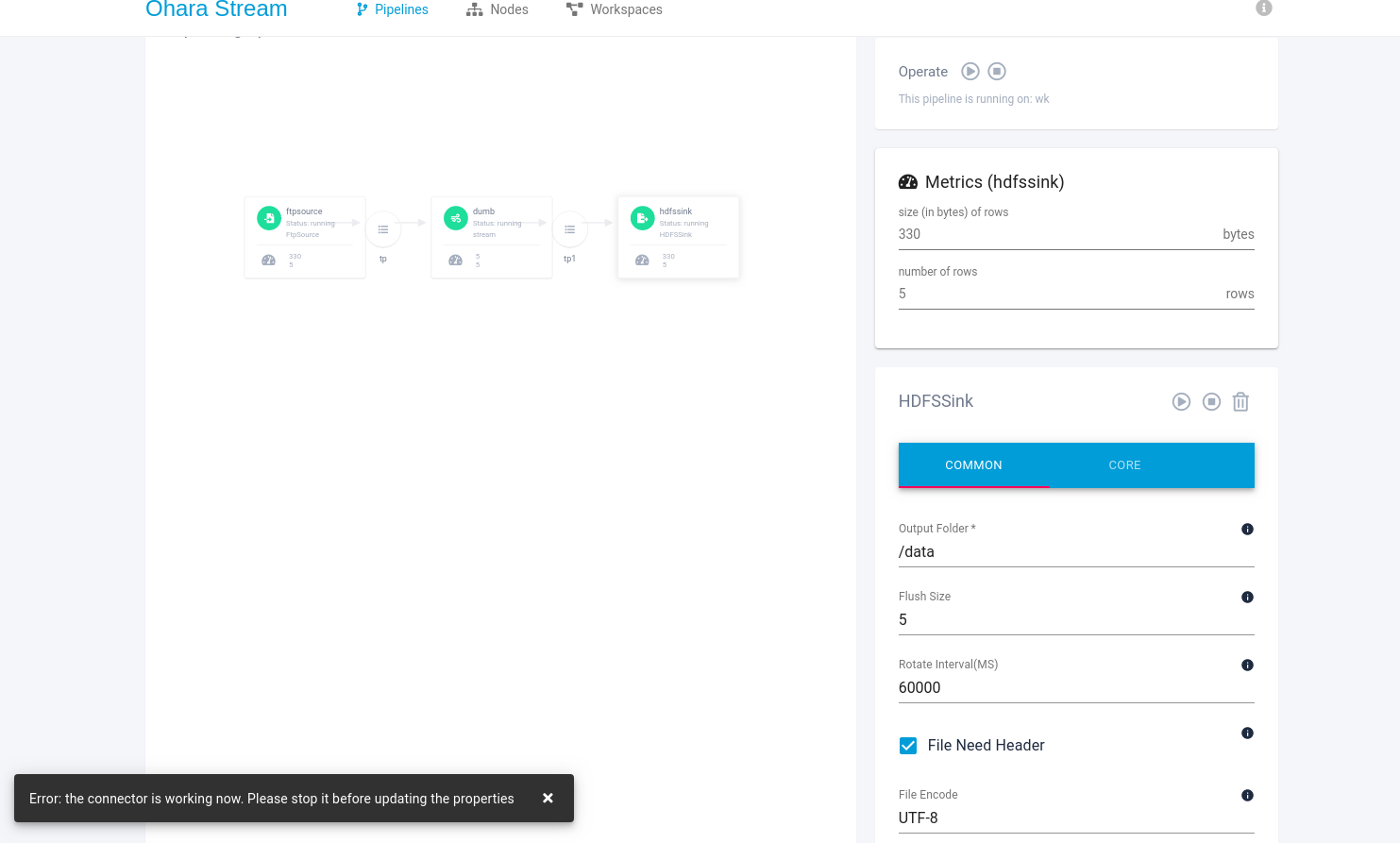
- 在click 'hdfssink' 圖示後顯示如下圖下方 error 內容, 只有在 hdfs sink connector 顯示, ftp source connector 和 stream app 都沒有 (Fixed in #2891)
other case:
- 當 workspace 超過1個, 在 connector 上 click 'TEST YOUR CONFIGS' 時, 會出現 'Erroe: we can't choose default cluster since there are too many clusters: wk,wk1'
__UPDATED__: Cannot reproduce this our demo env
 DavidMi-1
on 3 Oct 2019
DavidMi-1
on 3 Oct 2019
測試項目
1. 基本測試: DONE
[x] 確認畫面(UI)與設計稿(Design)是否一致
- 顏色、字型、符號、圖片、...
- [x] 檢查所有畫面的 Title 名稱是否正確
- [x] 所有連結是否有前往正確頁面
- [x] 切換視窗大小時,有無跑版情形
- [x] 切換視窗大小後,文字與圖形是否竄行
表單
- [x] 任何一個必填欄位未填寫,不能送出
- [x] 表單送出中,應該明確表達正在處理中的訊號
- [x] 表單送出中,應該要凍結表單(除非有提供取消功能)
- [x] 任何表單至少要有 CTA 及 Cancel 兩類按紐 (CTA: Call-To-Action)
訊息
- [x] 成功訊息,應該要明確指出完成對象
- [x] 錯誤訊息,應該要明確指出錯誤對象
[x] 確認訊息
[x] 刪除確認,應該要明確指出欲刪除對象
按鈕
- [x] 任何一個刪除按鈕,都要有刪除確認提示
鼠標
[x] 移動到所有可以點擊的元素,要出現 pointer cursor
Button, Link icon, Link text, ...
2.功能測試: DONE
Note:
- Please make sure you're testing these cases on demo environment
- The full test procedure can be found in each case's link
- Add your test report in the comment
Case 1: FTP to Topic to Streamapp to HDFS
- [x] Create a new workspace with three nodes
- [x] Create two topic and upload a stream app jar into the workspace
- [x] Create a new pipeline, add some connectors, topics and a stream app
- [x] 連接 FTP source -> Topic -> StreamApp -> Topic -> HDFS sink
- [x] Prepare the required folders and test data on the FTP server
- [x] Start all connectors and stream app
- [x] Verify which test data was successfully dumped to HDFS
Case 2: JDBC to Topic to FTP
- [x] Create a new workspace with three nodes
- [x] Create new topic into the workspace
- [x] Create a new pipeline, add a jdbc source connector, topics and a ftp sink connector
- [x] 連接 JDBC source -> Topic -> FTP sink
- [x] Prepare the required table and data on the PostgreSQL server
- [x] Prepare the required output folder on the FTP server
- [x] Start all connectors on the second_pipeline page
- [x] Verify which test data was successfully dumped to FTP server
3. 安裝測試: DONE
Case 1: Ohara installation
- [x] Confirm your use the hardware specification
- [x] Confirm your use version
- [x] Install Kubernetes
- [x] Running the Ohara Configuration service
- [x] Running the Ohara Manager service
測試結果:
測試所發現的問題紀錄
設計稿:
測試環境:
Ohara
- Mode: k8s
- Version: 0.8.0-SNAPSHOT
- Build date: 2019-10-03 01:36:25
- 測試工具
- OS: macOS 10.14.6
- 瀏覽器:Chrome 77.0.3865.90
- 最小螢幕寬度:1200
基本測試:
- Workspaces / plugins / new plugin: button name is different than other tabs (add plugin -> new plugin) (issue: #2895, won't fix in this release)
- Workspaces / nodes / button name and modal name is different (new node / add node) (issue: #2895, wont' fix in this release)
- Nodes / button name and modal name is different (new node / node ohara node) (issue: #2895, won't fix in this release)
- Warning message's link color is not using the primary theme color (different than other links) (issue: #2895, won't fix in this release)
- Pipeline list's edit icon is not aligned with the column name (issue: #2895, won't fix in this release)
- The stream jars link in workspaces' overview page has broken (fixed in #2930)
- Text content inside modals cannot be copied (issue: #2933, won't fix in this release)
- Don't break the page when the browser's view size is smaller than supported width (issue: #2934, won't fix in this release)
- Success and error message/notification should specify the item name of the action (issue: #2935, won't fix in this release)
功能測試:
konekoya
on 3 Oct 2019
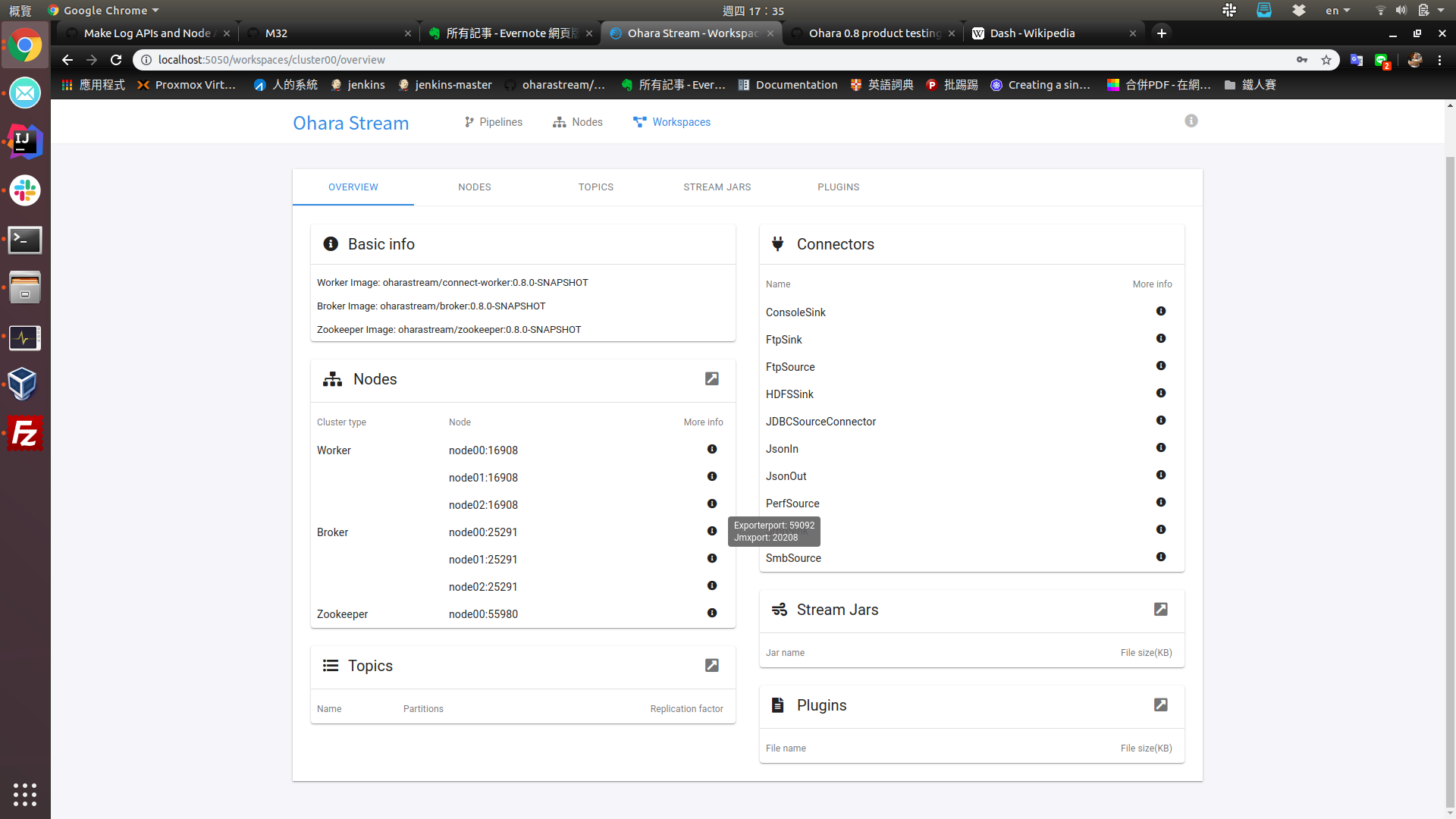
文字顯示不正確
- Jmxport => JMX port
- exporterport => exporter port
- Cluster type => Service type
__UPDATED__: This is a minor issue, so we won't backport to 0.8 (#2895)
 chia7712
on 3 Oct 2019
chia7712
on 3 Oct 2019
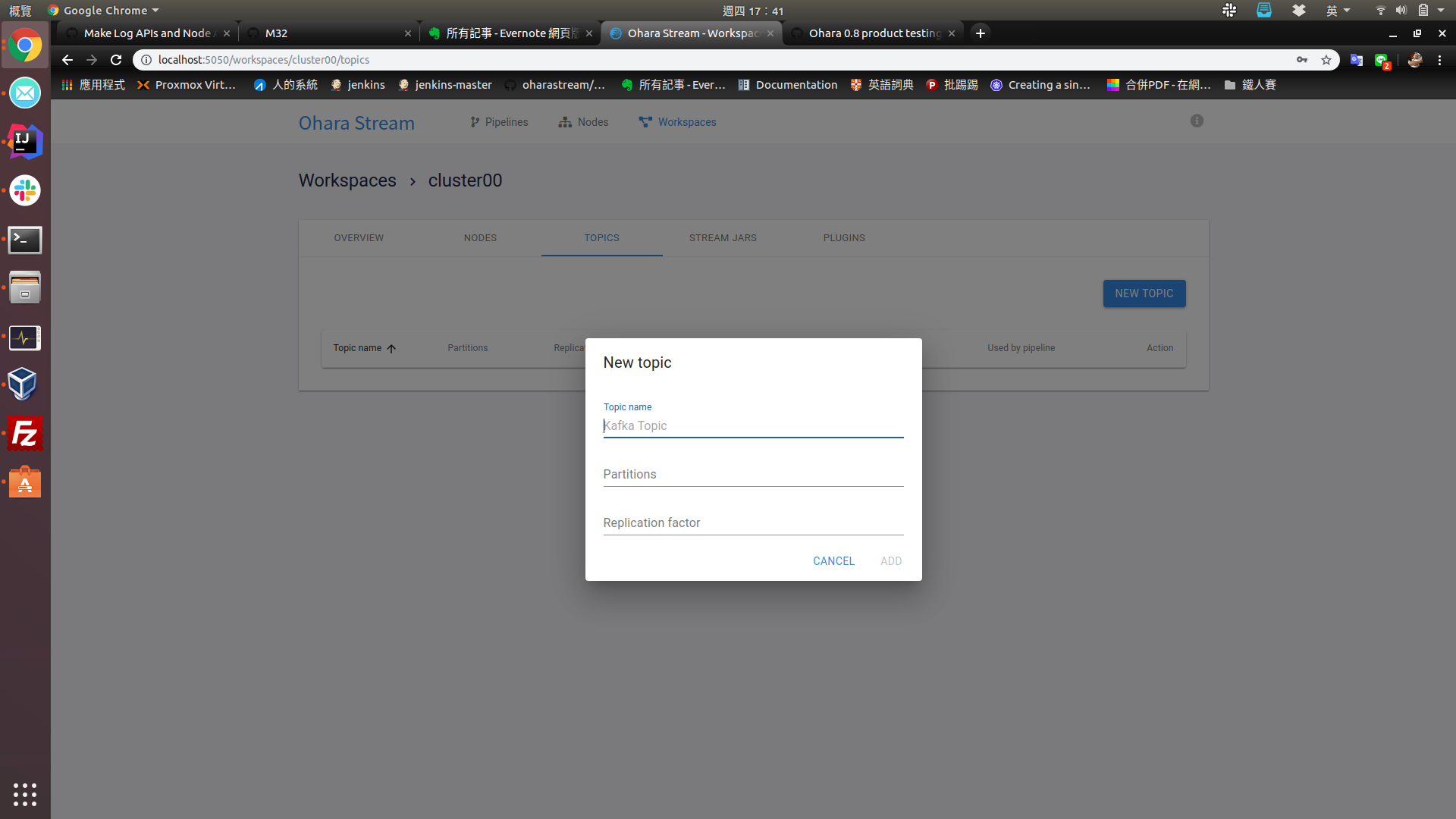
提示字不該使用"違法"的字"Kafka Topic"(大寫和空白不允許)
__UPDATED__: This is a minor issue, so we won't backport to 0.8 (#2895)
chia7712
on 3 Oct 2019
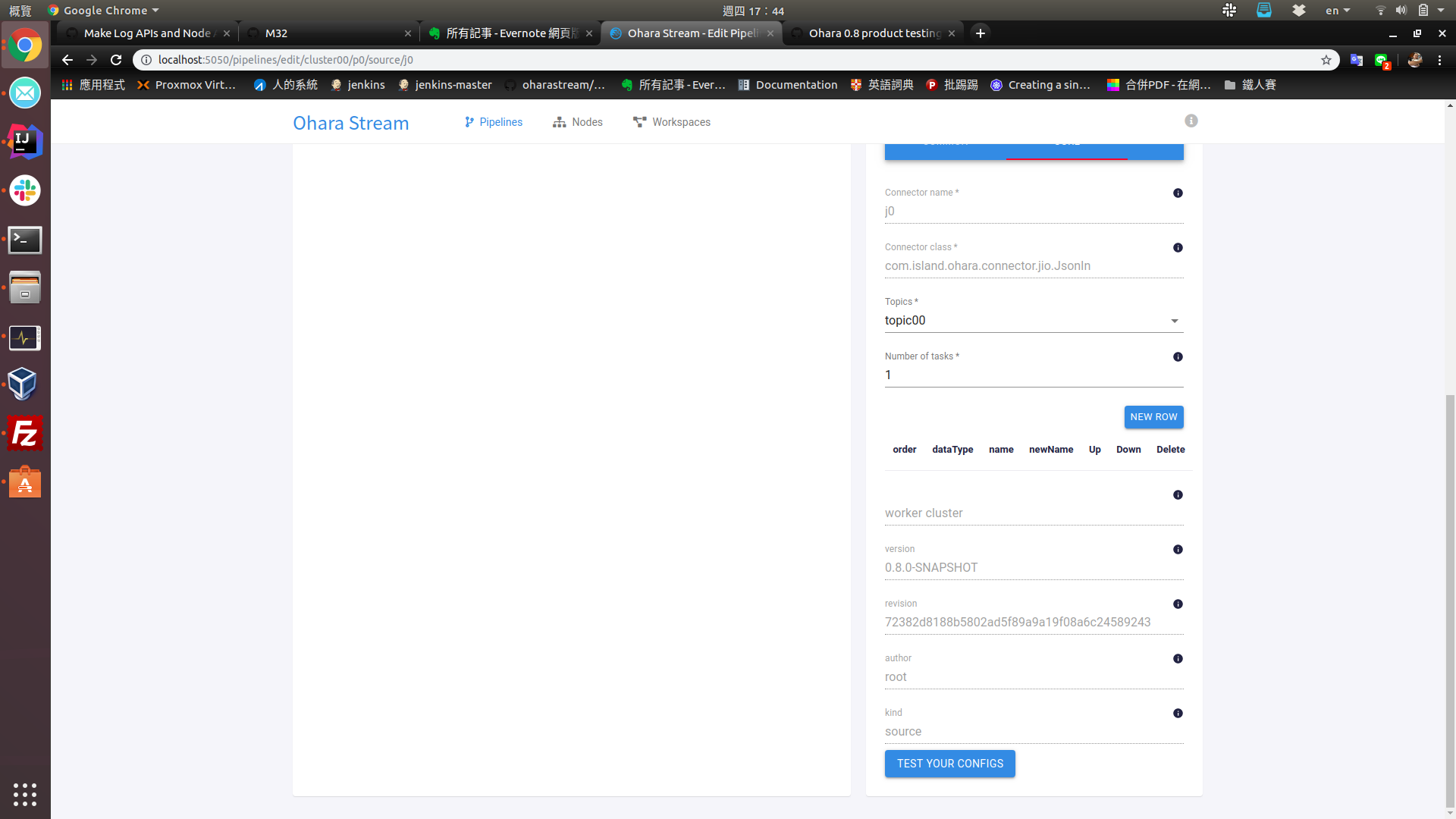
the "column" is useless to JsonIn ... (#2886)
__UPDATED__: resolve in #2886
chia7712
on 3 Oct 2019
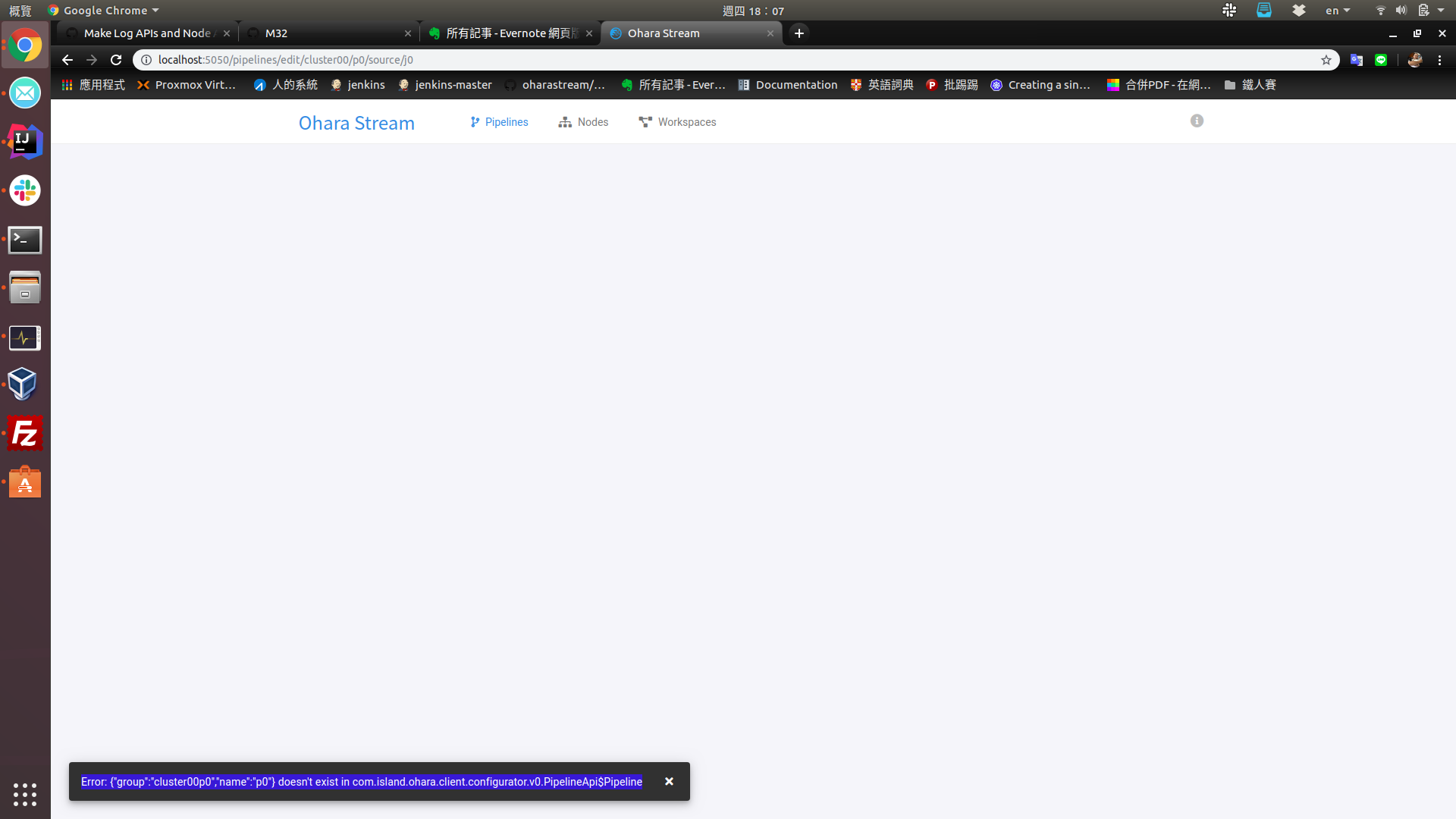
是否將存取不存在的資源重新導向統一的頁面?
__UPDATED__: won't fix this in this release. An issue was open to address this: #1957
chia7712
on 3 Oct 2019
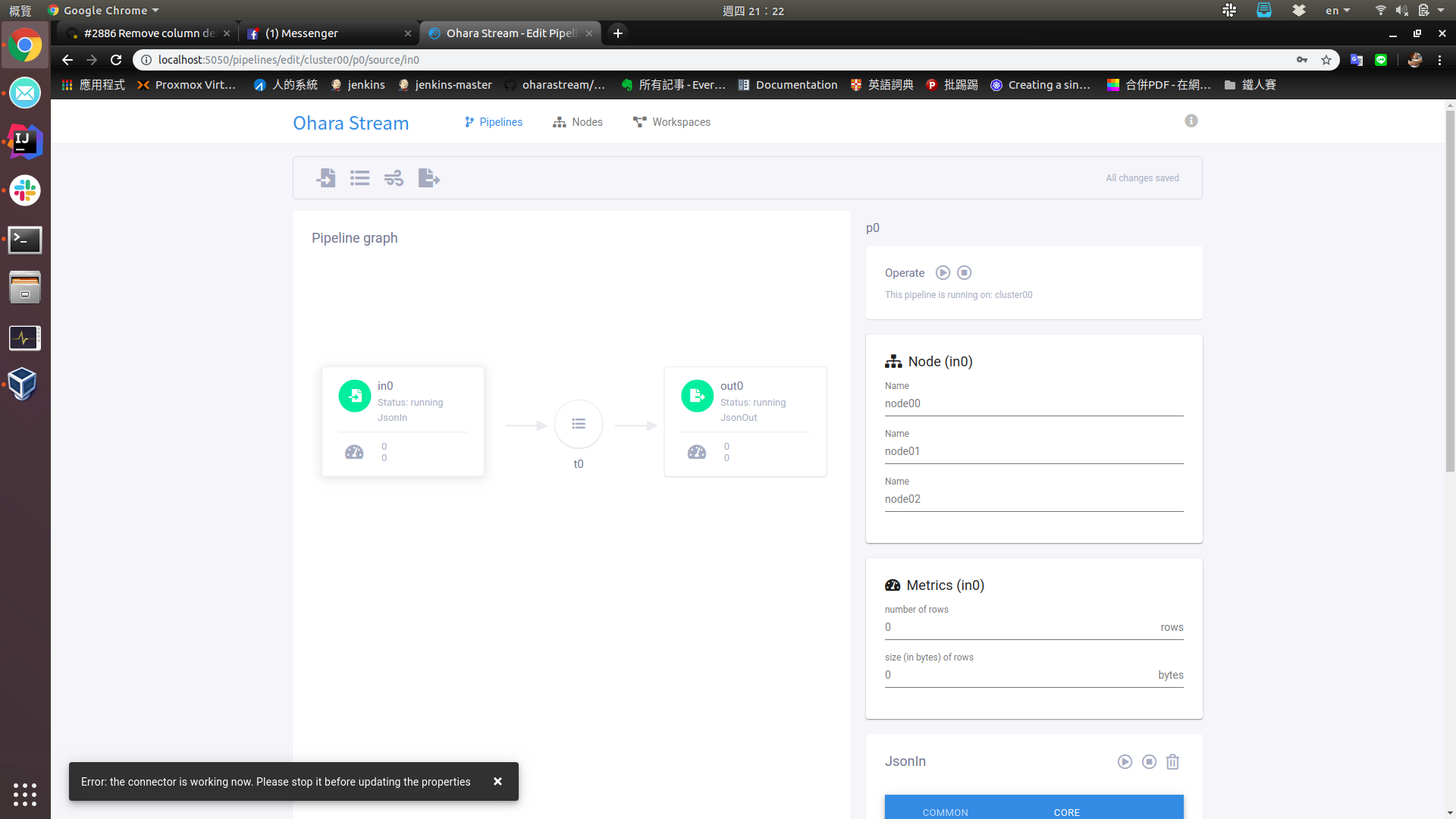
不斷跳出錯誤說我在嘗試修改一個正在運行的connector ... (#2891)
__UPDATED__: Fixed in #2891
chia7712
on 3 Oct 2019
@wu87988622 Is there a page to show the distribution of connectors? IIRC, you had demo the usage of JsonIn and JsonOut but I failed to fine out the distribution via our UI...
__UPDATED__: Addressed in #2901
chia7712
on 3 Oct 2019
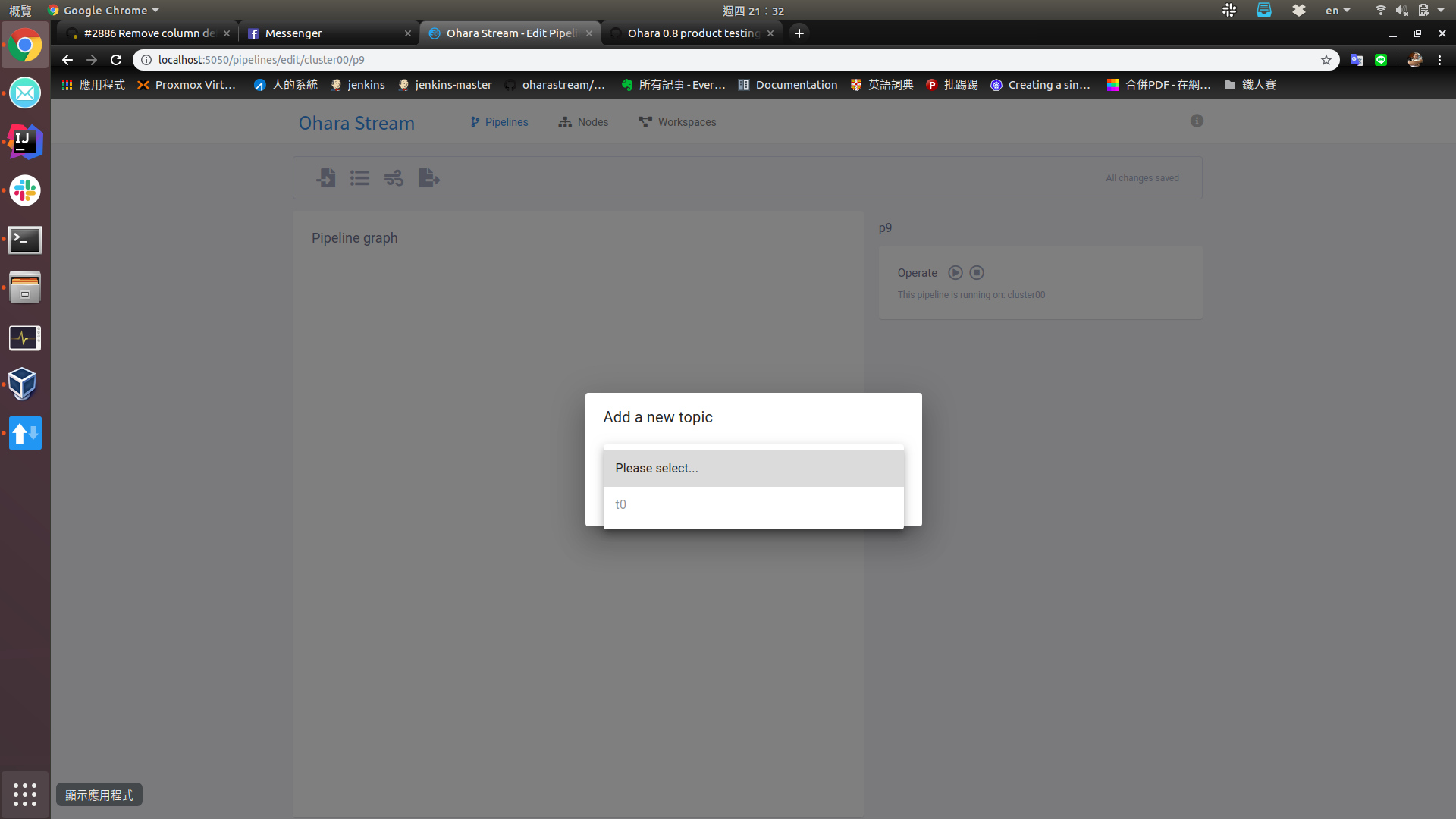
我們必須有個說明說為什麼topic不能被選擇...或者是乾脆隱藏掉已經被用的topics...
UPDATED: This is a minor issue, so we won't backport to 0.8 (#2895)
chia7712
on 3 Oct 2019
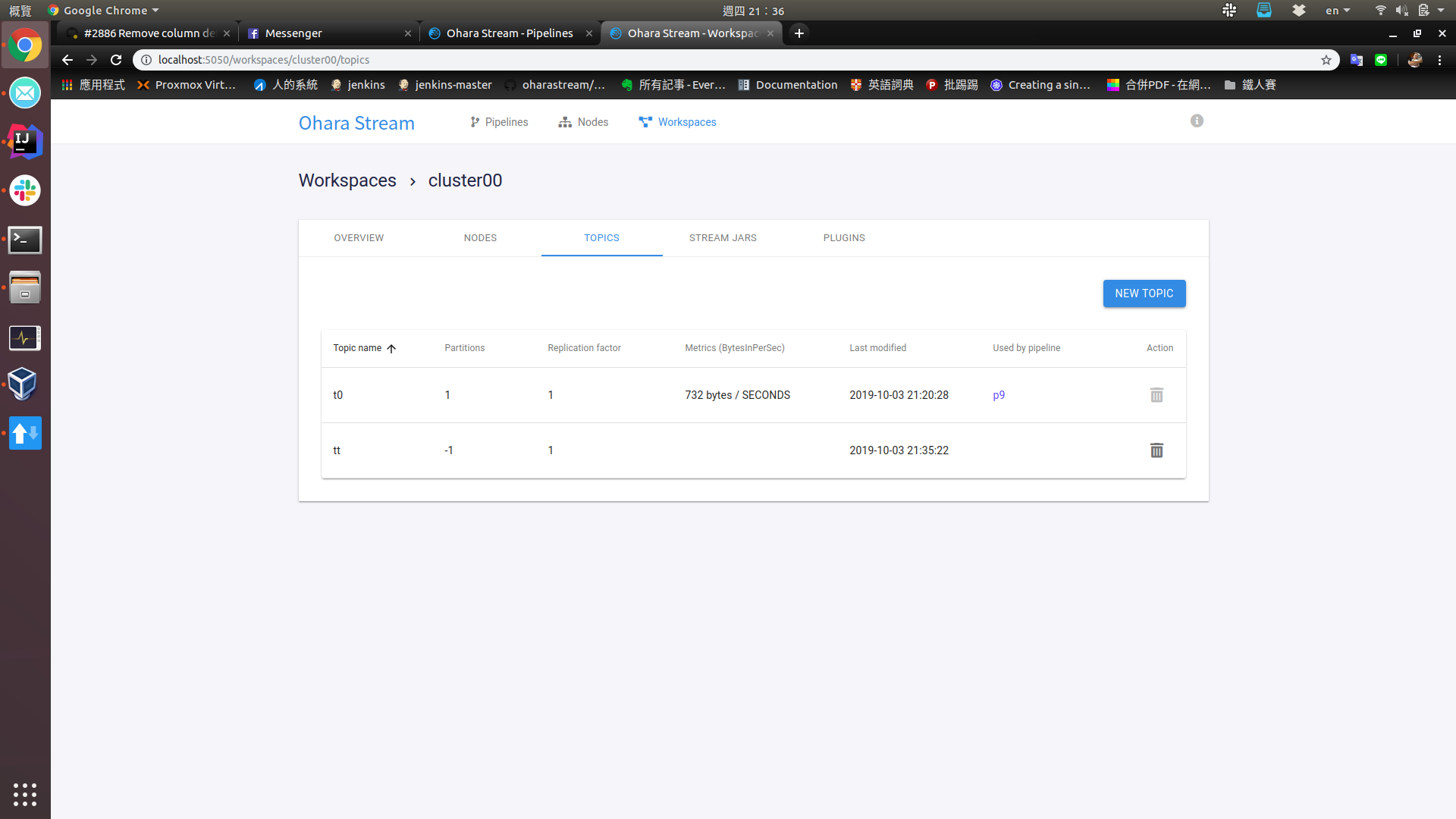
we should prevent user from inputting negative number to topic ... (#2888)
BTW, 前端在建立(post and then start) topic後應該要檢查一下topic的狀態,如果此時topic建立失敗應該要有對應的錯誤訊息 (#2894)
__UPDATED__: both issues were fixed (#2888) (2894)
chia7712
on 3 Oct 2019
我們必須有個說明說為什麼topic不能被選擇...或者是乾脆隱藏掉已經被用的topics...
I think we can add a little message to help user understand this. Completely removing them is a bit confusing :)
是否將存取不存在的資源重新導向統一的頁面?
Yep, we should do this. There is an issue for this: #1957
不斷跳出錯誤說我在嘗試修改一個正在運行的connector ...
Hmm, let's see if i can repro this can confirm this is indeed a bug. Thanks for reporting @chia7712! Will be fixed in #2891
konekoya
on 4 Oct 2019
BTW, 前端在建立(post and then start) topic後應該要檢查一下topic的狀態,如果此時topic建立失敗應該要有對應的錯誤訊息
I also noticed this yesterday. @wu87988622 I think we should fix this in 0.8. Would you mind submiting a PR?
文字顯示不正確
Jmxport => JMX port
exporterport => exporter port
Cluster type => Service type
提示字不該使用"違法"的字"Kafka Topic"(大寫和空白不允許)
These are minors but it would be great if we could correct them in 0.8. It's up to you :)
konekoya
on 4 Oct 2019
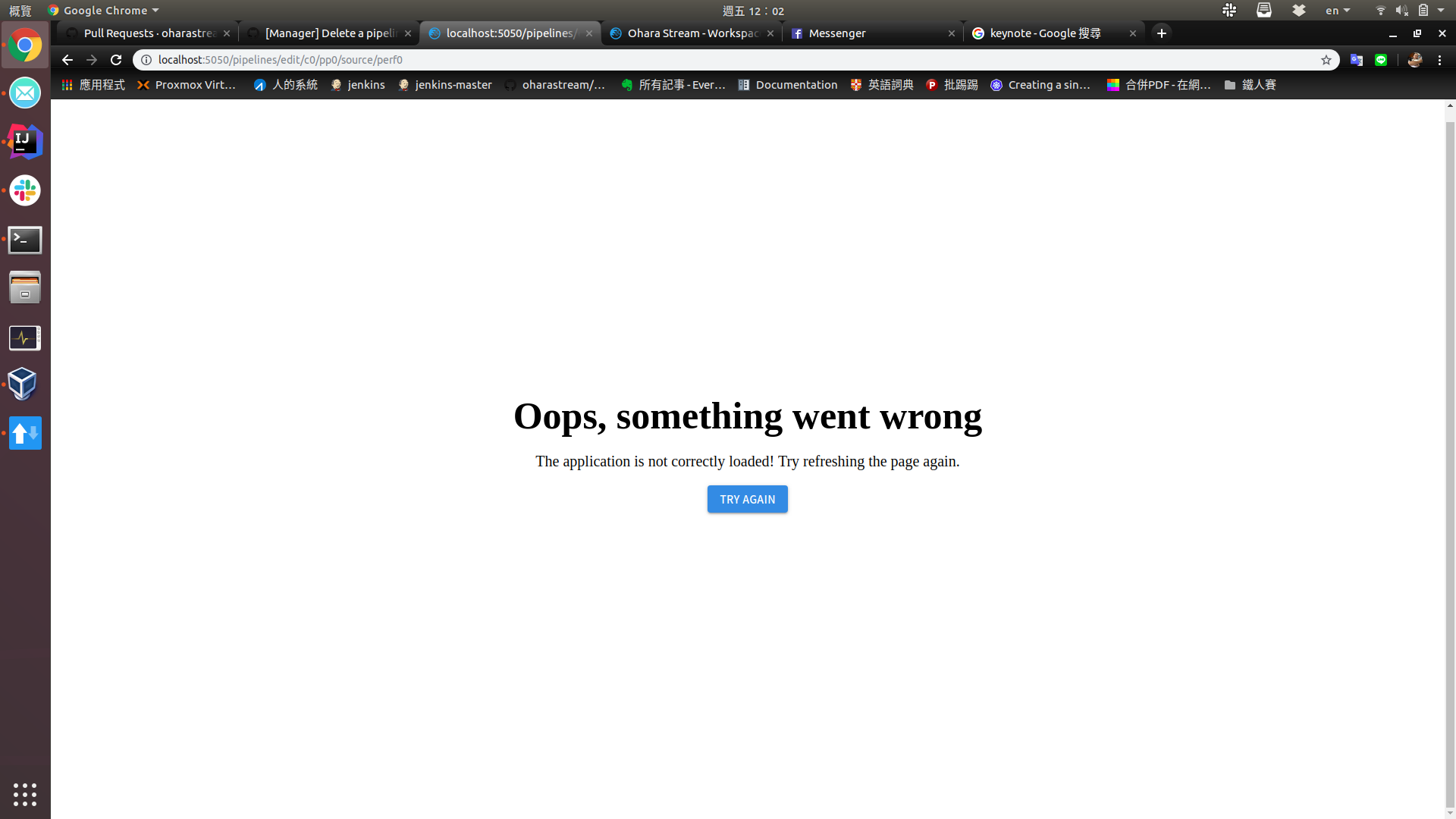
重現步驟:
- 使用ssh mode
- 加入三個nodes
- 啟動workspace
- 建立一個topic
- 建立一個pipeline
- 加入一個topic
- 加入PerfSource
- 給PerfSource加入一個column(如下圖)
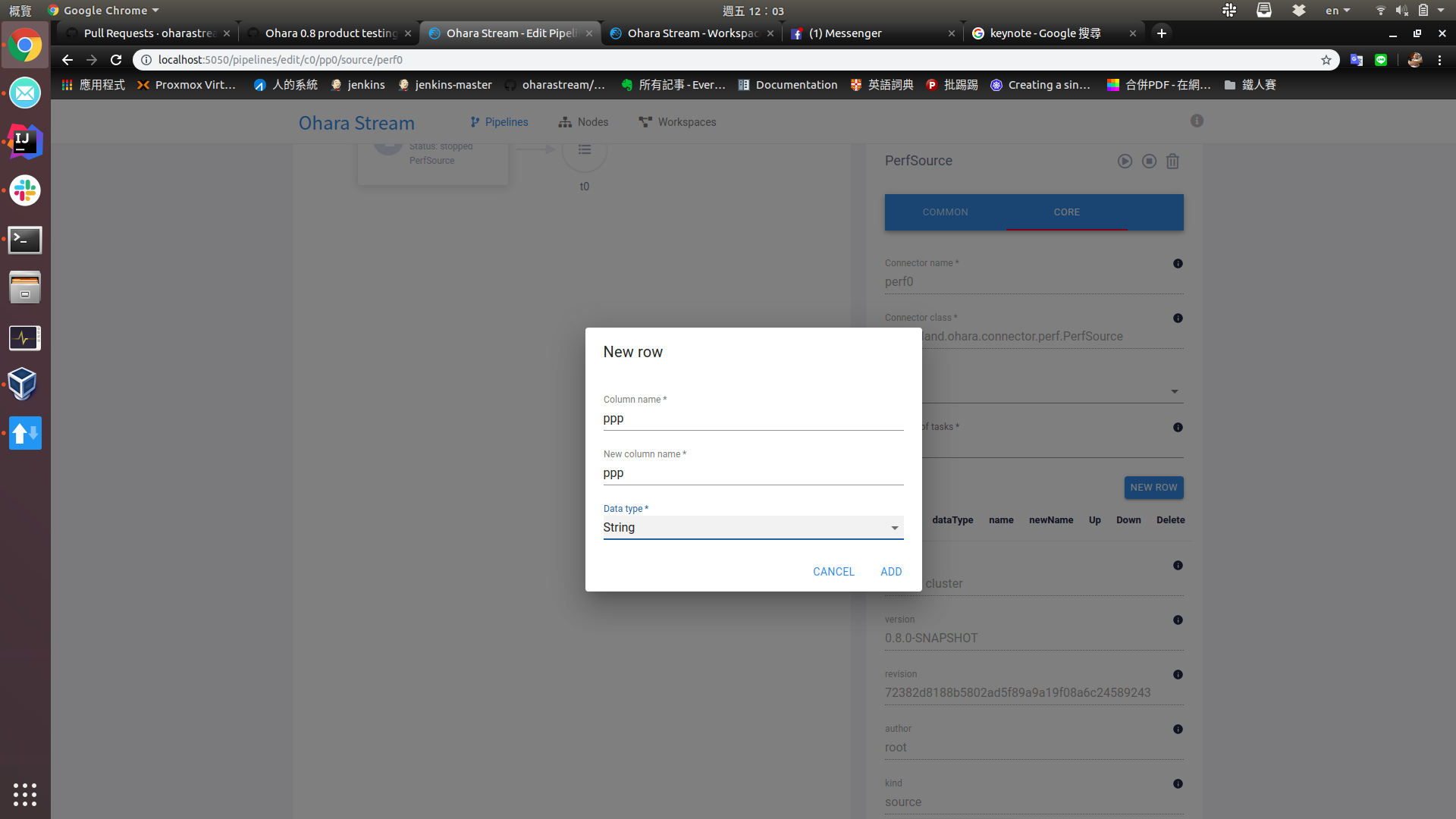
__UPDATED__: Fixed in #2902
chia7712
on 4 Oct 2019
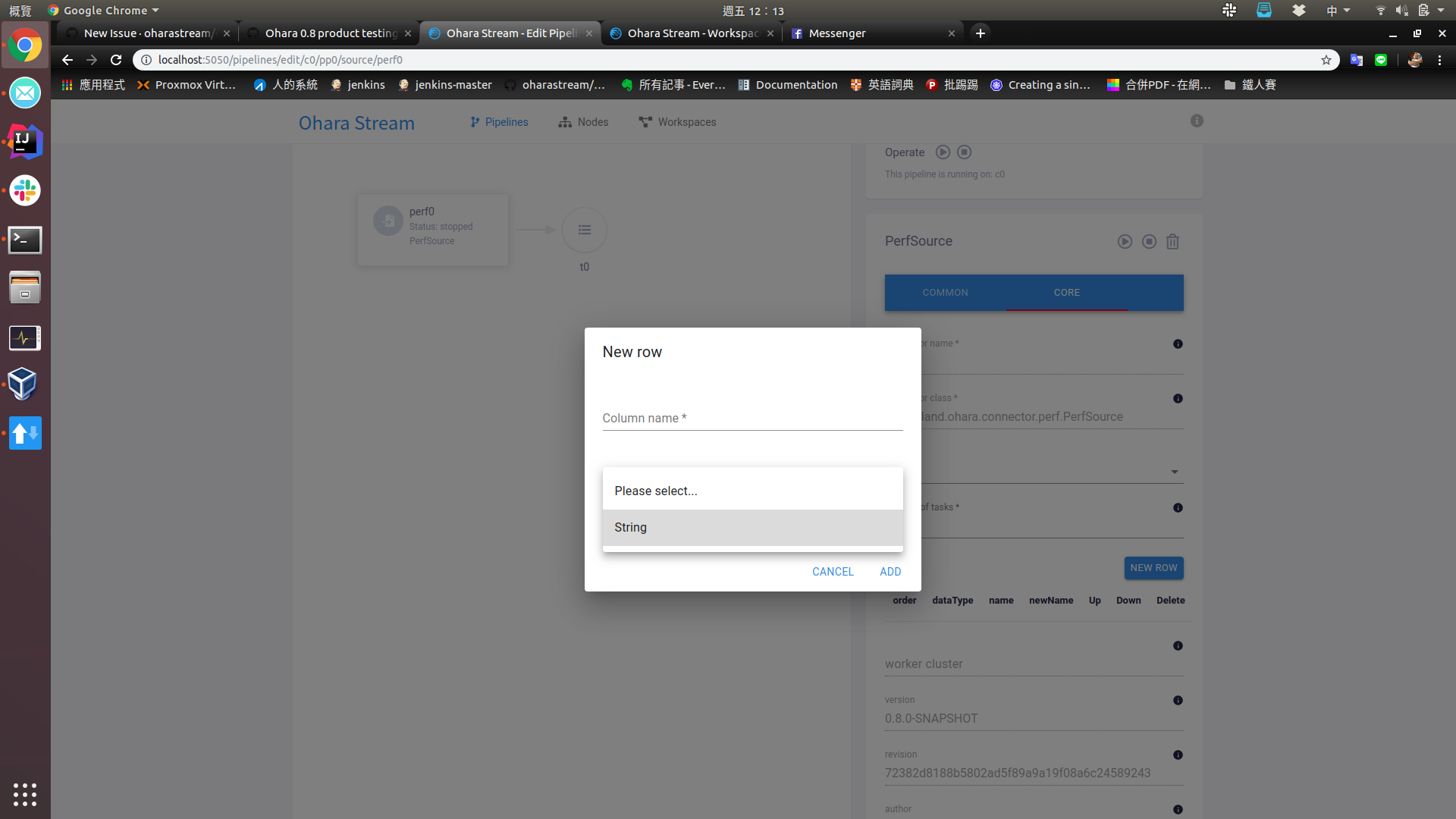
@wu87988622 @konekoya the enabled "value" is only "string". Is it caused by our weak definition? (related to #2900)
chia7712
on 4 Oct 2019
@wu87988622 Is there a page to show the distribution of connectors? IIRC, you had demo the usage of JsonIn and JsonOut but I failed to fine out the distribution via our UI...
只要點擊相關得rest 右方 node 將會顯示他所部署的節點
 wu87988622
on 4 Oct 2019
wu87988622
on 4 Oct 2019
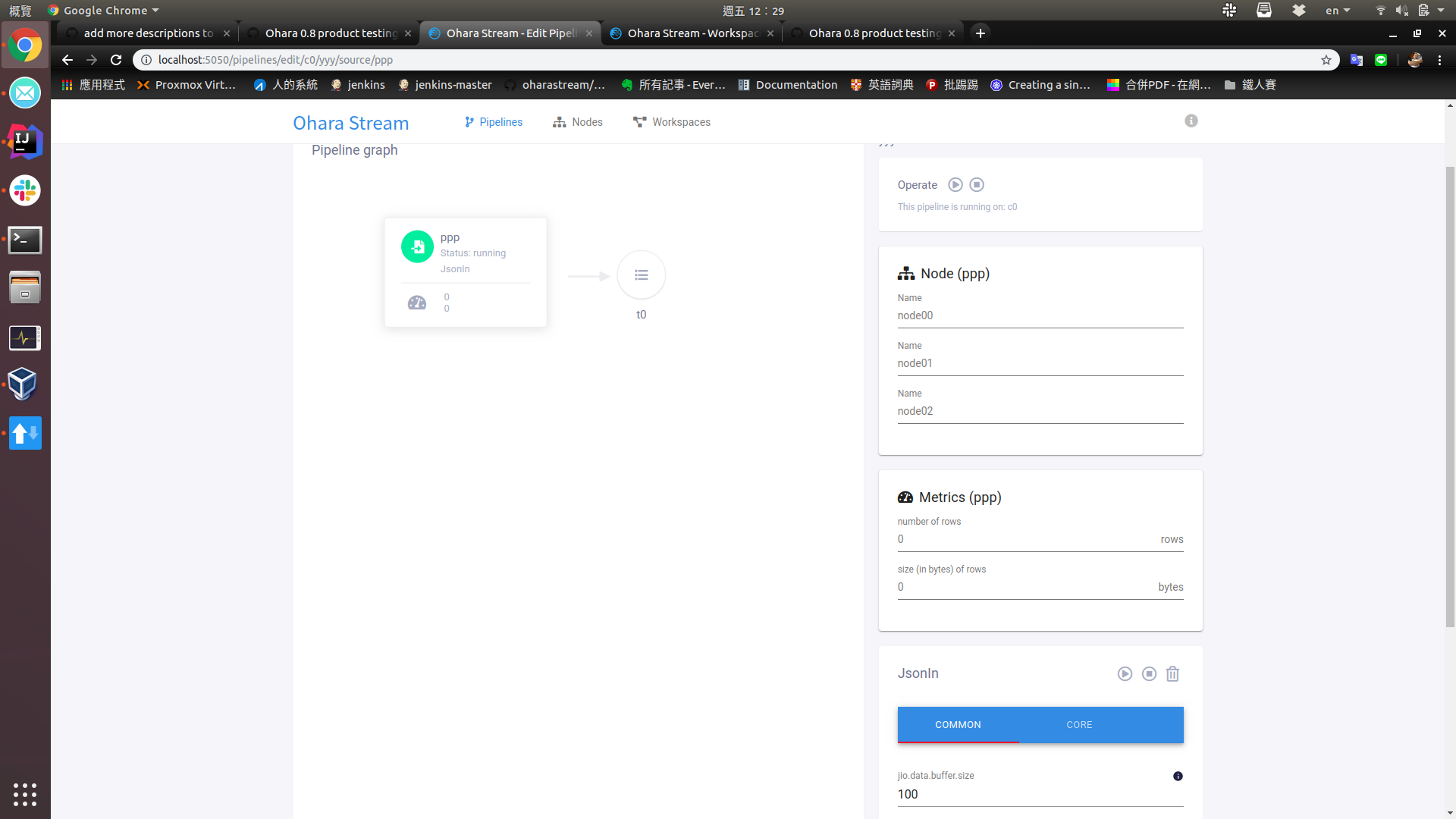
右方 node 將會顯示他所部署的節點
which one?
chia7712
on 4 Oct 2019
右方 node 將會顯示他所部署的節點
which one?
Node(ppp)
wu87988622
on 4 Oct 2019
Node(ppp)
The connector is deployed on a node only so it should NOT show all nodes in this page
chia7712
on 4 Oct 2019
@wu87988622 @konekoya the enabled "value" is only "string". Is it caused by our weak definition? (related to #2900)
Yes, our definition doesn't have a field which describes supported types. The __string__ is currently hardcoded in the frontend ...
konekoya
on 4 Oct 2019
Node(ppp)
The connector is deployed on a node only so it should NOT show all nodes in this page
ok Thanks i will open issue backport 0.8
wu87988622
on 4 Oct 2019
測試項目
1. 基本測試
2. 功能測試:
3. 安裝測試: (Done)
Note:
- Test this case in your own environment
- The full test procedure can be found in each case's link
- Add your test report in the comment
Case 1: Ohara installation
- [v] Confirm your use the hardware specification
- [v] Confirm your use version
- [v] Install Kubernetes
- [V] Running the Ohara Configuration service
- [v] Running the Ohara Manager service
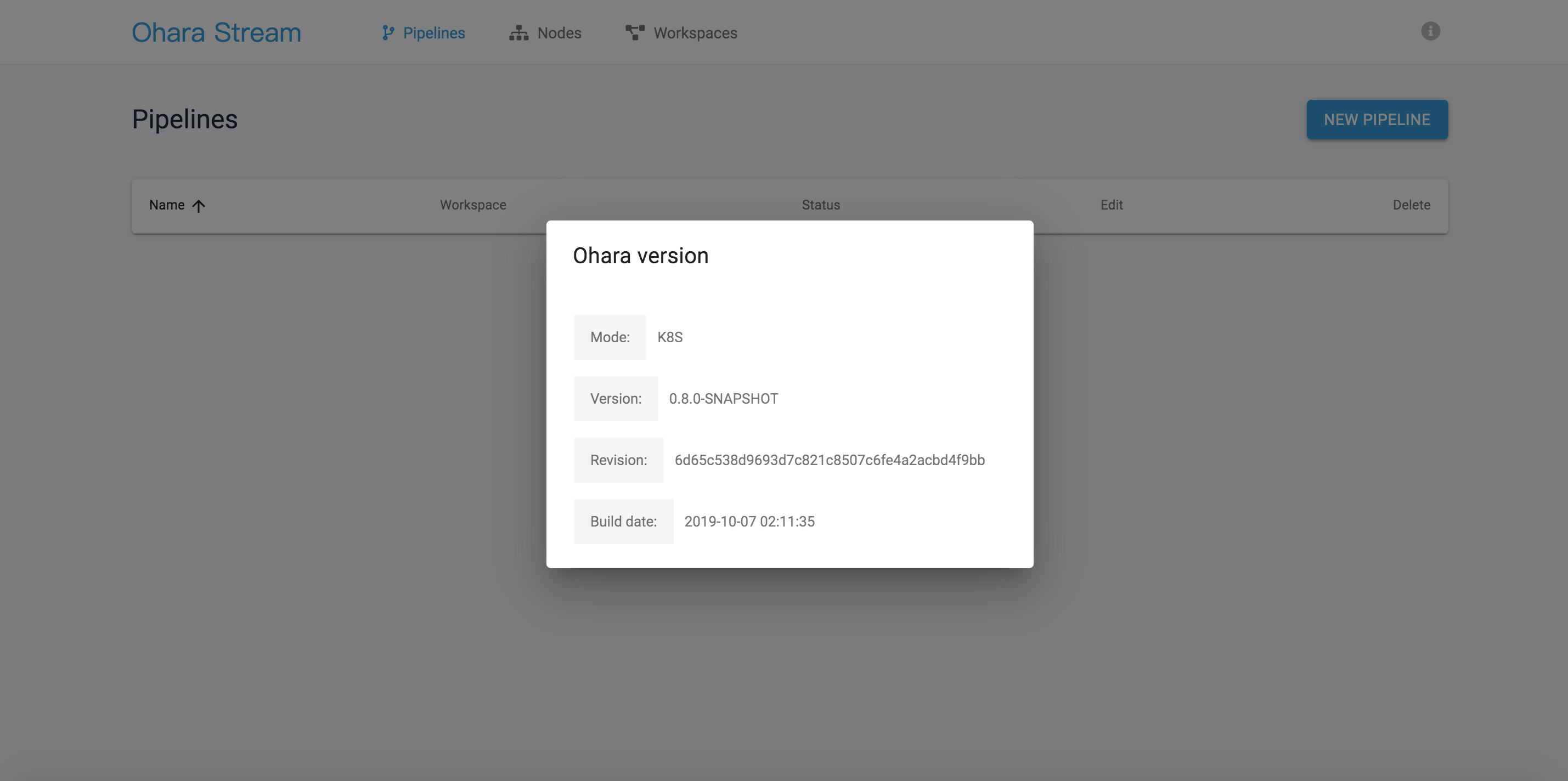
安裝測試結果:
- 成功打開 Ohara manager 網頁如下圖
測試所發現的問題紀錄
設計稿:
- (設計稿 Issue Number 紀錄在此)
測試環境:
- Ohara
- Mode: k8s
- Version: 0.8.0-SNAPSHOT
- Build date: 2019-10-07 02:11:35
- 測試工具
- 瀏覽器:Chrome 版本 77.0.3865.90 (正式版本) (64 位元)
- 最小螢幕寬度:1200
基本測試:
- (基本測試所發現的問題,紀錄在此)
功能測試:
- (功能測試所發現的問題,紀錄在此)
安裝測試:
- 關於安裝文件中使用root進行安裝的議題討論已另開議題討論
https://github.com/oharastream/ohara/issues/2926
 HarryChiang143
on 7 Oct 2019
HarryChiang143
on 7 Oct 2019
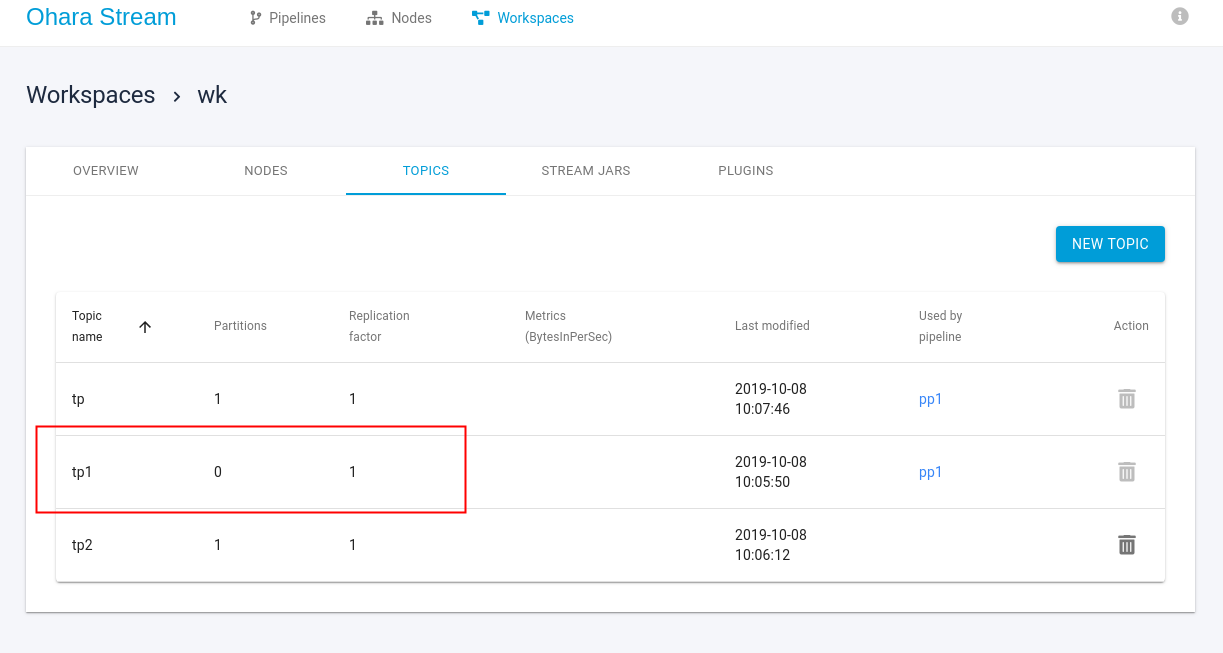
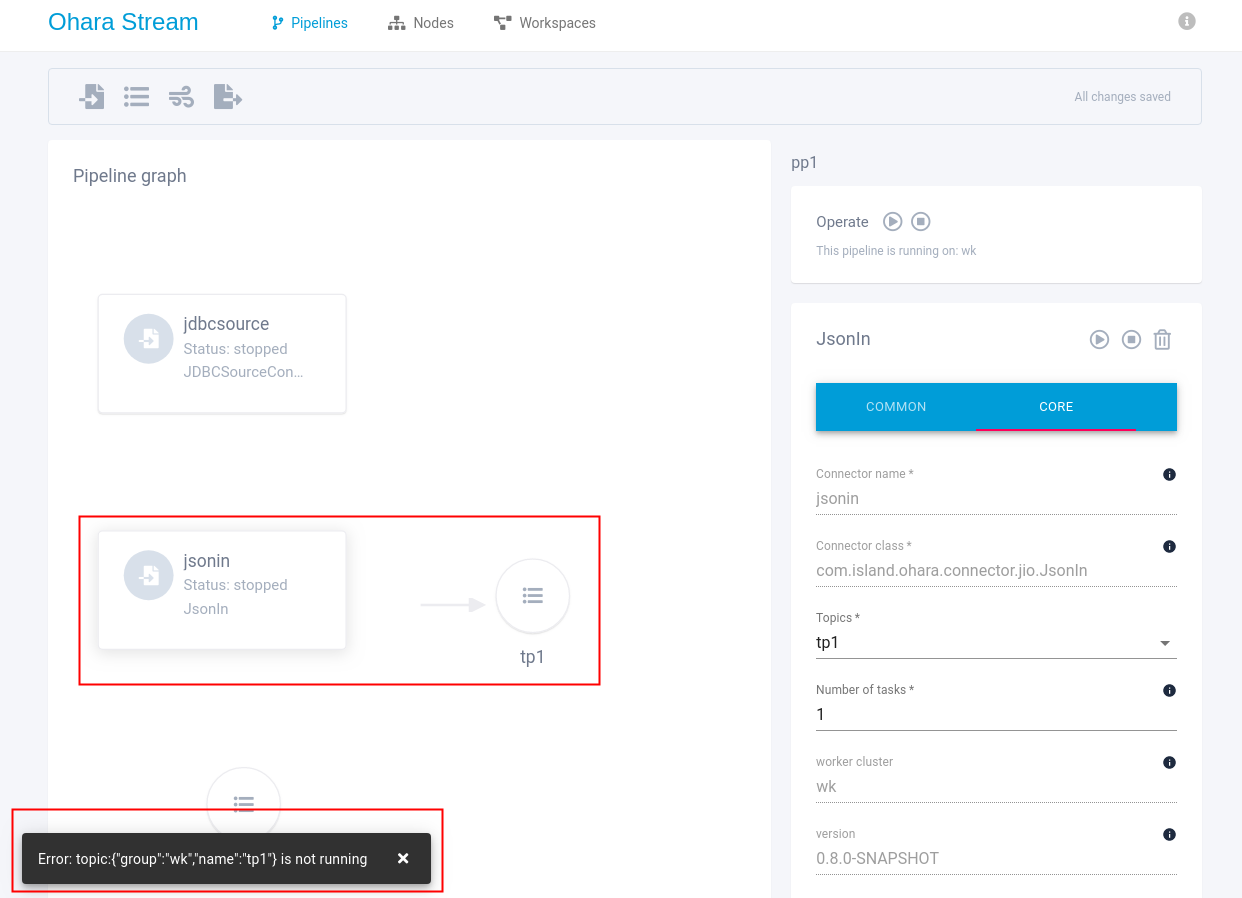
- 在新增 topics 時 replication factor 如果設為零, topic 會建立失敗, 可是如果是 partition 設為零, topic 會建立成功 ( 附圖一); 在 pipeline 中有 connector 使用到這個 topic 的話, 就會啟動失敗, 顯示
' Error: topic:{"group":"xxx","name":"yyy"} is not running ' ( 附圖二), 附圖示如下:
圖一
圖二
__UPDATED__: Fixed in #2942 and #2888
DavidMi-1
on 8 Oct 2019
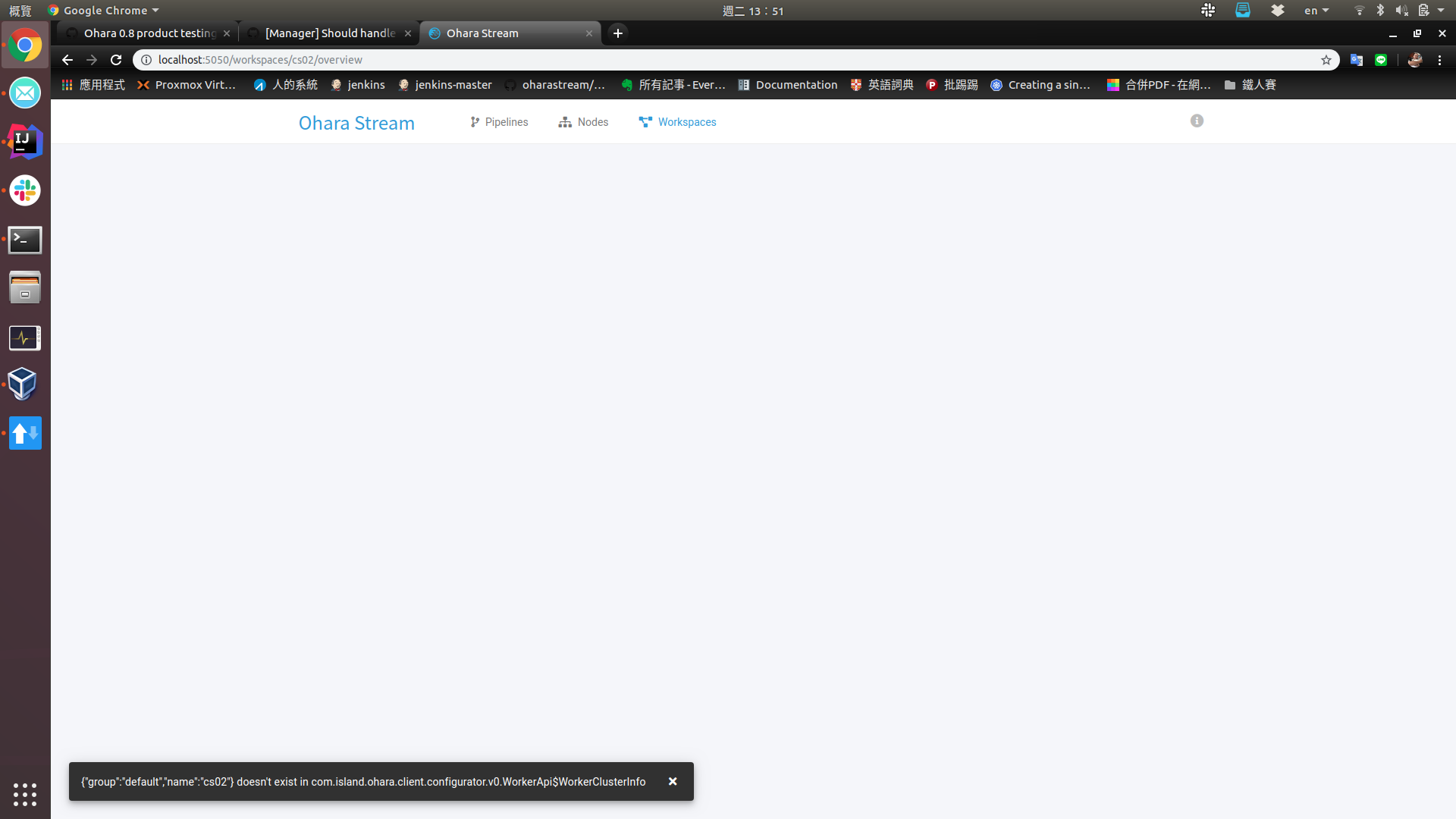
It does not redirect to the page for nonexistent resource.
__UPDATED__: won't fix this in this release. But an issue is here: #1957
chia7712
on 8 Oct 2019
在不同workspaces裡相同名字的topics無法被使用
重現步驟:
- 建立兩個workspaces
- 在兩個workspaces裡面各自建立一個topic (都命名為t0)
- 在兩個workspace裡面各自建立一個pipeline
- 在其中一個pipeline使用t0
- 在另一個pipeline裡面顯示t0已經被使用
預期結果:
不同workspace之間的資源應該是互相隔離,資源即使名稱相同也不該互相影響
__UPDATED__: Fixed in #2958
chia7712
on 8 Oct 2019
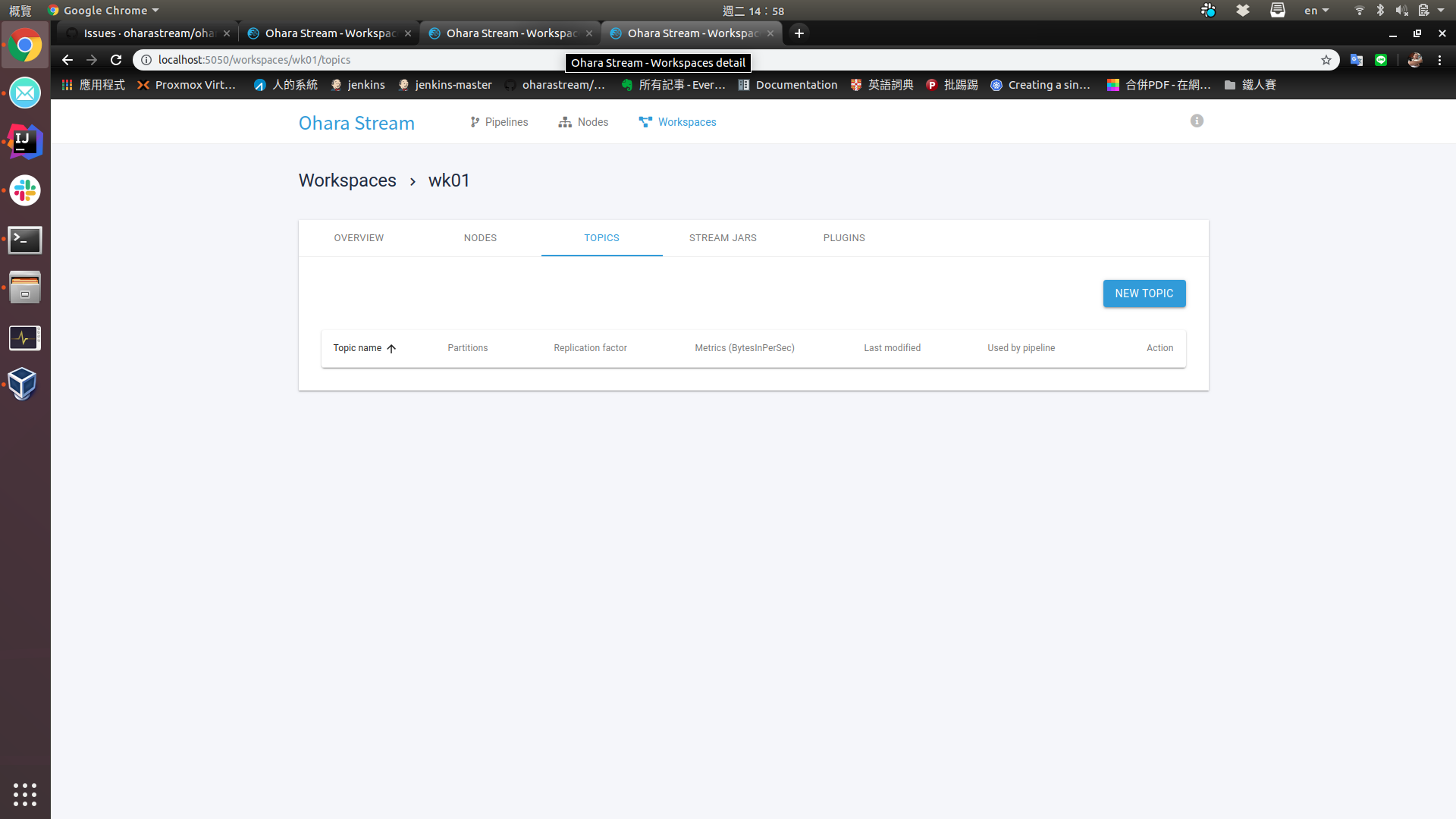
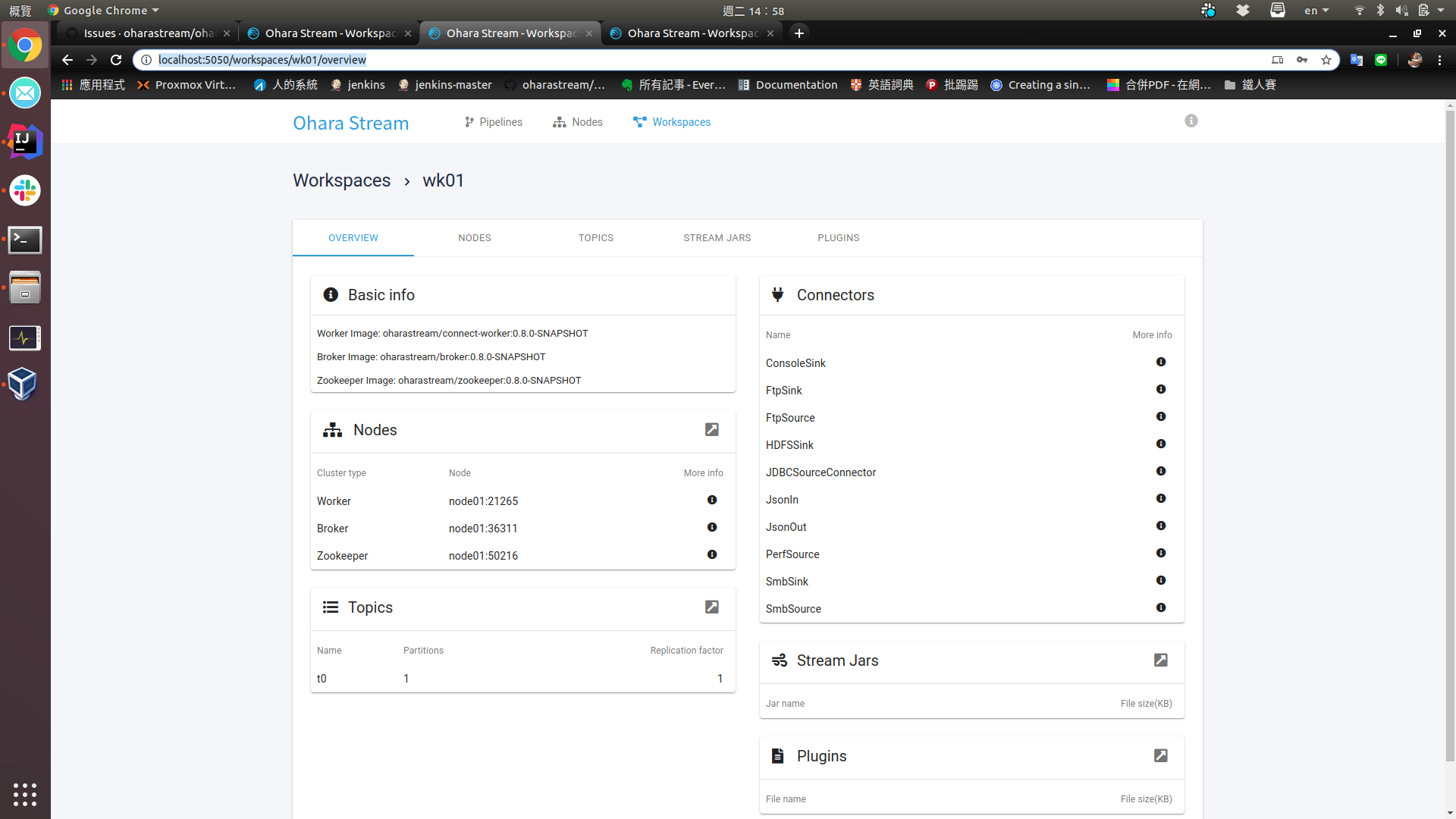
ghost topics!!! (the topic "t0" belongs to another workspace)
__UPDATED__: Fixed in #2958
chia7712
on 8 Oct 2019
Thanks for the help everyone! I'm closing this issue as we're about to release 0.8 today :)
konekoya
on 14 Oct 2019
Related issues
 jackyoh
·
4Comments
jackyoh
·
4Comments
 saivirtue
·
5Comments
konekoya
·
3Comments
saivirtue
·
3Comments
konekoya
·
5Comments
saivirtue
·
5Comments
konekoya
·
3Comments
saivirtue
·
3Comments
konekoya
·
5Comments