Officedocs-skypeforbusiness: Approvals App for Teams
Feedback for the new approvals app in team brought me here. Line breaks are ignored in approvals, you just get a wall of text. Even following the markdown guide on the page says to use forced line breaks. These just dont work!
Document Details
⚠ Do not edit this section. It is required for docs.microsoft.com ➟ GitHub issue linking.
- ID: 055b01ff-ee6c-7d5a-74bd-0e8eed7ee6b5
- Version Independent ID: 13c4174f-2a2a-2ef9-14c5-2f10817cc66a
- Content: Approvals application availability in Teams - Microsoft Teams
- Content Source: Teams/approval-admin.md
- Service: msteams
- GitHub Login: @cichur
- Microsoft Alias: v-cichur
 pr1malc0de
All 19 comments
Hi @pr1malc0de
I'm sorry that you're having problems. I'll forward your comments to our SME. Cindy
 cichur
on 14 Jan 2021
cichur
on 14 Jan 2021
Thanks @cichur much appreciated!
pr1malc0de
on 14 Jan 2021
@cichur in case this is useful I have some more information around this problem. Authoring an approval inside teams on the fly, you have to use x3 spaces and then return to force a line break (not the 2 spaces as described in the documentation here https://docs.microsoft.com/en-us/power-automate/approvals-markdown-support). Generating an approval from inside power automate using x2 or x3 spaces and return does not work.
pr1malc0de
on 15 Jan 2021
@pr1malc0de thank you for reaching out. I see the article was updated yesterday. Please let me know if there are any changes still needed for clarity.
 lindspea
on 21 Jan 2021
lindspea
on 21 Jan 2021
Hi @lindspea if your referring to the article in my previous message https://docs.microsoft.com/en-us/power-automate/approvals-markdown-support it shows a last updated date of 29/09/2020? but i assume you mean this article https://docs.microsoft.com/en-us/microsoftteams/approval-admin which has been updated on the 19th but i dont see any reference to line breaks? My issue is that i cant create line breaks in teams approvals sent from flow and the guide for markdown support (my previous article) is wrong. Is there any update from your SME @cichur ?
pr1malc0de
on 21 Jan 2021
@cichur Hi is there any update? We are midway through a project to roll out approvals across our company and no formatting in approvals is holding us back and we have no idea what is happening. I cannot find any other way to officially raise this issue, the link on the documentation for support goes to an access denied page.
pr1malc0de
on 26 Jan 2021
Hi @pr1malc0de,
I'm still waiting to hear back from the SME. I pinged him again this morning. Thank you. Cindy
cichur
on 26 Jan 2021
@pr1malc0de hey there thanks for reporting, we're fixing this issue in our current sprint, formatting fixes for markdown should be available this month, will be fast tracking asap
 farhazkmsft
on 26 Jan 2021
farhazkmsft
on 26 Jan 2021
@cichur Thanks for all your help appreciate it!
@farhazkmsft Great news! Looking forward to trying it out!
pr1malc0de
on 27 Jan 2021
@pr1malc0de Thank you for submitting feedback. We understand that this issue has been resolved.
Please feel free to re-open this issue if there is a specific area of the docs that we can improve or make better. Thank you.
 scanum
on 4 Feb 2021
scanum
on 4 Feb 2021
@scanum I've tested the Approval Apps on Teams and it's still now working properly with Markdown formatting for the Approvals. Has the fix have been rolled out live yet?
 vinnyng
on 4 Feb 2021
vinnyng
on 4 Feb 2021
@scanum @cichur This doesn't appear to be resolved yet but appreciate this GitHub page may not be the correct place for this as it's for documentation. Although technically the documentation is wrong because the products behaviour is different to the documentation ;-) but obviously that's not the point here. Is there a GitHub page or some kind of issue tracker for this product so we know when the issue is resolved? Cheers
pr1malc0de
on 4 Feb 2021
Hello @pr1malc0de
The SME replied:
@pr1malc0de hey there thanks for reporting, we're fixing this issue in our current sprint, formatting fixes for markdown should be available this month, will be fast tracking asap
It looks like you're dealing with a product bug. We believe that the documentation is correct once the bug is fixed. -Cindy
cichur
on 4 Feb 2021
thanks @cichur
Is there anywhere else that people can go to track this problem until it's resolved. I struggled to find any place to even report this problem until I stumbled here, if there is a more appropriate place it would be a great help to know where to go. Thanks
pr1malc0de
on 5 Feb 2021
@pr1malc0de hey there thanks for reporting, we're fixing this issue in our current sprint, formatting fixes for markdown should be available this month, will be fast tracking asap
@farhazkmsft any news on when this fix will be available? Thanks
pr1malc0de
on 8 Feb 2021
We just started rolling this out in our internal rings, hoping to reach GA in about 2/3 weeks assuming no major issues occur during rollout. Sorry about the delay, we just wanted to ensure high quality before we rolled it out
farhazkmsft
on 24 Feb 2021
@farhazkmsft that's really good to hear i look forward to release! I have another issue with Adaptive cards that in the last few weeks no longer formats correctly (even though the MS designer shows them rendering with teams template fine V1.2). Appreciate this isn't the correct place to raise this but support keep telling me to vote on fixing a bug! is there a github page to raise this and follow progress on teams issues? Thanks
pr1malc0de
on 24 Feb 2021
It looks like the markdown fix was rolled out for the Approval Apps on Teams and looks mostly good. The bold and new line markdown is working properly. My only issue is that a field that holds multiple lines of text with hard return in it are not showing correctly. It shows correctly on Outlook and Approval Center though. Can you take a look and verify?
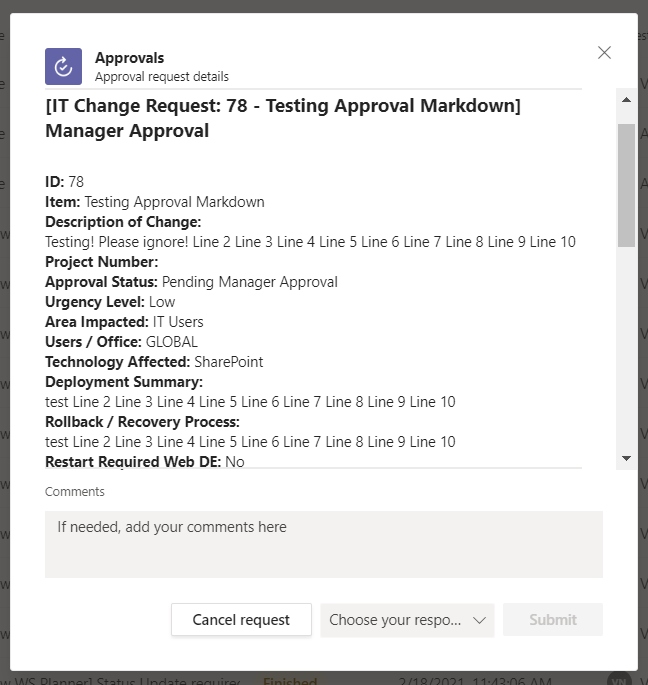
vinnyng
on 10 Mar 2021
@vinnyng Hi, yes it appears that line breaks are now working! If you want to get a line break in normal text you need to use x2 spaces first then a hard line break. I have confirmed this on my tenant. Have a look here in the "Paragraphs and Line Breaks" section https://docs.microsoft.com/en-us/power-automate/approvals-markdown-support
pr1malc0de
on 18 Mar 2021
Related issues
 warleygr
·
4Comments
warleygr
·
4Comments
 bsdmad
·
6Comments
bsdmad
·
6Comments
 adyst
·
4Comments
adyst
·
4Comments
 hyoshioka0128
·
6Comments
hyoshioka0128
·
6Comments
 tiagoroxo
·
6Comments
tiagoroxo
·
6Comments