Officedocs-skypeforbusiness: Purpose of diagnostic logs?
What is the point of these diagnostic logs? Depends on the moment when you have collected diagnostic logs, the file size of the diag. log is around 600KB and 20% of that contains a real active client logs. Rest of the content (over 80%) is something like configuration details.
Using diagnostic logging we could see around 30 minutes back.
And I'm referring to the diagnostic log without any defination (e.g. ...calling, ....cdl, ....cdlWorker).
Can you also be so kind and share description of different diagnostic logging:
A) MSTeams Diagnostics Log <time>.txt
B) MSTeams Diagnostics Log <time>_calling.txt
C) MSTeams Diagnostics Log <time>_cdl.txt
D) MSTeams Diagnostics Log <time>_cdlWorker.txt
E) MSTeams Diagnostics Log <time>_chatListData.txt
F) MSTeams Diagnostics Log <time>_sync.txt
Thanks.
Document Details
⚠ Do not edit this section. It is required for docs.microsoft.com ➟ GitHub issue linking.
- ID: 97d5e6d3-b7e0-d79f-0dea-ed423186a157
- Version Independent ID: ec6e68aa-552f-ab45-3c8e-92eff526b173
- Content: Use log files in troubleshooting Microsoft Teams - Microsoft Teams
- Content Source: Teams/log-files.md
- Service: msteams
- GitHub Login: @LolaJacobsen
- Microsoft Alias: lolaj
 Petri-X
All 8 comments
@Petri-X Thank you for submitting feedback and contributing to the docs. We are currently investigating this.
 scanum
on 6 May 2020
scanum
on 6 May 2020
Hello @Petri-X How are you? Hope you are doing good. 👍
What is the point of these diagnostic logs? Depends on the moment when you have collected diagnostic logs, the file size of the diag. log is around 600KB and 20% of that contains a real active client logs. Rest of the content (over 80%) is something like configuration details.
Using diagnostic logging we could see around 30 minutes back.
And I'm referring to the diagnostic log without any defination (e.g. ...calling, ....cdl, ....cdlWorker).
It seems you refer here to logs.txt file, that is the _Desktop log_ and as the article says:
Desktop logs, also known as bootstrapper logs, contains log data that occurs between the desktop client and the browser. Like media logs, these logs are only needed if requested by Microsoft.
(In my case the log file was much bigger.)
and
Can you also be so kind and share description of different diagnostic logging:
Those are the _Debug logs_ and as the article currently says
These are the most common logs and are required for all Microsoft support cases. Debug logs are produced by the Windows and Mac desktop clients, as well as browser based clients. The logs are text based and are read from the bottom up. They can be read using any text based editor and new logs are created when logging into the client.
- Debug logs show the following data flows:
- Login
- Connection requests to middle tier services
- Call/conversation
Does that helps answering your question?
Thank you
 get-itips
on 5 Jun 2020
get-itips
on 5 Jun 2020
No, I'm referring to the diagnostic logs:
By pressing Ctrl+Alt+Shift+1 I get this:

Funny thing is of course that in download folder I have six files:
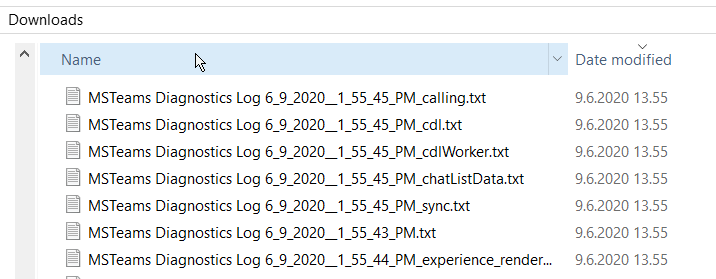
So one file which I was downloaded, was actually divided into six different files. But name of those logs are still "MSTeams Diagnostic Logs", don't you agree?
But still, instead of the names: debug/diagnostic, the content and description is still highly appreciated.
Petri-X
on 9 Jun 2020
@Petri-X
Yes, they are named _Debug Logs_ in this article but the filename names them _Diagnostics Log_. We are talking of the same thing, and the description in the article that I shared here still applies.
If you would like an expanded explanation, other from what the filename states (chatListData, sync..) of each of them, We would need to ask @LolaJacobsen if she can get it.
Thank you
get-itips
on 9 Jun 2020
@get-itips
Yes we speak about the same files. Unfortunately Teams seems to be full of confuses. Would be nice to see that these could be consistent. :)
It would be awesome if you or your team could share a little more details how to use those logs in a best way and what we are expected to be found from the files. I have played with some of the PowerShell CMDLets to get data out from there. But wouldn't that be easier if you could share the tools and commands for all?
About the length of the log, do you agree that you do not see more than 60 mins back? I'm asking this, because if you do have any connections available, it would be nice if they (product group?) could get this extended longer time, like 48 hours back. And I mean the file which have no extra extension.
Petri-X
on 9 Jun 2020
Checking with PM TJ Singh.
 LolaJacobsen
on 21 Jul 2020
LolaJacobsen
on 21 Jul 2020
@LolaJacobsen Hi Carolyn, any possible updates available?
scanum
on 28 Sep 2020
Since this issue was opened, we have made several revisions to this file to clarify the usage. I have another work item open to clarify what we mean by debug files because what we output is different. Those changes should be done and go live over the next couple of weeks. Accordingly, I'm closing this issue. Thank you for the feedback and helping us improve our content.
 SerdarSoysal
on 11 Dec 2020
SerdarSoysal
on 11 Dec 2020
Related issues
 TotallyInformation
·
5Comments
TotallyInformation
·
5Comments
 DeanGross
·
4Comments
DeanGross
·
4Comments
 hyoshioka0128
·
6Comments
hyoshioka0128
·
6Comments
 N8dog021
·
3Comments
N8dog021
·
3Comments
 webash
·
6Comments
webash
·
6Comments