Officedocs-skypeforbusiness: On-Prem only Exchange
The table above indicates that we can setup Teams and On-Prem exchange (without a hybrid deployment) if the we are using Exchange 2016 CU3 or higher. However all of the linked support documents only describe how to deploy in a hybrid environment with Exchange Online.
Are there any documents describing how to setup Teams with an On-Prem only environment?
Document Details
⚠ Do not edit this section. It is required for docs.microsoft.com ➟ GitHub issue linking.
- ID: 8456689d-6f04-fa5e-4f51-f413cb0b9d89
- Version Independent ID: e9b85126-0db7-4378-ad44-514e52f9fde1
- Content: How Exchange and Microsoft Teams interact - Microsoft Teams
- Content Source: Teams/Exchange-Teams-interact.md
- Service: msteams
- GitHub Login: @dstrome
- Microsoft Alias: dstrome
 skywalkerisnull
All 24 comments
@skywalkerisnull Thank you for submitting feedback and contributing to the docs. We are currently investigating this.
 scanum
on 8 Jan 2020
scanum
on 8 Jan 2020
I am interested in the same documentation.
 cleik59
on 10 Jan 2020
cleik59
on 10 Jan 2020
Ok, so what I have gathered so far you need:
- AD Sync working
- The domain that the users are using on-prem to authenticate has to match the email domain, so no .local as the sign-in domain
- Autodiscover setup and working, check it is working with this site: https://testconnectivity.microsoft.com/
- Autodiscover has to work with both the user name and email address being the same
This is as far as I have got, we can send teams meeting invites from within outlook on a computer that has Teams installed. Still wanting to know how we can get it to have the meetings tab from within Teams so it is more seamless as the table above seems to indicate is possible.
skywalkerisnull
on 15 Jan 2020
And a few more steps, you can setup the OAuth, however a number of the powershell commands will throw errors because you are not licenses in the cloud for exchange online.
But having a clear single document that described the process for a non-hybrid deployment would be appreciated rather than trying to figure it out by trial and error and getting onto MS support.
skywalkerisnull
on 24 Jan 2020
Hi @skywalkerisnull, thank you for your feedback.
@dstrome could you kindly help? I don't have this information.
 dariomws
on 6 Feb 2020
dariomws
on 6 Feb 2020
hi all. Thanks for the question. I'm following up with one of our PMs to get an answer for you.
 dstrome
on 28 Feb 2020
dstrome
on 28 Feb 2020
@dstrome Hi David! Thank you. Any update on this?
scanum
on 12 Mar 2020
@dstrome @scanum I'm also interested in this if you have any more documentation. Thanks
 GitHokie
on 12 Mar 2020
GitHokie
on 12 Mar 2020
@dstrome @scanum also interested, I've also discussed it with a fastrack engineer and they are unclear as to why we don't see the calendar in Teams.
 i-windows
on 19 Mar 2020
i-windows
on 19 Mar 2020
We are also facing this issue as the calendar icon is missing from teams since our all mailboxes are on exchange on-premises 2016 CU14 and we have AD connect in place to sync users to office 365. But no exchange attributes are syncing to cloud. we needed to know if we have to tick hybrid option in Ad connect or we need to sync all the exchange attributes or setup OAuth to see the calendar icon on teams. Any inputs will be appreciated.
 kashifexchange
on 29 Mar 2020
kashifexchange
on 29 Mar 2020
I have the same questions it's totally not clear if a hybrid is needed to get this calendar app work in the teams mobile app
 larsdemo123
on 31 Mar 2020
larsdemo123
on 31 Mar 2020
Same question. Will it work with on-prem Exchange without Hybrid deployment?
 tobvil
on 31 Mar 2020
tobvil
on 31 Mar 2020
as an update, Oauth is required between on prem and o365.
i-windows
on 1 Apr 2020
is there a clear documentation how to sync users calendar exchange 2016 onpremise to teams. we do not have hyprid. is there an intraorganizationconnector needed? this article is about onpremise and exchange online: https://docs.microsoft.com/en-us/exchange/configure-oauth-authentication-between-exchange-and-exchange-online-organizations-exchange-2013-help
 cm1984
on 3 Apr 2020
cm1984
on 3 Apr 2020
https://www.youtube.com/watch?v=V6B4KraD-FM
54:00
All the information is here.
For calendar in Teams there is a hybrid needed because the calendar of the user is in the mailbox hosted on-premise.
Beside that Teams and Exchange on-premise without hybrid is not supported.
larsdemo123
on 5 Apr 2020
@larsdemo123 please provide us the article were states that Teams and Exchange on-premise without hybrid is not supported. Allow me to add my two cents regarding that, you can have the calendar in MS Teams with Exchange on-premises and without any hybrid configuration, this is not needed therefore not stated in this article. The following steps are needed to get that work :
What here truly is needed are the following steps:
Azure AD Connect with Exchange Hybrid attributes sync
1.1 From that point, the Exchange Online is aware of the on-premises mailbox
Exchange on-premises 2016 CU3+
Exchange on-premises must be accessible from MS Teams IP
3.1 Autodiscover will be used from MS Teams backend services to discover and access the Exchange on-premises
3.2 Firewall rule to allow traffic may be required - MS Teams backend services IPs - http://aka.ms/ipurlws
3.2 Create Autodiscover DNS entry in your public DNS and point to your Exchange Server if it is not set
3.3 Exchange on-premises should answer to requests over 443 with a public certificate which covers autodiscover and the external hostname of the server
OAUTH has to be configured
4.1 https://docs.microsoft.com/en-us/exchange/configure-oauth-authentication-between-exchange-and-exchange-online-organizations-exchange-2013-help
4.2 Step 1-5 should be enough, test if OAUTH is working with the steps at the bottom of the article.
Please message me if you face any issue and I would be happy to assist you
Spikar
 Karspi
on 11 Apr 2020
Karspi
on 11 Apr 2020
like i write before
If you watch this video from 54:00
https://www.youtube.com/watch?v=V6B4KraD-FM
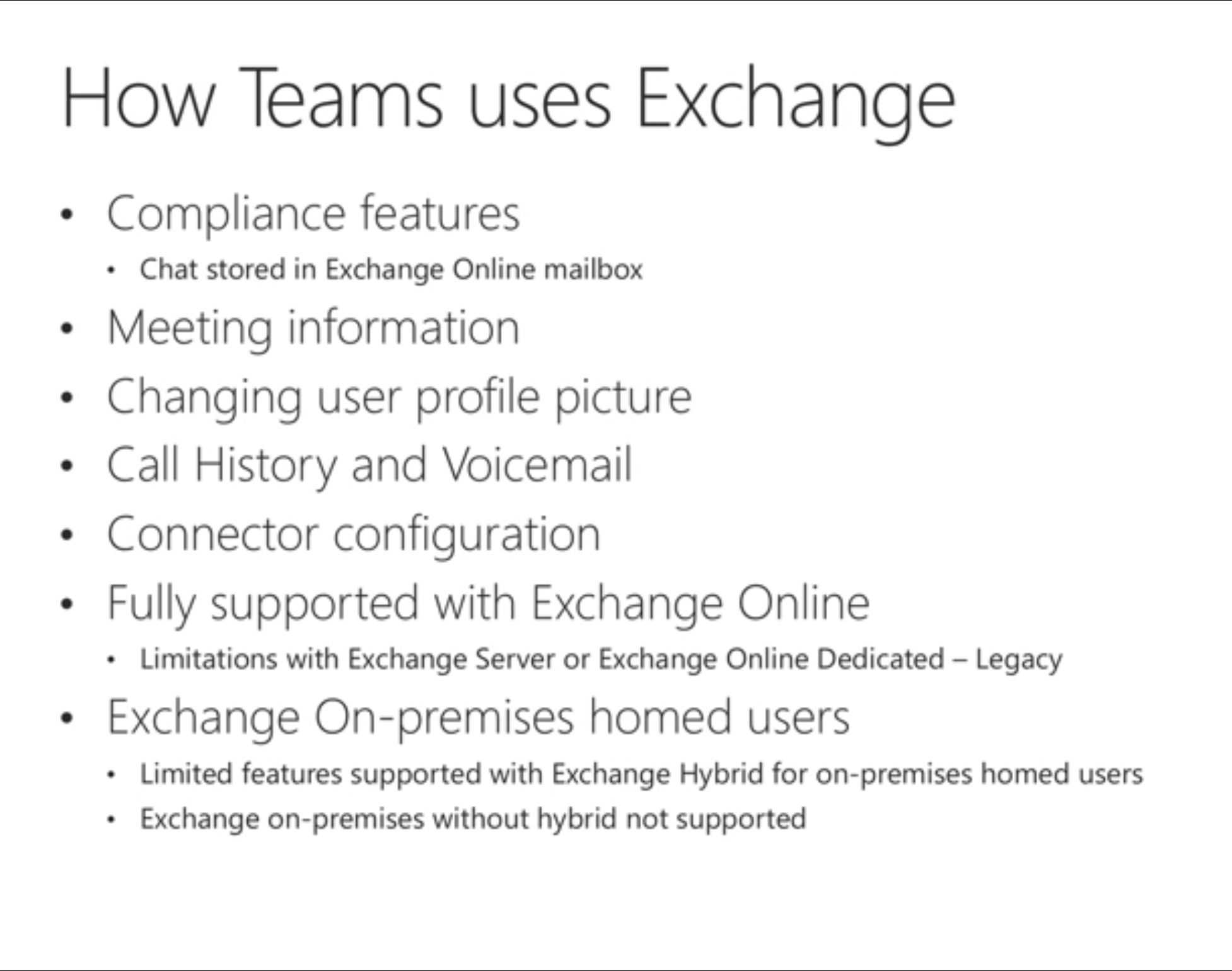
You see that Teams and Exchange on-premise without hybrid is not supported according to Microsoft
It is the last line in the picture in 54:00
larsdemo123
on 11 Apr 2020
From the video:
@dstrome could you kindly help us? Thanks!
dariomws
on 11 Apr 2020
@Karspi Thank you for your concise explanation. We run Exchange 2016 on Prem and want the Calendar button in Teams. I have gone through the steps of enabling Exchange Hybrid Deployment and running through steps 1-5 in the referenced Oauth article and am still not seeing any Calendar button appear. Not quite sure what to make of it. I do see you note that Exchange on-premises must be accessible from MS Teams IP...could you elaborate a bit on that? Would that be creating a new inbound rule on our firewall that's different than the OWA access rule we already have? Thanks again for your contributions here!
 Pineapple87
on 20 Apr 2020
Pineapple87
on 20 Apr 2020
@Pineapple87 your Exchange infrastructure has to be accessible over port TCP443 from the Microsoft Teams IP addresses, if you have a firewall rule any -> public IP exchange -> TCP443 -> exchange on-premises, that should be ok. Check if your public DNS has an entry for autodiscover.contoso.org and that points to your exchange public IP address. Don't forget to check for the calendar button over a browser where you can clear the cache. In Microsoft Teams client on Windows 10 you have to logout and login back to see the button, in some cases, you have to clear the Microsoft Teams' cache to be able to see it.
Karspi
on 20 Apr 2020
@Karspi I've checked our firewall and autodiscover DNS records and all looks good. I've also tried logging in and out of the Win 10 client, as well as logging in on the web from a PC I don't normally use. Any chance MFA for OWA could be coming into play? I'm assuming there's no need to restart any Exchange services? Thanks again.
Pineapple87
on 21 Apr 2020
An Exchange hybrid deployment is required when integrating Teams with an on-premises Exchange deployment. This is in addition to version-specific requirements for some features. The article has been updated to reflect this requirement.
dstrome
on 21 Apr 2020
@dstrome Does a "Exchange hybrid deployment" consist of merely enabling "Exchange Hybrid Deployment" in the Azure AD Connect utility or is there more to it? Still struggling getting the calendar button to appear in Teams.
Pineapple87
on 22 Apr 2020
Would it be possible to add more detail on exactly what the user experience would be like where certain features aren't supported? What about a table that includes feature support by Exchange on-prem version?
 causeway74
on 23 Apr 2020
causeway74
on 23 Apr 2020
Related issues
 warleygr
·
4Comments
warleygr
·
4Comments
 pyoungberg
·
5Comments
pyoungberg
·
5Comments
 webash
·
6Comments
webash
·
6Comments
 erik365online
·
6Comments
erik365online
·
6Comments
 DeanGross
·
4Comments
DeanGross
·
4Comments
Most helpful comment
An Exchange hybrid deployment is required when integrating Teams with an on-premises Exchange deployment. This is in addition to version-specific requirements for some features. The article has been updated to reflect this requirement.