Officedocs-skypeforbusiness: Details for customizing the meeting invitation
It would be helpful if documentation could provide more details about the effects of invite customization - what size of image is expected, how the invite will look like (screenshot that points out where specific items of customization go) as well as information if the image is embedded to the invite or needs to be a public, anonymous resource to work properly.
Document Details
⚠ Do not edit this section. It is required for docs.microsoft.com ➟ GitHub issue linking.
- ID: 470478ed-3b4e-ced8-0e28-6cda545b8400
- Version Independent ID: 95b4044b-3a47-a511-c726-b5ee75863441
- Content: Manage meeting settings - Microsoft Teams
- Content Source: Teams/meeting-settings-in-teams.md
- Service: msteams
- GitHub Login: @LanaChin
- Microsoft Alias: v-lanac
 Larryngolog
All 20 comments
@Larryngolog Thank you for submitting feedback and contributing to the docs. We are currently investigating this.
 scanum
on 12 Nov 2019
scanum
on 12 Nov 2019
+1 for details on recommended size and pixels of logo. The preview function within the Teams Admin Console is nice but additional info would be greatly appreciated.
 JohnE2
on 14 Nov 2019
JohnE2
on 14 Nov 2019
Hi @Larryngolog and @JohnE2, thank you for your feedback.
In the article you can say the next sentence:
"Create an image that's no more than 188 pixels wide by 30 pixels tall (it's quite small)."
Also:
"Store the image in a central location that everyone in your organization can access, such as a network share."
Do you think more information should be added?
Thanks!
 dariomws
on 9 Dec 2019
dariomws
on 9 Dec 2019
@dariomws306 The info about the pixel size is great.
The info about storing on a network share is something to reconsider. If the meeting invite is sent external to the organization, the image file will not be accessible if it is stored internally. In this scenario, the image file would need to be stored in a location that can be accessed anonymously and from the internet. Recommending to store this on an internal network share would not be advisable from a security standpoint. Maybe it is best to simply say the image will need to be configured for public anonymous access if sending to external attendees.
JohnE2
on 9 Dec 2019
With "Store the image in a central location that everyone in your organization can access, such as a network share." I understand that when a user in your organization send a meeting invite the image will be added to the invite from the network location and recipients don't need access the network share.
dariomws
on 9 Dec 2019
@dariomws306 even better! I thought it sent as a link.
JohnE2
on 9 Dec 2019
@dariomws306 the text about pixel size is helpful.
As for the image location I have tested and the image is linked, not embeded. I have tried it on my tenant and used image hosted on SPO. Internal users can see the image only after they sign it to SPO and external users cannot see the image, as they do not have access to the image. We also state on the Teams admin page that we need to have public site to host files used in this section.
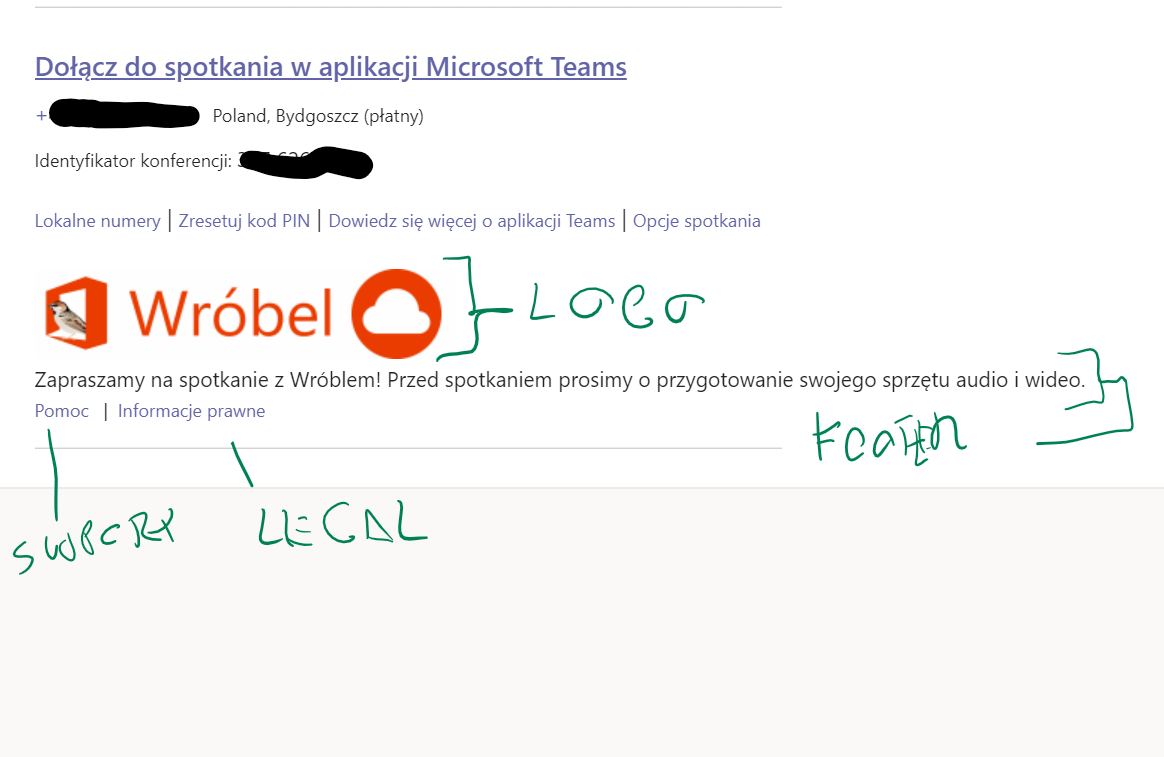
I also suggested adding a screenshot how the invite will look like and where the parts we configure will go, something like this:
Larryngolog
on 12 Dec 2019
Ok, I will check if I can add an image to provide more information.
@LanaChin What do you think?
dariomws
on 12 Dec 2019
@LanaChin Hi Lana, could you please help with this issue? Thanks!
scanum
on 30 Dec 2019
@LanaChin Hi Lana, could you please help with this issue? Thanks!
scanum
on 13 Jan 2020
@LanaChin Hi Lana, could you please help with this issue? Thanks!
scanum
on 17 Jan 2020
Hi everyone. The information on the images' source is clear. It shouldn't be a problem to host an image file reachable in the web. ;-)
But have a question corresponding to this issue. Why do the settings need one hour to take effect of any changes? That is quite uncomfortable to check, if the design corresponds to our managers. Is it possible to test it different and faster?
Thanks :-)
 gobmh
on 4 Feb 2020
gobmh
on 4 Feb 2020
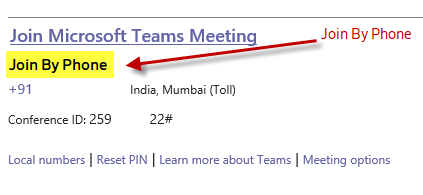
Is it possible to customize the Teams meeting invite to display the conference ID similar to Skype invite (with Join by Phone Text) as-
Join by Phone-
Toll Number
Conference ID
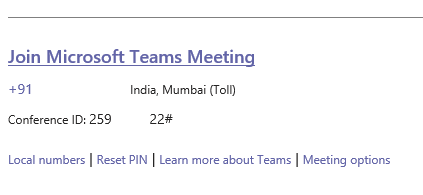
Current invite is as below
Teams Meeting URL
Toll Number
Conference ID
 shashank1320
on 14 Feb 2020
shashank1320
on 14 Feb 2020
Hi everyone. The information on the images' source is clear. It shouldn't be a problem to host an image file reachable in the web. ;-)
But have a question corresponding to this issue. Why do the settings need one hour to take effect of any changes? That is quite uncomfortable to check, if the design corresponds to our managers. Is it possible to test it different and faster?
Thanks :-)
Probably not that I am aware of. This is due to the Sync delays for O365 services which may take upto 24 hours sometime.
shashank1320
on 14 Feb 2020
Looking into this, thank you.
 LanaChin
on 27 Feb 2020
LanaChin
on 27 Feb 2020
Hi can we create a fixed default meeting link that can be copy and pasted in any calendar invite or pasted in an email to a client ? Or it has to be specific to "New MS Teams Meeting" when we click on our calendar only then the unique meeting link will be created.
 JannJJG
on 5 Mar 2020
JannJJG
on 5 Mar 2020
@Larryngolog - You can use the Preview invite button to see a preview of your meeting invite. The article has been updated to reflect this feature.
LanaChin
on 5 Mar 2020
@Larryngolog Thank you for submitting feedback. We understand that this issue has been resolved.
Please feel free to re-open this issue if there is a specific area of the docs that we can improve or make better. Thank you.
scanum
on 12 Mar 2020
Thank you for your help.
Larryngolog
on 12 Mar 2020
Is it possible to customize the Teams meeting invite to display the conference ID similar to Skype invite (with Join by Phone Text) as-
Join by Phone-
Toll Number
Conference ID
Current invite is as below
Teams Meeting URL
Toll Number
Conference ID
Yet to ant any response on this customization requirement.
shashank1320
on 12 Mar 2020
Related issues
 N8dog021
·
3Comments
N8dog021
·
3Comments
 tiagoroxo
·
6Comments
tiagoroxo
·
6Comments
 JAK1047
·
6Comments
JAK1047
·
6Comments
 stefandoh
·
3Comments
stefandoh
·
3Comments
 TotallyInformation
·
5Comments
TotallyInformation
·
5Comments