Officedocs-skypeforbusiness: Please update KB/Doc
"Manage Teams at the Office 365 tenant level
Note
Tenant-level control for Teams has been removed (effective August 2018). Control access to Teams in your organization with user-level licensing. To learn more, see Manage user access to Microsoft Teams."
I do not believe this to be the case for educational tenancy's and information on enabling this tenancy wide through powershell is vital, as you've disabled teams for all student licences at a tenancy level. i should say that i look after over 500 individual school tenancy's and powershell is the only way to look after that number.
Document Details
⚠ Do not edit this section. It is required for docs.microsoft.com ➟ GitHub issue linking.
- ID: cccdd91a-7f05-abd5-ed94-e82152b86914
- Version Independent ID: 3532d0a8-119c-f7d0-0d4f-a865ad32570f
- Content: Manage user access to Microsoft Teams
- Content Source: Teams/user-access.md
- Service: msteams
- GitHub Login: @LolaJacobsen
- Microsoft Alias: lolaj
 Jonathan-Nuttall
All 21 comments
@Jonathan-Nuttall Thank you for submitting feedback and contributing to the docs. We are currently investigating this.
 scanum
on 8 Nov 2019
scanum
on 8 Nov 2019
Hi @Jonathan-Nuttall, thank you for your feedback.
Could you please elaborate further as I don't have a Educational tenant to test it?
Do you still have the option to enable Teams at tenancy level?
 dariomws
on 9 Dec 2019
dariomws
on 9 Dec 2019
Yes, and its disabled for students but enabled for staff as standard. so even if you licence the students individually they cant use teams, because its turned off for them centrally.
Which was causing some confusion until we found it.
As you can imagine logging into all 500~ of our schools tenancies manually isn't really an option.
Jonathan-Nuttall
on 10 Dec 2019
I'm having the same issue, when you say centrally where did you go to manage that? I've been through the teams admin page, sfb admin, and through our O365 tenant settings but cannot find anything related to teams and students. I keep getting pointed back to the teams admin page. Frustrating.
Thank you.
 ShaneWhitford
on 11 Dec 2019
ShaneWhitford
on 11 Dec 2019
Thank you @Jonathan-Nuttall and @ShaneWhitford.
@Jonathan-Nuttall Could you give us more information about how you can enable it at the tenancy level in education?
@LolaJacobsen maybe you can kindly help us with this.
Thanks everyone!
dariomws
on 12 Dec 2019
Login to the admin portal
Settings
Services & Add-ins
Microsoft Teams
in here there is a secttion for enabling settings or licences for specified users/licences (Ive found that students are disabled by default) and id like the powershell to fix this and enable it for students at this level
Well I hate to admit it, But I totally missed the settings for teams. I was looking under T - teams not Microsoft Teams. Once you said they were in settings, I knew I must have missed it.
What I learned?
You must have the global setting turned on or licensed accounts will not work.
Also this is the only setting that is not available in the Teams admin center.
You must turn on teams for students or faculty in the Microsoft 365 admin center, Settings, Settings (click again in the drop down menu), Microsoft Teams, and finally Settings by user/license type.
Thanks for the help everyone!
ShaneWhitford
on 16 Dec 2019
Thank you @ShaneWhitford!
@Jonathan-Nuttall Do you think that this information is useful? Do you still think that there is something to improve in the article?
Thanks!
dariomws
on 16 Dec 2019
The article misses out the entire fact that education tenancies still have to enable teams centrally for students and contains no information on how to complete this either manually or using PowerShell.
I'd like the PowerShell commands putting in to the article as originally requested I need to update these settings on 500+ school tenancies and we don't have the man power to do it manually not to mention we already manage them by PS script.
I cant enable this using PowerShell at present, which we need to be able to do as we have schools asking for it under the knowledge that skype for business is being replaced by teams.
Jonathan-Nuttall
on 16 Dec 2019
@Jonathan-Nuttall I agree completely! And I would like to add that, I've gone back to the admin center and can confirm the Microsoft Teams option under teams is missing, but only when using the "new admin center" option. If turned off, Microsoft Teams appears as an option under Services and Add-On's in the settings area of the admin center. I was using the "new admin center" view which is why I could not see the setting.
ShaneWhitford
on 16 Dec 2019
Sorry if I still don't understand... But you have all your student users/account without the Teams license. You need to enable it of everyone.
You can accomplish this with the admin center:
https://docs.microsoft.com/office365/admin/manage/assign-licenses-to-users?view=o365-worldwide#assign-licenses-to-multiple-users-on-the-active-users-page
I have created a new Education tenant, created some student accounts and they have Teams license enabled by default.
dariomws
on 16 Dec 2019
Your Half right yes they need to be licenced for each individual user, but I can do that via Powershell already just like anyother licence.
Students are adminstratively disabled before the individual licence point, and need to be centraly enabled per tenancy in the settings and addons area. which non of your documentation lists or explains either manually (Via UI), or the backend PowerShell. That is the information I pasted above in response to @ShaneWhitford. however this is only useful for an individual tenancy and does not describe how to do this via PowerShell (I would need to log into 500~ tenancy's to fix this which i don't have the time to do).
Your documentation needs to be updated to describe the UI approach to enabling the students centrally as well as the PowerShell. when I say centrally i mean the services and addons teams settings.
In addition to this it appears that this central (Services and Add-ons) Teams settings seem to have been neglected from the new UI being implemented by Microsoft again as per @ShaneWhitford previously stated. (Which obviously needs fixing, so that students can use teams at all, I would imagine not fixing this could be damaging to the teams project especialy in education)
@dariomws306 you will probably find that even though they are licenced teams will not work for student users without following the steps I outlined above, if and where posible this is what needs documenting.
Jonathan-Nuttall
on 17 Dec 2019
@Jonathan-Nuttall Could you please kindly put a screenshot here as I cannot reproduce it on my demo tenant? Thanks!
I will try to involve more people as I don't have too much experience with Education tenants. (@LolaJacobsen)
dariomws
on 17 Dec 2019
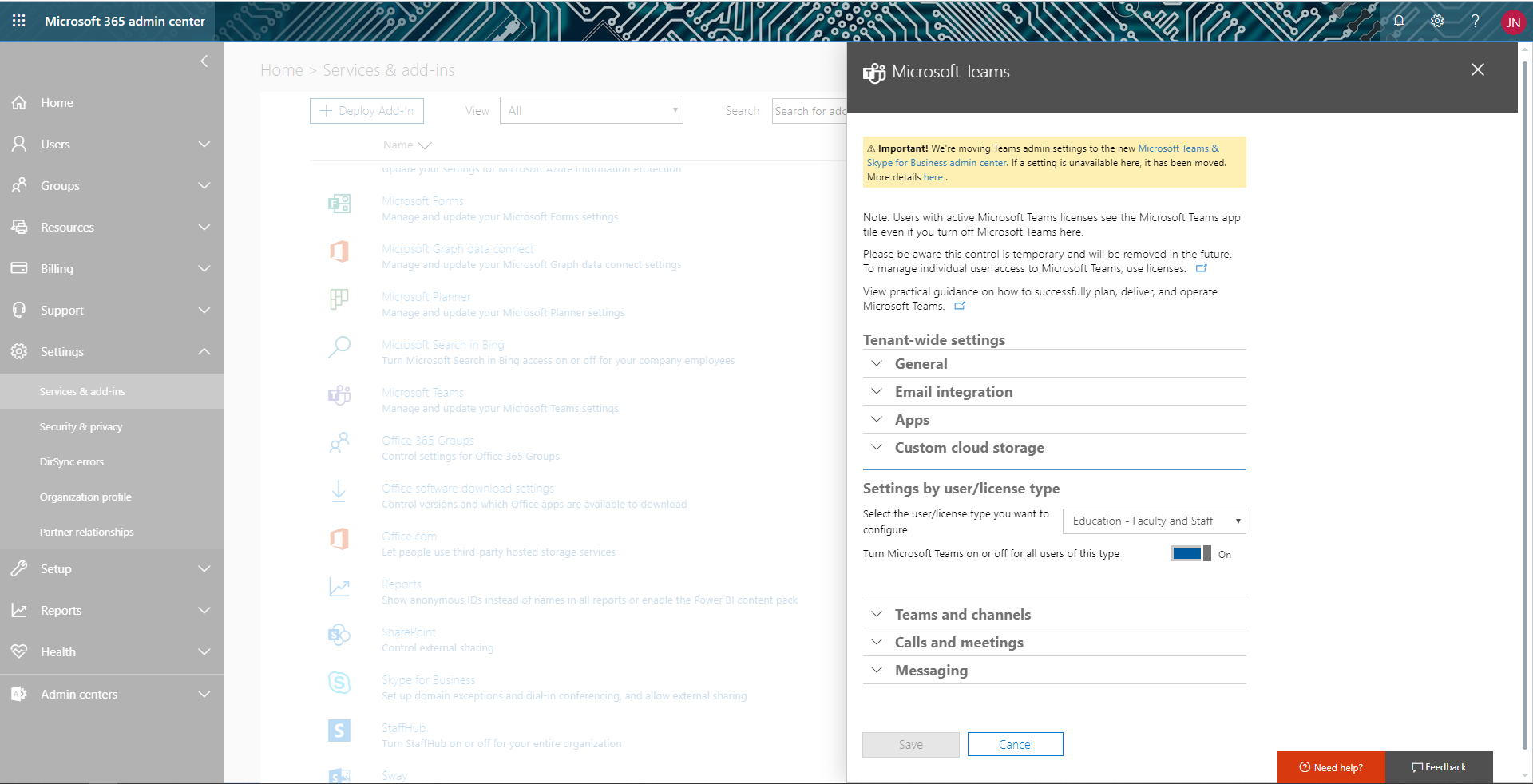
as you can see its on for "Education - Faculty and Staff" but off for "Education - Students" by default. this is the setting that prevents students from using teams even if they have an individual licence for the product. This setting is not visable in the new UI, and does not exist in the Teams and Skype for Buisness admin center.
Jonathan-Nuttall
on 18 Dec 2019
@LolaJacobsen Hi Lola, could you please help us with the following issue? Thanks!
scanum
on 30 Dec 2019
@LolaJacobsen Hi Lola, could you please help us with the following issue? Thanks!
scanum
on 13 Jan 2020
Checking with EDU PM to see who should handle this.
 LolaJacobsen
on 13 Jan 2020
LolaJacobsen
on 13 Jan 2020
@LolaJacobsen Thanks!
scanum
on 17 Jan 2020
Checking again with EDU PM.
LolaJacobsen
on 29 Jan 2020
Confirmed that tenant-level control still exists for EDU. I'm adding a note to the article today. Thank you for all your help tracking this down.
LolaJacobsen
on 30 Jan 2020
Thank you, can you please also provide the powershell for turning this on/off for the groups listed.
i need to do this over 500 times, powershell is the only real way to deploy.
Jonathan-Nuttall
on 31 Jan 2020
Related issues
 Lowell-Syncrety
·
4Comments
Lowell-Syncrety
·
4Comments
 bsdmad
·
6Comments
bsdmad
·
6Comments
 webash
·
6Comments
webash
·
6Comments
 DeanGross
·
4Comments
DeanGross
·
4Comments
 BSiefferman
·
4Comments
BSiefferman
·
4Comments
Most helpful comment
Confirmed that tenant-level control still exists for EDU. I'm adding a note to the article today. Thank you for all your help tracking this down.