Officedocs-skypeforbusiness: Shows up as "Program" under Startup tab of Task Manager
If you install the machine based teams installer, it adds this to the registry: value name = TeamsMachineInstaller, value data = %ProgramFiles%Teams InstallerTeams.exe --checkInstall --source=default to ComputerHKEY_LOCAL_MACHINESOFTWAREWOW6432NodeMicrosoftWindowsCurrentVersionRun. That causes an entry just called "Program" under the Task Manager Startup tab. It would be helpful if Teams could be properly identified under the Task Manager Startup tab instead of just "Program".
Document Details
⚠ Do not edit this section. It is required for docs.microsoft.com ➟ GitHub issue linking.
- ID: b2f71d9c-6b35-72c9-dd94-7f62319c1656
- Version Independent ID: 86172986-6cc8-eee5-1309-704d9de0dcd0
- Content: Install Microsoft Teams using MSI via SCCM
- Content Source: Teams/msi-deployment.md
- Service: msteams
- GitHub Login: @Lester-Hewett
- Microsoft Alias: lehewe
 MelQL
MelQL
All 12 comments
Agreed! I've noticed this on a few machines, and it's quite unnerving to see "Program" listed there.
 thedrum808
on 7 Feb 2019
thedrum808
on 7 Feb 2019
@officedocsbot unassign @yogkumgit
 scanum
on 10 Apr 2019
scanum
on 10 Apr 2019
@officedocsbot assign @scanum
scanum
on 10 Apr 2019
@MelQL Thank you for reaching out and helping improve MS Docs. I'll have the team look into this.
 lindspea
on 6 May 2019
lindspea
on 6 May 2019
@MelQL - thank you for submitting feedback.
I think the best way forward is if you open a service ticket in your tenant so this can get resolved ASAP. Based on the outcome let me know if it is something that can be called out in the docs.
Please follow this link to contact support for business products: https://docs.microsoft.com/office365/admin/contact-support-for-business-products
Please keep us posted here on the resolution so we can feed whatever information you discover into the content.
scanum
on 7 May 2019
@officedocsbot close
scanum
on 7 May 2019
Any update on this? I'm not able to escalate this as a tenant because I don't have tenant access. Seems like an issue with the installer, not a tenant-specific issue. It's a bit sloppy for the teams installer to be leaving this behind. Also, the path it leaves is not even valid because the files referenced no longer exist
 dwiller11
on 27 Dec 2019
dwiller11
on 27 Dec 2019
I just found this on daughters PC. It's still there. It's hard not to say bad things about MS...
edit:
OMG... it makes it look like its in "C:Program FilesTeam...." But if you look close it shows "C:Program"FilesTeam....
Who knows whats really going on except wasting my time finding out!
Oh, it's MS so it's perfectly fine/safe....
 Hillbi11y
on 14 Apr 2020
Hillbi11y
on 14 Apr 2020
I was about to submit my own issue but will add my contribution to this thread:

Is this a valid Start up entry for Microsoft Teams seems a little odd to me? Especially the misplaced " in the path.
Additionally its targeting the wrong program files folder, when I look on disk its located in the (x86) folder:

 mattou07
on 20 Apr 2020
mattou07
on 20 Apr 2020
Adding the Command line column in Task Manager finally gave me a bit of peace of mind that this was a legitimate "Program" but it would certainly be nice to have this fixed. Really wondering how this happened with a Microsoft application.
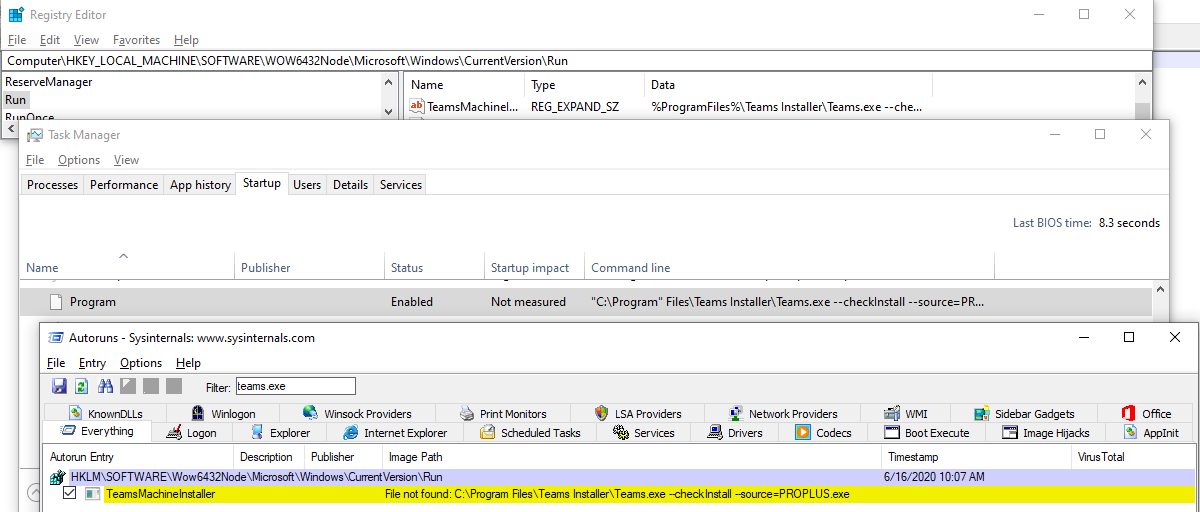
I found how to correct this manually so it appears correctly in the Startup tab. Just change the reg entry in HKLMSOFTWAREWOW6432NodeMicrosoftWindowsCurrentVersionRun
from: %ProgramFiles%Teams InstallerTeams.exe --checkInstall --source=PROPLUS
to: %ProgramFiles(x86)%Teams InstallerTeams.exe --checkInstall --source=PROPLUS
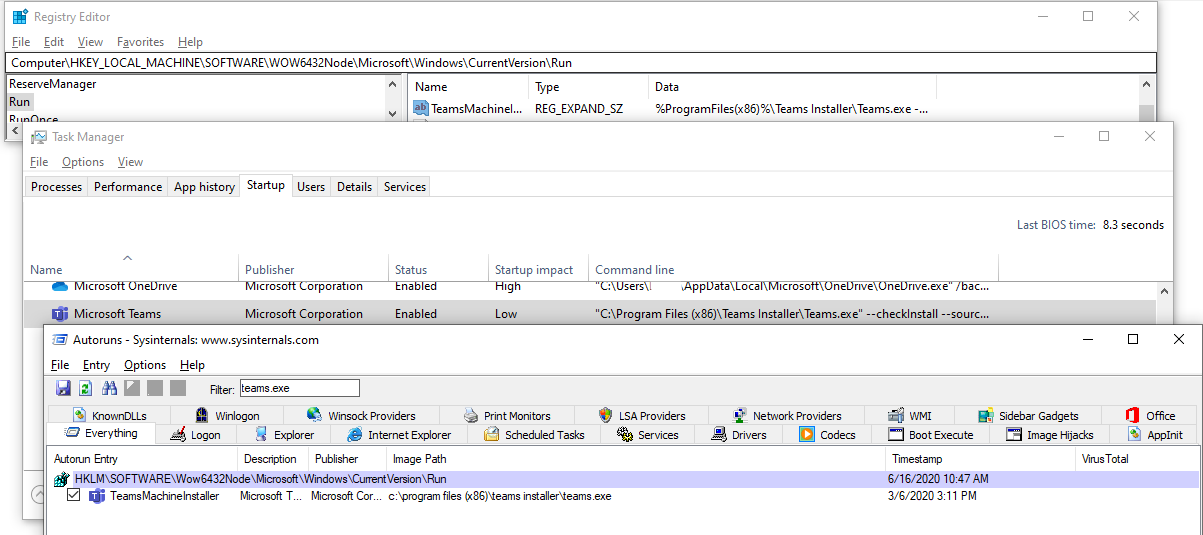
 ddawson100
on 16 Jun 2020
ddawson100
on 16 Jun 2020
I have this and I never even purposefully downloaded Teams, I think my other office products tried to do it for me.
 Toomber
on 21 Jun 2020
Toomber
on 21 Jun 2020
I just found this issue on my machine with Windows + O365 C2R Office installed in September 2020 and with a Teams installer dating back to August 2020. When changing the registry entry to the correct path, the "Program" is listed as "Teams". Strange that this issue is more than a year old, but no progress has been made on resolving it.
 TrutzS
on 26 Nov 2020
TrutzS
on 26 Nov 2020
Related issues
 DevJonBirkett
·
6Comments
DevJonBirkett
·
6Comments
 adyst
·
4Comments
adyst
·
4Comments
 JAK1047
·
6Comments
JAK1047
·
6Comments
 Mlavieri
·
6Comments
Mlavieri
·
6Comments
 bsdmad
·
6Comments
bsdmad
·
6Comments
Most helpful comment
Adding the Command line column in Task Manager finally gave me a bit of peace of mind that this was a legitimate "Program" but it would certainly be nice to have this fixed. Really wondering how this happened with a Microsoft application.
I found how to correct this manually so it appears correctly in the Startup tab. Just change the reg entry in HKLMSOFTWAREWOW6432NodeMicrosoftWindowsCurrentVersionRun
from: %ProgramFiles%Teams InstallerTeams.exe --checkInstall --source=PROPLUS
to: %ProgramFiles(x86)%Teams InstallerTeams.exe --checkInstall --source=PROPLUS