Officedocs-skypeforbusiness: Cannot toggle guest access
When attempting to toggle guest access for Teams "on", the toggle switch is grayed out. Any ideas?
Document Details
⚠ Do not edit this section. It is required for docs.microsoft.com ➟ GitHub issue linking.
- ID: 042d7ce6-ee22-690f-8188-ff8a4a585847
- Version Independent ID: 3e5bc99c-e08e-44e0-cda3-687ed3633175
- Content: Turn on or off guest access to Microsoft Teams
- Content Source: Teams/set-up-guests.md
- Service: msteams
- GitHub Login: @laithalshamri
- Microsoft Alias: laal
 Kettenhund
All 48 comments
@Kettenhund Thank you for this feedback
I want to make sure this guest access swiths gets addressed quickly for you. Support will be able to handle this issue to resolution.
I think the best way forward is if you can open a service ticket in your tenant so this can get resolved ASAP. Based on outcome let me know if it is something that can be called out in the docs.
Here is a quick video on opening a ticket: https://www.youtube.com/watch?v=puuOy0sEg1Y
If you don't mind please keep us posted here on the resolution and I really want to get this information you are discovering back into the docs.
 AndreaBarr
on 18 Sep 2018
AndreaBarr
on 18 Sep 2018
same problem here - i opened a ticket (#: 11521432) and we are currently searching.
i also ran following script:
Import-Module SkypeOnlineConnector
$Cred = Get-Credential
$CSSession = New-CsOnlineSession -Credential $Cred
Import-PSSession -Session $CSSession
Set-CsTeamsClientConfiguration -AllowGuestUser $True -Identity Global
but this doesn't help - i'm not able to toggle the slider nor to invite guests
 sweikelt
on 24 Sep 2018
sweikelt
on 24 Sep 2018
I also have this problem. Can it be because it takes time before enabling guest access is provisioned?
 Proxio
on 24 Sep 2018
Proxio
on 24 Sep 2018
Same issue. I have enabled guest access everywhere else but this toggle still won't budge. I am running a hybrid environment should it work the same way?
 aflores29
on 24 Sep 2018
aflores29
on 24 Sep 2018
Same issue. Cannot toggle button the Guest button.
 DarkwingDucker
on 24 Sep 2018
DarkwingDucker
on 24 Sep 2018
I can add guest. So, would you pls give more detail steps?
 loveunicom
on 25 Sep 2018
loveunicom
on 25 Sep 2018
I can add guest. So, would you pls give more detail steps?
@loveunicom - sorry but i don't know what you mean - we can't toggle the switch to allow guest-access - that's the problem - and i think that's the reason why we can't invite guests, although i ran the powershell-script above.
i didn't receive a possible solutions from microsoft yet - when i get answer, i'll let you know
sweikelt
on 25 Sep 2018
@sweikelt I mean that there are three places that control the guest access, so which toggle you can not switch?
loveunicom
on 25 Sep 2018
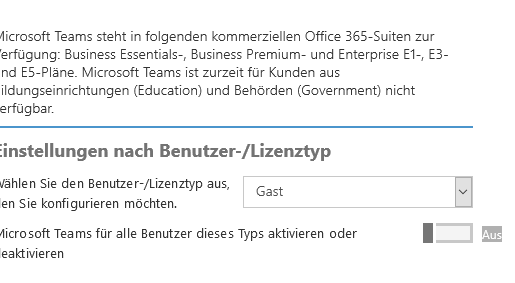
@loveunicom - ah ok - i'm in the office 365-admin-center -> Settings -> Services and Add-Ins -> Microsoft Teams -> settings by user/license type
sweikelt
on 25 Sep 2018
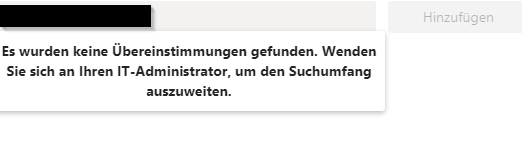
edit: in the https://admin.teams.microsoft.com - portal the guest-access is activated, but i'm not able to invite any external user
sweikelt
on 25 Sep 2018
@sweikelt How can I insert a pic here?
loveunicom
on 25 Sep 2018
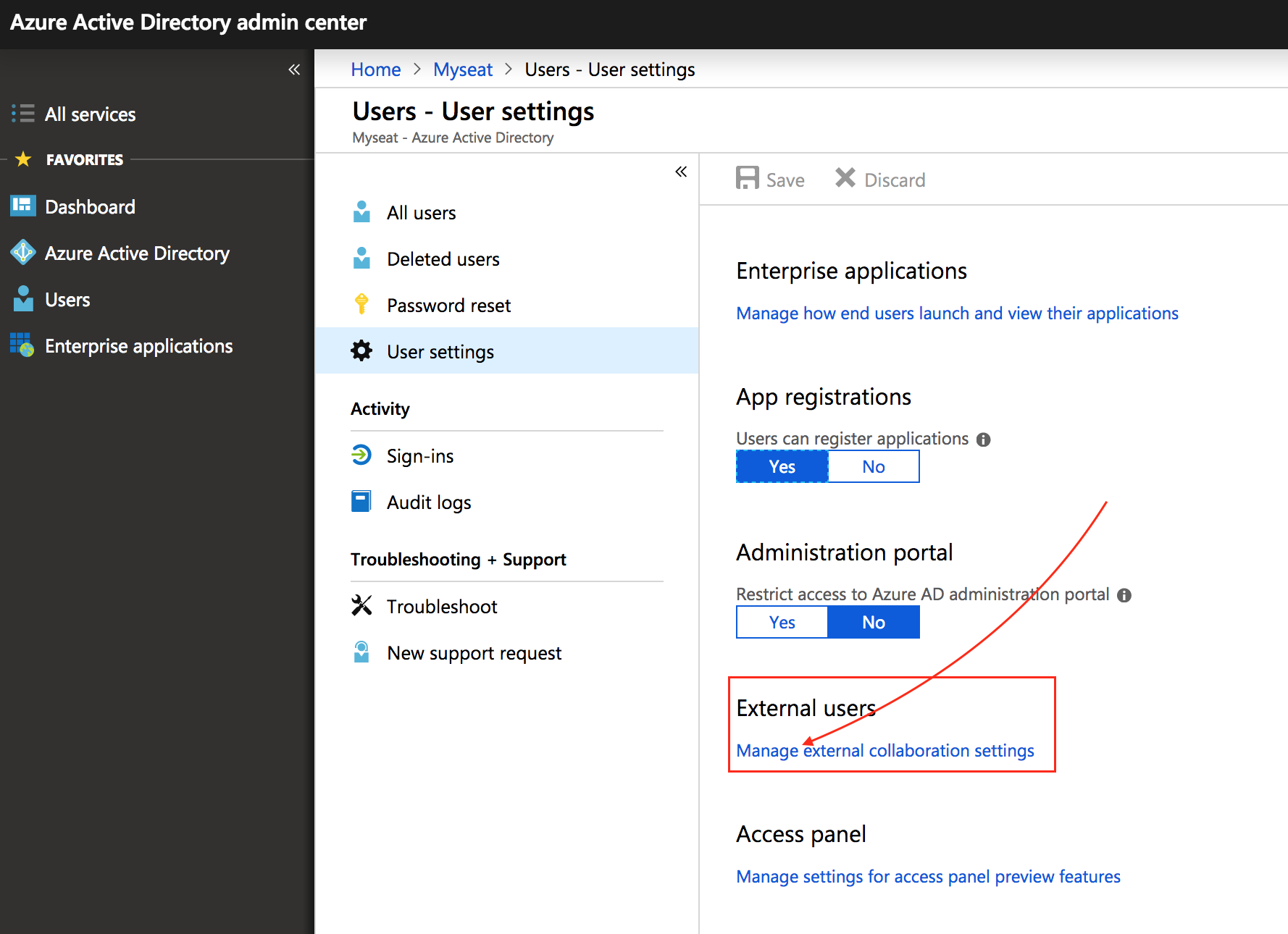
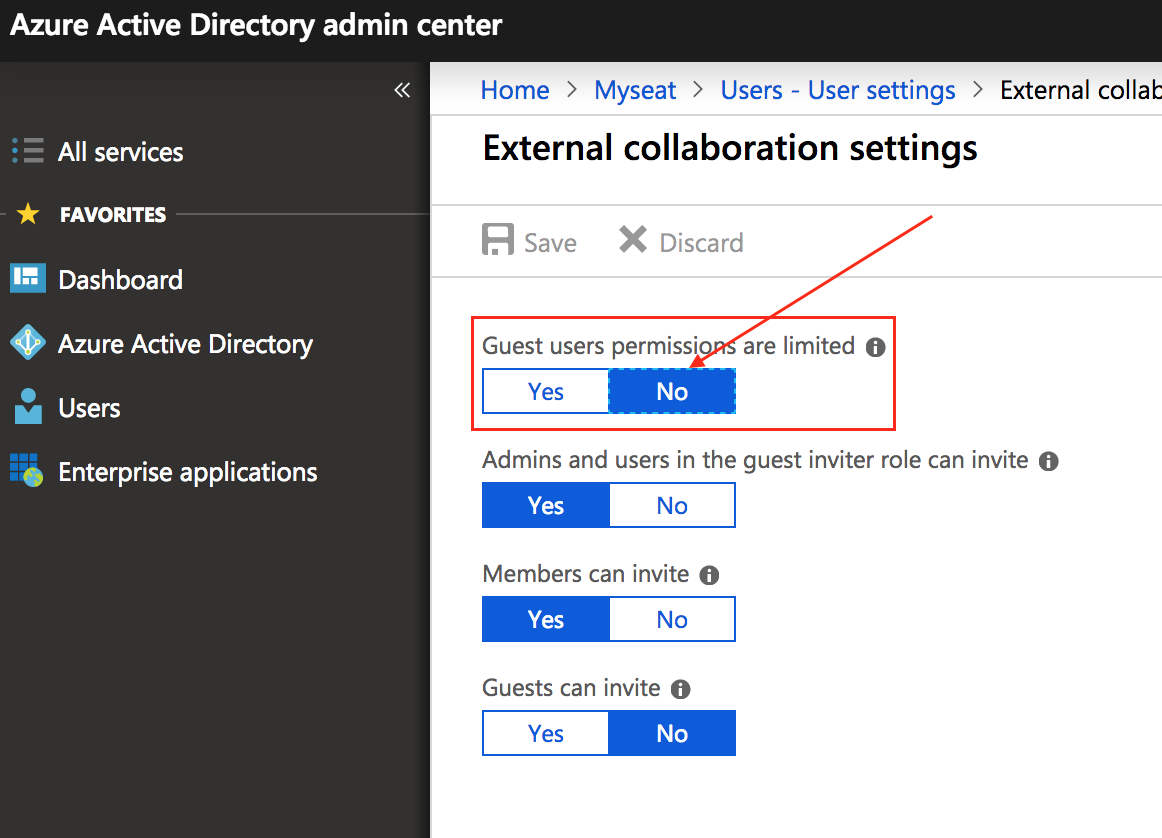
@sweikelt Please confirm the above two places setting first.
loveunicom
on 25 Sep 2018
@loveunicom - that's pretty simple - in case that you have it in your clipbord, just use ctr+v.
if you have it on your drive, drag and drop or select them
sweikelt
on 25 Sep 2018
@loveunicom - roger - this permission is set to yes - i switch it now
sweikelt
on 25 Sep 2018
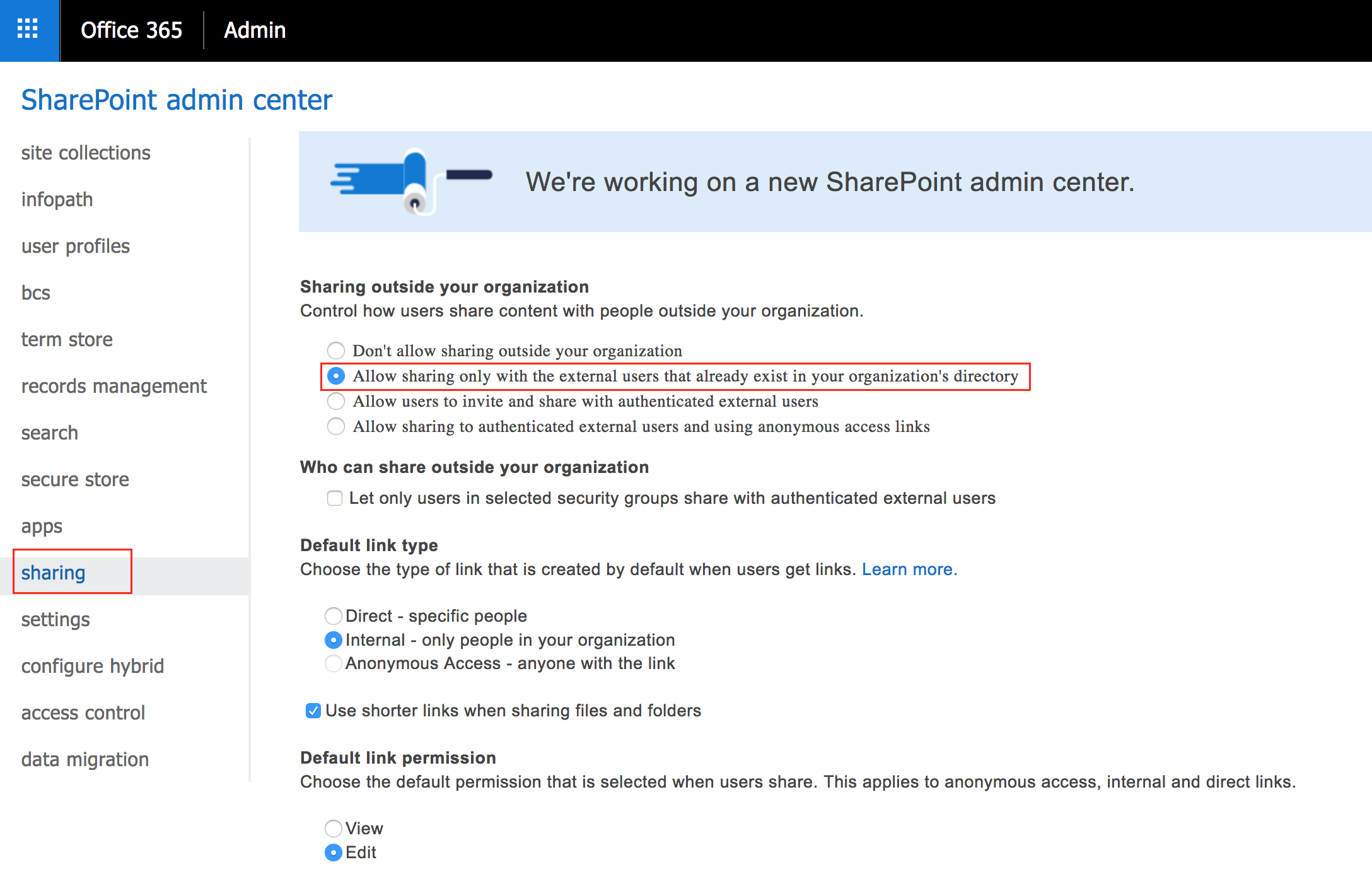
@sweikelt Addition:
The sharepoint setting:
loveunicom
on 25 Sep 2018
settings are set like yours, but i can't toggle the switch on.
let's wait some time, maybe it takes some time to be active.
PS: i don't like the setting in AzureAD ->Guest permissions are limited = set to "no" - it must work without setting this to "no" :-(
sweikelt
on 25 Sep 2018
settings are set like yours, but i can't toggle the switch on.
let's wait some time, maybe it takes some time to be active.PS: i don't like the setting in AzureAD ->Guest permissions are limited = set to "no" - it must work without setting this to "no" :-(
Yes, you're right. Me too.
loveunicom
on 25 Sep 2018
settings are set like yours, but i can't toggle the switch on.
let's wait some time, maybe it takes some time to be active.PS: i don't like the setting in AzureAD ->Guest permissions are limited = set to "no" - it must work without setting this to "no" :-(
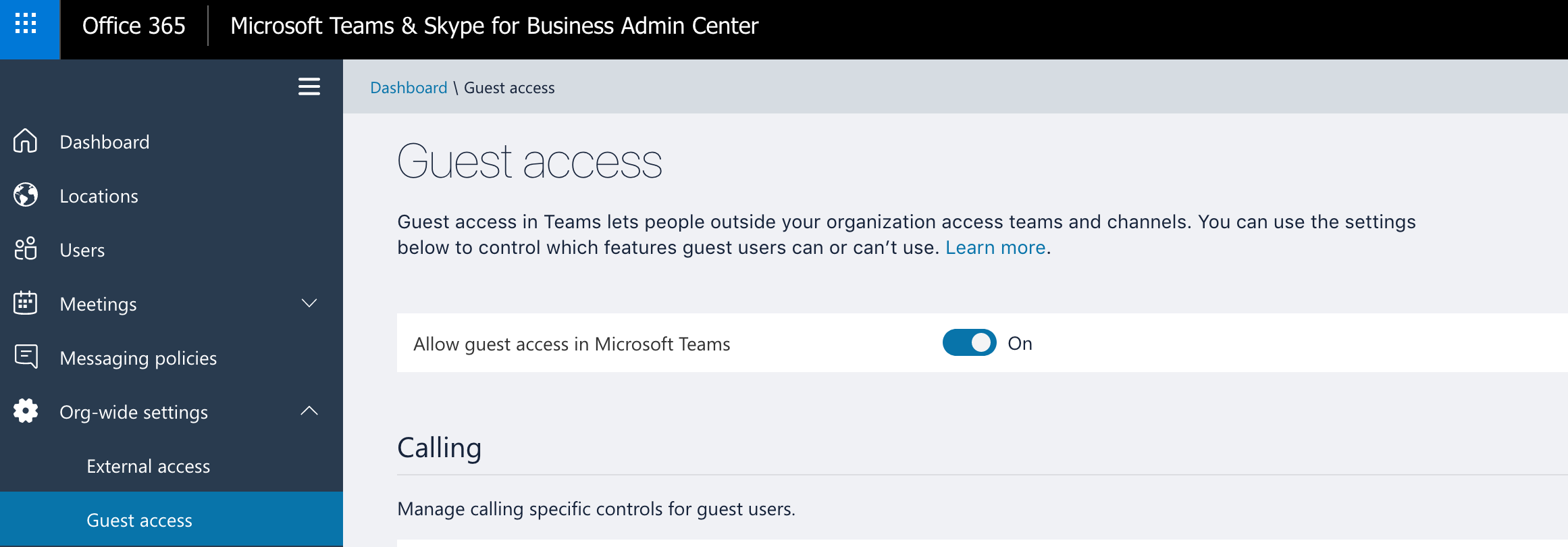
Please check this to see whether your powershell takes effect.
loveunicom
on 25 Sep 2018
@loveunicom - jep this is set to "on" too
sweikelt
on 25 Sep 2018
@loveunicom - jep this is set to "on" too
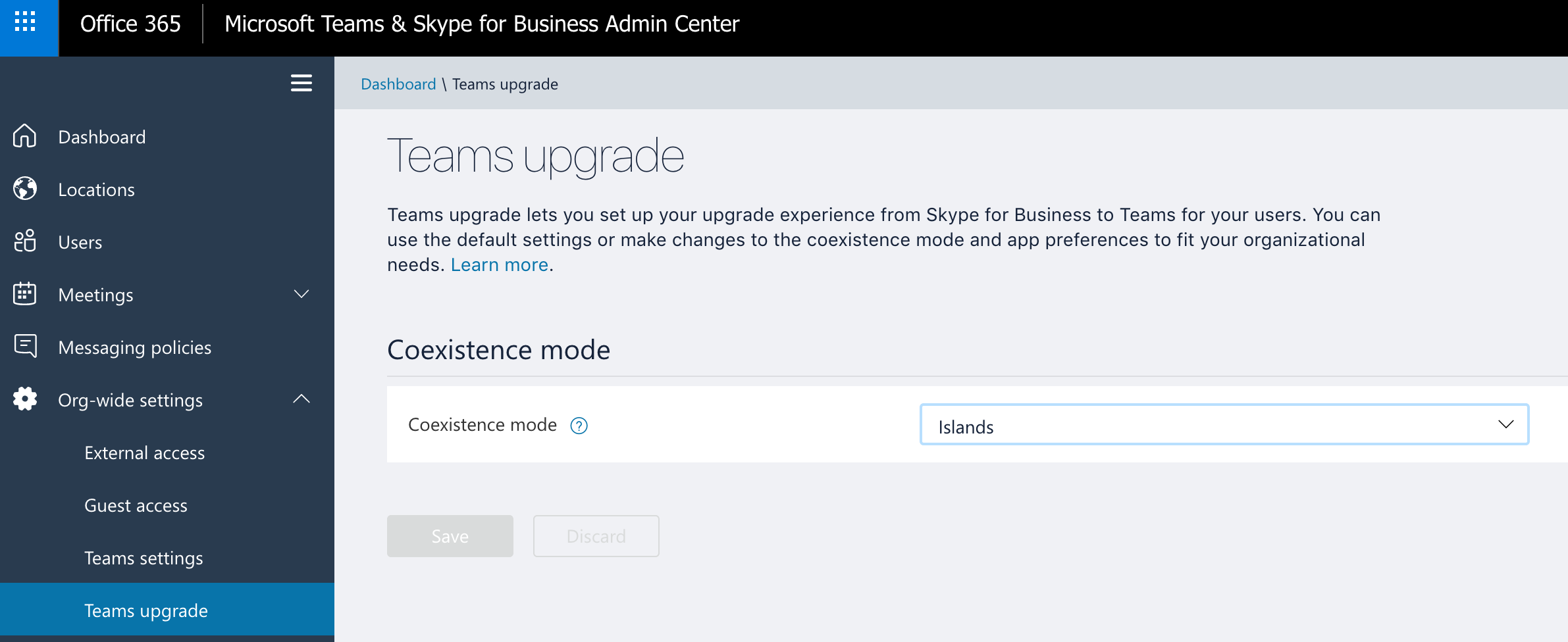
Did you upgrade teams?
loveunicom
on 25 Sep 2018
@loveunicom - jep this is set to "on" too
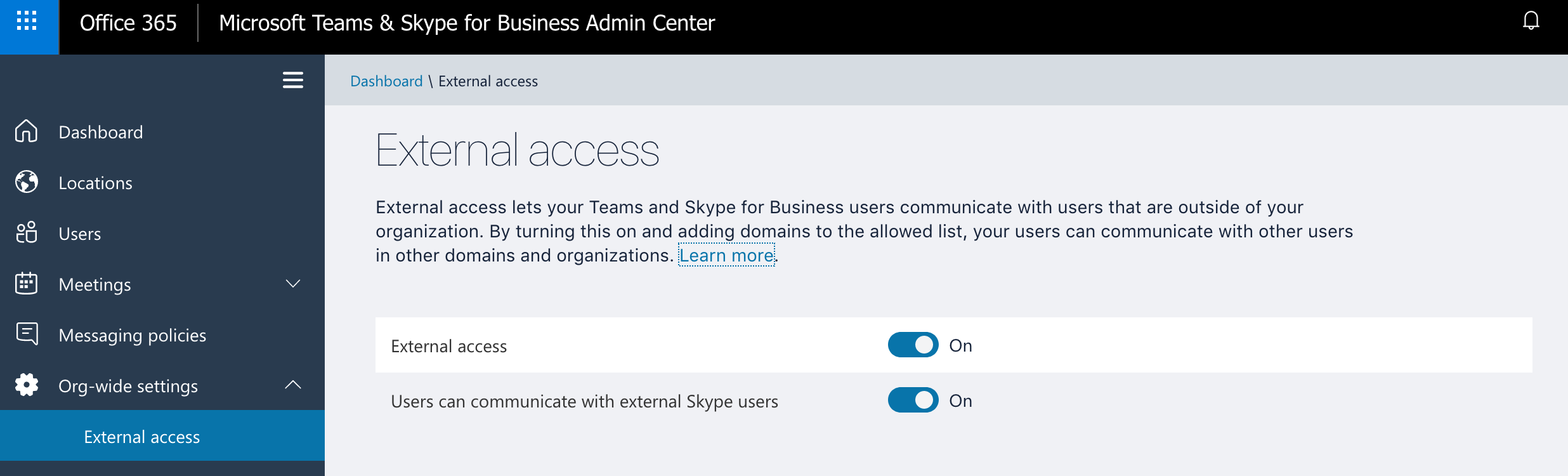
loveunicom
on 25 Sep 2018
@loveunicom , this settings are also enabled. Microsoft is just working on it - but the last info i got yesterday - with the same questtions you asked :-P
sweikelt
on 25 Sep 2018
@loveunicom , this settings are also enabled. Microsoft is just working on it - but the last info i got yesterday - with the same questtions you asked :-P
My sub is OK.
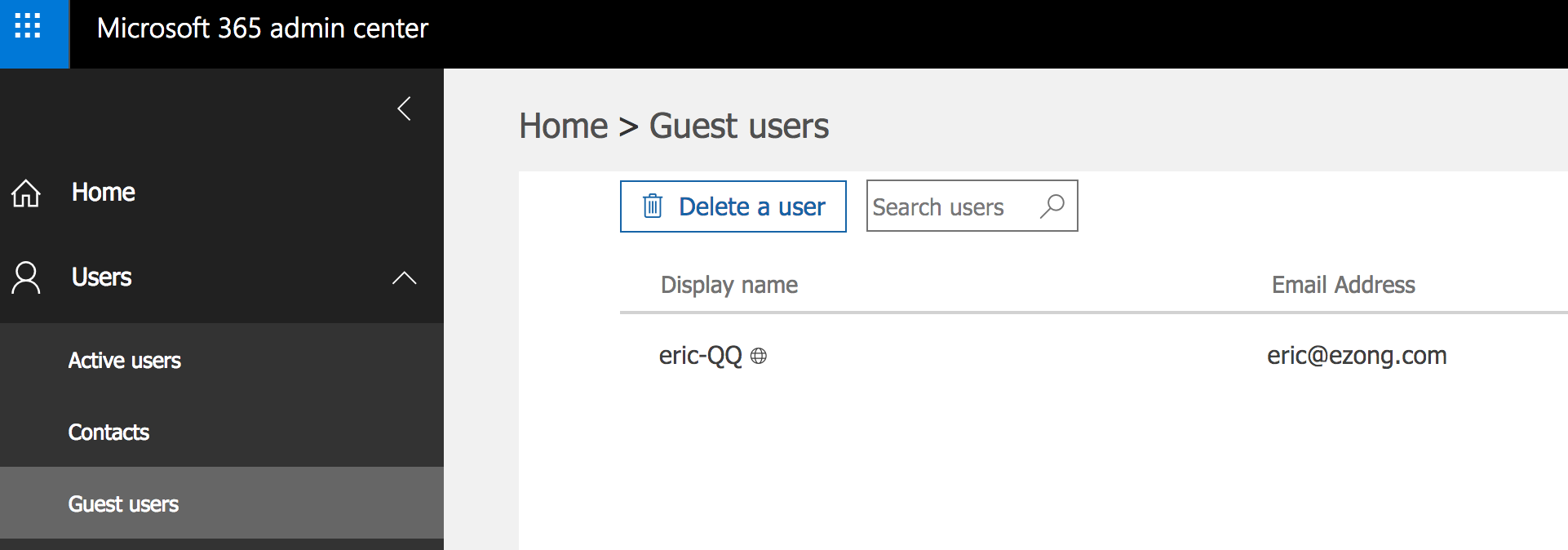
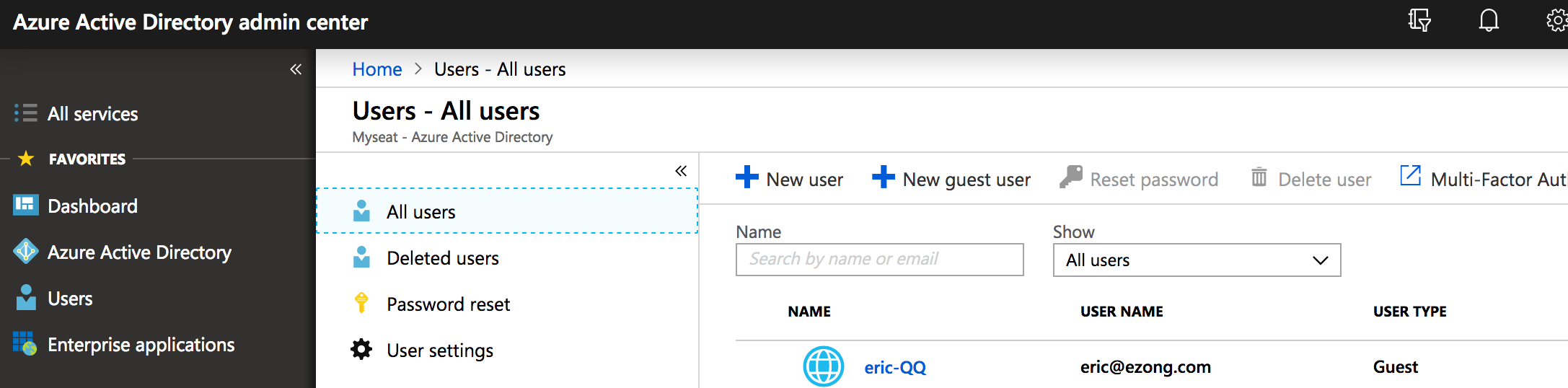
loveunicom
on 25 Sep 2018
another colleague of mine can toggle the switch on (he works in another company on an different o365-tenant).
i suspect, that he can toggle it on, because he bought o365 directly - we bought it through ingram.
sweikelt
on 25 Sep 2018
Same problem than @sweikelt, tried everything that @loveunicom mentioned (even if unlikely related), and still unable to toggle guest access for MS Teams :(
 KarimEZ
on 25 Sep 2018
KarimEZ
on 25 Sep 2018
@KarimEZ - we now managed to toggle it on - but on a very suspicious way.
i've informed microsoft about the way we did it and now exspect an answer if i may publish the workaround here.
pls stay tuned 👍
sweikelt
on 25 Sep 2018
Update: Microsoft says, that this switch should not be used anymore lol and that's why, in some tenants it is deactivated - because they are already migrated to "teams and skype for business portal".
My workaround (scripting via browser - not kidding!) is not supported (of course - would be a shame if it would be supported).
and again - we still don't got a working solution - maybe tomorrow with the help of the remote-help-god ^^
sweikelt
on 25 Sep 2018
Um, ok, thanks... so I currently don't have a solution to add guests to Teams:(
KarimEZ
on 25 Sep 2018
@KarimEZ , don't give up - you can create a support-ticket like me - maybe it will push the priority forward.
like i said - maybe we can get a better answer tomorrow - because my microsoft-supporter is not in the office anymore
sweikelt
on 25 Sep 2018
@KarimEZ Thank you for this feedback.
I want to make sure this issue is documented and troubleshooted promptly. Please open a ticket with support so we can start figuring out what is going on with some of the rings for Teams.
I think the best way forward is if you can open a service ticket in your tenant so this can get resolved ASAP. Based on outcome let me know if it is something that can be called out in the docs.
Here is a quick video on opening a ticket: https://www.youtube.com/watch?v=puuOy0sEg1Y
If you don't mind please keep us posted here on the resolution and I really want to get this information you are discovering back into the docs.
AndreaBarr
on 25 Sep 2018
@sweikelt do you mind publishing your unsupported workaround? That would be more than what Microsoft is giving us. I have had a ticket open with them and all they do is keep sending me documents that I have already seen. I love that they are attempting to merge everything together but they should keep the old stuff working until the new stuff has been thoroughly tested.
DarkwingDucker
on 25 Sep 2018
@DarkwingDucker - yeah for sure - i wanted to wait till microsoft gives me the correct solution, but i think now, this will take some time o_O
so here is what we did (i used firefox):
Open office 365-admin-center and go to Settings -> Services and Add-Ins -> Microsoft Teams -> settings by user/license type
-> now switch to Guest
here the funny-part beginns ^^
open the page inspector (https://developer.mozilla.org/en-US/docs/Tools/Page_Inspector)
-> click on "Console" and fire this up:
document.getElementById("EnableForSkypeTeams").disabled = false;
than press save, reload the page to be sure, that the insertion was successful.
after the switch is on, wait some mins and than invite some guests in your team.
i thought - "this will never work" and after the trick was done - i fell off the chair because i could not believe it
sweikelt
on 25 Sep 2018
@sweikelt wow. I was like you. No way is this going to work, but Bam! It did, big kudos on this. Thanks!
DarkwingDucker
on 25 Sep 2018
Thank you all for the information and good discussion. Please let us know the resolution so that we can make sure to update the docs for it.
AndreaBarr
on 25 Sep 2018
Lol, thanks @sweikelt.
Saved my day.
KarimEZ
on 25 Sep 2018
Thank you so much. Fixed a two day problem for me. For anyone that that types in the command and then presses save make sure you toggle the switch lol. The command, in my case, only enabled the switch to be toggled it does not change the setting. Thank you so much for this fix!
aflores29
on 26 Sep 2018
I'm glad you all have found a workaround while Support is working on this. I am closing again until we have word from support.
AndreaBarr
on 26 Sep 2018
Any updates on this one here?
I have the same issue :(
 Davidomir
on 7 Nov 2018
Davidomir
on 7 Nov 2018
Follow sweikelt's answer. It's an improbable workaround, but it's working.
KarimEZ
on 7 Nov 2018
Okay, so, you click inspect- console and then just type his line and press enter?
I did that in chrome and nothing happened, it just returned "false".. :/
Davidomir
on 7 Nov 2018
So use Firefox, as he suggested... 😑
KarimEZ
on 7 Nov 2018
So use Firefox, as he suggested... 😑
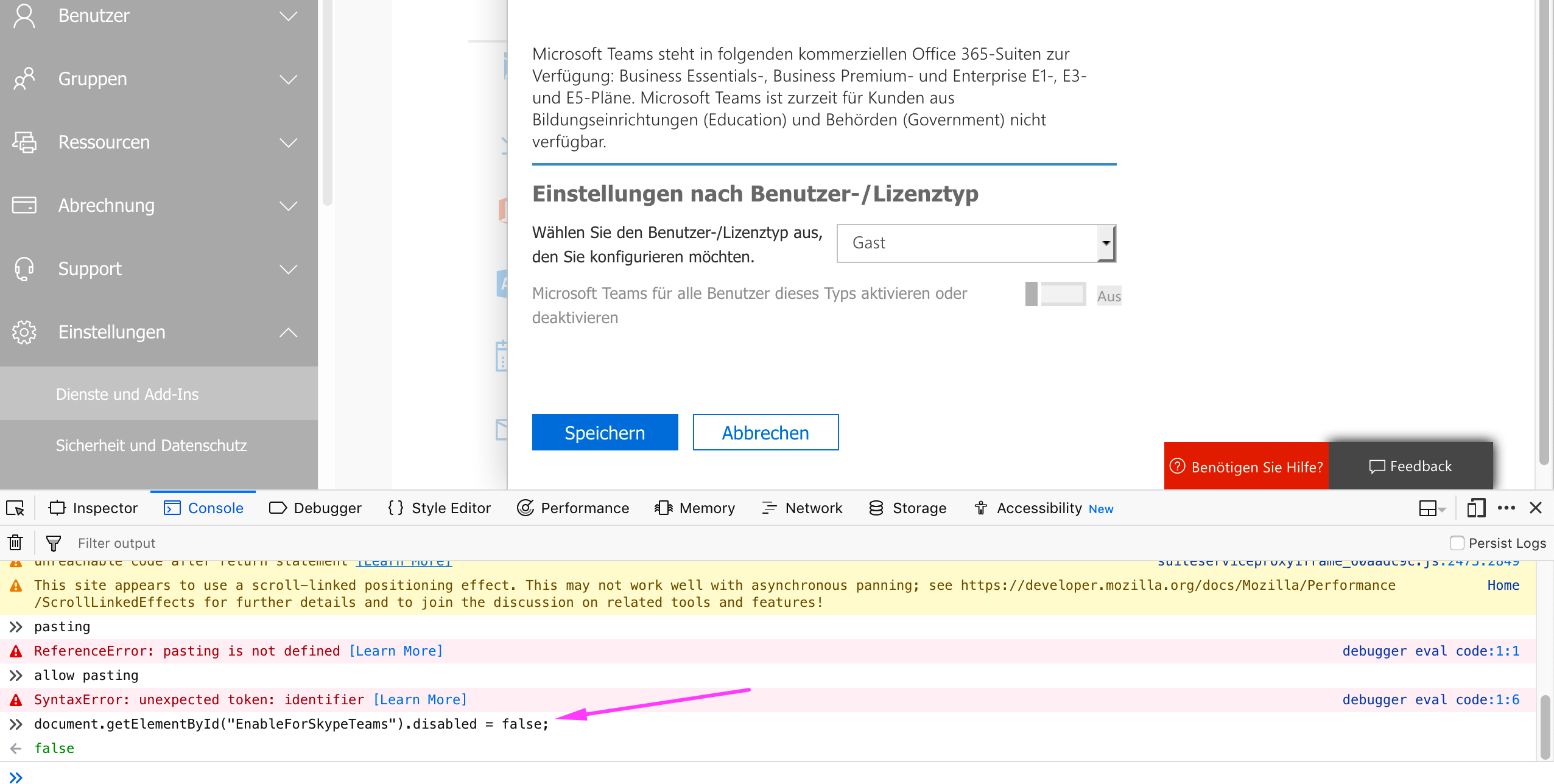
Doesn't change a thing... :/
Anything that I might have done wrong here?
Davidomir
on 8 Nov 2018
@Davidomir
i just tried it again - works like a charm for me.
maybe your Syntax-Error causes this
sweikelt
on 8 Nov 2018
Hmm okay... just to make sure.
I just copy paste it and press enter, right?
On Thu 8. Nov 2018 at 14:13, Stephan Weikelt notifications@github.com
wrote:
@Davidomir https://github.com/Davidomir
i just tried it again - works like a charm for me.
maybe your Syntax-Error causes this—
You are receiving this because you were mentioned.Reply to this email directly, view it on GitHub
https://github.com/MicrosoftDocs/OfficeDocs-SkypeForBusiness/issues/775#issuecomment-436989352,
or mute the thread
https://github.com/notifications/unsubscribe-auth/AcEUBQV9zz35dDKLGpmiZNeY9uSoy5Ngks5utC30gaJpZM4Wuta6
.
Davidomir
on 8 Nov 2018
@Davidomir
jep - just c&p and hit enter - maybe hit it a little bit harder ^^
in your posted screenshoot, i can see, that the command was correctly fired.
just be save and test all other suggested settings by microsoft
good luck!
viel erfolg!
sweikelt
on 8 Nov 2018
Alright, thanks buddy.
It is sad, that such an essential feature is buggy..
On Thu 8. Nov 2018 at 14:22, Stephan Weikelt notifications@github.com
wrote:
@Davidomir https://github.com/Davidomir
jep - just c&p and hit enter - maybe hit it a little bit harder ^^
in your posted screenshoot, i can see, that the command was correctly
fired.
just be save and test all other suggested settings by microsoftgood luck!
viel erfolg!—
You are receiving this because you were mentioned.
Reply to this email directly, view it on GitHub
https://github.com/MicrosoftDocs/OfficeDocs-SkypeForBusiness/issues/775#issuecomment-436991886,
or mute the thread
https://github.com/notifications/unsubscribe-auth/AcEUBbtloctyBGuxD_AaClYkEOod9YCPks5utDArgaJpZM4Wuta6
.
Davidomir
on 8 Nov 2018
@Kettenhund - thank you for submitting feedback.
I think the best way forward is if you open a service ticket in your tenant so this can get resolved ASAP. Based on the outcome let me know if it is something that can be called out in the docs.
Please follow this link to contact support for business products: https://docs.microsoft.com/office365/admin/contact-support-for-business-products
Please keep us posted here on the resolution so we can feed whatever information you discover into the content.
 scanum
on 29 Mar 2019
scanum
on 29 Mar 2019
@officedocsbot close
scanum
on 29 Mar 2019
Related issues
 warleygr
·
4Comments
warleygr
·
4Comments
 jspcstl
·
6Comments
jspcstl
·
6Comments
 JorgeALeitao
·
5Comments
JorgeALeitao
·
5Comments
 JAK1047
·
6Comments
JAK1047
·
6Comments
 erik365online
·
6Comments
erik365online
·
6Comments
Most helpful comment
@DarkwingDucker - yeah for sure - i wanted to wait till microsoft gives me the correct solution, but i think now, this will take some time o_O
so here is what we did (i used firefox):
Open office 365-admin-center and go to Settings -> Services and Add-Ins -> Microsoft Teams -> settings by user/license type
-> now switch to Guest
here the funny-part beginns ^^
open the page inspector (https://developer.mozilla.org/en-US/docs/Tools/Page_Inspector)
-> click on "Console" and fire this up:
document.getElementById("EnableForSkypeTeams").disabled = false;than press save, reload the page to be sure, that the insertion was successful.
after the switch is on, wait some mins and than invite some guests in your team.
i thought - "this will never work" and after the trick was done - i fell off the chair because i could not believe it