Office-js: Word add-in has horizontal scrollbar on Firefox on Windows
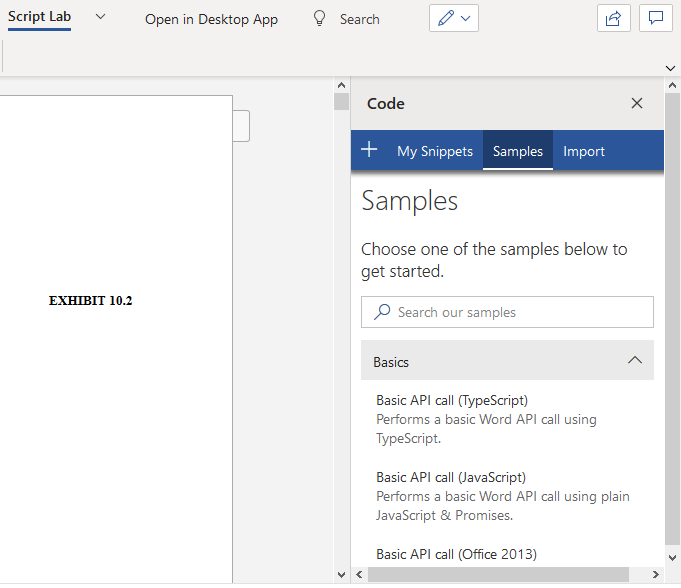
When loading a Word add-in in Firefox on Windows, there is a horizontal scrollbar.
Expected Behavior
The expectation is that there won't be a horizontal scrollbar.
Current Behavior
A horizontal scrollbar appears when opening an add-in in Firefox on Windows.
Steps to Reproduce, or Live Example
- Open a document on One Drive in Firefox on Windows 10
- Install the Script Lab add-in
- Open the add-in
- You'll see a horizontal scrollbar at the bottom of the add-in.
Context
The same issue with the horizontal scrollbar on Firefox happens in our add-in as well. This negatively affects the user experience. The horizontal scrollbar takes up space, is unnecessary, and confusing.
Your Environment
- Platform: Office Online
- Host: Word
- Office version number: Office 365
- Operating System: Windows 10
- Browser: Firefox
Useful logs
 morgan-tr
All 5 comments
Hey Morgan, thanks for reporting this issue. I was able to reproduce it following your steps and a bug has been logged in our backlog.
 AbidRahman-MSFT
on 14 May 2020
AbidRahman-MSFT
on 14 May 2020
Thanks for the update!
morgan-tr
on 15 May 2020
This bug manifests, and is easily fixed in
Windows 10: Edge, Firefox
MacOS Catalina: Safari, Firefox
Linux: Firefox
The fix is to give the immediate parent div.AppsForOfficeReactContainer of the taskpane iframe the display: flex css property.
In WordEditorWithCloudFonts.css
div.AppsForOfficeReactContainer {
  height: 100%;
  display: flex;
}
This fix does not break the correct rendering in Chrome and Chromium on any platform.
 calbrecht
on 19 Jun 2020
calbrecht
on 19 Jun 2020
@AbidRahman-MSFT, how long will this take to land in production?
calbrecht
on 19 Jun 2020
With the new Edge Browser Release (Version 83.0.478.54) on Windows, the Scrollbar has disappeared in the Browser (Edge), as well as the Word client.
So the Issue does just remain on FireFox, Safari, and the Word client on MacOS.
 vschaeidt
on 24 Jun 2020
vschaeidt
on 24 Jun 2020
Related issues
 cawise
·
4Comments
cawise
·
4Comments
 sshukurov
·
4Comments
sshukurov
·
4Comments
 gordonmleigh
·
3Comments
gordonmleigh
·
3Comments
 KantilalJadav
·
4Comments
KantilalJadav
·
4Comments
 Jarch09
·
3Comments
Jarch09
·
3Comments
Most helpful comment
This bug manifests, and is easily fixed in
Windows 10: Edge, Firefox
MacOS Catalina: Safari, Firefox
Linux: Firefox
The fix is to give the immediate parent
div.AppsForOfficeReactContainerof the taskpane iframe thedisplay: flexcss property.In
WordEditorWithCloudFonts.cssThis fix does not break the correct rendering in Chrome and Chromium on any platform.