Office-js: Outlook web contextual addin can't highlight results that has special chars
I'm developing an outlook contextual addin that highlights phone numbers with a regular expression.
Office 365 web Outlook will not highlight any number that has regex special chars, just to give some example: +,(, ).
Expected Behavior
I expect that results that match the provided regex are highlighted and can activate the addin.
Current Behavior
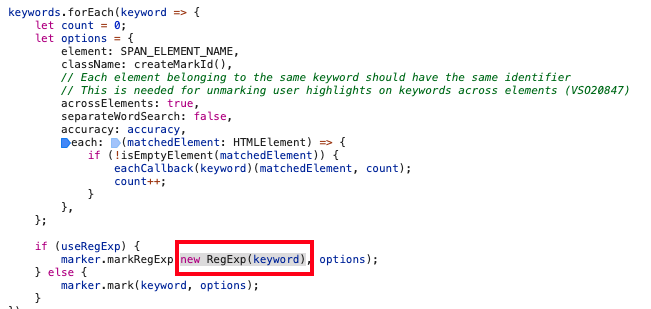
Results seems to be found by Outlook, then during the highlight process it breaks, since it uses the results in a second RegEx, which fails.
Steps to Reproduce, or Live Example
Manifest to match a number starting with +: (it can be reproduced by any other special char)
<ExtensionPoint xsi:type="DetectedEntity">
  <Label resid="contextLabel" />
  <SourceLocation resid="testResId" />
  <Rule xsi:type="RuleCollection" Mode="And">
    <Rule xsi:type="RuleCollection" Mode="Or">
      <Rule xsi:type="ItemIs" ItemType="Message" />
      <Rule xsi:type="ItemIs" ItemType="Appointment" />
    </Rule>
    <Rule xsi:type="ItemHasRegularExpressionMatch" RegExName="Test" RegExValue="\+1" PropertyName="BodyAsPlaintext" Highlight="All"/>
  </Rule>
</ExtensionPoint>
Then open a mail that contains +1 in the message.
Context
I can't highlight phone numbers in outlook for web that has usual special chars +, (,)
When it start with a +, there is also a console error provided below, since it result in an invalid regex for the second round, but for other cases it just simply is not highlighted (for the same reason).
Your Environment
- Platform [PC desktop, Mac, iOS, Office Online]: ___Office online___
- Host [Excel, Word, PowerPoint, etc.]: ___Outlook___
- Office version number: __Current Office 365 web____
- Operating System: ___OSX Catalina___
- Browser (if using Office Online): ___Chrome___
Useful logs
Console error:
constants.ts:1 Uncaught (in promise) SyntaxError: Invalid regular expression: /+1/: Nothing to repeat
    at new RegExp (<anonymous>)
    at constants.ts:1
    at Array.forEach (<anonymous>)
    at markElements.ts:54
    at AAQkADAzYTZlYTYyLWQyMGMtNDFhOS05MTAzLTQyYjJhNjBhMTYwZgAQAINoPf%2BPCdhNj6AVUpiXz4w%3D:347
    at Object.next (AAQkADAzYTZlYTYyLWQyMGMtNDFhOS05MTAzLTQyYjJhNjBhMTYwZgAQAINoPf%2BPCdhNj6AVUpiXz4w%3D:347)
    at a (AAQkADAzYTZlYTYyLWQyMGMtNDFhOS05MTAzLTQyYjJhNjBhMTYwZgAQAINoPf%2BPCdhNj6AVUpiXz4w%3D:347)
Based on the sourcemap, the issue is probably here, the keyword should be escaped for special chars before provided to regex, or be highlighted in any other way:
 jive-tamaskuzdi
All 6 comments
Thanks for reporting this issue regarding. It has been put on our backlog. We unfortunately have no timelines to share at this point.
 exextoc
on 8 Apr 2020
exextoc
on 8 Apr 2020
hello @exextoc @Rick-Kirkham ! do you by any chance have any estimations by now for the fix?
jive-tamaskuzdi
on 19 May 2020
We unfortunately have no timelines to share at this point. Thanks a lot for your patience.
exextoc
on 20 May 2020
@jive-tamaskuzdi We have fixed the issue reported and depending on the release channel, the fix can take up to 4 weeks.
Close the issue, once you verify the fix on your end.
exextoc
on 10 Jun 2020
This issue has been automatically marked as stale because it is marked as needing author feedback but has not had any activity for 4 days. It will be closed if no further activity occurs within 3 days of this comment. Thank you for your interest in Office Add-ins!
![msftbot[bot] picture](https://avatars.githubusercontent.com/in/26612?v=4&s=40) msftbot[bot]
on 19 Jun 2020
msftbot[bot]
on 19 Jun 2020
I can confirm that the bug is fixed, thank you!
jive-tamaskuzdi
on 19 Jun 2020
Related issues
 mattblackdev
·
4Comments
mattblackdev
·
4Comments
 barisbikmaz
·
4Comments
barisbikmaz
·
4Comments
 ndeeH
·
5Comments
ndeeH
·
5Comments
 sshukurov
·
4Comments
sshukurov
·
4Comments
 gordonmleigh
·
3Comments
gordonmleigh
·
3Comments
Most helpful comment
Thanks for reporting this issue regarding. It has been put on our backlog. We unfortunately have no timelines to share at this point.