Office-js: [Outlook] Dialog for Dynamics 365 App for Outlook failing
My company is a heavy user of the Dynamics 365 App for Outlook, which is just a fancy Outlook Add-in that makes use of outlook.js. Starting Tuesday morning the Dynamics 365 App stopped working for everyone in my company that was on Windows 7(about 500 users).
Expected Behavior
After logging into our Dynamics server using AD FS, the Outlook App is supposed to pass back the OAuth bearer token to the parent Dynamics 365 App for Outlook Window by calling
Office.context.ui.messageParent(JSON.stringify(response));
This successfully logs the user into Dynamics and let's them use the App to track emails.
Current Behavior
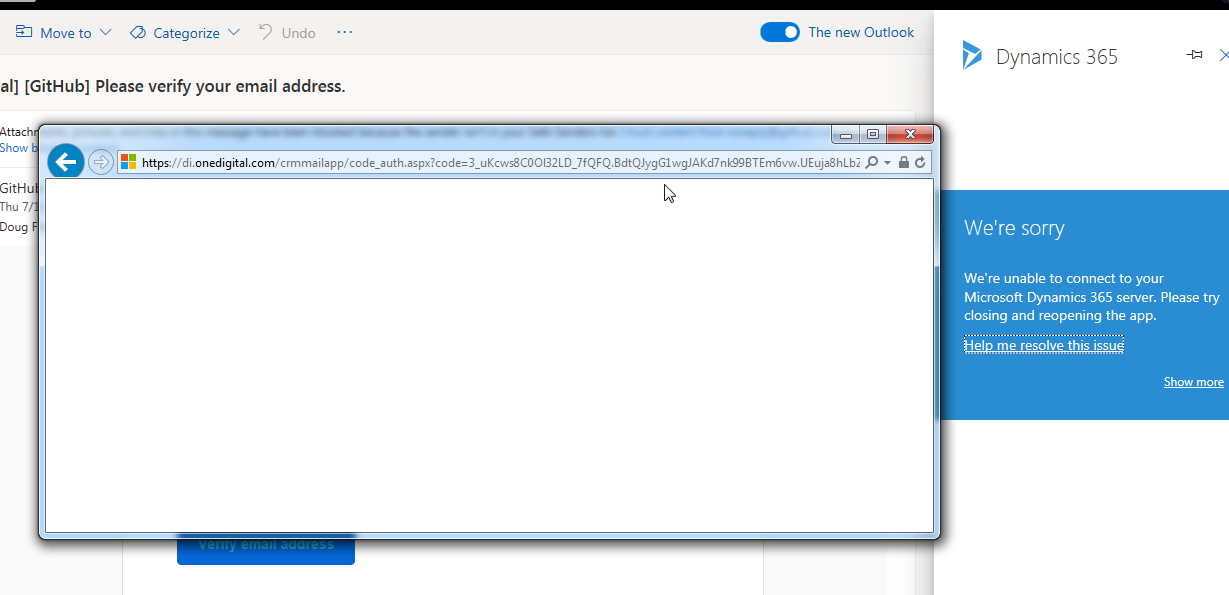
The javascript to pass the OAuth token back to the Outlook App never finishes and a blank window stays open in Outlook. This makes the App unusable.
Steps to Reproduce, or Live Example
- Link to live example: I'm unable to link to a live example since it requires a email and login from my company.
This is the javascript in question.
 var loginDialogMode = localStorage.getItem("MailApp_LoginDialogMode");

        if (loginDialogMode === "OfficeDialog")
        {
            Office.initialize = function ()
            {
                if (Office.context.ui.messageParent)
                {
                    Office.context.ui.messageParent(JSON.stringify(response));
                }
                else
                {
                    fallback();
                }
            };
        }
        else
        {
            fallback();
        }

        function fallback()
        {
            if (window.opener && window.opener.adfsLoginCallback)
            {
                window.opener.adfsLoginCallback(response);
                window.close();
            }
            else
            {
                var expiry = Date.now() + parseInt(response["expires_in"], 10) * 1000;
                var access_token = response["access_token"];
                var mailAppQuery = localStorage.getItem('MailAppQuery');
                var search = mailAppQuery ? mailAppQuery + '&expiry' + expiry : '?expiry' + expiry;
                search += '&secondaryLoad=1';
                window.location.replace(window.location.protocol + '//' + window.location.host + '/crmmailapp/index.html' + search + '#' + access_token);
            }
        }
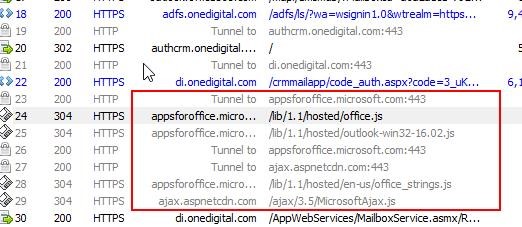
From my traces and debugging, the code makes it to the below line and then fails.
Office.context.ui.messageParent(JSON.stringify(response));
If I manually run the fallback(); method from the f12 javascript console, I am successfully logged into the Dynamics 365 App for Outlook.
- Additional details:
- Only our Windows 7 users are affected, Windows 10 works fine
- Using the app in OWA in Chrome works
- IE 11 in Windows 7 Does not work
- Using InPrivate Mode Causes the process to work
- Because of numbers 1-4 above, I feel it may be some change related to how Javascript LocalStorage is used in the office.js script
Context
A Microsoft product we have been using successfully for the past year is now broken.
Other companies with a similar setup have also been affected at the exact same time.
Your Environment
- CRM Version: Version 1612 (8.2.3.8)(DB 8.2.3.8) on-premises
- ADFS Version: 6.3.0.0 on Windows Server 2012 R2
- Outlook Version: Outlook 2016 16.0.4849.1000 64-bit
- IE Version: 11.0.9600.19377 | Update Version: 11.0.1.130 (KB4503259)
Useful logs
 dougfraser
All 14 comments
Just to clarify, does this issue occur only when you use the Dynamics app in Outlook web (in a browser) or does this also occur when you use the app in the native Desktop Outlook client? Have you encountered this issue with other apps in Outlook?
 exextoc
on 11 Jul 2019
exextoc
on 11 Jul 2019
Thanks for the response. It happens on the native desktop Outlook client. We don't use any other apps in Outlook to my knowledge but I'll double check tomorrow.
dougfraser
on 12 Jul 2019
Hi, sorry to hear you've encountered this—we're investigating, thanks for providing detailed info.
Could you tell me a bit about how you display the Dialog in the first place? What is the full URL for the dialog? Do you use window.replace() when setting the URL for displayDialogAsync()?
 danielgwilson
on 12 Jul 2019
danielgwilson
on 12 Jul 2019
Hi Daniel.
Thanks so much for investigating. Based on what is developing in that dynamics.com post I linked, it sounds like it could be related to a security patch breaking things. But more people are coming out and saying their company's Dynamics 365 broke on the exact same day (June 10) which is strange so I'd like to continue with my due diligence here.
Regarding your question, it's an app written by Microsoft, not me, so it's a little hard to answer your question but I will try my best.
You click the button to open the Dynamics 365 App for Outlook and it loads an index.html page
https://di.onedigital.com/CrmMailApp/index.html?org=di&mailAppMode=ReadDesktop&de=onprem&sde=online&orgId=000b442c-ef4f-4382-a495-fdd1a642ab20&ed=https://authcrm.onedigital.com&_host_Info=Outlook$Win32$16.01$en-US
That index page calls 3 javascript libraries
    <script src="/nga/scripts/jquery-2.1.1.js"></script>
    <script src="//appsforoffice.microsoft.com/lib/1.1/hosted/office.js" type="text/javascript"></script>
    <script src="adal.js"></script>
    <script src="shim.js?v=1"></script>
Either Shim or ADAL should be the one that makes the dialog window.
With a quick search, it looks like shim calls displayDialogAsync()
if (Office.context.requirements.isSetSupported("DialogApi", 1.1) && Office.context.ui.displayDialogAsync !== undefined) {
                localStorage.setItem(Mscrm.Authentication.LOGIN_DIALOG_MODE_KEY, Mscrm.Authentication.LOGIN_DIALOG_MODE_VALUE_OFFICE_DIALOG);
                Office.context.ui.displayDialogAsync(url, null, function (asyncResult
I've attached various source codes as a zip file in case you want to look further.
crm_app_dialog_loading_sources.zip
shim.js source code
adal.js source code
https://di.onedigital.com/CrmMailApp/index.html source code
and the source code of the dialog that pops up (it gets redirected about 3 times from this page to the eventual adfs login screen): https://di.onedigital.com/nga/mail.htm
dougfraser
on 12 Jul 2019
And to reiterate, the most important clue in my opinion is that this Dynamics 365 App broke on Tuesday July 10th for multiple different companies. None of us made any changes, Windows updates, or dynamics upgrades on that day, it just mysteriously stopped working. The only global link between all of our environments is this Office library. Was there any changes deployed that day?
Reinstalling outlook somehow seems to fix it but that isn't a solution I can implement on an enterprise scale at my company.
dougfraser
on 12 Jul 2019
This Windows update seems to be the culprit, at least partially. After uninstalling it on multiple machines in my office our add-ins are functioning normally.
 CypherX
on 12 Jul 2019
CypherX
on 12 Jul 2019
We had the same issue in our add-in used by multiple clients. On some clients we had to uninstall the update that @CypherX mentioned. Now it is working fine, but the update is a breaking change for us.
 fkranenburg
on 15 Jul 2019
fkranenburg
on 15 Jul 2019
We do not have that particular update installed on any of our affected computers so that isn't a solution for me.
dougfraser
on 15 Jul 2019
Dynamics dev here. We have a lot of customers reporting this issue all starting 7/10. In a debug session we were able to verify that messageParent was indeed failing, although we weren't able to use fallback() directly due to window.opener being stripped from the window (unrelated IE policy issue).
As @dougfraser mentioned, that update doesn't seem to be the root cause for all customers. We have some that don't have that update but are still having this exact problem.
 sbuggay
on 15 Jul 2019
sbuggay
on 15 Jul 2019
Hi,
anything new regarding this issue?
Our customer is also having the same issue.
 senyboi
on 19 Jul 2019
senyboi
on 19 Jul 2019
The bug here was in
https://appsforoffice.microsoft.com/lib/1/hosted/outlook-win32-16.01.js - messageParent was dropped from an object by mistake. The CDN has been updated so this particular problem should go away.
 stephenegriffin
on 22 Jul 2019
stephenegriffin
on 22 Jul 2019
@stephenegriffin
Thanks Stephen. It seems like this has mostly resolved the issue for my company.
I still can't track emails in OWA for Internet Explorer so you may want to double check /hosted.js for the same bug? But being that is a super small concern compared to the big win of being able to track in Outlook again.
dougfraser
on 22 Jul 2019
@dougfraser We are not able to reproduce problem of Dynamics CRM in OWA/IE combination. What version of IE you are using currently? Are you using new-OWA or old-OWA (Try the new outlook option)? Does Dynamic CRM work in other browsers (say Chrome) for OWA?
exextoc
on 24 Jul 2019
I was on the same environment in my original post and using the new-OWA.
IE Version: 11.0.9600.19377 | Update Version: 11.0.1.130 (KB4503259)
No one uses OWA in IE for tracking in my company so this isn't too important. If your team says you can't reproduce it, that is good enough for me.
dougfraser
on 24 Jul 2019
Related issues
 dgrudenic
·
4Comments
dgrudenic
·
4Comments
 ndeeH
·
5Comments
ndeeH
·
5Comments
 KantilalJadav
·
4Comments
dgrudenic
·
3Comments
KantilalJadav
·
4Comments
dgrudenic
·
3Comments
 cawise
·
4Comments
cawise
·
4Comments
Most helpful comment
@stephenegriffin
Thanks Stephen. It seems like this has mostly resolved the issue for my company.
I still can't track emails in OWA for Internet Explorer so you may want to double check /hosted.js for the same bug? But being that is a super small concern compared to the big win of being able to track in Outlook again.