Office-js-docs-pr: Request for Official list of Supported Langauage-IDs for Locale
Hello Microsoft,
We are about to build a multilingual addon for our company. I intend to use the API : Office.context.displayLanguage to get the locale of the host machine.
Currently, all I know is that locale is written in BCP-47 format by reading the following article :
https://docs.microsoft.com/en-us/office/dev/add-ins/reference/manifest/defaultlocale
But I really don't have a list of all supported language IDs. Do you have documentation of all supported IDs?
Or will the API (Office.context.displayLanguage ) return language-ids according to the following article :
https://docs.microsoft.com/en-us/deployoffice/office2016/language-identifiers-and-optionstate-id-values-in-office-2016
Thanks a billion. :)
Document Details
⚠ Do not edit this section. It is required for docs.microsoft.com ➟ GitHub issue linking.
- ID: 7dd87fc3-428d-8951-1fca-539bedd2a262
- Version Independent ID: 584318a3-b217-4a28-ad7b-73c4970d05ec
- Content: DefaultLocale element in the manifest file - Office Add-ins
- Content Source: docs/reference/manifest/defaultlocale.md
- Product: non-product-specific
- Technology: add-ins
- GitHub Login: @o365devx
- Microsoft Alias: o365devx
 glr0221
All 12 comments
@kbrandl any help please? thank you.
glr0221
on 19 Jun 2020
@glr0221 I'm no longer working at Microsoft, so unfortunately can't help with this. @Rick-Kirkham can you perhaps route this issue to the appropriate person? Thanks!
 kbrandl
on 19 Jun 2020
kbrandl
on 19 Jun 2020
@glr0221 Thanks for your interest in Office Add-ins. You are correct that the article, https://docs.microsoft.com/en-us/deployoffice/office2016/language-identifiers-and-optionstate-id-values-in-office-2016, specifies the possible values for displayLanguage and <DefaultLocale> (and <Override>). I will create a work item to clarify this in all the related articles.
 Rick-Kirkham
on 19 Jun 2020
Rick-Kirkham
on 19 Jun 2020
Thanks @kbrandl. I hope things are awesome for you. Kinda sad to hear you are not with MS anymore. Thank you @Rick-Kirkham for your responses.
glr0221
on 22 Jun 2020
@Rick-Kirkham
I have checked the Microsoft list of supported languages against our planned list of supported languages and it seems to be missing some key language ids. The missing language ids are :
English (Australia) --------- en-au
English (Canada) ----------- en-ca
English (Great Britain) ------ en-gb
Spanish (Mexico) --------- es-mx
French (Canada) ----------- fr-ca
Chinese Traditional --------- zh-hk
However, these missing language ids are present if I change my reference to the following url :
Please confirm which of the two tables/references are accurate and exhaustive. This is very crucial to our project. Thank you very much.
glr0221
on 22 Jun 2020
@Rick-Kirkham
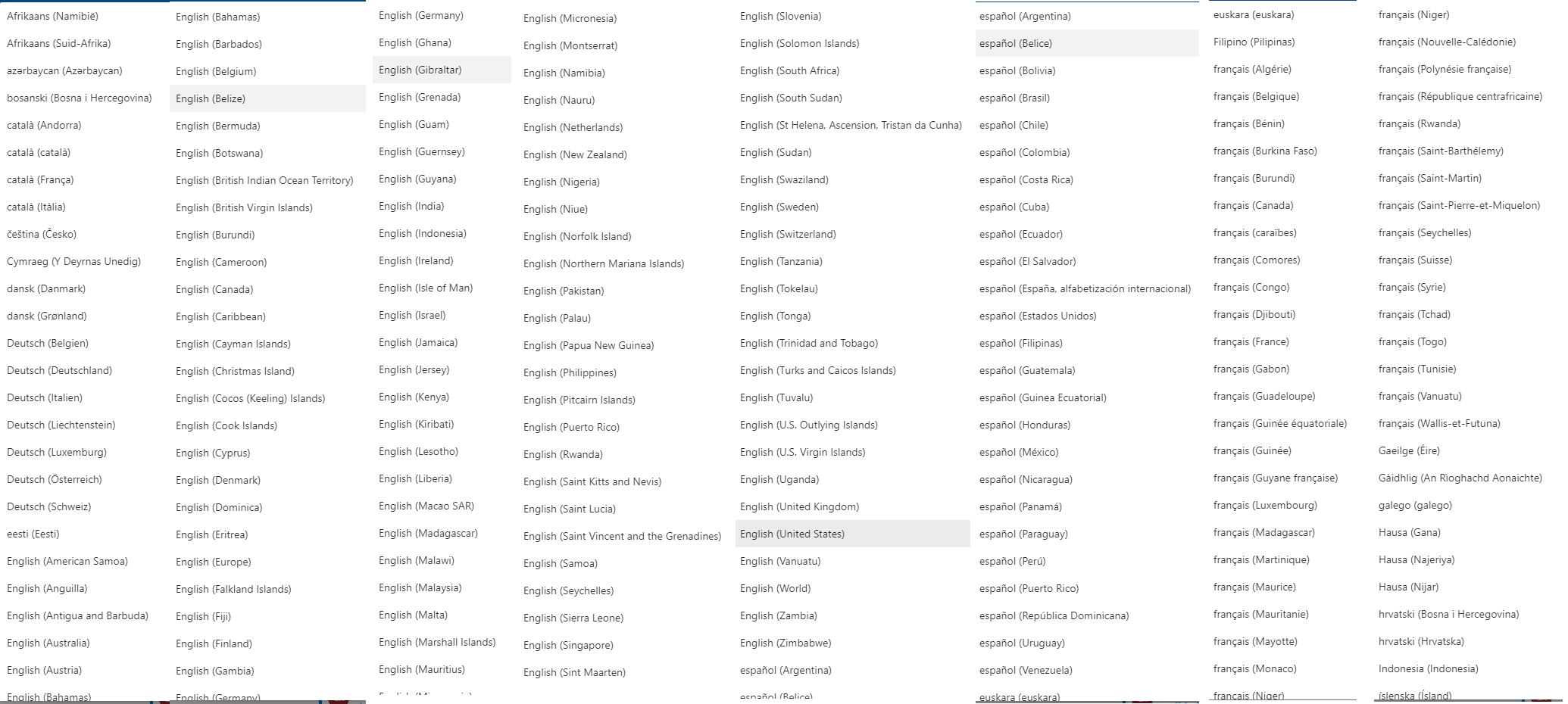
Another observation came up during my investigations today. So again in the discussion of supported locale, I checked OWA and stand alone Outlook client in windows. And here are what i found :
For OWA, using a browser, I found that there are over 220+ supported locales. These are the first 120 languages i saw :
For Outlook client in windows, I saw over 90+ locales/languages supported. These are all of them :
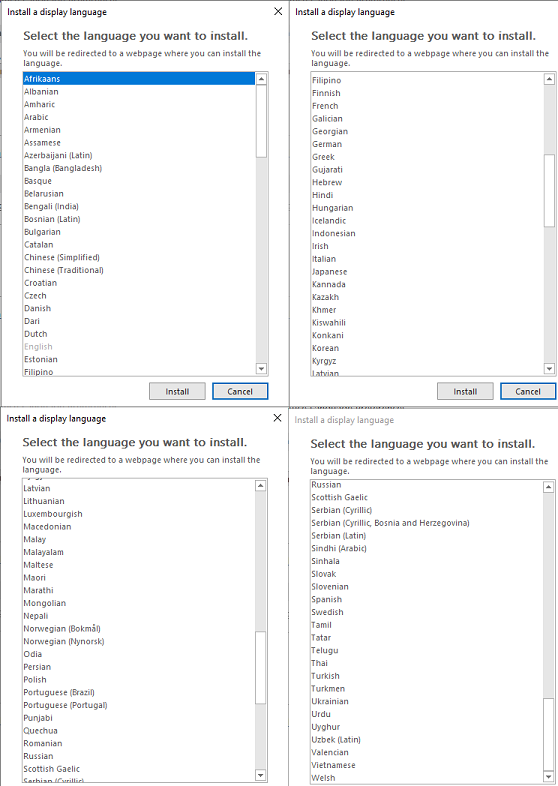
How about Outlook for MAC? Outlook for Android? and IOS? All of these platforms/clients support Outlook addins. What are ALL possible values for the API : office.context.displaylanguage
Thank you very much for all your support and sorry for the inconvenience.
glr0221
on 22 Jun 2020
The list you found in our OpenSpec docs (https://docs.microsoft.com/en-us/openspecs/office_standards/ms-oe376/6c085406-a698-4e12-9d4d-c3b0ee3dbc4a) is for Word, Excel, and PowerPoint (not Outlook), and it is a list of IDs that are "used" by Office; but that doesn't necessarily mean that the Office UI is translated into all of those languages.
The list that you linked to in your original post, https://docs.microsoft.com/en-us/deployoffice/office2016/language-identifiers-and-optionstate-id-values-in-office-2016, is for the perpetual license Office. There is another list for Microsoft 365 (formerly Office 365) subscription Office at: https://docs.microsoft.com/en-us/deployoffice/overview-deploying-languages-microsoft-365-apps#languages-culture-codes-and-companion-proofing-languages.
All of these lists are "correct" in some sense or another.
I got some information from one of the senior engineers for the Office add-in platform. His advice is that relying on a list would be fragile. The list could grow or shrink at any time. For example, note this article published barely a month ago: Microsoft to remove support for 27 languages from Outlook for iOS.
He suggests that you follow the standard practice for localizing an add-in. Start by assuming that the number of supported languages is more than you can possibly support in your add-in. Choose a finite set of locales you want to support. If your code detects a locale that is not supported, it should fall back to a “default” locale (that is supported.)
Please let us know if any of this helps.
Rick-Kirkham
on 22 Jun 2020
@Rick-Kirkham thank you very much for taking time to dive deeper into the matter. I understand the advice and it makes a ton of sense. The only issue i have though, is how do i check if our language-id's (i.e. en-gb, en-usa) matches those that are used by Microsoft Products.
I see no problems with the matchings in OWA because they support over 220+ languages and is easy to test.
But the standalone outlook clients for MAC, windows, ios and android, will be problematic because of the limited language sets they support. Plus it is relatively difficult to change language(s) in clients. That being said, any advice on the language ids supported by outlook clients? thanks
glr0221
on 23 Jun 2020
A product manager has also endorsed the advice of the engineer.
I think the idea is that you have a switch statement that reads the user's displayLanguage and branches depending on whether or not you support it. Something like this:
switch(Office.context.displayLanguage) {
  case "en-us":
    // branch to en-us UI
    break;
  case "en-gb":
    // branch to en-gb UI
    break;

    ...

    // a case for every language you support in your add-in

   ...

  default:
    // This code runs if the user's language is not any of the ones that you support, so branch to a language that you do support.
}
This issue has been automatically marked as stale because it is marked as needing author feedback but has not had any activity for 4 days. It will be closed if no further activity occurs within 3 days of this comment. Thank you for your interest in Office Add-ins!
![msftbot[bot] picture](https://avatars.githubusercontent.com/in/26612?v=4&s=40) msftbot[bot]
on 27 Jun 2020
msftbot[bot]
on 27 Jun 2020
This issue has been closed due to inactivity. Please comment if you still need assistance and we'll re-open the issue.
msftbot[bot]
on 1 Jul 2020
@Rick-Kirkham
Sorry I was unable to track this for a bit. But thank you so very much for your help. Your team and Microsoft as a whole are really better in communicating and answering issues. We really appreciate it.
Again, thank you very much,
GovZ
glr0221
on 1 Jul 2020
Related issues
 fowl2
·
5Comments
fowl2
·
5Comments
 redcirkle
·
3Comments
redcirkle
·
3Comments
 peteshub
·
7Comments
peteshub
·
7Comments
 charliereese
·
5Comments
glr0221
·
6Comments
charliereese
·
5Comments
glr0221
·
6Comments
Most helpful comment
A product manager has also endorsed the advice of the engineer.
I think the idea is that you have a
switchstatement that reads the user's displayLanguage and branches depending on whether or not you support it. Something like this: