Office-js-docs-pr: On Send Event Dialog Box
How do you attach a dialog box to a send event? I want the user to choose if they want to use my Outlook add-in via a dialog box but there seems to be no documentation about adding to an Event in Outlook.
Document Details
⚠ Do not edit this section. It is required for docs.microsoft.com ➟ GitHub issue linking.
- ID: a714626a-058a-789e-6add-5e9dfb21fd1f
- Version Independent ID: 1b88a28c-fc36-4518-2808-7246f08d9753
- Content: Use the Dialog API in your Office Add-ins - Office Add-ins
- Content Source: docs/develop/dialog-api-in-office-add-ins.md
- Product: non-product-specific
- Technology: add-ins
- GitHub Login: @o365devx
- Microsoft Alias: o365devx
 nitro-marky
All 20 comments
@nitro-marky Thanks for your question.
@exextoc Can you provide guidance for this?
Thanks.
 ElizabethSamuel-MSFT
on 31 Oct 2019
ElizabethSamuel-MSFT
on 31 Oct 2019
Just for a bit of context I have the ItemSend event hooked up to the FunctionFile which gets, that all works fine. I just want the user to essentially say yes log my email or no and then the rest of the function can either log or not.
nitro-marky
on 1 Nov 2019
Hi all, I thought I would give an update (just to note this is just a test class it doesn't have any logging capabilities. So I am now able to get a dialog box showing with a callback to handle the response. And by setting the ItemSend event to a global variable I thought I could close it anywhere, which I can do to an extent. The problem is that as the page doesn't technically reload when a new message is created which is leaving the send button blank. My assumption is that the event needs to be closed in my MessageSent. Any thoughts on this?
Here is the code:
``var sentTo;
var sentToName;
var sentToAddress;
var subject;
var ccTo;
var ccNames;
var ccAddress;
var body;
var mailContext;
var dialog;
function dialogCallback(asyncResult) {
if (asyncResult.status == "failed") {
    // In addition to general system errors, there are 3 specific errors for
    // displayDialogAsync that you can handle individually.
    switch (asyncResult.error.code) {
        case 12004:
            showNotification("Domain is not trusted");
            break;
        case 12005:
            showNotification("HTTPS is required");
            break;
        case 12007:
            showNotification("A dialog is already opened.");
            break;
        default:
            showNotification(asyncResult.error.message);
            break;
    }
}
else {
    dialog = asyncResult.value;
    dialog.addEventHandler(Office.EventType.DialogMessageReceived, messageHandler);
    dialog.addEventHandler(Office.EventType.DialogEventReceived, eventHandler);
}
}
function messageHandler(m) {
console.log(m.message);
switch (m.message) {
    case "log":
        mailContext.completed({ allowEvent: true });
        Log();
        //mailContext = null;
        break;
    case "no log":
        mailContext.completed({ allowEvent: true });
        //mailContext = null;
        break;
    //case "cancel":
    //    mailContext.completed({ allowEvent: false });
    //    break;
};
}
function eventHandler(e) {
closeContainer();
//mailContext.completed({ allowEvent: false});
}
Office.initialize = function (reason) {
$(document).ready(function () {
mailboxItem = Office.context.mailbox.item;
mailContext = null;
dialog = null;
console.log("Page reloaded");
});
};
// Helper function to add a status message to the info bar.
function statusUpdate(icon, text) {
Office.context.mailbox.item.notificationMessages.replaceAsync("status", {
type: "informationalMessage",
icon: icon,
message: text,
persistent: false
});
}
function MessageSent(event) {
console.log(event);
mailContext = event;
mailboxItem = Office.context.mailbox.item;
mailboxItem.to.getAsync({ asyncContext: event },
function (asyncResult) {
console.log(asyncResult.value[0].displayName);
console.log(asyncResult.value[0].emailAddress)
sentTo = asyncResult.value;
});
mailboxItem.cc.getAsync({ asyncContext: event },
    function (asyncResult) {
        ccTo = asyncResult.value;
    });

mailboxItem.subject.getAsync({ asyncContext: event },
    function (asyncResult) {
        console.log(asyncResult.value);
        subject = asyncResult.value.toString();
    });

mailboxItem.body.getAsync("text",{ asyncContext: event },
    function (asyncResult) {
        console.log(asyncResult.value);
        body = asyncResult.value;
    });

Office.context.ui.displayDialogAsync(window.location.origin + "/ThisDialog.html",
    { height: 10, width: 25, displayInIframe: true }, dialogCallback);


//event.completed();
//event.completed({ allowEvent: true});
}
function Log() {
}``
Sorry for the terrible code markings! But in short I'm assuming that closing the event outside the event handler is interfering next time it is called.
nitro-marky
on 4 Nov 2019
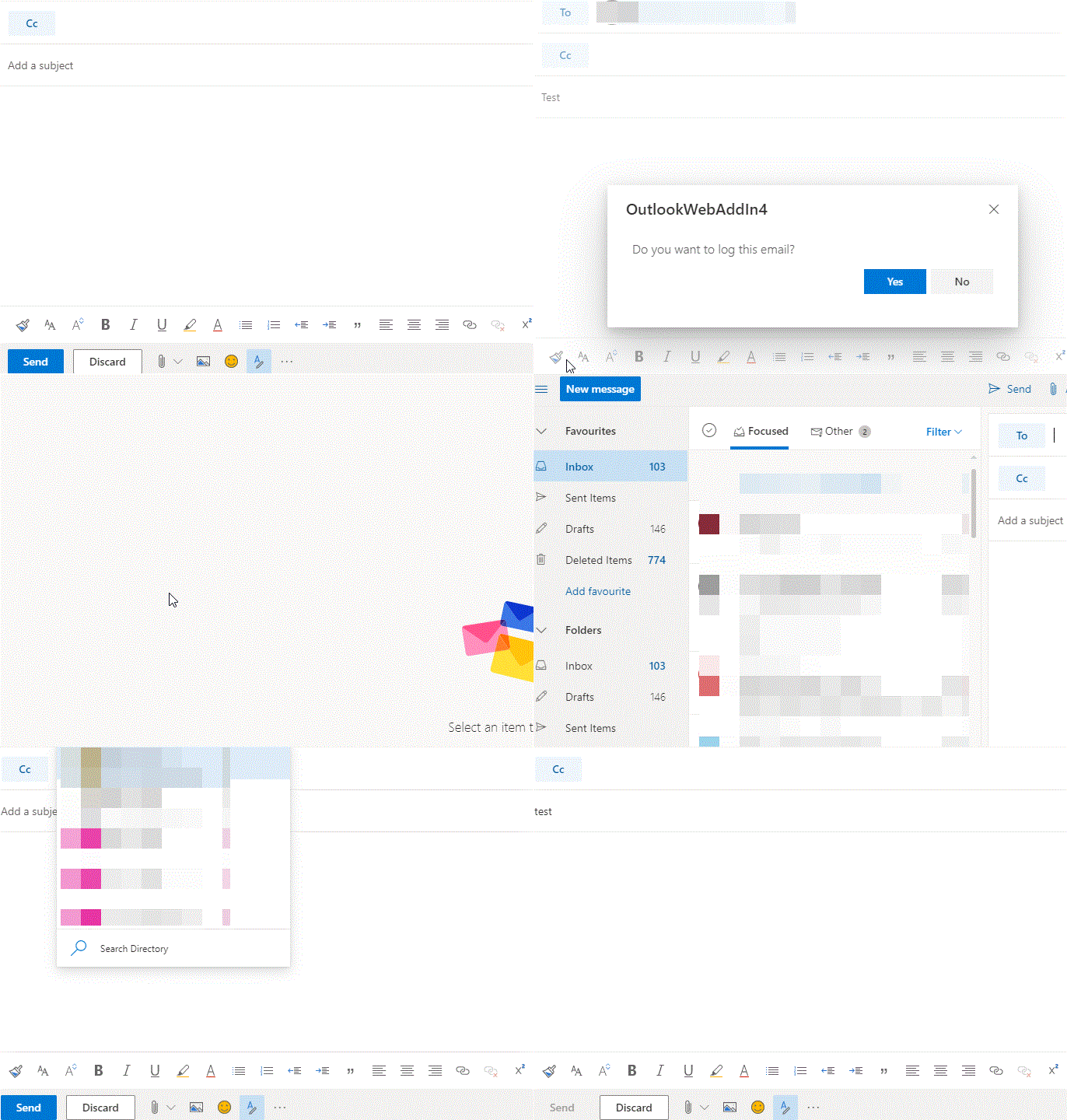
nitro-marky
on 4 Nov 2019
Further updates, the code works fine when sideloaded on the desktop version. So it must be the online React style version that is causing the problems. When new message is clicked is there any triggers fired I can hook onto? That might help me set up the sending part of the message.
nitro-marky
on 4 Nov 2019
Hi, I'm summarizing the thread so far to check my understanding and to ask a couple of questions.
Problem: Just before an email is sent, you would like to show a dialog to the user and run code before the email is sent.
Solution: As you noted, this can be accomplished with the ItemSend event and the display dialog APIs.
Please note the limitations of the item send event, and the additional information on using the Display Dialog API:
Thanks for including a gif. It appears that when the user clicks send, it shows your dialog, and when the dialog is dismissed, the message is sent. Your intention is that some of your code would run and then allow the message to be sent. From the gif, this all looks correct to me (I can see the dialog and I assume that the message is sent when the dialog is dismissed).
The problem is that as the page doesn't technically reload when a new message is created which is leaving the send button blank. My assumption is that the event needs to be closed in my MessageSent. Any thoughts on this?
Can you clarify which page and event you are referring to? Is this issue illustrated in the gif?
When new message is clicked is there any triggers fired I can hook onto?
A _new message_ trigger is not available at this time. Based on my understanding of the problem (summarized above), I don't think it's needed in your solution?
Lastly, I can make two suggestions for working with ItemSend in general and working with OWA in particular.
For ItemSend, similar to an execute function add-in command, please ensure that event.completed is called once after your code has run. Once this function is called, there is no guarantee that any additional add-in code will run (and if the function is not called, then it also causes problems).
Second, a tip for debugging add-in code running in OWA, you may send a mail once so that the browser loads your code, then set breakpoints in your code and send another mail to hit the breakpoints. I would like to better understand the issue you're hitting, but this should help in any case to make sure that your code is running at the times you expect it to run.
Since this is a long reply, I bolded the questions above. Thanks.
 exextoc
on 4 Nov 2019
exextoc
on 4 Nov 2019
Thanks for getting back to me. So when the user decides to log the message (or not) the first time it sends fine. But when I go to send another message the Send button is disabled, as in it won't even fire my code (which works fine first time around). So essentially I can send one message and then that functionality becomes broken.
The only way to fix it is to reload the web app to send another message. So I'm assuming an event is still open but as far as I can see I close the ItemSend event. And surely the dialog event closes when the dialog has been closed.
EDIT: So just to clarify in the gif, the first message has been sent, but when another message has been created the send button is disabled.

nitro-marky
on 5 Nov 2019
So I'm assuming that when a new message is created Office.Initialize is only called the first time?
Essentially I want to replicate the the no subject dialog box but with some back end code but there doesn't seem to be an out of the box solution.
nitro-marky
on 5 Nov 2019
@nitro-marky, thanks for reporting the info. We need below further info to reproduce and debug the issue:
- add-in manifest
- steps to reproduce the issue.
exextoc
on 6 Nov 2019
`
xmlns:xsi="http://www.w3.org/2001/XMLSchema-instance"
xmlns:bt="http://schemas.microsoft.com/office/officeappbasictypes/1.0"
xmlns:mailappor="http://schemas.microsoft.com/office/mailappversionoverrides/1.0"
xsi:type="MailApp">
    <DesktopFormFactor>
      <!-- Location of the Functions that UI-less buttons can trigger (ExecuteFunction Actions). -->
      <FunctionFile resid="functionFile" />
      <ExtensionPoint xsi:type="Events">
        <Event Type="ItemSend" FunctionExecution="synchronous" FunctionName="MessageSent" />
      </ExtensionPoint>
      <!-- Message Read -->
      <ExtensionPoint xsi:type="MessageReadCommandSurface">
        <!-- Use the default tab of the ExtensionPoint or create your own with <CustomTab id="myTab"> -->
        <OfficeTab id="TabDefault">
          <!-- Up to 6 Groups added per Tab -->
          <Group id="msgReadGroup">
            <Label resid="groupLabel" />
            <!-- Launch the add-in : task pane button -->
            <Control xsi:type="Button" id="msgReadOpenPaneButton">
              <Label resid="paneReadButtonLabel" />
              <Supertip>
                <Title resid="paneReadSuperTipTitle" />
                <Description resid="paneReadSuperTipDescription" />
              </Supertip>
              <Icon>
                <bt:Image size="16" resid="icon16" />
                <bt:Image size="32" resid="icon32" />
                <bt:Image size="80" resid="icon80" />
              </Icon>
              <Action xsi:type="ShowTaskpane">
                <SourceLocation resid="messageReadTaskPaneUrl" />
              </Action>
            </Control>
            <!-- Go to http://aka.ms/ButtonCommands to learn how to add more Controls: ExecuteFunction and Menu -->
          </Group>
        </OfficeTab>
      </ExtensionPoint>
      <!-- Go to http://aka.ms/ExtensionPointsCommands to learn how to add more Extension Points: MessageRead, AppointmentOrganizer, AppointmentAttendee -->
    </DesktopFormFactor>
  </Host>
</Hosts>

<Resources>
  <bt:Images>
    <bt:Image id="icon16" DefaultValue="~remoteAppUrl/Images/icon16.png"/>
    <bt:Image id="icon32" DefaultValue="~remoteAppUrl/Images/icon32.png"/>
    <bt:Image id="icon80" DefaultValue="~remoteAppUrl/Images/icon80.png"/>
  </bt:Images>
  <bt:Urls>
    <bt:Url id="functionFile" DefaultValue="~remoteAppUrl/Functions/FunctionFile.html"/>
    <bt:Url id="messageReadTaskPaneUrl" DefaultValue="~remoteAppUrl/MessageRead.html"/>
  </bt:Urls>
  <bt:ShortStrings>
    <bt:String id="groupLabel" DefaultValue="My Add-in Group"/>
    <bt:String id="customTabLabel"  DefaultValue="My Add-in Tab"/>
    <bt:String id="paneReadButtonLabel" DefaultValue="Display all properties"/>
    <bt:String id="paneReadSuperTipTitle" DefaultValue="Get all properties"/>
  </bt:ShortStrings>
  <bt:LongStrings>
    <bt:String id="paneReadSuperTipDescription" DefaultValue="Opens a pane displaying all available properties. This is an example of a button that opens a task pane."/>
  </bt:LongStrings>
</Resources>
</VersionOverrides>
`
This is the above manifest, I'm also trying to add-in Panes which have appeared to complicate matters further. I'll upload the code to git so the solution can be run which will hopefully let you replicate the issues I'm having.
Thanks.
(BTW I'm not sure why the code tags aren't working properly!
nitro-marky
on 8 Nov 2019
It can be cloned here as a full project so should just run.
To Recreate the send steps, start debugging, enter you O356 credentials to allow the Outlook window to open. Send a message. Then try to send another and the problem should recreate.
Clone from here:
https://areteresearch.visualstudio.com/OutlookWebAddIn4/_git/OutlookWebAddIn4
nitro-marky
on 8 Nov 2019
This is extremely frustrating, the web app and the desktop version are using code which has been changed and committed. I've tried flushing the cache for the webapp but it's still running code which is also now non-existent.
Also, why is this now closed?
nitro-marky
on 8 Nov 2019
@nitro-marky For some reason, it says you closed it. I'll reopen now. Thanks.
ElizabethSamuel-MSFT
on 8 Nov 2019
@nitro-marky i can understand your problem and thanks for your patience, if you will provide a link of manifest that will be helpful as it will be really difficult to install your add-in using above manifest part. after installing only we can debug your add-in.
Thanks
exextoc
on 8 Nov 2019
xmlns:xsi="http://www.w3.org/2001/XMLSchema-instance"
xmlns:bt="http://schemas.microsoft.com/office/officeappbasictypes/1.0"
xmlns:mailappor="http://schemas.microsoft.com/office/mailappversionoverrides/1.0"
xsi:type="MailApp">
    <DesktopFormFactor>
      <!-- Location of the Functions that UI-less buttons can trigger (ExecuteFunction Actions). -->
      <FunctionFile resid="functionFile" />
      <ExtensionPoint xsi:type="Events">
        <Event Type="ItemSend" FunctionExecution="synchronous" FunctionName="MessageSent" />
      </ExtensionPoint>
      <!-- Message Read -->
      <ExtensionPoint xsi:type="MessageReadCommandSurface">
        <!-- Use the default tab of the ExtensionPoint or create your own with <CustomTab id="myTab"> -->
        <OfficeTab id="TabDefault">
          <!-- Up to 6 Groups added per Tab -->
          <Group id="msgReadGroup">
            <Label resid="groupLabel" />
            <!-- Launch the add-in : task pane button -->
            <Control xsi:type="Button" id="msgReadOpenPaneButton">
              <Label resid="paneReadButtonLabel" />
              <Supertip>
                <Title resid="paneReadSuperTipTitle" />
                <Description resid="paneReadSuperTipDescription" />
              </Supertip>
              <Icon>
                <bt:Image size="16" resid="icon16" />
                <bt:Image size="32" resid="icon32" />
                <bt:Image size="80" resid="icon80" />
              </Icon>
              <Action xsi:type="ShowTaskpane">
                <SourceLocation resid="messageReadTaskPaneUrl" />
              </Action>
            </Control>
            <!-- Go to http://aka.ms/ButtonCommands to learn how to add more Controls: ExecuteFunction and Menu -->
          </Group>
        </OfficeTab>
      </ExtensionPoint>
      <!-- Go to http://aka.ms/ExtensionPointsCommands to learn how to add more Extension Points: MessageRead, AppointmentOrganizer, AppointmentAttendee -->
    </DesktopFormFactor>
  </Host>
</Hosts>

<Resources>
  <bt:Images>
    <bt:Image id="icon16" DefaultValue="~remoteAppUrl/Images/icon16.png"/>
    <bt:Image id="icon32" DefaultValue="~remoteAppUrl/Images/icon32.png"/>
    <bt:Image id="icon80" DefaultValue="~remoteAppUrl/Images/icon80.png"/>
  </bt:Images>
  <bt:Urls>
    <bt:Url id="functionFile" DefaultValue="~remoteAppUrl/Functions/FunctionFile.html"/>
    <bt:Url id="messageReadTaskPaneUrl" DefaultValue="~remoteAppUrl/MessageRead.html"/>
  </bt:Urls>
  <bt:ShortStrings>
    <bt:String id="groupLabel" DefaultValue="My Add-in Group"/>
    <bt:String id="customTabLabel"  DefaultValue="My Add-in Tab"/>
    <bt:String id="paneReadButtonLabel" DefaultValue="Display all properties"/>
    <bt:String id="paneReadSuperTipTitle" DefaultValue="Get all properties"/>
  </bt:ShortStrings>
  <bt:LongStrings>
    <bt:String id="paneReadSuperTipDescription" DefaultValue="Opens a pane displaying all available properties. This is an example of a button that opens a task pane."/>
  </bt:LongStrings>
</Resources>
</VersionOverrides>
nitro-marky
on 11 Nov 2019
We are still not able to reproduce the issue and we cannot access your repository. https://areteresearch.visualstudio.com/OutlookWebAddIn4/_git/OutlookWebAddIn4
Will it be possible to share the repo with us?
exextoc
on 12 Nov 2019
I've managed to figure out the issue and have it working. The fix was simply to close the dialog before closing the event. It might be an idea to make this clear on the dialog page when using with send events.
nitro-marky
on 14 Nov 2019
I've managed to figure out the issue and have it working. The fix was simply to close the dialog before closing the event. It might be an idea to make this clear on the dialog page when using with send events.
working for me too :)
 adrianmirek
on 5 Mar 2020
adrianmirek
on 5 Mar 2020
@nitro-marky You were asking about the code formatting. You probably have figured this out by now, but use three backticks above and below the code block, and you can also add a language specifier at the beginning.
Alternatively, you can indent the entire code block four spaces, but that doesn't let you specify the language, so the triple backticks are more recommended.
Here's an example of using the triple backticks. I indented this by four spaces to make the backticks visible:
```xml
<myxml>
   <someElement />
</myxml>
```
That renders as:
<myxml>
   <someElement />
</myxml>
 geary
on 3 Jul 2020
ElizabethSamuel-MSFT
on 9 Jul 2020
geary
on 3 Jul 2020
ElizabethSamuel-MSFT
on 9 Jul 2020
Related issues
 peteshub
·
7Comments
peteshub
·
7Comments
 NT-D
·
3Comments
NT-D
·
3Comments
 PramodKumarYadav
·
3Comments
PramodKumarYadav
·
3Comments
 sameera
·
5Comments
sameera
·
5Comments
 bilalchraibi
·
4Comments
bilalchraibi
·
4Comments
Most helpful comment
I've managed to figure out the issue and have it working. The fix was simply to close the dialog before closing the event. It might be an idea to make this clear on the dialog page when using with send events.