Office-docs-powershell: Can't create teams with Template EDU_Class
[Enter feedback here]
When i want to create team with this command nothing happens :
New-Team -DisplayName "Tech Reads" -Template EDU_Class
but when i do this command it's OK :
New-Team -DisplayName "Tech Reads"
Document Details
⚠ Do not edit this section. It is required for docs.microsoft.com ➟ GitHub issue linking.
- ID: 549c7d86-87b3-5c82-d2b3-a0cc0b4faa11
- Version Independent ID: b3377099-854a-50d0-0fe1-bbdd7ddec332
- Content: New-Team (teams)
- Content Source: teams/teams-ps/teams/New-Team.md
- Service: teams-powershell
- GitHub Login: @serdarsoysal
- Microsoft Alias: serdars
 MikaelBSB
All 7 comments
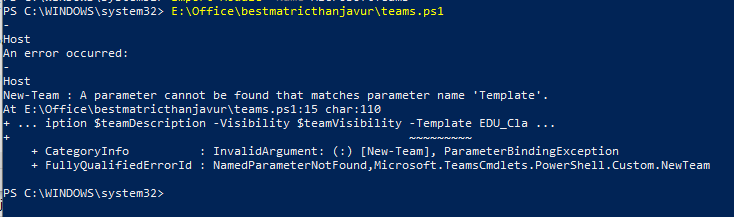
I am also getting the same error.
New-Team -DisplayName $teamName -Description $teamDescription -Visibility $teamVisibility -Template EDU_Class
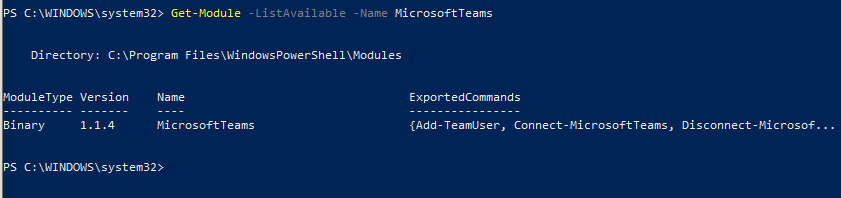
I have installed below Microsoft Teams Powershell module
 Kaliyani
on 13 Aug 2020
Kaliyani
on 13 Aug 2020
I have the same version for the module MicrosoftTeams (1.1.4) and my version for Powershell is 5.1.19041.1
MikaelBSB
on 14 Aug 2020
Regretfully, at this moment only the 0.9.6 module supports the -Template parameter; see https://docs.microsoft.com/en-us/powershell/module/teams/new-team?view=teams-ps:
_IMPORTANT: Using this cmdlet to create a new team using a template is still in preview. You can install and use the preview module from the PowerShell test gallery. For instructions on installing and using the Teams PowerShell preview module, see Install the pre-release version of the Teams PowerShell module (https://docs.microsoft.com/microsoftteams/install-prerelease-teams-powershell-module)._
I was hoping the 1.1.4 would finally have support, but apparently it still does not.
 Bart-Hoofd
on 14 Aug 2020
Bart-Hoofd
on 14 Aug 2020
Hello @MikaelBSB and @Kaliyani as @Bart-Hoofd kindly says here, the -Template parameter is part of the Public Preview module, which current version is 1.1.3-preview
Hope this information helps you
 get-itips
on 17 Aug 2020
get-itips
on 17 Aug 2020
@get-itips Thank you very much for the contribution and sharing this explanation. @MikaelBSB Hope this comment is helpful for you. If you see a documentation update is required, please feel free to open an issue for the same. We proceed here to close it. Thanks for taking out some time to open the issue. Appreciate and encourage you to do the same in future also.
 yogkumgit
on 17 Aug 2020
yogkumgit
on 17 Aug 2020
Regretfully, at this moment only the 0.9.6 module supports the -Template parameter; see https://docs.microsoft.com/en-us/powershell/module/teams/new-team?view=teams-ps:
_IMPORTANT: Using this cmdlet to create a new team using a template is still in preview. You can install and use the preview module from the PowerShell test gallery. For instructions on installing and using the Teams PowerShell preview module, see Install the pre-release version of the Teams PowerShell module (https://docs.microsoft.com/microsoftteams/install-prerelease-teams-powershell-module)._
I was hoping the 1.1.4 would finally have support, but apparently it still does not.
So am I correct in understanding that the only way to get this to work is install version 1.1.3-preview until Microsoft finally gets these all integrated together in the latest release? It is baffling how things are in preview for longer than new features are released and published in the GA. I found that you cannot attempt to do this with 1.1.4 installed and you must uninstall the other versions of the MicrosoftTeams module and ONLY install the 1.1.3-preview. You can do this via "install-module MicrosoftTeams -AllowPrerelease -RequiredVersion 1.1.3-preview -allowclobber". Hopefully this helps someone else.
 Cryptolaemus
on 17 Aug 2020
Cryptolaemus
on 17 Aug 2020
i have uninstall the module MicrosoftTeams 1.1.4 and install the version 1.1.3-preview. It works perfect for -Template parameter
MikaelBSB
on 18 Aug 2020
Related issues
 CallMeByMyName
·
5Comments
CallMeByMyName
·
5Comments
 Archehandoro
·
4Comments
Archehandoro
·
4Comments
 SamCosby
·
5Comments
SamCosby
·
5Comments
 aravindmunna
·
3Comments
aravindmunna
·
3Comments
 federico-r-figueredo
·
5Comments
federico-r-figueredo
·
5Comments