Office-docs-powershell: Get-Team ends to nowhere
Hi,
I'm new with MicrosoftTeams management shell. I did a manual installation and started to run the first command: get-Team and that gives nothing out, actually it did nothing.
I run the command again and took performance counters from the same time and the network load looks like the following:
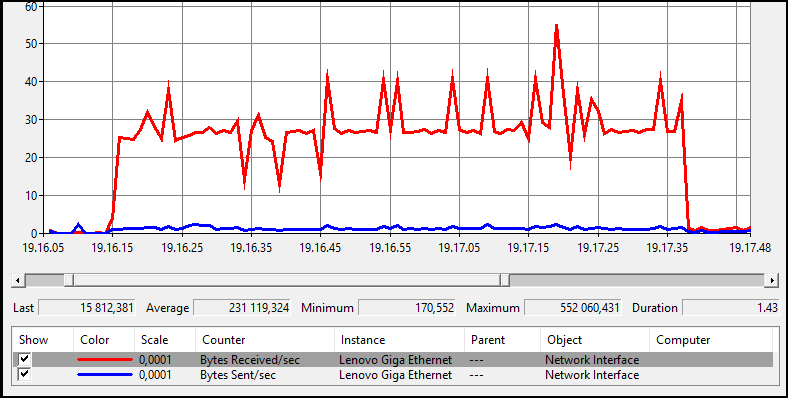
I started the Get-Team at "* Start: 3.3.2020 19.16.14" and you can see I started to receive data from network. But on the PowerShell I cannot see anything. Tried with -verbose also, but still nothing.
Even more strange is, Ctrl+c does not break it, so basically I need to kill the whole PowerShell window??
As I did a manual installation, could it be so that I'm missing some dependence. Even module description says: "No dependence".
Also, after I have closed the PowerShell window and start a new and try to do the same command:
PS C:\> get-team
get-team : One or more errors occurred.
At line:1 char:1
+ get-team
+ ~~~~~~~~
    + CategoryInfo          : NotSpecified: (:) [Get-Team], AggregateException
    + FullyQualifiedErrorId : System.AggregateException,Microsoft.TeamsCmdlets.PowerShell.Custom.GetTeam
This seems to go away in certain time, but this brings me an question also, could this have something to do with throttling limitations?
 Petri-X
All 16 comments
@officedocsbot assign @yogkumgit
 yogkumgit
on 4 Mar 2020
yogkumgit
on 4 Mar 2020
Hello @Petri-X
Tried that on my lab, where I installed the module using the nuget package and I could not reproduce.
So, can you please open a support ticket on your tenant to confirm if you have an issue specific to it? Thanks
 get-itips
on 13 Mar 2020
get-itips
on 13 Mar 2020
@get-itips do you know if I could get support for these versions? As this is kind of test version. I'm worried, that I might end into deep tunnel without hope to get out :)
When you say "_I installed the module using the nuget package_ " do you believe there could be differences between manual installation, like I did, and nuget installation, like you did.
Any thoughts about why Ctrl+c did not impact to the process either?
And there is no logging / verbose features available?
Petri-X
on 13 Mar 2020
What I did was the same as you on this other issue https://github.com/MicrosoftDocs/office-docs-powershell/issues/5000 isn't that what you did?
get-itips
on 13 Mar 2020
Okay, then this is strange. The last differences between us is most likely the proxy, as I'm connecting through the proxy.
But, btw, How many Teams you do have (I have +17k)? I have seen elsewhere as well, that Teams shell have had some strange limitations. So could this be the difference?
And there is no logging option available?
Petri-X
on 13 Mar 2020
Okay, then this is strange. The last differences between us is most likely the proxy, as I'm connecting through the proxy.
But, btw, How many Teams you do have (I have +17k)? I have seen elsewhere as well, that Teams shell have had some strange limitations. So could this be the difference?And there is no logging option available?
Hello @Petri-X
I do not have that number of teams in my demo tenant, besides that, as here we are limited to address documentation issues, please open a service ticket so they can help you further.
I will try to ask the PG if they know if the cmdlet has that kind of limit.
Thanks
get-itips
on 14 Mar 2020
also @Petri-X are you running the latest stable version 1.0.5?
get-itips
on 14 Mar 2020
Obviously not :)
I thought to run the latest one 1.0.20, but just realized that 1.0.21 has been released! :D
In my mind 1.0.5 does not support private channels: Teams Updates PowerShell Module for Private Channels
But as the test gallery points to here as a site, I was expecting to report issues from that version to here also. I could try with 1.0.5, but because of private channels, I do not see any point of using that anymore.
Petri-X
on 14 Mar 2020
Obviously not :)
I thought to run the latest one 1.0.20, but just realized that 1.0.21 has been released! :DIn my mind 1.0.5 does not support private channels: Teams Updates PowerShell Module for Private Channels
But as the test gallery points to here as a site, I was expecting to report issues from that version to here also. I could try with 1.0.5, but because of private channels, I do not see any point of using that anymore.
I forgot that you are trying to use this on private channels. If you are using the beta module I have to say that, and you probably know, they can fail, as that is the nature of a beta release.
get-itips
on 15 Mar 2020
@get-itips
Just testing with my trial tenant, and I recommend to you also to really create several thousands of Teams. I run several parallel CMDLets like following;
10001..11000 | % { New-Team -DisplayName "TestTeam-$($_)" -ErrorAction SilentlyContinue ; sleep 15 } | ft DisplayName
And I manage to get around 7000+ Teams.
Currently I'm testing with official version 1.0.5. And it looks that this is just as slow as faraos (they have not moved in years). While troubleshooting the issue, I found a log for this: %LocalAppData%\microsoft\Teams\PowerShell
From there I could read, it is downloading 10 teams per second (this is trial, so no proxy in use). So you could make the math how many seconds 7000 takes, and in my example 18000. And I call us as not so big company.
Also I found that Ctrl+c is not listen while it is downloading the teams from O365. In 1.0.5 either.
So the question for you is: what is your view how larger companies should use PowerShell, or should they not using it?
ps. Again I can come back and ask: wouldn't that be a smart if not all parameters are moved over the wire? Get-ADUser have a parameter "-properties" to define what you like to receive. In my mind that is excellent idea for here as well.
pss. If the version which is able to manage private channels, is in beta phase. Does it also means that private channels are in beta phase, and we should not use them? Or how shall we managed private channels?
Petri-X
on 17 Mar 2020
@Petri-X I will try to pass your feedback to the Product Group.
get-itips
on 17 Mar 2020
@Petri-X ... Thanks for the feedback. I believe you are reporting the perf involved in Get-Teams. I am explicitly calling out the following improvements you are suggesting...
- Support cmdlet termination (CTRL+C behavior)
- Reduce network payload by supporting relevant parameters similar to EXO propertysets and such
- Improve verbose and debug support for Get-Team
- Provide support for reporting progress
This is something we do want to invest and resolve in the coming releases.
 tameemansari
on 17 Mar 2020
tameemansari
on 17 Mar 2020
@tameemansari
Those two first one the most critical as get-team gets useless when amount of teams reach few thousands.
About the logging, I already mentioned:
While troubleshooting the issue, I found a log for this: %LocalAppData%\microsoft\Teams\PowerShell
So that is kind of alternative and available solution for logging.
And about the network payload, that is something you should start consider more widely on O365. Why you should by default sent all attributes back to PowerShell? As that would have a business case for MS as well by releasing CPU power from your data centers. This will impact the way how to use pipelines, but obviously that can be solved by communication.
Interesting to see if this become a reality someday :)
Petri-X
on 18 Mar 2020
...and @tameemansari if I could add one extra comment more. I had pretty interesting discussion about get-csCallQueue as that returns only 100 first queues by default. To get all queues you need to use parameter "-First XYZ" and use higher than your queues value on (XYZ). Obviously that is not mentioned in anywhere.
So if you could optimize the network traffic on these CMDLets, then you perhaps could also stop distributing those "-skip -first" parameters :) I know those were meant to be used like "paging" purposes. But in my mind that is not working as paging should come from the back end. If I try to do paging on client site, I never can trust the results.
Petri-X
on 18 Mar 2020
Hello @Petri-X I hope that @tameemansari contribution has helped you, we feel that this issue is addressed and will proceed closing it. Thanks for your feedback.
get-itips
on 19 Mar 2020
@get-itips and @tameemansari Thank you very much for the contribution and sharing this explanation. @Petri-X Hope this comment is helpful for you. If you see a documentation update is required, please feel free to open an issue for the same. We proceed here to close it. Thanks for taking out some time to open the issue. Appreciate and encourage you to do the same in future also.
yogkumgit
on 20 Mar 2020
Related issues
 Archehandoro
·
4Comments
Archehandoro
·
4Comments
 andikrueger
·
5Comments
andikrueger
·
5Comments
 CallMeByMyName
·
5Comments
CallMeByMyName
·
5Comments
 SamCosby
·
5Comments
SamCosby
·
5Comments
 tomlarse
·
5Comments
tomlarse
·
5Comments
Most helpful comment
@Petri-X ... Thanks for the feedback. I believe you are reporting the perf involved in Get-Teams. I am explicitly calling out the following improvements you are suggesting...
This is something we do want to invest and resolve in the coming releases.