Office-docs-powershell: Re-open of #3493 (Services not returned from Get-ExchangeCertificate in PS Remoting session
My comment from the original closed issue:
Is there any chance somebody in there could tell us how it is that the Exchange Admin Center and previously in 2010 the Exchange Management Console, are doing Get-ExchangeCertificate -Server and successfully determining the services for remote servers?
I've found this doesn't even work if you do Invoke-Command -Session . Trying to find a way to get Exchange certificates without having to logon to an Exchange server to do it. The only way to automate this task as it stands is to schedule the task on an Exchange server or somewhere that the Exchange Management Shell has been installed.
I'm wondering if I could decipher from the RawData (byte array)? Or some other means? Just would like to know what trick is being done under the covers by the Exchange software so that I can do the same trick in my PS remoting scripts.
 JeremyTBradshaw
All 7 comments
@officedocsbot assign @yogkumgit
 yogkumgit
on 8 Jan 2020
yogkumgit
on 8 Jan 2020
Hi @JeremyTBradshaw, thank you for your feedback.
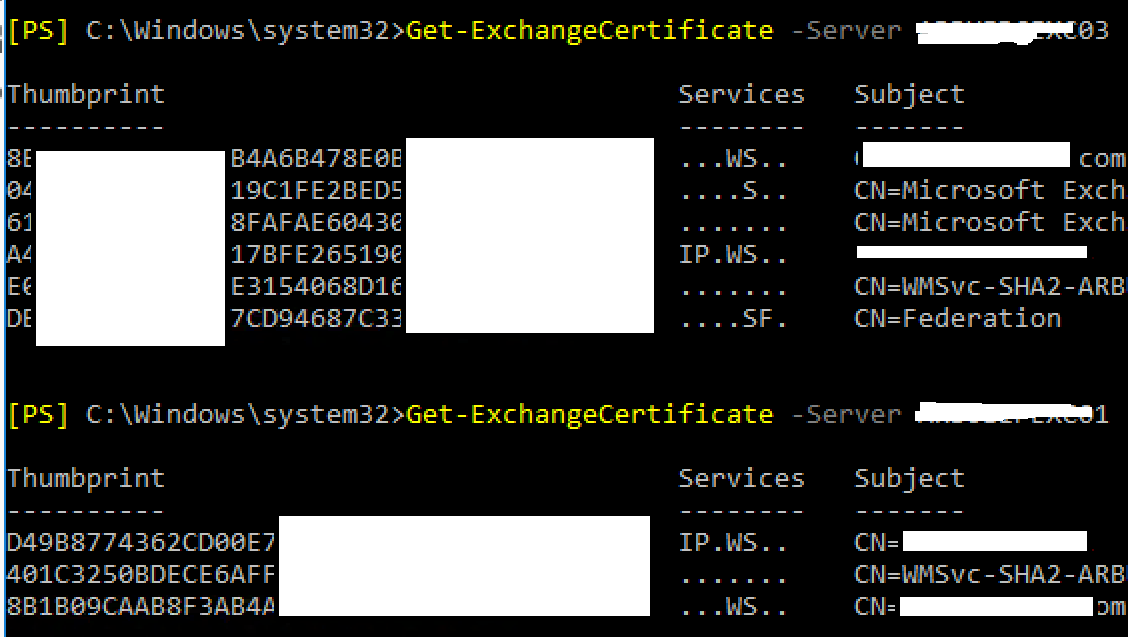
I have verified the Get-ExchangeCertificate cmdlet with the -Server parameter and I works for me (ran it on Exchange 2016 and 2010):
 dariomws
on 11 Jan 2020
dariomws
on 11 Jan 2020
Hi @dariomws306 , thanks but I mean from a PS remote session (i.e. just Windows PowerShell), not in the Exchange Management Shell.
When PS remoting, the Services and ServicesStringForm properties aren't returned at all.
JeremyTBradshaw
on 12 Jan 2020
Oh sorry @JeremyTBradshaw, I misunderstood it.
I understand there is no way to get it working using Remote PowerShell to an Exchange Server. You should run the scripts on Exchange Management Shell and use -Server parameter.
@chrisda Could you kindly confirm this?
Admin Center use -Server parameter you can confirm it using command logging.
dariomws
on 13 Jan 2020
Thanks @dariomws306 . I'm aware that the management shell can do it and that the EAC is doing it with the same command which can be seen in the command log window.
I'm hoping to find out how that's happening (i.e. what is the management shell doing to get that extra detail), so that I can implement a process to accomplish the same thing in a PS remote session, not from the management shell.
JeremyTBradshaw
on 14 Jan 2020
@JeremyTBradshaw, I'm sorry, I have no idea. There's no reason why remote PowerShell shouldn't behave the same as the Exchange Management Shell. If you really want an answer, you'll need to open a support ticket.
I can tell you that Get-ExchangeCertificate is an odd duck:
The position 0 parameter is Thumbprint and Identity is position 1. So, when you run:
Get-ExchangeCertificate 992F250A0635169A3AC20BB1B3DCDF35C7571941, you're really using Thumbprint, not Identity, but Identity takes the thumbprint as a valid value.Not all properties are returned if you pipe the command to
| Format-List; you need to use| Format-List *to see all the properties.
 chrisda
on 16 Jan 2020
chrisda
on 16 Jan 2020
Thanks @chrisda . I might try the support route but can accept the answer is not easily found (maybe not for public eyes either) so will gladly close this issue.
JeremyTBradshaw
on 16 Jan 2020
Related issues
 Staffanb88
·
3Comments
Staffanb88
·
3Comments
 ykuijs
·
5Comments
ykuijs
·
5Comments
 LindaSchaar
·
4Comments
LindaSchaar
·
4Comments
 CallMeByMyName
·
5Comments
CallMeByMyName
·
5Comments
 tomlarse
·
5Comments
tomlarse
·
5Comments
Most helpful comment
@JeremyTBradshaw, I'm sorry, I have no idea. There's no reason why remote PowerShell shouldn't behave the same as the Exchange Management Shell. If you really want an answer, you'll need to open a support ticket.
I can tell you that Get-ExchangeCertificate is an odd duck:
The position 0 parameter is Thumbprint and Identity is position 1. So, when you run:
Get-ExchangeCertificate 992F250A0635169A3AC20BB1B3DCDF35C7571941, you're really using Thumbprint, not Identity, but Identity takes the thumbprint as a valid value.Not all properties are returned if you pipe the command to
| Format-List; you need to use| Format-List *to see all the properties.