Office-docs-powershell: Set-SPOTenant -UserVoiceForFeedbackEnabled:$false seems to have no effect on modern pages
I ran Set-SPOTenant -UserVoiceForFeedbackEnabled:$false on two tenants and nothing changes (checked after 24h).
I would expect the "Feedback" link in the lower right hand corner to disappear when setting this value to false.

 wobba
wobba
All 40 comments
I will check with @VesaJuvonen who we can check with on Product Team. I would expect the Feedback to disappear too.
 kenwith
on 2 Apr 2018
kenwith
on 2 Apr 2018
I'm now looking for the internal owner so that we can make this fixed. It clearly seems to be a bug on the modern sites for ignoring this setting. Will come back asap.
 VesaJuvonen
on 3 Apr 2018
VesaJuvonen
on 3 Apr 2018
@VesaJuvonen feel free to alert the owner of the "Get the mobile app" link as well - wouldn't hurt to hide it :) assuming it's the same internal owner.
wobba
on 3 Apr 2018
@VesaJuvonen any news?
 ghost
on 1 Aug 2018
ghost
on 1 Aug 2018
I'm following this as well. Changing the value doesn't seem to have any effect.
 KatjaJokisalo
on 10 Aug 2018
KatjaJokisalo
on 10 Aug 2018
Just pinged again internal threads around this so that we could get this moving. Stay tuned.
VesaJuvonen
on 10 Aug 2018
Fix for this is currently rolling out worldwide and should be completely out within week or two. Thanks for reporting and let's close this issue when we have full confirmation that the fix is properly working.
VesaJuvonen
on 13 Aug 2018
Is this setting (Set-SPOTenant -UserVoiceForFeedbackEnabled:$false) expected to hide Feedback button in delve as well ?
 gurubn
on 25 Aug 2018
gurubn
on 25 Aug 2018
I can confirm this is working in several tenants on modern pages. @gurubn, it will only work on modern pages right now, not system pages, like Delve.
wobba
on 25 Aug 2018
Seems OK on modern pages, but shows up in list and pages like Site contents. Get the mobile app button shows up but not on every pages.
 mrik23
on 26 Aug 2018
mrik23
on 26 Aug 2018
It work for me as well but as with others, only on standard pages. Can we also have a way to hide the "Get the mobile app" button as this only addresses half the issue. It shows an incredible lack of foresight not to have this sorted when modern was released let alone to still not have a proper solution many months down the line, when clearly upwards of 80% of people don't want this feature. And whilst we are at it, please can we have a proper web UI setting for this instead of having to resort to PowerShell for everything.
 ColinGardner
on 26 Aug 2018
ColinGardner
on 26 Aug 2018
Confirmed working in both targeted and standard release tenants, at least on site pages. As per above posters, there are some pages (like certain application pages) where the button still appears.
 clkmsc
on 27 Aug 2018
clkmsc
on 27 Aug 2018
@clkmsc was there a delay in how long it took to update? Does it apply to all sites, modern and classic? I've attempted the same but not seeing the Feedback button disappear on my tenant.
Edit: It seems to be working now, so maybe ~15 minute delay. Took me forever to find this option!
 aaron-lionco
on 6 Sep 2018
aaron-lionco
on 6 Sep 2018
Tested it here as well and the Feedback link is indeed gone now from modern site pages. I'd say for consistency and to avoid confusion this issue is not resolved until it also disappears from i.e. the site contents as well. This is currently not the case yet.
 KoenZomers
on 6 Sep 2018
KoenZomers
on 6 Sep 2018
@wobba Thank you for this feedback
From my understanding this has been corrected and verrifed that it works now. I am going to close this issue. Please reopen if this issue is not resolved.
 AndreaBarr
on 19 Sep 2018
AndreaBarr
on 19 Sep 2018
Created a new issue to address the inconsistency as mentioned above: https://github.com/MicrosoftDocs/office-docs-powershell/issues/1752
KoenZomers
on 19 Sep 2018
@KoenZomers Thank you for opening a new issue for that so we can keep these separate and track issues to completion. Closing again.
AndreaBarr
on 20 Sep 2018
It should be working fine now on all pages
 victorbutuza
on 16 Oct 2018
victorbutuza
on 16 Oct 2018
@victorbutuza, I can confirm from testing on multiple tenants that it's now consistently gone on both modern site pages as well as modern site pages. Superb job!
KoenZomers
on 16 Oct 2018
@wobba It looks like this issue has been resolved. I am going to close this issue. If the issue is not resolved for you please re-open the issue.
AndreaBarr
on 16 Oct 2018
Just FYI, our official documentation has now also been updated to reflect this change in the behavior of the UserVoiceForFeedbackEnabled option in Set-SPOTenant:
https://docs.microsoft.com/en-us/powershell/module/sharepoint-online/set-spotenant?view=sharepoint-ps#optional-parameters
KoenZomers
on 18 Oct 2018
Don't know how to reopen but no, the issue has not been solved as described in the link above provided by KoenZomers.
The updated documentation for UserVoiceForFeedbackEnabled says that: "When set to $false, both of these links will not be shown anymore." That is not true. The case regards, and has always been about, the feedback button. The "Get the mobile app" button is STILL showing on each and every page.
I wish for the possibility to also have the "Get the mobile app" button deselected. I also wish for the possibility to deselect the feedback and mobile buttons on ALL O365 pages and not only the modern pages!
ghost
on 18 Oct 2018
@inorde, during my tests it did consistently also remove the "Get the mobile app" button when I fiddled the setting, although it did take some time before it was applied (several hours). I've received feedback that this is also how the PG has changed things. Same for the "Feedback" button. It has been removed from ALL modern SPO pages now with the sole exception of the modern SPO Admin pages. So what you're seeing does not seem right and fit with the patch that has been rolled out. Curious to hear if more people are running into this as I can't reproduce this on my tenants.
KoenZomers
on 19 Oct 2018
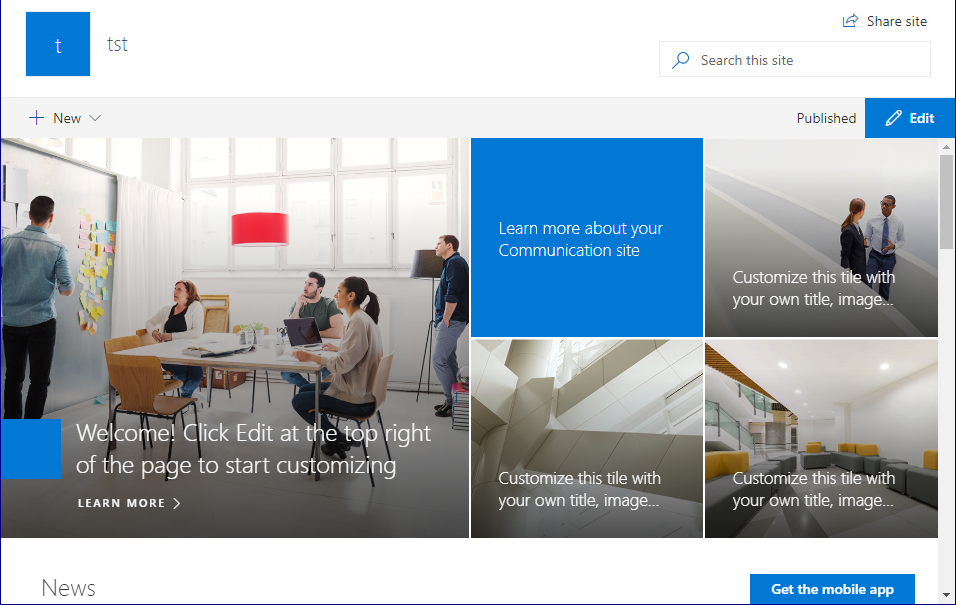
@KoenZomers, oddly enough it doesn't remove the "Get the mobile app" button from the top page in a site collection (see image), but it seems like it doesn't show up on new pages created under the top one. I will run run Set-SPOTenant -UserVoiceForFeedbackEnabled:$false again and see if it changes, I'll get back later with the result.
ghost
on 19 Oct 2018
Also a bit confusing that sharepoint admin closed Optionally disable feedback button with the comment _NOTE: this only applies to the feedback button; there is no way to disable the “get mobile app” button at this time._
ghost
on 19 Oct 2018
Also a bit confusing that sharepoint admin closed Optionally disable feedback button with the comment _NOTE: this only applies to the feedback button; there is no way to disable the “get mobile app” button at this time._
Noticed that one too. Bit of inconsistency going on. Let me try to address that.
KoenZomers
on 19 Oct 2018
Also a bit confusing that sharepoint admin closed Optionally disable feedback button with the comment _NOTE: this only applies to the feedback button; there is no way to disable the “get mobile app” button at this time._
Noticed that one too. Bit of inconsistency going on. Let me try to address that.
Any update on this? Customer would like to also hide the mobile app button, but it is still showing up after making the change with PowerShell.
 TuomasPakkanen
on 26 Oct 2018
TuomasPakkanen
on 26 Oct 2018
On my tenants the "Get the mobile app" also have returned now. Not sure what's going on. Still trying to get feedback on this.
KoenZomers
on 26 Oct 2018
Until Microsoft get this properly sorted out you can try out my App
Customizer solution
https://kaboodlesoftware.com/products/framework-solutions-for-sharepoint-modern/kaboodle-branding-package/
which adds CCS to the page to hide these pesky buttons.
On Fri, Oct 26, 2018 at 9:44 PM Koen Zomers notifications@github.com
wrote:
On my tenants the "Get the mobile app" also have returned now. Not sure
what's going on. Still trying to get feedback on this.—
You are receiving this because you commented.
Reply to this email directly, view it on GitHub
https://github.com/MicrosoftDocs/office-docs-powershell/issues/508#issuecomment-433374258,
or mute the thread
https://github.com/notifications/unsubscribe-auth/ADh00tiOp_ZvRAOYaz9p_XOYVM4Wh6S0ks5uou6qgaJpZM4S-eLX
.
ColinGardner
on 30 Oct 2018
I was able to run this and it worked for me - set-SPOTenant -UserVoiceForFeedbackEnabled $false
 rachoksh
on 11 Apr 2019
rachoksh
on 11 Apr 2019
Can anyone else confirm this is resolved? The POSH works in multiple tenants from my testing & from what @rachoksh reported...
 andrewconnell
on 4 Jun 2019
andrewconnell
on 4 Jun 2019
For me it also works for the "Feedback" link. There was a slight confusion before that it would also impact the "Get the mobile app" link, but it doesn't and wasn't intended to impact it after all.
KoenZomers
on 4 Jun 2019
Ran this command, waited a full day and the button is still there.
 JakeMadren
on 19 Jun 2019
JakeMadren
on 19 Jun 2019
Tested. It seems the "feedback" button got removed after some time on all modern sites. The "get the mobile app" seems to show on my hub site, and not my hub connected sites. This is all very confusing. Please just let us remove them easily and consistently.
 ZzyzxIsAlreadyTaken
on 4 Jul 2019
ZzyzxIsAlreadyTaken
on 4 Jul 2019
Any update on this?, after using Set-SPOTenant -UserVoiceForFeedbackEnabled $false we still have the "Get the mobile app".
 devdnn
on 30 Sep 2019
devdnn
on 30 Sep 2019
@trent-green who is the PM for SharePoint Online.. Trent any thoughts?
kenwith
on 30 Sep 2019
@yogkumgit - you can reach out to @trent-green on feedback. He is the PM that owns SPO. I am happy to help however I can but am not a SME on this particular area. Feel free to loop me in with Trent so we can get this figured out. This issue has been open a very, very long time.
kenwith
on 14 Nov 2019
@wobba Thank you for reporting this feedback here. This list is focused on content issues and I want to make sure your immediate product issue does not get lost in this list. If you would please open a service ticket the support engineers will be able to identify if there is a bug (highly likely) and escalate to the appropriate product team. Please also check the link: https://techcommunity.microsoft.com/t5/microsoft-sharepoint-blog/sharepoint-page-enhancements/ba-p/334735
 yogkumgit
on 19 Feb 2020
yogkumgit
on 19 Feb 2020
Is there some reason you can’t just recreate the issue and forward it to
support? We’ve been waiting a long time and obviously it’s a bug.
Thanks,
Jake
On Wed, Feb 19, 2020 at 7:27 AM Yogesh Kumar notifications@github.com
wrote:
Closed #508
https://github.com/MicrosoftDocs/office-docs-powershell/issues/508.—
You are receiving this because you commented.
Reply to this email directly, view it on GitHub
https://github.com/MicrosoftDocs/office-docs-powershell/issues/508?email_source=notifications&email_token=ABPBOAHKYXJX7PQYSBKZQZTRDUXTNA5CNFSM4EXZ4LL2YY3PNVWWK3TUL52HS4DFWZEXG43VMVCXMZLOORHG65DJMZUWGYLUNFXW5KTDN5WW2ZLOORPWSZGOWXS6PNY#event-3051743159,
or unsubscribe
https://github.com/notifications/unsubscribe-auth/ABPBOAE3DT7XEDJ27OWXBI3RDUXTNANCNFSM4EXZ4LLQ
.
JakeMadren
on 19 Feb 2020
@JakeMadren - I completely agree with you and wish there was a way to do that. The official channel is that the support engineers identify a bug, versus something unique to a tenant that can be fixed with other means, and then they have a process to escalate (with high visibility) to the relevant product teams and chains of leadership. If everyone that is experiencing the issue opens a support request then those will get to the right leadership chains in the product team and prioritized and added to their work queue. With all that being said though, @trent-green , is the PM that owns SharePoint PowerShell and I had a meeting with him and he is aware of these that have been brought up in the documentation feedback and he is working on it. I will keep bringing up this one in meetings too and any official bug reports from support engineering will help drive it home. I know it isn't the best answer and I will do all I can to increase the volume from the documentation side. And I am very much looking forward to updating the documentation when this is resolved.
kenwith
on 20 Feb 2020
Related issues
mrik23
·
5Comments
 BlasMS
·
5Comments
BlasMS
·
5Comments
 andikrueger
·
5Comments
andikrueger
·
5Comments
 tomlarse
·
5Comments
tomlarse
·
5Comments
 federico-r-figueredo
·
5Comments
federico-r-figueredo
·
5Comments
Most helpful comment
Tested it here as well and the Feedback link is indeed gone now from modern site pages. I'd say for consistency and to avoid confusion this issue is not resolved until it also disappears from i.e. the site contents as well. This is currently not the case yet.