Odo: Use PSI for running Kubernetes tests
Kubernetes tests that were earlier working on Travis need to run on PSI infrastructure.
Acceptance Critera
- [x] Kubernetes test results for every PR
Scope of the issue
https://github.com/openshift/odo/issues/4287#issuecomment-752359444
https://github.com/openshift/odo/issues/4287#issuecomment-754408501
/area testing
/priority high
/assign @mohammedzee1000
 dharmit
All 32 comments
@prietyc123 @kadel please add any more acceptance critera or detail to the issue that I might have missed.
dharmit
on 4 Dec 2020
@prietyc123 is going to try the following steps manually:
- Create openstack vm
- Install minishift on it
- Run some tests
Once we have manually achieved this, it is trivial to script it out
Also, will need to give robot account access to openstack for automation purposes
 mohammedzee1000
on 9 Dec 2020
mohammedzee1000
on 9 Dec 2020
- Create openstack vm
can we configure Jenkins to do this for us?
 kadel
on 9 Dec 2020
kadel
on 9 Dec 2020
- Create openstack vm
can we configure Jenkins to do this for us?
That would be the final goal, a script in jenkins. Infact that is why robot account access to openstack
mohammedzee1000
on 9 Dec 2020
So the scope of this issue will be:
- [ ] Get our internal Jenkins robot account access to our internal PSI project
- [ ] Jenkins robot script 1
- Provisions VM on OpenStack with ssh key login
- Gathers the IP acquired by VM and generates a ssh node list (https://github.com/mohammedzee1000/ci-firewall#sshnodefile)
- Calls
ci=firewall workwith sshnodefile generated above and nessasary envs for logging into minikube
- [ ] Create a script that
- Provision minikube using podman (preferable) using https://minikube.sigs.k8s.io/docs/drivers/podman/ or docker if unavoidable using https://minikube.sigs.k8s.io/docs/drivers/docker/
- Run the tests against said cluster
- Demolish the cluster
- [ ] Jenkins robot script 2 that demoloshes the VM created by robot script 1, configured to execute no matter what happens in testing
- [ ] Create a jenkins project, a message queue and prow job for running this per PR
mohammedzee1000
on 30 Dec 2020
@prietyc123 is going to try the following steps manually:
- Create openstack vm
I was able to successfully install openstack client. Followed doc - https://docs.openstack.org/mitaka/cli-reference/common/cli_install_openstack_command_line_clients.html
Tried creating fedora vm using CLI command
$ openstack server create --flavor m1.large --image Fedora-Cloud-Base-32 --nic net-id=provider_net_shared_2 --security-group default --security-group all-open --key-name releng-key fedora-minikube
But it is throwing error
Build of instance d35a70de-45b7-4cf9-aca8-c7f5688eaff4 aborted: Failed to allocate the network(s) with error No fixed IP addresses available for network: 14c15d33-175c-424e-88ba-361a875e0c5c, not rescheduling
I am trying to find out the root cause of the failure.
 prietyc123
on 30 Dec 2020
prietyc123
on 30 Dec 2020
@prietyc123 is going to try the following steps manually:
- Create openstack vm
I was able to successfully install openstack client. Followed doc - https://docs.openstack.org/mitaka/cli-reference/common/cli_install_openstack_command_line_clients.html
Tried creating fedora vm using CLI command$ openstack server create --flavor m1.large --image Fedora-Cloud-Base-32 --nic net-id=provider_net_shared_2 --security-group default --security-group all-open --key-name releng-key fedora-minikubeBut it is throwing error
Build of instance d35a70de-45b7-4cf9-aca8-c7f5688eaff4 aborted: Failed to allocate the network(s) with error No fixed IP addresses available for network: 14c15d33-175c-424e-88ba-361a875e0c5c, not reschedulingI am trying to find out the root cause of the failure.
It says it right there. No more IPs. can you try a different network like _3 instead of _2
mohammedzee1000
on 30 Dec 2020
Scope of the issue mentioned in https://github.com/openshift/odo/issues/4287#issuecomment-752359444 also includes manual verification of scenarios like
- [x] Provisions VM on OpenStack with ssh key login
- [x] Install minikube inside the created VM
- [x] Run tests manually
prietyc123
on 5 Jan 2021
Provisions VM on OpenStack with ssh key login
Created fedora 32 VM on openstack
$ openstack server create --flavor m1.large --image Fedora-Cloud-Base-32 --nic net-id=provider_net_shared_3 --security-group default --security-group all-open --key-name releng-key fedora-minikube-none

$ ssh fedora@<ip>
Install minikube inside the created VM
Installing minikube using none driver inside fedora 32 VM with pre-req docker container environment. As fedora 32 doesn't support docker, we need to revert back to v1 cgroups. Steps to revert to v1 cgroups:
$ sudo -i
$ dnf install grubby
$ grubby --update-kernel=ALL --args="systemd.unified_cgroup_hierarchy=0"
$ systemctl reboot
$ ssh fedora@<ip>
$ sudo -i
Docker installation
Install docker as per doc https://docs.docker.com/engine/install/fedora/
$ docker version
Client: Docker Engine - Community
 Version:           19.03.13
 API version:       1.40
 Go version:        go1.13.15
 [...]
 OS/Arch:           linux/amd64
 Experimental:      false

Server: Docker Engine - Community
 Engine:
  Version:          19.03.13
  API version:      1.40 (minimum version 1.12)
  Go version:       go1.13.15
  [...]
  OS/Arch:          linux/amd64
  Experimental:     false
 containerd:
 [...]
Minikube installation using bare metal
$ curl -Lo minikube https://storage.googleapis.com/minikube/releases/v1.11.0/minikube-linux-amd64 && chmod +x minikube && sudo mv minikube /usr/local/bin/

$ curl -Lo kubectl https://storage.googleapis.com/kubernetes-release/release/v1.16.1/bin/linux/amd64/kubectl && chmod +x kubectl && sudo mv kubectl /usr/local/bin/

// Kubernetes 1.18.3 requires conntrack to be installed
$ yum install -y conntrack

// Close selinux
$ setenforce 0

// enable add-ons
$ sudo chmod -R 777 /etc/kubernetes/addons/

// Enable kubelet services
$ systemctl enable kubelet.service

// To fix https://github.com/kubernetes/minikube/issues/6391 while starting minikube
$ sysctl fs.protected_regular=0

// start minikube
$ minikube start --vm-driver=none --container-runtime=docker

$ kubectl version
Client Version: version.Info{Major:"1", Minor:"16", GitVersion:"v1.16.1", ...}
Server Version: version.Info{Major:"1", Minor:"18", GitVersion:"v1.18.3", ...}

$ kubectl cluster-info
Kubernetes master is running at https://<ip>:<port>
KubeDNS is running at https://<ip>:<port>/api/v1/namespaces/kube-system/services/kube-dns:dns/proxy

To further debug and diagnose cluster problems, use 'kubectl cluster-info dump'.
Will try to run the test manually and then automate the whole process.
prietyc123
on 6 Jan 2021
@prietyc123 I think its better to use systemctl enable --now kubelet.service to ensure service starts, if its not started for any reason. Other that that, I can second this
mohammedzee1000
on 7 Jan 2021
$ dnf install grubby
$ grubby --update-kernel=ALL --args="systemd.unified_cgroup_hierarchy=0"
$ systemctl reboot
$ ssh fedora@
To avoid whole grubby installation we can use Fedora 30 openstack vm.
prietyc123
on 18 Jan 2021
To avoid whole
grubbyinstallation we can useFedora 30openstack vm.
It's EOL (https://fedoraproject.org/wiki/End_of_life). We should avoid using EOL tooling, IMO.
dharmit
on 18 Jan 2021
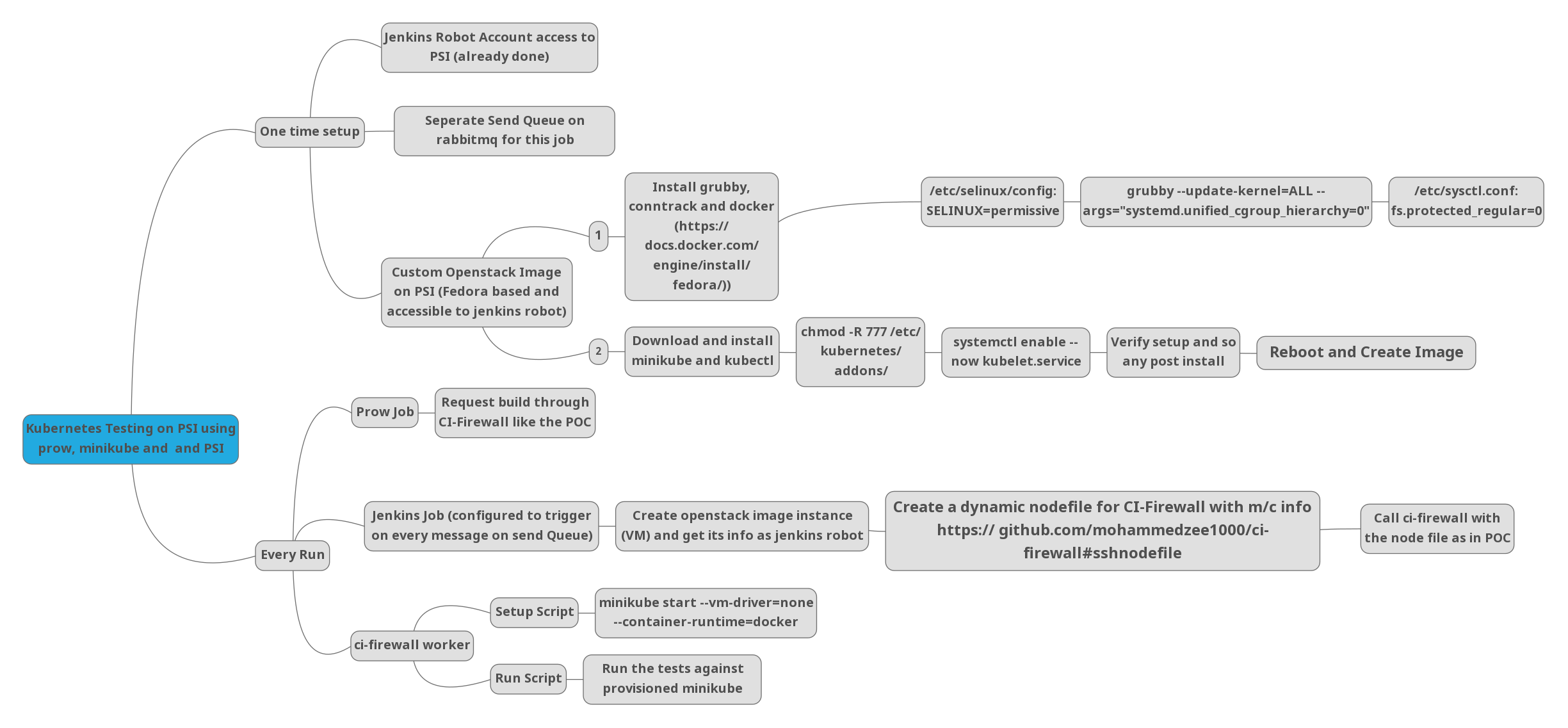
I will be handling the one time set up and @prietyc123 will handle every run piece. This will also give @prietyc123 experience with how to work with our jenkins and how the entire system works
mohammedzee1000
on 19 Jan 2021
We are facing issue on psi minikube https://github.com/openshift/odo/issues/4383
prietyc123
on 22 Jan 2021
Blocked due to https://github.com/openshift/odo/issues/4383 , However I will try to analyse and get more info on failures.
prietyc123
on 22 Jan 2021
Steps I verified once we have the customised image created the VM:
#!/bin/sh

# fail if some commands fails
set -e
# show commands
set -x

sudo -i
git clone https://github.com/openshift/odo.git openshift/odo
cd openshift/odo
export GOPATH=$HOME/go
mkdir -p $GOPATH/bin
make goget-ginkgo
export PATH="$PATH:$(pwd):$GOPATH/bin"
minikube delete
minikube start --vm-driver=none --container-runtime=docker
set +x
kubectl cluster-info
set -x
make bin
cp odo /usr/bin
export KUBERNETES=true
make test-cmd-project
make test-integration-devfile
It works as expected.
prietyc123
on 28 Jan 2021
Issues we are facing while minikube implementation on jenkins:
Connection timeout while ssh into the vm
Although PSI Fedora vm are in running state, I think few configurations are not fully setup. For temporary solution we are adding 20 sec sleep into the configuration script. For long run solution we are planning to add a loop for ssh timeout into ci-firewall repo.minikube start with
nonedriver needs root permission access on jenkins
As minikube start with none driver needs root user access, we are usingdockerdriver instead ofnone
One of the issue has been fixed by pr #4436
prietyc123
on 1 Mar 2021
Hitting file permission issue on kubernetes job https://prow.ci.openshift.org/view/gs/origin-ci-test/pr-logs/pull/openshift_odo/4512/pu[…]-master-psi-kubernetes-integration-e2e/1371511255918972928
prietyc123
on 16 Mar 2021
It has been closed accidently via https://github.com/openshift/odo/pull/4516
prietyc123
on 17 Mar 2021
Successful job run is blocked on https://github.com/openshift/odo/issues/4523 . However we have a debug pr https://github.com/openshift/odo/pull/4538 opened as a work around.
prietyc123
on 22 Mar 2021
Most frequently ran into issue https://github.com/openshift/odo/issues/4548 on PSI jobs 🙁 Also I suspect the customised image fedora-minikube-bootstrapper-v1 is broken, as it complains about minikube command not found. I guess we need to create new customised image and check the behaviour of the pr.
prietyc123
on 24 Mar 2021
There is one test related issue on kubernetes https://github.com/openshift/odo/issues/4577 working on this one.
prietyc123
on 1 Apr 2021
We are getting false logs for PSI jobs on PRs everytime. For ex https://prow.ci.openshift.org/view/gs/origin-ci-test/pr-logs/pull/openshift_odo/4578/pull-ci-openshift-odo-master-psi-kubernetes-integration-e2e/1377582757776986112#1:build-log.txt%3A32 I don't see any jobs running for build no. 990 🙁
I think there is something wrong on jenkins front, that we need to look into.
prietyc123
on 1 Apr 2021
kubernetes jobs fails on
[ssh:Fedora 32] Running odo with args [odo create nodejs --context /tmp/119184934 --project default eluphj]
[...]

[ssh:Fedora 32] Running odo with args [odo push --context /tmp/119184934]

[ssh:Fedora 32] [odo] I0412 06:10:07.006222   42480 context.go:130] absolute devfile path: '/tmp/119184934/devfile.yaml'

[ssh:Fedora 32] [odo] I0412 06:10:07.006262   42480 context.go:72] absolute devfile path: '/tmp/119184934/devfile.yaml'

[ssh:Fedora 32] [odo] I0412 06:10:07.006340   42480 util.go:727] HTTPGetRequest: https://raw.githubusercontent.com/openshift/odo/master/build/VERSION

[ssh:Fedora 32] [odo] I0412 06:10:07.006449   42480 util.go:748] Response will be cached in /tmp/odohttpcache for 1h0m0s
[...]
[ssh:Fedora 32] [odo] I0412 06:10:07.045597   42480 preference.go:235] The path for preference file is /tmp/119184934/preference.yaml

[ssh:Fedora 32] [odo] I0412 06:10:07.048336   42480 utils.go:60] Deployment eluphj not found

[ssh:Fedora 32] [odo]

[ssh:Fedora 32] [odo] Validation

[ssh:Fedora 32] [odo]  ���  Validating the devfile  ...

[ssh:Fedora 32] [odo] I0412 06:10:07.048400   42480 command.go:171] Build command: devbuild

[ssh:Fedora 32] [odo] I0412 06:10:07.048411   42480 command.go:178] Run command: devrun

[ssh:Fedora 32] [odo]
[...]
���  Validating the devfile [47939ns]

[ssh:Fedora 32] [odo]

[ssh:Fedora 32] [odo] Creating Kubernetes resources for component eluphj

[ssh:Fedora 32] [odo] I0412 06:10:07.048436   42480 preference.go:235] The path for preference file is /tmp/119184934/preference.yaml

[ssh:Fedora 32] [odo] I0412 06:10:07.063247   42480 command.go:92] the command group of kind "debug" is not found in the devfile

[ssh:Fedora 32] [odo] I0412 06:10:07.063284   42480 utils.go:223] Updating container runtime entrypoint with supervisord

[ssh:Fedora 32] [odo] I0412 06:10:07.063298   42480 utils.go:118] Updating container runtime with supervisord volume mounts

[ssh:Fedora 32] [odo] I0412 06:10:07.063311   42480 utils.go:128] Updating container runtime env with run command

[ssh:Fedora 32] [odo] I0412 06:10:07.063327   42480 utils.go:145] Updating container runtime env with run command's workdir

[ssh:Fedora 32] [odo] I0412 06:10:07.065571   42480 adapter.go:475] Creating deployment eluphj

[ssh:Fedora 32] [odo] I0412 06:10:07.065595   42480 adapter.go:476] The component name is eluphj

[ssh:Fedora 32] [odo]  ���  Failed to start component with name eluphj. Error: Failed to create the component: unable to create or update component: unable to create Deployment eluphj: the namespace of the provided object does not match the namespace sent on the request
I tested the same scenario locally with the same minikube version that psi has:
$ minikube version
minikube version: v1.12.3
$ kubectl create namespace test2
namespace/test2 created
$ kubectl config set-context --current --namespace test2
Context "minikube" modified.
$ odo create nodejs --context testdis/ --project default efghij
Devfile Object Validation
 ✓  Checking devfile existence [66436ns]
 ✓  Creating a devfile component from registry: DefaultDevfileRegistry [51430ns]
Validation
 ✓  Validating if devfile name is correct [50194ns]

Please use `odo push` command to create the component with source deployed
$ odo push --context testdis/

Validation
 ✓  Validating the devfile [589245ns]

Creating Kubernetes resources for component efghij
 ✓  Waiting for component to start [4m]
 ✓  Waiting for component to start [66ms]
 ⚠  Unable to create ingress, missing host information for Endpoint 3000-tcp, please check instructions on URL creation (refer `odo url create --help`)


Applying URL changes
 ✓  URLs are synced with the cluster, no changes are required.
[...]

Pushing devfile component efghij
 ✓  Changes successfully pushed to component
Ran test as well:
$ ginkgo tests/integration/devfile/
Running Suite: Devfile Suite
============================
Random Seed: 1618217952
Will run 1 of 208 specs

SSSSSSSSSSSSSSSSSSSSSSSSSSSSSSSSSSSSSSSSSSSSSSSSSSSSSSSSSSSSSSSSSSSS
------------------------------
• [SLOW TEST:28.746 seconds]
odo devfile push command tests
/Users/pkumari/go/src/github.com/openshift/odo/tests/integration/devfile/cmd_devfile_push_test.go:20
  Testing Push for Kubernetes specific scenarios
  /Users/pkumari/go/src/github.com/openshift/odo/tests/integration/devfile/cmd_devfile_push_test.go:1127
    should push successfully project value is default
    /Users/pkumari/go/src/github.com/openshift/odo/tests/integration/devfile/cmd_devfile_push_test.go:1134
------------------------------
SSSSSSSSSSSSSSSSSSSSSSSSSSSSSSSSSSSSSSSSSSSSSSSSSSSSSSSSSSSSSSSSSSSSSSSSSSSSSSSSSSSSSSSSSSSSSSSSSSSSSSSSSSSSSSSSSSSSSSSSSSSSSSSSSSSSSSSSSSS
JUnit report was created: /Users/pkumari/go/src/github.com/openshift/odo/tests/reports/junit_2021-4-12_14-29-35_1.xml

Ran 1 of 208 Specs in 28.788 seconds
SUCCESS! -- 1 Passed | 0 Failed | 0 Pending | 207 Skipped
PASS | FOCUSED

Ginkgo ran 1 suite in 51.763187378s
Test Suite Passed
[odo create nodejs --context /tmp/119184934 --project default eluphj]
[...]
odo push
[...]
[ssh:Fedora 32] [odo]  ���  Failed to start component with name eluphj. Error: Failed to create the component: unable to create or update component: unable to create Deployment eluphj: the namespace of the provided object does not match the namespace sent on the request
@kadel @mik-dass I am confused if we are passing project as default, how odo push fails on namespace mismatch 🙁 . However the same test passes locally. Could you please share your thoughts on this.
Logs: https://prow.ci.openshift.org/view/gs/origin-ci-test/pr-logs/pull/openshift_odo/4605/pull-ci-openshift-odo-master-psi-kubernetes-integration-e2e/1381514526851076096#1:build-log.txt%3A418
prietyc123
on 12 Apr 2021
$ minikube version
minikube version: v1.12.3
$ kubectl create namespace test2
namespace/test2 created
$ kubectl config set-context --current --namespace test2
Context "minikube" modified.
$ odo create nodejs --context testdis/ --project default efghij
Devfile Object Validation
 ✓  Checking devfile existence [66436ns]
 ✓  Creating a devfile component from registry: DefaultDevfileRegistry [51430ns]
Validation
 ✓  Validating if devfile name is correct [50194ns]

Please use `odo push` command to create the component with source deployed
$ odo push --context testdis/

Validation
 ✓  Validating the devfile [589245ns]

Creating Kubernetes resources for component efghij
 ✓  Waiting for component to start [4m]
 ✓  Waiting for component to start [66ms]
 ⚠  Unable to create ingress, missing host information for Endpoint 3000-tcp, please check instructions on URL creation (refer `odo url create --help`)


Applying URL changes
 ✓  URLs are synced with the cluster, no changes are required.
[...]

Pushing devfile component efghij
 ✓  Changes successfully pushed to component
Ran test as well:
$ ginkgo tests/integration/devfile/
Running Suite: Devfile Suite
============================
Random Seed: 1618217952
Will run 1 of 208 specs

SSSSSSSSSSSSSSSSSSSSSSSSSSSSSSSSSSSSSSSSSSSSSSSSSSSSSSSSSSSSSSSSSSSS
------------------------------
• [SLOW TEST:28.746 seconds]
odo devfile push command tests
/Users/pkumari/go/src/github.com/openshift/odo/tests/integration/devfile/cmd_devfile_push_test.go:20
  Testing Push for Kubernetes specific scenarios
  /Users/pkumari/go/src/github.com/openshift/odo/tests/integration/devfile/cmd_devfile_push_test.go:1127
    should push successfully project value is default
    /Users/pkumari/go/src/github.com/openshift/odo/tests/integration/devfile/cmd_devfile_push_test.go:1134
------------------------------
SSSSSSSSSSSSSSSSSSSSSSSSSSSSSSSSSSSSSSSSSSSSSSSSSSSSSSSSSSSSSSSSSSSSSSSSSSSSSSSSSSSSSSSSSSSSSSSSSSSSSSSSSSSSSSSSSSSSSSSSSSSSSSSSSSSSSSSSSSS
JUnit report was created: /Users/pkumari/go/src/github.com/openshift/odo/tests/reports/junit_2021-4-12_14-29-35_1.xml

Ran 1 of 208 Specs in 28.788 seconds
SUCCESS! -- 1 Passed | 0 Failed | 0 Pending | 207 Skipped
PASS | FOCUSED

Ginkgo ran 1 suite in 51.763187378s
Test Suite Passed
@kadel @mik-dass I tried the entire step manually on PSI and its failing. Not only the tests but also manually code executions are failing.
$ odo create nodejs --context testpsi/ --project default abcdef
? Help odo improve by allowing it to collect usage data. Read about our privacy statement: https://developers.redhat.com/article/tool-data-collection. You can change your preference later by changing the ConsentTelemetry preference. Yes
Devfile Object Validation
 ✓  Checking devfile existence [46493ns]
 ✓  Creating a devfile component from registry: DefaultDevfileRegistry [22473ns]
Validation
 ✓  Validating if devfile name is correct [25464ns]

Please use `odo push` command to create the component with source deployed

$ odo push --context testpsi/

Validation
 ✓  Validating the devfile [149860ns]

Creating Kubernetes resources for component abcdef
 ✗  Failed to start component with name abcdef. Error: Failed to create the component: unable to create or update component: unable to create Deployment abcdef: the namespace of the provided object does not match the namespace sent on the request
Blocked on issue https://github.com/openshift/odo/issues/4609
prietyc123
on 12 Apr 2021
@kadel @mik-dass I tried the entire step manually on PSI and its failing. Not only the tests but also manually code executions are failing.
Is it possible that something is misconfigured on PSI minikube instance if this is passing everywhere else?
kadel
on 12 Apr 2021
@kadel @mik-dass I tried the entire step manually on PSI and its failing. Not only the tests but also manually code executions are failing.
Is it possible that something is misconfigured on PSI minikube instance if this is passing everywhere else?
I don't think so because odo push works fine but it fails only if we create component with default project. Not sure if we need to do some additional configuration for default project component.
prietyc123
on 12 Apr 2021
@kadel @mik-dass I tried the entire step manually on PSI and its failing. Not only the tests but also manually code executions are failing.
Is it possible that something is misconfigured on PSI minikube instance if this is passing everywhere else?
I don't think so because
odo pushworks fine but it fails only if we create component with default project. Not sure if we need to do some additional configuration fordefaultproject component.
ok, I'm able to reproduce this localy
kadel
on 12 Apr 2021
As part of Sprint 200,
- [ ] 3 consecutive successful test run on jenkins.
- [ ] Enable minikube jobs on pr
prietyc123
on 14 Apr 2021
Related issues
 johnmcollier
·
7Comments
johnmcollier
·
7Comments
 adisky
·
9Comments
adisky
·
9Comments
 maysunfaisal
·
8Comments
maysunfaisal
·
8Comments
 valaparthvi
·
3Comments
dharmit
·
8Comments
valaparthvi
·
3Comments
dharmit
·
8Comments
Most helpful comment
Created fedora 32 VM on openstack
Installing minikube using none driver inside fedora 32 VM with pre-req docker container environment. As fedora 32 doesn't support docker, we need to revert back to
v1cgroups. Steps to revert to v1 cgroups:Docker installation
Install docker as per doc https://docs.docker.com/engine/install/fedora/
Minikube installation using bare metal
Will try to run the test manually and then automate the whole process.