Problem
Users have to use oc to login into the cluster.
Solution
add odo login and odo logout commands that will have the same arguments as their oc counterparts.
oc login -h
Log in to your server and save login for subsequent use

First-time users of the client should run this command to connect to a server, establish an authenticated session, and
save connection to the configuration file. The default configuration will be saved to your home directory under
".kube/config".

The information required to login -- like username and password, a session token, or the server details -- can be
provided through flags. If not provided, the command will prompt for user input as needed.

Usage:
  oc login [URL] [options]

Examples:
  # Log in interactively
  oc login

  # Log in to the given server with the given certificate authority file
  oc login localhost:8443 --certificate-authority=/path/to/cert.crt

  # Log in to the given server with the given credentials (will not prompt interactively)
  oc login localhost:8443 --username=myuser --password=mypass

Options:
  -p, --password='': Password, will prompt if not provided
  -u, --username='': Username, will prompt if not provided      --certificate-authority='': Path to a cert file for the
certificate authority
      --insecure-skip-tls-verify=false: If true, the server's certificate will not be checked for validity. This will
make your HTTPS connections insecure
      --token='': Bearer token for authentication to the API server

Use "oc options" for a list of global command-line options (applies to all commands).
- [x] odo login #826
- [ ] Add command odo logout #699
 kadel
kadel
All 18 comments
odo login has to work in the exactly same way as oc login.
Login command obtained from OpenShift console should work when oc is replaced with odo
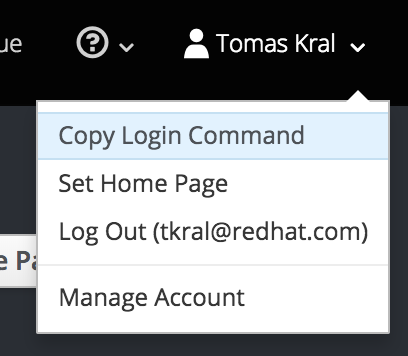
oc login https://api.starter-us-east-1.openshift.com --token=mytoken
odo login https://api.starter-us-east-1.openshift.com --token=mytoken
Similary with minishiftodo login -u developer -p dev has to work in the same way as with oc
kadel
on 11 Jul 2018
How is this going @surajnarwade @syamgk ?
kadel
on 14 Aug 2018
Implementation of ODO LOGIN
Before implementing odo login, Let's understand how oc login works:
In oc, there are 3 ways to login,
username and password:
oc login -u developer -p developertoken:
oc login --token xxxxxxcertificate authority file:
oc login --certificate-authority
For our convenience, we will focus on token based auth first and user/password later
(We understand that, user will use user/password for most of his work )
Flow for token based authentication
you type
oc login --tokenit gathers necessary other information like serveraddress
put this token into clientconfig, based on this clienconfig, we call whoami function, which verifies token and gives corresponding username of token
Based on username, we gather project information such as, if there's any project by corresponding user, if yes assign that, and show list of other project available. if there is no any project, guide user to create project.
Now the tricky part comes into picture, we need to override this configuration in kubeconfig file and set proper current context
(Note: I covered first 3 steps but, I am confused about writing config part, any help is appreciated)
Flow of username and password based authentication:
(Note: this is just my finding, I havn't tried to implement it)
you type
oc login --username developer --password developerit gathers information like serveraddress
based on clientconfig, username and password, we call requesttoken function which talks to cluster and get new token for respective user
again, we call whoami function, which verifies token and gives corresponding username of token (verification process)
Based on username, we gather project information such as, if there's any project by corresponding user, if yes assign that, and show list of other project available. if there is no any project, guide user to create project.
Finally we need to update kubeconfig file with proper context
 surajnarwade
on 16 Aug 2018
surajnarwade
on 16 Aug 2018
@surajnarwade I would only login and logout the user, but now show the list of available projects, only the project he's currently in. That output is too verbose for odo.
@bparees @liggitt
In odo we need to replicate login/logout functionality as provided by oc. Is there a set of reusable functions in cli-go for this? Should we re-create the functionality from scratch? If the latter is the workflow described by @surajnarwade good, and how do we deal with .kube/config file?
 jorgemoralespou
on 16 Aug 2018
jorgemoralespou
on 16 Aug 2018
/cc @soltysh
 bparees
on 16 Aug 2018
bparees
on 16 Aug 2018
@surajnarwade I've been able to use golang.org/x/oauth2 library to get token, you can check it at https://gist.github.com/kadel/c30b3085e2e90a93393b99a2b39f4806
kadel
on 18 Aug 2018
In odo we need to replicate login/logout functionality as provided by oc. Is there a set of reusable functions in cli-go for this? Should we re-create the functionality from scratch? If the latter is the workflow described by @surajnarwade good, and how do we deal with .kube/config file?
There are no re-usable bits, yet. We are hoping that with the new plugin mechanism introduced in k8s 1.12 we'll slowly start turning openshift commands into plugins. Not sure how far this will go, but that approach would benefit odo just by reusing the same plugins.
 soltysh
on 20 Aug 2018
soltysh
on 20 Aug 2018
@kadel maybe it would be worth for you to spend some time with @soltysh understanding this new plugin mechanism and if we should go that route now.
jorgemoralespou
on 23 Aug 2018
Login PR: https://github.com/redhat-developer/odo/pull/643
Logout PR: https://github.com/redhat-developer/odo/pull/699
surajnarwade
on 12 Sep 2018
Why are you trying to (buggily) reimplement oc functionality ?
Just call oc under the hood and avoid all the issues that come up from diverging code bases.
I think you are going in the wrong direction here.
 simo5
on 12 Sep 2018
simo5
on 12 Sep 2018
@simo5, @enj , we don't want dependency of oc binary, so we are trying to reimplement it using odo login or odo logout.
can you please review the both login/logout PR and let us know why it is buggy ?
wrong direction ? I didn't get it ?
surajnarwade
on 12 Sep 2018
We will keep improving and changing oc including and especially login, if you reimplement it you will diverge and will not work as seamlessly as oc login does.
This is going to cause major issues.
Out of the bat I can see that you do not support Single Sign On login which various customers depend on, and you are not verifying TLS certificates which is as a capital sin as you can get. I do not have time to review further, this code duplication is quite a waste of time for all involved and will grow in future further issues for customers and support when you diverge.
I cannot support your course of action.
simo5
on 12 Sep 2018
@simo5 is that improving and changing oc contemplating moving that functionality into reusable code/library?
Or is expected that oc is added as dependency instead of using oc-client-go?
We would like advice.
jorgemoralespou
on 12 Sep 2018
We would like to make oc login more rusable in the future, and perhaps we'll have it as a separate repo in the not too distant future so you could vendor in just the oc client and not the whole of origin.
But for the short term it would be easier for you to just depend on oc IMHO, at least if you want the same functionality and be upgrade safe.
simo5
on 12 Sep 2018
@simo5 @enj I created an issue way long back on openshift/client-go, you can find it here https://github.com/openshift/client-go/issues/52
can you please comment/guide us about the plan ?
surajnarwade
on 13 Sep 2018
@surajnarwade there is no simple way to use openshift/client-go to build the login command. It is a complex higher level command that client-go will never directly support. Even if we broke out the login command into its own repo, just using it as a library would be non-trivial as it requires cgo to interface with GSSAPI and also has custom Windows code for SSPI. For the foreseeable future the only safe and correct route is to use oc.
 enj
on 13 Sep 2018
enj
on 13 Sep 2018
@surajnarwade Could odo vendor relevant parts from oc?
ODO could just call oc login but on the code level, not executing oc binary
kadel
on 25 Sep 2018
Closing since #826 and #699 is merged :tada:
surajnarwade
on 14 Nov 2018
Related issues
kadel
·
4Comments
 maysunfaisal
·
9Comments
kadel
·
5Comments
maysunfaisal
·
9Comments
kadel
·
5Comments
 rnapoles-rh
·
4Comments
surajnarwade
·
5Comments
rnapoles-rh
·
4Comments
surajnarwade
·
5Comments
Most helpful comment
We will keep improving and changing oc including and especially login, if you reimplement it you will diverge and will not work as seamlessly as oc login does.
This is going to cause major issues.
Out of the bat I can see that you do not support Single Sign On login which various customers depend on, and you are not verifying TLS certificates which is as a capital sin as you can get. I do not have time to review further, this code duplication is quite a waste of time for all involved and will grow in future further issues for customers and support when you diverge.
I cannot support your course of action.