Goals
Interactive mode for ocdev would be particularly interesting. When a developer is new to the CLI, he does not necessarily know what are the different commands and options.
The interactive mode would help and guide the user to provide the right commands and options.
Enable/Disable options
The interactive mode for ocdev should be unactivable.
We should enable the interactive mode by default, but have options to disable it so that the
Sub-tasks
- [ ] Study how to provide interactive mode in
ocdev - [x] https://github.com/redhat-developer/odo/issues/1272
 slemeur
All 67 comments
Interesting frameworks to create interactive UIs:
- https://github.com/c-bata/go-prompt
- https://github.com/manifoldco/promptui
- https://github.com/abiosoft/ishell
Ideally, we could have that level of interaction without being thrown into a kind of "sub-shell" mode so that all the completion/interaction could happen on a single line command but that might prove difficult to implement.
I'm starting to look deeper into these options.
 metacosm
on 27 Sep 2018
metacosm
on 27 Sep 2018
Would generating all necessary shell completion scripts (an extension of what has already been done) much the same way that kubectl does be considered a solution?
 geoand
on 2 Oct 2018
geoand
on 2 Oct 2018
@geoand I would consider what you mention the minimum requirement, and AFAIK this is already there, although completion is not on applications/components. Then what @metacosm point, even being a nicer story, sadly I find there are so many other issues that would rank higher than this one. IMHO
 jorgemoralespou
on 2 Oct 2018
jorgemoralespou
on 2 Oct 2018
@jorgemoralespou thanks for your take on this and I must say that I understand your perspective.
I indeed had completion of the components in mind.
geoand
on 2 Oct 2018
@jorgemoralespou I opened #801 for the providing completion on odo create
geoand
on 2 Oct 2018
We need also an interactive mode to help users when they create a service from the catalog (select service, select plan, define parameters)
 cmoulliard
on 2 Oct 2018
cmoulliard
on 2 Oct 2018
@cmoulliard I could look into that using the bash completion method I used in #801 if that is something of interest to the odo team
geoand
on 2 Oct 2018
Is there any interest in this feature? We've started experimenting with making things more interactive in our prototype and would like to know if it's something that's worth pursing for odo as well.
metacosm
on 2 Oct 2018
Also added odo service create completion in #801
geoand
on 3 Oct 2018
Here's an example of an experiment on project scaffolding for our sd prototype using a combination of completion (using posener/complete) and smart prompts (using manifoldco/promptui): https://asciinema.org/a/3sWZmR6UDDqp5qkS0r36tSzvo
metacosm
on 5 Oct 2018
And here's a more complete experiment implementing interactive creation of a service catalog instance: https://asciinema.org/a/cH5WGgEyUFr1NNr9pqgpaMdeZ
metacosm
on 8 Oct 2018
https://github.com/snowdrop/spring-boot-cloud-devex/tree/interactive-basic-complete-promptui branch has been updated to include validation that flags can drive the command if provided. This make the code a little more complex but it still works OK, the interactive mode kicking in only when required information is missing.
metacosm
on 12 Oct 2018
I've added another demo showing the interactive mode working in conjunction with passing flags: if flags are provided, only missing required information is prompted about: https://asciinema.org/a/33XrZKqNwqfQoGQvVrWmdS4Ny
metacosm
on 15 Oct 2018
@metacosm This looks really cool
jorgemoralespou
on 15 Oct 2018
@metacosm FYI, the new openshift installer (https://github.com/openshift/installer) is using an interactive shell go library. This is the one. https://github.com/AlecAivazis/survey
Maybe worth raising in that repository a question on why they did choose that library.
jorgemoralespou
on 16 Oct 2018
@jorgemoralespou great to know, thanks!
geoand
on 16 Oct 2018
Is this lib very different - https://github.com/AlecAivazis/survey from what you adopted @metacosm
cmoulliard
on 16 Oct 2018
@jorgemoralespou good to know, I will take a look!
metacosm
on 16 Oct 2018
multiselect is a nice option that's missing from promptui.
metacosm
on 16 Oct 2018
@jorgemoralespou how did you figure out that installer is using this lib, I don't see it in vendor?
metacosm
on 16 Oct 2018
It is defined within to the gopkg.toml file -> https://github.com/openshift/installer/blob/master/Gopkg.toml#L8-L10
@metacosm
cmoulliard
on 16 Oct 2018
I have created alternative implementations for service create interactive mode in #845 (using promptui) and #857 (using survey). Please let me know which implementation should be used.
My opinion on this: promptui allows for more customization of what is being displayed but this leads to some additional complexity in the code (though nothing too serious). survey is simple and provides nice out of the box features (like typing to reduce possible options in a list of options, which can also be implemented using promptui).
metacosm
on 22 Oct 2018
Do we have any idea of the traction the two libraries have @metacosm ?
geoand
on 24 Oct 2018
I've tested both.
Visually I like promptui a little bit more. There are two things that I especially liked:
As you type validation

Red cross automatically changes to green checkmark once the input validation function is satisfied, so you know if your input is valid even before hitting the enter.
It looks like this is not possible to do with survey you have to hit enter, to get a message if your input is ok or not.
Descriptions for each available option.
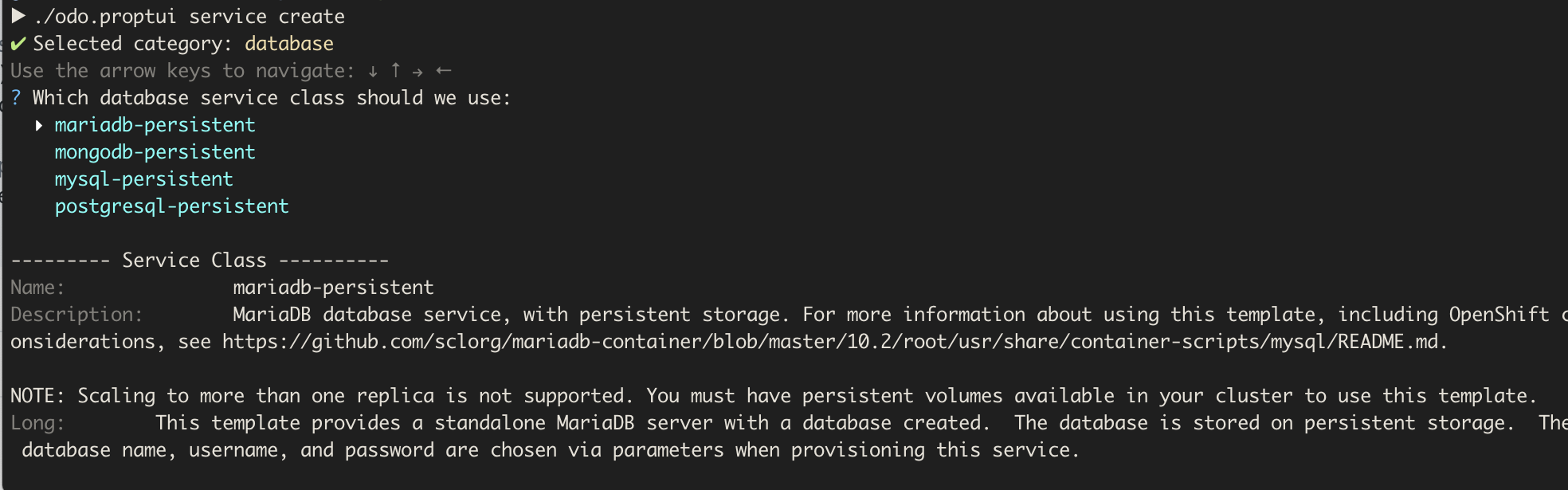
Not sure if this is possible with survey. This is a great feature that would make choosing services a lot easier.
On the other side I really like simplicity of the survey library. And it looks like it is more widely used.
(Packages that import promptui vs. Packages that import survey). Notable projects that are using survey: openshift/installer, GoogleCloudPlatform/skaffold, jenkins-x/jx, pulumi/pulumi ...
Not sure about what to choose. Both options are OK. If we could do the descriptions with survey I would probably go with that, as it might be safer option just based on other projects using it.
But on the other hand, from the users point of view promptui feels a little bit more polish, at least for me.
 kadel
on 25 Oct 2018
kadel
on 25 Oct 2018
I have one comment for an interactive mode in general.
With the current implementation, you can do something like partial interactive mode. You can provide just some flags and interactive mode will ask you for the rest.
For example, I can run odo service create mysql-persistent -p MYSQL_DATABASE=mydb and then interactive mode will ask me for all remaining parameters.
I think that it would be better to run either in interactive mode or in normal batch mode.
If you run just odo service create without any arguments it would start interactive mode.
Once you provide even a single argument or flag you would be in the normal batch mode.
That means that if you run something like odo service create mysql-persistent -p MYSQL_DATABASE=mydb and you are missing required arguments it fails.
kadel
on 25 Oct 2018
Regarding the partial interactive mode, here's the comment I made right after the initial commit: https://github.com/redhat-developer/odo/pull/845#issuecomment-431073931
Personally, I think that a flag to control "batch" mode would be better so that power-users can still benefit from a mixed mode.
metacosm
on 25 Oct 2018
I think this boils down to you the main audience of odo is intended to be.
If it's people that will script its execution, then batch mode should be the default. Otherwise, interactive makes most sense.
geoand
on 25 Oct 2018
Somewhat related, if batch mode is going to be the default, the I believe we need to ensure that the various delete commands don't ask for confirmation
geoand
on 25 Oct 2018
I think the target audience are developers so I think the interactive mode should be the primary focus. However, as a developer, I also like to automate stuff and in that case, I'd rather have a flag (or maybe an env variable) that I could use to tell odo that I don't want to interact with it at all. I suspect (but I'm don't know enough about shell scripting) that there might even be a way to detect whether we're running in an interactive shell or as part of a script, in which case odo could deactivate the interactive mode by itself.
metacosm
on 25 Oct 2018
Detecting interactive mode in bash: https://www.gnu.org/software/bash/manual/html_node/Is-this-Shell-Interactive_003f.html
metacosm
on 25 Oct 2018
Check if output is a terminal in Go: https://rosettacode.org/wiki/Check_output_device_is_a_terminal#Go
(not sure that would be enough)
metacosm
on 25 Oct 2018
I agree that the target audience should be developers with an interactive focus in mind. But then again I crashed the odo party pretty late so I am not aware of what has been discussed in the past :)
geoand
on 25 Oct 2018
@kadel I've managed to display details similarly to what can be done with promptui using survey. It's a pretty rough proof of concept but I think we could make it work. #857 is updated with that code if you want to give it a try.
metacosm
on 25 Oct 2018
@geoand
Somewhat related, if batch mode is going to be he default, the I believe we need to ensure that the various delete commands dont ask for confirmation
Every delete command already have -f /--force.
@metacosm , @geoand
I agree with you that default mode should be interactive, that is why I suggest that when you run the command without any flag then it should go to interactive mode.
For me, the combination where you can specify a few flags and then the command will jump into the interactive mode and ask you for the rest is pretty wired and confusing.
If I run the command with flags it should expect that I want to use flags and not interactive mode.
But maybe it is just me 😇 I'll try to look around and see how other tools are doing it.
kadel
on 26 Oct 2018
For me, the combination where you can specify a few flags and then the command will jump into the interactive mode and ask you for the rest is pretty wired and confusing.
If I run the command with flags it should expect that I want to use flags and not interactive mode.
Fair enough, and it would make the implementation simpler too 😉
metacosm
on 26 Oct 2018
@kadel have you been able to make a determination on whether to have a mixed mode or not? Also, do we have a decision on whether to go with survey or promptui?
metacosm
on 30 Oct 2018
I've tested both survey and promptui on windows.
I have one issue with promptui on windows. When selecting something from the list the arrows keys don't work. I had to use the vi keys j and k to move up and down.
I haven't had this issue with survey.
Tested with regular cmd.exe terminal on Windows 10 inside VirtualBox on MacBook.
kadel
on 28 Nov 2018
@kadel should we go ahead with survey then? That's the assumption I've been working on, updating the survey PR (#857)…
metacosm
on 4 Dec 2018
@metacosm updating the issue with what we discussed on today's planning call. Yes, survey is the framework selected.
jorgemoralespou
on 5 Dec 2018
I have been playing with the interactive mode PR and although it's awesome, I think we are sort of limiting ourselves.
I believe that interactive should be our default mode where you provide as much help as possible to developers whenever possible.
For example with the current situation, odo service create dh-postgresql-apb would fail because the user is expected to set a plan. Such a condition could easily be picked up by the tool if we assumed interactive was the default and guide the user to complete the remaining steps.
Same could happen for example for odo url create, odo link and probably everywhere we have auto-completion in place.
So the gist is that I believe interactive mode should be the default and batch mode should be enabled explicitly (with a global flag like -b)
geoand
on 10 Dec 2018
If you run just odo service create without any arguments it would start interactive mode.
Once you provide even a single argument or flag you would be in the normal batch mode.
That means that if you run something like odo service create mysql-persistent -p MYSQL_DATABASE=mydb and you are missing required arguments it fails.
@kadel @metacosm I believe it might help to run a mixture. If the user misses a required parameter(s), it would be better to ask him for them, because if he doesn't, it might be by mistake as the list of them might be too long. WDYT?
 mik-dass
on 12 Dec 2018
mik-dass
on 12 Dec 2018
If you run just odo service create without any arguments it would start interactive mode.
Once you provide even a single argument or flag you would be in the normal batch mode.
That means that if you run something like odo service create mysql-persistent -p MYSQL_DATABASE=mydb and you are missing required arguments it fails.@kadel @metacosm I believe it might help to run a mixture. If the user misses a required parameter(s), it would be better to ask him for them, because if he doesn't, it might be by mistake as the list of them might be too long. WDYT?
@mik-dass That's what I propose as well. Currently the interactive mode is limited in what it can provide. Only if you embrace it fully will we unlock it's potential
geoand
on 12 Dec 2018
@mik-dass That's what I propose as well. Currently the interactive mode is limited in what it can provide. Only if you embrace it fully will we unlock it's potential
Agreed :+1: Otherwise it will be limited in use just as you said. The tool should be smart enough.
mik-dass
on 12 Dec 2018
@geoand @metacosm I think we need to balance the complexity it makes to have partial interactiveness in the code, in a consistent manner (to each and every command). As far as I understood last time we discussed this, the code gets more complicated if we want to support interactiveness partially, as the command line needs to be parsed and compared to the list of possible options, and....
It's up to you, but I would consider a reasonable scenario to fail to the user in case he provides arguments when one is missing, as long as you tell him the missing argument so he can fix the command line in a second attempt. With time, we will learn better, but look into this scenario:
A user does:
odo create java my-java-component --memory=2G
Should the CLI then ask me for each and every command that it can use? Only the required ones? How can one identify the required ones before hand. Is it always possible?
In the scenario your laid out, creating a service, if the service has only one plan, it should use that one, but when there are multiple plans, it should:
- ask for a plan
- use a default (if there is one)
- fail
IMHO there's much pressing issues to this one, and at the end of the day everything boils down to code complexity. In any case, the behavior (if adopted) needs to be able to be opted-out, so that in automation, it would just fail in these situations. This last part is very critical.
jorgemoralespou
on 12 Dec 2018
@jorgemoralespou I believe the tool should be made as smart as possible to make it as easy as possible for our users. If that means having more complex code on our side, so be it. Regarding the interactive mode kicking in in automation scenarios, I believe that would represent a scripting error in any case because it would mean that the automation tool is missing parameters anyway… We could, of course, add a flag to make sure that the interactive mode never kicks in when requested but the way I previously implemented the mixed mode was that it would only kick in when required parameters were missing so it would only kick in in automation scenarios if the calling script was not providing required values which would result in a failure either way…
metacosm
on 12 Dec 2018
@metacosm but the problem is that in automatic scenarios one should error out immediately and not wait for user input until it times out. Which by the way, will eventually timeout, not?
I agree on making the tool as smart as possible by complicating the code, but I wouldn't trade off making this for having many of the missing required functionality. Only if it would be easy to implement I would take this now, else, there's a lot of things that I would do before. But not my call ;-)
jorgemoralespou
on 12 Dec 2018
Time out: that's a good question… :)
metacosm
on 12 Dec 2018
Regarding the timeout feature, there's a feature request for survey: https://github.com/AlecAivazis/survey/issues/159
metacosm
on 3 Jan 2019
Seems like most people who try the interactive mode are surprised by the lack of interactivity when some parameters are provided. I really think we should implement a maximally interactive tool and provide a flag to force it to "batch" mode instead of the current behavior. What do you think, @kadel @jorgemoralespou? Could we at least settle this discussion once and for all (and document it) since it keeps popping up when people try the interactive mode?
metacosm
on 4 Jan 2019
As for the scenarios where absolutely no interactivity should ever be present, we could easily use a -b flag like maven does for example
geoand
on 4 Jan 2019
I still find the mixed mode confusing, and unnecessarily complicated. I would much more prefer full interactive or no interactive at all, but nothing in between.
odo service create- interactive modeodo service create mysql- non-interactive mode, with all default values
If you run just a root command, you end up in interactive mode, as soon as you add argument or flag, you are in non-interactive mode.
For me this makes sense. I don't think that there should be any confusion, especially if we mention the rule in documentation and help message.
kadel
on 4 Jan 2019
@kadel the problem is that pretty much everyone but you expected a mixed mode when providing only some values based on the comments on the PR… and I think the tool would be more useful that way. Don't you think a flag to trigger a completely non-interactive mode would be a proper solution?
The problem with the scenario you describe above is that in many instances you will need to run the command (or different commands) multiple times to figure out what the proper parameters are and you might not even be aware of them in the first place. Similarly, there are many instances where no default values exist or they don't make much sense when they do. Finally while using default values is fine for demos, I'd assume that most real-life scenarios will see developers provide custom values to these properties and the tool should help there as much as possible.
metacosm
on 4 Jan 2019
I agree with @metacosm as when I was crying a service I didn't know what
parameters to provide but I knew what service I wanted to create.
I would at least hope for a flag that triggers interactive in this case:
odo service create mysql -i
So at least I can get the interactive help for those parameters I'm not
sure about.
jorgemoralespou
on 6 Jan 2019
I'd argue that the interactive mode should be the default (less typing, less cognitive load). It doesn't hurt script creators to add one flag so I think the "burden" of enabling/disabling the interactive mode should be on people wanting to automate, not on people interacting (pun intended) with the tool directly.
metacosm
on 7 Jan 2019
@metacosm we have decided we should probably validate the user experience that makes more sense.
I'll do a due diligence with my team in the meantime
jorgemoralespou
on 8 Jan 2019
@metacosm we have decided we should probably validate the user experience that makes more sense.
I'll do a due diligence with my team in the meantime
We have 5 data points already: you, @kadel, @geoand, @mik-dass and me. Out of these 5, only @kadel would not want more interactivity so far.
metacosm
on 9 Jan 2019
My whole OpenShift Advocate team voted to support @kadel (they were 6)
jorgemoralespou
on 10 Jan 2019
My whole OpenShift Advocate team voted to support @kadel (they were 6)
That's surprising. What was the rationale?
metacosm
on 10 Jan 2019
The argument was that it was more intuitive.
I'm tagging them here:
@marekjelen, @jankleinert, @gshipley, @grahamdumpleton, @mhausenblas, @ryanj, @joshix
jorgemoralespou
on 10 Jan 2019
I presented one point to Jorge
- should only be used on temrinal commands when no arguments were passed
the second reason would be that
- should not be replacing general help, but should be there help in cases, where the flow otherwise would be way too complex for the end user
 marekjelen
on 10 Jan 2019
marekjelen
on 10 Jan 2019
@marekjelen that makes sense, however, in the specific service create instance, the help won't really help you as it will not list any of the parameters you will need to create a service, just give you the syntax. The flow without full interactive mode is: figure out which class you want, then which plan for that class, then figure out which parameters exist for that class/plan and which are required or which you can accept default values (if any). It's quite a complex flow and most humans won't be able to perform it successfully in only one try without running other commands in parallel to check what's needed and/or write things down before attempting the command. Just because you know the service class you want to use doesn't mean you know all the other information by heart. Only during demos do you accept default values usually, anyway.
metacosm
on 11 Jan 2019
But like I said before, having a less interactive mode is easier to implement. However, it makes for an inferior tool, in my opinion, as a tool should always try to help as much as possible (without becoming nagging, of course).
metacosm
on 11 Jan 2019
The argument was that it was more intuitive.
I'm tagging them here:
@marekjelen, @jankleinert, @gshipley, @GrahamDumpleton, @mhausenblas, @ryanj, @joshix
How was the problem presented, though? Because discussing with people, it seems that we don't all have the same assumptions regarding what an interactive mode means. Did they actually try to create a service instance with non-default values?
metacosm
on 11 Jan 2019
I would say let's start with what is easier to implement.
We will get more people using it and we will get more feedback and than we can update accordingly.
It is better to start with something simple, and than add features to it based on feedback.
kadel
on 14 Jan 2019
@kadel makes sense, let's get #857 merged then… :)
metacosm
on 14 Jan 2019
continued in https://github.com/redhat-developer/odo/issues/1242
kadel
on 28 Jan 2019
Closing this since it will be tracked in #1242
 surajnarwade
on 3 Jul 2019
surajnarwade
on 3 Jul 2019
Related issues
surajnarwade
·
5Comments
 prietyc123
·
7Comments
prietyc123
·
7Comments
 jbpratt
·
5Comments
jbpratt
·
5Comments
 johnmcollier
·
7Comments
johnmcollier
·
7Comments
 maysunfaisal
·
8Comments
maysunfaisal
·
8Comments
Most helpful comment
I have been playing with the interactive mode PR and although it's awesome, I think we are sort of limiting ourselves.
I believe that interactive should be our default mode where you provide as much help as possible to developers whenever possible.
For example with the current situation,
odo service create dh-postgresql-apbwould fail because the user is expected to set a plan. Such a condition could easily be picked up by the tool if we assumed interactive was the default and guide the user to complete the remaining steps.Same could happen for example for
odo url create,odo linkand probably everywhere we have auto-completion in place.So the gist is that I believe interactive mode should be the default and batch mode should be enabled explicitly (with a global flag like
-b)