Odm: GDALWarp doesn't use multiple cores
Hey!
I'm running a very big project to identify bottlenecks on opendronemap and I've found out that gdalwarp is not running on multiple cores.
Output line from OpenDroneMap:
[DEBUG] running gdalwarp -cutline /code/odm_georeferencing/odm_georeferenced_model.bounds.shp -crop_to_cutline -co NUM_THREADS=ALL_CPUS -co BIGTIFF=IF_SAFER -co BLOCKYSIZE=512 -co COMPRESS=DEFLATE -co BLOCKXSIZE=512 -co TILED=YES -co PREDICTOR=2 /code/odm_orthophoto/odm_orthophoto.original.tif /code/odm_orthophoto/odm_orthophoto.tif
htop screenshot:
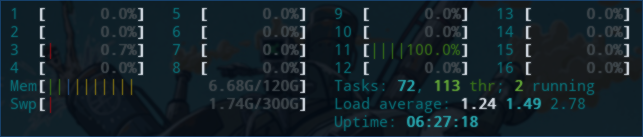
Isn't -co NUM_THREADS=ALL_CPUS suposed to make it run on multiple threads?
 giovannicimolin
All 22 comments
Found something here: http://osgeo-org.1560.x6.nabble.com/gdal-dev-gdalwarp-and-gdaladdo-in-multi-threaded-mode-td5252818.html
Apparently there's 2 parameters on gdalwarp to speed up calculations using multiple processors/cores:
-multi
and
-wo NUM_THREADS=ALL_CPUS
giovannicimolin
on 7 Mar 2018
This may not be a bug: if this task is I/O bound there's not much we can do besides using faster disks...
giovannicimolin
on 7 Mar 2018
The task doesn't seem to be I/O bound, i'ts only showing some 4 to 10 Mb/s read peaks on an aws instance with instance store (500Mb/s nominal speed).

giovannicimolin
on 7 Mar 2018
I find myself constantly shaking my fists at GDAL. The code is found here:
https://github.com/OpenDroneMap/OpenDroneMap/blob/master/opendm/cropper.py#L46
Can you try adding -multi like below:
            run('gdalwarp -cutline {shapefile_path} '
                '-crop_to_cutline '
                '-multi '
                '{options} '
                '{geotiffInput} '
                '{geotiffOutput} '.format(**kwargs))
 dakotabenjamin
on 7 Mar 2018
dakotabenjamin
on 7 Mar 2018
Nor -multi neither -co NUM_THREADS=ALL_CPUS or -wo NUM_THREADS=ALL_CPUS seems to make it work on multiple cores.
giovannicimolin
on 7 Mar 2018
OK then. @pierotofy contributed this code, perhaps he can provide some insight
dakotabenjamin
on 7 Mar 2018
Use multithreaded warping implementation. Two threads will be used to process chunks of image and perform input/output operation simultaneously. Note that computation is not multithreaded itself. To do that, you can use the -wo NUM_THREADS=val/ALL_CPUS option, which can be combined with -multi
http://www.gdal.org/gdalwarp.html
So try to pass both?
 pierotofy
on 7 Mar 2018
pierotofy
on 7 Mar 2018
Also what version of gdalwarp are we running?
pierotofy
on 7 Mar 2018
I've tried passing both options too with no sucess.
We're using GDAL 2.1.3
giovannicimolin
on 9 Mar 2018
Did some digging, what happens if you pass:
-co GDAL_NUM_THREADS=ALL_CPUS ?
-wo --> options passed to warp algorithm (which doesn't affect speed here, because we don't warp anything, we are just cropping)
-co --> options passed to output driver, and GDAL_NUM_THREADS is set to do compression on the main thread (slow)
-multi --> Enables multithreaded warping implementation (uses two threads for input and output), but again, since we don't do warping, I don't think this helps us.
If it works, could you open a PR?
pierotofy
on 9 Mar 2018
Would be interesting to also see if performance increases when passing -co GTIFF_VIRTUAL_MEM_IO=IF_ENOUGH_RAM and -co GTIFF_DIRECT_IO=YES. http://www.gdal.org/frmt_gtiff.html
pierotofy
on 9 Mar 2018
For -co GTIFF_VIRTUAL_MEM_IO=IF_ENOUGH_RAM I get:
Warning 6: driver GTiff does not support creation option GTIFF_VIRTUAL_MEM_IO
For -co GTIFF_DIRECT_IO=YES I get:
Warning 6: driver GTiff does not support creation option GTIFF_DIRECT_IO
Also this -co GDAL_NUM_THREADS=ALL_CPUS doesn't work:
Warning 6: driver GTiff does not support creation option GDAL_NUM_THREADS
giovannicimolin
on 9 Mar 2018
If passing:
-multi -co NUM_THREADS=ALL_CPUS -wo NUM_THREADS=ALL_CPUS -oo NUM_THREADS=ALL_CPUS -doo NUM_THREADS=ALL_CPUS
Doesn't improve performance, then I'm not sure what's the cause. When I pass both -co and -wo I see full usage of all my cores. :confused:
pierotofy
on 9 Mar 2018
Running GDAL 2.2.3, released 2017/11/20 on my machine.
pierotofy
on 9 Mar 2018
GDAL Version:
➜  test gdalwarp --version
GDAL 2.2.3, released 2017/11/20
Command used:
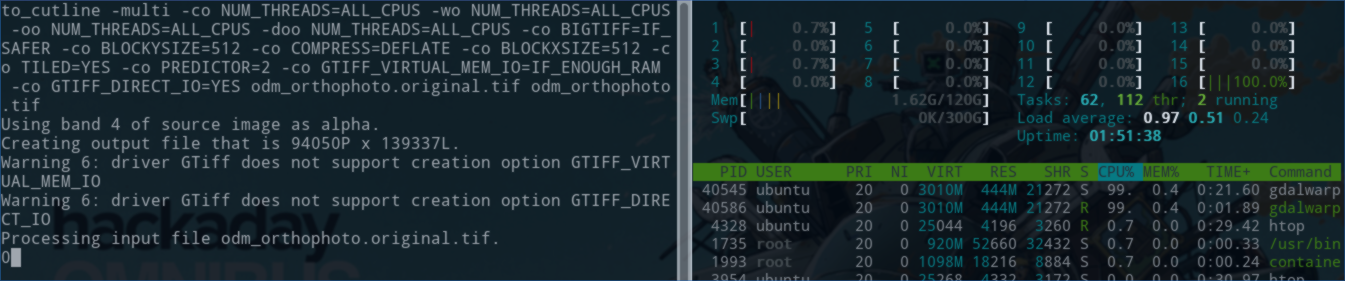
gdalwarp -cutline odm_georeferenced_model.bounds.shp -crop_to_cutline -multi -co NUM_THREADS=ALL_CPUS -wo NUM_THREADS=ALL_CPUS -oo NUM_THREADS=ALL_CPUS -doo NUM_THREADS=ALL_CPUS -co BIGTIFF=IF_SAFER -co BLOCKYSIZE=512 -co COMPRESS=DEFLATE -co BLOCKXSIZE=512 -co TILED=YES -co PREDICTOR=2 -co GTIFF_VIRTUAL_MEM_IO=IF_ENOUGH_RAM -co GTIFF_DIRECT_IO=YES odm_orthophoto.original.tif odm_orthophoto.tif
Runs only on 1 core.
GDAL was built from SVN branch 2.2.
giovannicimolin
on 9 Mar 2018
Thanks for the screenshots/info.
Mm, could you share your odm_georeferenced_model.bounds.shp and odm_orthophoto.original.tif file? Trying to understand why I'm observing different results :smile:
pierotofy
on 9 Mar 2018
I've sent you the requested files on a private channel on Gitter, as I can't make them publicly available.
giovannicimolin
on 12 Mar 2018
So, the performance is almost certainly I/O and memory bound based on my observations. This is especially true for larger GeoTIFFs (which is what you are testing with).
Options --> Time for 1 tick of processing
-wo NUM_THREADS=ALL_CPUS --> 2:59
-co NUM_THREADS=ALL_CPUS --> 3:05
-co NUM_THREADS=ALL_CPUS -wo NUM_THREADS=ALL_CPUS --> 3:06
-multi -co NUM_THREADS=ALL_CPUS -wo NUM_THREADS=ALL_CPUS --> 3:07
--config GDAL_CACHEMAX 500 -wm 500 --> 1:34 (makes sense, since it loads more blocks into memory)
-multi -co NUM_THREADS=ALL_CPUS -wo NUM_THREADS=ALL_CPUS --config GDAL_CACHEMAX 500 -wm 500 --> 1:34 (no improvements here, thus memory bound)
--config GDAL_CACHEMAX 3000 -wm 3000 --> 0.33 (3G of RAM required here however)
--config GDAL_CACHEMAX 9000 -wm 9000 --> 0.21 (9GB, enough to load your GeoTIFF in memory all at once)
So the bottom line is that I don't think (hope somebody proves me wrong) there's not much to be gained by adding more cores (this might have been true if we were doing warping, but since we're just cropping I suspect most of the time is spent just doing I/O).
We should tweak GDAL_CACHEMAX and -wm, but we need to be careful, choosing too high of a value will make the program fail (bad). Perhaps we can use Python to query the available memory, divide by 3 and use that.
PR for this would be welcome if anyone wants to take a stab at it.
pierotofy
on 13 Mar 2018
--config GDAL_CACHEMAX $VALUE -wm $VALUE
Where $VALUE is half the free memory.
Can I put these parameters on all gdal_options?
I believe it will improve overall performance on all GDAL operations if the parameters are supported.
PR Incoming... :smile:
giovannicimolin
on 15 Mar 2018
I would recommend using %X for GDAL_CACHEMAX: This option controls the default GDAL raster block cache size. If its value is small (less than 100000), it is assumed to be measured in megabytes, otherwise in bytes. Starting with GDAL 2.1, the value can be set to "X%" to mean X% of the usable physical RAM. Note that this value is only consulted the first time the cache size is requested overriding the initial default (40MB up to GDAL 2.0, 5% of the usable physical RAM starting with GDAL 2.1) https://trac.osgeo.org/gdal/wiki/ConfigOptions
wm requires more thought. https://trac.osgeo.org/gdal/wiki/UserDocs/GdalWarp
`The -wm flag affects the warping algorithm. The warper will total up the memory required to hold the input and output image arrays and any auxilary masking arrays and if they are larger than the "warp memory" allowed it will subdivide the chunk into smaller chunks and try again.
If the -wm value is very small there is some extra overhead in doing many small chunks so setting it larger is better but it is a matter of diminishing returns.`
So adding more is not necessarily going to improve performance. I wouldn't add it to all commands unless you can measure a tangible improvement in performance.
pierotofy
on 16 Mar 2018
Perhaps related, but are we using -co "BLOCKXSIZE=value" -co "BLOCKYSIZE=value" when we create the initial tif? This could help in ensuring we have small chunks to stream through further operations, and might help with memory bound operations. I usually set it to -co "BLOCKXSIZE=512" -co "BLOCKYSIZE=512" but have set it as high as 4096.
 smathermather
on 16 Mar 2018
smathermather
on 16 Mar 2018
I should say, I've never tested its effect on future GDAL operations, but it'd be good practice to use BLOCKXSIZE and BLOCKYSIZE for serving the data to web services, viewing in QGIS, etc..
smathermather
on 16 Mar 2018
Related issues
 syehorov
·
5Comments
syehorov
·
5Comments
 x-ancin
·
3Comments
x-ancin
·
3Comments
 xialang2012
·
3Comments
xialang2012
·
3Comments
 thsant
·
5Comments
pierotofy
·
4Comments
thsant
·
5Comments
pierotofy
·
4Comments