Odm: Fewer than 3 GCPs have correspondences in the generated model.
I have been repeatedly encountering an issue with the GCPs by running ODM with the Toledo input and also with my own data. I have checked the GPS locations in the exif data from the images. The GCPs are in the right locations and the coordinates are in UTM with the correct header. But I get always the same error:
Error in Georef:
Fewer than 3 GCPs have correspondences in the generated model.
[ERROR] Georeferencing failed.
Traceback (most recent call last):
File "/home/vman/vman/OpenDroneMap/scripts/odm_georeferencing.py", line 124, in process
'-outputCoordFile {coords}'.format(**kwargs))
File "/home/vman/vman/OpenDroneMap/opendm/system.py", line 28, in run
raise Exception("Child returned {}".format(retcode))
Exception: Child returned 1
The odm_georeferencing_log.txt files says at the bottom:
Successfully loaded /home/vman/vman/OpenDroneMap/tests/test_data/odm_texturing/odm_textured_model.obj.
Error in Georef:
Fewer than 3 GCPs have correspondences in the generated model.
I have more than 3 GCPs in the gcp_list.txt file.
Everything works fine by ignoring the gcp_list.txt file (--use-exif option).
Is there still something I am overseeing?
Thanks
Volker
 vroeb
vroeb
All 43 comments
@Volker
I have had problems with GCP as you describe.
I compile ODM from today's git.
The fewer than 3 GCPs message disappear but i have inconsistent results.
I have a set of 10 images with 19 painted targets measured with geodetic GPS.
i let it here, if you wanna take a look.
cartognu.org/odm/odm_gcp_br_2017-04-10.tar.bz2 89MB
thx, regards,
julio
 yjmenezes
on 10 Apr 2017
yjmenezes
on 10 Apr 2017
Thanks, Julio!
I downloaded your dataset and successfully processed it. No error. The georeferencing step worked as expected. Great!
I then verified that my GCPs are in the same format as yours and I reprocessed my images. I got the same GCP error as before. I noticed that at the end of the opensfm process "Merging depthmaps" had failed due to insufficient memory. The processing, however, continues and eventually stops with "Error in Georef: Fewer than 3 GCPs have correspondences in the generated model."
Might this be the issue? I have got 150 images and 8GB of RAM. I can try to reduce the amount of images.
Thanks,
Volker
vroeb
on 11 Apr 2017
Resizing the images to some smaller dimensions helped to work around the memory problem in the opensfm process "Merging depthmaps". But the GCP error remains the same.
Attached is the odm_georeferencing_log.txt file. Anything suspicious?
odm_georeferencing_log.txt
Thanks,
Volker
vroeb
on 11 Apr 2017
It looks like you are using negative values for the pixelY values in your gcp file:
"
Reading following GCPs from file:
x_: 501645 y_: 4.23477e+06 z_: 14.522 pixelX_: 750 pixelY_: -610 image: Shinko_20170402_0234.jpg
"
I think thats the problem!
regards, Lucas
 LucasMM86
on 11 Apr 2017
LucasMM86
on 11 Apr 2017
Hi Lucas,
the negative sign does not seem to have any influence. Same error with only positive numbers. So far, I used ODM on a Dell XPS 13 with Ubuntu 16.04 installation.
Surprising:
I installed ODM on my MacBook Pro through Docker and the georeferencing works . No GCP error occurred (with negative numbers for the pixelY positions).
Are there any OS dependencies?
Volker
vroeb
on 11 Apr 2017
Volker,
thank you.
I saw your log and i realise this:
1- resized image as input for georeferencing, this may justify the scale problem i am facing. I confirmed it.
I rescale my Pixel_X, pixel_Y to fit resized images. From 4000x3000 to 2400x1800. Scale factor 0.6
from this:
EPSG:32722
658528.361 7167002.098 890.636 2460.6 233.9 IMG_5349.JPG HV01
to this:
EPSG:32722
658528.361 7167002.098 890.636 1476.4 140.3 IMG_5349.JPG HV01
and then this: ODM Pixel_X, Pixel_Y must be integers
EPSG:32722
658528.361 7167002.098 890.636 1476 140 IMG_5349.JPG HV01
2- your Pixel_Y are negative, i change mine to +.
ODM image axis have origem on uper left corner. Y axis grows positive downwards.
3- empty lines, wrong header can be a problem. Extra point name field is ok.
stack FIFO: first in , first out
garbage in, garbage out
Please , try reprocess my data set with this new gcp_list.txt
http://cartognu.org/odm
[]s
julio
2017-04-11
yjmenezes
on 11 Apr 2017
I'm having issues with the GCP file in Toledo as well. I think at one point I resized the original images and that's why the GCPs no longer work. TBH I should just remove that dataset from the repo and point to https://github.com/OpenDroneMap/odm_data for sample testing datasets.
 dakotabenjamin
on 11 Apr 2017
dakotabenjamin
on 11 Apr 2017
@dakotabenjamin
1- i think the scale i applied by hand, should be done inside Georef routine.
( runtime parameter --resize-to )
2- i agree, https://github.com/OpenDroneMap/odm_data for sample testing datasets. it could be revised and keep good datasets for all situations.
i use some extra GPS points for QC check. ODM works like a charm, considering my poor image quality. http://cartognu.org/odm/odm_extra_gcp_ckeck.png
BTW, git Toledo has no GCPs.
[]s
julio
yjmenezes
on 11 Apr 2017
@yjmenezes I tried this http://cartognu.org/odm and the georreferencing with gcp worked OK.
Then I tried the same but with --resize-to 500 and i get "Fewer than 3 GCPs have correspondences in the generated model."
I had this problem already with other datasets. It looks like odm_georreferencing is not taking into account the resize parameter when finding the gcp positions in the model. Is that right? Does odm_georeferencing only work with --resize-to parameter at default?
LucasMM86
on 11 Apr 2017
@LucasMM86
this is the question.
By default ODM resize the 4000x3000 images to 2400x1800.
Georef uses resized images as input, so, the Pixel_X, Pixel_Y must refer to resized images.
If runtime parameter --resize-to, changes the resized images, Georef will fail.
The --resize-to 500 convert from 4000x3000 to 375x500 and this will be a problem unless we edit gcp_list.txt.
I think user should measure Pixel X, Pixel Y over raw input image and let ODM, accordingly scale it, to fit the resized images.
yjmenezes
on 12 Apr 2017
I can confirm LucasMM86's findings. Running the http://cartognu.org/odm data set with default resizing to 2400x1800 pixels works. No GCP error.
Setting the --resize-to value to something different from 2400 sometimes results in errors regarding the georeferencing process, but sometimes does complete successfully. Attached are two log files for --resize-to 2100 and 2300. Resizing to 2100 returns the GCP Georef error, whereas processing with the 2300 value completes successfully.
odm_georeferencing_log_2100.txt
odm_georeferencing_log_2300.txt
I noticed that small resize values are often returning gcp errors, whereas resize values larger than 2400 seem to work - at least for the data set from yjmenezes, . It is probably safer to rescale the Pixel_X, Pixel_Y to fit the resized images as suggested by yjmenezes.
Can anybody see a dependency in the georeferencing process on the image dimensions?
Also, any experience with computing the georeferencing part externally using a different software? I could potentially first process my images with --use-exif and then later georeference the ODM result. I am mostly interested in a final xyz (las) file.
Thanks,
Volker
vroeb
on 12 Apr 2017
So I think the solution here is to remove the entire resize module. It's largely irrelevant anyways as OpenSfM does its own image manipulation and the rest of the toolchain should just use the raw images/ directory.
dakotabenjamin
on 12 Apr 2017
The dependency is here I think: https://github.com/OpenDroneMap/OpenDroneMap/blob/master/scripts/odm_georeferencing.py#L97
dakotabenjamin
on 12 Apr 2017
@dakotabenjamin
I agree, resize and gcp_list.txt scale could be done as a preparation step, outside ODM, case user have a large and heavy dataset and wanna a fast validation run.
Besides that:
. bundle_r000.out will reflect the collected images.
. final image quality can be better despite a run time costs.
yjmenezes
on 12 Apr 2017
My opinion is that resize-to in ODM is very usefull. I use this to make quick runs and I dont have a big computer so I need it for medium size datasets.
LucasMM86
on 12 Apr 2017
@vroeb
if you use --resize-to , you must edit ou write a new gcp_list.txt measuring the photo coordinates again over the new resized images, unless it will be implemented a code to take the new scale into account, automaticly.
@LucasMM86
yes, resize-to is important but i think it could be performed outside ODM pipeline.
Once you prepare your resized dataset and measure your GCP over it, ODM can run without resize module as @dakotabenjamin has suggested.
yjmenezes
on 12 Apr 2017
I could be wrong, but @yjmenezes -- I don't think it's necessary to write a new gcp list based on the resize, if the resize is happening within ODM. This is only necessary if you resize after creating gcps but before loading into ODM. If this is not the case, then we have a bug or regression in ODM.
 smathermather
on 12 Apr 2017
smathermather
on 12 Apr 2017
@smathermather
i apologise for my bad english and thank you to start ODM project, you and all developers.
For me, ODM is working this way:
After loading the raw images, ODM performs resize, automatically.
By default a 4000x3000 is resized to 2400x1800, ( i do not test other sensors ).
The user do not know about this automatic resize step, unless he is watching the screen or reading the logs.
All next steps uses the resized image, right ?. OpenSfm,..... Georef
I have to measure the gcp_list.txt consistent with the resized images as well.
Any change, for example due to --resize-to, will have consequences on gcp_list.txt
Better would be the user gcp_list.txt be measured over the raw image and any effect due to resize be treated by ODM at run time, keeping the original raw gcp_list.txt.
Please, correct me if i misunderstood the ODM georeferencing procedure.
yjmenezes
on 12 Apr 2017
Hi @yjmenezes -- if you are correct about what ODM does, then it's a bug. Have you verified that the resized images are what are used in georeferencing, or are you assuming that this is the case?
smathermather
on 13 Apr 2017
@smathermather
i am sure ODM works with resized images during georeferencing process.
BTW, @dakotabenjamin already add a bug label.
Please, try my small dataset, cartognu.org/odm and check odm_georeferencing_log.txt head.
i have two gcp_lists, raw and scaled.
thx,
PS: I think odm_boruszyn_kap-master uses gcp_list.txt was measured over resized images too.
yjmenezes
on 13 Apr 2017
Cool. Thanks to you and @vroeb for bringing this to our attention!
smathermather
on 13 Apr 2017
odm_boruszyn_kap was for sure measured and referenced to original images.
 merkato
on 14 Apr 2017
merkato
on 14 Apr 2017
@merkato
tkx for sharing your good dataset.
please, take a look on cartognu.org/odm
i plot your gcp_list.txt over gcp_4881_raw.png and gcp_4881_resized.png
the gcp over resized image have made more sense for me.
i did not check all dataset.
yjmenezes
on 14 Apr 2017
@dakotabenjamin
I have fixed Toledo dataset gcp_list.txt. Same problem, solved after scale to resized images.
Please, take a look in your spare time, cartognu.org/odm
odm_toledo_georef_2017-04-18.tar.bz2
yjmenezes
on 18 Apr 2017
Thank you all for shedding light on the GCP and resizing issue!
I was able to process my images with different resolutions. I ended up using ImageMagick 'convert' to resize the images first.
The Pixel_X, Pixel_Y indices in the GCP list file have to be scaled accordingly (to integers). In case the original indices are being used in combination with resized images, the GCP points end up in the wrong location and the georeferencing process produces a distorted output.
Now, one thing I noticed:
Using resized images of lower resolution than the original image does not save me much memory. My goal is to use low resolution images to cover a larger area. I am fine with a low resolution output, but in the cases that I have tried (e.g. resizing to 2000 or even 1000) the resulting odm_georeferenced_model point clouds are of about the same file size compared to what I get from the original images of resolution 4000.
Any idea how to reduce the resolution of the point cloud data and how to reduce the memory consumption?
Thanks
Volker
vroeb
on 20 Apr 2017
Hi @vroeb -- reducing memory further requires some code overhaul. The good news is that work is underway. Expect some substantial improvements starting at the end of May and completing hopefully by the end of June.
smathermather
on 20 Apr 2017
@smathermather, great!
Looking forward to seeing the improvements. Keep up the good work!
Best,
Volker
vroeb
on 20 Apr 2017
I have confirmed that this is a bug, the current solution for users is use --resize-to n where n is your original image size. Alternatively, manually copying the images into a folder called images_resize works as well. I'll work on a fix in the coming weeks.
dakotabenjamin
on 4 May 2017
@yjmenezes I'm going back in time to try and find the root of this problem: Issue https://github.com/OpenDroneMap/OpenDroneMap/issues/383 and PR #386 changes the input images from the original to resized. This was a somewhat misguided change for sure, because odm_georef seems to account for resized images in some capacity: https://github.com/OpenDroneMap/OpenDroneMap/blob/master/modules/odm_georef/src/Georef.cpp#L783
So in reality we may need to talk to a c++ dev to get to the bottom of this. cc @smathermather
It may just be that we need to revert to using the raw images and do some other checks to account for the problems and assumptions discovered in #383
dakotabenjamin
on 8 May 2017
Or get @paulinus to finish his work on the GCP / exif rebuild.
smathermather
on 9 May 2017
I've got it partly integrated into ODM but I have to add support for EPSG codes at OpenSfM
dakotabenjamin
on 9 May 2017
@dakotabenjamin
I applied a patch to fix Georef.cpp to work with GCP measured over original raw image and --resize-to is working as expected.
You was right about Georef.cpp line 783, thank you.
cam.focal_length *= static_cast
I hardcoded the raw image width but it must come from some other class code .
My patch is here: https://github.com/yjmenezes/odm_tnova/tree/master/patch
btw: i have found some problem related with opensfm vs pmvs. some pictures here: /pmvs_x_sfm_check.
yjmenezes
on 19 May 2017
I use the code "python run.py -i home/ricardo/ODMProjects bellus --skip-resize" to run the odm_data bellus demo whith the ODM aplication.
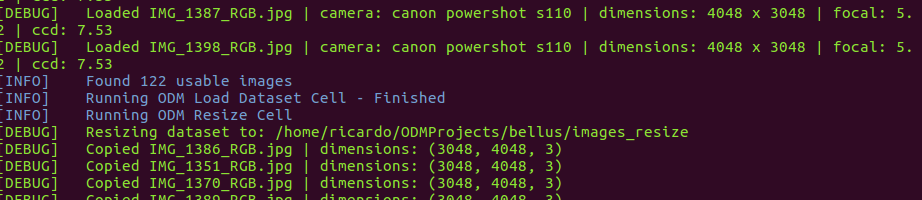
If you see, the --skip-resize copy exacly the images to the image resize directory whithout change.
All the post-proces work ok with the GCPs file come with the bellus demo data.
But went I load the orthophoto to the QGIS and plot the GCPs.
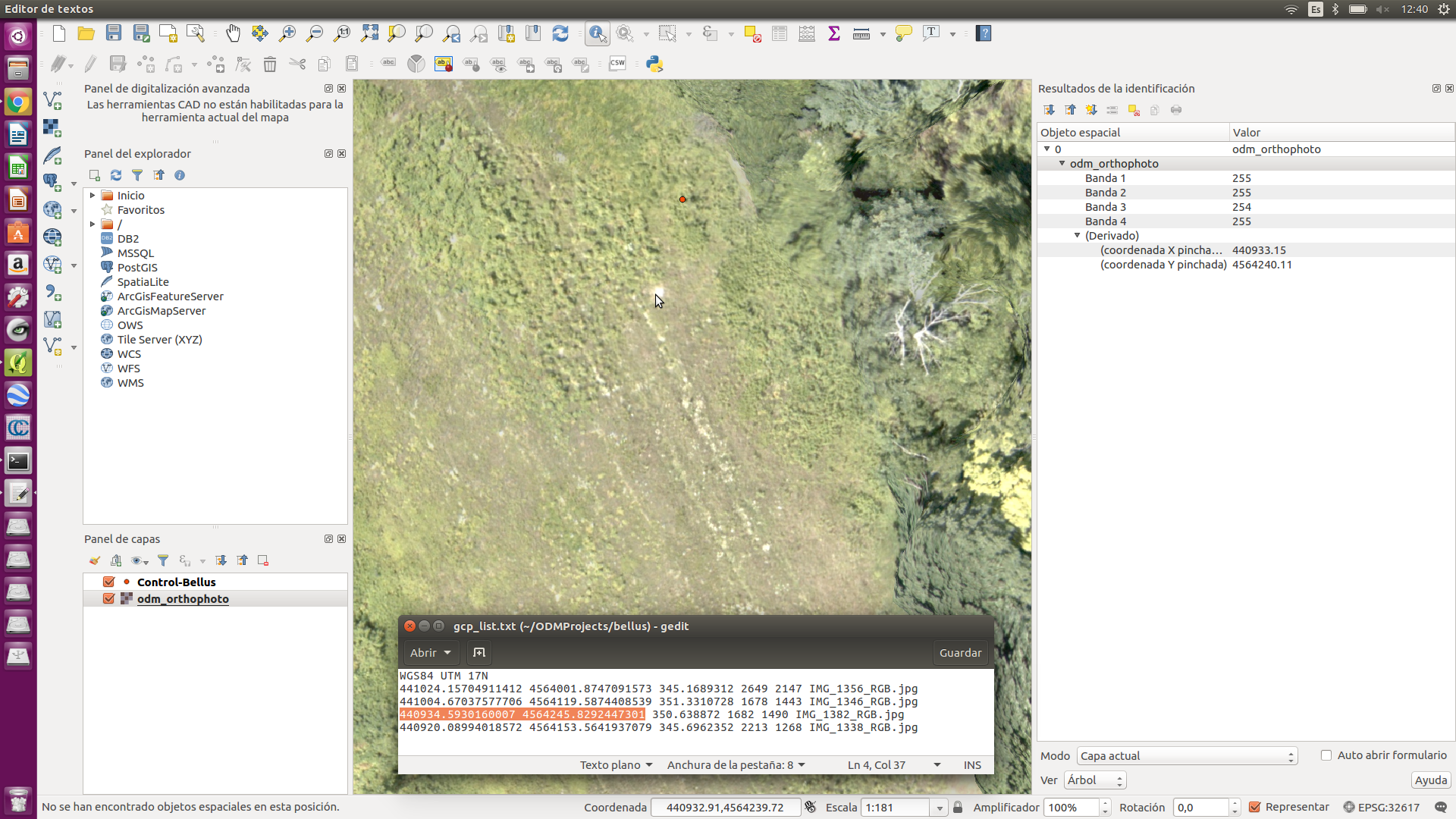
All the GCPs points are very displaced from his respective ground marks.
@dakotabenjamin Perhaps this is also due to the problem of scales?With EXIF data the control points are better located with the marks.
@yjmenezes acaso esto se deberá también al problema de escalas? Con los datos EXIF los punto de control quedan mejor ubicados con las marcas.
Look this picture:
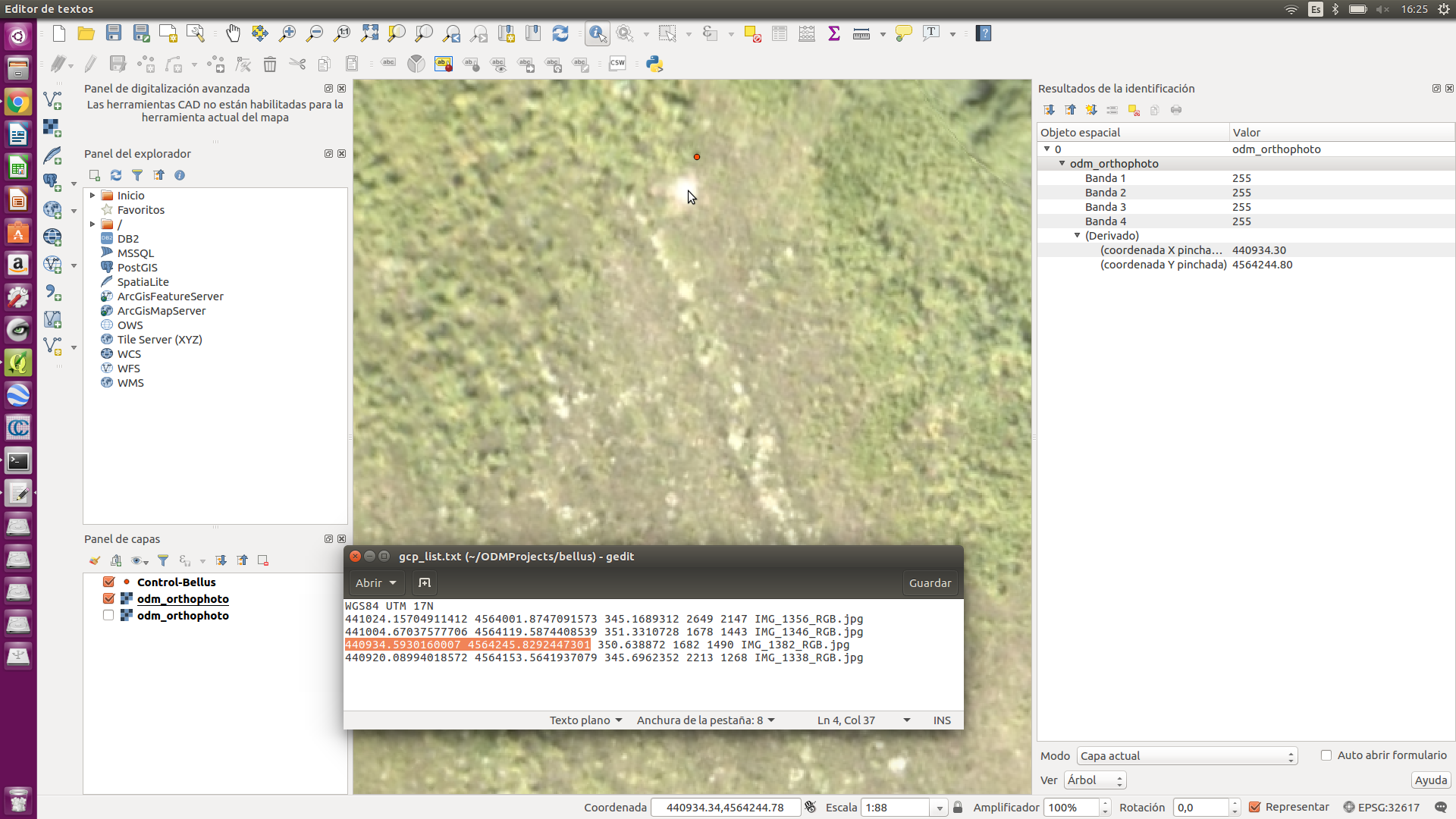
 GeoCONeXion
on 10 Jul 2017
GeoCONeXion
on 10 Jul 2017
@GeoCONeXion
please try this gcp_list.txt, scaled to resized images.
gcp_list.txt.zip
yjmenezes
on 11 Jul 2017
@GeoCONeXion
attached bellus exiftags and gcp.
the gcp distribution is not good.
the gcp_list.txt was scaled for 2400x1800 resized images.
gcp_list.txt.zip
yjmenezes
on 12 Jul 2017
@yjmenezes Thanks for your answerd.
OK. It work. I will take the pixelX_ and pixelY data from the resized images.
But I need more precision, with this changes you made, I only take a meter precision y need a centimeter precision. It can be by the precision when take coordinates of the GCPs on the BELLUS data demo.
If you look the odm_georeferencing_log.txt file resulting, in the reading data from the GCPs file the x_: it read rounded to the 1 meter and the y_: it read rounded into the 10 meters. No matter if they are entered the x_: and y_: data in milimeter precision.
Are the data from the GCPs file are read wrong precision, to take good precision in the orthophoto?
Reading following GCPs from file:
x_: 441024 y_: 4.564e+06 z_: 345.169 pixelX_: 1588 pixelY_: 1288 image: IMG_1356_RGB.jpg
x_: 441005 y_: 4.56412e+06 z_: 351.331 pixelX_: 1006 pixelY_: 865 image: IMG_1346_RGB.jpg
x_: 440935 y_: 4.56425e+06 z_: 350.639 pixelX_: 1008 pixelY_: 890 image: IMG_1382_RGB.jpg
x_: 440920 y_: 4.56415e+06 z_: 345.696 pixelX_: 1327 pixelY_: 760 image: IMG_1338_RGB.jpg
GeoCONeXion
on 12 Jul 2017
@GeoCONeXion
the x_ y_ meter are due output format.
to fix it, please, path Georef.cpp
take my patch here as reference: https://github.com/yjmenezes/odm_tnova/tree/master/patch
this:
include
include
using namespace std;
and this:
log_<< setiosflags(ios::fixed) << setprecision(3) <<"x_: "<< gcp.x_ <<" y_: "<< gcp.y_<<" z_: "<< gcp.z_ <<" pixelX_: "<
yjmenezes
on 12 Jul 2017
@GeoCONeXion
Georef.cpp printing x_ y_ z_ with 3 decimal places.
1- replace the original by this one.
cp Georef.cpp ???/OpenDroneMap/modules/odm_georef/src/
2- from ???/Opendronemap run ./configure.sh reinstall
good luck
path_Georef.zip
yjmenezes
on 13 Jul 2017
The other option with georeferencing is to do it once you have a cloud or an obj model.
I often svae my fine referencing until afterwards then load the whole thing into Cloud Compare and georeference there. this is a LOT less fiddly than attributing GCP's to images.
 KommandorKeen
on 14 Jul 2017
KommandorKeen
on 14 Jul 2017
@KommandorKeen
Interesting !
Is it possible to get 3D centimeter level accuracy using CC ?
yjmenezes
on 14 Jul 2017
Oh yes,
If you load the final georeferenced obj model you can see your gcps as per the orthoimage resolution so set it to 2cm and off you go. I use 40cm archery targets for my GCPs
Simon
Sent from my iPhone
On 14 Jul 2017, at 22:48, julio cesar de menezes notifications@github.com wrote:
@KommandorKeen
Interesting !
Is it possible to get 3D centimeter level accuracy using CC ?—
You are receiving this because you were mentioned.
Reply to this email directly, view it on GitHub, or mute the thread.
KommandorKeen
on 15 Jul 2017
@KommandorKeen
thx, i will try it ! altimetry is very important for me.
btw, i have used EVA rubber sheets ( yellow + black ), not white.
yjmenezes
on 15 Jul 2017
Closing this issue as it's been a couple of years, and the GCP process is completely rebuilt.
smathermather
on 14 Nov 2019
Related issues
smathermather
·
5Comments
 pierotofy
·
3Comments
pierotofy
·
3Comments
 nyinyinyanlin
·
3Comments
nyinyinyanlin
·
3Comments
 thsant
·
5Comments
thsant
·
5Comments
 linusmartensson
·
5Comments
linusmartensson
·
5Comments