Octoprint: [RC Feedback] Feedback on the 1.5.0rc1 Release Candidate
Please provide general feedback on your experience with the 1.5.0rc1 Release Candidate here. An "All is working fine" is valuable feedback as well, because it tells me that people in fact are testing the RC and just not finding any problems. Thanks :)
If you run into any obvious bugs not yet listed below the following line, please open a new ticket and follow "How to file a bug report". I need full bug reports, not just a statement that something doesn't work!
Currently known issues
- [x] ✨ #3804 Better handling of no
users.yamlfile - [x] 🐛 #3805 1.5.0 internal server error with files.get
- [x] ♻ #3811 Only start tracking resend ratio after a set amount of lines has been transmitted
- [x] 🐛 #3812 AttributeError: 'BackupPlugin' object has no attribute '_logger'
- [x] 🐛 #3813 octoprint zeroconf service announced as 127.0.0.1 under py2
- [x] 🐛 #3814 Error on translation upload
- [x] 🥅 #3822 Prevent circumvention of access control through admin subgroups/permissions
Unreproduced issues
Unreproduced and information for further analysis missing
- 🐛 #3699 M876 not being force-sent while printing
Third party issues
- Plugins affected by the knockout dependency upgrade:
- 🐛 https://github.com/Kragrathea/OctoPrint-PrettyGCode/issues/75 PrettyGcode - PR available - no reaction yet from maintainer @Kragrathea
- 🐛✔ Bed Level Visualizer - RC available
- 🐛✔ Widescreen - RC available
- 🐛✔ Tasmota - RC available
- 🐛✔ WemoSwitch - RC available
- 🐛✔ TerminalCommandsExtended - RC available
- 🐛✔ TasmotaMQTT - RC available
- 🐛✔ ConsolidatedTabs - RC available
- 🐛✔ MQTTSubscribe - RC available
- 🐛✔ ConsolidateTempControl - RC available
- 🐛✔ Tab Order - RC available
- 🐛✔ https://github.com/benlye/OctoPrint-ActionCommandsPlugin/pull/5 Action Command not working - fix provided to plugin author and merged
- 🐛 https://github.com/BillyBlaze/OctoPrint-FullScreen/issues/32 OctoPrint-Fullscreen
Issues needing analysis
 foosel
All 27 comments
Installed at my pi with Klipper FW. System is up and running. Print test in progress
 schnello
on 10 Nov 2020
schnello
on 10 Nov 2020
Maybe we should start tracking a list of broken plugins as a result of the upgrade? So far, prettygcode as you mentioned, bed level visualizer, widescreen, Tasmota, WemoSwitch, TerminalCommandsExtended, TasmotaMQTT, ConsolidatedTabs, MQTTSubscribe, ConsolidateTempControl.
 jneilliii
on 10 Nov 2020
jneilliii
on 10 Nov 2020
Pleased to report my plugins seem to work, WS281x LED Status, Virtual Printer Settings, Marlin EEPROM editor and the bare minimum that is WLED.
 cp2004
on 10 Nov 2020
cp2004
on 10 Nov 2020
@jneilliii I've added a list to the OP
foosel
on 10 Nov 2020
add Tab Order to that list...
jneilliii
on 10 Nov 2020
I have release candidates available for all plugins except Bed Level Visualizer that will fix any known conflicts with OctoPrint 1.5.0. The Bed Level Visualizer one is going to take me a while to dig into the code that was added by another contributor to figure out why $parentContext.$index() doesn't work in this new knockout version.
jneilliii
on 10 Nov 2020
Updated (I hope I got that correctly)
foosel
on 10 Nov 2020
Apart from the already identified plugins all working fine on my single test instance.
Anycubic Kossel LP (Stock firmware)
Pi3B+
Octopi 0.17
Python 3.7.3
 Crowlord
on 11 Nov 2020
Crowlord
on 11 Nov 2020
3rd party plugin issue: Action Command Prompt
3810 - fix has been provided to the plugin author: https://github.com/benlye/OctoPrint-ActionCommandsPlugin/pull/5
cp2004
on 11 Nov 2020
3rd party plugin issue: Action Command Prompt
3810 - fix has been provided to the plugin author: benlye/OctoPrint-ActionCommandsPlugin#5
Testing now - will merge shortly. Thanks!
 benlye
on 11 Nov 2020
benlye
on 11 Nov 2020
Firmware Updater plugin seems to be working fine.
benlye
on 11 Nov 2020
In anticipation of upgrading to 1.5.0rc1, I decided to convert my 1.4.2 from access control disabled to access control enabled. If I failed miserably, I could revert back to disabled and still print! I followed the destructions on https://docs.octoprint.org/en/master/features/accesscontrol.html#rerunning-the-wizard successfully and created a user. Sure enough, I need to enter a username and password every time I want to use my printer.
In OctoPrint on Air #35 at approximately 5:30 Gina mentions config files and auto login local and then moves along with the rest of the video. Unfortunately, that wasn't quite enough of a hint as the only obvious config file is config.yaml which I edited to get to this point, and the Access Control section of the documentation didn't mention auto login local at all.
With some help from the @jneilliii on Discord, I was pointed to https://docs.octoprint.org/en/master/configuration/config_yaml.html#access-control and found that I needed to add "autologinLocal: true", "autologinAs:", and "localNetworks:".
I also saw documentation for "enabled:" but when I added the above to my config.yaml, the "enabled: true" I had added previously had disappeared but there was an undocumented "salt:" in its place.
IMO, the documentation should be updated to include a mention of the auto login stuff on the Access Control page and the config.yaml documentation should include something about salt: and that it replaces "enabled: true". At the very least, this should be documented in the release notes.
I mention this because I believe there are many users with access control disabled that have NOT put their OctoPrint on the internet. The release of 1.5.0 will force these users to change their behavior and I don't think all of them will accept it quietly. Since the capability exists for auto login local, I believe this should be just as prominent as the access control is now mandatory. If its possible, I'd even lobby for automagically adding it during the upgrade.
 b-morgan
on 13 Nov 2020
b-morgan
on 13 Nov 2020
I'm just at this very moment sitting on a guide on how to set up autologin. The salt doesn't replace enabled (which has been removed completely, the docs have just not yet been updated but will soon) but rather is where OctoPrint stores the salt used for password storage. I so far saw no need to document that, as it is not something users should touch.
foosel
on 13 Nov 2020
Bed Level Visualizer: RC available
jneilliii
on 13 Nov 2020
I'd add "salt:" to the config.yaml documentation with the text "Used for password hashing, DO NOT TOUCH" or something similar. Acknowledging its existence is all that is needed, IMO.
b-morgan
on 13 Nov 2020
Now I'm off to backup my existing 1.4.2 SD card so I can replace it with 0.18.0 RC and 1.5.0rc1 and see how much trouble I can get into :smile:
b-morgan
on 13 Nov 2020
foosel
on 13 Nov 2020
I've upgraded to OctoPi 0.18.0 (32 bit for RPi 3B) and upgraded OctoPrint to 1.5.0rc1. I have the old SD card mounted in a USB SD card reader. The basics are working but I haven't tried printing anything yet. Oh the joys of a fresh OS!
b-morgan
on 13 Nov 2020
Just try to upload a language pack on two raspberry pi with latest 1.5.0rc1 (Python 3.7.3 - OctoPi 0.17.0) and nothing happens, impossible to upload it, there is no error.
On first, try to delete existing language pack and uploaded the new one, no files uploaded
On second try to update existing language pack by the new one, the old language pack is still there
OctoPrint 1.5.0rc1 - Pack Langue FR.zip
OctoPrint 1.4.2 - Pack Langue FR.zip
 Guilouz
on 14 Nov 2020
Guilouz
on 14 Nov 2020
I can confirm @Guilouz's error. Will post issue if it hasn't already been.
jneilliii
on 14 Nov 2020
Updated on three raspi systems, a 4B, a 3B, and a 2B - looks to be working on all of them but I've only submitted one print on the 3B (Prusa Mini) and none yet on the 2B (Anycubic). Several prints on the 4B (to MK3S) and no issues but did discover that the Fullscreen Plugin doesn't seem to be working. I can submit an issue to that project when I get a chance. The Exclude Region plugin was inadvertently tested with a single part failing of a 6 part print and it worked like a champ.
Only other issue encountered was the change in auth broke my monitoring. I was hitting the / URI and looking for "OctoPrint" but now it's a 302. I curled to get that 302 target, loaded the new /login/?redirect... URI and my monitoring is happy again.
Will continue to test, but now a QA person so don't usually do much more than normal workflow. If anyone has a suggested procedure for testing everything out, I'm all ears.
 ChrisHeerschap
on 14 Nov 2020
ChrisHeerschap
on 14 Nov 2020
1.5.0rc1 running on an OctoPi 0.17 release with all packages up-todate.
Had an issue with Octoprint web service not running (pi was still up, I got the page telling me how to check whether the service is still runing) where restarting the service failed. The logs were empty, as well as the journal for the octoprint service.
Starting the octoprint service manually, I got an error message that config.yaml is malformed. Indeed, in the beginning of the config.yaml was some binary data. I deleted everything until valid yaml (accessControl:...). After that, the service still didn't come up, but I was able to run octoprint manually now in a tmux session. I started a print, but after about 30min I got a segmentation fault mid-print. Nothing in the logs though.
Attached is the malformed yaml file with authentication data removed.
 oliof
on 14 Nov 2020
oliof
on 14 Nov 2020
@oliof Huh... that's a new one. That much garbage in the data, combined with a service refusing to start when manual start work, and a segfault to boot - frankly, that sound like something might be wonky with the file system. Unsatisfying explanation, I know, but running a file system check on the card might yield some results. Sadly nothing that I'd have any idea about how to analyse from my side right now, all the update tests that I ran ran through without data corruption (that I know of) and roll-out also doesn't indicate a general issue.
Speaking of which, current stats for 1.5.0rc*:
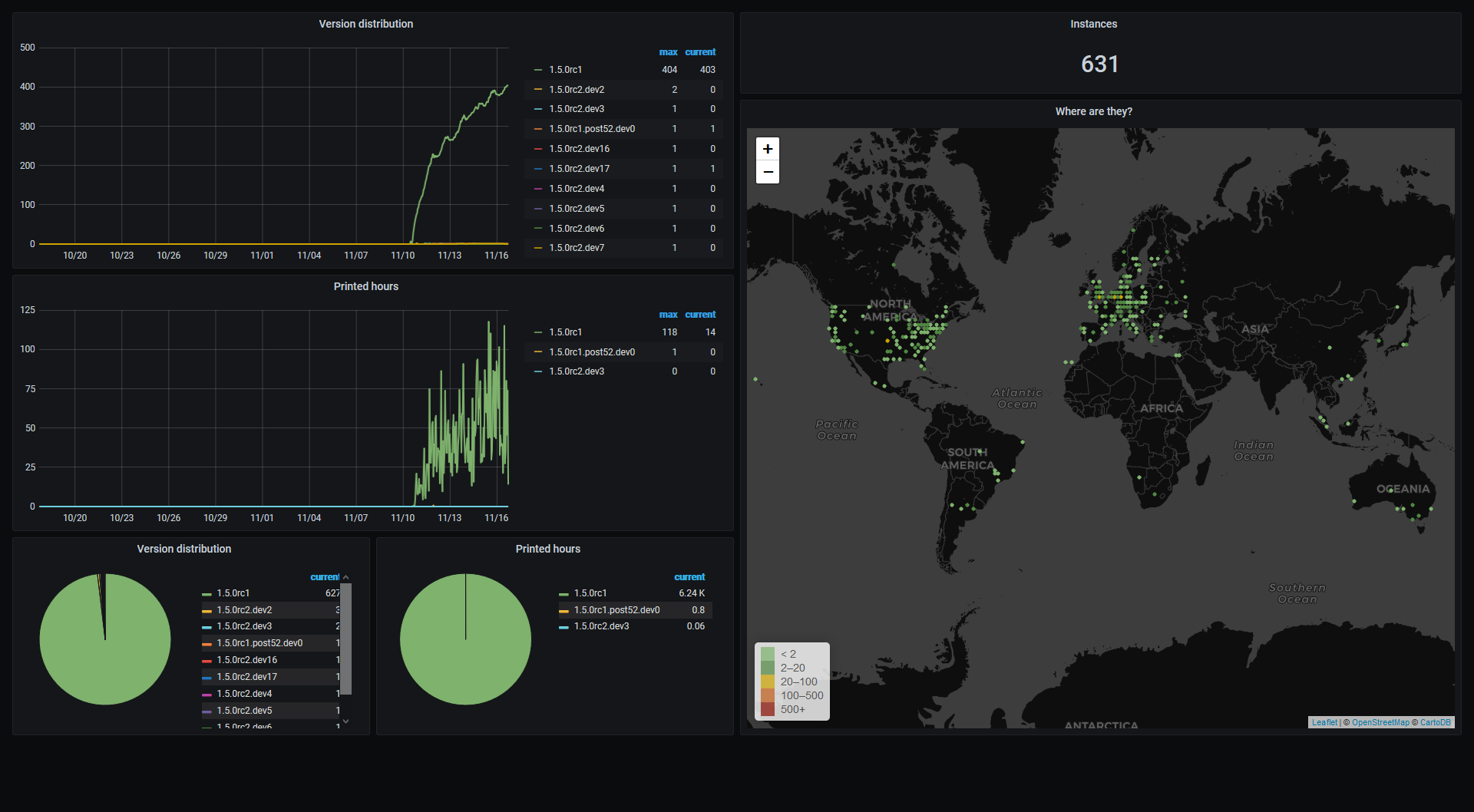
Currently targeting a second RC tomorrow or Wednesday the latest (I have some appointments tomorrow that I'll have to work around, hence no full commitment for tomorrow).
foosel
on 16 Nov 2020
Other than Fullscreen Webcam plugin not working, I'm not seeing any issues on 1.15rc1 installed on Debian Buster on an Intel J1900 mini-PC (64 bit). I've been looking into the sources for the Fullscreen Webcam plugin to see if I can figure out what the problem is, but my CSS/JS knowledge is very limited.
 ManuelMcLure
on 16 Nov 2020
ManuelMcLure
on 16 Nov 2020
Preparing to test rc1, and ran into this tiny issue regarding avconv/ffmpeg: #3821
[1.5.0rc1] Path to FFMPEG: /usr/bin/avconf missing #3821
 JohnOCFII
on 17 Nov 2020
JohnOCFII
on 17 Nov 2020
@JohnOCFII That's an OctoPi issue, I've copied your ticket over there.
Fullscreen webcam plugin issue has been added to known third party issues.
foosel
on 17 Nov 2020
1.5.0rc2 is out, new feedback ticket is here: #3823
foosel
on 17 Nov 2020
Related issues
 mc2880
·
4Comments
foosel
·
5Comments
mc2880
·
4Comments
foosel
·
5Comments
 noahwilliamsson
·
5Comments
cp2004
·
4Comments
noahwilliamsson
·
5Comments
cp2004
·
4Comments
 mdelecate
·
5Comments
mdelecate
·
5Comments
Most helpful comment
Testing now - will merge shortly. Thanks!