Octoprint: Watchdir Does Not Recognize Files [Renamed?]
What were you doing?
- Export from Slicer (IdeaMaker) to Watchdir
- Watchdog does not pick up file.
What did you expect to happen?
Watchdog on watchdir should have picked up the file.
What happened instead?
Watchdog does not pick up the file. Polling on, it never picks up the file.
Did the same happen when running OctoPrint in safe mode?
n/a
Version of OctoPrint
1.4.2
Operating System running OctoPrint
Octopi / Pi3b+
Printer model & used firmware incl. version
Artillery Sidewinder X1 / Klipper
Browser and version of browser, operating system running browser
n/a
Link to octoprint.log
n/a -- nothing to show in debug log mode.
Link to contents of terminal tab or serial.log
n/a
Link to contents of Javascript console in the browser
n/a
Screenshot(s)/video(s) showing the problem:
n/a
I have read the FAQ.
Additional Notes
This behavior has been seen with Ideamaker and might exist with other slicers that first export their files to a temporary filename within the path of the watchdir and then on completion rename it to the destination file name. This confuses the watchdir watchdog and will never get picked up by Octoprint.
Rebooting the Octopi will have the file upon services coming back up bring the file in.
Current work around is to export to a local staging directory and then copy it into the watchdir.
 ciordia9
All 10 comments
Hi @ciordia9,
It looks like there is some information missing from your bug report that will be needed in order to solve the problem. Read the Contribution Guidelines which will provide you with a template to fill out here so that your bug report is ready to be investigated (I promise I'll go away then too!).
If you did not intend to report a bug but wanted to request a feature or brain storm about some kind of development, please take special note of the title format to use as described in the Contribution Guidelines.
Please do not abuse the bug tracker as a support forum - that can be found at discourse.octoprint.org. Go there for any kind of issues with network connectivity, webcam functionality, printer detection or any other kind of such support requests or general questions.
Also make sure you are at the right place - this is the bug tracker of the official version of OctoPrint, not the Raspberry Pi image OctoPi nor any unbundled third party OctoPrint plugins or unofficial versions. Make sure too that you have read through the Frequently Asked Questions and searched the existing tickets for your problem - try multiple search terms please.
I'm marking this one now as needing some more information. Please understand that if you do not provide that information within the next two weeks (until 2020-09-08 17:50 UTC) I'll close this ticket so it doesn't clutter the bug tracker. This is nothing personal, so please just be considerate and help the maintainers solve this problem quickly by following the guidelines linked above. Remember, the less time the devs have to spend running after information on tickets, the more time they have to actually solve problems and add awesome new features. Thank you!
Best regards,
~ Your friendly GitIssueBot
PS: I'm just an automated script, not a human being, so don't expect any replies from me :) Your ticket is read by humans too, I'm just not one of them.
 GitIssueBot
on 25 Aug 2020
GitIssueBot
on 25 Aug 2020
Hey @ciordia9 - Please provide the octoprint.log here, it may not look like there is something in there that helps, but it contains important information about the underlying environment to help reproduce the issue. Thanks.
 cp2004
on 25 Aug 2020
cp2004
on 25 Aug 2020
Hey @ciordia9 - Please provide the
octoprint.loghere, it may not _look_ like there is something in there that helps, but it contains important information about the underlying environment to help reproduce the issue. Thanks.
How much of it do you want, clear, fresh boot, test load? There are literally no new-lines formed when this occurred but I get it when you speak of the rest of the architecture.
I have at least one other that has reported this in our 3dp discord. I'll see if I can get them to post up as well.
ciordia9
on 25 Aug 2020
If you could test load the file into the watchdir, then just download & drop here the octoprint log, so that anyone who goes to reproduce it can compare details etc. Don't worry if it's a bit long with previous events - I have a good scroll wheel 🙂
cp2004
on 25 Aug 2020
Deleted all the logs. Restarted the service. Debug logging captured:
I've edited the log to show where the file was uploaded..(CIORDIA DEBUG) You'll see nothing.
Just to showcase that it does indeed work if you copy the file over after the fact annotated right behind it is an actual watchdir firing off.
ciordia9
on 25 Aug 2020
Thanks for that, @ciordia9, I can take a look but no guarantees that I'll find anything, since I'm only triaging some tickets while Gina (foosel) is on a break. Just wanted to make all info is there.
cp2004
on 25 Aug 2020
All good. I've been working around it for a good while. Just ran into others having the same problem and explained what I had found and thought I should probably stop just Discord chatting and actually write it up. :)
ciordia9
on 25 Aug 2020
What's the name of the temporary file that gets exported first? Does it work if you enable active polling under Settings > Folders?
 foosel
on 3 Sep 2020
foosel
on 3 Sep 2020
What's the name of the temporary file that gets exported first? Does it work if you enable active polling under Settings > Folders?
Hi Foosel, no, I keep active polling on and it never picks it up (until reset.)
I attempted it again and had to screenshot the passing file as you don't see it if you blink--
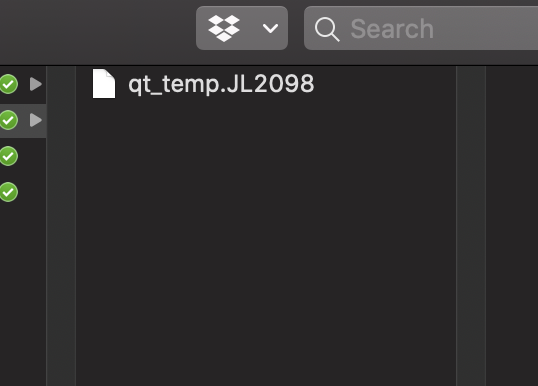
qt_temp_JL2099
That gets renamed into a proper filename whatever.printme.gcode
I cleared the program and loaded a few models and exported and caught a variation
qt_temp.JL3449
ciordia9
on 6 Sep 2020
Turns out the watchdog has separate events for file added and file moved/renamed. So far it only triggered on creation. When a temporary file is first created in the folder by your slicer it won't match the pattern matcher, and the subsequent name change will only trigger a move event and not be detected, thus the file never gets added.
Easy fix, just needed to make the watchdog aware of file renames as well. Pushed to maintenance, to be released with 1.5.0.
foosel
on 7 Sep 2020
Related issues
 LuisDiazUgena
·
4Comments
LuisDiazUgena
·
4Comments
 halkeye
·
4Comments
foosel
·
5Comments
halkeye
·
4Comments
foosel
·
5Comments
 gege2b
·
3Comments
gege2b
·
3Comments
 FormerLurker
·
5Comments
FormerLurker
·
5Comments