Octoprint: [Request] Compress all http requests
With #3497, static assets are pre-compressed before being served.
However, at least with my setup, it'd be faster to compress everything, including the giant index.html file:

The y-axis is the ratio of total request time (compression+transfer) compared to an uncompressed request. Here are absolute timings:
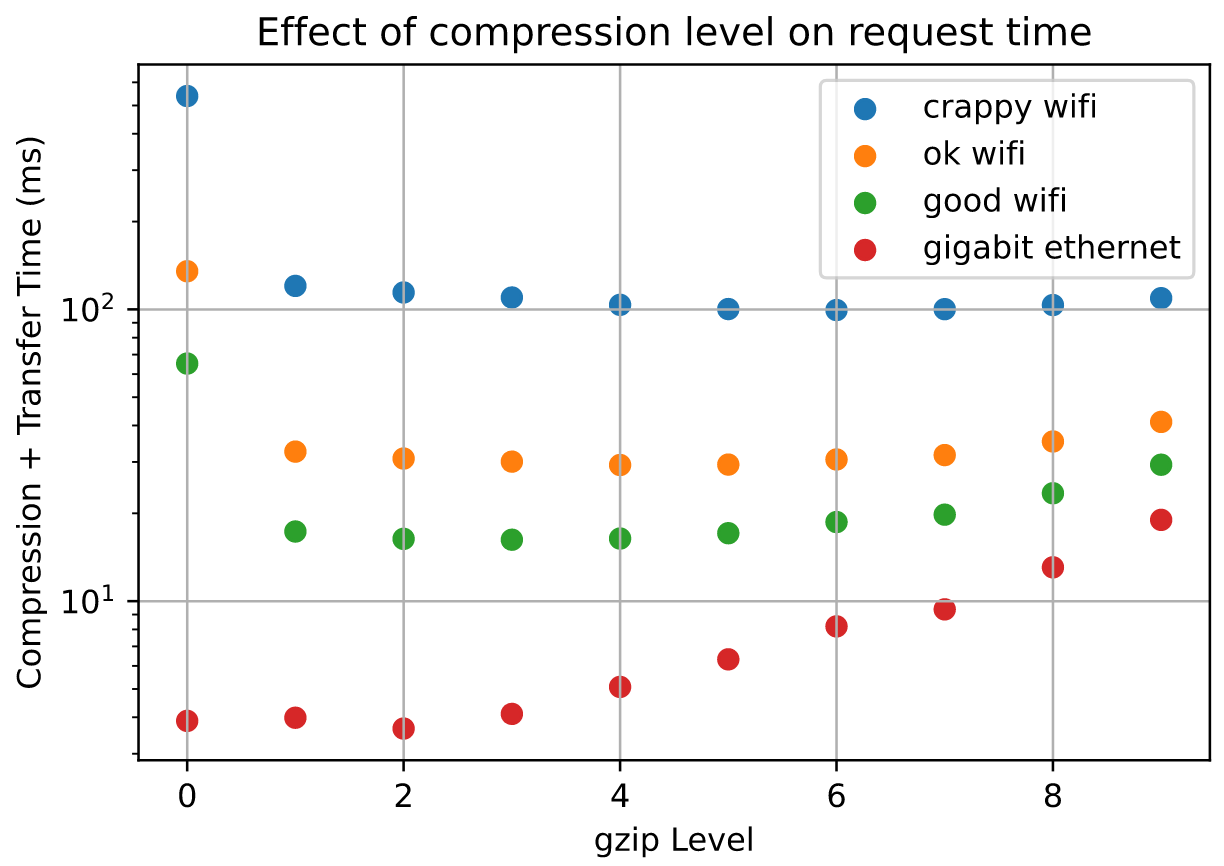
A full description of my assumptions/procedure is at https://flaviutamas.com/2020/embedded-system-http-compression, and I'd be happy to take a look at this later this week. I just wanted to see if anyone else has any thoughts on this.
 flaviut
All 26 comments
I'd be open to a PR for that.
 foosel
on 20 Apr 2020
foosel
on 20 Apr 2020
nice work flaviut! An Orange Pi Zero is equivalent to a Pi 2, CPU-wise. I don't have a pi4, but I may test it on some 2s and 3s for data.
 tedder
on 20 Apr 2020
tedder
on 20 Apr 2020
@flaviut what are you using for test.html? Can you share it to keep things consistent in my tests?
tedder
on 20 Apr 2020
Sure, here you go: htmlfile.zip
It's the index.html from my OctoPrint server, so it's representative for this application.
I'd be happy to update my notebook with your data, crediting you of course. There's a lot more people with RPi 2s and 3s than with Orange Pi Zeros.
flaviut
on 20 Apr 2020
I don't need credit, it's just easy-to-generate data. I changed the number of runs to 200 (vs 20) for the below.
pi zero w
-----------
compression level, time (ms), compressed size (kiB)
(0, 30.750923147425056, 403.51953125),
(1, 56.50688246823847, 87.796875),
(2, 62.272521518170834, 83.490234375),
(3, 74.89095780998468, 79.7978515625),
(4, 95.76078267768025, 74.3955078125),
(5, 126.15370814688504, 70.9033203125),
(6, 178.63186597824097, 68.8701171875),
(7, 208.8448277581483, 68.52734375),
(8, 286.76771722733974, 68.2294921875),
(9, 372.8513611666858, 68.1083984375),
pi 3b+
-----------
compression level, time (ms), compressed size (kiB)
(0, 3.196966909963521, 403.4951171875),
(1, 19.005972410013783, 87.796875),
(2, 20.030818789964542, 83.490234375),
(3, 22.46101433003787, 79.7978515625),
(4, 29.703730330002145, 74.3955078125),
(5, 36.419819695001934, 70.9033203125),
(6, 46.733187825011555, 68.8701171875),
(7, 53.182204344993806, 68.52734375),
(8, 73.58660432502802, 68.2294921875),
(9, 108.01055543503026, 68.1083984375),
pi 3b (wasn't going to include it, but the numbers are different enough)
-----------
compression level, time (ms), compressed size (kiB)
(0, 8.48450058605522, 403.51953125),
(1, 20.45514478813857, 87.796875),
(2, 21.674628779292107, 83.490234375),
(3, 24.547811467200518, 79.7978515625),
(4, 33.120426214300096, 74.3955078125),
(5, 41.06177996378392, 70.9033203125),
(6, 53.13521234784275, 68.8701171875),
(7, 60.72028100024909, 68.52734375),
(8, 84.74066481925547, 68.2294921875),
(9, 122.62580338865519, 68.1083984375),
pi 2b
-----------
compression level, time (ms), compressed size (kiB)
(0, 9.100849420000046, 403.4951171875),
(1, 33.37465870999999, 87.796875),
(2, 36.06914414499997, 83.490234375),
(3, 40.57832427499996, 79.7978515625),
(4, 54.28145773999994, 74.3955078125),
(5, 65.18291386999991, 70.9033203125),
(6, 82.15777844499996, 68.8701171875),
(7, 93.87751609000006, 68.52734375),
(8, 130.58228247000002, 68.2294921875),
(9, 192.14019666, 68.1083984375),
observations:
- the first graph could use a label, btw- "higher is better" on the y axis.
- there's too much precision in the "compressed size". I'm guessing a bunch of the small digits are artifacts of 16-bit blocks (or similar).
- I had two pi2's, the results were very similar. (I was setting up one for testing when I realized where the other one was on my network)
tedder
on 20 Apr 2020
also: I went down the path of testing mgzip but it doesn't work with Pi threading and might have other problems too. Ah well.
tedder
on 20 Apr 2020
Curious if you had explored brotli vs. gzip for this feature ? Most browsers support it these days (Opera mini and older-than-dirt IE notable exceptions): https://caniuse.com/#feat=brotli
https://medium.com/oyotech/how-brotli-compression-gave-us-37-latency-improvement-14d41e50fee4
 fiveangle
on 21 Apr 2020
fiveangle
on 21 Apr 2020
here's a quick little test of brotli on a pi3b (not b+). Note it actually goes to (level) 11, but I didn't modify the test because there are diminishing returns. I left it at MODE_GENERIC, MODE_TEXT was only faster by a 'in the noise' amount. It started getting notably slower after level 5.
pi 3b
-----------
compression level, time (ms), compressed size (kiB)
(0, 8.18446714503807, 84.81640625),
(1, 12.886356675007846, 78.064453125),
(2, 22.360340155064478, 73.3525390625),
(3, 24.79609996495128, 70.5986328125),
(4, 37.84952622496348, 67.2822265625),
(5, 59.42477812495781, 61.91015625),
(6, 72.48795958999835, 60.6357421875),
(7, 102.50455483997939, 59.662109375),
(8, 137.5899090999883, 59.0712890625),
(9, 205.88554069006932, 58.642578125),
So interpolating for gzip (close enough approximation) 38ms = 72kb while brotli = 67kb
And since this is real-time vs pre-compression of static assets, even the slowest hw would benefit even if minimal compression were selected in order to reduce latency since gzip 0 being 8ms/400k vs brotli 0 being 8ms/80k.
Seems a worthwhile improvement since were optimizing at all plus the maximum brotli compression ratio gzip simply can’t attain, which is an added benefit if pre-compression is implemented. Most of the improvement of brotli for web traffic comes from the pre-selected dictionary which does not need to be included in the compressed transfer, so win-win.
But I think this needs to be plugged into a real OP instance and charted as @flaviut originally had because no real-time compression should be implemented if it exasperates end-to-end latency beyond a reasonable threshold.
Thanks for trying it out !
[Cue Opera Mini users rising up en masse to cry foul 😉]
fiveangle
on 21 Apr 2020
@tedder - reviewing, I was under the assumption that level “0” was no compression in whatever test was being performed but your brotli results show size as 84k but the original file is supposed to be 403k. Do we know where your methods and @flaviut methods diverge ?
fiveangle
on 21 Apr 2020
Brotli's source doesn't really explain what level '0' is. I'm guessing they choose to use it as a compression level, rather than a no-compression passthrough type of thing.
To me, what it shows is flaviut's original premise is correct: gzip at a level 4 or so is the best way to go- there isn't enough gain from going to brotli to justify adding a library.
tedder
on 21 Apr 2020
gzip at a level 4 or so is the best way to go- there isn't enough gain
from going to brotli
Agreed. I'm hoping adding gzip isn't much more than a one-line change, and
it's just not worth the development time for a percent or two extra
improvement when there's much bigger bottlenecks.
flaviut
on 21 Apr 2020
It would be interesting to see the difference in CPU utilization for each compression level. Looking at the Tornado docs I see mention of the option compress_response to enable compression on textual responses but not seeing anything for setting the level except w/ WebSockers. This could always be done in a reverse proxy (haproxy/nginx) if anything. (Such as the one used in OctoPi)
 kantlivelong
on 23 Apr 2020
kantlivelong
on 23 Apr 2020
Brotli's source doesn't really explain what level '0' is. I'm guessing they choose to use it as a compression level, rather than a no-compression passthrough type of thing.
To me, what it shows is flaviut's original premise is correct: gzip at a level 4 or so is the best way to go- there isn't enough gain from going to brotli to justify adding a library.
If your idea is true and they use "0" as a compression level, does that show gzip at level 4 is best ?
If Brotli can compress a 400k file to 85k with basically no increase in latency (it shows 8.1ms for Brotli "0" 85kiB vs 8.5ms for gzip "0" 403kiB file) that is amazing really. On the other hand, perhaps the Brotli 0 test above wasn't actually working at all, which means that gzip is best. How do we get to the bottom of the "Brotli 0" setting / test results ?
Secondly, if "Brotli 0" does in fact provide reasonable compression for nearly no overhead, @flaviut other PR for static compression could further benefit since the higher (too slow for realtime) Brotli compression settings outperform anything gzip can do.
This could always be done in a reverse proxy (haproxy/nginx) if anything. (Such as the one used in OctoPi)
Hrmmm 🤔
fiveangle
on 23 Apr 2020
How do we get to the bottom of the "Brotli 0" setting / test results ?
You can read the brotli source or try it yourself. Here's the unix util (instead of python):
$ brotli -0 test.html -o test.html.0.br
$ brotli -1 test.html -o test.html.1.br
$ ls -l test.ht*
-rw-r--r-- 1 ted ted 413126 Apr 20 12:26 test.html
-rw-r--r-- 1 ted ted  86852 Apr 20 12:26 test.html.0.br
-rw-r--r-- 1 ted ted  79938 Apr 20 12:26 test.html.1.br
I still think it's yak-shaving, though, as gzip should be a oneliner.
tedder
on 23 Apr 2020
I went into octoprint/server/__init__.py and set compress_response=True in the tornado.web.Application instantiation. Not seeing a difference. Hmm.
tedder
on 23 Apr 2020
@tedder yup, that's why I haven't implemented this yet. Octoprint overrides a bunch of internal Tornado stuff, so my best guess at this moment is that it ignores that parameter somewhere.
flaviut
on 23 Apr 2020
glad it's not just me, flaviut :) I just added it in haproxy, though, and it works. Page size drops to ~112k on my instance (1/5th the size) and loads slightly faster (10%). And I'm on local ethernet, so that's the "worst case" of compression.
tedder
on 23 Apr 2020
And to follow up with various requests, their original size, and their haproxy-compressed sizes:
request               full_size    haproxy_compressed
/                      516k           112k
packed_libs.css        169k            37k
packed_core.css        102k            16k
packed_plugins.css       3k           1.4k
less.min.js            145k            53k
heatmap.png             55k            50k
fontawesome-...woff     78k          78.2k
packed_libs.js         1.2M           396k
Look at packed_libs.js!
tedder
on 23 Apr 2020
Looked at the source more and it seems that compress_response will only work if no transforms are being passed which they are. We would essentially need to shim tornado.web.GZipContentEncoding into octoprint.server.util.tornado.GlobalHeaderTransform or get tornado.web.GZipContentEncoding to work in here.
kantlivelong
on 23 Apr 2020
Alright curiosity got to me. I hacked this in and it seems to work. It's just a PoC and if this was merged I'd question @foosel's sanity.
diff --git a/src/octoprint/server/util/tornado.py b/src/octoprint/server/util/tornado.py
index 79ae7b715..c8f42b855 100644
--- a/src/octoprint/server/util/tornado.py
+++ b/src/octoprint/server/util/tornado.py
@@ -649,6 +649,17 @@ class WsgiInputContainer(object):
                header_obj = tornado.httputil.HTTPHeaders()
                for key, value in headers:
                        header_obj.add(key, value)
+
+               from tornado.web import GZipContentEncoding
+               gzip = GZipContentEncoding(request)
+               gzip_hack_headers = {}
+               gzip_hack_headers['Content-Type'] = header_obj.get('Content-Type')
+               gzip_status_code, gzip_headers, gzip_chunk = gzip.transform_first_chunk(status_code, gzip_hack_headers, body, finishing=True)
+               body = gzip_chunk
+               header_obj.add('Content-Encoding', 'gzip')
+               header_obj.add('Vary', 'Accept-Encoding')
+               header_obj['Content-Length'] = str(len(body))
+
                request.connection.write_headers(start_line, header_obj, chunk=body)
                request.connection.finish()
                self._log(status_code, request)
Edit: Oh it breaks images but whatever. My statement on sanity still stands.
kantlivelong
on 24 Apr 2020
Pushed https://github.com/kantlivelong/OctoPrint/commit/3e6bc06baa60faa4ab6f473a4a39634fc9f963b3. Cleaner and seems to work properly.
Not sure if this would be something that should have a config option for and if so what the best way to implement?
Implementing into WsgiInputContainer didn't cover all requests (including the "packed" files) but adding to transforms fixed that. Could be others that I'm missing, not sure.
Also not sure of the best way to set the compression level for the transforms part.
kantlivelong
on 24 Apr 2020
Also not sure of the best way to set the compression level for the transforms part
you can extend the GZipContentEncoding class and set the compression level in there.
Pushed kantlivelong@3e6bc06. Cleaner and seems to work properly.
Very nice, I've been trying why transform_first_chunk wasn't getting called, and it looks like you might have figured it out. However, I don't think special casing the gzip handler inside WsgiInputContainer is a good idea, it'd be better if the transforms were iterated through and executed.
However I suspect that there's some sort of until-now benign bug in OctoPrint's tornado overrides, and I'd rather track that down before deciding whether to work around it or fix it.
flaviut
on 25 Apr 2020
@flaviut From what I've found it seems (assuming I'm understanding this right) that there are multiple different handlers for serving content. https://github.com/OctoPrint/OctoPrint/blob/403b638eb6a8ccae67db1e1baa6cbb54332675d2/src/octoprint/server/__init__.py#L666-L732
kantlivelong
on 25 Apr 2020
@kantlivelong I think you're right, but if I understand Application(transforms=…) correctly (unfortunately the tornado docs don't go into much detail), the transforms should get called in order for every request that passes through regardless of what handler it comes from.
flaviut
on 25 Apr 2020
@flaviut According to the stack when requesting static/webassets/packed_libs.js?##### tornado.web.RequestHandler.flush() is called which contains the part where it cycles through the transforms. When requesting something like /static/js/lib/less.min.js I'm not seeing it hit that part. Not sure why yet though.
Edit:
Also just noticed there are still some errors.
2020-04-24 22:43:53,020 - tornado.application - ERROR - Uncaught exception POST /api/plugin/pluginmanager (127.0.0.1)
HTTPServerRequest(protocol='http', host='127.0.0.1:5000', method='POST', uri='/api/plugin/pluginmanager', version='HTTP/1.1', remote_ip='127.0.0.1', headers={u'Origin': 'http://127.0.0.1:5000', 'Accept-Language': 'en-US,en;q=0.5', 'Accept-Encoding': 'gzip, deflate', 'Host': '127.0.0.1:5000', 'Accept': 'application/json, text/javascript, */*; q=0.01', 'User-Agent': 'Mozilla/5.0 (X11; Ubuntu; Linux x86_64; rv:72.0) Gecko/20100101 Firefox/72.0', 'Dnt': '1', 'Connection': 'keep-alive', 'X-Requested-With': 'XMLHttpRequest', 'Cache-Control': 'no-cache', 'Cookie': 'session_P8001=.eJyrVorPTFGyqlZSSFKyUvJ398rwzfLLinJJN_CtijSMDA_K9Q33LPfLci33D3ECyiRX-VZ5VvhVudoq1eooZaak5pVkllTqJZaWZMSXVBakKlnllebkIMkgmR7lEVaSFJEN1FkLADkpKAI.XoywKA.WrEOg9cOtHDpl9zJMtiffqN8QT0; session_P5000=.eJx9z0FPgzAUB_CvYnpejECJg2QHSkuDSUswOPJ6ITpQqIBmQCZd9t2tO-3k7b33__8O74yq92MztSicj0uzQVVXo_CM7t5QiMBERnJ2Ajf1wRBtdyx1_QnFhyNdOchSdYo-DaqAVRh2ErpvFc09wXMsdOoqbech0RnNseSpkUXbKmvAPPdZmTuCCwzm4AtzwOCCl9H9IArZQ5kbxf_My4-9G6VTB7TtcfAFFau0RlH2ADrpbMeoMt-hywZ1dTPO3bzevy5zW83rd4PCcen7m-Tmu5rvTR3trnKZmmP1TzY109R9jVeOKIkiHBAv2sYBdrckIknMKGOPhJAgdmN0-QWqvm0o.XqOj1w.CRDFwHkCdW6n7LtYn2TMKAmjiNg'})
Traceback (most recent call last):
  File "/home/shawn/src/OctoPrint/venv27/local/lib/python2.7/site-packages/tornado-4.5.3-py2.7-linux-x86_64.egg/tornado/web.py", line 1514, in _execute
    self.finish()
  File "/home/shawn/src/OctoPrint/venv27/local/lib/python2.7/site-packages/tornado-4.5.3-py2.7-linux-x86_64.egg/tornado/web.py", line 992, in finish
    self.flush(include_footers=True)
  File "/home/shawn/src/OctoPrint/venv27/local/lib/python2.7/site-packages/tornado-4.5.3-py2.7-linux-x86_64.egg/tornado/web.py", line 950, in flush
    chunk = transform.transform_chunk(chunk, include_footers)
  File "/home/shawn/src/OctoPrint/venv27/local/lib/python2.7/site-packages/tornado-4.5.3-py2.7-linux-x86_64.egg/tornado/web.py", line 2861, in transform_chunk
    self._gzip_file.write(chunk)
AttributeError: 'GZipContentEncoding' object has no attribute '_gzip_file'
2020-04-24 22:43:53,021 - octoprint.plugin - DEBUG - Calling on_event on tracking
2020-04-24 22:43:53,021 - tornado.general - ERROR - Cannot send error response after headers written
2020-04-24 22:43:53,022 - tornado.general - ERROR - Failed to flush partial response
Traceback (most recent call last):
  File "/home/shawn/src/OctoPrint/venv27/local/lib/python2.7/site-packages/tornado-4.5.3-py2.7-linux-x86_64.egg/tornado/web.py", line 1023, in send_error
    self.finish()
  File "/home/shawn/src/OctoPrint/venv27/local/lib/python2.7/site-packages/tornado-4.5.3-py2.7-linux-x86_64.egg/tornado/web.py", line 992, in finish
    self.flush(include_footers=True)
  File "/home/shawn/src/OctoPrint/venv27/local/lib/python2.7/site-packages/tornado-4.5.3-py2.7-linux-x86_64.egg/tornado/web.py", line 950, in flush
    chunk = transform.transform_chunk(chunk, include_footers)
  File "/home/shawn/src/OctoPrint/venv27/local/lib/python2.7/site-packages/tornado-4.5.3-py2.7-linux-x86_64.egg/tornado/web.py", line 2861, in transform_chunk
    self._gzip_file.write(chunk)
AttributeError: 'GZipContentEncoding' object has no attribute '_gzip_file'
Related issues
 dm3942
·
49Comments
dm3942
·
49Comments
 LangBalthazar
·
163Comments
LangBalthazar
·
163Comments
 lakay
·
44Comments
lakay
·
44Comments
 ZhuDaHai
·
42Comments
ZhuDaHai
·
42Comments
 foulowl
·
58Comments
foulowl
·
58Comments
Most helpful comment
here's a quick little test of brotli on a pi3b (not b+). Note it actually goes to (level) 11, but I didn't modify the test because there are diminishing returns. I left it at MODE_GENERIC, MODE_TEXT was only faster by a 'in the noise' amount. It started getting notably slower after level 5.